Specs are compiled from manufacturer listings and verified buyer reviews and can change over time — please confirm the key details on the product page before buying.
You need a till that takes cards, prints receipts, and does not fall apart on a busy Saturday. The tricky part is that a POS terminal (point-of-sale terminal, the machine that rings up sales and takes payment) is really two purchases in one: the hardware you plug in, and the processing account that runs the money through it. Get the second one wrong and a perfectly good machine becomes a paperweight. Here are the real trade-offs, so you pick a terminal that fits your counter, your staff, and your card fees.
This guide is built by comparing the manufacturers’ published specifications and the patterns across verified customer reviews, so you get each pick’s real strengths and trade-offs instead of marketing spin.
Some terminals lock you into the seller’s own card processor, while others let you keep the account you already have. Below you get honest picks, the specs that actually change your day, and the fine print most listings bury in the last line.
Top Picks

How To Choose The Best POS Terminal for Small Business
Start with the lock-in, not the hardware. Plenty of terminals are sold at a friendly hardware price because the seller makes its money on your card fees. Read the listing for a line like “requires new merchant processing account.” If you see it, that terminal only works with that one processor. That is fine if you have no existing account, and a hard stop if you have one you like.
Will it take cards, or just ring up the sale?
A terminal with a built-in NFC reader (near-field communication, the tap-to-pay chip that reads contactless cards) can take a tap only when a compatible payment app and processor sit behind it. Some machines ship with a card reader on board but still need a service to move the money. Others are register hardware only, and you pair them with your own card terminal. Know which you are buying before it lands on your counter.
Counter footprint and cable reality
An all-in-one register with a cash drawer and printer takes up real estate, and some of these units are heavy — one runs 45 pounds, another 13 pounds, another 12.6 pounds. Measure your counter before you commit. Handhelds weigh as little as 2.11 ounces, so you can carry them to a table or a food truck window. Also check whether the unit is corded or battery-powered, because a “portable” terminal that only runs plugged in will not travel with you.
Receipt printing: built in or separate
Thermal receipt printers (they burn the image onto heat-sensitive paper, no ink or toner) come in two flavors here. Some terminals have a 58mm printer built right in, which means one device to charge and carry. Others are sold with a separate 80mm printer as part of a bundle. Built-in is the simpler life for a handheld; a separate printer usually means more paper width and fewer paper jams on a busy day.
Side-by-Side Comparison
| Model | Best For | Form Factor | Built-In Printer | Requirements | Amazon |
|---|---|---|---|---|---|
| Square Handheld★ Best Overall | Tableside and food truck sales | Pocketable handheld | No | Square account | Amazon |
| PS10 NFC Android 14Fastest Printing | One-device mobile checkout | Handheld with printer | Yes (58mm) | Compatible payment app and processor | Amazon |
| Square Register (2nd Gen)Best Dual Screen | Busy countertop checkout | Dual-screen countertop | No | Square account | Amazon |
| Datio POS Base Station | iPad-based retail and salon | Base station cradle | No | Datio software subscription | Amazon |
| Clover Station Duo | Two-screen full register | Dual-screen countertop | Yes | Powering POS processing account | Amazon |
| Smart POS System SET04 | Full retail store bundle | Touch screen + customer display | Yes (80mm) | Windows 10 PC | Amazon |
| Clover Compact | Plug-in countertop card taking | Compact countertop | No | Powering POS processing account | Amazon |
| Bisofice PDA Printer | Budget handheld sales + printing | Handheld with printer | Yes (58mm) | Android 8.1 apps | Amazon |
Detailed Reviews
1. Square Handheld
Our pick — 4.5+★ from 200+ verified ratings; the strongest balance of quality and price.
A card terminal that rides in your palm, not on your counter.
If your staff walks the floor — taking orders at a table, working a food truck window, or standing in the aisle of a salon — a countertop register is the wrong shape for your day. The Square Handheld measures just 7.04 x 3.12 x 0.62 inches and weighs 2.11 ounces, so it drops into a pocket between customers. For comparison, the Datio base station is 12 inches tall and 16 inches wide — a completely different piece of furniture.
What wins people over is how much this little machine handles. It scans barcodes with the built-in reader, takes card payments, and runs offline so a dropped internet connection does not stop a sale. Setup is quick: sign into your existing Square account and your catalog and settings load automatically. For a food truck setting, the machine talking to the kitchen display system (the screen that shows incoming orders to the cook) is the detail that makes a shift run itself.
The honest catch is on the money side. Card processing comes at Square’s simple rate, and the recurring gripe in the value category is that the paywall for POS software features can feel steep next to the hardware itself. Think of the terminal as the front door and the software as rent — this is a device you buy once but keep paying into. As owners put it, it is “a useful tool for a restaurant owner, but it is entirely bricked and paywalled” once you want deep restaurant features. That said, it is the crowd favorite here at 4.5+ stars across 200+ owners, and it earns that score by being genuinely pocketable.
Why owners keep it on them
- 2.11 ounces and pocket-sized, so it travels to any customer
- Built-in barcode scanner for fast item lookup and inventory
- Offline payments keep sales going if the WiFi drops
- Signs into your existing Square account and pulls your catalog
Where it stings
- No receipt printer built in, so receipts come another way
- Advanced POS software features sit behind a paywall
- Card fees run through Square’s rate
The fit: Anyone whose sale happens away from a fixed counter — tableside, truck-side, or on the shop floor.
The catch: If you need printed receipts from the same gadget, this one does not have a printer inside it.
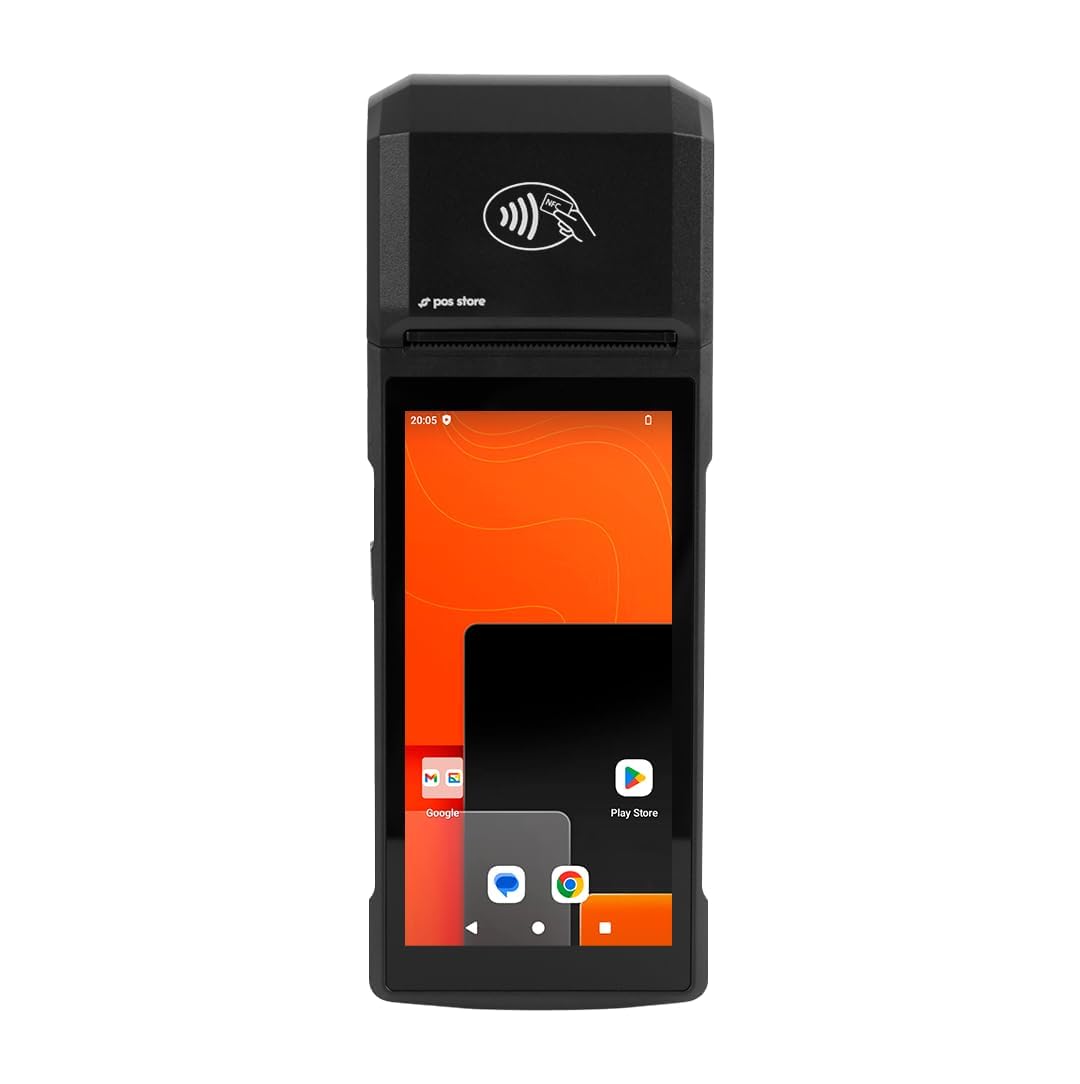
2. PS10 NFC Android 14 Handheld POS Terminal
Order, tap, and print a receipt — all from one hand-sized terminal.
The PS10 packs a 58mm thermal receipt printer (inkless printing on heat paper, so you never buy toner) right into the handheld body. It prints order tickets and kitchen slips at up to 75mm/s, which means you are not waiting around for a slip mid-service. And unlike the Square Handheld, which needs a separate printer for receipts, this one finishes the whole transaction in your hand.
Under the hood it runs Android 14 on a 2.3GHz octa-core processor with 3GB RAM and 32GB ROM, and it is Google Play certified (GMS), so you can install ordinary Android apps and POS software from the store. There is an SDK for custom integration if your developer wants to build on it. The 5.5-inch 1440 x 720 IPS screen is clear enough for menus and item lists, and the 5MP autofocus rear camera scans barcodes and QR codes.
Staying connected is where this terminal shines: it runs on 4G LTE (mobile data) with a Nano SIM (the small phone-style card), dual-band 2.4GHz/5GHz WiFi, Bluetooth 5.1, and USB-C OTG (a USB-C port that also connects accessories). The NFC reader (the tap-to-pay chip) handles cards, loyalty tags, and Mifare badges with a compatible app and processor. The battery is a removable 3000mAh pack, so a spare keeps a long shift going. One honest small number on the spec sheet: this printer is listed at 1 page per minute against the Bisofice handheld’s 20 pages per minute, so treat it as a ticket-slip printer, not a bulk report machine.
One-device checkout: If your staff needs to take an order, print a ticket, and move on without a separate printer, this is the most complete handheld in the lineup.
Know before you buy: The NFC reader only moves money with a compatible payment app and processor behind it — the hardware is the reader, not the merchant account.
Reach for this if: You want Android apps, a built-in printer, and cellular data in one pocketable terminal.
Look elsewhere if: You need high-volume printing — the page rate here is built for slips, not stacks.
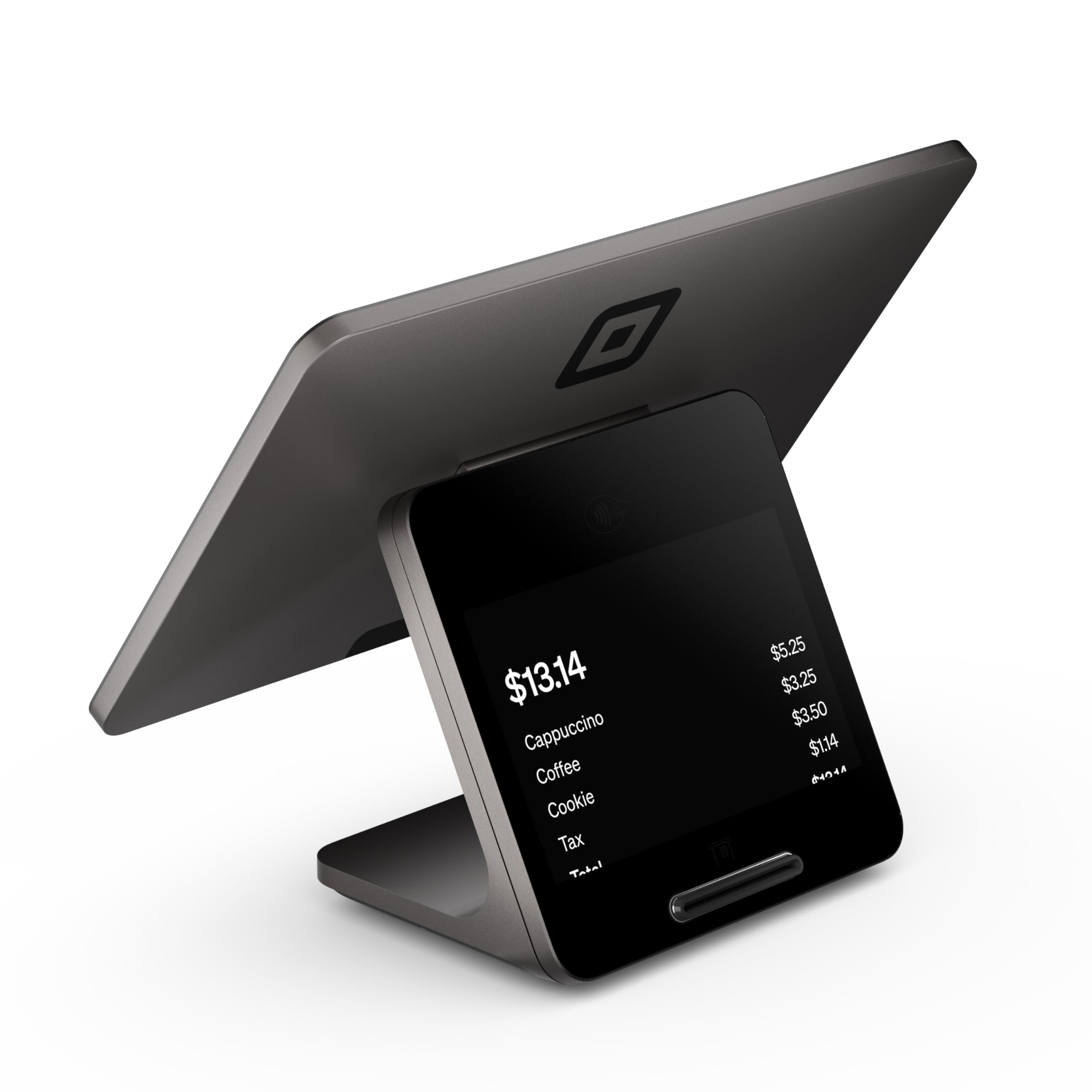
3. Square Register (2nd Generation) – Powered by POS
The countertop workhorse that shows the customer the total while you ring it up.
Two screens change the rhythm of checkout. The Square Register combines dual responsive touchscreens with built-in POS software in one countertop unit, so the customer sees the order, the tip screen, and the total while your staff keeps tapping. It handles busy shifts and big orders with high-speed processing and memory. Owners call it “faster, more responsive, and extremely reliable during our busiest days” — the upgrade note you want when your old register lagged at peak hours.
The Register is IP54-rated, an ingress rating (the first digit covers dust, the second covers water splashes) — so everyday spills and dust on a counter do not end the machine. It weighs 12.6 pounds, heavier than the 0.62-inch-thin Square Handheld by a wide margin, because it is a fixed piece of hardware with real screens and a sturdy base. You are buying it to stay put.
Payments run through Square at one simple rate, and funds can arrive as soon as the next business day. Quality is the thing owners rate highest here, and the bar code reader draws steady praise for scanning accuracy. The trade-off you should weigh: this still runs on Square’s ecosystem, so if you already have a processor you like, you are switching rather than keeping it. If you are starting fresh, the two-screen hardware earned 4.0+ stars and upgrades cleanly from an older Square setup.
Pick it for: A busy fixed counter where the customer-facing screen cuts down on “what’s my total” questions.
Second-guess it for: A mobile setup — 12.6 pounds and a corded power source want a permanent home.
4. Datio POS Point of Sale Base Station

A cash-register stand that turns an iPad you already own into a till.
If you have an iPad or Amazon Fire tablet lying around, the Datio base station lets it do register duty. The station is 16 x 16 x 12 inches and weighs 13 pounds, so plan a real corner for it — it dwarfs a handheld like the Square Handheld at 0.62 inches thick. It is built for retail, salons, and quick-serve counters where you order at the counter. The listing is clear that the tablet is not included; you supply it.
What owners consistently praise is the software side. The Datio POS software tracks sales by category and lets you follow consignment purchases by item number, which makes tax prep and inventory review far less painful. Customer support gets strong marks for setup help over phone, text, and email. One owner called it the most affordable option that was still easy to use and set up, with “great customer service and technical support.”
Here is the fine print you must lock in before buying: the stand only runs Datio POS Software, and that software requires a monthly subscription — the listing states a figure for the retail or quick-serve version. You can run cards through Worldpay with a free EMV device on processing approval, use your own processor and terminal, or keep it cash-only. If you will not pay a monthly software fee, this stand is not for you. If you want live sales tracking and a tidy inventory report, that subscription is where the value sits.
Software that earns its keep: Category-level sales tracking and item-level consignment logs do real bookkeeping work for a small shop, which is why owners stay happy after setup.
Cost to weigh: The stand is a shell without the monthly software subscription — budget for that as a recurring line item, not a one-time buy.
Suits you if: You already own a compatible tablet and want a cash drawer, stand, and reporting software in one system.
Doesn’t suit: Anyone who wants a one-time hardware purchase with no monthly software cost.
5. Clover Station Duo

A full two-screen register with the printer and cash drawer already in the box.
You get the whole setup in one box, where most terminals make you add the pieces. The Clover Station Duo ships as a complete system: a 14-inch HD display for the cashier, an 8-inch touch screen for the guest to confirm the order, tip, redeem rewards, pay, and request a digital receipt, plus a printer and included cash drawer. Two screens keep a line moving because the customer handles the tip prompt themselves. Owners call the whole package beautiful and easy to use — the hardware looks at home on a nice counter.
It is also expandable. You can add multiple countertop and handheld devices with accessories like printers and scanners, and the Clover Dashboard syncs transactions and sales data across them through the cloud. That means it can grow from one register to a multi-station setup without swapping platforms. It is heavy — 45 pounds versus the 5-pound Clover Compact — so this is permanent-counter hardware. Weigh that against the 8-inch guest screen, which most compact terminals simply do not have.
The hard requirement comes first in the listing for a reason: you must open a new merchant processing account through Powering POS, and the unit cannot be used with a different processor. That is a commitment, not an add-on. In return you get a rate match guarantee and a system ready to work from the start with software built in, keeping staff training short. It holds a solid 4.0+ stars across owners. Buy it for the finished bundle; do not buy it if you are loyal to a processor you already have.
What the bundle gives you
- 14-inch cashier screen plus 8-inch guest tip screen in one box
- Printer and cash drawer included, so no extra shopping
- Syncs across multiple stations through the Clover Dashboard
- Software built in, which keeps staff training minimal
The commitment it asks
- Requires a new processing account through Powering POS
- Cannot be paired with a different processor
- 45 pounds means it stays put on one counter
The sweet setup: A café or shop that wants one finished register — screens, printer, drawer, software — on day one.
The deal to weigh: Your card processing has to move to Powering POS, no exceptions.
6. Smart POS System SET04

A Windows register bundle that outfits the whole counter — scanner, printer, drawer, keyboard and all.
You get a full counter kit in one order, not a single box. The SET04’s default build upgrades to a new design with a 15-inch touch screen, an 11.6-inch customer display, an 80mm thermal receipt printer (the wider paper roll, so fewer jams per shift), a cash drawer, a free keyboard and mouse set, a desktop scanner, and retail POS software. If you are stocking a grocery, convenience store, or supermarket counter from scratch, that is most of the setup in one order.
The brain is a proper PC: an i5 motherboard CPU, 8GB RAM, 128GB SSD, and Windows 10. That matters because Windows 10 hardware runs far more third-party software than a locked phone-style terminal. Interfaces are generous — 6 USB ports, 1 HDMI, 1 VGA, 1 LAN port, and 2 audio outputs — so plugging in a scale, a second screen, or a scanner is straightforward. The software has no monthly fees and lifetime use, which flips the cost model of the subscription terminals in this lineup.
The trade a Windows bundle makes: it is a computer, so it wants setup time and a learning curve that an app-based terminal skips. You also supply the card processing separately, since this is register hardware and software, not a merchant account. It sits at 4.0+ stars, and the draw is no-monthly-fee software plus a full hardware stack. For a store that wants to own its platform rather than rent it, this is the one to look at.
Own, don’t rent: Lifetime software with no monthly fees is the headline — you pay once and stop, unlike the subscription-based Datio station.
Setup reality: A Windows 10 machine with 6 USB ports needs someone to configure it; a plug-in-and-go app terminal does not.
For the store owner who: Wants a full scanner-printer-drawer stack and prefers a one-time software buy over a monthly bill.
Not for the impatient: It needs Windows setup and a separate card processor before it takes its first payment.
7. Clover Compact Payment Terminal

The small plug-in terminal that plays nice with a bigger Clover system.
You can skip the two screens and the drawer if your counter is small. The Clover Compact is a plug-in countertop terminal at 5 pounds — far lighter than the 45-pound Clover Station Duo — and it is designed to sync with the Clover Mini or Station through the Clover Dashboard, so you can manage transactions and business data across both devices. If you add a second checkout point later, this one slots into the same cloud system instead of starting over.
Know exactly what you are buying: this is not a battery or mobile unit. You plug it in. And it requires a new processing account through Powering POS, with the same rate match guarantee the Duo offers, and it cannot be used with a different processor. If you are already planning a Clover setup with the Duo, the Compact is the natural second station. If you want an all-in-one with a printer and drawer, the Station Duo does that and the Compact does not.
One honest note on the data: this terminal carries a lower score at 3.5+ stars, so it is the value option in the Clover line rather than the star of the show. The processing lock is the same as the Duo, so the decision is really about if you need the smaller plug-in footprint or the two-screen bundle. For a single busy card-taking counter, the small size and shared dashboard are sensible.
Worth it when: You run (or plan) a Clover system and want a compact second station that shares one dashboard.
Skip the hassle if: You need a battery-powered terminal or a built-in printer — this plug-in unit has neither.
8. Bisofice POS Receipt Printer

A pocket sales-and-print machine that barely sips the budget.
If printing speed is what gates your checkout, the Bisofice PDA is the standout. Its built-in printer is listed at 20 black-and-white pages per minute against the PS10’s 1 page per minute, so tickets and receipts come out dramatically faster. It uses 58 x 35mm thermal paper with no cartridges or ribbons, so running cost stays low and the printing is quiet. The handheld is compact enough to carry, and it runs Android 8.1 for stable printing-focused apps.
The battery is the practical win: a built-in 5000mAh rechargeable pack supports long working stretches, so you are not hunting for an outlet between customers. Connectivity covers 3G, WiFi, Bluetooth 4.0, and USB OTG. There is a built-in camera alongside the printer for order workflows. It is a sensible pick for warehouse management, or a small cafeteria, boutique, or bookstore where you want a receipt printed without leaving the aisle.
Be realistic about the era it sits in. Android 8.1 is older than the Android 14 on the PS10, so treat this as a focused printing terminal rather than an app powerhouse. It is the budget entry in this lineup and carries 4.0+ stars. For a shop that mainly needs fast receipts and basic sales in hand, it does the job without the processing commitment of the Clover units or the subscription of the Datio.
Print speed to the rescue: At 20 pages per minute versus 1 on the PS10, it clears a queue of receipts while a slower handheld is still on its first slip.
Older platform: Android 8.1 is a generation behind, so expect this to print more than it computes.
Reach for this if: Fast, cheap receipt printing in a carryable terminal is the core of what you need.
Think twice if: You want the newest Android apps — this runs an older OS.
Know the Specs
Processing lock-in and merchant accounts
A POS terminal is only half the deal. The other half is the merchant processing account — the service that actually moves money from the customer’s card into your bank, and charges you a fee to do it. Terminals like the Clover Compact and Station Duo require you to open a new account through one specific provider and cannot be paired with a different processor. Square’s devices run through Square’s rate. The Datio stand wants its own monthly software subscription. Only a Windows bundle like the SET04, or a hardware-only terminal you feed your own processor, lets you keep the account you already have — so read the first line of every listing before you buy hardware.
Thermal printing and paper width
You never buy ink or toner with a thermal printer, because it burns the image onto heat-sensitive paper. The two common roll widths are 58mm (compact, used in handhelds like the PS10 and Bisofice) and 80mm (wider, used in the SET04 bundle). Narrow paper fits a pocket terminal; wide paper means bigger, clearer receipts and fewer jams per shift. Also check whether the printer is inside the terminal or a separate box — a built-in 58mm printer means one device to carry, while a separate 80mm printer means more paper width but an extra thing on your counter.
NFC readers and tap-to-pay
An NFC reader is the chip that lets a customer tap a contactless card or phone. On the PS10 it supports ISO/IEC 14443 Type A/B and Mifare, which covers tap cards, loyalty tags, and badges. But a reader alone does not take money — you still need a compatible payment app and processor to move the funds. That is the sentence buried on most listings, and it is the difference between “takes card payments” and “has a card reader you still have to connect to a service.”
Tablet cradles versus all-in-one registers
Some terminals are complete machines with screens, software, and a printer built in. Others, like the Datio base station, are cradles that hold a tablet you supply and pair with the maker’s software — and the tablet is not included. All-in-one registers save you tablet shopping, while cradles let you reuse a device you own and swap the tablet later. Either way, match the software model to how you like to pay: one-time purchase versus monthly subscription.
Common Questions
Do I have to change my card processor to use a POS terminal?
What does a built-in receipt printer do for a handheld terminal?
Can a POS terminal take payments when the internet goes down?
What is an IP rating and does a POS terminal need one?
Which POS terminal prints faster for receipts, the PS10 or the Bisofice?
Do I need a tablet for the Datio POS base station?
Is a Windows POS bundle better than an app-based terminal?
Will a tablet-based or handheld terminal show customers the total on screen?
Can I add more checkout stations later on a Clover or SET04 system?
The Bottom Line
For most small businesses, the strongest pick for the Best POS Terminal for Small Business is the Square Handheld — it is the crowd favorite at 4.5+ stars, pocketable at 2.11 ounces, and its offline payments mean a dropped connection does not cost you a sale. If you need a receipt printer inside the device and cellular data, the PS10 does the whole transaction in your hand. And for a fixed counter that wants two screens, a printer, and a cash drawer as a finished system, the Clover Station Duo is the one to reach for — as long as you are ready to open a processing account through Powering POS.
How we choose
We do not accept paid placement. Every pick is matched to a real buyer and a real use-case; we do not hands-on test units.
Sources
Specifications: manufacturer listings and product documentation. Review insights: verified customer reviews, as of November 2026. Pricing: not shown on this page (it changes often); check the current price via the retailer link.
As an Amazon Associate, Tactical Gear Guy earns from qualifying purchases. This does not affect which products we feature.