Specs are compiled from manufacturer listings and verified buyer reviews and can change over time — please confirm the key details on the product page before buying.
If you need to hand a client a signed-looking invoice from a hotel room or a truck cab, the winner here is the Phomemo M85. It weighs 1.6 lbs, runs an inkless thermal printhead, and its touchscreen walks you through setup without a laptop. That combination — 1.6 lbs, inkless printing, and on-device setup — is what separates a real portable office printer from a desktop model you lug around.
This guide is built by comparing the manufacturers’ published specifications and the patterns across verified customer reviews, so you get each pick’s real strengths and trade-offs instead of marketing spin.
The picks below split into two camps: inkless thermal printers that never touch a cartridge, and true inkjet machines that still print in color. Both can earn a place in your bag, but they solve different problems: thermal for black-and-white paperwork, inkjet for color. This breakdown of the portable office printer market tells you exactly which one fits your work.
Top Picks

How To Choose The Best Portable Office Printer
Start with the one question that splits this whole category: do you need color, or do you need to never buy ink again? Answer that honestly and half the models in this guide drop out.
Inkless thermal versus inkjet on the road
A thermal printer (it heats special paper to form the image) needs no ink, toner, or ribbons — the Phomemo M85 and M08D both work this way. The catch is that it prints only in black and white, and it only prints on thermal paper, which you buy in rolls. An inkjet like the Canon TR160 or HP OfficeJet 250 uses cartridges and handles color documents and photos, but you carry the ink cost and the cartridge weight with you.
Battery capacity and page counts
Battery capacity here is stated in mAh, and it decides how many pages you print between wall sockets. The M85 carries a 3500mAh battery rated for 200+ pages, while the M08D is rated for up to 150 pages of continuous printing. The TATTMUSE quotes 160 sheets of 8.5″ x 11″ paper per charge. Those figures assume plain-text pages, so dense graphics will pull the number down.
Connection method matters more than print speed
Check each printer’s connection list against the devices you actually carry before you buy. Native AirPrint (Apple’s built-in printing protocol, no app needed) means you tap Print from an iPhone or Mac and go — that is what the TATTMUSE and the Phomemo M810 offer. Bluetooth printers like the M85 pair with a phone but need USB-C for a computer. The M08D explicitly requires a cable and driver for computer printing and does not support Bluetooth on a PC.
Resolution and paper size
300 DPI is the working standard across the thermal picks, which is fine for text, invoices, and shipping labels but not for photographs. The Canon PIXMA models push far higher color resolution for photo work. On paper, look for stated support of 8.5″ x 11″ US Letter if you print contracts — several of these printers list multiple roll widths alongside it.
Side-by-Side Comparison
| Model | Best For | Print Speed (B&W) | Weight | Print Technology | Amazon |
|---|---|---|---|---|---|
| Phomemo M85★ Best Overall | Best Overall | 10 pages per minute | 0.79 kg | Thermal, 300 DPI | Amazon |
| Phomemo M08DBest Value | Budget-friendly on-the-road printing | 7 pages per minute | 745 g | Thermal | Amazon |
| TATTMUSE AirPrint A285M ProTeam Favorite | Multi-device team printing | 10 pages per minute | 1129 g | Thermal, 300 DPI | Amazon |
| Canon PIXMA TR160 | Color documents and photos on the go | 9 pages per minute | 4.5 pounds | 5-color inkjet | Amazon |
| HP OfficeJet 200 (Renewed) | Wireless invoices without internet | 10 pages per minute | — | Inkjet | Amazon |
| HP OfficeJet 250 (Renewed) | Scan and copy on the road | 20 pages per minute | — | Inkjet all-in-one | Amazon |
| Canon Pixma iP110 | High-resolution color in a small body | 9 pages per minute | — | Inkjet, 9600 x 2400 DPI | Amazon |
| Epson WorkForce WF-100 | Maximum compactness | 3.5 pages per minute | — | Inkjet | Amazon |
Detailed Reviews
1. Phomemo M85 Portable Printers
Our pick — 4.5+★ from 60+ verified ratings; the strongest balance of quality and price.
The folding-umbrella-sized printer that asks for no ink and almost no setup.
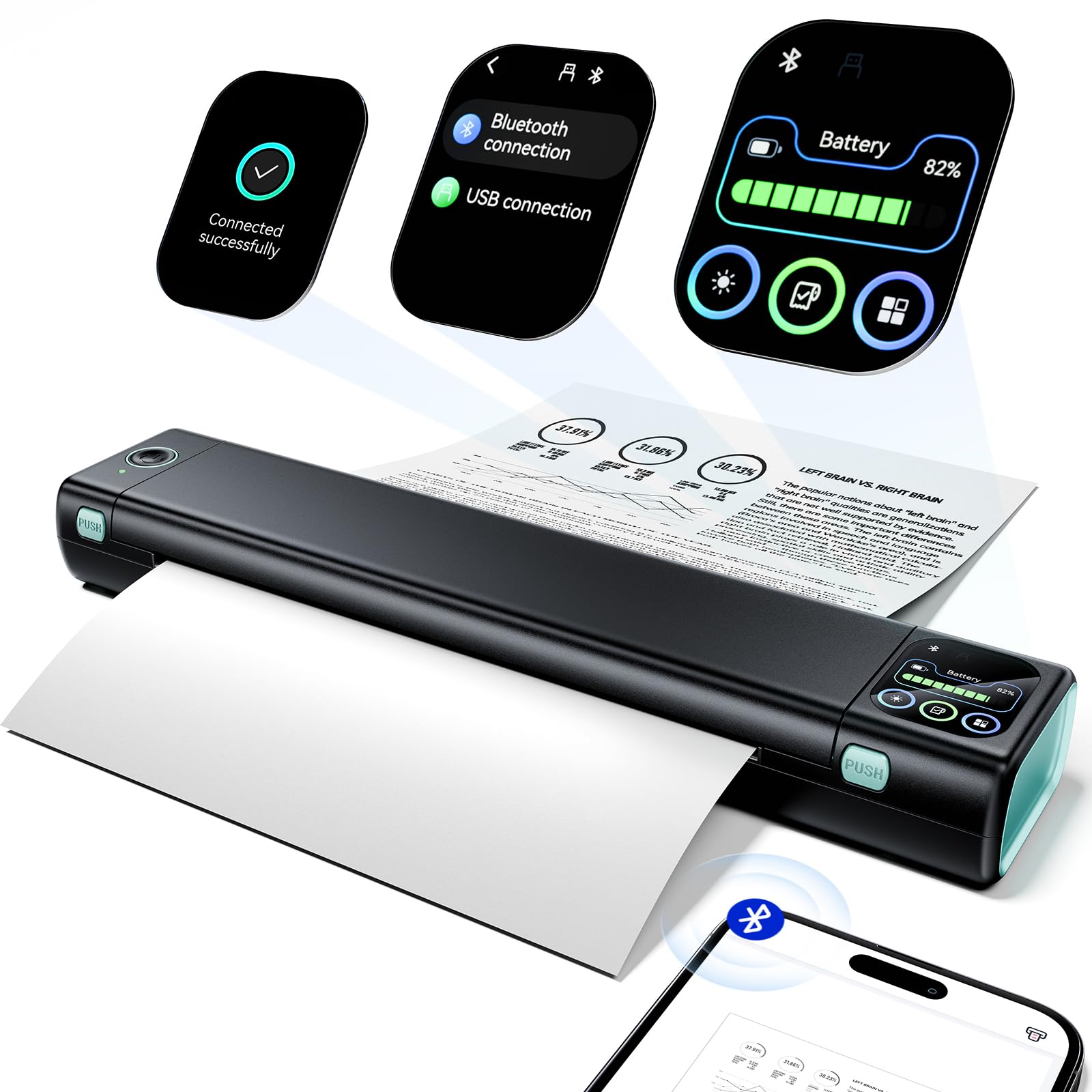
For a sales rep, courier driver, or field inspector who prints a handful of pages a day, the M85 is the one to beat. It weighs 1.6 lbs and its body is described as folding-umbrella sized, so it disappears into a backpack rather than announcing itself. The 3500mAh battery is rated for 200+ pages on a single charge — that is roughly a week of normal road paperwork before you go hunting for a USB-C cable.
What wins people over is the built-in quality of the prints themselves, with eight-and-a-half-out-of-ten feedback logged as positive on the review pages. The 300 DPI printhead delivers crisp black text, and because it is inkless there is no cartridge to leak in a hot car or dry out between trips. Just as important, the touchscreen actually does work: it previews templates and shows connection status, battery level, and paper position. Setup goes through the app once, and after that you print straight from the screen. The packing list helps too — the case, a US Letter roll, and three smaller roll widths all ship in the box.
Airtight on paper sizes: it takes US Letter, A4, 4.33″, 3.14″, and 2.08″ rolls, and prints folded or single sheets as well as roll paper. Bluetooth covers iOS 13 and above and Android 7 and above, while USB-C handles macOS 10, Windows 7 and above, ChromeOS, and Linux, and it reads Word, Excel, PDF, and JPG files. The honest limit is color — this is a black-and-white thermal machine, so a full-color client deck is out. Thermal paper is also a purchase you keep making, unlike plain copy paper.
Where it earns the top spot
- 200+ pages from one 3500mAh charge — about a week of paperwork between outlets.
- 300 DPI printhead and zero ink, toner, or ribbon required.
- Touchscreen previews templates and shows paper position and battery live.
- Five paper widths from US Letter down to 2.08″, plus roll, folded, and single-sheet support.
What to weigh first
- Black and white only — no color documents whatsoever.
- You are tied to thermal paper for every print.
- Templates need a one-time app upload before they show on the screen.
Reach for this if: you print black-and-white contracts, invoices, or delivery notes away from a desk and want nothing to refill.
Look elsewhere if: color photos or branded color materials are part of your day — the inkjet picks below handle that job.
2. Phomemo M08D Portable Printer
A smart screen and a 1.5 lb frame make this the value pick for occasional printing.
If you print once in a while rather than daily, the M08D is where the money makes sense. It weighs 745 g — noticeably lighter than the TATTMUSE’s 1129 g — and its body runs just 1.26″ deep, so it slides into a briefcase or car pocket without eating space. The built-in battery is rated for up to 150 pages of continuous printing on one charge.
The display is the genuine upgrade over older models, showing status, connection, and step-by-step troubleshooting guides so a first-timer is not left guessing. Printer quality is the thing buyers praise most here, and the value math is real: no ink means no cartridge refills, which is the specific reason road users keep coming back. The recurring gripe is not the print itself but the paper — thermal stock is a specialty purchase, and more than one owner has pointed out that the ink savings only hold if you factor in that paper cost. Some also found the first setup took a little getting used to before it clicked.
Connection detail matters here. Bluetooth works for phones via the app on iOS and Android, but a computer must use a USB cable with a downloaded driver — the M08D does not print to a PC over Bluetooth. It runs 7 pages per minute in black and white and is simplex only (single-sided). For a trucker printing permits, a student printing study sheets, or a small business owner printing invoices, that trade is easy to accept.
The paper cost catch: ink-free does not mean supply-free. Thermal rolls are the one recurring cost, so budget for paper rather than toner.
The light-travel read: at 745 g and 1.26″ deep, this is the pick for someone who wants thermal printing without the M85’s price tier.
Best for: light-duty road printing where weight and value matter more than speed.
Otherwise: if you need faster output, the M85 runs 10 pages per minute against this one’s 7.
3. TATTMUSE Portable Printer
Ten devices, one printer, no app — the shared-office option for a small crew.
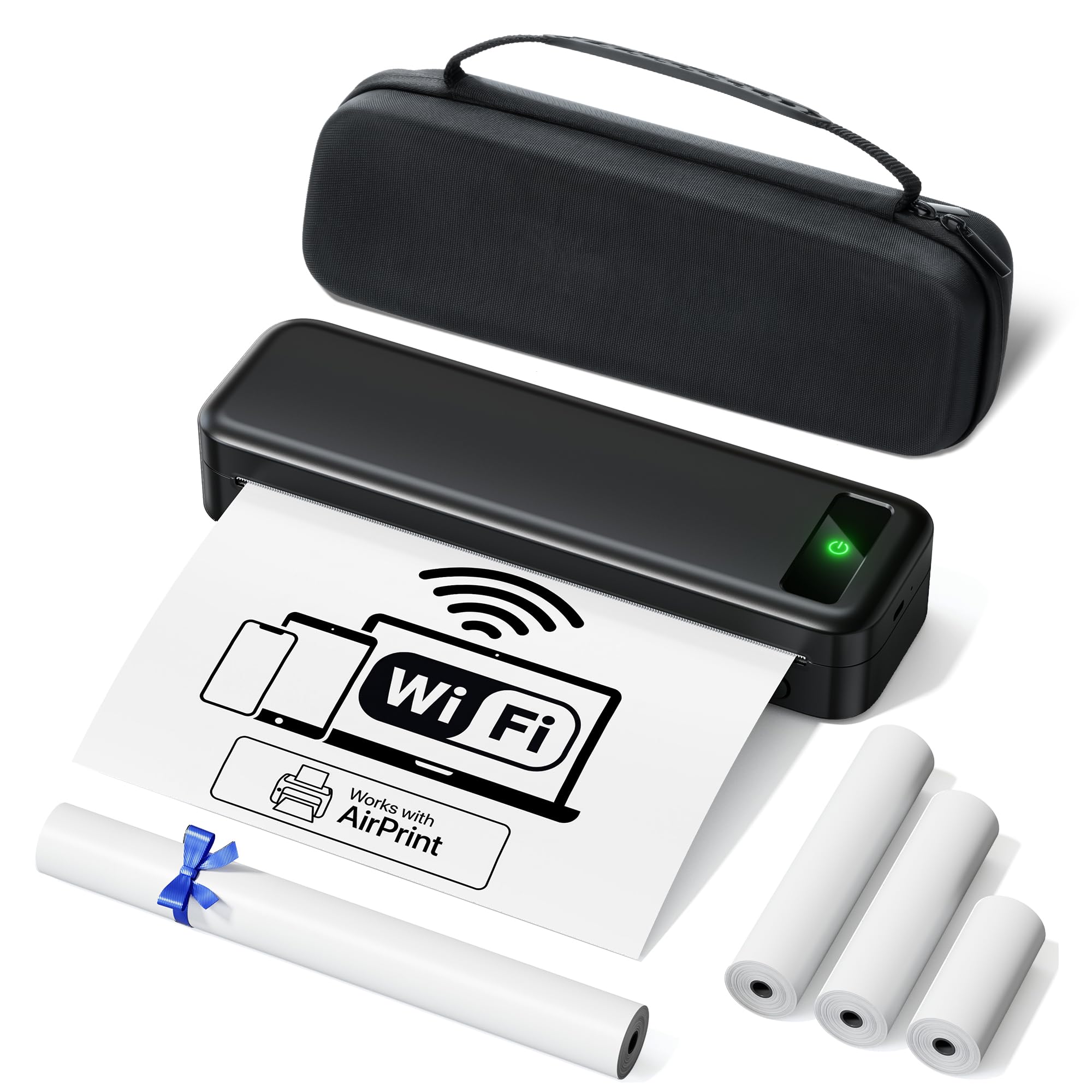
Picture a job site trailer or a small shared office where three people all need to print from their own phones. That is exactly where the A285M Pro wins: it takes up to 10 simultaneous device connections, so nobody waits for someone else to disconnect before sending a job. It is the one real advantage it holds over every Bluetooth pick here, including the M85, which pairs one device at a time.
Native AirPrint is the other headline — pick it straight from the iPhone or Mac print menu with no third-party app or driver at all. Your files stay on the local network rather than routing through a cloud server, which matters if you handle confidential contracts. It prints 8.5″ x 11″ at 300 DPI and, per the maker, runs 160 sheets per charge off a rechargeable battery. The carrying case and four paper rolls — including a Letter roll — come in the box, so it is usable out of the gate.
Be clear on the limits before you buy. It weighs 1129 g, making it the heaviest thermal pick on this list and noticeably heftier to carry than the M85’s 0.79 kg. It handles only thermal paper and only black-and-white output. Wi-Fi setup goes through connecting your device to the printer’s own hotspot, which is a simple process but does mean switching your phone’s network when you want to print.
The standout: 10 simultaneous connections is the spec no other thermal printer here matches — ideal for shared use.
The heft note: 1129 g is real weight in a bag, so this stays in the office or car rather than your shoulder all day.
Choose this if: multiple people need to print from their own phones to one machine.
Think twice if: you want the lightest possible bag — the M85 shaves off real ounces here.
4. Canon PIXMA TR160 Color Wireless Portable Printer

Full color and photo printing in a body you can still call portable.
If your work lives in color — branded proposals, product sheets, the occasional photo — none of the thermal machines will do it, and the TR160 is the color answer. It uses a 5-Color Hybrid Ink System (five separate ink channels instead of the usual four-ish) and handles borderless and square prints up to 8.5″ x 11″. Black documents run at 9 pages per minute and color at 5.5 pages per minute, so text stays quick while color slows you a little.
Print quality is what owners gush about, and it is the clear strength of this model. The 1.44″ monochrome OLED display (a small screen that shows ink levels and status without a phone) means you can check supply at a glance. Canon PRINT, Apple AirPrint, and Mopria covered the wireless side, and Wireless Direct mode lets you connect when there is no router in reach. It weighs 4.5 pounds — real weight compared to the sub-1 kg thermal picks — so this is the one you plan around carrying rather than pocketing.
The recurring frustration is wireless setup: some got it connected quickly while others fought the Wi-Fi pairing. Ink consumption is the other regular note — color printing means cartridges, and that is a running cost the inkless picks simply do not have. Approach it as a color machine that travels rather than a bag-of-holding printer, and it delivers.
Why color buyers pick it
- 5-Color Hybrid Ink System prints vivid color and photos up to 8.5″ x 11″.
- 1.44″ OLED shows ink and status without opening an app.
- AirPrint, Mopria, Canon PRINT, and Wireless Direct cover most devices.
Where it costs you
- 4.5 pounds makes it a planned carry, not a pocket printer.
- Wi-Fi pairing is hit-or-miss for some setups.
- Cartridge ink adds an ongoing running cost.
Pick this when: color documents and photos are non-negotiable and you want genuine print quality.
Weigh the setup: budget a little patience for Wi-Fi pairing the first time.
5. HP OfficeJet 200 Portable Printer

The mobile-business inkjet that prints wirelessly without any internet at all.
An inspector or delivery driver who prints on the move and cannot rely on a router should look here. The OfficeJet 200 was built for exactly that: high-quality printing without needing to connect to the internet, which is the specific thing that keeps a mobile business moving in a warehouse or on a rural route. It runs 10 pages per minute in black and white, its color page rate is listed at 19 pages per minute, and it takes HP 62 black and tri-color cartridges.
The print output is the clear draw — sharp text and vibrant graphics, down to contracts, invoices, and presentation materials. It carries an LCD display and voice control through Amazon Alexa, so hands-free printing is possible when your hands are full. It is a simplex machine (single-sided prints only), and the wireless connection and overall reliability are a mixed bag: most of the time it works cleanly, but the occasional unit misbehaves. If you land on a good one, the portability and output make it a durable workhorse.
One honest caveat to sizing up: this is a renewed unit, meaning a tested refurbish rather than a brand-new box. Reviews note that print quality, while good, can come out a touch faded rather than razor-bold, so judge it against how bold your documents need to be. For the traveler who wants real inkjet color with a long-lived battery and voice control, it earns a spot.
Its specific edge: true no-internet wireless printing from a phone, which is exactly what a mobile business needs.
The refurb reality: renewed means tested and repackaged — inspect it on arrival before relying on it for deadline work.
Go for it if: you need inkjet color and phone printing with no router in sight.
Note the trade: single-sided only, and print contrast can run a little light.
6. HP OfficeJet 250 Portable Printer

The only all-in-one here that scans and copies as well as it prints.
Anyone who has ever needed to scan a signed contract back to the office from a hotel will get why this one matters. The OfficeJet 250 is an all-in-one — it scans, copies, and prints — with a 2.65″ color touchscreen and an auto document feeder, a feature no other pick in this group carries. It runs 20 pages per minute in black and white, and its first page arrives in 13 seconds for black and 20 seconds for color.
The quality of the output leads the feedback here, and the functionality — the scan and copy side — runs a close second. It takes the HP 62 family, including the XL high-yield cartridges, so you can stretch a trip between refills. It setup and connect both ways: laptop or phone, with Wi-Fi Direct for Android users to find and print without a router. The included battery charges in about 90 minutes from AC while the printer is off, and it fits in a car or backpack.
The honest caveats are two. Ink is expensive on this model — a running cost you accept for real color and scanning. And the battery is the weak link, with capacity complaints the most consistent negative: a small 12V cell means shorter unplugged sessions than the thermal picks, so this is a plug-in-when-possible traveler. It is also a renewed unit, sold tested and repackaged with a stated 90-day warranty.
Features that win it a place
- Scan, copy, and print in one portable body — unique in this lineup.
- 20 pages per minute black, 19 pages per minute color, 13-second first black page.
- 2.65″ touchscreen plus an auto document feeder for batch scans.
Where it stretches you
- Battery life draws the most consistent complaints — plan around outlets.
- Cartridge ink is a real recurring expense.
- No duplex printing and no built-in carry case.
Built for: the traveler who must scan and copy, not just print, and who can stay near power.
The catch: that small battery means unplugged sessions are short — charge it before you head out.
7. Canon Pixma iP110 Wireless Mobile Printer

A compact color inkjet built around a serious 9600 x 2400 DPI printhead.
For high-resolution color output from a machine that still travels, the iP110 is the standout spec of the group: 9600 x 2400 maximum color DPI, a resolution that puts the 300 DPI thermal printers in a completely different league for photos and fine detail. It prints black documents at 9 pages per minute and color at 6 pages per minute, and it is the only pick here that lists automatic duplex printing — a real page-saver when you are feeding thermal-free plain paper.
Owners love it for exactly that form factor — compact enough for a motorhome or a carry-on workbox, and it prints documents well for its size. It works with the Canon PRINT app, cloud services, and Alexa, so you can fire a shopping list or document from voice. The body dimensions put it in a backpack beside a laptop without crowding it.
The honest limit is age and setup. This is an older model with no Bluetooth, no NFC, and — despite the AirPrint label — connectivity and setup split the reviews, with install friction a recurring theme. It weighs little and prints well, but a first connection needs patience. If resolution is the deciding spec, nothing here matches it.
The numbers that decide it: 9600 x 2400 color DPI against 300 DPI on the thermal machines — that is photo-grade versus text-grade.
The setup patience: older connectivity plus install friction means expect a fiddly first pairing.
For the detail-obsessed: choose this when color resolution and automatic duplex are the whole point.
Elsewhere: if you want painless Wi-Fi pairing from the start, the newer color picks are easier.
8. Epson Workforce WF-100 Wireless Color Mobile Printer

The tiniest frame on the list, built to live in a cupboard between jobs.
For someone who wants a printer that tucks away and comes out only when needed — a student, a home-office worker, a traveler with tight luggage — the WF-100’s selling point is pure size. Epson bills it as the world’s lightest and smallest mobile printer, and its narrow footprint is the thing owners notice most. It prints from iPad, iPhone, tablets, and phones, and it charges over USB or an AC adapter from its built-in rechargeable lithium-ion battery.
Print quality is the strongest suit: crisp, high-grade color output including photos, with easy ink changes on a small frame. It keeps a small paper load, which suits drafts and single documents rather than long runs. The speed numbers tell you to be patient — it lists 3.5 pages per minute in black and 1 page per minute in color, the slowest in the group.
Two things to check before committing. It is designed to use Epson cartridges only, and third-party or refilled ink may not work properly, so factor genuine ink into the running cost. Reliability and compatibility sit at the mixed end, with connection friction reported on first use. As a compact color printer that lives mostly on the shelf until needed, it does its job.
The compaction case
- Smallest and lightest frame in this lineup — stored away between jobs.
- Photo-capable color printing with easy ink changes.
- Charges over USB or AC from a built-in lithium-ion battery.
The trade you accept
- 3.5 pages per minute black, 1 page per minute color — the slowest here.
- Epson ink only; third-party cartridges may not work.
- First-time connectivity can take a few tries.
The answer for: a printer you store away and pull out rarely, with color when you need it.
Not for speed: if throughput matters, look at the faster OfficeJet 250 instead.
Know the Specs
Thermal vs Inkjet
A thermal printer heats specially coated paper to form the image, so it needs no ink, toner, or ribbon. That means no cartridge to run dry mid-trip, but it prints only in black and white and only on thermal rolls. An inkjet uses replaceable cartridges and prints full color, including photos — the cost and the color are the trade. Choose thermal for contracts and labels, inkjet for anything that has to be colored.
Battery Capacity (mAh)
mAh (milliamp-hours) measures how much charge a battery holds. The M85’s 3500mAh battery is rated for 200+ pages, the M810 for 250+ prints, the M08D for 150 pages, and the TATTMUSE for 160 sheets. Higher mAh and page figures mean fewer interruptions on a trip. Remember that photos and dense graphics drain faster than plain-text documents.
Print Resolution (DPI)
DPI (dots per inch) is how many ink or heat dots land in each inch of page. 300 DPI is sharp for text and invoices; the Canon PIXMA models go far higher for photo-level detail. Higher DPI generally means slower printing and heavier files, so match the resolution to your job — 300 DPI for text, 9600 x 2400 DPI for photos.
Connection Standards
AirPrint lets Apple devices print with no app or driver at all. Bluetooth pairs phones reliably but often needs USB-C for computers — check the driver requirement for the M08D and M85. Wi-Fi Direct skips the router entirely. Match the connection to your devices: phone-first users want AirPrint, laptop users should confirm the printer has a USB cable-and-driver path.
Common Questions
Can a portable office printer print on normal copy paper?
Do thermal portable printers really never need ink?
Will an AirPrint printer work with my Windows laptop?
How many pages can these printers print on a full charge?
Which portable printer is best for printing color contracts or photos?
Is a renewed or refurbished portable printer a safe buy?
Do these printers support double-sided printing?
Can several people print to one portable printer at the same time?
What is the difference between 300 DPI and 9600 x 2400 DPI here?
Will these printers fit in a backpack or carry-on?
The Bottom Line
The portable office printer that earns the crown is the Phomemo M85, because it nails the road-work essentials at once: 1.6 lbs, 200+ pages from a 3500mAh battery, and a 300 DPI inkless printhead that never asks for a cartridge. Its touchscreen handles the setup a laptop would otherwise do, so you print from the bag without extra gear.
If you handle color proposals or photos, reach for the Canon PIXMA TR160 — its 5-Color Hybrid Ink System and 8.5″ x 11″ color output are the reasons to carry the extra heft. And when a small crew needs to print to one machine at the same time, the TATTMUSE AirPrint A285M Pro and its 10 simultaneous Wi-Fi connections is the one to hand around.
What ties the thermal picks together is the running cost: no cartridges to buy, only thermal paper rolls to restock. Pick the connection and paper size your work demands, and you will not outgrow it.
How we choose
We do not accept paid placement. Every pick is matched to a real buyer and a real use-case; we do not hands-on test units.
Sources
Specifications: manufacturer listings and product documentation. Review insights: verified customer reviews, as of November 2026. Pricing: not shown on this page (it changes often); check the current price via the retailer link.
As an Amazon Associate, Tactical Gear Guy earns from qualifying purchases. This does not affect which products we feature.