Specs are compiled from manufacturer listings and verified buyer reviews and can change over time — please confirm the key details on the product page before buying.
If you want to go live from a venue with four cameras and no laptop, buy a hardware switcher-encoder with real HDMI inputs — that single decision solves most of the pain. A phone can push one camera to one platform. The moment you need a second angle, an overlay, or a stable uplink over unreliable venue Wi-Fi, you need a box that ingests HDMI, encodes the picture, and sends it out on its own. This guide covers the nine portable live streaming devices worth your attention, sorted into standalone all-in-one studios, HDMI switchers, and wireless camera links.
This guide is built by comparing the manufacturers’ published specifications and the patterns across verified customer reviews, so you get each pick’s real strengths and trade-offs instead of marketing spin.
You want to stream live from a venue, and you need a box that fits in a bag. This list groups the picks by the job they do, so the nearest same-type tool that does the same job is included — not always the exact model you typed into the search bar. Most people searching for a portable live streaming device actually need one of these three job categories, not one specific box.
Top Picks


How To Choose The Best Portable Live Streaming Device
Three questions decide almost everything: how many cameras you need to switch, whether you can trust the venue’s internet, and if you want to carry a laptop. Answer those and the shortlist collapses to one or two boxes.
Decide if you need a switcher or a transmitter
A switcher takes several HDMI cameras in and lets you cut between them. A wireless transmitter takes one camera’s HDMI signal and beams it to a receiver or a phone. They solve different problems, and buying the wrong type is the most common mismatch. If you plan to cut between angles live, you need a switcher with multiple HDMI inputs.
Count your HDMI inputs before anything else
Every camera, game console, or laptop you want to cut to needs its own HDMI input. A four-input box handles a three-camera shoot with one spare. An eight-input box handles a small church service with room for a laptop for lyrics or slides. Buying one input short is the mistake that forces an upgrade within months.
Check how the box gets online
Some units push straight out over an Ethernet port and need nothing else. Others rely on your phone or a USB modem for cellular. The strongest option for venues with shaky internet is network bonding, which combines several connections at once — that is what lets a box keep a stream alive when one link drops.
Weigh the screen against the carry weight
A built-in display means you can monitor all your inputs without dragging along a separate field monitor. That convenience comes with weight and bulk. A bare switcher is lighter but needs a screen or laptop to see what you are cutting to.
Side-by-Side Comparison
| Model | Best For | HDMI Inputs | Built-in Screen | Weight | Amazon |
|---|---|---|---|---|---|
| osee GoStream Deck★ Best Overall | Multi-platform streaming without a PC | 4 | — | 1.1 pounds | Amazon |
| EZCast CamCastBest Value | Turning a phone into a field monitor | 1 (loop to app) | — | — | Amazon |
| Zowietek ZowieBoxMost Compact | NDI and SRT encoding on a budget | 1 | LCD status screen | 5.9 ounces | Amazon |
| Mixer Plus | Compact switcher with its own monitor | 4 | 4-inch | — | Amazon |
| Roland AeroCaster | Phone-and-iPad wireless production | None (wireless) | iPad app | — | Amazon |
| Accsoon CineView HE | Long-range wireless camera feed | 1 in, 1 loop-out | — | 222 g | Amazon |
| Blackmagic ATEM Mini Extreme | Eight-camera productions on a desk | 8 | — | 4.1 pounds | Amazon |
| YoloBox Ultra | Vertical social streaming with bonding | 4 | 8-inch touchscreen | 1 kg | Amazon |
| YoloBox Extreme | Large multi-cam events with ISO capture | 8 | 11.2-inch OLED | 2 kg | Amazon |
Detailed Reviews
1. osee GoStream Deck HDMI Pro
Our pick — 4.5+★ from 350+ verified ratings; the strongest balance of quality and price.
A full switching desk that fits in a small bag, with no computer chained to it.
You get a hard control panel with PVW/PGM buses (preview and program rows that let you line up the next shot before you cut) plus a T-Bar fader for manual transitions. Four cameras plug into four HDMI inputs, and two HDMI outputs feed your multiview and monitoring screens. You watch both feeds on your displays and cut. Recording goes to an SD card or a USB SSD while you stream — so you walk away with a file of the show, not just a broadcast that vanishes.
The part that makes it a standalone studio is the Ethernet port. It pushes your program to three platforms at once — YouTube, Facebook, Zoom, or any RTMP server — without a PC in the chain. If you would rather stream through OBS or vMix, the USB-C output handles that instead. It also reads landscape and portrait, so the same box covers a horizontal YouTube broadcast and a vertical social feed. Built into the panel: a downstream keyer for logos and lower-thirds, an upstream keyer for green screen and picture-in-picture, and audio tools including EQ and a limiter so your voice stays level.
What wins people over is the sheer amount of broadcast machinery packed into a 1.1-pound frame — the functionality and build quality are the two things owners bring up constantly, and the price-to-capability ratio is the running theme. The honest catch is heat. A fan-cooled box running an encoder will warm up during a long service, and a handful of owners find the menu system takes a session to learn. Neither is a reason to walk away; it is a reason to give yourself a practice run before a paid gig. Auto-switching is also here, which keeps a podcast on the active talker without you touching the fader.
Where it earns its keep
- Streams to three platforms at once straight over Ethernet, with no laptop in the chain.
- T-Bar, PVW/PGM buses and Macro buttons give you real broadcast control.
- Records program to SD or USB SSD while it streams, so you keep a master file.
- Handles both landscape and portrait output from the same unit.
What to plan around
- It runs warm during long sessions — leave ventilation around it.
- The menu system has a learning curve before it feels quick.
Reach for this if: you run worship services, conferences, or weddings with up to four cameras and want the whole production off a laptop.
Think twice if: your shoot is one camera only — you would be paying for switching you never touch.
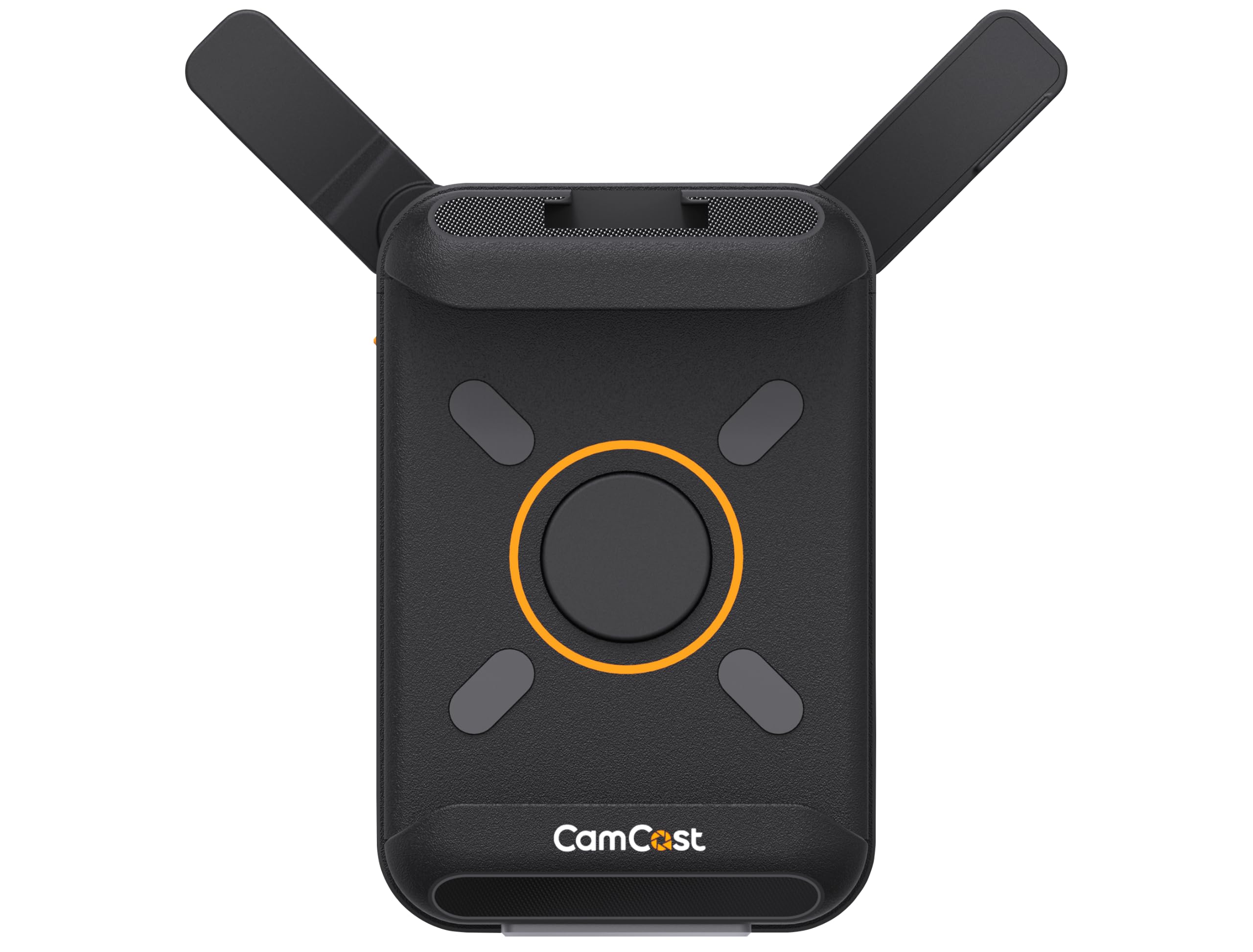
2. EZCast CamCast Wireless HDMI Video Transmitter
Your phone already has a good screen — this box turns it into the field monitor you were about to buy.
You run one HDMI cable out of your camera, and the picture travels over 5GHz Wi-Fi (the faster, less crowded of the two common home Wi-Fi bands) to as many as four iPhones, iPads, or Android devices at the same time. The director sees the shot, the client sees the shot, and nobody has to crowd behind the camera. The free CamCast app needs iOS 15 or Android 10 and up, and on supported Sony, Canon, and Nikon bodies you can trigger recording and stills from the phone itself.
The range figure is the reason this pick exists: monitoring holds up to 150 meters with under 60ms of delay — a delay small enough that lip-sync still reads correctly to the eye. How far you actually get depends on how many devices are pulling the feed. Power comes from an NP-F battery or USB-C at 5V/3A, and the box ships with a cold shoe adapter, a gimbal mount adapter, and a phone clamp so it rides on the rig. There is a second life here too: plugged into a computer by USB-C it behaves like a webcam, feeding your camera’s picture into OBS or Streamlabs with no capture card.
Here is the trade-off to weigh honestly. This is a camera-to-screen link, not a switcher — it does not cut between angles for you, and it carries one HDMI source. The NP-F battery and the HDMI cable are not in the box, so budget for both on day one. If you want a full multi-camera program out of one device, the GoStream Deck above does that job and this one does not. But for a solo shooter who wants a clean, cheap monitor feed on set, it is the smallest spend on this list that solves a real problem.
What it really is: a camera-to-phone bridge — one HDMI source, four viewers, 150m of range, well under a tenth of a second of lag. Pair it with the phone in your pocket and you skip a dedicated monitor entirely.
Set your expectations: no switching, no encoding, no multi-cam program. It is a monitoring and webcam tool first, a streaming accessory second.
Suits: solo shooters and small crews who want a director’s monitor without buying a director’s monitor.
Not for: anyone who needs to cut between several cameras live.
3. Zowietek 4K Video Streaming Encoder/Decoder, ZowieBox
Smaller than a phone, and it turns one HDMI camera into an IP stream with no computer attached.
Your camera feed appears inside OBS or vMix as if it were plugged in, thanks to NDI HX3 — a compressed version of the NDI video-over-network standard that lets a feed travel across Ethernet or Wi-Fi. It also handles SRT, RTMP(S), and RTSP, so the same unit can act as a hardware streamer to YouTube or a low-latency SRT transmitter. HDMI passthrough is zero-lag, so your monitor never lags behind the action, and the encoder converts the same signal into a 4K IP stream on the side. It can run the other direction too, decoding an IP stream back to a 4K HDMI signal.
Weighing 5.9 ounces with an aluminum body and a tripod mount, it disappears on a rig. Power comes by USB-C or PoE (Power over Ethernet, where the network cable carries the electricity as well as the data), which is genuinely useful when you mount it far from an outlet. Control runs through a web interface from a PC, phone, or tablet, and it can drive PTZ cameras over VISCA (a control protocol for pan-tilt-zoom cameras). Supported resolutions reach 4K@30fps and 1080p@60fps in decoding.
Set-up is where this one shines — the interface is straightforward enough that it lands in the praise pile, and the picture quality when it works is praised most. The honest caveat is reliability, and it is the loudest theme in the feedback: plenty of units run without a hiccup, and a real share of buyers hit a unit that never worked. Encoder and decoder modes cannot run at the same time, and full NDI is not supported, so check your workflow before you buy. Treat it as a specialist’s compact tool, test it before the event, and keep a fallback. On a gaming or streaming desk where you want an IP feed without a PC, it earns its place.
Small enough to leave mounted
- 5.9 ounces of aluminum with a tripod mount, so it parks on the rig and stays there.
- NDI HX3 plus SRT, RTMP(S), and RTSP covers most IP workflows.
- USB-C or PoE power means one cable can do data and electricity.
- Zero-lag HDMI passthrough keeps your monitor live while it encodes.
Test before you trust it
- Reliability is a genuine coin-flip across buyers, so bench-test before a live date.
- Encoder and decoder modes cannot run simultaneously, and full NDI is out.
Worth a look if: you need an NDI/SRT feed from one camera and want the box small enough to forget about.
Look past it if: your production cannot tolerate a unit that might need to go back.
4. Mixer Plus Compact Video Switcher
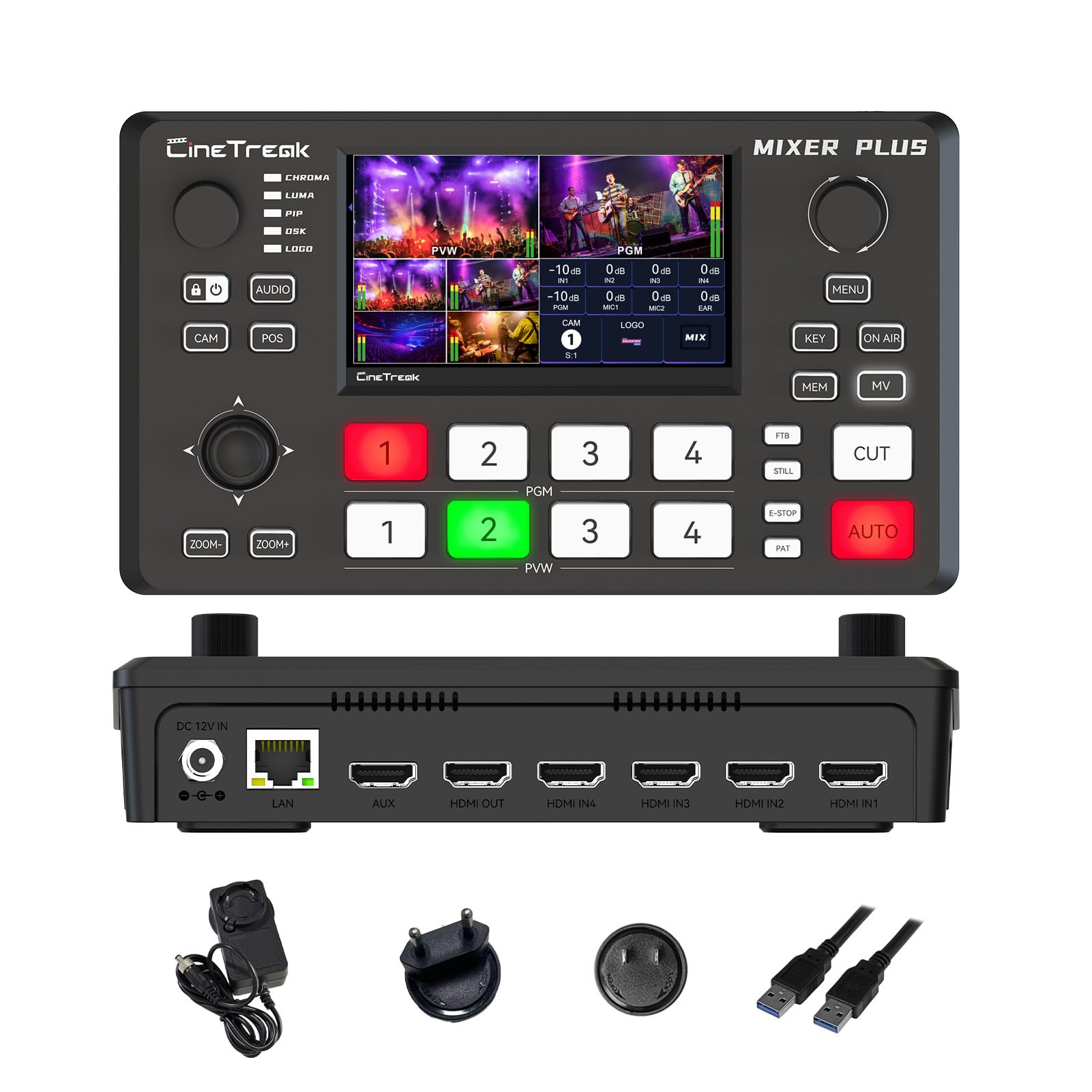
Four HDMI inputs, a 4-inch screen, and zero-latency cuts in a package you can hold in two hands.
The built-in 4-inch display is what makes this a real field tool: it shows Multi View — every input, plus dedicated Program and Preview windows, resolution readouts, and audio level meters — without a separate monitor. Four HDMI inputs switch with zero latency, and there are 30 customizable transition effects plus 4 user-defined scene presets so you can jump to a look on cue.
You get broadcast extras that usually live on bigger desks: PTZ control over VISCA (a control protocol for pan-tilt-zoom cameras) for up to four cameras with four presets each, chroma key and luma key (green-screen and brightness-based cutouts), picture-in-picture, a downstream keyer, and logo overlay. The AUX HDMI output is configurable — the maker lists IN1 through IN4, PGM, Clean PGM, PVW, Clean PVW, PAT, and Multi View as options — which means you can send a clean program feed to one destination and a multiview to another.
You get a self-contained switcher with a monitor baked in, in an eight-inch-square box that carries its own screen. Buyers report it delivers professional results without the bulk, and the screen reads clearly enough to see all inputs at a glance. It has a smaller owner base than the big names here, so you are trusting a newer track record. Set it on a table at a classroom, event, or small YouTube shoot and you have multi-cam control with nothing else plugged in but cameras.
The self-contained angle: a 4-channel switcher with a 4-inch multiview screen, 30 transition effects, 4 scene presets, and PTZ control in an 8-inch-square footprint. It is the smallest way to run multi-cam with your own eyes on every input.
Check your workflow: confirm the AUX output and PTZ presets line up with your cameras before you commit — the flexibility is there, but it is on you to configure it.
Pick it for: classrooms, church halls, and small events where you want multi-cam and a monitor in one carry.
Skip it for: eight-camera productions that need more inputs than four.
5. Roland AeroCaster Portable Livestreaming System

Four phones, one iPad, and a hardware surface — a camera crew you already own.
This one makes the list because it asks for almost nothing: an iPad running iPadOS 14.6 or later, plus phones. Switch up to four wireless devices at once plus the host iPad’s own camera, all over Wi-Fi, and save or recall 30 scenes with titles, graphics, and picture-in-picture windows. The hardware control surface doubles as an audio interface, with two XLR inputs, a 3.5mm stereo input, headphone and monitor outputs — so a proper microphone plugs straight in rather than going through the iPad.
Streaming leaves over Wi-Fi or 4G/5G cellular directly to YouTube, Facebook Live, Twitch, and custom RTMP channels. You can also share screens from computers and phones through a Chrome browser, which is handy when a presenter needs to show a document. A free Version UP update adds live viewer comment display, enhanced scene settings, and recording without streaming, plus iCloud Drive file storage. The body is compact at roughly 4.9 by 4.6 by 2 inches and sits on a desk.
Owners land on the day-to-day usefulness — it simply works for the services and channels they run. A note of caution to weigh: the value read is genuinely split, with buyers landing on both sides of whether it repaid its keep. And there is no escaping that this is iPhone-and-iPad territory — Android devices join as cameras but the brain is iPadOS. If your crew already carries iPhones, you have most of the hardware. If your kit is Android-first, look elsewhere on this list.
Why it stands out: four wireless cameras plus the host iPad, 30 recallable scenes, and two XLR inputs on a hardware surface that fits beside a laptop. The phone in your pocket becomes a camera, not a viewer.
The honest limit: iPadOS only. Without an iPad you cannot run it, and existing owners are split on whether it earned what they spent on it.
Made for you if: you already shoot on iPhones and want multi-cam switching without buying cameras.
Cross it off if: your production brain is Android or Windows.
6. Accsoon CineView HE Wireless Video Transmitter & Receiver

A camera feed that crosses a football pitch and still lands inside a tenth of a second.
Dual-band 2.4GHz and 5GHz transmission is the foundation here — it picks between the two bands to keep the signal stable when a venue’s airwaves are crowded. The headline numbers: 1200ft of range and latency under 0.06 seconds, so a director watching from across the field is seeing the action close to live. The transmitter has one HDMI in and one HDMI loop-out, and the loop-out is a zero-latency lossless pass-through, so the camera operator’s own monitor stays perfectly in sync.
The receiver adds UVC out, meaning one USB-C cable carries the received picture into a computer and straight into OBS or YouTube — no capture card in the middle. One transmitter can feed up to four receivers, mixing standard receivers with phones and tablets running the Accsoon app, so the whole crew watches the same shot. Power is flexible in three ways: DC input from 7.4V to 16.8V, NP-F batteries from the 550 up through the 970 series, or USB-C at 5V/2A. The maker notes a single NP-F970 can run up to 12 hours. Batteries and cables are not included.
Performance and connectivity are the two things owners bring up — the wireless link does surprisingly well and integrates into a rig without fuss. The trade-off is scope: this is a camera-to-monitor and camera-to-computer pipe, not a switcher. It solves the problem of getting one camera’s picture somewhere useful over long distance, and it does that with a 222-gram transmitter. For weddings, sports, and any shoot where the camera and the director are far apart, that is the answer.
Where the long link pays off
- 1200ft range with under 0.06s latency keeps a far-off director in sync.
- UVC out turns the receiver into a capture device over one USB-C cable.
- One transmitter feeds up to four receivers, mixing hardware and phones.
- Dual-band 2.4GHz/5GHz fights interference in crowded venues.
Budget these separately
- Batteries and charging cables are not included — plan for NP-F cells or USB-C power.
- It carries one camera; it does not switch between sources.
Your move if: the camera and the monitor or computer sit far apart and you must stay in sync.
Not the one if: you need multi-camera switching — this is a single-source link.
7. Blackmagic Design ATEM Mini Extreme HDMI Switcher

The eight-input desk that turns a room of cameras into one clean program feed.
You can cut between six cameras, a laptop of slides, and a spare without running out of ports: this box has eight HDMI inputs, each a 10-bit HD input with two-channel embedded audio, plus two outputs. That is the largest input count on the list — eight HDMI inputs versus four on the GoStream Deck and Mixer Plus. Every one of those eight inputs carries re-sync and frame-rate and format conversion, so cameras set to different resolutions drop into the same picture without you chasing menus.
It is a desktop switcher rather than a pocket device: 4.1 pounds and a long, flat chassis that wants a table. That is a fair trade for the input count. If your production is a church service, a lecture hall, or a multi-cam studio where the switcher sits at the operator’s station, the extra inputs and per-input conversion save you from a rack of adapters.
Functionality is the theme that carries this pick. The honest note to attach is reliability — the feedback splits, with plenty of units running fine and a share showing early failures. On a device this central, that means a spare or a tested backup plan is worth having. If you need eight cameras into one cut, there is little else in this list that does it, and the per-input re-sync alone justifies the desk space.
The input math: eight HDMI inputs with re-sync and format conversion on every one, against four on the GoStream Deck and Mixer Plus. When your camera count climbs, this is the box that does not run out of holes.
Weigh the station life: 4.1 pounds and a table footprint mean it is not the grab-and-go pick, and reliability across buyers is mixed enough to justify testing before a big date.
Built for: fixed multi-cam setups — churches, lecture halls, studio desks — with more cameras than four.
Not the fit for: run-and-gun shoots where the switcher has to ride in a bag.
8. YoloBox Ultra NDI

An all-in-one 4K studio that fits in a bag and streams vertically without batting an eye.
Switcher, 4K encoder, recorder, and 8-inch touchscreen monitor in one chassis — no laptop, no capture card, no extra software. That is the shape of the Ultra, and it is why it takes the social pick. It goes live on three horizontal platforms at once (YouTube, Facebook, other RTMP) or two vertical ones (TikTok, Instagram) at the same time. Four HDMI inputs plus USB-C and USB-A give it more than 10 sources to draw from, with one-tap switching, picture-in-picture, overlays, scoreboards, instant replay, and auto-switching.
A shaky venue link does not kill the broadcast, because cellular bonding combines up to five network connections — two USB modems, one 4G LTE, one Wi-Fi, and one Ethernet — into one stream. NDI and SRT support adds low-latency remote production, and the maker notes NDI and SRT remote production carries extra charges. ISO recording captures every input separately with adjustable resolution, frame rate, and bitrate, so editing after the fact gives you clean camera files rather than one flattened program. It weighs 1 kg and has 10 ports.
Functionality and versatility are what owners praise most — the phrase that keeps returning is that it handles everything natively, and setting up multi-camera streaming on it is a short job rather than an afternoon. The honest limits: reliability and performance draw split feedback, with 30fps streaming reported as smooth for some and laggy or freezing for others, and value is mixed. If your stream is vertical-first, or you shoot in places where you cannot trust the internet, the bonding alone earns it a serious look.
One box, whole studio
- Built-in 4K encoder, recorder, and 8-inch touchscreen — no laptop required.
- Streams to three horizontal or two vertical platforms at once.
- Bonds up to five network connections to survive weak venue internet.
- ISO recording saves each input separately for clean post-production.
Know before you go
- Performance feedback splits — test your frame rate on your own sources first.
- NDI/SRT remote production carries additional charges.
Ideal for: creators and churches who stream vertically, or need bonded cellular at venues with untrustworthy Wi-Fi.
Think carefully if: you need guaranteed locked frame rates every single time.
9. YoloBox Extreme 4K

An 11.2-inch OLED you can read from a step back, wired for eight cameras at 4K.
That 2.5K OLED touchscreen is the marquee piece: 120Hz refresh for a smooth interface and up to 1,000 nits of brightness, so it stays legible in a bright room. Around it sits a serious rig — eight HDMI inputs with built-in 4K60 scaling, plus three USB and six NDI inputs (two NDI FX or six NDI HX). Two HDMI outputs assign independently to Program, Multiview, or Preview. This is the largest input count here, matching the ATEM’s eight HDMI but adding NDI and USB sources on top.
ISO recording is deep: every input saved separately, at up to 4K30 on five inputs or 1080p60 on six. That means a sports replay or a six-camera service gives you clean per-camera files for editing rather than a single flattened program. MultiCam Instant Replay handles six cameras at 1080p60 in real time, and the battery runs to 10 hours, enough for a full production day. Weighing 2 kg, this is the heaviest pick on the list, and it is clearly meant to sit at a station. Firmware v2.5.0 adds companion support, a viewer map, animated effects, and overlay enhancements.
Performance is what owners praise most, with versatility right behind — the sense is that it handles everything natively rather than needing add-ons. The honest note: connectivity and video lag draw split feedback, with some reporting minimal lag and others hitting issues, and at this weight and price it is a station unit, not a pocket one. If your event has eight sources and you want them all recorded separately, the Extreme is the tool that does it in one box.
The compelling number: 8 HDMI plus 3 USB plus 6 NDI inputs, a 2.5K OLED at 120Hz and 1,000 nits, and ISO recording on up to six inputs — a full production station without a tower PC.
The honest cost: 2 kg of rig that lives on a table, and mixed reports on connectivity and lag mean you should bench-test your sources before the event.
Right for: large events — sports, multi-cam services — that need eight-plus sources, ISO files, and a big readable screen.
Wrong for: travel and one-bag shoots, where 2 kg and a station footprint cost you mobility.
Know the Specs
HDMI Inputs and Switching
Every camera or laptop you want to cut to needs its own HDMI input. A four-input switcher covers three cameras and a spare; an eight-input box covers a larger room. Switching with zero latency means the cut happens the instant you press it, and a multiview shows all inputs at once so you can see what is coming. If you plan to switch live between angles, input count is the number to check first.
Network Bonding and Protocol Support
Bonding combines several internet connections into one stream, so if venue Wi-Fi drops, a cellular link keeps the broadcast alive. A box that supports more connections can bond more links. Protocol support matters too — RTMP is the common standard for YouTube and Facebook, while SRT and NDI are used for low-latency and IP-based workflows. Check that your platform and your workflow are both covered before you commit.
Latency and Wireless Range
Latency is the delay between the camera seeing something and your monitor showing it. Wireless links list it in seconds or milliseconds — a lag of a few hundredths of a second keeps lip-sync reading correctly, while a longer delay makes interviews and live cues hard to judge. Range is the maximum distance the signal holds, and it usually shrinks as more devices connect. Treat both figures as best-case and test on site.
ISO Recording and Screen Size
ISO recording saves each camera’s feed as its own file, so editing after the event gives you clean footage from every angle rather than one flattened program. It is the difference between a rough cut and a proper edit. A built-in screen decides how much you carry: a small multiview display keeps you portable, while a larger OLED makes every input readable at a glance. Weigh screen size against carry weight for the way you actually shoot.
Common Questions
Can I stream to YouTube and TikTok at the same time from one device?
Do I need a laptop to run a portable streaming switcher?
What does network bonding actually do for a live stream?
How much wireless delay is acceptable for a camera monitor link?
Can a wireless transmitter act as a webcam for OBS?
What is ISO recording and why should I care?
Does the ZowieBox stream and decode at the same time?
How many cameras can one wireless transmitter feed at once?
Do these devices work with PTZ cameras?
Is a hardware switcher better than streaming from a phone?
The Bottom Line
For most people putting together a portable live streaming device setup, the osee GoStream Deckis the one to buy — four HDMI inputs, T-Bar control, SD/USB recording, and three simultaneous platforms over Ethernet in a 1.1-pound box. If vertical social streaming and bonded cellular matter more than a hard control panel, the YoloBox Ultra carries an 8-inch touchscreen and five-connection bonding in a 1 kg chassis. And when eight cameras plus ISO files are the requirement, the YoloBox Extreme is the station unit that does the job in one box.
One nudge worth acting on: the GoStream Deck carries a 4.5+ star rating from 350+ owners, the strongest combination of score and following on this list.
How we choose
We do not accept paid placement. Every pick is matched to a real buyer and a real use-case; we do not hands-on test units.
Sources
Specifications: manufacturer listings and product documentation. Review insights: verified customer reviews, as of November 2026. Pricing: not shown on this page (it changes often); check the current price via the retailer link.
As an Amazon Associate, Tactical Gear Guy earns from qualifying purchases. This does not affect which products we feature.