Specs are compiled from manufacturer listings and verified buyer reviews and can change over time — please confirm the key details on the product page before buying.
You sit down, your phone is at 9%, and the only free wall socket is behind the printer. A desk with built-in charging fixes that in one move — the power sits right on the desktop, so you plug in or drop your phone down without leaving your chair. Below are the eleven desks that do this best, sorted by what they actually solve: workspace, storage, height adjustment, and how the charging is wired in.
This guide is built by comparing the manufacturers’ published specifications and the patterns across verified customer reviews, so you get each pick’s real strengths and trade-offs instead of marketing spin.
Every desk here has charging built in — some with wireless pads, some with USB-A and USB-C ports, some with full AC outlets for your laptop and monitor. You will see exactly which type each one uses, where it sits on the desk, and whether it keeps up with a full workday of devices, so the best Phone Charging Desk for your room is an easy call.
Top Picks
How To Choose The Best Phone Charging Desk
Charging is the headline here, but the desk still has to be a desk. Get the charging type right first, then check the height range and the frame, then decide how much storage you actually need.
Wireless Pad Or Wired Ports
A wireless charging pad lets you drop your phone down flat and walk away — no cable to find. That is the easiest daily habit, but it only works with a phone that supports wireless charging, and a case can slow it down.
A USB-A or USB-C port is a cable connection, and it works with anything. USB-C is the newer plug shape and delivers more power than the older USB-A rectangle, so if you have a modern phone, look for a Type-C port on the desk.
Where The Ports Sit
Front-panel ports are the ones you will actually use. If the USB ports are tucked behind the desktop, you will crawl under the desk to reach them, and the feature goes unused. Check that the charging sits where your hand naturally lands.
AC Outlets Versus USB Only
USB ports charge phones and tablets, and nothing more. If you want to plug in a laptop brick, a monitor, or a desk lamp, you need AC outlets — the same three-prong sockets you find in a wall. A desk with 4 AC outlets handles a whole workstation; a desk with USB only handles your small devices.
Height Range And Wobble
On an electric standing desk, the height range in inches tells you who it fits. A desk that drops to 25.4 inches and rises to 51.2 inches covers a very wide spread of body heights, while a narrower band suits a standard seated setup. Wobble at full height is the thing to check in reviews — a desk that shakes with a monitor on it is worse than a fixed one.
Side-by-Side Comparison
| Model | Best For | Charging Built In | Height Range | Load Capacity | Amazon |
|---|---|---|---|---|---|
| Desktronic HomePro 80×30★ Best Overall | Big dual-motor workstation | USB-A and USB-C | 25.4″–51.2″ | 352.7 lbs | Amazon |
| Huuger 55 x 28Most Outlets | Outlet-heavy budget rig | 4 AC, 2 USB, 1 Type-C | 28.3″–46.5″ | 220 lbs | Amazon |
| AQIMUELE Solid WoodSmall Space Pick | Small rooms and tight corners | Side charging station | — | — | Amazon |
| AODK 55 Inch | Storage and mood lighting | 3 outlets, 2 USB | 29.9″–46.1″ | — | Amazon |
| HUANUO Glass 48×24 | Glass top, fast setup | USB-A and Type-C | 28.3″–46.5″ | — | Amazon |
| YDN Wireless Glass 48″ | Cable-free phone charging | Wireless pad and Type-C | 28.3″–46.5″ | 132 lbs | Amazon |
| BTHFST 59.1″ Executive | File storage and LED lighting | 2 outlets, 2 USB | — | — | Amazon |
| SIAGO L-Shaped | Corner setups, dual monitors | 3 AC, dual USB Type-A/C | 27.5″–45.7″ | — | Amazon |
| Monomi 35″ Black Glass | Tiny rooms, desks on wheels | USB-A and Type-C | 28.3″–46.5″ | — | Amazon |
| SEDETA 78.7″ L Desk | Large executive footprint | 4 AC, 2 USB | — | — | Amazon |
| FLEXISPOT Q8 55″ | Dual-motor lift plus wireless | Wireless, USB-A, USB-C | — | 220 lbs | Amazon |
Detailed Reviews
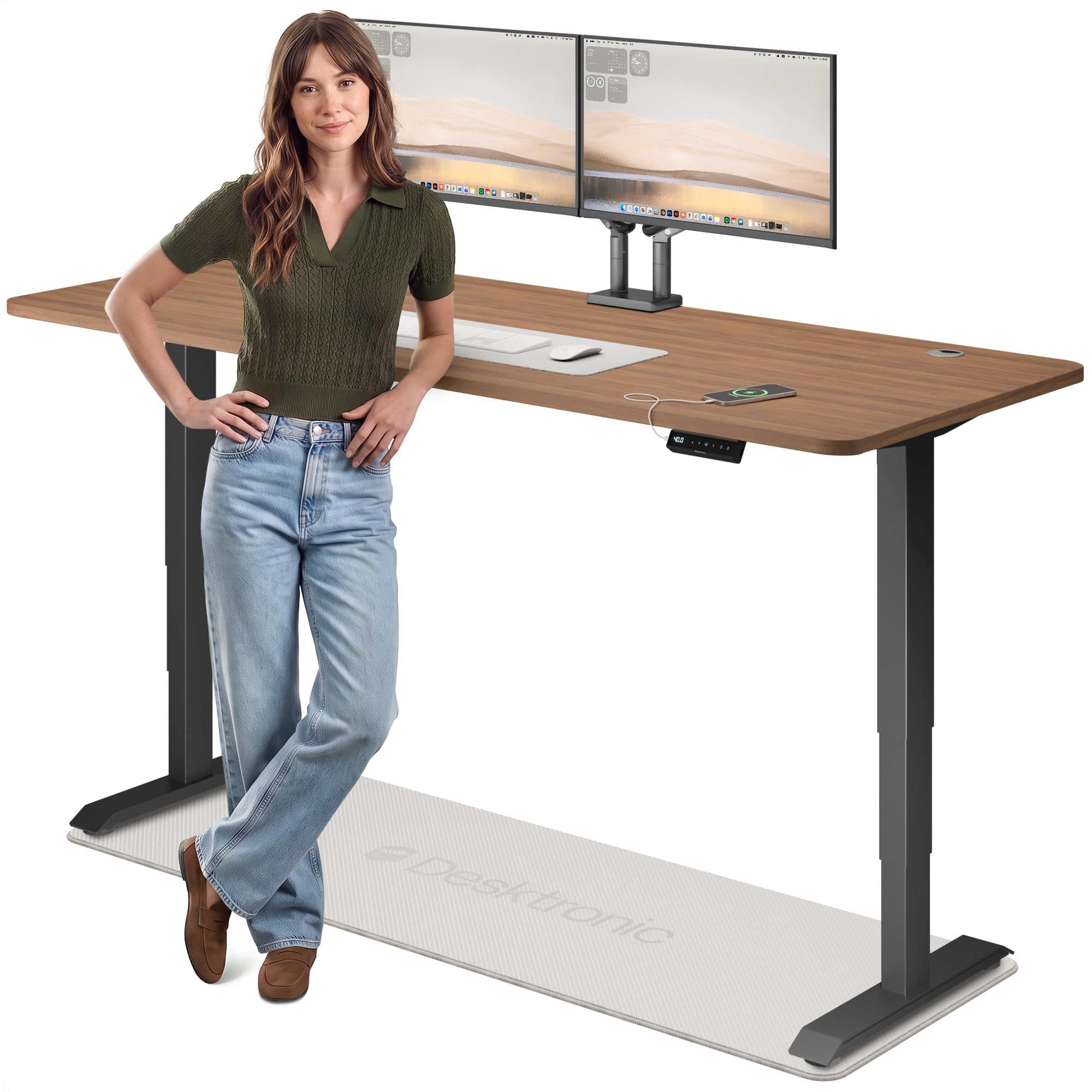
1. Desktronic HomePro Standing Desk 80×30
Our pick — 4.5+★ from 850+ verified ratings; the strongest balance of quality and price.
An 80-inch dual-motor desk that fits triple monitors and rises to standing height without a shake.
The number that sets this one apart is 80 inches of width. That is twice the 39.4-inch top of the AQIMUELE below, which means a triple-monitor setup plus speakers and a laptop riser all fit with room to spare. It also runs 30 inches deep against the AQIMUELE’s 22 inches, so your keyboard sits far enough back that your arms rest properly.
That is the difference between a desk that flexes under a monitor arm and one that stays flat. The dual-motor frame holds its 352.7 lb rating without wobble at any workstation height, and owners consistently call it rock solid. Charging arrives as USB-A and USB-C ports built into the desktop, so your phone or watch cable lives on the surface instead of the floor. A touchscreen controller stores 3 memory presets, so your sit and stand heights come back in one tap.
The height range runs 25.4 inches to 51.2 inches — enough travel for users from 5’0″ to 6’8″, and 18% more than the AODK below. An anti-collision sensor reverses the desk on contact, which matters if a drawer or box ever ends up under the frame.
What earns the top spot
- 80-inch wide top holds triple monitors without crowding
- 352.7 lb dual-motor capacity holds steady at standing height
- USB-A and USB-C ports sit on the desk itself
- 3 memory presets plus anti-collision safety reversal
- Machines in under 30 minutes with all tools included
Where it asks for room
- 80 inches of width needs a genuinely large wall
- One-piece desktop means you measure your doorway before delivery
Reach for this if: you run two or three monitors and want a dual-motor frame that does not flinch at standing height.
Measure first if: your office wall is short — 80 inches of top is the whole story here.
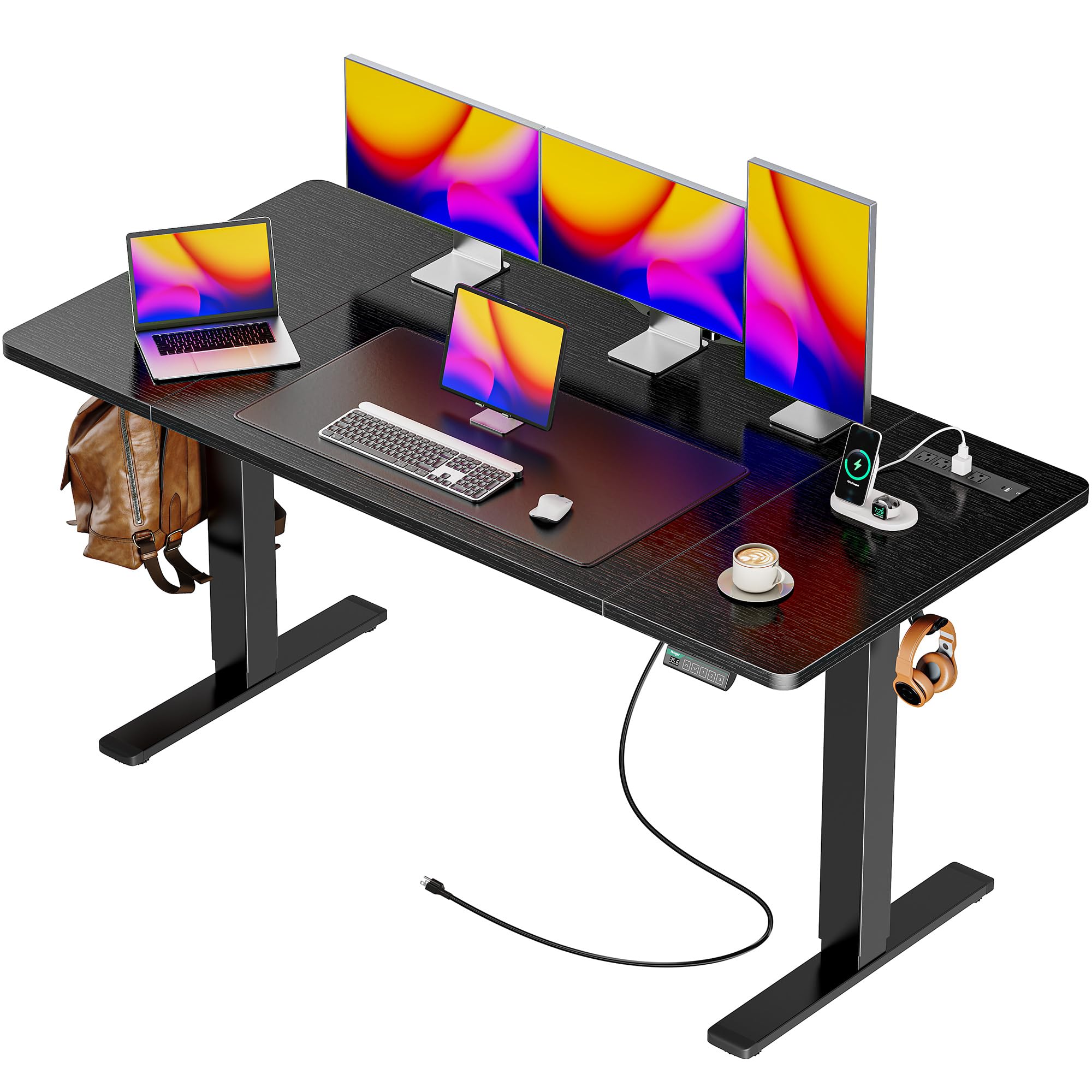
2. Huuger 55 x 28 Charging Large Electric Standing Desk
Four AC sockets on the desk shove a full workstation off the wall — no power strip needed.
Most desks in this range give you USB ports and call it a day. This Huuger carries 4 AC outlets, 2 USB ports, and 1 Type-C port built right into the top — 33% more AC sockets than the AODK’s 3. That covers a monitor, a laptop brick, a lamp, and a speaker on AC at once, with your phone on the Type-C port.
The 55 x 27.6 inch desktop is made from durable green materials, and the motor runs under 45 dB — quiet enough that a call will not pick it up. Height runs 28.3 inches to 46.5 inches across 3 presets, and the T-shaped steel frame is rated to 220 lbs. Two side hooks hold a headphone or a bag, and cable managers keep the wiring from pooling on the floor. What people respond to most is how the desk looks once it is built — the black powder-coated finish reads clean rather than cheap. The build itself is straightforward, with clear instructions and labeled parts.
One honest note: the sturdiness feedback on this model is mixed rather than unanimous, so if you plan to load a heavy monitor arm at full standing height, check the anti-collision and adjustable feet settings carefully during setup. The 110–220V operating range and anti-collision reverse are both there, and the feet adjust to level a sloped floor.
Where it lands: the outlet count is the reason to buy — 4 AC sockets plus a Type-C port covers a full desktop load without an extension cord.
The honest catch: sturdiness draws a split verdict, so treat this as a mid-weight desk and keep the heaviest gear centered.
Plugs in best for: a desk loaded with monitors, a laptop, and lamps that all want a wall socket.
Think twice if: you need a frame that holds a very heavy multi-arm setup at the top of its travel.
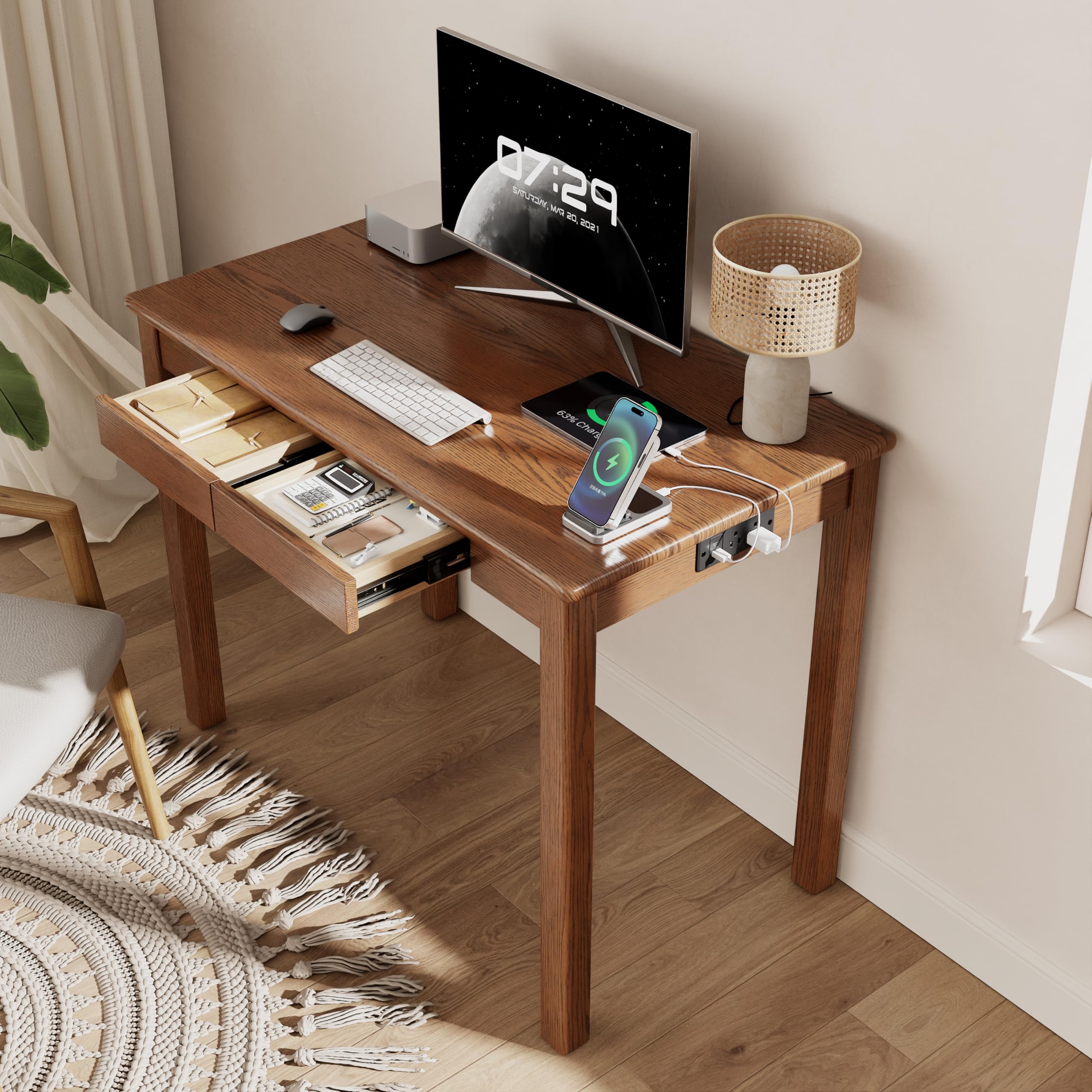
3. AQIMUELE Solid Wood Desk with Charging Station and Drawers
Real rubberwood at a compact 39.4 inches wide — a fixed desk for the corner nobody else fits.
This is the one for a bedroom, dorm, or apartment corner where a 55-inch standing desk simply will not go. The top runs 39.4 inches wide and 22 inches deep, against the Desktronic’s 80 by 30 — half the width and 36% less depth, which is the whole point. It is crafted from solid rubberwood, a dense hardwood that resists scratches and warping better than the engineered wood most desks at this level use.
Charging comes from a side station with a 4.6 ft power cord, so your laptop, phone, or tablet plugs in at desk level rather than at the wall behind it. Two smooth-gliding drawers swallow stationery, notebooks, and charging accessories, and the four-leg frame keeps the top free of wobble during daily use. Rounded edges and a warm walnut finish make it look like furniture rather than an office supply. A wipe-clean surface handles coffee rings and pencil marks.
The trade-off is fixed height: there is no motor, no preset, and no standing option. If you want to alternate between sitting and standing through the day, this is not that desk — it is the desk for a room that needs a solid surface and a place to plug in.
Sized for: tight bedrooms, dorms, and apartments where 39.4 inches is the most wall you can spare.
Not for you if: standing height adjustment is a must — this top stays put.
4. AODK 55 Inch Standing Desk with Drawers & Keyboard Tray
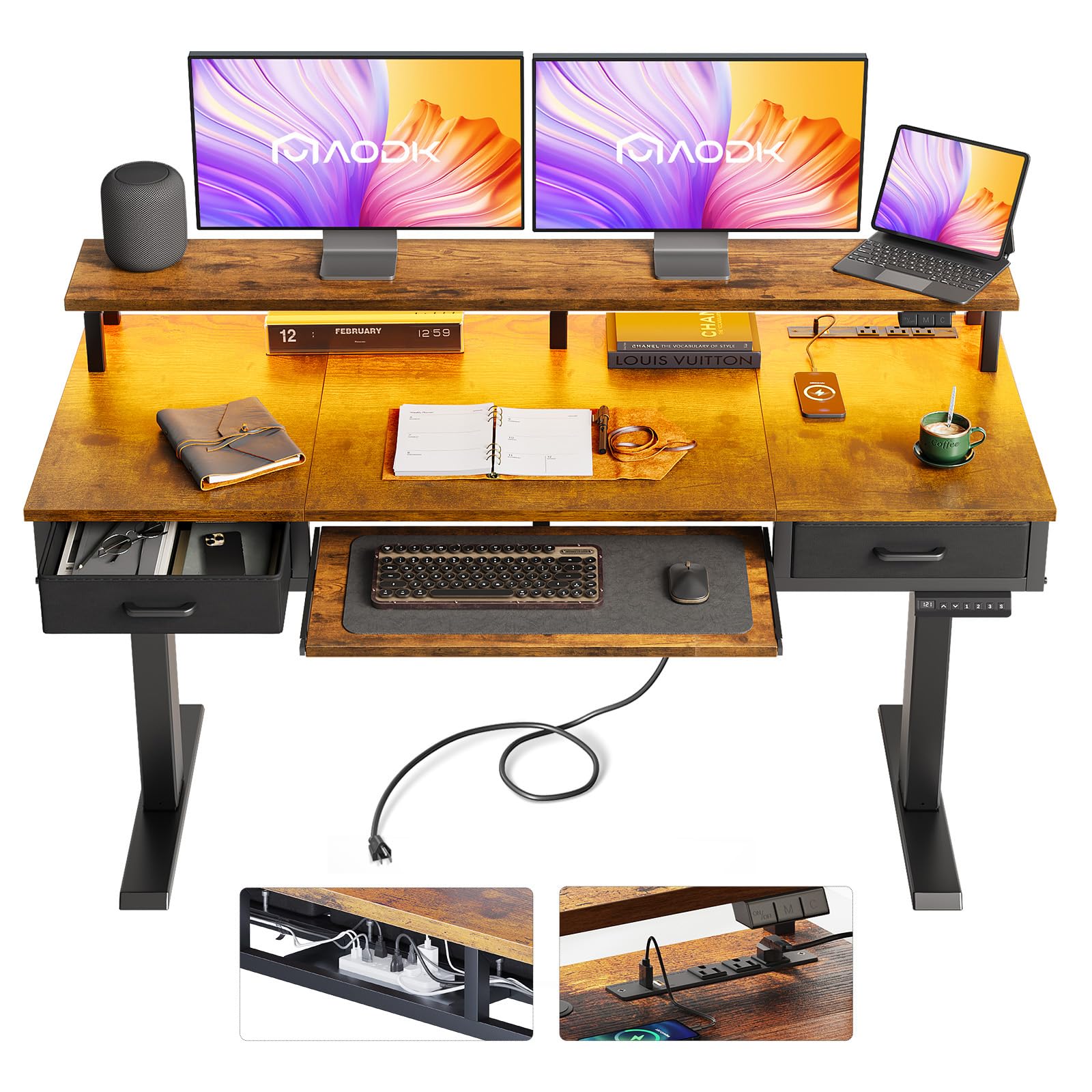
Two cloth drawers, a keyboard tray, a monitor shelf, and 20 light modes on one electric frame.
Storage is the reason this desk exists. Two fabric drawers and a full keyboard tray keep your mouse, cables, and notebook out of sight, and the monitor shelf lifts the screen to eye level so your neck is not craned down all day. The iron drawer structures cut 80% of the assembly steps, so most buyers get it built quickly.
Charging runs through a built-in power outlet with 3 outlets and 2 USB ports — 33% fewer AC sockets than the Huuger above, but plenty for a laptop and a phone. The LED lighting is the fun part: 20 light modes shift the mood of the room, and the whole thing has a warm, cozy look that owners consistently call out. Height sweeps from 29.9 inches to 46.1 inches across 3 memory presets, with a hidden cable tray behind the frame so wires disappear until you need them.
Assembly draws a split reaction — the labeled parts and step-by-step instructions get you there, but a few buyers find the process takes patience. Give yourself an uninterrupted afternoon rather than a rushed one.
Wins on
- 2 cloth drawers plus a keyboard tray and monitor shelf
- 3 outlets and 2 USB ports for daily devices
- 20 LED light modes set the room’s mood
- 3 height presets across a 29.9″–46.1″ range
Budget extra time for
- Assembly runs long for some builders
- Cloth drawers suit light items, not heavy files
Built for: a home office that wants drawers, a tray, and a lit backdrop from one piece of furniture.
Keep in mind: the drawers are cloth — light office odds and ends, not files.
5. HUANUO Glass Standing Desk with Drawers, 48 x 24 Inch

A glass top you can write on, plus a front charging panel that faces you instead of the wall.
Two things sell this desk. The first is the ultra-clear tempered glass desktop, which doubles as a dry-erase surface — jot a task list, wipe it clean, no sticky notes. The second is the front panel holding both USB-A and Type-C ports, positioned where your hand lands rather than tucked around the back.
Built-in drawers hide office supplies out of sight, which keeps the glass looking clean instead of cluttered. The electric frame runs 28.3 inches to 46.5 inches, and an anti-collision system stops and reverses on obstruction. The carbon steel base adds rigidity, and the one-piece pre-assembled tabletop means you attach the legs and you are working in about 20 minutes — the fastest setup on this list.
What owners consistently point to is the build itself: it holds steady, does not tip, and looks exactly like the photos. The glass demands a little care — no dragging a metal-edged monitor stand across it — but that is the nature of the surface, not a flaw. If you want a woodgrain look, this is not the desk; if you want a bright, modern top that wipes clean, it is.
Why glass wins here: the write-on surface and the front-facing USB-A and Type-C panel solve two daily annoyances at once.
Care note: tempered glass rewards gentle handling — lift gear rather than sliding it.
Suits you if: you sketch plans mid-call and want the charging port right where you sit.
Look elsewhere if: you prefer warm wood tones over a reflective white top.
6. YDN Wireless Charging Glass Standing Desk 48 Inches
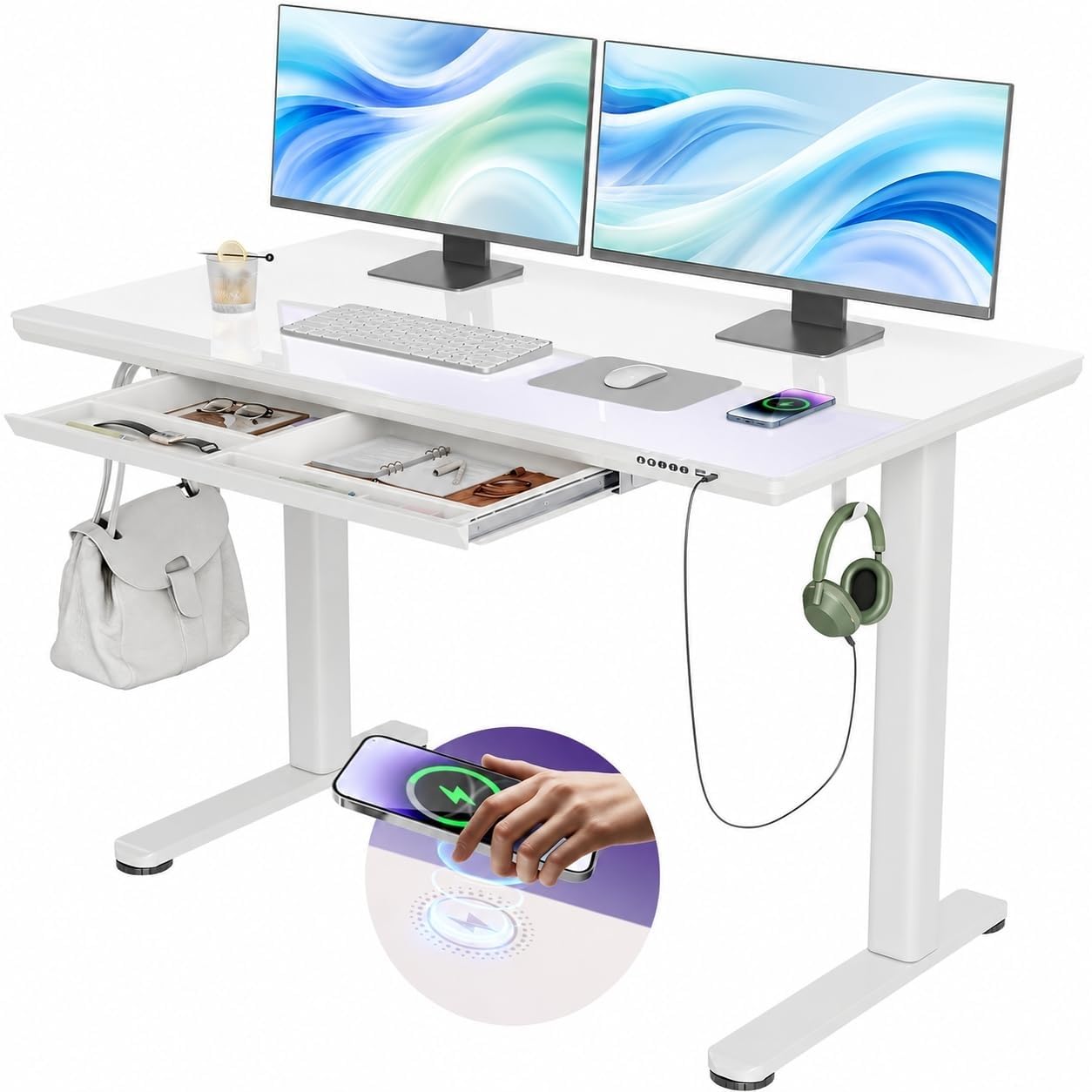
Drop your phone on the glass and walk away — the only true wireless pad in the lineup.
This is the desk for someone who never wants to hunt for a cable again. A wireless charging pad sits built into the desk alongside a Type-C wired port, so your phone lands on the surface and charges with no plug at all. The glass top is scratch-resistant tempered glass that doubles as a dry-erase whiteboard, which keeps sticky notes off the surface entirely.
The frame is industrial-grade reinforced steel rated to 132 lbs, and it holds wobble-free with dual monitors at maximum height. The motor sweeps 28.3 inches to 46.5 inches with 4 programmable memory presets — more saves than the Huuger’s 3. A partitioned drawer with 4 internal zones keeps gadgets hidden but reachable, and the whole build earns steady praise for how solid it feels once assembled. Owners also note the surface takes two monitors, a large keyboard, a mouse, and a laptop without crowding.
The one thing to know: some encrypted charging cables will not talk to the port, so if your phone is fussy about cables, lean on the wireless pad instead.
The real draw: a wireless pad plus a Type-C port means your phone charges whether or not you can find a cable.
Weight to know: the 132 lb rating is the lightest frame capacity in this group, so plan around it.
Pick this one when: you want to set the phone down and forget it, with no cable hunting at all.
Skip the wireless if: your phone case is thick — wired Type-C is the surer path there.
7. BTHFST 59.1″ Executive Desk

Six drawers and a legal-file drawer in a 59.1-inch executive frame that still leaves desk space.
If paper lives in your workspace, this is the desk. There are 6 drawers total, a glass cabinet with an adjustable shelf, and a bottom file drawer that takes legal-size or letter-size hanging files. The charging station is built into the left side with 2 standard outlets and 2 USB ports — a laptop and a phone covered without an extension cord.
The full monitor stand lifts the screen to eye level and frees the space beneath it for a keyboard or a stack of notebooks. The RGB light strips cover more than 60,000 static colors, plus music and microphone modes that pulse with the room. The 59.1-inch top is wide enough for a monitor plus paperwork to the side, and the double pedestal base gives it a solid stance. The look earns the loudest approval — the burnished hardware and linear drawer faces read as high-end furniture rather than a box you assembled.
Two things to budget for: this desk takes real time to put together, and the sturdiness feedback is split once it is built. Tighten every fitting during assembly and it settles in well. There is no motor here — the height is fixed, so this is the pick for storage and looks, not standing.
What you gain
- 6 drawers plus a legal/letter file drawer
- 2 outlets and 2 USB ports on the desk
- Monitor stand frees up the work surface
- RGB lighting with 60,000-plus static colors
What it asks of you
- Assembly takes time and care
- Sturdiness feedback splits once assembled
- Fixed height, no motor
Made for: a paper-heavy desk that needs a real file drawer and a place to plug in the laptop.
Know before you buy: no motor means no standing — this is a sit-only executive desk.
8. SIAGO L-Shaped Standing Desk, 63 x 55 Inch

A 63 x 55 inch corner desk that flips left or right to fit whichever wall you actually have.
The reversed installation is the clever bit here. You choose whether the long side runs left or right, so the same desk fits an L-shaped corner regardless of which way the room turns. The 63 x 55 inch top gives you a true dual-monitor corner setup with a separate zone for paperwork or a laptop stand. Three equal-length legs support the frame, and the motor is tested through 50,000 lifting cycles at a 250 lb load.
Charging runs through 3 AC outlets plus dual USB fast-charging ports in both Type-A and Type-C — fewer AC sockets than the Huuger’s 4, but more than enough for a laptop, a phone, and a monitor. The memory controller holds 3 preset heights across 27.5 inches to 45.7 inches, and a child safety lock stops accidental taps. Two headphone hooks and built-in cable management keep the wires out of the way.
At 48 dB the motor is quiet, and the desk holds steady at maximum height with monitors on it. Setup is a 45-minute job with the included toolkit. It is a heavy piece at 80.5 pounds, so plan for a second pair of hands on delivery day.
The differentiator: a reversible corner layout that fits the room you have, not the room you wish you had.
Plan for: 80.5 pounds of desk arriving — get help carrying it in.
Right for: corner rooms and gaming or dual-monitor setups that need horizon-wide surface.
Check first: your corner orientation — the reversible build only helps if you install it the right way round.
9. Monomi 35″x20″ Standing Desk
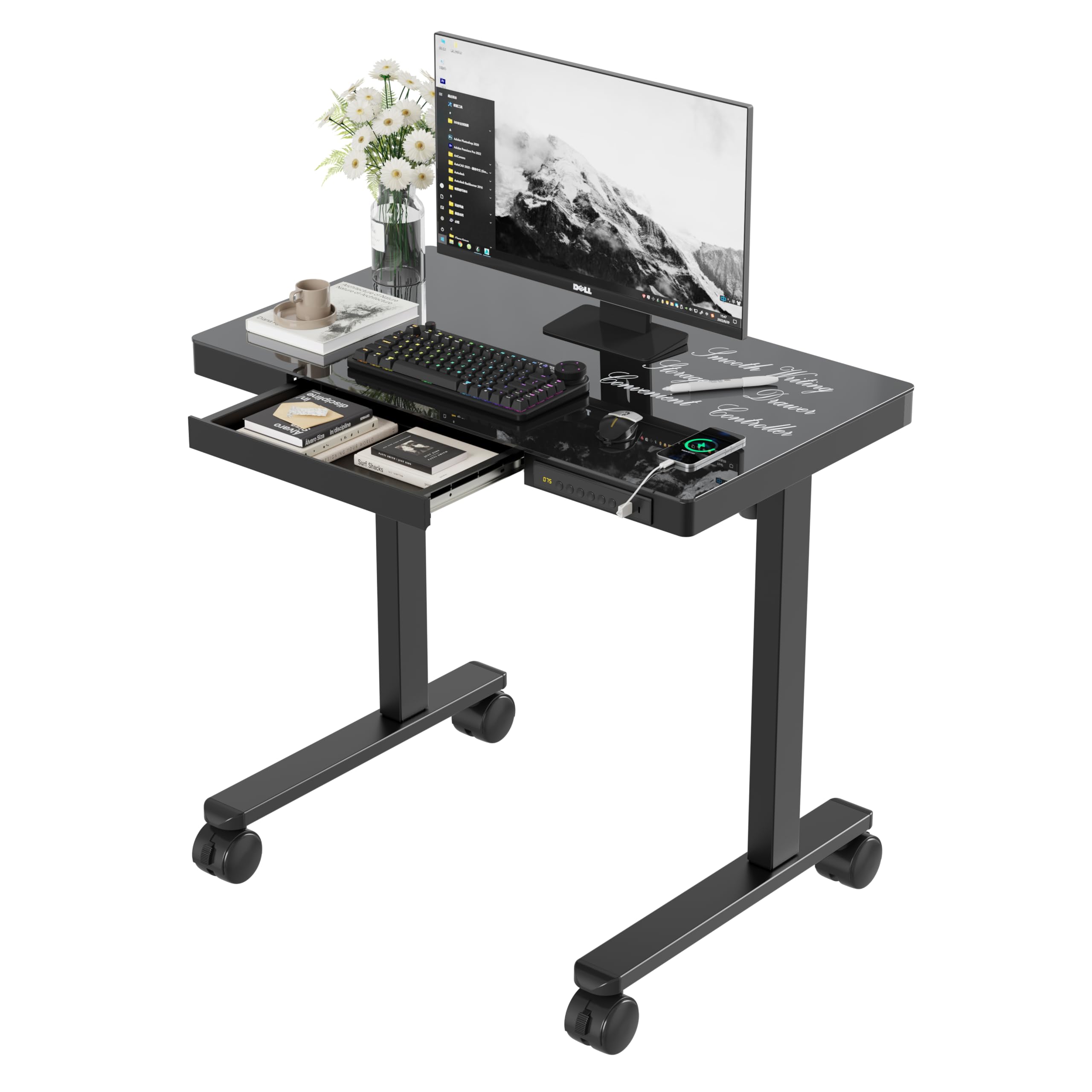
Thirty-five inches wide, on lockable casters — a standing desk that rolls into a closet when you are done.
Small rooms rarely get a standing desk because standing desks rarely fit. This one runs 34.6 x 19.7 inches on lockable casters, so it parks in a corner and wheels out when you need it.
Charging sits on the front panel with USB-A and Type-C ports, so a phone and tablet charge together without reaching behind the desk. One detail worth knowing: charging pauses automatically while the desk is adjusting, and the ports are not meant for laptops. The black glass top takes dry-erase markers, so you can sketch a plan and wipe it away. The motor runs 28.3 inches to 46.5 inches with 3 saved heights, which suits a shared desk where two people want their own position. A 14.4 x 8.4 x 1.3 inch drawer holds chargers, notebooks, and pens. Assembly is quick — pre-drilled holes and a 30-minute setup with a manual and video to follow.
What owners keep coming back to is the build quality relative to the size — it feels like a real desk, not a folding tray. The compact footprint does mean one monitor and a laptop, not three.
Best when: your space is tiny but you still want to sit and stand through the day.
Know the limit: phone and tablet charging only at the front panel — laptops need a wall socket.
10. SEDETA 78.7″ L Shaped Executive Desk with Charging Station

A 78.7-inch main top with a 55.1-inch side wing — the largest footprint on this list.
This is a two-person-sized workspace. The main desktop runs 78.7 inches wide with a 55.1-inch side desk, all at 0.8-inch thickened, scratch-resistant engineered wood. Two monitors, a laptop, a printer, and a stack of binders all sit comfortably, and the FSC-certified wood material gives it a solid, weighty feel.
The charging station carries 4 AC outlets rated 120V/12A, 2 USB ports at 5V/2A, a master on/off switch, and a 5 ft power cord — enough for a full workstation without a power strip. Storage runs deep: 3 drawers on the left including a full-extension file drawer for Letter, A4, and Legal folders, plus a closed cabinet and 2 open compartments on the right with height-adjustable shelves. A cable grommet, a CPU stand, and an under-desk privacy baffle round it out.
Build quality and appearance carry the day — the desk reads as sturdier than its tier suggests. Assembly, though, is the honest catch: some buyers report it takes considerable time. Two packages arrive separately, so check both before you start building.
Standout: 4 AC outlets plus a full file drawer and adjustable cabinet shelving in one L-shaped footprint.
Set aside time: this ships in two boxes and the build runs long — plan a full session.
Ideal for: a business or home office that needs to file paperwork and charge three or four devices at once.
Be ready for: a long assembly and two separate deliveries to coordinate.
11. FLEXISPOT Q8 55″ Bamboo Dual Motor Standing Desk
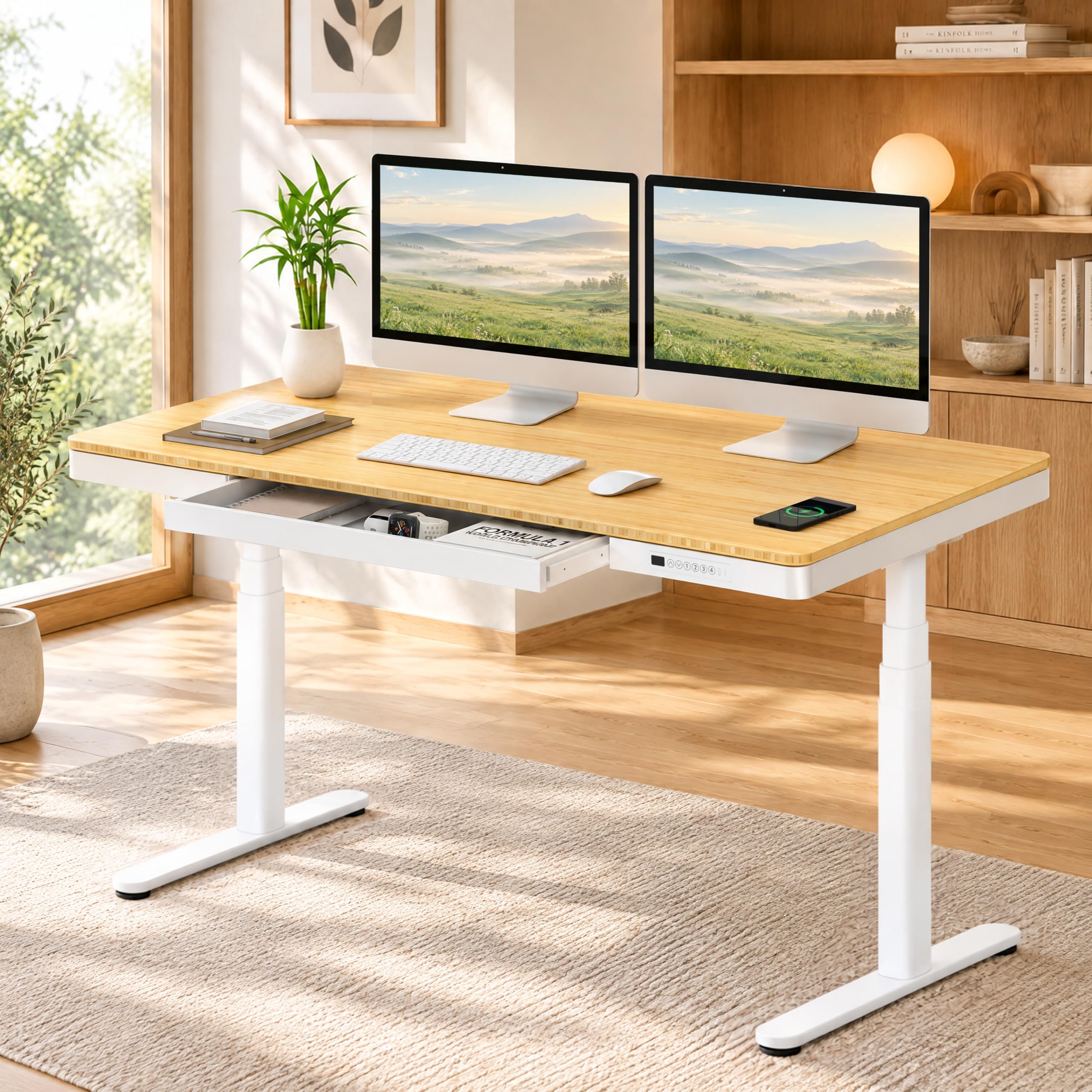
Bamboo top, dual motor, and all three charging paths — wireless, USB-A, and USB-C — on one desk.
This is the only desk here that gives you every charging option: a wireless pad for a cable-free drop, plus USB-A and USB-C ports for devices that need a wire. That trio is the reason to look here rather than at a single-port desk. A dual motor lifts the top at 1.5 inches per second and holds 220 lbs — the same rating as the Huuger, but split across two motors rather than one. Oval legs and rounded wide feet improve balance and reduce knocks in a tight home office.
The bamboo top is scratch-resistant and lightweight, so it takes daily keyboard and mouse wear without the scuffing a thin veneer shows. A pre-assembled top and drawer get the whole desk standing in about 15 minutes — the quickest build on this list. Owners point to the frame parts as genuinely heavy-duty, and the desk holds steady at full height with a monitor on it.
One thing to note is that the desk ships with the height range stated on the controller rather than a wide spread in the specs, so confirm your standing height against the presets before ordering. Otherwise, this is the most complete charging package in the lineup.
Take this one if: you want wireless, USB-A, and USB-C all on the same desk plus a dual-motor lift.
Double-check: the height presets against your own standing height before you commit.
Know the Specs
Charging Type: Wireless, USB, and AC
A wireless charging pad uses a flat coil to pass power through the back of a compatible phone — set it down, it charges. USB-A is the older rectangular plug; USB-C is the newer oval plug and the one modern phones use. AC outlets are the same three-prong sockets you find in a wall, and they are what a laptop brick or a monitor needs. Match the port type to each device you plan to run.
Load Capacity in Pounds
Load capacity is the total weight the frame can hold — desktop, monitors, arms, and everything else. A 352.7 lb desk handles a monitor arm and a heavy dual-screen setup without flex; a 132 lb desk is best kept to a single monitor and a laptop. Read it as the ceiling, not a target, and leave some headroom for anything clamped to the edge.
Height Range and Presets
The height range in inches tells you who the desk fits. A 25.4″ to 51.2″ span covers a wide spread of body heights, while a 28.3″ to 46.5″ range suits standard seated and standing positions. Memory presets let you save your exact sit and stand heights so both come back with one touch — 3 or 4 presets means you never hunt for the right level again.
Motor Count and Noise
A single motor uses one lift mechanism; a dual motor uses two synchronized ones, which generally means more even lifting and steadier holding at height. Noise is measured in decibels (dB) — under 45 dB is quiet enough to sit through a call without the other end hearing the desk move.
Common Questions
Can a phone charging desk charge my phone without a cable?
Will a USB-C port on the desk charge a laptop?
How much weight can these desks hold with monitors on them?
Is a dual motor really better than a single motor?
What height range do I need for standing work?
Can I use the glass top as a whiteboard?
How long does assembly take on a charging desk?
Do these desks need a special wall outlet?
Is a fixed-height charging desk worth it over an electric standing one?
Will a standing desk with charging fit in a small apartment bedroom?
The Bottom Line
For most buyers, the phone charging desk winner is the Desktronic HomePro 80×30, because 80 inches of width and a 352.7 lb dual-motor frame carry a triple-monitor setup at standing height without a shake. If your priority is outlets rather than surface area, the Huuger 55 x 28 puts 4 AC sockets and a Type-C port on the desk for a fraction of the footprint. And for a tight bedroom or dorm, the AQIMUELE Solid Wood delivers real rubberwood and a side charging station in 39.4 inches. Whichever you pick, check the charging type against your actual devices first — that is the one spec that decides whether the feature earns its place.
How we choose
We do not accept paid placement. Every pick is matched to a real buyer and a real use-case; we do not hands-on test units.
Sources
Specifications: manufacturer listings and product documentation. Review insights: verified customer reviews, as of November 2026. Pricing: not shown on this page (it changes often); check the current price via the retailer link.
As an Amazon Associate, Tactical Gear Guy earns from qualifying purchases. This does not affect which products we feature.