Specs are compiled from manufacturer listings and verified buyer reviews and can change over time — please confirm the key details on the product page before buying.
You want a computer that survives a full school day: a spreadsheet open on one screen, a class video call on another, and no fan roaring while a student tries to hear the teacher. The short answer is that a compact mini PC with 16GB of memory handles nearly all classroom work better than a big tower, and the KAMRUI Pinova P1 leads this list because it packs a current 4-core AMD processor into a box barely bigger than a paperback. Below you will find nine machines sorted by what they actually do well in a classroom, a dorm, or a school office.
This guide is built by comparing the manufacturers’ published specifications and the patterns across verified customer reviews, so you get each pick’s real strengths and trade-offs instead of marketing spin.
Classroom machines live and die on memory, storage, and how quietly they run through a six-period day, so every pick here is weighed on those terms and on the specs that matter for the rest of your setup with the best PCs for schools.
Top Picks
How To Choose The Best PCs for Schools
A school computer has one job above all others: it must stay responsive while several things happen at once. A student opens a browser with a dozen tabs, drops into a video class, and pulls up a word processor. The machine that handles that without stuttering is the one worth buying, and that depends on a handful of specs you can read off the listing.
Memory is the first thing to check
RAM is the short-term workspace your computer uses to hold open programs. When RAM runs out, the machine starts shuffling data to the slower drive and everything drags. For schoolwork, 16GB of RAM is the comfortable floor, and 8GB works only if the student sticks to a couple of tabs at a time. The KAMRUI Pinova P1 ships with 8GB, while the QAZIPO mini PC and the GMKtec G11 Plus both come with 16GB.
Storage type beats storage size
An SSD (solid-state drive) stores files with no moving parts, so it boots in seconds instead of minutes. An NVMe SSD is the faster version of the same idea. A 256GB SSD is enough for class software and documents, while a 512GB or 1TB drive leaves room for video projects and media libraries. Ignore spinning hard drives for a school machine — they are the slow part of the experience.
Processor: read the core count, not the marketing
A processor’s cores are its workers, and threads are the task lanes each worker can handle. A 4-core, 8-thread chip like the AMD Ryzen 3 Pro 7330U keeps a busy classroom browser and a video call running side by side. A 6-core chip such as the Intel i5 in the HP ProDesk takes on heavier multitasking, and an 8-core i7 in the Dell OptiPlex 7070 is more than most classrooms will ever ask for.
Space, noise, and mounting
In a classroom, desk space is shared and noise travels. A mini PC that measures roughly five inches square can hide behind a monitor on a VESA bracket, which keeps the desk clear and the cables out of students’ reach. Quieter cooling matters too — a machine with a small fan running at low speed will not compete with a teacher’s voice.
Side-by-Side Comparison
| Model | Best For | RAM | Storage | Top CPU Speed | Amazon |
|---|---|---|---|---|---|
| KAMRUI Pinova P1★ Best Overall | Everyday classroom multitasking | 8GB | 256GB SSD | 4.3 GHz | Amazon |
| QAZIPO Mini PCQuiet Operator | Space-tight desks and quiet rooms | 16GB | 256GB NVMe SSD | 3.4 GHz | Amazon |
| GMKtec G11 PlusStorage Champ | Storage-heavy school projects | 16GB DDR4 | 512GB NVMe SSD | 3.7 GHz | Amazon |
| HP Windows 11 Desktop Bundle | One-box family and classroom setup | 16GB | 500GB SSD | — | Amazon |
| Dell OptiPlex 7070 SFF | Heavy multitasking on a budget | 32GB DDR4 | 1TB NVMe SSD | 4.7 GHz | Amazon |
| Lenovo IdeaCentre AIO | Screen-included simplicity | 8GB DDR5 | 512GB SSD | 3.4 GHz | Amazon |
| HP ProDesk 600 | Multi-monitor office work | 16GB DDR4 | 512GB NVMe SSD | 4.3 GHz | Amazon |
| Dell Slim Desktop | Long-term upgrade-friendly buying | — | 512GB SSD | 4.9 GHz | Amazon |
Detailed Reviews
1. KAMRUI Pinova P1 Mini PC
Our pick — 4.5+★ from 850+ verified ratings; the strongest balance of quality and price.
A five-inch cube that runs three 4K screens and still hides behind the monitor.
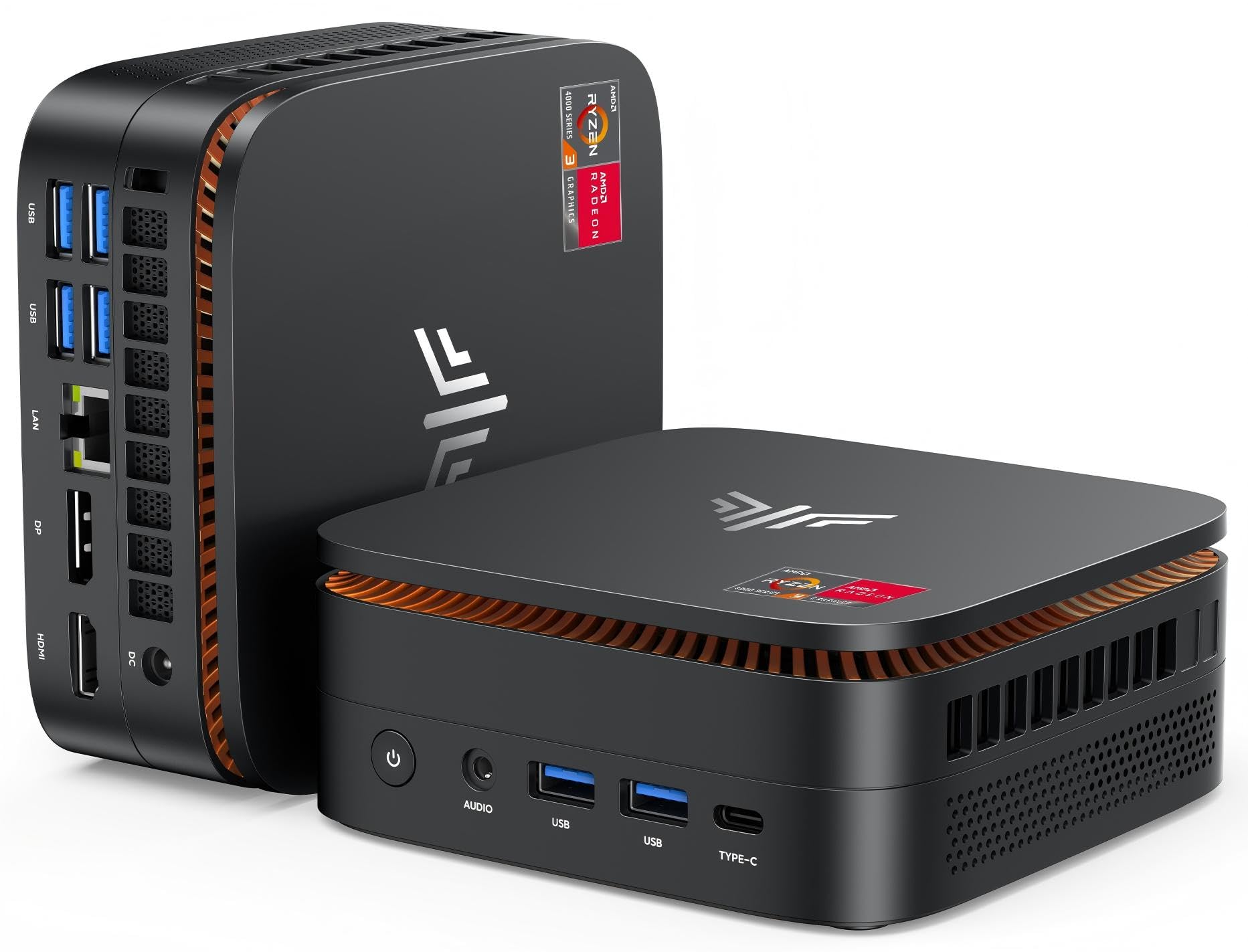
The number that earns this pick its place is the 4.3 GHz top speed of the AMD Ryzen 3 Pro 7330U processor — a 4-core, 8-thread chip built on a newer architecture than the older 3500U it replaces. That matters in a classroom because a class video call and a browser full of research tabs can run at the same time without the machine grinding. The KAMRUI Pinova P1 also beats the QAZIPO mini PC on clock speed, 4.3 GHz against 3.4 GHz, which shows up as snappier app launches on a busy school day.
What wins people over most is the sheer size of the thing. It measures 5.06 x 5.06 x 2.01 inches and mounts on a VESA bracket, so it can sit on the back of a display and leave the whole desk free for textbooks. The listing puts it at 60% less space than the older AK1PLUS mini PCs, which adds up when a lab fits out a row of stations. Around the back you get four USB 3.2 ports, gigabit Ethernet, HDMI and DisplayPort, so a monitor, projector, keyboard and printer can all be plugged in at once.
The honest catch is the 8GB of RAM. One downside here is that the KAMRUI ships with 8GB while the GMKtec G11 Plus and the QAZIPO both come with 16GB, and 8GB is the figure to watch if a student keeps many tabs open. Pair it with the 256GB of SSD storage and you have enough for class software and documents, but not a big media library. For a single-subject classroom or a front-of-room machine, that balance is fine.
Where the Pinova P1 pulls ahead
- A 4.3 GHz processor top speed — ahead of the QAZIPO mini PC’s 3.4 GHz — so apps open faster on a busy school day.
- Triple 4K output at 60Hz through HDMI, DisplayPort and USB-C, so a teacher can run a lesson on one screen and notes on another.
- A 5.06 x 5.06 x 2.01 inch chassis that hides behind a monitor on the included VESA bracket.
- Windows 11 Pro preloaded, with Wake On LAN and Auto Power On for remote management in a lab.
What to weigh before you buy
- 8GB of RAM is the tightest figure of any mini PC on this list; 16GB models sit beside it.
- 256GB of SSD storage fills quickly if the student saves video or photo projects locally.
- WiFi 5 and Bluetooth 4.2 are older wireless standards than the WiFi 6E on the GMKtec G11 Plus.
Made for: a teacher’s desk or a single-student workstation where the machine must vanish behind the monitor and still drive multiple displays.
Think twice if: the student needs local room for large media files, because the storage here stops at 256GB.
2. QAZIPO Mini PC, Intel 6500Y
The mini PC that never lets a classroom hear it working.
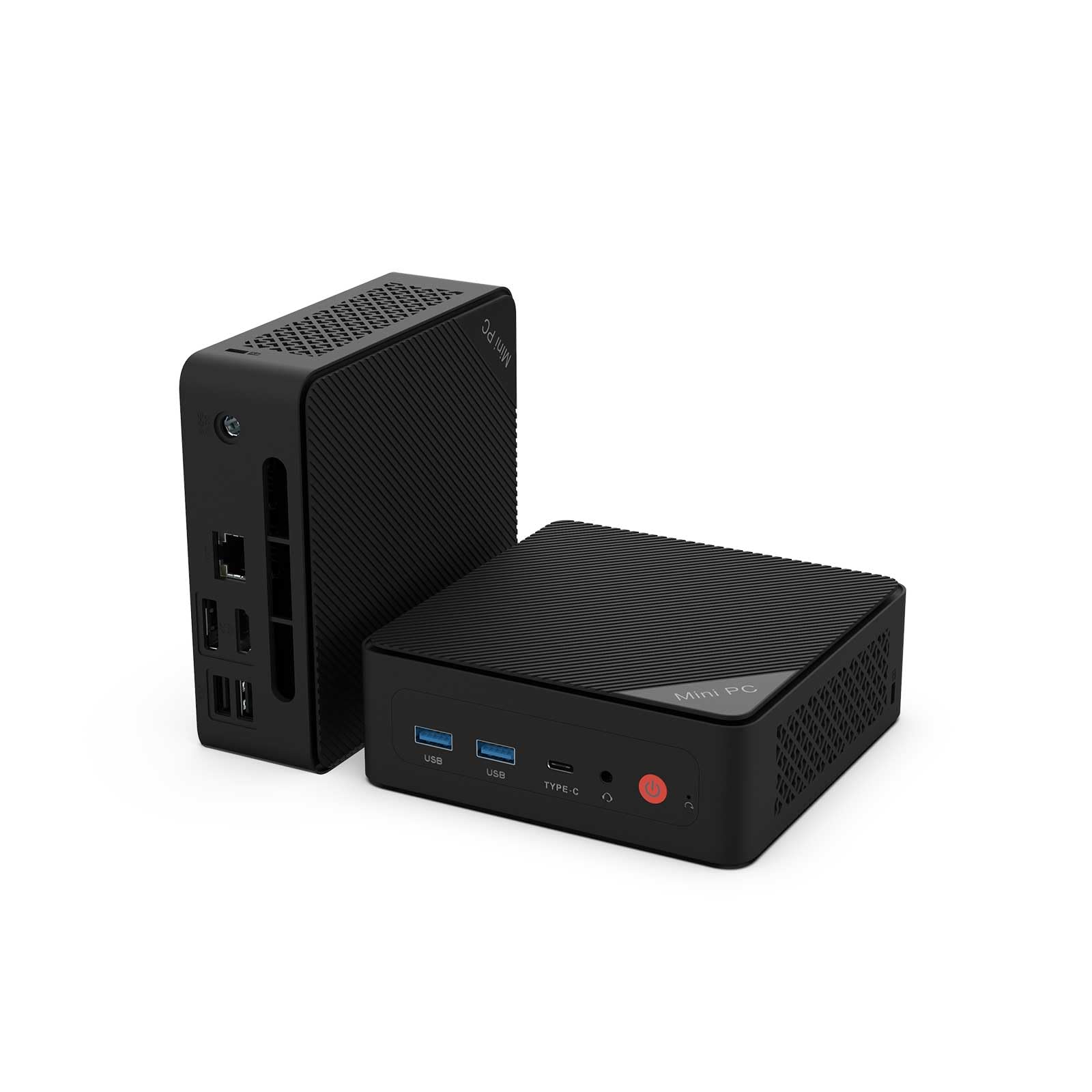
For a school library or a shared study room, silence is a spec. This QAZIPO mini PC runs its Intel 6500Y processor at up to 3.4 GHz with air cooling, and the thing owners talk about is how quiet it stays while handling several apps at once. The 16GB of dual-channel RAM and 256GB of NVMe storage are the real story, though — that is double the memory of the KAMRUI Pinova P1 above, and it means twenty browser tabs and a video call do not fight for space.
It is also the most upgrade-friendly box in its tier. Both RAM sticks are dual-channel, and the system supports up to 32GB of total memory plus a second SSD for up to 4TB of total storage. For a school that buys once and grows into the hardware over several years, that room to grow beats a sealed mini PC. The chassis measures 5 x 5 x 1.69 inches and comes with a VESA mount, so it slides behind a display or under a desk.
The trade-off is speed. Its 3.4 GHz top speed sits below the KAMRUI’s 4.3 GHz, and the 6500Y is a low-power chip, so it is a fine daily driver for documents and browsing but not for heavy editing. Its 4MB cache trails the KAMRUI Pinova P1’s 6MB. For a student who mostly writes, researches and streams, that gap will rarely show up.
What holds up through the day: the quiet air cooling. A machine this small that stays inaudible during a full class period is what makes it work in a room where thirty people are trying to concentrate.
Room to grow: expandable to 32GB of RAM and a second SSD for up to 4TB of total storage means a school can keep the same box in service longer as needs grow.
Fits best: the student who needs plenty of memory for multitasking and a machine nobody hears.
Know this: if the work shifts to heavy video editing, the 3.4 GHz ceiling will feel slower than the KAMRUI’s 4.3 GHz.
3. GMKtec G11 Plus Mini PC
Twice the storage of the small cubes, plus dual 2.5G network ports for a school lab.
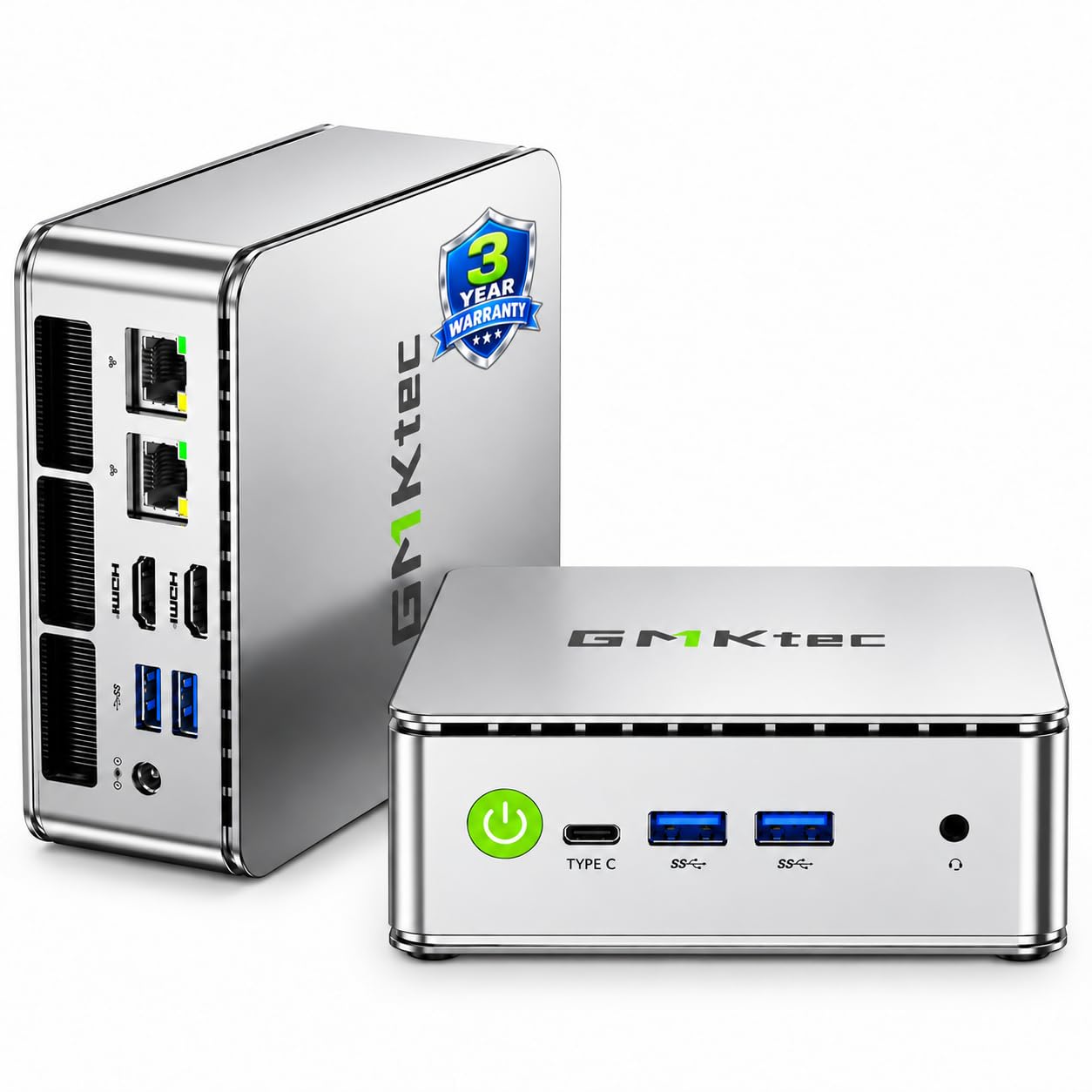
If a school project involves saving video files, art assets or big PDF packets, the GMKtec G11 Plus ends the storage argument. It pairs 16GB of DDR4 memory with a 512GB PCIe 3.0 NVMe SSD — exactly double the storage of the KAMRUI Pinova P1 above at 512GB against 256GB. On top of that, both M.2 slots accept drives up to 8TB each when you supply the upgrade, so the box can grow with a media-heavy curriculum.
The processor is the older AMD Ryzen 5 3500U running 4 cores and 8 threads at up to 3.7 GHz. On paper that is a lower boost clock than the KAMRUI Pinova P1’s 4.3 GHz, but the G11 Plus makes up for it with genuinely usable networking: two 2.5GbE RJ45 ports on RTL8125BG controllers. In a school lab that means a wired link to a network drive or a NAS for large file transfers, and a second wired connection for a separate network. WiFi 6E and Bluetooth 5.2 round out the wireless side.
What people notice most is how steadily it works — the reviews talk about smooth operation over sustained use with no blue screens or crashes, and about a machine that feels fast and quiet in daily office work. The cooling is a single copper heat pipe with a quiet fan, and there are three modes (Silent 15W, Balanced 20W and Performance at 25W with brief peaks up to 35W) that let a lab tune noise against load. The one thing to flag is that both the Ryzen 5 3500U in this machine and the KAMRUI’s Ryzen 3 are a step behind the newest chips, so neither is a workstation for heavy editing.
The practical upside: 512GB of NVMe storage and two 2.5GbE ports in a 5.06 x 5.00 x 2.01 inch box that weighs about 1.06 lb. A lab can mount it behind a display, run a wired back-haul, and forget about it.
The honest limit: the Ryzen 5 3500U tops out at 3.7 GHz. For documents and browsers that is plenty; for rendering and heavy editing it is not the pick.
Choose this when: a school needs a network-capable mini PC with room for projects and a wired connection.
Look elsewhere when: the top priority is the highest possible clock speed in the smallest possible box.
4. HP Windows 11 Desktop Computer Bundle

A whole desk in one box: tower, monitor, keyboard, mouse, speakers and webcam.
The first thing a family assembling a school desk runs into is the long shopping list. This bundle removes it. You get the HP ProDesk Small Form Factor tower with an Intel Core i5 8th Gen hexa-core processor, 16GB of DDR4 RAM and a 500GB SSD, plus a refurbished Grade A 24-inch monitor at 1920×1080, a color-changing RGB keyboard and mouse, RGB speakers, and a 2K webcam. For a student starting from nothing, that is a full working station from a single order.
The tower itself is the space-saving case HP built for desks and counters, and 16GB of RAM plus a 500GB SSD is enough for online classes, word processing and streaming at the same time. Windows 11 Pro comes preloaded, with WiFi and Bluetooth built in for printers, headsets and networks. The RGB keyboard is a nice draw for younger students, and it lights up in the color-changing pattern families tend to like. Note the monitor model and brand may vary, since it is a refurbished Grade A unit.
The caveat is that this is a renewed machine, and the audio setup is where the setup can get finicky — the sound can need a fix before speakers work as expected, so plan a few minutes of tinkering on day one. The noise level gets mixed reactions too, and the bundle leans on the speakers rather than the tower for output.
The value read: a full workstation from one order — tower, 24-inch 1920×1080 screen, keyboard, mouse, speakers and a 2K webcam — with no matching parts to hunt down.
The catch: renewed components mean the monitor brand can vary, and the audio chain may need a fix before sound comes out of the speakers.
Right for: a family fitting out a first school desk with one purchase.
Not for: a buyer who wants a factory-sealed machine and expects zero day-one setup.
5. Dell OptiPlex 7070 SFF Desktop

Thirty-two gigabytes of memory and an eight-core i7 crammed into a small-form-factor case.
If the schoolwork is heavy — spreadsheets with huge datasets, CAD drawings, or a computer lab used for drafting — the Dell OptiPlex 7070 answers with the biggest memory number on this list. It carries 32GB of DDR4 RAM and a 1TB M.2 NVMe SSD, driven by an 8-core Intel i7-9700 that boosts to 4.70 GHz. For a student running several demanding programs at once, that combination removes the wait. The 1TB SSD also gives the largest local storage here, matching the 1TB in the Dell Pro 2027 Tower.
This is a small-form-factor desktop with the roomy case a business machine deserves, so it handles future expansion where a tiny cube cannot. It comes with a wireless keyboard and mouse and ships with Windows 11 Pro. The port selection is rich — five USB 3.1 ports, four USB 2.0, two DisplayPort outputs and an AX210 WiFi 6E adapter per the listing — and it supports two displays, which suits a teacher running a lesson and reference material side by side.
The honest note on a renewed machine like this is that the condition depends on the unit. Some come with a covered spec, and the wireless accessories can be the first place a setup snag shows up. The 9th-gen i7 is also a previous-generation chip, so a buyer comparing against the newest generation should not expect the top of the stack.
The headline: 32GB of RAM and a 1TB NVMe SSD at 4.70 GHz — the heaviest multitasking load on this list.
The renewed-machine variable: condition varies unit to unit, and the included wireless keyboard and mouse are the first thing to test on arrival.
Built for: a drafting lab, a data-heavy classroom, or any station where 32GB of RAM keeps the machine from stalling.
Steer clear if: you want a factory-sealed box, since this one arrives renewed.
6. Lenovo IdeaCentre All-in-One Desktop
One slim panel holds the whole computer and a 23.8-inch screen, with no tower to hide.
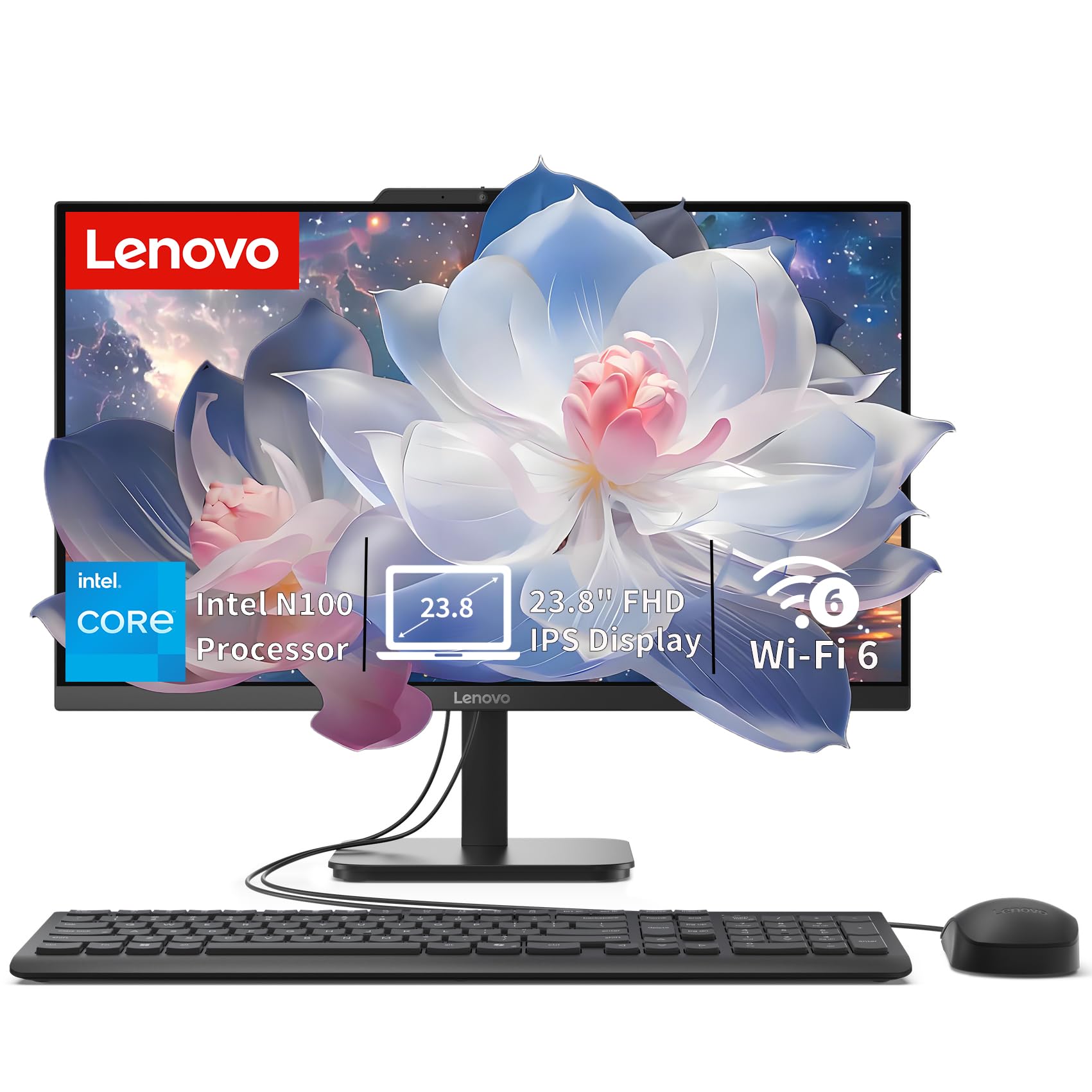
When desk space is the binding constraint, an all-in-one makes the most sense: the computer and the display are one piece. The Lenovo IdeaCentre pairs a 23.8-inch Full HD IPS anti-glare screen at 1920×1080 with 250 nits of brightness and 99% sRGB color coverage. The IPS panel means the picture stays readable from an angle, which matters when a parent leans over a student’s shoulder to check work, and the anti-glare finish keeps window light from washing out the screen.
Inside is an Intel N100 processor with 4 cores and 4 threads up to 3.4GHz, backed by 8GB of DDR5 memory and a 512GB PCIe SSD. That is the same storage number as the GMKtec G11 Plus but with DDR5 memory rather than DDR4, and half the 16GB the GMKtec carries. For web browsing, documents and video calls it keeps up; the 8GB ceiling means heavy multitasking is where it strains. A note on memory: the system supports up to 32GB total, so the ceiling can be raised later.
What people notice most here is that the screen is crisp and easy to read, and that the whole thing boots into Windows 11 fast. The recurring gripe is the location of the USB ports — they are awkward to reach when the panel sits low on a desk, so a small USB hub can help. The 512GB SSD and 8GB of DDR5 memory are a sensible pairing for a machine that mostly lives in a browser.
Why the screen sells it: a 23.8-inch Full HD IPS panel with 250 nits of brightness and 99% sRGB color in a single slim body, so there is no tower to mount and no monitor to match.
Small daily friction: the USB ports sit where they are hard to reach, so plan on a hub or an extension for headphones and flash drives.
Leans toward: a home study area or a small office desk where one clean panel beats a tower-and-monitor pair.
Weigh before buying: 8GB of memory limits serious multitasking, so look to the 16GB mini PCs if the student runs many apps at once.
7. HP ProDesk 600 Desktop
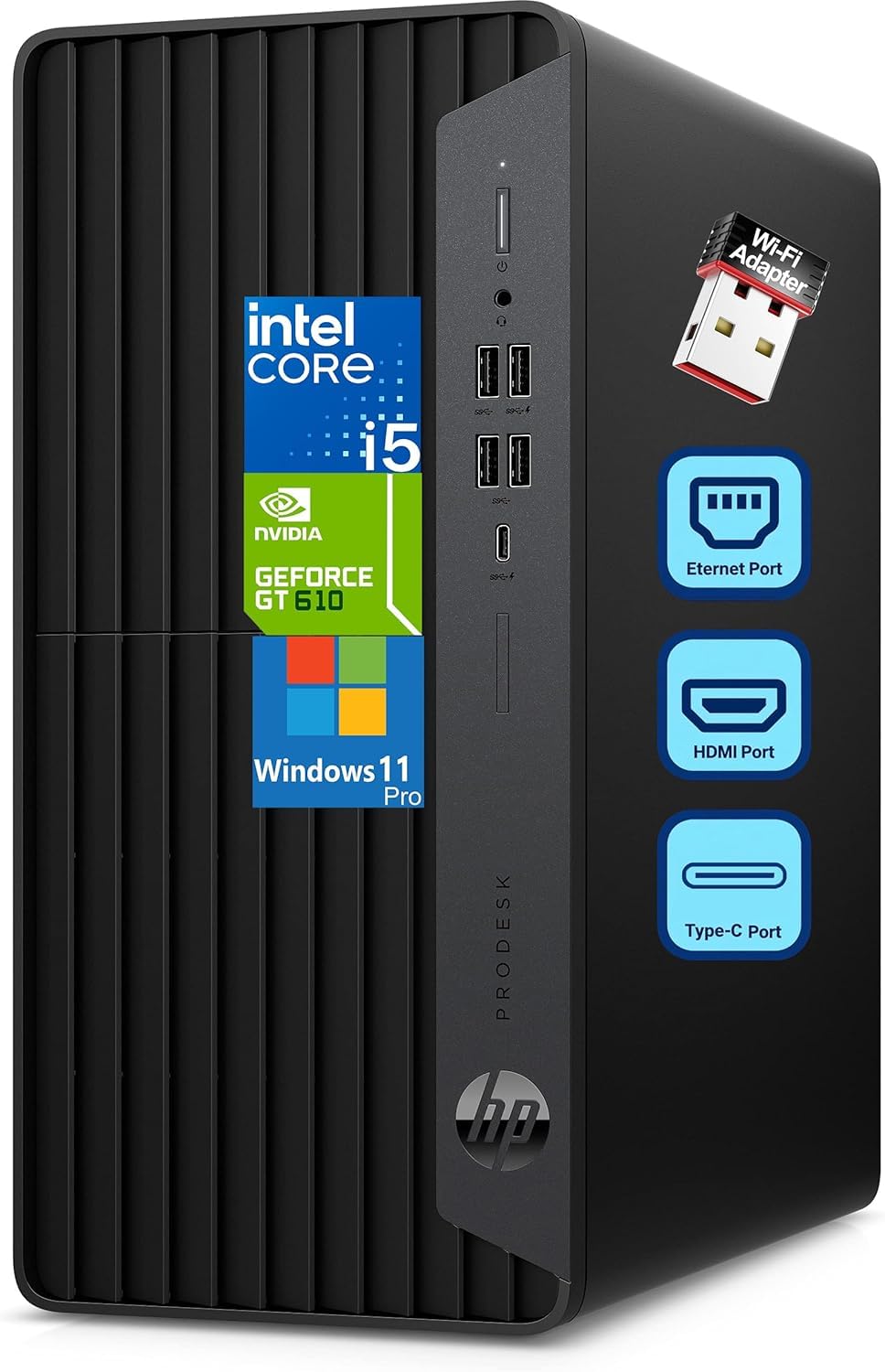
A six-core office tower with a dedicated graphics card and three monitor connections.
For a school office or a lab station that needs to spread work across displays, the HP ProDesk 600 gives you the right bones: a 6-core Intel i5 running from a 2.90GHz base up to 4.30GHz turbo, 16GB of DDR4 RAM, and a 512GB PCIe NVMe SSD. The dedicated GeForce 2GB graphics card adds HDMI, DVI-I and VGA outputs so you can run multiple monitors without adapters, and that is a real convenience for finance-style spreadsheets or lesson planning with two screens.
The connectivity is generous: on the front a USB Type-C at 10Gbps, two USB Type-A at 10Gbps and two USB Type-A at 5Gbps, plus a headphone/mic jack, with more USB and video outputs on the rear along with RJ-45 Ethernet and a WiFi adapter. Windows 11 Pro comes preloaded, with an HP wired keyboard and mouse in the box. The microtower measures 5.98 x 11.93 x 13.27 inches and carries a 180W power supply, so it wants a spot on or under a desk, not behind a monitor.
Where it can trip you up: this is a bigger box than the mini PCs, so it will not hide behind a screen, and its GeForce GT 610 is an older-generation card. For everyday spreadsheets, presentations and browser tabs it is fine; it is not a machine for rendering or modern gaming.
What the ProDesk 600 does well
- A 6-core Intel i5 boosting to 4.30GHz paired with 16GB of DDR4 — steady for accounting software and data work.
- A GeForce 2GB graphics card with HDMI, DVI-I and VGA outputs for multi-monitor desks.
- USB-C at 10Gbps and four high-speed USB-A ports on the front for quick file transfer.
What to keep in mind
- The 5.98 x 11.93 x 13.27 inch microtower needs desk or floor space a mini PC does not.
- The GT 610 is a previous-generation card, so it is not a rendering or gaming machine.
Suits: an administrative office or multi-screen study station that wants dedicated video outputs.
Skip if: the goal is to hide the computer entirely behind a display.
8. Dell Slim Desktop, Intel Core Ultra 5-225
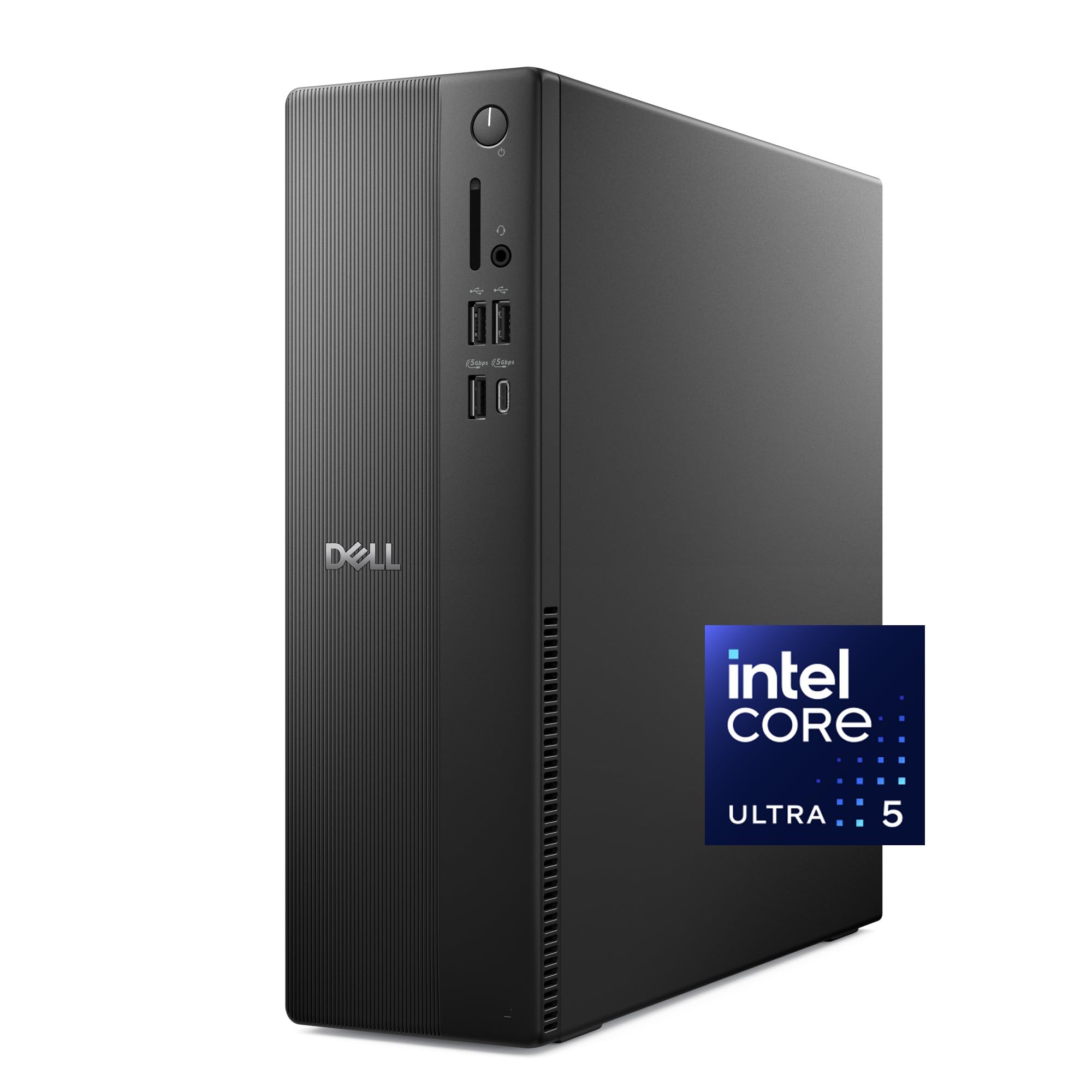
A slim tower built for the long haul, with a panel that opens without tools.
The Dell Slim Desktop takes the practical long view: buy once, upgrade as the machine ages. It runs an Intel Core Ultra 5-225 processor up to 4.9 GHz and a 512GB SSD, and the case opens without tools with a removable side panel, so memory and storage can be swapped by anyone with a screwdriver and a few minutes. For a school that keeps machines in service for years, that tool-less access is worth a lot next to the sealed mini PCs.
The display options are broad: up to four FHD monitors via DisplayPort 1.4a with daisy-chaining, or two 4K displays using HDMI 2.1 and DisplayPort 1.4a. The hardware TPM security chip, built-in lock slot and padlock loop matter in a shared classroom, and Dell’s 1 Year Onsite Service plus six months of the Dell Migrate tool make the move from an old machine simpler. It ships with a wired keyboard and mouse and runs Windows 11 Home.
The trade-off is that there is no built-in display, so a family fitting out a desk from scratch needs to add a monitor on top. The case is also a slim tower rather than a mini cube, so it takes up desk or floor space. And the user experience can take a day or two to settle in, since Windows 11 is a change from older versions.
The long-play advantage: tool-less access and a removable panel mean upgrades take minutes, and the hardware TPM chip plus lock slot suit a shared environment.
Adding it up: no display in the box, so plan on a monitor purchase alongside the tower.
Pick it when: a school plans to buy once and upgrade internally for years.
Watch the extras: the monitor is separate, so the full setup costs more than the tower alone.
Know the Specs
RAM and Why 16GB Is the School Standard
RAM holds the programs and tabs you have open right now. When it fills, the computer moves data to the slower drive and the whole machine feels sluggish. A machine with 8GB works for light browsing and documents, but a 16GB model keeps a video class, a browser and a word processor running side by side. The QAZIPO mini PC and GMKtec G11 Plus carry 16GB, while the Lenovo IdeaCentre and KAMRUI Pinova P1 sit at 8GB. Look for the number of slots and the maximum supported — expansion matters in a machine a school keeps for years.
SSD, NVMe, and What Boot Time Actually Means
An SSD stores files with no moving parts, so it starts up in seconds. NVMe is the faster interface used by the PCIe SSDs on this list. All nine picks here use solid-state storage, which is the right choice for a classroom because there is no spinning disk to wear out or slow the machine down. Watch the capacity: 256GB covers class software and documents, 512GB gives room for projects, and a 1TB drive handles media libraries. Look for a second internal slot if the school plans to add storage later.
Processor Cores, Threads, and Boost Speed
Cores are the processor’s workers, and threads are the lanes each worker can handle. A 4-core, 8-thread chip like the AMD Ryzen 3 Pro 7330U keeps a busy browser and a video call moving at once. The 6-core Intel i5 in the HP ProDesk and the 8-core i7-9700 in the Dell OptiPlex 7070 take on more work at once. The boost speed figure — 4.3 GHz on the KAMRUI, 4.9 GHz on the Dell Slim Desktop — is the short burst speed the chip hits when a task needs it, not the sustained pace it holds all day.
Video Outputs and Multiple Displays
How many monitors a computer can drive depends on its ports. A single HDMI output runs one screen, while a mix of HDMI, DisplayPort and USB-C video can drive two, three and in the Dell Slim Desktop’s case up to four FHD monitors through DisplayPort 1.4a daisy-chaining. For a classroom, two screens is the common balance — a lesson on one and reference material on the other. Check the port list before you assume a monitor will connect, since adapters add cost and occasionally cause trouble.
Common Questions
Will a mini PC like the KAMRUI or QAZIPO work as a school computer?
Can I mount a mini PC on the back of a school monitor?
Is 8GB of RAM enough for a student, or do I need 16GB?
Should I buy a renewed desktop or a new one for a classroom?
How many monitors can a school desktop support?
Does SSD storage type matter for a school computer?
Can I add more RAM or storage to these computers later?
Is a mini PC or a full tower better for a school lab?
What wireless standard should a school computer have?
Can a school PC handle video calls and online classes?
The Bottom Line
For most classrooms, the pcs for schools winner is the KAMRUI Pinova P1 because it drives three 4K displays from a box that hides behind the monitor, and its 4.3 GHz Ryzen 3 Pro 7330U boots and loads faster than the 3.4 GHz chips beside it. Pair it with a monitor on the VESA bracket and the whole desk stays clear for textbooks.
If storage and wired networking matter more than raw clock speed, the GMKtec G11 Plus doubles the drive to 512GB and adds two 2.5GbE ports for a lab back-haul. And for a shared room where machines must be locked down, the Dell Pro 2027 Tower brings 1TB of storage plus a lock slot and BitLocker. Whichever you choose, the mini PCs are the safest starting point — they hide behind a monitor and stay quiet through a full class period.
How we choose
We do not accept paid placement. Every pick is matched to a real buyer and a real use-case; we do not hands-on test units.
Sources
Specifications: manufacturer listings and product documentation. Review insights: verified customer reviews, as of November 2026. Pricing: not shown on this page (it changes often); check the current price via the retailer link.
As an Amazon Associate, Tactical Gear Guy earns from qualifying purchases. This does not affect which products we feature.