Specs are compiled from manufacturer listings and verified buyer reviews and can change over time — please confirm the key details on the product page before buying.
Here is the short answer most shoppers actually want: buy the card whose memory and slot size fit the games and the case you already own, not the one with the biggest number on the box. A PCIe x16 graphics card is the full-length expansion card that drops into the long slot on your motherboard, and every pick below is confirmed to fit that slot. The hard part is that a 6GB card and a 16GB card can look similar on a spec sheet yet behave very differently once 4K textures and ray tracing arrive.
This guide is built by comparing the manufacturers’ published specifications and the patterns across verified customer reviews, so you get each pick’s real strengths and trade-offs instead of marketing spin.
What follows is a nine-card lineup sorted by what each one is genuinely good at, from budget-tier plug-and-play upgrades up to premium cards with 16GB of memory. Every entry lists the exact memory type, clock speed and slot size so you can match a card to your power supply, your case and your monitor before you spend. This breakdown of the best pcie x16 graphics card covers memory, clock speed, slot clearance and noise.
Top Picks


How To Choose The Best PCIe X16 Graphics Card
You might think the biggest memory number wins. That is only half true. More memory holds more high-resolution texture data at once, so modern games hitch less. But a card that does not fit your case, or that your power supply cannot feed, delivers nothing at all.
Start with memory and what it holds
The memory is the card’s own private pool of video RAM. Six gigabytes (GB) is enough for undemanding titles at everyday settings. Sixteen GB is what you want for 4K textures, ray tracing and local AI work, because big textures and AI models need somewhere to sit. The RTX 5060 Ti carries 16GB of GDDR7 memory, three tiers above the 6GB GDDR6 on the RTX 3050 cards here.
Check the slot, the length and the power plugs
A PCIe x16 card is a full-length board, and it needs real room. The RX 9070 Challenger runs 15.75 inches long and uses two 8-pin power connections with a recommended 700W power supply. A compact RTX 3050 Ventus measures 7.4 inches long, which is a different install entirely. Measure the space inside your case before anything else, not after.
Read the boost clock with the cooling attached to it
Boost clock is the highest speed the graphics chip will reach when it has thermal headroom, measured in megahertz (MHz). A higher number helps, but only if the cooler can hold it. Cards with a 2.5-slot design, three fans or a phase-change thermal pad are built to sustain those speeds. A slim two-fan card holds lower clocks, which is why budget cards clock lower — not because they are defective.
Side-by-Side Comparison
| Model | Best For | Memory | Boost Clock | Slot / Cooling | Amazon |
|---|---|---|---|---|---|
| ASUS PRIME GeForce RTX 5070 12GB GDDR7 OC★ Best Overall | Small-form-factor builds that still want real power | 12GB GDDR7 | 2587 MHz (OC mode) | 2.5-slot, dual Axial-tech fans | Amazon |
| GIGABYTE GeForce RTX 3050 WINDFORCE OC V2 6GBest Value | Budget first builds and office upgrades | 6GB GDDR6, 96-bit | 1477 MHz | Two WINDFORCE fans | Amazon |
| MSI Gaming RTX 3050 Ventus 2X 6G OCMost Compact | Low-power systems with a modest power supply | 6GB GDDR6, 96-bit | 1492 MHz | Compact 7.4″ board | Amazon |
| ASRock Radeon RX 9070 Challenger 16GB OC | 1440p and 4K gaming on AMD RDNA 4 | 16GB GDDR6, 256-bit | 2520 MHz | Triple fans, 2.5-slot | Amazon |
| PNY NVIDIA GeForce RTX 5060 Ti 16GB OC Dual-Fan | Creative work and local AI on a compact card | 16GB GDDR7, 448 GB/s | 2407 MHz | Dual-fan, compact design | Amazon |
| GIGABYTE Radeon RX 9070 XT Gaming OC 16G | High-refresh 1440p and 4K play | 16GB GDDR6 | 3060 MHz | WINDFORCE cooling, Hawk Fan | Amazon |
| ASUS Prime Radeon RX 9070 XT 16GB GDDR6 OC | Quiet high-end builds with a dual BIOS switch | 16GB GDDR6 | 3030 MHz (OC mode) | 2.5-slot, Axial-tech fans | Amazon |
| MSI GeForce RTX 5080 16G Gaming Trio OC | No-compromise flagship gaming | 16GB GDDR7, 256-bit | 2715 MHz | TRI FROZR 4, 3 fans | Amazon |
Detailed Reviews
1. ASUS PRIME GeForce RTX 5070 12GB GDDR7 OC Edition
Our pick — 4.5+★ from 300+ verified ratings; the strongest balance of quality and price.
A small-form-factor card that punches like a full-size one and runs near-silent.
If your case is tight but your games are not, this is the card to start with. ASUS built it as an SFF-Ready enthusiast GeForce card, meaning it is designed to fit small-form-factor builds without giving up performance. That is rare in this lineup, where several cards simply will not go into a compact chassis.
The 12GB of GDDR7 memory is the newer, faster memory generation compared to the GDDR6 on the Radeon cards here. The chip runs 2587 MHz in OC mode and 2557 MHz in Default mode, with NVIDIA’s Blackwell architecture and DLSS 4 behind it. It outputs at 3840 x 2160, so 4K on a big monitor is in reach. The cooler uses axial-tech fans with a smaller hub and longer blades, plus a phase-change thermal pad to move heat off the GPU, and the 2.5-slot design keeps it compatible with more builds.
What wins people over here is everyday usability, not benchmark bragging. ASUS rates the dual-ball fan bearings to last up to twice as long as standard sleeve bearings, and 0dB technology stops the fans during light gaming for a quiet desk. A dual BIOS switch toggles between Quiet and Performance profiles, and GPU Tweak III software handles thermal control and monitoring. The honest catch is the one recurring gripe: value. A meaningful share of owners feel the card is priced above what the raw performance delivers, so buy it for the compact fit and quiet running, not for a bargain.
What this card gets right
- SFF-Ready design that fits small chassis most cards in this list will not
- 12GB of GDDR7 memory — the newer, faster memory generation
- 2587 MHz boost in OC mode with a phase-change thermal pad behind it
- 0dB mode and Quiet BIOS keep light gaming near-silent
Where it asks you to compromise
- Value is the most-debated point — a noticeable slice of owners call it overpriced
- 12GB sits below the 16GB cards here if you plan heavy 4K texture work
Built for: cramped small-form-factor builds that still need Blackwell architecture and DLSS 4.
Think twice: if raw frames-per-dollar matters more to you than fitting a tight case.
2. GIGABYTE GeForce RTX 3050 WINDFORCE OC V2 6G
The entry ticket to real GPU gaming when your budget is the hard limit.
Not everyone needs 16GB. If you are upgrading a hand-me-down desktop for undemanding titles, this is the cheapest sensible way onto a PCIe x16 card, and the value question is what owners bring up when they talk about it. The 6GB of GDDR6 on a 96-bit memory interface is the entry-level spec here — compare it with the PNY RTX 5060 Ti’s 16GB and you see the gap plainly.
Performance does fine for what it is. The card is built on NVIDIA Ampere streaming multiprocessors with 2nd-gen RT Cores and 3rd-gen Tensor Cores, and it clocks 1477 MHz. Two WINDFORCE fans keep it cool in a 7.5-inch board, which is compact enough for smaller cases. Setup is a plug-and-play affair — install it, load the driver, and it is running.
A head-to-head worth knowing: this GIGABYTE clocks 1477 MHz while the ASUS Dual RX 9060 XT reaches 3250 MHz in OC mode, so this is a budget card and behaves like one. Still, for entry-level gaming and office work it lands the job, and buyers consistently describe the install as painless. The trade-off is future-proofing. Six gigabytes fills up fast in modern titles, so treat this as a card for today’s games at modest settings, not the one you keep for the next several years.
Where it earns its place: entry-level gaming, office duties, and anything that needs a working x16 slot without stretching the budget.
The real limit: 6GB of memory is the smallest pool here, so high-resolution textures are off the table.
Snap it up if: you want a working gaming desktop for straightforward titles and the budget is fixed.
Look past it if: you already know you want to run modern games at high texture settings.
3. MSI Gaming RTX 3050 Ventus 2X 6G OC
A 7.4-inch board that sips power and slips into almost anything.
This MSI card suits an old office tower with a modest power supply and no room to spare. At 7.4 inches long by 4.3 inches wide, it is one of the two smallest boards here. The ASRock RX 9070 Challenger stretches 15.75 inches by 8.66 inches, more than twice the footprint, so measure before you assume either fits.
The MSI sips power — owners consistently note it uses only 70 watts and draws its power entirely from the motherboard slot, which is why it suits low-power systems so well. The chip is the GeForce RTX 3050 with a 1492 MHz boost clock and 14 Gbps memory. Memory is 6GB of GDDR6 on a 96-bit interface, and outputs are one DisplayPort 1.4a plus two HDMI 2.1a ports. That is a generous set of connectors for a card this small.
What people tend to bring up is how straightforward the whole thing is. The install is simple, the card is budget-friendly, and it handles light gaming without fuss. There is a small honest limit: 6GB of memory means you should not expect to crank texture settings in demanding titles. If your goal is to get a modest desktop gaming-capable for cheap, that limit rarely bites.
The quiet achiever: 70-watt draw pulled straight from the slot, a 1492 MHz boost and three video outputs in a 7.4-inch frame.
The honest limit: the same 6GB memory ceiling as other entry cards, so keep texture settings sensible.
The right call for: low-power builds and older systems that cannot feed a hungry card.
Not the right call for: anyone planning heavy modern games at high settings.
4. ASRock Radeon RX 9070 Challenger 16GB OC

Triple fans and 16GB on a 256-bit bus, built for 1440p and 4K.
This is the card for someone who wants a proper step up in resolution without chasing the absolute flagship. AMD’s RDNA 4 architecture sits underneath the RX 9070 GPU, with 56 compute units and 3584 stream processors. Third-gen ray-tracing hardware and second-gen AI accelerators ride along, which is why ASRock positions it for 1440p and 4K gaming.
The numbers worth knowing: a factory boost clock of up to 2520 MHz and a game clock of 2070 MHz get you smooth, high-frame-rate play with no tuning required. Then there is the memory — 16GB of GDDR6 on a 256-bit bus at 20 Gbps. That bandwidth is what makes 4K textures and ray tracing playable rather than stuttery. Three fans and a 0dB silent mode handle the cooling, and the LED indicator gives a quick visual check.
Performance is what defines this card, and it is the trait that earns the most praise by a wide margin. Temps stay cool and the card runs quiet, and a lot of owners frame it as working well and even beating the 9070 XT model. The real catch is fit: this is a 2.5-slot card measuring 290 x 123 x 51mm that needs two 8-pin power connectors and a recommended 700W power supply. Verify chassis clearance before you buy — a big card in a small case is the one mistake this review cannot save you from.
Why it earns the Top Performer tag
- 16GB of GDDR6 on a 256-bit, 20 Gbps bus for 4K textures
- 2520 MHz factory boost — no manual overclocking needed
- Triple-fan cooling with a 0dB silent mode for quiet play
What to plan around first
- Needs two 8-pin power feeds and a recommended 700W supply
- A 2.5-slot card, so confirm your case has the clearance before ordering
Choose this when: you are stepping up to 1440p or 4K and want AMD’s RDNA 4 architecture doing the work.
Check first: your case clearance and power supply wiring, since this card demands both.
5. PNY NVIDIA GeForce RTX 5060 Ti 16GB OC Dual-Fan
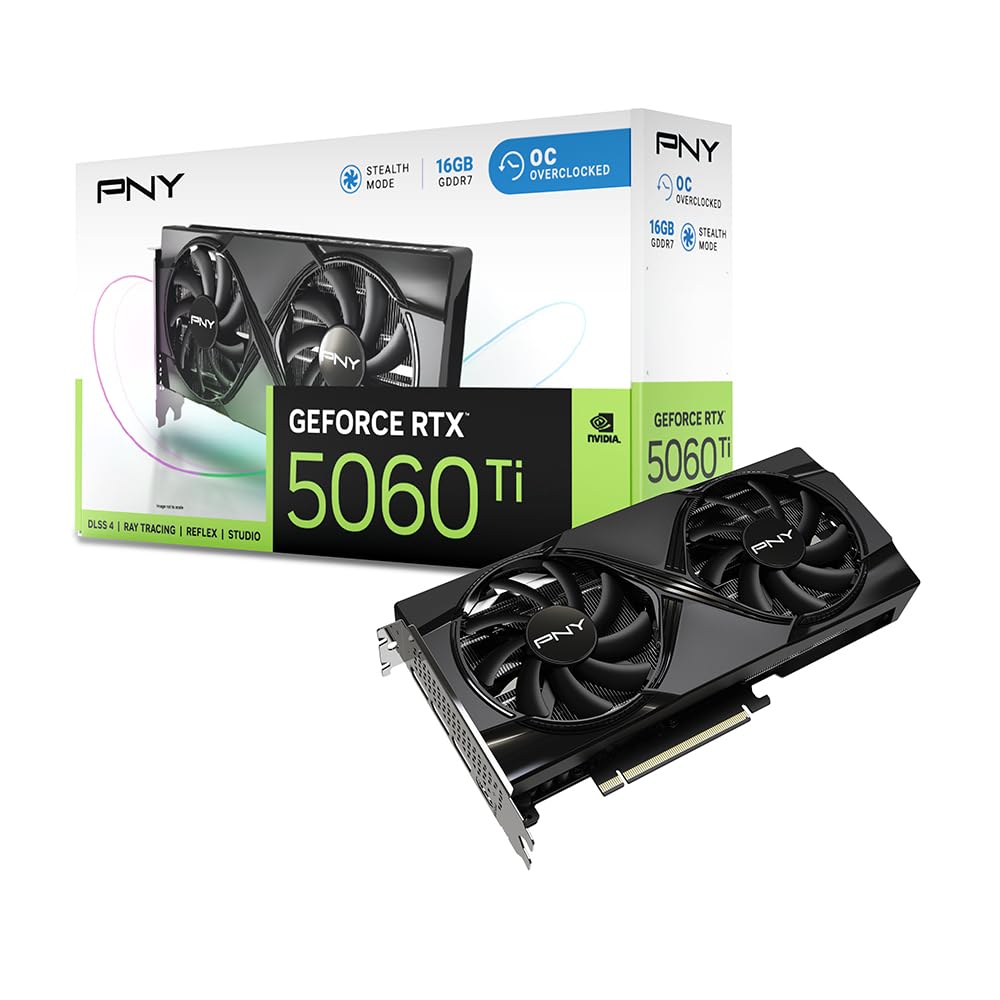
16GB of GDDR7 in a compact dual-fan shape — for editors and AI tinkerers.
If your work leans on big textures, large creative projects or local AI models, memory capacity is the number that decides whether a project loads or fails. This PNY gives you a full 16GB frame buffer of GDDR7 running 448 GB/s of bandwidth. Compare that with the 6GB GDDR6 on the GIGABYTE RTX 3050 and the difference in what fits at once is plain to see.
The cooling is engineered around staying small. Two fans spread heat across a compact design, so the card has the thermal headroom to hold its boost clocks without occupying a full-length slot. A dense heatsink pulls heat away from the GPU, and a vented metal backplate adds passive cooling while reinforcing the board against sagging. NVIDIA’s Blackwell architecture brings 5th-gen Tensor Cores, new streaming multiprocessors for neural shaders, and 4th-gen Ray Tracing Cores built for Mega Geometry. The base GPU clock is 2407 MHz.
There is a software advantage worth calling out. PNY’s VelocityX software lets you fine-tune core and memory clocks, set custom fan curves, and watch temperatures and speeds in real time, and it saves up to five profiles for instant recall. Performance is what owners bring up most, and the card is frequently described as a perfect budget GPU. The honest catch is that it runs warmer under sustained loads than a triple-fan card would — balance that against how much space you have.
Reasons creatives reach for it
- 16GB of GDDR7 with 448 GB/s of bandwidth for large textures and AI models
- Dual-fan cooling keeps the card compact without giving up boost headroom
- VelocityX software saves up to five tuning profiles
What to keep in mind
- A dual-fan heatsink runs hotter under long renders than a triple-fan design
- 2407 MHz base clock is lower than several gaming-first cards here
Pick it for: editing, AI experimentation and 1440p textures where memory capacity is the wall you keep hitting.
Skip it for: pure gaming where a higher-clocked card would serve you better.
6. GIGABYTE Radeon RX 9070 XT Gaming OC 16G

A 3060 MHz flagship-class card that delivers 1440p and 4K frames with RGB flair.
Here is a card for the build that has to look as good as it runs. The 3060 MHz boost clock is the highest on any AMD card in this lineup, and the 16GB of GDDR6 with PCIe 5.0 gives it room to stretch at 1440p and 4K. Performance is what earns it the most praise — owners describe it as excellent and note how well it handles demanding titles.
Cooling is handled by GIGABYTE’s WINDFORCE system with a Hawk Fan and server-grade thermal conductive gel. That combination is what keeps temperatures efficient during long sessions. The 11.34-inch by 5.2-inch board carries RGB lighting, and the appearance is a clear plus — aesthetics earn nothing but positive notes here.
The noise level is the one genuinely mixed point in the record. Some describe very little coil whine and near-silence, while others find it extremely loud under load. That split is worth going in with your eyes open about. The size runs 11.34 inches by 5.2 inches; plan the case before ordering.
The price-performance read: 3060 MHz and 16GB of GDDR6 make this one of the strongest value-per-frame cards in the premium tier.
The honest split: fan noise divides opinion — plan on a quiet-bias fan curve if you need silence.
The card for you if: you want flagship-class 1440p and 4K performance and RGB styling.
Pass it over if: absolute silence at load is a hard requirement.
7. ASUS Prime Radeon RX 9070 XT 16GB GDDR6 OC Edition

The cool-running flagship for builders who want options and a quiet profile.
This is a build-it-and-forget-it card. The 3030 MHz OC mode boost and 2480 MHz OC game clock put it right at the top of the AMD stack, and the 16GB of GDDR6 on PCIe 5.0 gives it room to breathe at high resolution. The 2.5-slot design keeps it compatible with more cases than you might expect, and the HDMI and DisplayPort 2.1 outputs pair well with modern monitors.
Cooling sits at the center of the design. A phase-change GPU thermal pad moves heat away efficiently, and ASUS’s axial-tech fans use a smaller hub with longer blades and a barrier ring. ASUS rates these dual-ball bearings to last roughly twice as long as conventional sleeve-bearing designs. A dual BIOS switch toggles Quiet and Performance profiles, and 0dB mode means the fans stop during light loads. GPU Tweak III handles thermal monitoring, and the GPU Guard reinforces the mount.
Everyday running stays quiet and cool because the thermal pad does real work here. The card weighs 1500 g, which matters if you mount it horizontally in a thin case. At 4.5+ stars, it is among the most-reviewed cards here, so its track record is well tested. Still, check the length before you commit.
Thermal strength: the phase-change thermal pad and dual-ball fans make sustained high clocks comfortable rather than tense.
One practical note: at 1500 g it is a heavy card, so check your case mount and consider a support bracket.
Made for: builders who want AMD’s top tier with quiet operation and tunable profiles.
Consider the weight: if your case lacks support for a substantial card.
8. MSI GeForce RTX 5080 16G Gaming Trio OC

The top of the mountain — GDDR7 at 30Gbps with three STORMFORCE fans moving air.
If you build once and want the fastest memory here, this is the ceiling of the lineup. The RTX 5080 runs 16GB of GDDR7 on a 256-bit interface at 30Gbps, paired with PCIe 5.0. That is the fastest memory configuration here, and the boom for big-framerate gaming is immediate.
Cooling has its own dedicated system. TRI FROZR 4 combines three STORMFORCE fans with a Gaming and Silent mode switch, so you can bias toward performance or keep the build quieter. RGB lighting picks up the look of a showcase build. The boost clock is 2715 MHz, and the outputs are HDMI 2.1b and DisplayPort 2.1b — both current standards for high-refresh displays.
The trade-off is the obvious one. This is the premium tier of the list, and the physical size is substantial. It also lands firmly in flagship territory, so if 1440p is your target rather than 4K, the cards below this one in the lineup will serve you well for a lot less.
What the top tier buys you
- 16GB of GDDR7 at 30Gbps on a 256-bit bus
- TRI FROZR 4 cooling with three STORMFORCE fans and a Silent mode
- HDMI 2.1b and DisplayPort 2.1b for modern high-refresh monitors
What comes with the territory
- Premium-tier placement means this costs the most
- Top-tier performance is overkill if 1440p is your target
Buy it when: you want the fastest memory this lineup offers and the budget is not the deciding factor.
Look lower if: you play at 1440p and want more frames per dollar.
Know the Specs
Memory Size and Speed
Memory is the card’s own pool of video RAM, and size plus speed together decide what it can display smoothly. GDDR7 is the newer generation, faster at moving data than GDDR6. The PNY RTX 5060 Ti 16GB runs GDDR7 at 448 GB/s; the ASUS Dual RX 9060 XT runs 16GB of GDDR6. A 256-bit bus moves more at once than a 96-bit bus, which is why flagship cards pair big memory with a wide connection. For everyday gaming at 1080p, 6GB is enough. For 1440p textures and 4K, 16GB gives you the headroom.
Boost Clock and Cooling Headroom
Boost clock is the top speed the graphics chip reaches when it has enough cooling to keep going, measured in MHz. A high number only holds if the cooler keeps the GPU cool. A two-fan card with a smaller heatsink holds lower clocks than a triple-fan 2.5-slot model. That is why the ASRock RX 9070 Challenger runs three fans and 2520 MHz, while the compact RTX 3050 Ventus runs two fans at 1492 MHz. Cooler design and clock speed travel together.
Slot Size and Power Feeds
A PCIe x16 card is a full-length expansion card that plugs into the long slot on your motherboard. Its physical size and power requirements decide whether it fits. The ASUS Dual RX 9060 XT is an 8-inch by 4.7-inch, 2.5-slot card that fits more cases. The ASRock RX 9070 Challenger runs 290 x 123 x 51mm and needs two 8-pin power connectors with a recommended 700W supply. The MSI RTX 3050 Ventus draws its 70 watts straight from the slot — no extra power cable at all.
Noise, Profiles and Software
0dB technology stops the fans entirely during light loads for silent everyday work. A dual BIOS switch lets you flip between a quiet profile and a performance profile. Dual-ball fan bearings are rated up to twice as long as standard sleeve bearings, so they outlast cheaper designs. Software like ASUS’s GPU Tweak III and PNY’s VelocityX lets you set custom fan curves, monitor temperatures and save profiles. If a quiet desk matters to you, look for 0dB mode and a Quiet BIOS together.
Common Questions
Will a card with two 8-pin power connectors work with my power supply?
How do I know a card will physically fit in my case?
Is 6GB of memory enough for modern games?
Does GDDR7 make a real difference over GDDR6?
Will my old power supply run a card that only draws from the motherboard slot?
What does 0dB technology actually mean in practice?
Do I need a PCIe 5.0 slot to use these cards?
Why is one card louder than another with a similar fan count?
Is a 12GB card enough for 4K gaming?
Can I fine-tune these cards myself once installed?
The Bottom Line
For most builders, the winner is the ASUS PRIME GeForce RTX 5070 12GB GDDR7 OC because it fits a small-form-factor case while carrying GDDR7 memory (the newest, fastest graphics memory type), a 2587 MHz boost (the top speed the card can reach), and 0dB quiet running (fans stop at low load). If you care most about a high boost clock on 16GB, the ASUS Dual Radeon RX 9060 XT reaches 3250 MHz in OC mode (a factory overclock) and stays quiet doing it. For the tightest budget where a full low-power upgrade matters most, the MSI RTX 3050 Ventus runs on 70 watts straight from the slot.
If you can only remember one thing from this article, remember this: match the card’s memory and physical size to your case and your games, then let the clock speed break the tie. The ASUS PRIME RTX 5070, at 4.5+ stars across 300+ owners, is the safe pick if you are unsure.
How we choose
We do not accept paid placement. Every pick is matched to a real buyer and a real use-case; we do not hands-on test units.
Sources
Specifications: manufacturer listings and product documentation. Review insights: verified customer reviews, as of November 2026. Pricing: not shown on this page (it changes often); check the current price via the retailer link.
As an Amazon Associate, Tactical Gear Guy earns from qualifying purchases. This does not affect which products we feature.