Specs are compiled from manufacturer listings and verified buyer reviews and can change over time — please confirm the key details on the product page before buying.
You want a graphics card that plugs into your motherboard’s PCIe x16 slot and actually earns its place in your case. That means two things matter more than any marketing badge: enough video memory (VRAM — the card’s own working memory for game textures) to keep modern titles smooth, and a cooler that stays quiet under load. Get those right and everything else follows.
This guide is built by comparing the manufacturers’ published specifications and the patterns across verified customer reviews, so you get each pick’s real strengths and trade-offs instead of marketing spin.
Below you will find nine PCIe cards sorted by what they actually do well, from a 16GB value hero to big triple-fan flagships. My top overall pick holds 4.5+ stars across 400+ owners, and it costs less than several cards ranked below it here. Every pick below is a genuine pcie graphics card chosen on real specs and owner experience.
Top Picks

How To Choose The Best PCIe Graphics Card
A graphics card is the part of your desktop that draws every frame you see on screen. It slides into the long PCIe x16 slot on your motherboard and outputs video through HDMI or DisplayPort. The buying decision is mostly about three numbers — memory, physical size, and power — plus one honest look at the games you actually play.
Start with memory capacity, not the logo on the box
Video memory (VRAM) holds the textures and geometry a game streams in. A 16GB card gives you room to run modern titles without the card spilling data out to slower system memory. A 6GB card is fine for older or lighter games, but it is a tighter fit for new releases. Plain rule: more memory buys you headroom, not speed.
Measure your case before you fall for a triple-fan card
Big coolers mean big cards. A card measuring 13 inches long and 5.5 inches wide needs a roomy mid-tower and clear space past your drive cages. A 7.5-inch card slips into almost anything, including small-form-factor builds. Check the slot thickness too — a 2.5-slot card covers the slot below it, and a 3.125-slot card covers more.
Match the power connector to your power supply
Some cards draw all their power from the PCIe slot itself and need no extra cable. Others want a dedicated 8-pin connector. Before you buy, look at the connector on the card and confirm your power supply has a spare cable and enough rated wattage for the rest of your system.
Decide what resolution you actually play at
1080p is forgiving, 1440p rewards memory and clock speed, and 4K punishes anything mid-tier. Be honest with yourself here — a card that nails 1440p at high settings can feel like overkill if your monitor tops out at 1080p, and a budget card will struggle the moment you jump to 4K.
Side-by-Side Comparison
| Model | Best For | VRAM | Boost Clock | Length | Amazon |
|---|---|---|---|---|---|
| ASUS Dual Radeon RX 9060 XT 16GB★ Best Overall | Quiet 1440p all-rounder | 16 GB GDDR6 | 3250 MHz | 8″ | Amazon |
| XFX Swift RX 9060 XT OC Triple FanTop Performer | Fastest-clocked 9060 XT | 16 GB GDDR6 | 3320 MHz | — | Amazon |
| ASRock RX 9060 XT Challenger 16GB OCCompact Pick | Compact 2-slot build | 16 GB GDDR6 | 3290 MHz | 9.8″ | Amazon |
| ASUS TUF Gaming RTX 5070 12GB OC | Built-to-last cooling | 12 GB GDDR7 | 2640 MHz | 13″ | Amazon |
| XFX Swift RX 9070 XT Triple Fan | Raw frame-rate punch | 16 GB GDDR6 | 2970 MHz | — | Amazon |
| GIGABYTE RX 9070 XT Gaming OC 16G | 1440p price-to-frame king | 16 GB GDDR6 | 3060 MHz | 11.34″ | Amazon |
| PNY RTX 5070 Ti OC Triple-Fan | NVIDIA feature set, whisper mode | 16 GB GDDR7 | 2295 MHz | — | Amazon |
| MSI RTX 5070 Ti 16G Shadow 3X OC | SFF-ready 5070 Ti | 16 GB GDDR7 | 2497 MHz | 16″ | Amazon |
| GIGABYTE RTX 3050 WINDFORCE OC V2 6G | No-extra-power upgrade | 6 GB GDDR6 | 1477 MHz | 7.5″ | Amazon |
Detailed Reviews
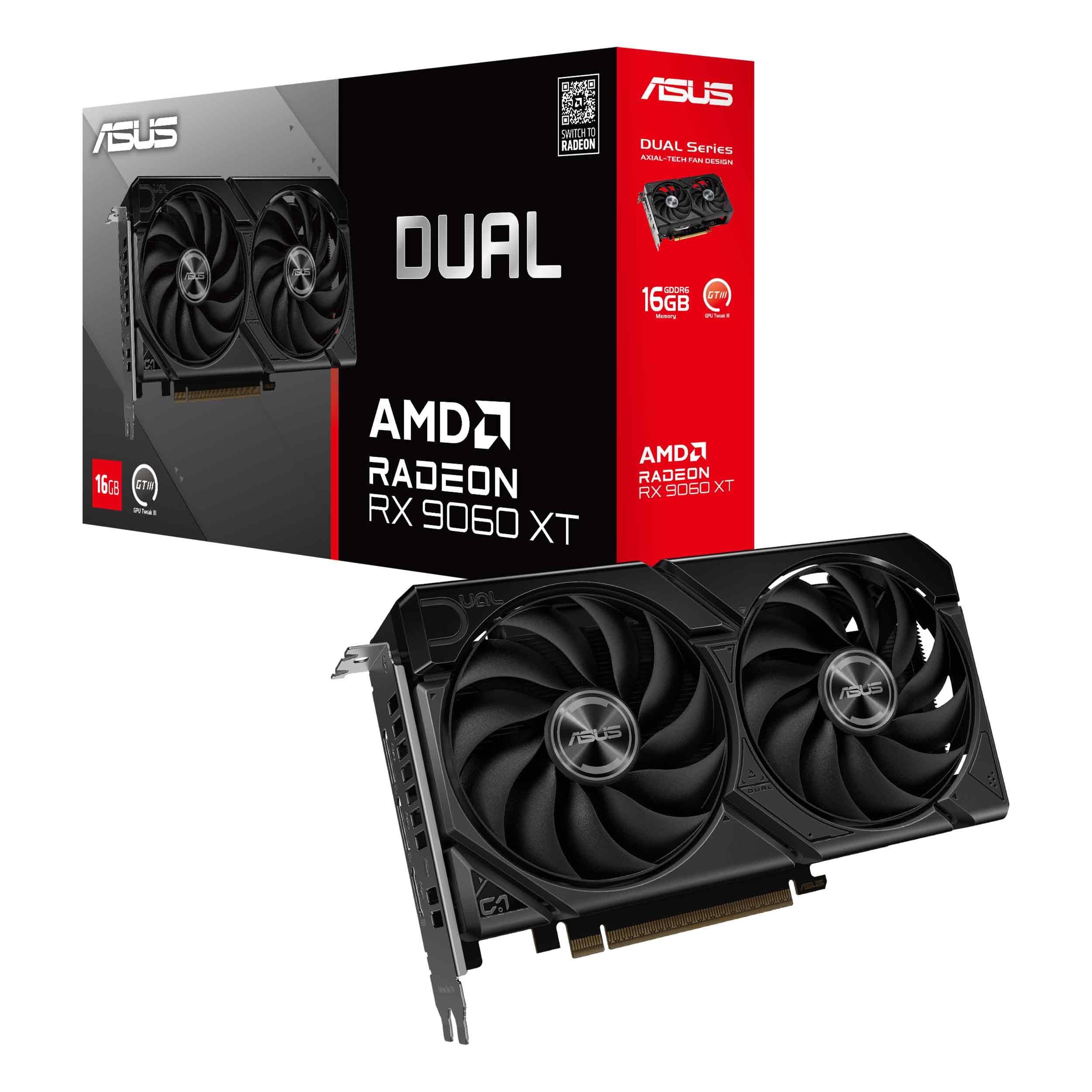
1. ASUS Dual Radeon RX 9060 XT 16GB GDDR6
Our pick — 4.5+★ from 400+ verified ratings; the strongest balance of quality and price.
Sixteen gigabytes of memory and a quiet dual-fan cooler in a case-friendly 8-inch body.
Here is the card that makes the fewest compromises for the most people. It packs 16 GB of GDDR6 memory (fast video memory holding the textures your games stream in) — so a modern title loads its full texture set without the card reaching for slower system memory. It boosts to 3250 MHz (the top speed the card can hit under load), which is enough to keep high-refresh 1440p gaming fluid. And it measures just 8 inches long and 4.7 inches wide, so it drops into builds where a 13-inch flagship would not fit at all.
The cooling design is what wins people over. Axial-tech fans use a smaller hub so the blades are longer, and a barrier ring pushes air down onto the heatsink instead of letting it spill sideways. It is a 2.5-slot card, so it covers the slot directly below it but leaves the one beneath that free. A 0dB mode (fans stop when the card is cool and quiet) keeps light gaming and desktop work silent. And the dual BIOS switch lets you flip between a Quiet profile and a Performance profile, so you can lean the card toward hush or toward speed without any software.
The catch is power headroom, and it is worth knowing up front. The card’s own ceiling is governed by a conservative power limit baked into its firmware, so it will not chase the highest clocks some rivals do even with the same chip. That is the trade-off for the quiet, cool running and the compact size. Outputs cover HDMI 2.1b and DisplayPort 2.1a, and the card runs the PCIe 5.0 interface. If you want the highest-clocked 9060 XT instead, the XFX below pushes more.
What earns it the top slot
- Full 16 GB GDDR6 memory at the same capacity as cards costing far more
- 8-inch length and 2.5-slot depth fit tight builds
- 0dB silent mode plus a Quiet/Performance BIOS switch
- Boost clock up to 3250 MHz with dual ball-bearing fans rated to last longer than sleeve designs
Where you may push back
- The firmware power limit caps how hard it will work, so hardcore overclockers may want more headroom
- Quiet profile trades a little top-end speed for lower noise
Reach for this if: you want 16 GB of memory, 1440p speed, and near-silent running in a mid-size case.
Hold off if: your build is roomier and you specifically want the fastest clock on the RX 9060 XT — the XFX triple-fan edition climbs higher.
2. XFX Swift AMD Radeon RX 9060 XT OC Triple Fan
The same 16GB RX 9060 XT chip, spun up to the highest boost clock of the trio.
If the ASUS above is the balanced pick, this XFX is the one for buyers chasing clocks. Boost clock reaches 3320 MHz, which is the fastest 9060 XT figure in this lineup and clearly ahead of the ASUS card’s 3250 MHz. The base clock sits at 1900 MHz. It pairs that with the XFX SWFT triple-fan cooling solution — three fans pushing air over the heatsink so the card can hold its clock longer under sustained load. Memory is the same 16 GB of GDDR6 at a 20 GHz memory clock.
Owners describe a card that simply runs cool and does not flinch. One owner’s 1440p Battlefield session on a Ryzen 5 5600 held around 45 Celsius with fans that stayed quiet. The thing everyone raves about is raw performance across titles, and the cooling backs it up. FSR4 (AMD’s frame-boosting and image-sharpening tech) also draws praise for closing the visual gap between this card and the NVIDIA alternatives.
Two honest notes. First, this is a physically large card — one buyer found it needed a support bracket to sit level, so measure your case and consider a brace for a long triple-fan body. Second, the value conversation is split: some gamers call it worth the outlay for demanding AAA titles like Warzone, while others feel the card should not be bought far past its maker’s suggested starting figure. Outputs are HDMI and two DisplayPort, and it tops out at 4K UHD resolution.
Clock advantage: 3320 MHz boost leads the 9060 XT group, backed by a triple-fan cooler that holds temperatures down during long sessions.
Own the fit check: this is a big body — plan for case clearance and possibly a support bracket so a long card does not sag.
Pick this one if: you have the case room and want the highest clocked RX 9060 XT with strong, quiet cooling.
Think twice if: you have a small case or want the smallest possible footprint — the ASUS or ASRock cards are more compact.
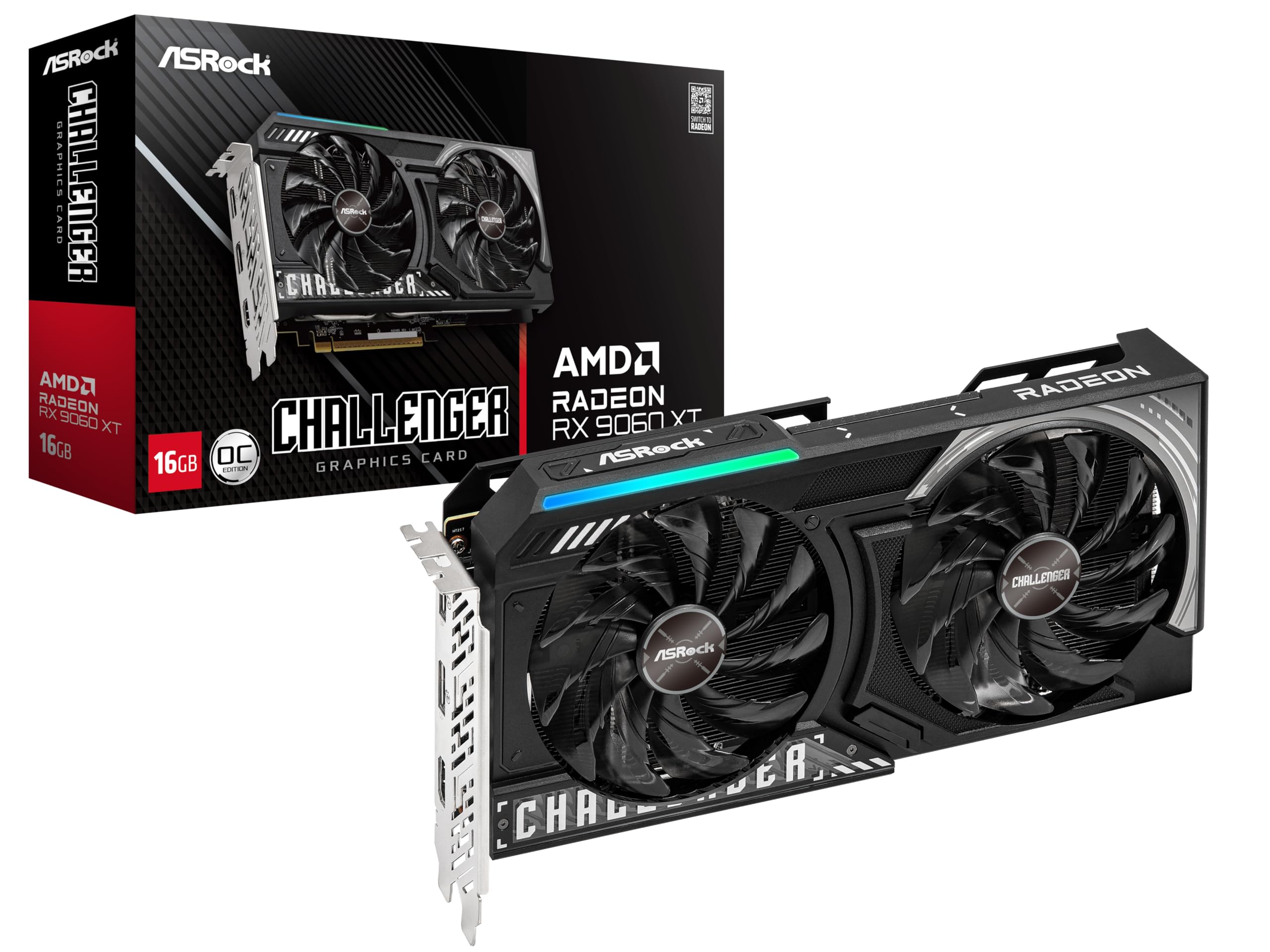
3. ASRock Radeon RX 9060 XT Challenger 16GB OC
The 9060 XT built to slide into a cramped case on a single 8-pin cable.
This is the card for anyone whose chassis is the limiting factor. It is a true 2-slot design, which means it covers one expansion slot below it and no more — the same 16 GB of GDDR6 but a slimmer body than the 2.5-slot ASUS or the big triple-fan XFX. It runs off a single 8-pin power connector, so you are not hunting for two spare cables. The maker lists a recommended power supply rating of 550W, which is a friendlier target than many high-end cards demand.
Clocks are strong for the format: a boost clock up to 3290 MHz and a game clock of 2700 MHz straight from the start. On the technology side it uses AMD’s RDNA 4 architecture with 32 compute units, 3rd Gen ray tracing cores, and 2nd Gen AI accelerators — ray tracing being the lighting technique that makes reflections and shadows look physical, and the AI accelerators handling upscaling work. Memory runs on a 128-bit bus at 20 Gbps. The 0dB silent mode stops the dual fans at idle, and an LED indicator lets you see the card’s power state at a glance.
What owners notice is that it is smaller than expected and, in one case, smaller than an RTX 3060 — which left better airflow in a tight case and put less strain on the power supply. It is not as heavy as other cards. Games run well on both Windows and Linux. The other side of the coin: a few buyers want more power-supply headroom than the listed rating, with one suggesting a higher-rated unit as a safety cushion. Treat that as build advice rather than a spec — the card’s official recommendation is the 550W figure above.
Why it earns space
- 2-slot depth with a single 8-pin connector — easy on cases and cables
- Boost clock up to 3290 MHz on 16 GB of GDDR6
- 0dB silent mode and an LED power indicator
- RDNA 4 with 3rd Gen ray tracing and 2nd Gen AI accelerators
What to weigh first
- Its maker recommends a 550W supply — check your unit before you buy
- Dual fans may need to spin harder than a triple-fan cooler in the heaviest sessions
Suits you if: your case is tight, your power supply has one spare 8-pin, and you still want 16 GB and 1440p speed.
Not for you if: you want the absolute quietest triple-fan cooler at full tilt.
4. ASUS TUF Gaming GeForce RTX 5070 12GB GDDR7 OC

An NVIDIA-badged card built like a brick with a cooler that barely breaks a sweat.
The RTX 5070 is your entry point into NVIDIA’s current architecture, and it comes with 12 GB of GDDR7 memory — the newest generation of video memory. Boost clock reaches 2640 MHz in OC mode, dropping to 2610 MHz in default mode. That clock figure is lower than the AMD 9060 XT cards here, but the two chip families are built differently, so compare them by the games you play rather than by clock alone. It is a PCIe x16 card that outputs up to 7680×4320.
The physical build is the story. Military-grade components are specified for power stability, the PCB wears a protective coating against moisture, dust, and debris, and a phase-change thermal pad on the GPU is meant to hold up under heavy loads longer than traditional thermal paste. A GPU Guard and bracket help prevent the card from cracking or sagging. The 3.125-slot fin array is fed by three Axial-tech fans. And there is the whole NVIDIA side of the house: the Blackwell architecture and DLSS 4, NVIDIA’s upscaling and frame-generation technology.
Here is the part that bites: size. The card measures 13 inches long and 5.5 inches wide — in our comparison that is 73% longer and 25% wider than the compact 7.5-inch GIGABYTE RTX 3050 near the bottom of this list. Owners make the same point loudly, noting the newer cards are massive and that you need to check your case clearance before ordering. The 12 GB of memory is also a real conversation point — it handles a lot, but demanding players wish there were more for the long haul.
Where it shines: Owners consistently report temperatures that never climb past 60 Celsius and a card that stays quiet while doing it, with a well-built body and a little RGB logo on the edge.
Measure twice: at 13 inches long and 5.5 inches wide this needs a roomy tower — confirm clearance before you commit.
Go here if: you want NVIDIA features, a heavily built card, and a cooler that holds under 60 Celsius in a full-size case.
Look elsewhere if: your case is compact or you want a card you can easily clear around other components.
5. GIGABYTE Radeon RX 9070 XT Gaming OC 16G

The 9070 XT that most buyers should shortlist, with the most frame data behind it.
This is the highest-rated card on this list at 4.5+ stars, and it sits right at the heart of the 9070 XT pack. It carries 16 GB of GDDR6 on a boost clock of 3060 MHz, runs on PCIe 5.0, and hoists a WINDFORCE cooling system with a Hawk Fan plus server-grade thermal conductive gel. Its body measures 11.34 inches long and 5.2 inches wide — shorter than the 13-inch ASUS TUF, which matters if your case is snug.
What makes this the shortlist card is how it handles the two resolutions that matter. It runs 1440p like it is nothing and reaches into 4K without breaking stride. Owners talk about the performance most, then the price-to-frame ratio, then the thermals — and the build holds up under real use, with one former RTX 5070 Ti owner calling this switch a relief after instability on the other card. RGB lighting rounds out the look for a see-through case. It also comes out ahead on value against the XFX 9070 XT above despite a nearly identical 16 GB memory pool, because it does the same resolution work for a friendlier figure.
The one thing to plan around is fan noise. It is a split issue — plenty of builds run near-silent, but the card can get loud when you push the fan curve to keep temperatures down. If your priority is a completely hushed rig at full load, the XFX triple-fan sits quieter on our list. For everyone else, this is the best balance of speed, memory, and build quality on the page.
Still leads where it counts: 1440p and 4K performance plus strong thermals, all in a body shorter than the biggest cards here.
The trade-off: you can push the fans louder than your ears might like to hold those temperatures under load.
Best for: the player who wants rock-solid 1440p with 4K headroom and does not mind a little fan noise when the card works hard.
Skip if: a whisper-quiet rig matters more than raw frame rate.
6. XFX Swift AMD Radeon RX 9070 XT Triple Fan

A stealthy triple-fan 9070 XT that runs cool enough to make the fans optional.
The point of this card is restraint. It carries the same 16 GB of GDDR6 as the GIGABYTE 9070 XT above, but boosts to 2970 MHz rather than the GIGABYTE card’s 3060 MHz, and its XFX SWFT triple-fan cooler keeps temperatures low enough that the fans barely have to work. Owners describe games running at 1440p max settings without issue, over 200 fps in some titles, and one case of a GPU sitting around 70 Celsius under load. It weighs in at 4.2 pounds and outputs through HDMI plus three DisplayPort connections.
The surprising part is how quiet it stays for a triple-fan card. It runs cooler than an older RX 6950 XT Red Devil and quiets down at the same time — and the cooling stays steady on lighter esports titles like Overwatch 2 and Left 4 Dead 2. The performance holds up for creative work too, with 3D modeling running noticeably smoother than before. One owner’s card pushed past an RTX 5080 in their own comparison and reached 200+ fps at 1440p ultra without stuttering. FSR4 support keeps image quality close to the competition in live play.
The honest caveat is the top of the fan curve. When the fans ramp all the way up, the card gets a bit loud — it is not a defect, just the price of a hard-working cooler. If you game mostly in the middle of the range, which most people do, you will barely hear it. The value case is also less airtight than the GIGABYTE card above, which does comparable resolution work for a friendlier figure. This one earns its spot on cooling and hush rather than on price.
What earns its place
- Triple-fan SWFT cooling keeps it cool and quiet in normal play
- Sound for 3D modeling and creative work as well as games
- HDMI plus three DisplayPort outputs for multi-monitor setups
- Strong 1440p and 4K real-world results without stutter
What to weigh
- Fans get noticeably louder at maximum ramp
- Not the cheapest path to 9070 XT frame rates on this list
Choose this for: a quiet triple-fan 9070 XT that also handles modeling and multi-monitor work.
Reconsider only if: you want the lowest price per frame among 9070 XT cards — the GIGABYTE below leads there.
7. PNY NVIDIA GeForce RTX 5070 Ti OC Triple-Fan
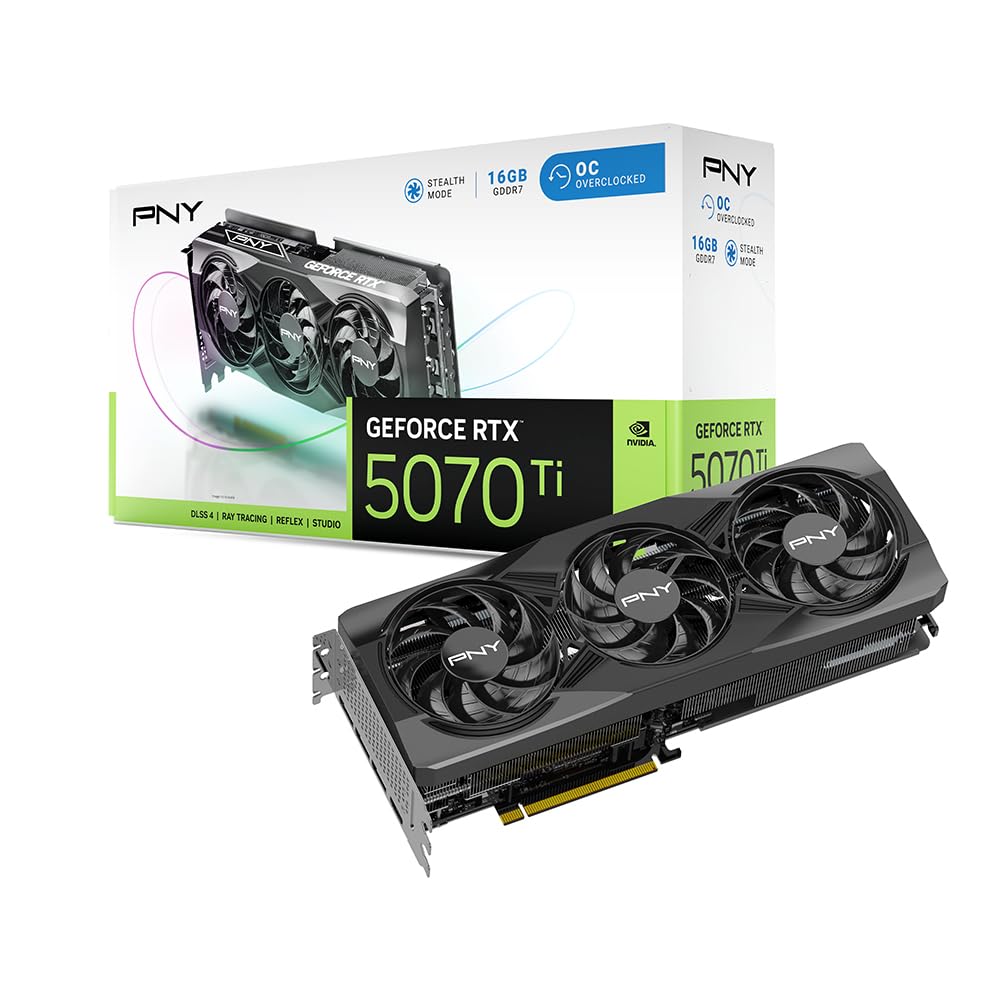
A 16GB Blackwell card that can shut its fans off entirely at low load.
If you want the full NVIDIA toolkit rather than an AMD card, this is the value-minded route. It carries 16 GB of GDDR7 on a boost clock of 2295 MHz and is built on the Blackwell architecture with 5th-Gen Tensor cores and 4th-Gen Ray Tracing cores — Tensor cores being the parts that accelerate AI work like upscaling, and ray tracing cores the parts that render realistic light and shadow. Stealth Mode stops the fans completely at low temperatures, so desktop work and light gaming run in dead silence, and a triple 90mm axial-fan setup with counter-rotation cuts turbulence when the fans do spin.
The cooling is more elaborate than the price tier suggests. A vapor chamber and an ultra-dense heatsink pull heat away fast, and an open aluminum backplate lets air move through. The VelocityX software lets you fine-tune core and memory clocks, set custom fan curves, and save up to five profiles for instant recall. The bundle includes a 16-pin to three 8-pin power adapter, so check that your power supply has the header or adapters to match.
Owners describe a card that never exceeds 55 Celsius, with one report of around 285 watts average draw and 7300 points in a Steel Nomad benchmark. Fans kick on only occasionally and stay quiet when they do. A realistic note: the card’s exterior is mostly plastic, though it holds up visually, and some buyers would rather spend the difference on a bigger model. If you would rather have the highest-clocked 5070 Ti on this list, the MSI below clocks higher — while this PNY leans toward hush and efficiency instead.
Quiet-first design: Stealth Mode can stop the fans entirely at idle, and the vapor chamber keeps temperatures low enough that they rarely need to start.
Check your PSU: the card comes with a 16-pin to three 8-pin adapter, so confirm your power supply can feed it before you install.
Ideal for: NVIDIA-loyal builders who want 16 GB of GDDR7 and the quietest possible idle in a mid-size case.
Not the one for: buyers chasing the highest 5070 Ti clocks — the MSI edition clocks higher.
8. MSI Gaming RTX 5070 Ti 16G Shadow 3X OC

A 5070 Ti aimed at small-form-factor builds, clocked highest of the NVIDIA trio.
This is the clocked-up 5070 Ti. It reaches 2497 MHz in its extreme performance mode, ahead of the PNY 5070 Ti’s 2295 MHz, and packs 16 GB of GDDR7 on a 256-bit memory bus — the width of the memory path, which governs how much data flows to the GPU at once. It is billed as an SFF-Ready Enthusiast GeForce card, meaning it is sized for compact cases, and it carries the full NVIDIA Blackwell architecture with DLSS 4.
The cooling is purposeful: TORX Fan 5.0 links fan blades with ring arcs to hold high-pressure airflow, a nickel-plated copper baseplate captures heat from the GPU and memory quickly, and square profile Core Pipes boost contact with the baseplate. Outputs are three DisplayPort 2.1a and one HDMI 2.1b. Owners describe it handling everything like a champ and being a sound pick for entry into 4K, with the GPU hitting 75+ fps in most games maxed out.
There is one very split point: noise. Some builds run it really quiet, while others note the fans get loud under cooling and that the backplate is plastic rather than metal. It is not a universal complaint, but it is the trade-off to know. The other part is the price tier — this sits among the top of our lineup, so if you want the same 16 GB memory pool for less, the GIGABYTE 9070 XT below delivers 1440p and 4K work for a friendlier outlay. For an SFF build with an NVIDIA preference, this is the top-clocked option here.
Where it delivers
- 2497 MHz extreme-mode clock, the highest of the NVIDIA 5070 Ti picks
- SFF-Ready sizing for compact builds
- 16 GB GDDR7 on a 256-bit bus with DLSS 4
- Copper baseplate and TORX Fan 5.0 cooling for entry 4K
The honest limits
- Noise is a split report — some builds find the fans loud under cooling
- Plastic backplate rather than metal
Built for you if: you are assembling a small-form-factor rig and want NVIDIA’s top-clocked 5070 Ti here.
Think twice if: a metal backplate and guaranteed hush are must-haves for you.
9. GIGABYTE GeForce RTX 3050 WINDFORCE OC V2 6G

The drop-in upgrade that runs straight off the slot, no cables or new PSU required.
Not everyone needs a triple-fan flagship, and this card understands that. It is built on NVIDIA’s Ampere architecture with 2nd Gen RT Cores and 3rd Gen Tensor Cores, and it carries 6 GB of GDDR6 on a 96-bit memory interface. Boost clock sits at 1477 MHz. It measures just 7.5 inches long and 4.4 inches wide — the smallest card here — and, crucially, it needs no external PCIe power connection. That last point is the whole pitch: you slide it into the slot, your computer picks it up, and you drive on.
The numbers that matter for this tier are easy to read. It runs light games, drives photo processing, and pushes graphics settings a weaker old card could never touch. Installing it is about as simple as PC work gets — Windows recognizes it immediately, and the official drivers install without a fight. That is why so many non-gamers and casual upgraders land on it: it does the job without demanding you rebuild your power supply around it.
Be clear about what you are buying. With 6 GB of memory and a 1477 MHz clock, this is not the card for modern AAA titles at high settings, and it is not close to the 16 GB cards above on raw performance. The crowd this suits is the office PC, the photo editor, the older machine getting a second life. For those uses it is genuinely great. For a 4K gaming build, look at the 9070 XT or 5070 Ti picks instead.
Its whole reason to exist: no external power connector means no new power supply, no cable routing, no fuss — a true plug-and-play upgrade.
Realistic ceiling: 6 GB and a 1477 MHz clock handle everyday tasks and lighter games, not demanding 4K titles.
Right for: a non-gamer or casual user upgrading an older desktop who does not want to touch the power supply.
Wrong for: anyone chasing high-framerate modern gaming — the 16 GB cards above are a different league.
Know the Specs
VRAM and memory type (GDDR6 vs GDDR7)
VRAM is the card’s own fast memory, and its capacity decides how much of a game’s texture data fits on the card at once. When a game needs more than fits, it reaches into slower system memory and you feel it as stutter or lower detail. A 16 GB card offers generous headroom for modern titles, while a 6 GB card is a lighter-duty fit. The type matters too — GDDR7 is newer than GDDR6, which is why the NVIDIA cards here carry GDDR7 and the AMD cards carry GDDR6. Do not read the type as a verdict on speed; the chip architecture does more of that work.
Boost clock and what it really changes
The boost clock in MHz is the highest speed the GPU can hit when it has thermal and power room to do so. Higher numbers look impressive, but the gap between 2970 MHz and 3060 MHz rarely shows up as a dramatic frame difference — cooling and power headroom decide whether a card can hold its clock over an hour of play. Compare clocks within the same chip family, not across AMD and NVIDIA, because the two are built differently. The clock is a tiebreaker after memory and cooling.
Common Questions
Will a PCIe card work in my existing motherboard slot?
Do I need a new power supply for these graphics cards?
Is 16GB of VRAM actually better than 12GB or 6GB?
Do I need a support bracket for a long triple-fan card?
What resolution do these cards actually target?
Will a bigger card actually fit in my case?
Does a higher boost clock always mean more frames?
What ports do I need on a graphics card for a modern monitor?
Can I run these cards on an older PCIe generation motherboard?
How do I know if a card is worth it over my current one?
The Bottom Line
For most people, the pcie graphics card that strikes the best balance is the ASUS Dual Radeon RX 9060 XT 16GB, because it pairs a full 16 GB of GDDR6 memory with a quiet 2.5-slot cooler in an 8-inch body that actually fits a normal case. If you want the fastest 9060 XT clock on this list, grab the XFX Swift RX 9060 XT OC Triple Fan. And for the best price-per-frame at 1440p and beyond, the GIGABYTE RX 9070 XT Gaming OC 16G is the one to reach for.
The pattern across all nine picks is simple: the cards that earn their place do it with memory capacity, honest cooling, and a fit that matches real cases. A higher clock or a flashier name is not worth a card that throttles under load or will not fit your tower. Pick the capacity and resolution you need first, then let the cooler and the price tier decide the rest.
How we choose
We do not accept paid placement. Every pick is matched to a real buyer and a real use-case; we do not hands-on test units.
Sources
Specifications: manufacturer listings and product documentation. Review insights: verified customer reviews, as of November 2026. Pricing: not shown on this page (it changes often); check the current price via the retailer link.
As an Amazon Associate, Tactical Gear Guy earns from qualifying purchases. This does not affect which products we feature.