Specs are compiled from manufacturer listings and verified buyer reviews and can change over time — please confirm the key details on the product page before buying.
Case mods are the cheapest way to make a PC look expensive — and the easiest way to waste money on a part that won’t fit. Fit is the part that matters most. A fan that doesn’t match your header, a cable cover that won’t clear your GPU, or a screen that needs a port you don’t have will sit in a box while your rig stays plain. This guide sorts the add-ons that install cleanly from the ones that fight you. It also explains every spec in plain terms, so you know what you are buying before it ships.
This guide is built by comparing the manufacturers’ published specifications and the patterns across verified customer reviews, so you get each pick’s real strengths and trade-offs instead of marketing spin.
Each pick below is sorted by what it actually changes inside your chassis — not by how it photographs. You will see which ones need a specific motherboard header, which ones fit any standard layout, and where the honest limits sit. The result is a shortlist built around pc case mods that install cleanly and hold up.
Top Picks


How To Choose The Best PC Case Mods
The first thing to check is not the look — it is the connector. Most case lighting and cable kits run on a 5V 3-pin ARGB header, which is a small three-pin plug on your motherboard that carries both power and data for each LED. If your board only has a 12V 4-pin RGB header, an ARGB strip will not work there without a separate controller. Confirm what your board offers before you fall for a photo.
Header types and what they power
To get an ARGB strip or fan glowing, you need a 5V 3-pin header (a small power and data plug on the motherboard) and software that speaks the same language — Asus Aura, Gigabyte RGB Fusion, MSI Mystic Light, or ASRock RGB LED. A cable extension or cover works differently: it either plugs into that same header or runs entirely on its own controller. Knowing which one you are buying decides if you need motherboard software at all.
Fan specs that change your temperatures
Two numbers tell you where a fan belongs. Airflow, measured in CFM (cubic feet per minute — how much air gets pushed through), suits open case vents. Static pressure, measured in mmH2O, is the push a fan can maintain against a dense radiator or filter. A fan rated high in airflow but low in pressure will feel weak against a radiator. A 4-pin PWM connector lets the motherboard raise and lower fan speed automatically with temperature, which keeps noise down when the system is idle.
Measure before you buy
A shelf, screen, or frame mod only works if it fits your case. A 120mm fan mount is a specific size, and a display needs a flat panel area plus a USB header or port nearby. Check the internal clearance around your graphics card before adding a cable cover that sits over the connectors. Every pick here installs easily once you confirm it physically fits your case.
Side-by-Side Comparison
| Model | Best For | Connection | Lighting | Form Factor | Amazon |
|---|---|---|---|---|---|
| Sirlyr PSU Extension Kit★ Best Overall | Cable management | 24-pin ATX / 8-pin EPS / 2x 8-pin PCIe | None | 30cm / 24cm cables | Amazon |
| Speclux ARGB LED Strip 2-PackBest Value | Budget lighting | 5V 3-pin ARGB | Addressable RGB | 2x 13.7in strips | Amazon |
| Thermalright TL-C12C-S 5-PackBest Fan Pack | Full fan swap | 4-pin PWM + 3-pin ARGB | ARGB | 120mm, 25mm thick | Amazon |
| Jungle Leopard Figurine Shelf | Display piece | 3-pin ARGB header | ARGB | For 120mm fan mounts | Amazon |
| Thermalright TL-M12Q-S X3 | Radiator builds | 4-pin PWM + 3-pin ARGB | ARGB + infinity mirror | 120mm, 25mm thick | Amazon |
| TECWARE Flex RGB Cable Cover | RGB cable glow | 5V 3-pin ARGB | Up to 81 LEDs per cable | 24-pin + 8/16-pin covers | Amazon |
| ASUS TUF ARGB Kit GT502 | GT502 Horizon owners | Aura Sync | ARGB outer frames | GT502 Horizon specific | Amazon |
| WOWNOVA 5″ Temp Monitor | System stats display | Single USB Type-C | Not specified | 5in panel, 800×480 | Amazon |
| Hyte Y70 Touch Screen Kit | Full build showcase | DisplayPort + USB | Not specified | 14.9in IPS, 2.5K | Amazon |
Detailed Reviews
1. Sirlyr PSU Extension Cable Kit
Our pick — 4.5+★ from 250+ verified ratings; the strongest balance of quality and price.
The mod that cleans up the mess every glass-panel build shows off first
The most visible thing in a tempered-glass case is not the graphics card — it is the tangle of power cables crossing it. This kit replaces the ugly stock runs with sleeved extensions in gray and white: one 24-pin motherboard cable, one 8-pin CPU cable, and two 8-pin graphics card cables. All of it is 16AWG alloy copper (a thicker wire gauge that carries current with less resistance), so the cables stay cool under load. The 24-pin and CPU runs measure 30cm / 11.8 inches, while the graphics card cables stretch to 24cm / 13.3 inches for large towers. The pre-bent shape — long wires on top, shorter ones underneath — is the detail that does the actual work. It trains the cable to curve toward your grommets instead of kinking sideways.
What wins people over here is build quality, and the appearance follows right behind it. Gold-plated terminals on the 8-pin graphics cables reduce power loss and heat, which matters when you are pulling serious wattage into a modern card. Each extension arrives with three transparent cable combs already fitted, and there is an extra set of white combs in the box so you can restyle the finish. Nylon braid keeps the color from oxidizing in a hot chassis, so the look holds instead of fading.
The honest catch is flexibility and length. The pre-bent design does not bend much to the side, so a case with a tight side-routing channel may need the cable to sit where it wants rather than where you want. The 11.8-inch main runs are also on the shorter side for a very deep full tower. Neither is a defect — it is a fit question. If your motherboard tray is standard depth and your routing holes line up behind the board, this installs like it was measured for your case.
What earns its spot
- Gold-plated terminals on the 8-pin GPU runs cut power loss and heat at high draw
- Three pre-fitted combs per cable plus a spare white set for restyling
- Nylon braid resists oxidation and color fade inside a hot case
- Pre-bent wire lengths guide the cable toward routing holes without sideways kinks
Where it asks you to adapt
- The pre-bent routing resists sideways bending, so side channels need room
- 11.8-inch main runs can feel tight in a very deep full tower
Made for: anyone with a glass side panel who wants the cable runs to look deliberate instead of tucked and hidden.
Check first: measure the distance from your PSU shroud to the board connector — the pre-bent shape needs that space to land cleanly.
2. Speclux Addressable RGB LED Strip 2-Pack
Two thin strips that add the glow without a screw or a clip in sight
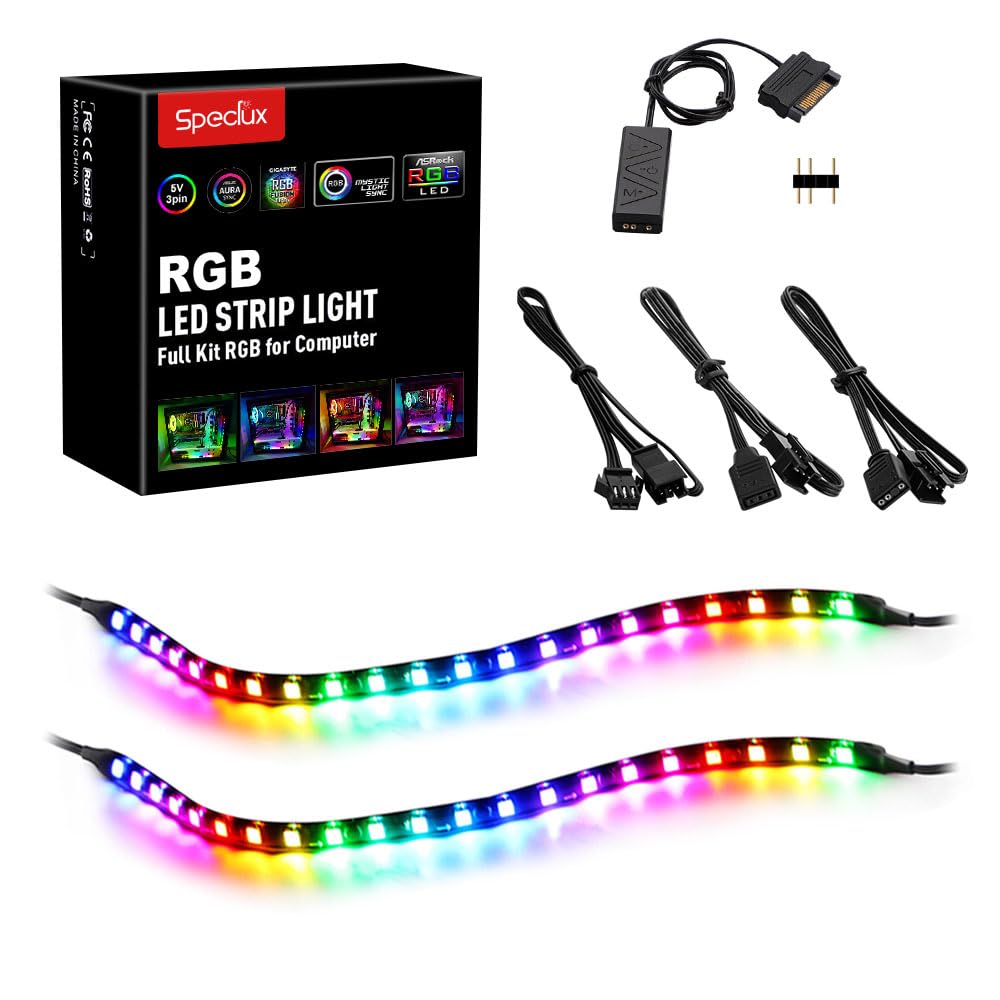
Lighting is the fastest visual upgrade you can make, and this pair gets it done without tools. You get two 13.7-inch flexible strips, a remote control, two extension cables, and a SATA connection cable. The strips attach with magnetic backing or double-sided adhesive, so the inside of your chassis gains color in a few minutes instead of an afternoon. The remote gives you dimmable output at 5 levels in static mode and adjustable speed in the animated modes, which means you can dial the brightness down at night rather than living with one harsh setting.
Addressable is the key word here. These strips run on a 5V 3-pin ARGB header, the same standard Asus Aura, Gigabyte RGB Fusion, MSI Mystic Light, and ASRock RGB LED boards use. That means the strips can follow your other components through one piece of software instead of a separate app. Buyers report the brightness and color accuracy get the most praise, and the strips hold consistent color through software like Aorus and Razer Chroma.
The magnet strength is the mixed note. Some builds find the magnetic hold plus the adhesive plenty, while others find the magnets too weak to trust on a vertical panel and lean on the tape instead. If you plan to mount these on a downward-facing surface, clean the panel first and use the adhesive as your primary grip. Otherwise this is the lowest-effort way to light a case.
Install reality: no screws, no clips, no drilling — just a flat surface and a free 5V 3-pin header.
Worth knowing: two 13.7-inch strips cover most mid-tower interiors, but a full tower will want a second set.
Reach for this if: your motherboard already has an ARGB header and you want color inside the case today.
Look elsewhere if: your board only offers a 12V RGB header — these need the 5V three-pin standard.
3. Thermalright TL-C12C-S 120mm ARGB 5-Pack
Five matching 120mm fans that let you rebuild the whole airflow map at once
One fan is a replacement. Five is a redesign. This pack gives you a matched set for intake, exhaust, and a cooler at the same time, which is what makes it the practical choice for a full case rebuild rather than a spot fix. Each fan pushes up to 66.17 CFM (cubic feet per minute — a measure of how much air moves through) at 1550RPM, with 1.53mmH2O of static pressure and a rated noise of ≤25.6dBA. The 4-pin PWM connector lets your motherboard raise and lower speed with temperature instead of running flat out all the time.
That airflow figure is where the value shows up next to the pricier eight-inch-class options. Compare these to the TL-M12Q-S X3 above: 66.17 CFM versus 68.9 CFM, and 1550RPM versus 2000RPM — close enough that the five-pack wins on coverage for the same money. Performance earns the most praise by a wide margin, and owner reports show CPU temperatures dropping by up to 8°C. The S-FDB bearing (a fluid-dynamic bearing that keeps the blade from wobbling at speed) is the part doing the quiet work.
Where it gets awkward is wiring. Daisy-chaining these draws mixed opinions, and several builds find the cabling plentiful once you stack five of them. Budget time for cable routing, or use a fan hub if your board has few headers. The ARGB lighting itself runs up to 17 modes with addressable support, so the five fans will stay synced to your board’s scheme.
Where the money goes: five matched fans cover intake, exhaust, and a cooler in one purchase instead of three separate ones.
Plan for: the wire count — five PWM and five ARGB connectors add up fast in a small case.
Right call when: you are swapping every fan in the case and want them to look and sound like a set.
Pause if: you only need one or two fans — a full five-pack leaves spares sitting in the box.
4. Jungle Leopard ARGB Figurine Shelf
A little lit stage where your figure collection becomes part of the build
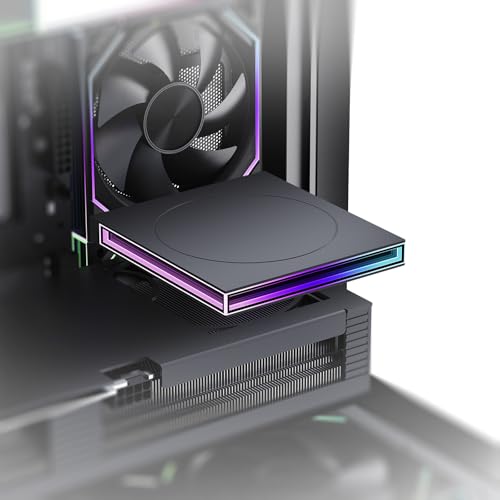
Most case mods change the look of the machine. This one gives you somewhere to put something that is not a component. The shelf mounts where a 120mm fan would sit, adds an infinity mirror effect behind it, and runs off the standard 3-pin ARGB header on your motherboard, so its lighting follows whatever software you already use. Hidden screws and a vibration-tolerant mount mean it stays put even when the fan beside it is spinning hard.
The physical build is the part worth understanding before you buy. Jungle Leopard prints each shelf in PETG, a tough heat-resistant plastic that is chosen for long-term use inside a warm chassis, and the packaging is picked to cut waste. It is a single unit, not a multi-pack — this is the mod you add for one centerpiece, not a set to scatter through the case. The compatibility note is simple: it wants a 120mm mounting spot and a free 3-pin ARGB header.
The quiet trade-off is rarity. This is a small-batch 3D-printed piece, and the listing is one standalone shelf rather than a bundle. If you want the inside of your case to look curated rather than lit, that is the point. If you need to light a whole case, this is not the workhorse — the strips and fan packs above cover that job.
For the collector: turns a spare 120mm slot into a lit display shelf for a figure, with lighting synced through your board’s ARGB software.
Material note: PETG plastic is chosen for heat resistance, so it holds up beside warm components.
Suits: a build with a free 120mm slot and a favorite figure that deserves a lit spot.
Not for: anyone hoping to light up a full case — this is one shelf, not a lighting kit.
5. Thermalright TL-M12Q-S X3 120mm ARGB 3-Pack
Faster blades and a double-sided mirror for builds that show every fan
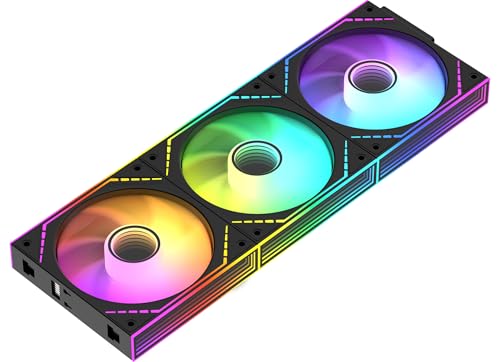
If your case has a glass front and a glass side, every fan face is on display, and this trio is built for that view. Each 120mm fan carries an infinity mirror on both sides plus lit blades, so the RGB reads from the inside of the case as well as the outside. The airflow numbers are the strongest comparison here: 68.9 CFM and 2.21mmH2O of static pressure at up to 2000RPM, against 66.17 CFM and 1.53mmH2O at 1550RPM for the five-pack above. More pressure means the fan pushes harder into a dense radiator or filter instead of stalling out.
Owners mention CPU temperature drops of almost 10°C, the figure that answers whether swapping fans is worth it. The noise rating is 28.2dBA at full speed, slightly louder than the quieter five-pack’s 25.6dBA — a fair trade for the extra RPM and pressure. Daisy-chained PWM and ARGB connections keep the wiring from tripling, which matters more in a three-fan set than you would expect.
The connectivity is the one spot to watch. The ARGB connectors can work loose on their own, and some builds secure them with electrical tape to keep the connection solid. It is a small, fixable annoyance rather than a failure — but plan a little tape or a zip tie at the header. Set those, and this becomes a fan set that looks as good turned off as it does lit.
Why it leads on pressure
- 2000RPM and 68.9 CFM move more air than the 1550RPM five-pack above
- 2.21mmH2O static pressure holds up against radiator fins and filters
- Infinity mirror on both sides keeps the look clean from every angle
- Daisy-chained PWM and ARGB wiring cuts the cable count in a three-fan set
The one thing to tape down
- ARGB connectors can back out — secure them at the header
- 28.2dBA at full speed is a touch louder than a quiet 120mm fan
Built for: a water-cooled or heavily filtered build where pressure and visible blades both matter.
Skip if: silence at full load is your top priority over airflow.
6. TECWARE Flex RGB Cable Cover Kit
The cable mod that puts the light inside the wires instead of beside them
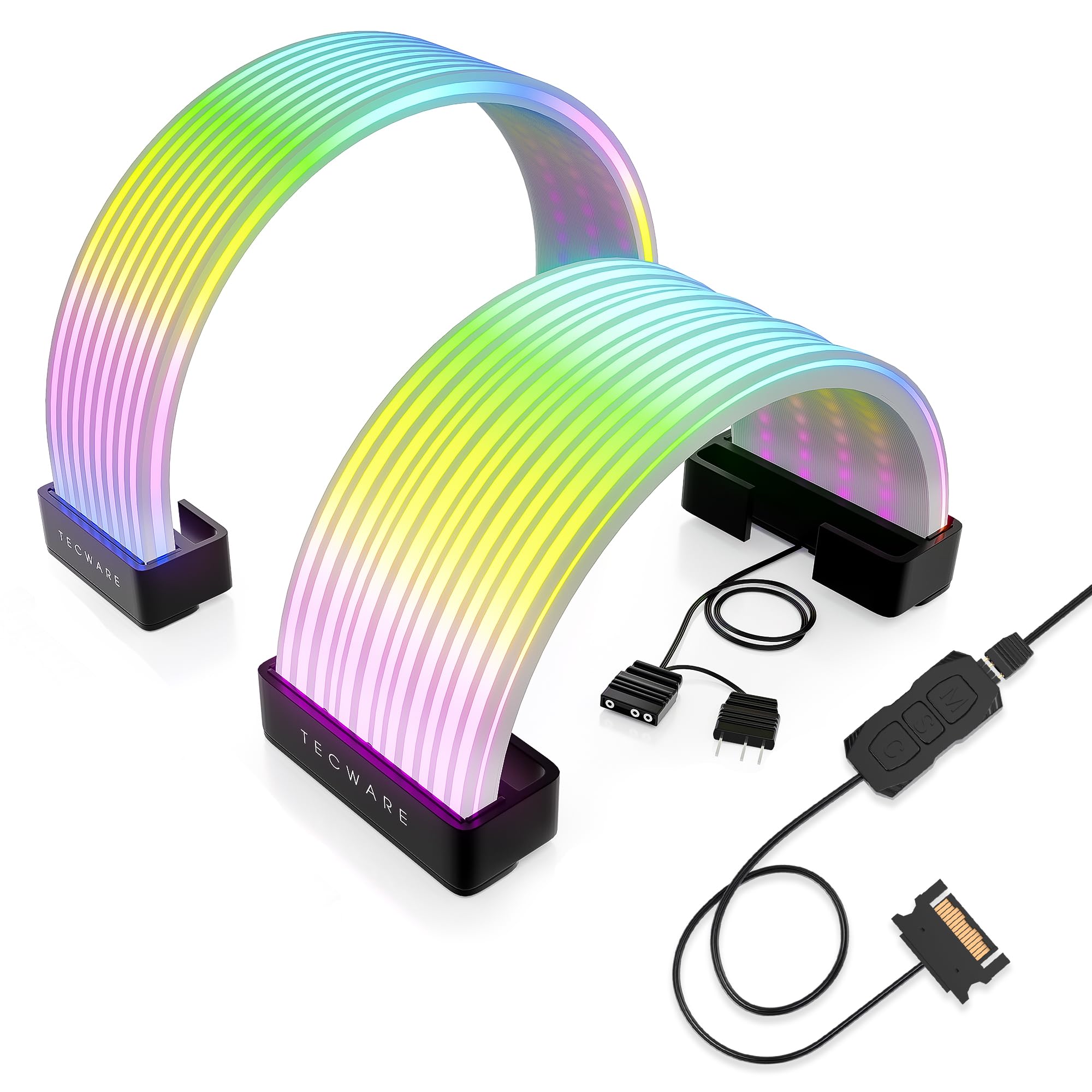
This is the showpiece of the cable category. Instead of running a strip along your cables, TECWARE wraps the cable itself in a silicone cover lit by up to 81 LEDs per run. You get a continuous glow that travels the length of the 24-pin motherboard cable and the 8-pin or 16-pin GPU cable. The silicone is flexible enough to bend smoothly around corners, so the light follows the cable path instead of fighting it. It syncs through a 5V 3-pin ARGB header and works with the major lighting software, so the effect matches your fans and strips.
The LEDs cannot be controlled individually — they diffuse as one even ribbon of light per cable. That is the design choice that makes the effect look like a smooth stream rather than a string of dots. Quality and appearance are the two things people rave about most, and flexibility gets its own share of praise for bending well and offering different modes. The 12 included cable braces hold the covers in place on your existing cables, so you do not need to replace your PSU.
Durability is the mixed note. Some covers keep working past two years, while a few lose individual lights or stop lighting entirely over time. It is the fair trade for a lighting piece that flexes and bends every time you move a cable. Treat the covers gently during install and leave the bends alone once they are set — this is a cosmetic layer, not a structural part.
Why it reads differently: the glow is in the cable, not on it, so it looks embedded in the build rather than added to it.
Install note: the kit includes covers and 12 braces but not the power cables themselves — you add it to the cables you already have.
Pick it for: the most striking cable look on the list, especially in a glass-panel case with open cable runs.
Think twice if: you plan to move or re-route cables often — the light layer prefers to be left alone once installed.
7. ASUS TUF Gaming ARGB Lighting Kit

Two magnetic frames that wrap the GT502 Horizon in light without screws
This one is a targeted mod, not a general one. It is built specifically for the ASUS TUF Gaming GT502 Horizon series, and it works by adding two outer frames that surround the case with color. The mounting is magnetic, so the frames snap into place with no drilling and no brackets. Aura Sync handles the color and effects alongside the rest of your ASUS hardware, so the outer glow matches your fans and strips in one software scheme. The frames come in black or white to match the build.
The frames are rated for up to 20,000 hours of use. That is the manufacturer’s own rated life, and it means you are not going to be swapping this piece out. Appearance, installation, and the lighting effect itself are all the things this kit gets right — it is the sort of mod that makes the outside of the case match the inside.
The limit is obvious and honest: it only fits the GT502 Horizon. If you own a different chassis, this kit will not do anything for you. That is not a flaw — it is the reason it fits so cleanly. For a GT502 Horizon owner who has already lit the interior, this completes the look without any fabrication work.
Exact fit: designed only for the GT502 Horizon series — two outer frames, magnetic mounting, no tools.
Rated life: the maker rates the frames for up to 20,000 hours, so the lighting is not the part that ages out.
Only for: ASUS TUF Gaming GT502 Horizon owners who want the exterior lit to match the interior.
Wrong pick if: you run any other case — this kit is built for that one chassis.
8. WOWNOVA 5″ Computer Temp Monitor

A little stats panel that turns the inside of your case into a dashboard
Some mods are for looks; this one is for information, and it does both at once. The 5-inch IPS panel shows CPU, GPU, RAM, FPS, and HDD data through the maker’s own software, acting as a second monitor you can mount inside the case. The panel runs at 800×480 resolution with 250 candela per square meter of brightness (a measure of how bright the screen glows) and a 1000:1 contrast ratio, on an aluminum housing just 0.39 inches thick. One USB Type-C cable carries both data and power from an internal header, so you do not need a port on the graphics card or a separate power lead.
Screen quality is the thing that gets the most praise here, and setup follows close behind. The included 16GB flash card lets you load your own dynamic video themes, and the visual theme editor works by dragging elements anywhere on the panel. The screen mounts horizontally or vertically to fit your case interior.
The mixed part is software and function. When it clicks, it works right away and looks sharp; when it does not, owners describe it as not intuitive at all. Some units simply never came to life. The honest read is that this is the pick for someone comfortable spending a little time in software settings. If you want plug-and-play with zero learning curve, expect some patience.
The draw: live CPU, GPU, and FPS readouts on a 5-inch screen, wired with one cable from an internal USB header.
Face it honestly: the software decides whether you love this — the hardware is capable, but setup rewards patience.
Yes if: you enjoy tuning a dashboard and want temperature readouts visible through the side panel.
Hold off if: you expect a screen to work flawlessly the moment it is plugged in.
9. Hyte Y70 Touch Infinite Display Upgrade
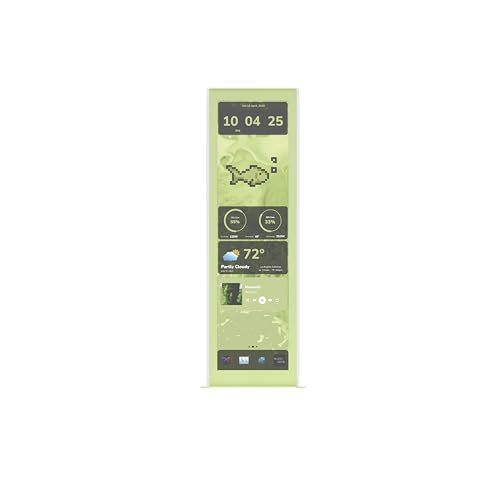
The biggest, brightest screen a case can wear — and it responds to touch
This is a different class of mod entirely. The Y70 Touch Infinite puts a 14.9-inch capacitive IPS touchscreen into the case itself, at 682 x 2560 resolution (marketed as 2.5K) and 178 pixels per inch — a measure of how densely packed the pixels are, which is why text and widgets look crisp rather than blocky. Hyte rates the panel 43% brighter than the previous version, at 500 nits and a 1000:1 contrast ratio. Ten-point touch and a 60Hz refresh keep finger interaction smooth.
You can fill the panel with themes and widgets and arrange them your way, and the touch input turns a status panel into something you actually interact with. The screen quality is the thing that draws the most praise, and the vibrant, responsive display backs that up. It connects through DisplayPort and USB, and at 4.2 pounds it is a serious piece of hardware rather than a token add-on.
The catch is installation. Getting this panel into place takes patience, and screw alignment on the top of the glass panel is where the friction shows up. A few also found it awkward as a fourth monitor. If you enjoy the build as much as the result, that is work you will not mind. If you want a quick mod, this is the longest job on the list.
What it adds: a 14.9-inch, 2.5K, 10-point touch display built into the case, not bolted on beside it.
Plan for: a careful install — screw alignment at the glass panel is the fiddly step.
For the showcase builder: the centerpiece mod when the case itself is the thing everyone looks at.
Not the starter mod: it is the biggest job and the biggest commitment on this list.
Know the Specs
ARGB headers and voltage
Addressable RGB runs on a 5V 3-pin header, which carries power and a data signal so each LED can be addressed separately — that is what lets a strip chase a rainbow rather than glow one flat color. A 12V 4-pin RGB header is a different standard and does not work with 5V strips. Check your motherboard manual before ordering, because a wrong plug is the most common reason a lighting mod arrives and does nothing.
CFM and mmH2O explained
CFM (cubic feet per minute) tells you how much air a fan moves, which is what matters for open case vents. Static pressure in mmH2O tells you how hard it can push through resistance like a radiator or filter. A fan with high airflow but low pressure will feel weak on a radiator. Match the number to the job: open vents want CFM, dense radiators want pressure.
PWM versus fixed-speed fans
A 4-pin PWM fan accepts a speed signal from the motherboard, so it can spin slowly when the system is cool and ramp up when it is not. That is how a five-fan setup stays quiet at idle instead of roaring all the time. Fixed-speed fans run at one rate and are easier but louder. When a listing gives a noise figure like 25.6dBA or 28.2dBA, treat it as the sound at rated speed.
Resolution and pixel density on case screens
On a small case display, resolution and pixel density matter more than they do on a desk monitor because you sit close and read small text. A 800×480 panel handles stats and simple widgets; a 682 x 2560 panel at 178 pixels per inch is built for sharp detail and touch use. Match the screen to the job — a big sharp touchscreen is overkill if you only want to glance at temperatures.
Common Questions
Will a 5V ARGB strip work on my motherboard?
Do I need a controller to run case lighting?
Is higher CFM always better for a case fan?
Can I install a temp monitor screen without a GPU port?
How loud is a 2000RPM case fan next to a 1550RPM one?
Will a PSU cable extension kit fit my power supply?
Does the ASUS TUF ARGB kit fit cases other than the GT502?
What size fan mount does a figurine shelf need?
Do case screen mods need their own power supply?
Can I mix ARGB fans from different brands in one build?
The Bottom Line
For most people, the pc case mods pick that pays off first is the Sirlyr PSU Extension Kit. It fixes the one thing a glass panel shows off most — the cable runs — without needing board software or a free ARGB header. If your goal is airflow and matching fans, the Thermalright TL-M12Q-S X3 delivers the strongest pressure figures on the list for radiator and filtered builds. And if the outside of the case deserves the same glow as the inside, the ASUS TUF ARGB kit is the exact-fit answer for GT502 Horizon owners. Start with the cable kit and one lighting piece to get the fastest visible upgrade.
How we choose
We do not accept paid placement. Every pick is matched to a real buyer and a real use-case; we do not hands-on test units.
Sources
Specifications: manufacturer listings and product documentation. Review insights: verified customer reviews, as of November 2026. Pricing: not shown on this page (it changes often); check the current price via the retailer link.
As an Amazon Associate, Tactical Gear Guy earns from qualifying purchases. This does not affect which products we feature.