Specs are compiled from manufacturer listings and verified buyer reviews and can change over time — please confirm the key details on the product page before buying.
Buying your own modem for Optimum cable internet can shave the rental charge off your bill, but only if the box is actually approved for Optimum’s network. That is the whole game here. A DOCSIS 3.1 modem on Optimum’s approved list provisions cleanly and pays for itself in rental savings; an unlisted one may never connect at all. This guide covers the models that genuinely work on Optimum and tells you exactly which one fits your speed tier.
This guide is built by comparing the manufacturers’ published specifications and the patterns across verified customer reviews, so you get each pick’s real strengths and trade-offs instead of marketing spin.
You will see the channel counts, the downstream and upstream figures, and the plain truth about which boxes handle home phone service. Here is the shortlist of the best Optimum cable modem choices for your connection.
Top Picks


How To Choose The Best Optimum Cable Modem
The single most important step happens before you buy anything: confirm the model is on Optimum’s approved list. Optimum (now under the Altice umbrella) maintains a list of modems it will provision on its network, and a box that is not on that list may refuse to connect no matter how good its spec sheet looks. The second check is your speed tier — a 16×4 modem tops out around 686 Mbps, so if you are paying for a gigabit-class plan you want a 32×8 or DOCSIS 3.1 box to actually reach those rates.
Channels and speed tiers
A channel is a slice of cable bandwidth, and bonding more of them together raises your ceiling. A 16×4 modem bonds 16 downstream and 4 upstream channels, which is plenty for internet plans up to a few hundred Mbps. A 32×8 modem doubles that downstream count, so it can carry a gigabit plan without straining. If Optimum has moved your neighborhood to DOCSIS 3.1, a 3.1-capable modem with OFDM support is the future-proof pick.
Modem only, or modem plus router?
Every box on this list is a modem only — none of them broadcast Wi-Fi. That is a feature, not a flaw: you pair the modem with your own router or mesh system, which usually gives better range than a rented combo gateway. Budget for the router if you do not already own one. The one exception to the modem-only rule is phone service — if you keep Optimum home phone, you need a telephony modem with RJ-11 voice ports.
Side-by-Side Comparison
| Model | Best For | Max Downstream | Max Upstream | Channel/Spec Type | Amazon |
|---|---|---|---|---|---|
| Motorola MB8600★ Best Overall | Gigabit plans and future-proofing | 686 Mbps | 1 Gbps | DOCSIS 3.1 / 32×8 | Amazon |
| ARRIS SB6190Best Value | High-speed value on a 32×8 | 1400 Mbps | 232 Mbps | DOCSIS 3.0 / 32×8 | Amazon |
| TP-Link TC-7620 | Entry-level speed tiers | 686 Mbps | 143 Mbps | DOCSIS 3.0 / 16×4 | Amazon |
| Motorola MB7420 | Everyday home internet | 686 Mbps | 120 Mbps | DOCSIS 3.0 / 16×4 | Amazon |
| Arris Touchstone TM1602A | Phone-line setups | 960 Mbps | 960 Mbps | DOCSIS 3.0 / 16×4 E-MTA | Amazon |
| Arris TM3402 | Optimum internet plus home phone | 1000 Mbps | 100 Mbps | DOCSIS 3.1 / 32×8 (VOIP) | Amazon |
Detailed Reviews
1. Motorola MB8600 DOCSIS 3.1 Gigabit Cable Modem
Our pick — 4.5+★ from 10,000+ verified ratings; the strongest balance of quality and price.
The future-proofing pick that bonds 32 lanes now and is ready for the next upgrade.
If you are on a gigabit-class Optimum plan and want a modem that will not need replacing when the network moves forward, start here. The MB8600 is a DOCSIS 3.1 box with 32×8 channel bonding underneath, so it covers the newer standard and the older one in the same unit. A 10/100/1000 Gigabit Ethernet port lets you connect a single device — your router, a computer, an HDTV, or a game console — and that is the whole point of a modem-only design.
The upstream ceiling is the standout number: 1 Gbps up, against 120 megabits per second on the Motorola MB7420 below, so this is the pick that stops you worrying about upload bandwidth on a busy household. Downstream is listed at 686 Mbps max, though one owner on gigabit service reports hitting 945Mbps on Xfinity. Easy installation shows up repeatedly too — a clear quick-start guide and a box that works after you call Optimum to provision it. Buyers report the reliability is the thing they keep coming back to; it just runs.
Two things to know before you click buy. It is a modem only — no Wi-Fi router and no phone service built in — so you supply your own router, which is fine but worth remembering if you are coming off a rented gateway. A small number of owners hit connection drops and a handful found the provisioning process fiddly with certain providers. Neither is typical, but it is the honest trade-off on a high-tech box. No cable modem here is compatible with fiber, DSL, or satellite, so confirm your address is cable first.
What earns its keep
- DOCSIS 3.1 with 32×8 bonding covers your current gigabit and the next tier up
- 1 Gbps upstream gives you real headroom for uploads and video calls
- Quick-start setup and a clear guide get you online fast
- Rugged, compact design that owners describe as consistent and stable
Where it stings
- No Wi-Fi router or phone port inside — pair it with your own router
- A rare owner sees connection drops requiring a re-provision
- Downstream spec is 686 Mbps, so ultra-high tiers lean on the 3.1 network
Grab this: if you want one modem that handles today’s gigabit plan and whatever Optimum rolls out next.
Think twice: if you still pay for home phone service — you need the telephony box instead.
2. ARRIS SB6190 DOCSIS 3.0 32×8 Gigabit Modem
The high-channel bargain — 32 downstream lanes on an older standard, priced to tempt.
The SB6190 is the value play for someone who wants a lot of channels without paying for DOCSIS 3.1. It bonds 32 downstream and 8 upstream lanes on DOCSIS 3.0 and lists a 1400 Mbps downstream ceiling against 232 Mbps up. That downstream figure is double the 686 Mbps on the TP-Link TC-7620 and the Motorola MB7420, which makes it the strongest pure-speed spec in this list on a spec-sheet read.
What wins people over here is reliability and quality in equal measure — owners consistently call it dependable, and it makes a real difference to a household that was fighting with an old box. On real plans, owners mention it handling 200Mbps service and delivering over 150Mbps with spikes to 180Mbps. Setup is straightforward, with one caveat — you may need to call Optimum and ask them to provision it, and it can take a little patience on the provider’s end. It is also genuinely small, so it does not eat shelf space.
The catch worth knowing: this modem runs on the Intel Puma6 platform, which some owners associate with latency sensitivity, and it does not include Wi-Fi or a phone port. Optimum compatibility is mixed, so check the approved list before you buy — some report it works beautifully, others find it refused. And the front indicator lights are noted as unusually bright, which is minor but real.
Who it suits: the buyer who wants maximum bonded channels for the money and does not need 3.1 yet. The 2-year warranty and 1 Gigabit Ethernet port make it a low-stakes way into owning your own gear.
The match: a high-speed DOCSIS 3.0 pick for mid-tier Optimum plans where you want channels over future-proofing.
Look elsewhere: if you run on a gigabit-tier plan or want Wi-Fi built in.
3. Motorola MB7420 16×4 Cable Modem

The compact workhorse that fits on a desk and just gets on with the job.
If your Optimum plan tops out somewhere in the hundreds of Mbps and you want a straightforward box that does not cost a premium, the MB7420 is a sensible target. It is a 16×4 DOCSIS 3.0 modem rated for service speeds up to 375 Mbps, with a 686 Mbps downstream and 120 Mbps upstream ceiling. It is small — 9.3 ounces and 4.9″L x 2″W x 6.1″H — which is why it slips onto a desk or shelf without complaint, unlike the larger 7.25″L x 2.25″W x 7.88″H MB8600 above.
Functionality is what owners lean on most: it works, the signal stays strong and stable, and there is near-zero configuration time on most setups. Owners on the right plan report up to 300Mbps down and 25Mbps up, and one says the rental savings pay for the modem within four months. The full-band capture tuner helps keep the connection consistent. It is certified by Xfinity, Spectrum, Cox, and lists Optimum in its supported providers.
The honest catch: it is a modem only, so no Wi-Fi and no phone landline support, and a small slice of owners have seen units stop working inside the warranty window. That is rare on a broadly reliable box, but it is the one thing to keep an eye on when you first set it up.
Why people keep it
- 16×4 channels handle typical home plans without breaking a sweat
- Near-instant setup and a stable, strong signal
- Compact 9.3-ounce shell that disappears into a shelf
- Two-year warranty plus surge protection circuits
Room to know
- No built-in Wi-Fi or telephone capability
- 120 Mbps upstream is the lowest upload ceiling here
- A rare unit fails early — check it within the first weeks
Reach for this: on a standard-speed Optimum plan where compact and reliable beats future-proof.
Skip if: you run a gigabit tier or need home phone on the same box.
4. Arris Touchstone TM1602A 16×4 DOCSIS 3.0

A telephone-capable box for Optimum customers who still want a landline in the mix.
The TM1602A is the E-MTA (embedded multimedia terminal adaptor) choice — a modem with telephone support built in, approved for Optimum alongside Time Warner, Spectrum, Cablevision, and Charter. It runs 16×4 channel bonding with a listed 960 Mbps downstream and upstream ceiling, so it can carry high-speed data while handling a phone line through the same box. Two Ethernet ports give you a bit of flexibility a single-port modem does not.
Where it wins: installation. Owners describe getting online in about ten minutes after Optimum verified the box, and the rental savings are the reason most people buy it — it works just like the gateway the provider hands you, without the monthly fee. A few report their internet speed climbing after the swap. The 16×4 channel setup with 960 Mbps rated throughput sits above the MB7420’s 686 Mbps, so if you have a fast tier and a phone, this is one of the few boxes that keeps both.
Go in with eyes open here. Compatibility is the other question: this model is tied to specific providers, and not every Optimum account provisions it cleanly. Confirm your exact service tier and modem approval before you commit, and buy from a seller with a straightforward return path.
The fit: households that keep a home phone and want a single box to carry both internet and voice. It replaces a rental telephony gateway and saves the monthly charge.
Worth a look: if you need voice and internet on one device and your Optimum tier is on the approved list.
Not for you: if a rock-solid track record matters more than phone support — the data-only picks are steadier.
5. TP-Link TC-7620 DOCSIS 3.0 16×4 Cable Modem
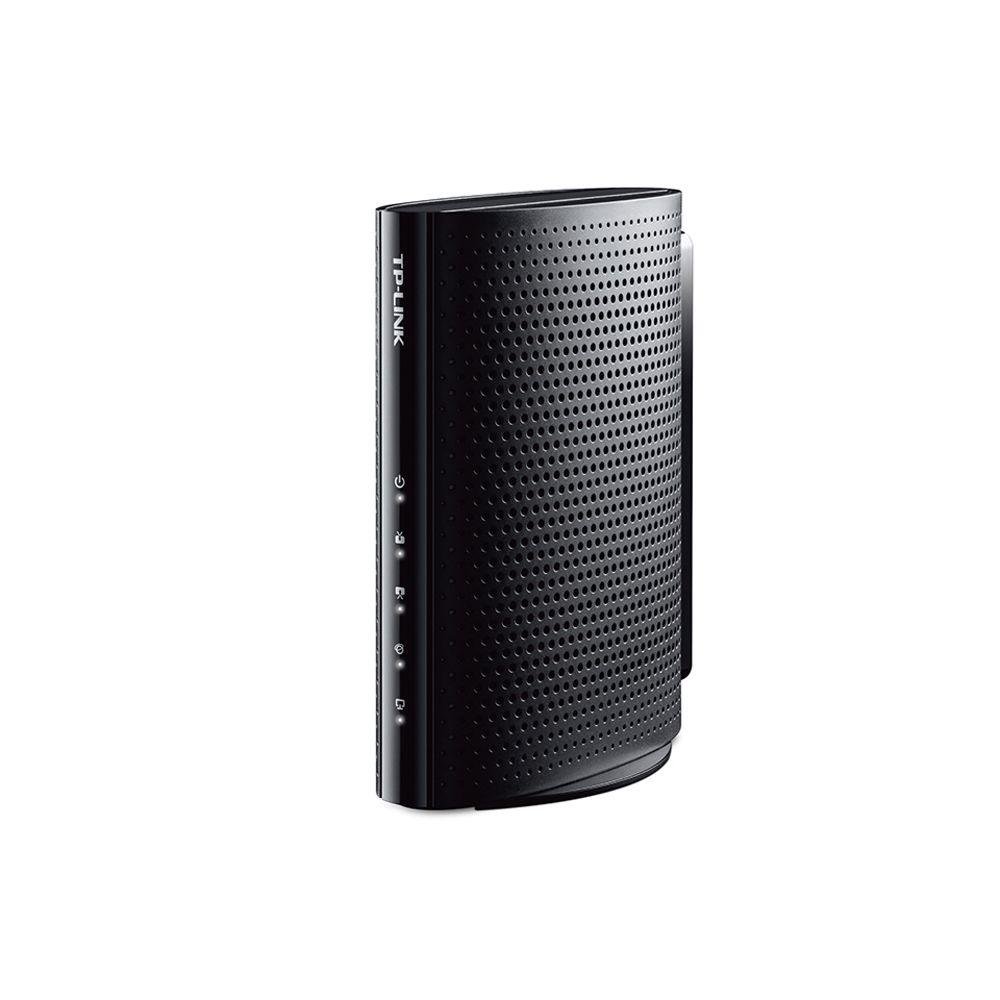
The budget-friendly entry point for a modest Optimum plan that needs no frills.
This is the box to consider when your Optimum plan sits in the lower speed tiers and you want to stop paying the rental charge. It bonds 16 downstream and 4 upstream channels on DOCSIS 3.0, with a 686 Mbps downstream and 143 Mbps upstream ceiling. That upstream figure edges the MB7420’s 120 Mbps, so uploads have a touch more room. It is also lighter than the Touchstone at 1.2 pounds versus 16 ounces.
Customers note downloads up to 165 Mbps and uploads of 25-30 Mbps, so it handles a 150Mbps plan easily but is not a gigabit box. It earns its slot on price: it costs less than most 16×4 modems, and one owner says the rental savings cover a month’s fee. Setup is quick, and a couple of reviewers point out it auto-connected to Xfinity without a call, though with Optimum expect to call and have them activate it.
Two honest limits. It has no Wi-Fi and no phone port, so it needs a router — one owner pairs it with a TP-Link AC1900 mesh unit, which is a sensible match. Most units run reliably for up to two years of continuous use, but a few shoppers say heat buildup or an early failure. Keep it ventilated and check its first days of operation.
Best for: entry-tier plans where a stable, cheap, no-frills modem is exactly what you need. The included Ethernet cable and quick-start guide mean you are online without hunting for extras.
Pick this: to take the cheapest route to owning a modem on a modest plan.
Pass if: your speed tier is high or you want a box that never needs a second thought.
6. Arris TM3402 DOCSIS 3.1 Telephony Cable Modem

Built specifically for Optimum internet plus home phone, with two RJ-11 ports in one box.
This is the one model here designed from the ground up for Optimum Internet + Phone service, not just data. It is an eMTA telephony modem with DOCSIS 3.1 and 32×8/2×2 OFDM/OFDMA support, so it can handle gigabit-class data on compatible Optimum tiers while carrying two RJ-11 phone lines. Two Ethernet ports and no Wi-Fi mean you pair it with your own router or mesh system for coverage. It is listed for Optimum and explicitly not intended for Xfinity, Spectrum, Cox, Verizon, AT&T, or DSL/fiber.
If you keep a landline with Optimum and want to ditch the rental gateway, this is the box that does both jobs in one unit. It is a renewed unit — pre-owned — which explains the smaller review base, and the experience is genuinely a coin-flip depending on your setup. Some buyers report it handling their speed upgrade and dropping the rental fee, others receive a unit that will not power on at all. Maximum downstream is listed at 1000 Mbps, upstream at 100 Mbps.
The catch deserves its own line here. Compatibility with the exact Optimum phone bundle swings the outcome, and a defective unit from the start is a real risk with any renewed telephony modem. Buy it only if you need the voice ports and have confirmed your bundle supports third-party equipment — otherwise the data-only picks are the safer route.
Who it serves: Optimum customers with a bundled internet-and-phone plan who want to own their gateway and stop renting. Two voice ports and two Ethernet ports give you room to wire in what you need.
Choose this: if you keep Optimum phone service and want one box for both internet and voice.
Think again: if you need only data, or if you want a rock-solid out-of-the-box record — this is a renewed unit with a smaller track record.
Know the Specs
Downstream and upstream channels
Channels are bonded lanes your modem gathers to raise your speed ceiling. Downstream channels carry data to you — 16 channels suit mid-tier plans, while 32 channels give gigabit plans room to breathe. Upstream channels carry data from you, so more of them help uploads, video calls, and gaming. Match the channel count to your Optimum tier: a 16×4 modem tops out around 686 Mbps, so a gigabit plan wants 32×8 or DOCSIS 3.1.
DOCSIS version
DOCSIS is the cable internet standard. DOCSIS 3.0 on a 32×8 box handles most high-speed plans fine. DOCSIS 3.1 adds newer modulation (OFDM/OFDMA) that lets a modem reach gigabit-class speeds and stay useful as providers upgrade. If you want to buy once and not worry about the next tier, a 3.1 box is the safer bet — just confirm Optimum provisions it in your area.
Modem only versus a router or gateway
Every modem here is data-only and has no Wi-Fi radio. You connect it to your own router or mesh system with an Ethernet cable and let the router broadcast Wi-Fi. This usually beats a rented combo gateway on range and control, but it means two devices rather than one. Check you own a router before you buy, or budget for one alongside.
Telephony and voice ports
If you keep Optimum home phone, you need an eMTA (embedded multimedia terminal adaptor) with RJ-11 phone ports — that is the jack a standard landline phone uses. The Touchstone and TM3402 include voice support; the plain data modems do not. Only buy a telephony modem if your bundle actually includes phone service, since the extra circuitry is wasted otherwise.
Common Questions
Will the Motorola MB8600 work with Optimum internet?
Do I need a separate router with these modems?
What is the difference between DOCSIS 3.0 and DOCSIS 3.1?
Can I use a modem with Optimum that has phone ports?
How many channels do I need for a gigabit plan?
Will buying my own modem really save money?
Why do some Optimum-approved modems still fail to connect?
Do these modems work with fiber or DSL internet?
Should I buy a renewed telephony modem to save on rental fees?
What internet speed can a 16×4 modem handle?
The Bottom Line
For most people after the best optimum cable modem, the Motorola MB8600 is the clear pick — DOCSIS 3.1, 32×8 bonding, and a 1 Gbps upstream that covers a gigabit plan and the next one after it. If you want maximum bonded channels for less and do not need 3.1, the ARRIS SB6190 leads on raw downstream spec at 1400 Mbps. And if you keep Optimum home phone, the Arris TM3402 is the box that carries both internet and voice. Match the modem to your actual speed tier and confirm it is on Optimum’s approved list — that single check is what separates a smooth install from a bricked box.
How we choose
We do not accept paid placement. Every pick is matched to a real buyer and a real use-case; we do not hands-on test units.
Sources
Specifications: manufacturer listings and product documentation. Review insights: verified customer reviews, as of November 2026. Pricing: not shown on this page (it changes often); check the current price via the retailer link.
As an Amazon Associate, Tactical Gear Guy earns from qualifying purchases. This does not affect which products we feature.