Specs are compiled from manufacturer listings and verified buyer reviews and can change over time — please confirm the key details on the product page before buying.
You want to see your coolant temperature, boost pressure, or voltage without taking your eyes off the road, and you want it to actually work on your car. That is the whole decision here. A gauge display plugs into your car’s OBD2 port (the diagnostic socket under the dash that the engine computer talks through) and shows live engine data on a screen you mount on the dash or windshield. The right one matches your model year, reads live ECU data instead of GPS guesses, and stays readable in daylight. The wrong one shows blank fields, wrong speeds, or fights your car’s computer. This guide covers nine standalone OBD2 gauge displays and tells you which one suits which driver.
This guide is built by comparing the manufacturers’ published specifications and the patterns across verified customer reviews, so you get each pick’s real strengths and trade-offs instead of marketing spin.
Below you will find a comparison table, plain-English spec explainers, and honest notes on compatibility limits before you commit. The picks are sorted by model-year coverage, data channels, and mounting style rather than screen size alone.
Top Picks


How To Choose The Best OBD2 Gauge Display
The first thing to check is not the screen — it is whether the unit talks to your car. Most OBD2 gauge displays expect a 16-pin port on a vehicle built after 2008, and some go back to 2005 on certain Japanese and European brands. Before you read another word, find your car’s model year and your port shape. If you drive a pre-2008 vehicle, a dual OBD2-plus-GPS unit is often the safer bet because the GPS side supplies speed even when the OBD2 side cannot.
Match the unit to your model year and port
A 1996-or-newer car with a 16-pin OBD2 port is the standard target. Some displays explicitly state support for 1996+ vehicles, while others stick to 2003 or 2008-and-newer. Diesel trucks with 6-pin or 9-pin ports need a dedicated diesel unit, not a standard OBD2 gauge. Read the compatibility line on each product carefully, because “universal” rarely means every car made since the invention of the automobile.
Decide if you need GPS backup
GPS mode uses satellite signals to compute speed and time, and it works even on older or specialty vehicles where OBD2 data is thin. A dual-system display lets you switch between OBD and GPS at startup. That dual-system setup adds a GPS antenna and a startup mode choice, but it keeps the speedometer working if your car’s ECU refuses to share certain channels.
Count the gauges you actually use
More displayable parameters is not automatically better if they crowd the screen. What matters is how many you can see at once and how quickly you can switch layouts. Some units show up to 9 gauges on screen, some show 12 data sets on one interface, and some dedicate pages to separate vehicles or driving modes. If you only care about coolant temp and voltage, a two-gauge layout is less distracting than a 12-data cluster. If you are tuning or towing, more data points earn their space.
Side-by-Side Comparison
| Model | Best For | Screen Size | Power Source | Vehicle Support | Amazon |
|---|---|---|---|---|---|
| ScanGauge 3★ Best Overall | No-app touchscreen control | 4.3″ touch | OBD2 port | 1996+ 16-pin OBD2 | Amazon |
| LORPHEIR L5010 HUDBudget Dual-System | Budget dual OBD2 + GPS | Not listed | OBD2 / USB | 2008+ OBD2, GPS any | Amazon |
| KONNWEI KW206Budget Champion | Budget all-in-one scanner | 3.5″ color | OBD2 port | 2003+ OBDII | Amazon |
| Dyno Racing BX102864 | Inclinometer + boost gauge | LCD meter | OBD2 port | 2008+ OBD2/EOBD | Amazon |
| Lufi XF-06 | Deep customization | Not listed | OBD2 port | US 2008+, JP/EU 2005+ | Amazon |
Detailed Reviews
1. ScanGauge 3 SG3
Our pick — 4.5+★ from 500+ verified ratings; the strongest balance of quality and price.
The self-contained touchscreen that skips the phone, the app, and the subscription entirely.
If you want a gauge display that behaves like a small dedicated computer on your dash, the ScanGauge 3 is the one to beat. It runs everything on a 4.3″ capacitive color touch screen — that is the responsive, finger-swipe kind rather than the press-hard kind — with a native resolution of 480×272. Two fingers swiped up or down brighten or dim the screen, so it stays readable in glare and gentle at night. The display can show up to 9 gauges at once, spread across three pages you set up for different vehicles or driving uses. That means a tow page and a commute page can coexist without reprogramming.
Nothing here depends on your phone. No app, no subscription, no pairing screen — the unit powers straight from the OBD2 port, so there are no batteries to charge or replace. Free updates arrive over 2.4 GHz WiFi (the standard home WiFi band) as newer vehicles and features appear, so you do not have to ship it back for new software. Live MPG, fuel used, and trip data are included, and you can set fuel type to gas, hybrid, diesel, or LPG, then calibrate against a fill-up so the numbers match what you actually pumped. XGauge auto scan hunts down extra supported channels such as transmission temp, with published XGauge codes available when your vehicle needs manual input.
The coverage target is 1996-and-newer cars and light trucks with a 16-pin OBD2 port, including newer WWHOBD vehicles. It is not built for 6-pin or 9-pin diesel ports — that job belongs to the ScanGauge D. The included 6 ft OBD2 cable and Deluxe Window Mount attach magnetically, rotate 360 degrees, and lift off so you can move the unit between vehicles without buying a second mount. This is the strongest overall package in the group, and it is what wins people over: the setup is simple enough that it stops feeling like a gadget and starts behaving like part of the dashboard.
What earns its spot up top
- Everything lives on the 4.3″ touch screen with no phone, no app, and no subscription in the chain.
- Up to 9 gauges across three pages, so you can build separate layouts for different vehicles and uses.
- Free 2.4 GHz WiFi updates keep it current with newer vehicles and added features.
- Magnetic 360-degree window mount lifts off and travels between cars in seconds.
Where the limits sit
- 6-pin and 9-pin diesel ports are out — those need the separate ScanGauge D model.
- Extra gauges like transmission temp depend on what your specific vehicle exposes.
- On the high end of this group’s range, so it suits buyers who want the no-app experience.
Go for it if: you want a dedicated, battery-free touchscreen that never asks you to open a phone app.
Pass on it if: you drive a diesel with a 6-pin or 9-pin diagnostic port, where this unit simply is not designed to connect.
2. OBD2 GPS Car HUD
Picks up satellite speed when your older vehicle’s OBD2 port has nothing to say.
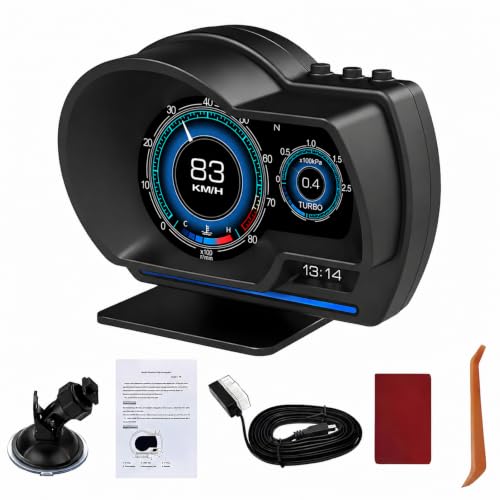
The LORPHEIR L5010 is the pick that hedges its bets. It runs two systems — OBD2 for on-board engine data and GPS for satellite-based speed — so a car that resists the diagnostic side still gets a working speedometer. That is the reason to choose it over a pure OBD2 unit. It measures 4 x 3 x 2 inches and weighs 10 ounces, which is heavier than the Dyno Racing P6 below at 6.72 ounces. The difference shows up as a slightly heftier lump on your dash, though both mount the same way. Over 20 parameters are available, including speed, RPM, water temperature, voltage, fuel consumption, altitude, driving time and distance, turbo pressure, intake pressure, oil temperature, and navigation coordinates.
Installation is deliberately flexible. You get a 360-degree rotating suction cup bracket for the windshield, a console mounting base, and adhesive tape for permanent placement — so you can position it without blocking your view. A dual-core processor and dual-system memory keep the switching smooth, and the maker claims real-time data accuracy within 1% variance. It is rated for -40°C to +80°C and 10-95% humidity, with built-in 11-18V voltage protection. Overspeed alerts and fatigue driving warnings round out the safety side.
The honest middle ground: the build quality leads the conversation here, and the everyday ease of use holds up. The mixed part is functionality and value — for some cars it performs exactly as advertised, and for others it falls flat. That split is typical of dual-system HUDs, where results track your vehicle as much as the device.
Reach for this if: you want speed and engine data from one small dual-system unit without stretching the budget.
Look elsewhere if: your car needs guaranteed data across every channel — the GPS fallback covers speed, not coolant temp on a stubborn pre-2008 vehicle.
3. KONNWEI KW206
A gauge and a fault-code scanner in one small dashboard box.
The KONNWEI KW206 stands out for combining two jobs. It is a live trip computer and a diagnostic scan gauge in one unit, showing speed, RPM, coolant temperature, fuel consumption, and total mileage on a 3.5″ color LCD. It also reads and clears DTCs — diagnostic trouble codes, the stored fault messages behind your check engine light — and lets you check the live data stream to pin down why the light came on. For a household that wants one tool for both monitoring and basic troubleshooting, that dual role is the case for it. That screen measures 3.5″, smaller than the ScanGauge 3’s 4.3″ touch display up top.
Four alarm parameters — RPM, VSS speed, ECT (engine coolant temp), and voltage — can be set to warn you before you drift into a risky range, which helps curb over-speed habits. Compatibility covers all 2003-or-newer OBDII-certified gas and diesel cars, SUVs, and light trucks, including J1850, CAN, and EOBD protocol vehicles. You plug it into the port and it powers on automatically, then walks you through on-screen instructions. On-top four-button operation keeps the menu simple, and it can switch between metric and imperial, auto-adjust screen brightness, and run a 0-100 speed-up test.
Two details make it easy to live with. It supports lifetime software updates to fix issues down the road, and you can leave it plugged in — it enters sleep mode when the engine is off and powers on when it detects ignition. It weighs 275 g and is built from metal. The typical setup is forgiving, though a minority of drivers find the speedometer readings or older-car compatibility off. A 2000 Civic is the kind of aging vehicle cited where the handshake can be shaky, so check your model year before you rely on every channel.
Why it earns its keep
- Doubles as a fault-code reader and clearer, not just a gauge display.
- Works on 2003-and-newer OBDII gas and diesel vehicles across J1850, CAN, and EOBD protocols.
- Lifetime software updates and auto sleep/wake mean you can mount it and forget it.
What to expect
- Smaller 3.5″ screen than the top touch option.
- A minority of older vehicles see inaccurate speed readings or partial compatibility.
Choose it for: one inexpensive unit that watches live data and helps you deal with a check engine light.
Think again if: you drive a much older model where OBD2 protocol handshakes are known to be fussy.
4. OBD2 Gauge Car HUD

Adds an inclinometer and a strobe-lit face to the usual speed-and-temp readouts.
This Dyno Racing unit is for the driver who wants more than speed and temp on the glass. It reads speed, voltage, water temperature, RPM, fuel consumption, total mileage, and adds a boost gauge plus an inclinometer for tilt awareness on slopes. You get multiple display interfaces with a strobe-style atmosphere lamp and free switching between them, plus a readable face day and night. You can set the car logo to show on screen for a personal touch. It also reads data streams and clears fault codes. At 7.52 ounces and 4.49 x 1.47 x 3.11 inches, it is a compact dash companion with a 3-month warranty.
Compatibility is the critical line to read. This is strictly an OBD2 and EOBD unit for vehicles built after 2008, running on 11V-18V at 12V and 200mA. If your car predates that window, a dual-system unit like the LORPHEIR above is the more forgiving route. Mounting uses an adjustable bracket that rotates 360 degrees to set the viewing angle and height, with two options — dash placement or windshield stick-on — and no drilling. Overspeed warnings and a fatigue-driving reminder are part of the package, so long highway stretches get a nudge. The included manual walks through setup, and it pays to read it before the first plug-in.
The extra-sensor angle: the inclinometer and boost readout are what separate it from a basic HUD, useful if you tow on grades or watch turbo behavior.
Worth knowing: its 2008-and-newer OBD2 limit rules out older vehicles, and the short 3-month warranty is the shortest coverage in this group.
Fits you if: you want an inclinometer and boost gauge folded into a compact, angle-adjustable HUD.
Skip you otherwise if: your car is pre-2008 — this one will not talk to it.
5. XF OBD2 Gauge Display
Where the screen, colors, and engine parameters bend to your preferences, not the other way around.
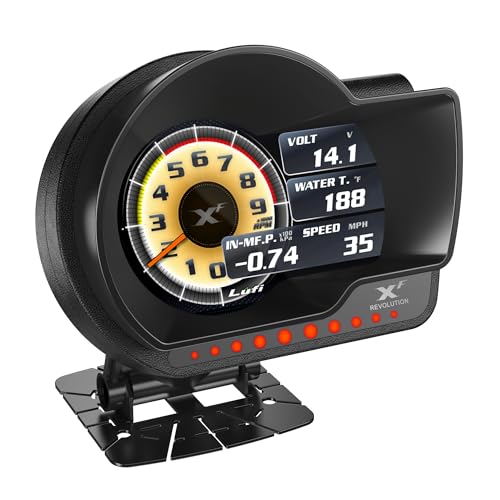
The Lufi XF-06 earns its spot on customization: you can upgrade the instrument program, build different display data combinations, change display colors, and even swap the car logo on screen. It connects through the car’s 16-pin OBD2 port and monitors live ECU data (engine computer readings) — water temperature, boost pressure, fuel consumption, speed, and more — with the caveat that it can only show data from sensors your car actually has. Buyers report the build quality is what wins them over, with functionality and accuracy close behind, and they also praise the easy install and responsive, lag-free refresh. If you just want one fixed readout, the Dyno Racing P6 above is simpler; pick the XF-06 when you want to design your own screen.
The alarm system is one of its better ideas. When ECU values like water temperature, turbo pressure, or exhaust temperature climb past dangerous thresholds, pop-up windows and audible alarms warn you before damage sets in, and it also handles common fault-code clearing and reminders. A maintenance-mileage setting reminds you when service is due, and an odometer function makes it handy as a spare gauge on older vehicles. Compatibility reaches American brands built after 2008 and Japanese and European brands after 2005, with the exception of pure electric vehicles.
One limit needs stating plainly. Oil temperature and transmission temperature or pressure are not supported by every car brand from the start, and a few models need custom PIDs with help from the maker’s engineers. There is no suction cup in the box — the base is fixed with double-sided tape instead, because suction mounts drift with temperature swings. At 9.9 ounces it sits solidly once taped down.
The customization payoff
- Program upgrades, color changes, data-combination layouts, and a custom car logo.
- Pop-up and audible alarms for water temp, turbo pressure, and exhaust temp.
- Maintenance-mileage reminders plus an odometer role for older cars.
- Wide brand coverage — US 2008+, Japanese and European 2005+.
The fine print
- Oil and transmission temp data is not guaranteed on every brand without custom PIDs.
- No suction cup — the base is taped down, so it is less portable between cars.
- Not compatible with pure electric vehicles.
Made for: the driver who wants to shape every color and parameter on screen and gets a kick out of tuning the layout.
Less ideal for: anyone who expects transmission temp to just appear — verify your brand supports it first.
6. X7 OBD2 Gauge Display

Twelve engine data sets stacked on a single interface for the data-hungry driver.
One interface on the Lufi X7 can show up to 12 sets of ECU data at once — water temperature, turbo pressure, air-fuel ratio, fuel consumption, and more — so you can watch fuel habits and engine conditions during spirited driving without switching screens. That is more data per screen than the Lufi XF-06 above, which leans on color and layout instead. It connects to the 16-pin OBD-II port via the supplied cable and reads real-time ECU channels like coolant temp, boost pressure, fuel consumption, and speed. The aim is overload prevention, giving you a heads-up when the engine is working harder than it should. It weighs 10.56 ounces and runs on 12 volts with a 1-year warranty.
Customization runs deep. You can change the data shown on the dashboard interface, the display colors, and even the minute pointers, and you can set a custom car logo. The PID question is the one to understand before buying. Oil temperature and transmission temperature or pressure are not shown by default, and you use the built-in PID commands to test whether your vehicle supports them. Where it does not, you can look up the correct PID parameters with a diagnostic tool and the engineering team can write dedicated ones for you.
Compatibility covers American brands after 2008 and Japanese and European brands after 2005, with pure electric vehicles excluded — check your model against the product image before ordering. There is no suction cup in the packaging; the maker recommends double-sided tape to fasten the base so temperature swings do not loosen it. On the whole it earns its place on quality, with value seen as fair for the feature set. Compatibility is the split note — it works great for many cars and trips up on some ports.
Built for the data hound: 12 simultaneous data sets is the headline, and the pointer-and-logo customization keeps a busy screen looking intentional.
Check before you commit: that same PID uncertainty applies to oil and transmission temp, and the taped base means it stays put on one dash rather than hopping between cars.
Pick it when: you want the most simultaneous engine data on one screen and enjoy tailoring every color and pointer.
Hold off if: your GM port or older vehicle has given OBD2 devices trouble before.
7. X1 Obd2 Gauge Display

Built for the car that never had a speedometer or tach from the factory.
Some vehicles leave the lot without a tachometer, and some older builds have a speedometer that has seen better days. The Lufi X1 targets exactly those cars — an all-in-one HUD and OBD scanner meant to stand in for missing factory instruments. Its LCD shows speed, RPM, water temperature, fuel consumption, and turbo pressure, and it reads and clears engine fault codes. Over 30 driving data points are on tap so you can watch every detail without dropping your eyes to the dash. The functionality is what it does best, with installation and value close behind.
Customization is pitched at solving the classic OBD2 gauge failures — frequent crashes, black screens, pixel drop, and inaccurate data. The system carries its own data fine-tuning function aimed at Honda, Toyota, Volkswagen, and Mazda models. Alarms trigger on turbo pressure, high water temperature, overspeed, RPM limits, and engine trouble codes, helping you catch an overload before it bites. It also switches units between metric and imperial, auto-adjusts screen brightness, and transfers data at a fast rate. Acceleration tests cover 1/4 mile, 0-60MPH, and 0-100MPH, and an automatic sleep mode lets you leave it in the car without unplugging.
There is one honest catch, and it comes from the maker. Wearing polarized sunglasses makes the TFT screen look blurred, so the maker does not recommend buying it if you routinely drive in polarized shades. Accuracy is the mixed part among buyers — it works amazingly for some and not well at all for others, which again tracks the vehicle as much as the unit. It weighs 10.56 ounces, comes with an OBD2 cable, and carries a 1-year manufacturer warranty.
The polarized-glasses warning: if you never take off polarized sunglasses behind the wheel, this screen will read blurry for you — a real fit issue, not a defect, and worth deciding on before you buy.
Who it shines for: tach-less cars and Honda/Toyota/VW/Mazda owners who want data fine-tuning built in.
Suits you when: your car lacks a factory tach or speedometer and you want a display plus fault-code reader to fill the gap.
Choose differently if: you drive in polarized sunglasses daily, where the screen will not read cleanly.
8. AEM 30-0311 X-Series OBDII Gauge

A round, slim gauge built to slip into a standard pod and disappear into the dash.
The AEM 30-0311 is a different shape of product from the windshield HUDs here, and that is its advantage. It is a 2-1/16th-inch (52mm) round gauge sized to drop into an existing gauge pod, with a slim 0.825″ overall depth and a 0.200″ cup depth so it mounts almost anywhere. Power and data come straight from the OBDII port using the supplied connector, on vehicles from 2008 model year and newer, and it reads and clears diagnostic trouble codes. A positive-locking connector keeps the link secure, and an auto-dimming sensor sets the display brightness to suit the light. It is compatible with vehicle and system voltages up to 16V.
Accuracy is where this gauge makes its name, alongside a clean look that blends into a modified interior. Twenty-four green outer LEDs give a quick visual reference to the engine parameter you are tracking, so a glance tells you whether things are in range. Ease of use and ease of install round out the appeal, and 2008-and-newer coverage keeps the wiring simple. It weighs 0.22 kg, is built from plastic, and comes with a black bezel and black faceplate along with a 1-year manufacturer’s warranty.
The honest side of the story is functionality. It works well for a large share of buyers and simply does not for some — a split pattern that usually traces back to the specific vehicle and system. If you want a factory-clean round gauge that reads live channels and clears codes, this is a tidy choice. If you want a large multi-gauge touchscreen you can move between cars, the ScanGauge 3 and the windshield HUDs above are the better fit.
Right choice for: anyone building a gauge pod who wants a slim 52mm round display that reads and clears codes.
Wrong shape if: you want a big multi-parameter touchscreen for the windshield — this one is designed to sit in a pod.
Know the Specs
OBD2 Compatibility and Model-Year Windows
Check your car’s model year before you buy, because OBD2 (the standardized diagnostic system most cars switched to in the late 1990s) is usually described by model-year windows rather than a blanket “all cars.” Units here span 1996+ (ScanGauge 3), 2003+ (KONNWEI KW206), 2008+ (AEM, Dyno Racing, LORPHEIR, Lufi), and mixed brand windows (Japanese and European brands from 2005). The rule of thumb: match the stated model-year window to your car, and if you fall outside it, look for a dual OBD2-plus-GPS unit that keeps speed working. Diesel trucks with 6-pin or 9-pin ports need a separate diesel model altogether.
PID Support and the Data You Actually Get
PID stands for parameter ID — the code the gauge uses to ask the engine computer for a specific value. Some channels, like coolant temperature and RPM, are broadly supported. Others, like oil temperature and transmission temperature, depend on whether your car exposes them. That is why Lufi units mention custom PIDs and testing tools. A screen fill with blank slots usually means the vehicle does not broadcast that channel, not that the gauge is broken. Check brand-specific support before expecting specialized readings.
Mounting: Windshield, Dash, or Pod
Mounting choice affects daily usability. Windshield suction brackets with 360-degree rotation let you angle the screen without blocking your view, but suction can drift with temperature — several Lufi units tape the base down instead. Dashboard placement keeps the unit lower and steadier. Round pod gauges like the AEM 2-1/16th-inch (52mm) design drop into an existing cup and take up almost no dash real estate, suited to a modified interior rather than a quick transfer between vehicles.
Screen Type, Size, and Daylight Readability
Screen choices range from a 4.3″ color touch display with 480×272 native resolution to a 3.5″ color LCD, from LCD meters to a TFT panel and a round LED-accented gauge. Size affects how many gauges fit at once — up to 9 on the ScanGauge 3, up to 12 data sets on the Lufi X7. Readability is the real measure: auto-dimming sensors and brightness controls keep the display usable in glare and gentle at night. If you wear polarized sunglasses, note that some TFT screens can look blurred through them.
Common Questions
Will an OBD2 gauge display work on my pre-2008 car?
Do I need an app or a phone to use these gauge displays?
Can an OBD2 gauge clear my check engine light?
Why does my gauge show no data for oil temperature or transmission temperature?
Will a gauge display drain my car battery if I leave it plugged in?
What is the difference between OBD2 mode and GPS mode?
How many gauges can I display at once?
Can I move a gauge display between two cars?
How do I install an OBD2 gauge display without drilling?
Do these gauge displays support diesel trucks and 6-pin or 9-pin ports?
The Bottom Line
For most drivers, the best OBD2 gauge display here is the ScanGauge 3. It puts a 4.3″ capacitive touch screen, up to 9 gauges across three pages, live MPG with fill-up calibration, and free 2.4 GHz WiFi updates into one cable-free, phone-free unit on 1996-and-newer OBD2 vehicles. If you drive an older or specialty car where the diagnostic port is unreliable, the dual-system LORPHEIR L5010 keeps speed working through GPS. For a budget all-in-one that also clears your check engine light, the KONNWEI KW206 does double duty. And if you are building a gauge pod rather than a windshield setup, the slim round AEM 30-0311 drops straight into a 52mm cup. Match the model-year window to your car, confirm your port shape, and check whether the channels you want are actually broadcast — that is the honest path to picking right.
How we choose
We do not accept paid placement. Every pick is matched to a real buyer and a real use-case; we do not hands-on test units.
Sources
Specifications: manufacturer listings and product documentation. Review insights: verified customer reviews, as of November 2026. Pricing: not shown on this page (it changes often); check the current price via the retailer link.
As an Amazon Associate, Tactical Gear Guy earns from qualifying purchases. This does not affect which products we feature.