Specs are compiled from manufacturer listings and verified buyer reviews and can change over time — please confirm the key details on the product page before buying.
You want your laptop to stop cooking its own components — and a stand with a fan is the cheapest way to do that. The catch is that fan count is not the same as cooling, and a howling 13-fan pad can be worse to live with than a single well-sealed turbo fan. What follows is a plain breakdown of which of these pads actually keeps a hot machine stable, sorted by the job each one does best.
This guide is built by comparing the manufacturers’ published specifications and the patterns across verified customer reviews, so you get each pick’s real strengths and trade-offs instead of marketing spin.
We’ll cover how to match a pad to your laptop’s intake layout, the difference between raw RPM and real airflow, and the noise tax that comes with the biggest fans. Pick the right one and a cooling pad becomes the cheapest performance upgrade you can buy for a hot laptop.
Top Picks

How To Choose The Best Notebook Stand with Fan
A cooling pad only works if the moving air reaches the vents on the bottom of your laptop. Everything else — RGB, extra ports, how many fans sit under the mesh — is secondary. Get the air path right and even a modest three-fan pad drops your temperatures.
Match the fan size to your laptop’s intake
A large laptop with a wide bottom grille benefits from one big fan sealed against the shell. Smaller machines with narrow vents do better with several small fans spread across the surface, so at least one sits under the intake wherever it happens to be.
Read the RPM, then read the noise
Fan speed is measured in RPM (revolutions per minute — how many times the blade spins in a minute). A higher RPM moves more air, and that is where the real cooling comes from. The trade-off is volume: a turbo fan pushing hard is audible in a quiet room. A pad with a speed dial or low/medium/high modes lets you dial it back for office work and open it up for gaming.
Decide if you need a seal
Some pads use memory foam or sealing foam around the fan to press air into the laptop’s own intake rather than letting it spill sideways. That seal is the difference between a pad that cools a little and one that cools a lot, especially on high-power gaming laptops.
Check the tilt range and the lip
Multiple height settings raise the back of the screen for typing comfort. Just as important is a front lip or stopper that keeps the laptop from sliding down the tilted surface — worth checking before you commit if you game or type at a steep angle.
Side-by-Side Comparison
All five columns use the same dimensions across every row, so you can scan the trade-offs in one pass.
| Model | Best For | Fans | Height Settings | Laptop Fit | Amazon |
|---|---|---|---|---|---|
| llano V12 Ultra★ Best Overall | Big gaming laptops that run hot | 1 turbo fan (5.5″) | 3 (15°, 12°, 3°) | 15.6″–19″ | Amazon |
| Gaming Laptop Cooler 13-FanMost Lighting Options | RGB-heavy desk setups on a budget | 13 (3 large, 10 small) | 9 (10°–45°) | 15″–21″ | Amazon |
| havit HV-F2056Quietest Crowd Favorite | Quiet everyday cooling, big review base | 3 | 2 | 15.6″–17″ | Amazon |
| Amazon Basics Cooling Pad | Simple set-and-go cooling with a dial | 6 | 6 | Up to 17″ | Amazon |
| Kootek LCP04 | Adjustable angle on a light budget | 5 | 6 | 12″–17″ | Amazon |
| Trullypine 10-Fan | RGB and high tilt on a smaller budget | 10 (4 large, 6 small) | 7 | 12″–18.1″ | Amazon |
| IETS GT500 | Serious gaming heat, infinite speed control | 2 turbofans (4200 RPM) | — | 13″–17.3″ | Amazon |
| llano V10 | Turbo power with tactile buttons | 1 turbo fan (4.72″) | 3 | 13″–17.3″ | Amazon |
| KLIM Turbofrost | Aluminum build and long-term backup | 4 (4000 RPM each) | — | Up to 17.3″ | Amazon |
Detailed Reviews
1. llano V12 Ultra Laptop Cooling Pad
Our pick — 4.5+★ from 750+ verified ratings; the strongest balance of quality and price.
One massive sealed fan that forces air into the laptop instead of blowing past it.
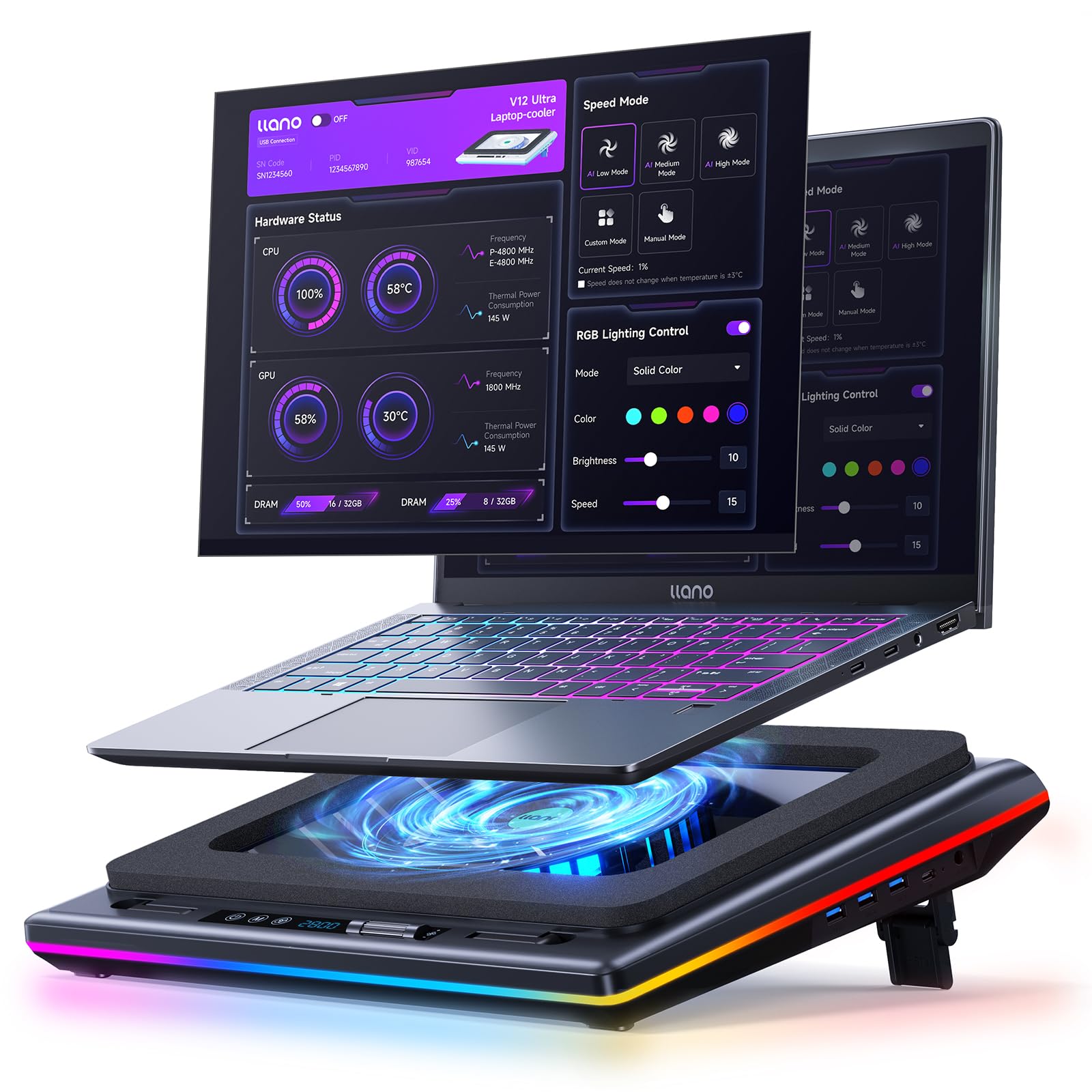
If you own a 15.6- to 19-inch gaming laptop that hits its thermal limit mid-match, this is the pad built for exactly that problem. A single 5.5-inch turbo fan spins up to 2800 RPM and presses air through a memory-foam edge seal, so the cool air has nowhere to go but into your machine’s bottom intake. The maker rates the drop at up to 22°C in 90 seconds — treat that as a best case, but the memory-foam seal is what makes it plausible rather than hopeful.
Power comes from a dedicated 36W adapter that plugs into the wall, so the fan runs at full tilt without stealing juice from your laptop’s battery. Three smart modes can adjust speed automatically to your workload through the Myth.cool software — though that software only runs on Windows 64-bit and above, and there is no macOS or Linux version. Manual control still works via the built-in scroller, so Mac and Linux users lose the automation but not the control.
Owners single out the build and cooling quality more than any other aspect, by a wide margin. The honest counterweight is noise: at high fan speeds it is loud enough to notice, and that is the trade you make for a sealed turbo fan at full power. A 1-in-3 USB 3.0 hub (a port that splits one connection into three) runs at 5Gbps, so your mouse, keyboard, or drive plugs into the pad and you skip a second cable to the laptop. The removable dust mesh filter pops out with no tools, so cleaning takes seconds. It also gives you a 3-Port USB hub, three tilt settings at 15°, 12°, and 3°, and a 16.9″L x 12.9″W x 2.7″H footprint. That footprint is noticeably larger in every direction than the havit HV-F2056 at 14.96″L x 11.02″W x 1.18″H — the size you accept to move that much air.
Where it earns the top slot
- Sealed 5.5″ fan at up to 2800 RPM pushes air into the intake rather than across the shell
- Dedicated 36W wall adapter keeps full fan speed off your laptop’s battery
- Removable dust filter cleans up without tools, protecting both pad and laptop airflow
- 5Gbps USB-A to C hub data transfer for mouse, keyboard, or drive
What you give up for that airflow
- Audible at high fan speed — the one thing the review base pushes back on
- Smart auto-adjustment only works on Windows 64-bit and above
- Takes more desk depth than a slim three-fan pad
Take a hard look at this one if: you want a sealed turbo fan with software control and don’t mind real fan noise for real temperature drops.
Think twice if: you run macOS or Linux, or you need a quiet laptop for recording — the speed modes are manual-only and the high setting is loud.
2. Gaming Laptop Cooler
Thirteen fans and nine tilt stops for someone who wants screen drama, not just airflow.
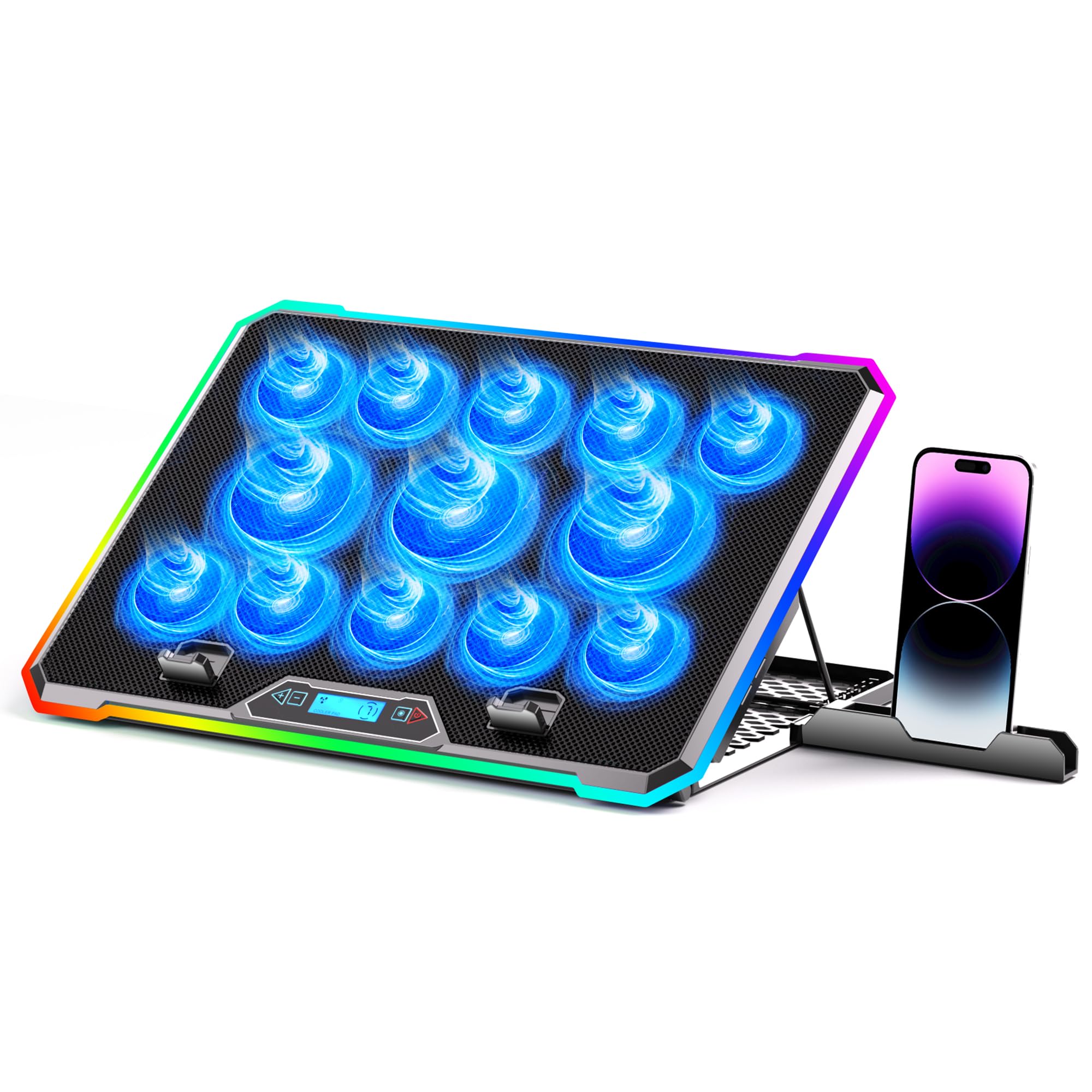
Here is the headline number: 13 fans — 3 large and 10 small — against the single turbo fan on the llano V12 Ultra. That spread of fans is what happens when you need coverage across a wide bottom grille, and the LCD screen lets you watch the cooling instead of guessing at it. Cooling is the aspect owners talk about most, and you can add the lighting layer separately with 10 RGB modes that remember your last setting, plus a one-touch switch to kill the lights for work hours.
You get far more angle choice here than on the havit HV-F2056: nine stop points from 10° to 45°, against just two settings on the havit. That range is where this pad separates from everything else on the list. A silicone phone holder sits up front, so your handset stays put while the laptop tilts. Power comes straight off your laptop’s USB port, so there’s no wall adapter to pack, and the dual USB ports let you still connect two peripherals through the pad.
This is the one pad on the list where the trade-off is structural rather than a preference. The build has a rough reputation: the recurring story in the review pages is of a hinge or frame failing well inside a year. So treat it as a desk-bound pad and skip the lap-and-sofa routine that its non-slip base invites. A few buyers report the lights cannot always be fully switched off, and fan noise draws a split verdict, with users split between very quiet and louder over time. Non-slip stability on uneven surfaces is genuinely good, which makes the short build life the real gamble.
The tilt argument: nine height stops from 10° to 45° is the widest adjustment range in this whole group, and the silicone phone holder makes a lap-desk setup genuinely usable.
Buy it knowing: the frame is the weak link. If you want a pad that survives a couple of years of hard daily use, the metal-shelled options lower down suit you better.
The right call for: a set-dressing-friendly gaming desk where the pad stays put and the RGB is the point.
Pass on it if: it needs to travel or survive years of heavy use — the frame is where these end.
3. havit HV-F2056 Laptop Cooling Pad
The three-fan pad that built a following on silence rather than horsepower.
Three fans, two height settings, and a shell 1.18 inches thick — this is the pad people buy when they mostly want the laptop cooler to stop roaring. At 697.3 g it is the lightest full-size pad here, and that is the difference you feel when you slide it into a backpack. The metal mesh top gives the laptop a stable, flat surface, and the USB port and power switch mean you don’t lose a port to the fan.
Quiet operation is the reason this one has a following. It’s the most-praised trait in a pile of feedback that dwarfs every other pad here, and you can barely hear the fans running on a desk. Cooling is steady rather than dramatic — enough to keep a general-use laptop from throttling, not a sealed turbo fan pushing air into a gaming rig’s intake.
Reliability is where expectations split, and it’s worth sizing honestly: the fan assembly on some units quits early, so it’s the pad you buy for quiet everyday cooling rather than a five-year fixture. Watch the cable spec too — the bundled lead is USB to USB, so a USB-C-only laptop needs a Type-C to USB adapter to run the fans at all.
Why it stays on the list: nothing else here runs this close to silent at this weight, and the slim shell means you’ll actually carry it. It beats the Amazon Basics pad on noise and the Trullypine 10-fan on portability.
Where to be careful: it’s a general-use cooler, not a gaming-class one. If your GPU is already throttling, this pad won’t fix it.
Reach for this if: you want a slim, near-silent pad for everyday laptop use and occasional travel.
Look elsewhere if: your laptop already throttles under load — this cools gently, not forcefully.
4. Amazon Basics Laptop Cooling Pad Stand

Six fans, a simple dial, and nothing you have to learn to use it.
Six fans spread across the deck do the work, and a turn knob sets the speed — no software, no modes, no app to install. A blue LED confirms the fans are spinning so you aren’t left wondering. Six adjustable-height settings give you more tilt range than the havit’s two, and it fits laptops up to 17 inches (43.2cm) including MacBook, Dell, HP, and ASUS machines.
The dual hub gives you both USB-A and USB-C connections for a mouse or keyboard, and the USB-A to USB-C cable stores in a built-in slot so it doesn’t dangle loose in your bag.
One thing to get straight before you buy: the USB ports are for peripherals, not charging. The maker notes explicitly that it isn’t designed for charging phones or other devices, so keep a dedicated charger on your desk. Owners describe it as a cooler that just runs — effective, quiet, and unremarkable in the best way.
What sells the simple version
- Turn-knob fan speed with a visible LED indicator — no app or modes needed
- Six height settings give more tilt range than the two-setting pads
- USB-A and USB-C hubs for peripherals, with a cable slot that keeps it tidy
- Fits laptops up to 17 inches across the major brands
Facts to weigh before checkout
- Heaviest of the value tier at 882.7 g — a desk pad more than a travel one
- USB ports don’t charge devices, only connect peripherals
This one suits: the buyer who wants the fans to run 24/7 and never think about them again.
Different story if: you want the pad to travel — the extra weight and the no-charging USB ports make it a desk fixture.
5. Kootek Laptop Cooling Pad Cooler Stand
Five fans you can stagger on and off — one, four, or all five at once.
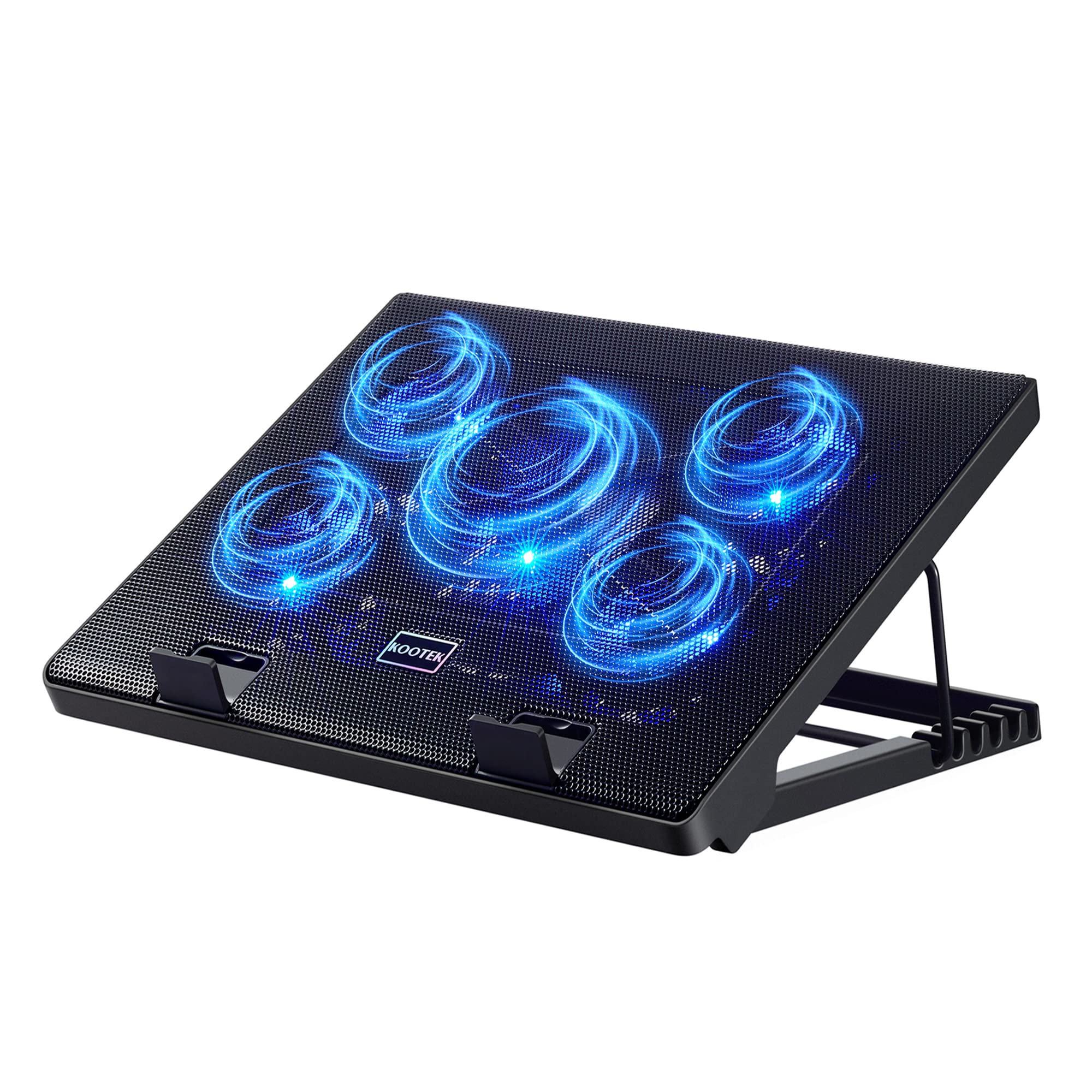
Five built-in fans — a big 4.72-inch one and small 2.76-inch ones — each lit with blue LEDs, and two on/off switches let you run 1 fan, 4 fans, or all 5 at once. That is real control, not a single speed. Six height settings cover the tilt needs of a long work session, and two stoppers on the front surface keep a 12- to 17-inch laptop from sliding down toward you mid-typing.
A dual USB hub runs your peripherals through the pad. There’s a power caveat worth knowing: Kootek recommends a 5V 1A adapter for best performance, and without one the fans can fail to spin or run very slowly. So plug the pad’s cable into a proper wall adapter, not a tired laptop port.
The adjustability here is the draw, and cooling and functionality both hold up well across a long feedback history. Buttons aside, the weak point is the plastic body — the tabs that hold the laptop and the tilt mechanism are the parts people describe going first. Treat it as a sturdy-enough desk stand rather than a travel case resident.
What stands out: the staggerable fans are a genuine feature — 1, 4, or 5 at once — and six height settings beat the havit and Amazon Basics on adjustable range.
What to keep in mind: the front tabs and the tilt frame are the fragile parts. It’s a fair value for desk use, not a rugged travel kit.
Go here if: you want staged fan control and a wide tilt range without spending much.
Different pad if: you need something you can toss in a bag without worrying about the tabs.
6. Trullypine Laptop Cooling Pad
Ten fans and seven tilt stops under a lightweight ABS shell.
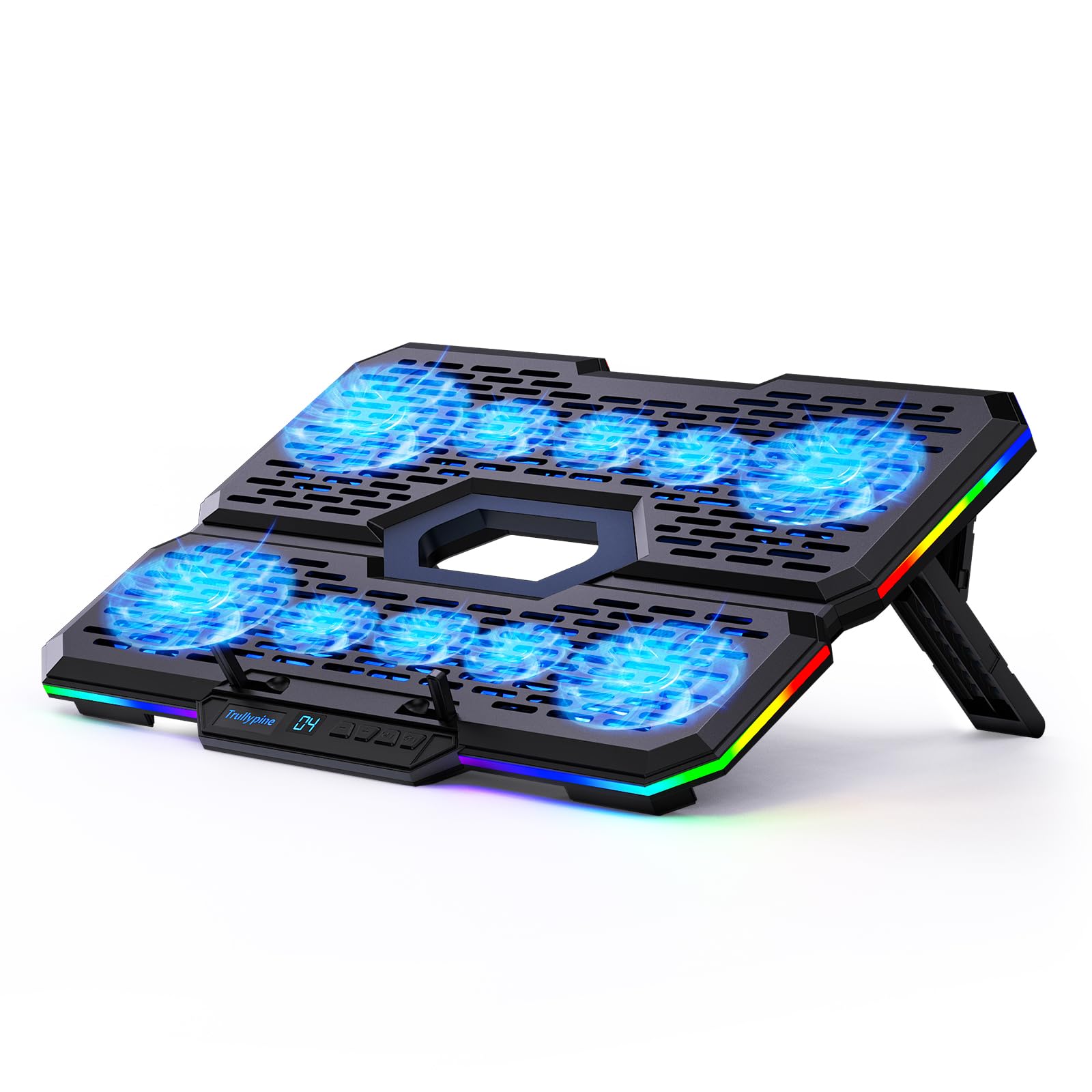
Ten fans — four large and six small — with five speed settings, which is a lot of fan spread for the tier. The touch buttons switch both speed and 5 RGB dynamic lighting modes across 7 colors, so the RGB and the airflow get separate controls. At 903 g it’s light enough to move around the desk, and it fits mainstream 12- to 18.1-inch laptops as well as tablets and routers.
Seven height settings give a long adjustment arc for posture, and the makers build it from heat-resistant ABS, which is the right material choice for a device that sits under a hot machine. The USB Type-C port adds a second expansion path so your peripherals don’t have to fight for the laptop’s single port.
This one lives on performance and cooling feedback, both of which hold up, with a mixed note on noise and a short patience span for durability — some report it broke quickly. It’s a reasonable desk pad for a mid-size laptop. Just don’t expect it to grow old with you.
Worth knowing: 10 fans and 5 speed settings give you more cooling capacity than the five-fan pads for a modest step up, and the touch RGB is a nice extra.
The trade-off: build life is the question mark — treat it as a desk pad tied to one laptop, not a commuting accessory.
Best match for: a mid-size laptop you leave on a desk where ten fans and touch RGB earn their keep.
Keep looking if: you need years of hard use — this one tends to retire early.
7. IETS GT500 Powerful Turbo-Fan (4200 RPM) Laptop Cooling Pad

An industrial turbofan that pushes 4200 RPM and tells you upfront about the noise.
Two cores, one industrial-grade turbofan spinning up to 4200 RPM, and a combined sealed foam duct that directs the air no matter where your laptop’s intake sits. It’s genuinely 360-degree in the sense that the sealed foam adapts to your chassis, and the bottom-intake design eliminates the heat-backflow problem on rear-exhaust gaming laptops. Owners mention CPU temps in the 40–50°C range during demanding gaming sessions.
The speed is infinitely variable from 0 to 4200 RPM, so you can set an office-quiet setting and open it up for gaming. That’s a wider range than the stepped modes on the llano V12 Ultra. It suits 13- to 17.3-inch laptops with the foam trimmed or arranged to fit.
IETS says it in its own listing: this pad is loud. Noise is the single strongest counterpoint in its feedback. At the highest speed it can reach around 55 dB (decibels, the unit used to measure loudness), which the maker compares to normal conversation. If you are sensitive to noise, this one will wear on you at full tilt. The high-speed mode is a tool for cutting heat, not for a quiet office.
Why heat-chasers pick it
- 4200 RPM industrial turbofan with infinitely variable speed from 0 up
- Sealed foam adapts to the laptop, so airflow gets forced into the intake
- Bottom-intake design eliminates rear-exhaust heat backflow
- Effective across 13″-17.3″ laptops with adjustable foam
The cost of that speed
- Loud at the top end — the maker itself flags noise-sensitive shoppers
- No height adjustment on the deck
- One manufacturer’s cooling figure should be treated as a best case
This is your pad if: you game on a hot laptop and accept fan noise as the price of temperature control.
skip it if: your laptop lives in a shared or quiet room — the top speed is a conversation.
8. llano V10 Gaming Laptop Cooling Pad, RGB Laptop Cooler Stand

The turbo-fan sibling of the top pick, with physical buttons instead of a touch slider.
A 4.72-inch turbo fan driven by a pure copper motor spins up to 3500 RPM here, and the maker rates it to drop a laptop’s temperature by up to 38°C within minutes. That copper motor is a step toward sustained performance over a cheaper brushed fan. Cooling and temperature control dominate the feedback, and owners with 13-, 16-, and 17-inch machines report 10–13°C drops in normal use. Extra foam inserts snug the pad up for 13- to 14-inch laptops that would otherwise sit loose.
The controls are why some pick this over the V12: physical buttons for RGB and fan speed instead of a touch slider, so you can’t mis-hit and lose your settings mid-match. Twelve RGB modes across five hues with memory recall restore your last look. Three ergonomic tilt levels, front anti-slip baffles, and a removable dust filter cover the practical side, plus dual USB-A and USB-C ports.
At 14.8″L x 11.4″W x 2.5″H, this pad sits clearly between the V12 and the KLIM in size. It’s more compact than both the V12 at 16.9″L x 12.9″W x 2.7″H and the KLIM at 16.4″L x 12.56″W x 2.88″H, so it fits a tighter desk. Cooling is its strongest story. The honest concern is reliability: a handful of units stop turning on, which is the rare-but-real risk on a turbo pad pushed hard.
The gamer’s case: a 3500 RPM copper-motor fan with tactile button control beats the V12 for anyone who games at high load and wants physical controls without touchscreen fumbling.
What to weigh: reliability is the fair caveat — it’s a high-power pad, and a small share of them stop spinning over time.
Worth it when: you want turbo-fan cooling with memory-recall RGB and button controls at a large-laptop-friendly size.
Not for you if: quiet is a non-negotiable — a 3500 RPM turbo fan makes itself heard.
9. KLIM Turbofrost Gaming Laptop Cooling Pad
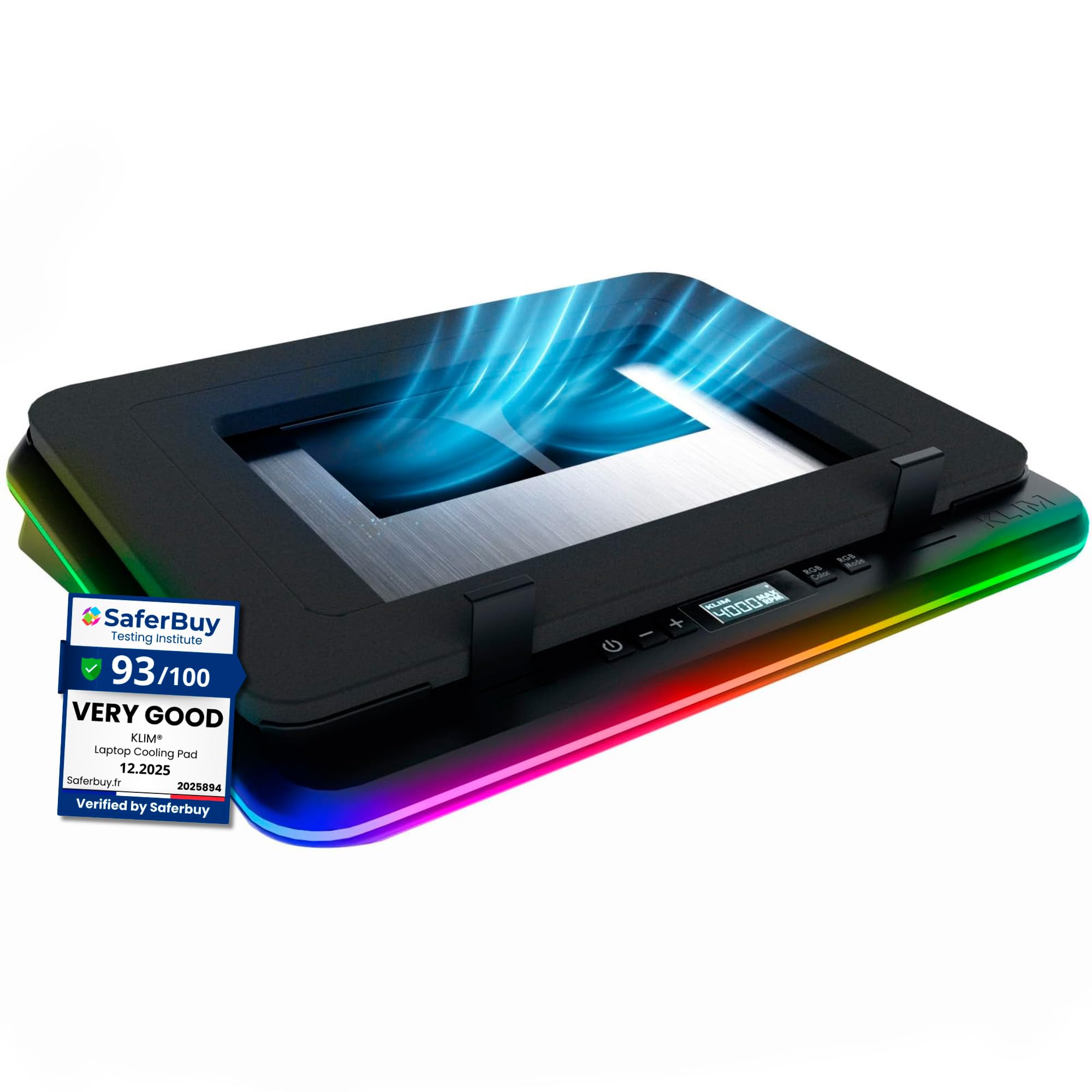
Four fans, an aluminum deck, and an assurance that outlasts everything else here.
Four high-speed fans, each rated at 4000 RPM, combine into a 16,000 RPM cooling force — a way of stating the fan spec that tells you all four spin hard together. The aircraft-grade aluminum deck pulls heat away faster than a plastic shell, which is the difference you feel when the laptop’s underbody has already been hot for an hour. Owners describe it as the best on the market at keeping laptops cool, and adaptive noise-canceling foam keeps the volume manageable.
On size, at 16.4″L x 12.56″W x 2.88″H it’s larger than the llano V10 and the sealed base takes real desk space. It fits laptops up to 17.3 inches. The 360-degree RGB covers 64 lighting modes with memory recall, so your settings survive a power cycle.
The headline feature for long-term value is the manufacturer’s 5-year product assurance with 24/7 support — far longer than the 1-year coverage most cooling pads carry. Power runs off a DC adapter for full steady performance at a desk, or off your laptop’s USB-C port when there’s no outlet; note that USB-C power may only drive two of the four fans.
This pad is for: the long game — you want the metal deck and five-year assurance rather than the cheapest fan count.
Not the right fit if: your laptop only has USB-C to give and you need all four fans running at once.
Know the Specs
Fan Speed in RPM
RPM means revolutions per minute — how many times a fan blade turns in sixty seconds. Higher RPM moves more air, and that is where cooling power comes from. A pad rated near 4200 RPM will move more air than one at 2800 RPM, at the cost of more noise. Look for a pad with a speed dial or modes so you can drop the RPM for quiet work and raise it for gaming.
Fan Count and Size
Fan count is not a direct measure of cooling — a spread of small fans covers a wide grille, while one large fan sealed against the chassis can press air through a narrower intake. Match the layout to your laptop: wide bottom vents favor multiple fans, a concentrated intake favors a single sealed turbo fan.
What a Sealing Foam Does
Some pads use memory foam or sealing foam around the fan to duct air into the laptop’s own intake instead of letting it spill sideways across the shell. That ducting is how a modest-looking pad still drops temperatures noticeably — the air goes into the intake instead of spilling sideways. It also makes the fit more forgiving, since the foam adapts to different chassis shapes.
USB Ports and Power Source
Extras vary. A USB hub lets a mouse or keyboard travel through the pad, but check whether the ports are for data or charging — many only carry peripherals. Power matters too: a dedicated wall adapter runs the fans at full speed without draining the laptop, while USB-powered pads rely on a laptop port and can slow if the port is weak. A USB-C-only laptop may need an adapter for a USB-to-USB pad.
Common Questions
Will a laptop cooling pad work with my USB-C-only laptop?
Is more fan noise the price of better cooling?
Does my laptop need a sealed-foam pad instead of an open one?
Will a cooling pad stop my gaming laptop from throttling?
Do the USB ports on a cooling pad charge my phone?
Can a cooling pad run on a weakness-prone laptop USB port?
How many height settings do I actually need?
What is the difference between a laptop cooler and a laptop stand?
Does an aluminum or metal shell cool better than plastic?
Can I use a cooling pad on my lap or on a bed?
The Bottom Line
For most buyers, the notebook stand with fan winner is the llano V12 Ultra. Its sealed 5.5-inch turbo fan at up to 2800 RPM (revolutions per minute, how fast the blades spin) presses air into the laptop’s own intake, so the heat leaves instead of building up. Its 36W wall adapter runs it at full speed without draining your battery. If you want the widest tilt range and screen-worthy RGB, the 13-fan cooler gives you nine height stops and ten lighting modes. And for a laptop you need to keep quiet on a desk all day, the havit HV-F2056 is the slim, near-silent choice with a huge owner base behind it.
One honest nudge: if you game hard and the budget allows, the IETS GT500 at 4200 RPM is the pad that will actually move the heat. Just plan to run it below full speed when you’re not mid-match.
How we choose
We do not accept paid placement. Every pick is matched to a real buyer and a real use-case; we do not hands-on test units.
Sources
Specifications: manufacturer listings and product documentation. Review insights: verified customer reviews, as of November 2026. Pricing: not shown on this page (it changes often); check the current price via the retailer link.
As an Amazon Associate, Tactical Gear Guy earns from qualifying purchases. This does not affect which products we feature.