Specs are compiled from manufacturer listings and verified buyer reviews and can change over time — please confirm the key details on the product page before buying.
A separate number pad (often called a numpad or ten-key) is the easiest way to speed up spreadsheets, invoices, and accounting work without replacing your laptop. All 7 picks add a full 0–9 block, but they split sharply on key count, tilt, battery, and connection reliability.
This guide is built by comparing the manufacturers’ published specifications and the patterns across verified customer reviews, so you get each pick’s real strengths and trade-offs instead of marketing spin.
Every pick below adds a full number block to your laptop over Bluetooth or USB wireless, and this guide ranks each one by keys, tilt, battery, and real owner feedback so you buy the right piece of the notebook numeric keypad puzzle.
Top Picks

How To Choose The Best Notebook Numeric Keypad
The main trade-offs fall into three buckets: key count (how many functions you keep), connection method (Bluetooth, 2.4G USB, or wired), and physical comfort (tilt, key style, and weight). Nail those three and the rest is detail.
Key count: 18 keys or 34 keys
An 18-key pad keeps the bare 0–9 block, plus a few operators. A 34-key pad adds Insert, PgUp, PgDn, and calculator shortcuts — useful if you work in Excel all day. Fewer keys means a slimmer footprint; more keys means quicker data entry without reaching back to your laptop keyboard.
Connection method: Bluetooth vs 2.4G vs wired
A Bluetooth pad pairs wirelessly and works across Mac and Windows, but it can drop the connection or need re-pairing. A 2.4G dongle plugs into a USB-A port and stays reliably connected, but takes up a port. A wired pad never needs charging, but limits where you set it down.
Comfort: tilt, switch type, and key noise
Scissor-switch keys feel like a laptop keyboard — low-profile, quiet. Mechanical switches feel tactile and audible. A 7.5° tilt is subtle; 15° lifts the back of your hand into a more natural typing position. Non-slip pads underneath matter just as much as tilt for keeping the pad steady during fast entry.
Side-by-Side Comparison
| Model | Best For | Key Count | Connection | Weight | Amazon |
|---|---|---|---|---|---|
| Nulea Wireless Number Pad★ Best Overall | Everyday spreadsheet work | 34 keys | Bluetooth 5.0 & 2.4G | — | Amazon |
| iClever Bluetooth Number PadEditor’s Alternative | Dual-device desk setup | 34 keys | Bluetooth | 7.65 oz | Amazon |
| SANWA Bluetooth Numeric Keypad | Travel and portability | 22 keys | Bluetooth | 3.52 oz | Amazon |
| Doohoeek Backlit Bluetooth Numeric Keypad | Low-light and night typing | 34 keys | Bluetooth 5.0 | 195 g | Amazon |
| Satechi Slim Aluminum Bluetooth Keypad | Mac and Apple setups | 18 keys | Bluetooth 3.0 | 98.7 g | Amazon |
| MOFII Ergonomic RGB Wireless Number Pad | Multi-device switching | — | Bluetooth 5.0, 2.4G & USB-C | — | Amazon |
| 8BitDo Retro 18 Mechanical Numpad | Mechanical feel and retro design | 18 keys | Bluetooth, 2.4G & USB | — | Amazon |
Detailed Reviews
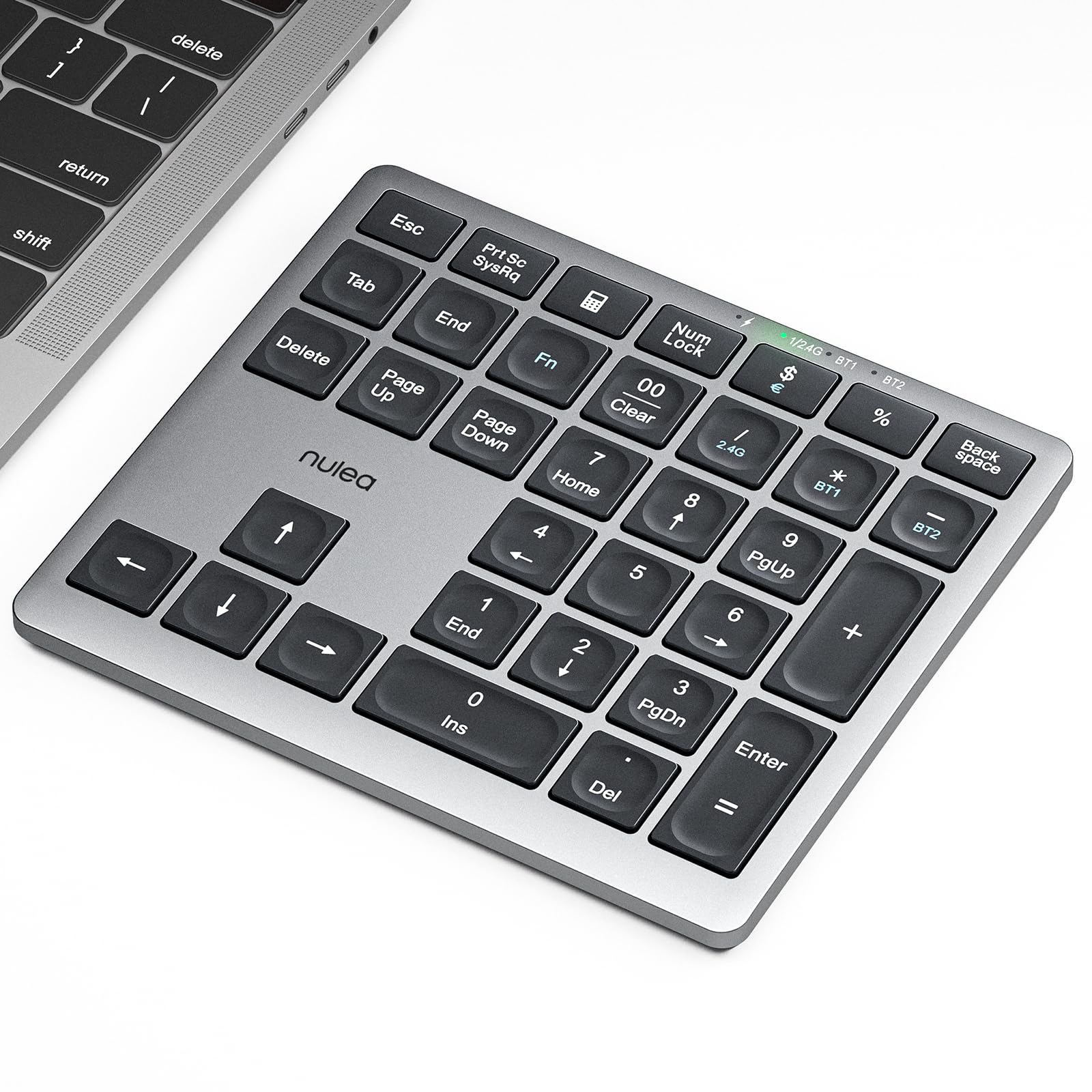
1. Nulea Wireless Number Pad for Laptop
Our pick — 4.5+★ from 850+ verified ratings; the strongest balance of quality and price.
The 34-key pad that quietly turns a cramped laptop into a full accounting station.
If you spend your day punching numbers into Excel, the Nulea is the one most owners keep on their desk. You get a full 34-key layout that keeps Insert, PgUp, PgDn, and a calculator shortcut right under your fingers. Insert, PgUp, and PgDn sit under your fingers, so you never reach back to the laptop mid-formula.
The 280 mAh rechargeable battery is generous next to the SANWA’s 100 mAh — you will plug in far less often. The claimed 96-day standby time with auto-sleep helps too: walk away, and the pad wakes up on the first keystroke. Bluetooth 5.0 pairs with two devices at once, and a 2.4G dongle mode gives you a stable backup when Bluetooth gets finicky.
Buyers consistently praise the build: it feels like a real keyboard, not a flimsy add-on. The catch is the long-term durability: the plastic housing is ABS, and some buyers find it doesn’t survive heavy daily use for years. Treat it gently and it lasts; for a decade of abuse, the metal-bodied iClever is the safer bet.
What earns it the top spot
- 34-key layout with calculator and navigation shortcuts
- Dual Bluetooth 5.0 pairing plus 2.4G dongle for backup
- 280 mAh rechargeable battery with 96-day claimed standby
- Silent scissor switches and a 7.5° tilt for comfortable typing
What to go in knowing
- ABS plastic housing; durability is the most-mixed point in feedback
- Cannot be programmed — the keys do exactly what they say
- USB-C charging port only — no USB-A cable support for charging
Best for: anyone who wants a 34-key pad with strong battery life and dual wireless modes for everyday Excel and accounting.
Look elsewhere if: you need a pad that will survive years of heavy travel abuse — a metal body is the better bet.
2. iClever Bluetooth Number Pad for Laptop, Aluminum
The stainless-steel base that makes a number pad feel like a real keyboard.
Most numpads are ABS plastic and feel like toys; this one doesn’t. The iClever pairs a stainless steel base with an ABS top cover, and that metal foundation gives it a planted, premium weight. It is the heaviest pick on this list at 7.65 ounces — noticeably heavier than the SANWA’s 3.52 ounces, and that extra heft is what keeps it from sliding during fast entry.
You get 34 keys with calculator, PgUp, PgDn, and Insert functions, and the maker claims the scissor switches are rated to survive over 5 million keystrokes. A 1-hour charge is claimed to deliver up to 100 hours of use, and the USB-C port charges it back up. The Bluetooth link switches between two devices, so you can flip from a MacBook to an iPad mid-task.
Two honest stumbles come up in buyer feedback. Some find the sleep mode too eager — it drops into standby and needs a keypress before it reconnects — and occasional double-registration of digits on rapid-fire entry is noted. Those are friction points, not deal-breakers, and the pad remains a popular choice for its solid feel. If you need the fastest possible key registration with zero sleep lag, the 8BitDo below is the stronger option.
Build worth handling: the stainless steel base and ABS top make this the most solid-feeling pad here; the 7.65-ounce weight is a direct result of that construction.
The honest trade-off: aggressive sleep mode and occasional double-entries are the two most-cited irritations, so if those bother you, a wired-only pad eliminates both.
Reach for this if: you want a metal-bodied dual-device pad that feels as solid as your laptop’s own keyboard.
Steer clear if: you need instant wake-up on every keypress with zero re-connect delay.
3. SANWA Bluetooth Numeric Keypad, 22-Key

A featherweight 22-key pad that disappears into a backpack pocket.
The SANWA is the lightest pick here at 3.52 ounces — that’s about the weight of a candy bar, and the point is simple: you can slip it into a laptop sleeve and forget it’s there. The 15° tilt is the steepest on this list (the Nulea uses 7.5°), and that steeper slope eases wrist strain during long data-entry sessions.
Key budget is the trade: 22 keys versus the Nulea’s 34 means no Insert, no PgUp/PgDn, no dedicated calculator hotkey. You get 0–10, Numlock, tab, home, esc, +/-, /, =, page up/down, delete, enter, and a calculator shortcut. For pure number entry, 22 keys is enough. For navigating large spreadsheets it runs short.
The 100 mAh battery is small — the Nulea’s 280 mAh nearly triples it — and the claimed 55-hour runtime reflects that. Owners do report quick recharging and an ON/OFF switch to prevent drain, and the scissor-switch keys are notably quiet. Reliability is the strongest signal in feedback, with the round-key design drawing consistent praise. Bluetooth connectivity is the mixed spot: it pairs cleanly for most, but a few find the initial pairing fussy.
Lightweight champion: at 3.52 ounces with a 15° tilt, this is the pad to throw in a bag for coffee-shop accounting days.
Where it falls short: 22 keys means no navigation shortcuts, and the 100 mAh battery runs a fraction of the Nulea’s 280 mAh.
Pick it when: portability and a steep wrist-friendly angle matter more than extra function keys.
Think twice if: you regularly page through big spreadsheets — the missing PgUp/PgDn keys will slow you down.
4. Doohoeek Backlit Bluetooth Numeric Keypad

The only pick here that lights up — seven colors and three brightness levels.
In a dim office or at night, the Doohoeek’s backlight solves what the other pads ignore: seeing the keys. Seven backlight colors and three brightness levels (adjusted with Esc plus the arrow keys) cover low-light use without a separate lamp.
The battery figure is the headline: 220 hours without backlighting, versus the SANWA’s 55 hours — roughly four times the runtime on paper. You get that from a 195g body with an on/off switch and auto-sleep. The 34-key layout matches the Nulea and iClever, so all the Insert, PgUp, and PgDn functions stay on hand.
The caveat is mirrored in buyer feedback: the same build that feels solid from the start doesn’t always hold up under heavy use. Some find keys loosen over months, and the responsiveness can be hit-or-miss. It’s a strong pick for occasional and travel use, less so for eight-hour-a-day spreadsheet grind. Note too: it ships set for Windows and MacBook — you select the OS after pairing.
Where it shines
- 7 backlight colors at 3 brightness levels for dim rooms
- 220-hour claimed battery life without backlighting
- 34 keys including Insert, PgUp, PgDn, and calculator
- Bluetooth 5.0 with 10m range
Worth weighing first
- Durability is the least-favorable aspect in feedback over time
- Responsiveness is mixed — some find key delays
- Heavier than plastic-only pads at 195g
Suits you if: you type numbers in the dark and want the brightest, longest-running backlit pad on this list.
Look past it if: you need a pad to survive constant daily abuse — the build quality is the weakest link.
5. Satechi Slim Aluminum Bluetooth Keypad
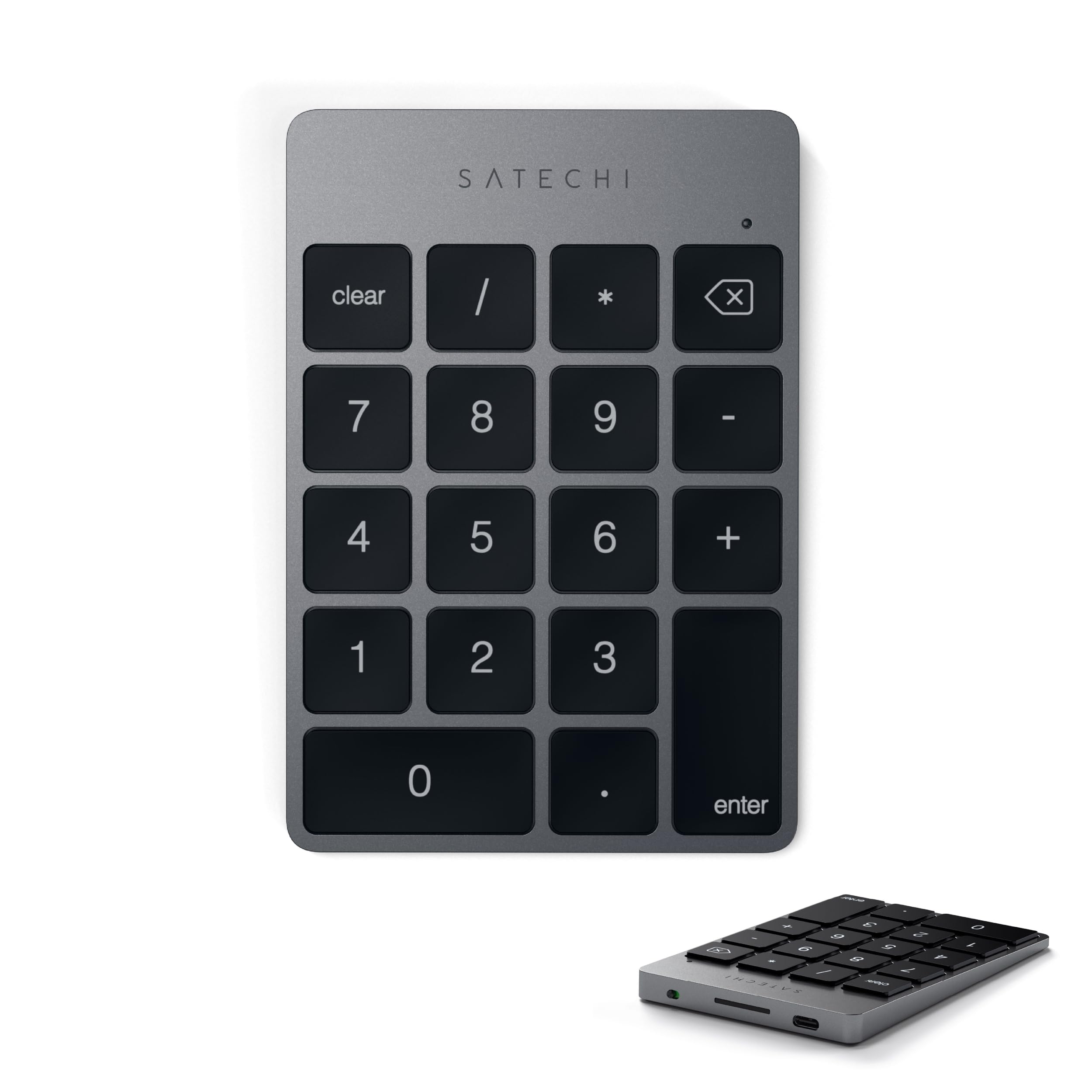
The aluminum pad built to match a MacBook, right down to the space gray finish.
Satechi designed this specifically for Apple hardware — the aluminum body and space gray finish match MacBooks, iMacs, and iPads, and the listing explicitly lists those Mac models as compatible. At 98.7 grams it’s among the lightest here, and the aluminum shell is the only metal build at this key count. You get 18 keys: the bare 0–9 block, plus a few operators and a low-profile tilt.
Battery life is claimed at up to 2 weeks on a charge, with an automatic sleep mode after 1 hour of inactivity. The USB-C charging is convenient if you already own a recent Mac or iPad. Bluetooth 3.0 is the older standard. That’s enough for steady typing on a desktop, but it’s a step behind the Bluetooth 5.0 on the Nulea and Doohoeek.
The clear gap is key count: 18 keys means no Insert, PgUp, or PgDn. If you’re a Mac user working on a single spreadsheet tab, that’s fine. If you page through multi-tab workbooks, you’ll feel the missing shortcuts. The aluminum build also comes with a 2-year limited warranty backed by Satechi.
Made for Mac: the aluminum body, space gray finish, and 98.7g weight make it the cleanest-looking companion to a MacBook or iMac.
The catch: 18 keys drops the navigation and calculator shortcuts that 34-key pads keep, and Bluetooth 3.0 is the oldest wireless standard here.
Designed for: Mac users who want their number pad to look like it shipped with their laptop.
Not the pick for: heavy Excel users who rely on Insert and PgUp shortcuts to navigate big sheets.
6. MOFII Ergonomic RGB Wireless Number Pad
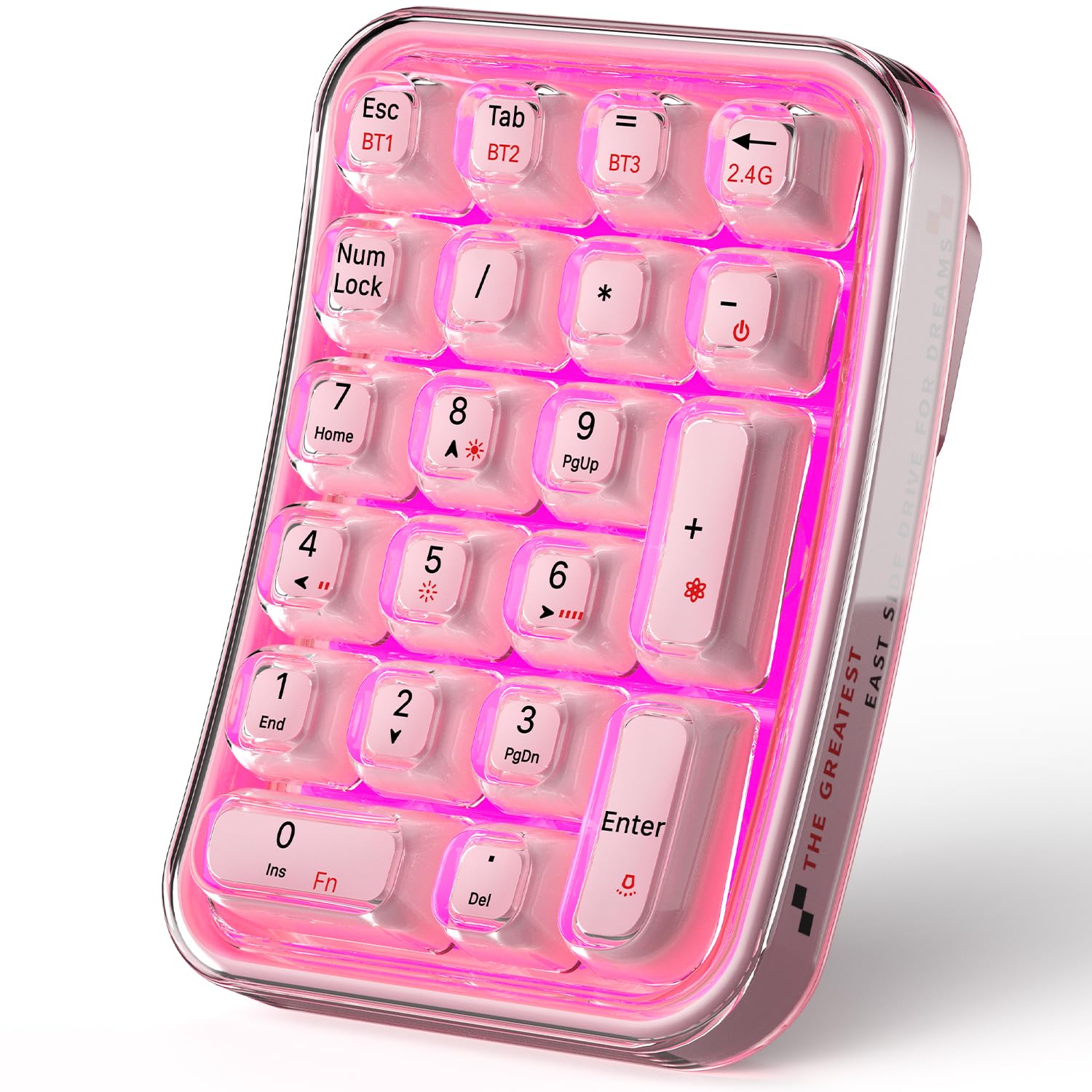
Three connection modes and a curved body — the do-more-everywhere pad.
The MOFII gives you three ways to connect: Bluetooth 5.0 with three independent pairing channels, a 2.4GHz wireless dongle, and a plug-and-play USB-C wired mode. The USB-C wired option is rare on numpads, and it’s the ace in the hole — if Bluetooth fails mid-task, you plug in and keep working with zero downtime.
The body is contoured to match your hand’s natural posture, with a raised front base and non-slip silicone pads to hold it in place. The RGB backlight with rainbow effects and multiple dynamic modes helps in dim settings, and the rechargeable battery removes the disposable-battery cycle.
The clear-pink finish stands out, and the build quality is what buyers talk about most favorably — described as well-made and easy to set up. A few note that fast typing sometimes needs a firmer keypress to register, and a minority were hoping for a different connection profile. That’s the honest fit note: light daily use is perfect; constant high-speed entry might test the key registration.
Three ways in: Bluetooth 5.0 with triple pairing, 2.4GHz dongle, and USB-C wired mode — the only pick here with a wired backup option.
The curve trade-off: the contoured body and RGB make it a lovely desk piece, but a few find fast keypresses need extra pressure to register.
Best for: multi-device users who jump between a laptop, tablet, and phone, and who want a wired fallback when wireless glitches.
skip it if: you need perfect key registration on the fastest possible data entry pace.
7. 8BitDo Retro 18 Mechanical Numpad

A mechanical numpad shaped like a classic NES controller and built to clack.
The 8BitDo is the only mechanical pad here, and the difference is felt on the first keystroke. The keys clack with a satisfying tactile response, and the retro NES-inspired design with a red display draws consistent admiration. Buyers describe it as top-end and solid — not cheaply made.
What separates it from every other pick is calculator mode: this pad can function as a standalone desk calculator without being connected to a computer. That’s genuinely useful if you regularly tally numbers away from your desk. Connection is tri-mode: Bluetooth, 2.4G, and USB wired. The pad works with Windows and Android from the start, and buyers report it also works on Mac and Linux.
The 18-key layout is the trade. There’s no Insert, no PgUp, no PgDn. The design is also intentionally retro — if you prefer a sleek, low-profile pad, this one’s chunky style will feel out of place next to a slim laptop. For raw key feel and the calculator trick, it’s the most fun pick here.
Why buyers rave about it
- Mechanical switches with a tactile, audible clack
- Standalone calculator mode works without a computer
- Tri-mode connection: Bluetooth, 2.4G, and USB wired
- Solid build and retro NES-style design with red display
Before you commit
- 18 keys only — no Insert, PgUp, or PgDn
- Chunky retro body may not match a sleek laptop aesthetic
- Mechanical keys are louder than scissor switches
The one to grab if: you want the tactile feel of mechanical keys and the novelty of a pad that works as a desk calculator.
Pass it over if: you need the navigation shortcuts of a 34-key layout or a slim, quiet typing experience.
Know the Specs
Key Count and Layout
An 18-key pad covers the basic number block and little else. A 34-key pad adds Insert, PgUp, PgDn, and calculator functions — handy for Excel and accounting. More keys means a bigger footprint but faster entry. If you rarely leave a single spreadsheet tab, 18 keys is enough; if you navigate multi-tab workbooks daily, 34 keys saves constant mousing.
Battery Capacity in mAh
mAh (milliamp-hours) measures how much charge the battery holds. Higher mAh usually means longer use between charges. The Nulea’s 280 mAh tops the SANWA’s 100 mAh, so the Nulea runs longer per charge. Battery life is also shaped by backlighting and auto-sleep settings — turning the lights off extends runtime on any pad.
Tilt Angle and Wrist Comfort
Tilt lifts the back edge of the pad so your hand sits at a more natural angle. The SANWA’s 15° is steeper than the Nulea’s 7.5°. A steeper tilt reduces the bend in your wrist during long sessions. If you already have wrist fatigue, a steeper-tilt pad with non-slip feet helps more than a flat one.
Connection Method: Bluetooth vs 2.4G vs Wired
Bluetooth pairs without a dongle and works across Mac and Windows. 2.4G uses a USB-A dongle for a steady connection but takes up a port. Wired over USB-C never needs pairing or charging. Pads that support all three modes — like the MOFII and the 8BitDo — give you a fallback if one method fails.
Common Questions
Will a Bluetooth numpad work with my MacBook?
How do I pair a numeric keypad with my laptop via Bluetooth?
What is the difference between 18-key, 22-key, and 34-key numpads?
Do I need a special driver to use a numeric keypad?
Can a wired numpad work with a USB-C-only laptop?
How long does the battery last on these numpads?
Does a numpad drain my laptop battery by staying connected?
Will a mechanical numpad be too loud for an office?
Can I use a numpad with a tablet or phone?
Is a standalone calculator numpad worth it over a software calculator?
The Bottom Line
For most people the notebook numeric keypad winner is the Nulea Wireless Number Pad — 34 keys, dual Bluetooth 5.0 and 2.4G connection, and a 280 mAh battery that outlasts every other wireless pad here. If a solid metal build matters more than battery, the iClever is your pick. For travel, grab the 3.52-ounce SANWA. And if you want a pad that clacks and doubles as a desk calculator, the 8BitDo is the one to reach for.
How we choose
We do not accept paid placement. Every pick is matched to a real buyer and a real use-case; we do not hands-on test units.
Sources
Specifications: manufacturer listings and product documentation. Review insights: verified customer reviews, as of November 2026. Pricing: not shown on this page (it changes often); check the current price via the retailer link.
As an Amazon Associate, Tactical Gear Guy earns from qualifying purchases. This does not affect which products we feature.