Specs are compiled from manufacturer listings and verified buyer reviews and can change over time — please confirm the key details on the product page before buying.
You want a board and processor that boot Windows 11 without a fight — no missing security chip, no unsupported CPU warning, no afternoon lost to BIOS screens. Every combo here clears that bar. Your real choice depends on one thing: a cheap gaming machine, or a machine you plan to keep for years. For the safest middle ground, the Ryzen 7 9700X pair with the MSI PRO B850-P gives you the newest chip on this list, built-in graphics, and Wi-Fi 7 on the board (the newest wireless standard, so your Wi-Fi keeps up with newer routers).
This guide is built by comparing the manufacturers’ published specifications and the patterns across verified customer reviews, so you get each pick’s real strengths and trade-offs instead of marketing spin.
Windows 11 asks two things of a combo: a processor on its supported list and firmware you can switch into a security mode called TPM 2.0. Every bundle below clears both. Here is how to pick the right pair of motherboard and CPU for Windows 11 without overspending on features you will never touch.
Top Picks


How To Choose The Best Motherboard CPU Combo for Windows 11
These bundles are two parts sold as one box: a processor (the chip that does the computing) and a motherboard (the board everything plugs into). Buying them together saves you the compatibility headache, because the socket already matches and the board already supports the chip. What you still have to check is memory, storage slots, and whether the bundle includes a cooler.
Socket and platform come first
AMD’s AM5 socket boards on this list take Ryzen 7000, 8000, and 9000 series chips, which is why a 7700X bundle and a 9700X bundle can share the same board design. Intel’s LGA 1700 socket pairs with the Core i7-14700K instead. Pick your side by whichever chip you want, then confirm the board name — the socket type is baked into the bundle, so you cannot mix them.
TPM 2.0 is the Windows 11 gate you cannot skip
Windows 11 will not install without TPM 2.0, a security feature built into the firmware of modern boards. On these platforms you switch it on inside the BIOS, usually under a security or trusted-computing menu. Every combo here is a recent enough platform to support it, which is the whole reason this list is filtered.
Decide how much memory headroom you want
Memory (RAM) is where your open apps live. The four-slot boards here support up to 128 GB on the A520 bundle and up to 256 GB on the AM5 bundles and the Intel pairs. Speed matters too — DDR5 boards advertise clock ceilings from 5200 MHz up to 8200 MHz. Higher ceilings matter if you plan to buy fast kits later; a base build runs fine on slower memory.
Coolers and storage slots
Most AMD bundles on this list ship without a cooler, and the 7800X3D listing specifically recommends a liquid cooler. Budget for one, or confirm your existing cooler fits before you order. Storage is the other gap: M.2 slots (the small stick-style drives that plug flat into the board) range from a single slot on the budget board to three on the B650E and B850 boards. The newest boards run PCIe 5.0 speeds (the fastest current drive connection), so a fast SSD loads games and files quicker.
Side-by-Side Comparison
| Model | Best For | CPU Cores | Memory Support | Max Memory | Amazon |
|---|---|---|---|---|---|
| AMD 5500 + ASUS TUF A520M Plus★ Best Overall | Cheapest route to a working Windows 11 PC | 6 Cores / 12 Threads | DDR4, 4400 MHz | 128 GB | Amazon |
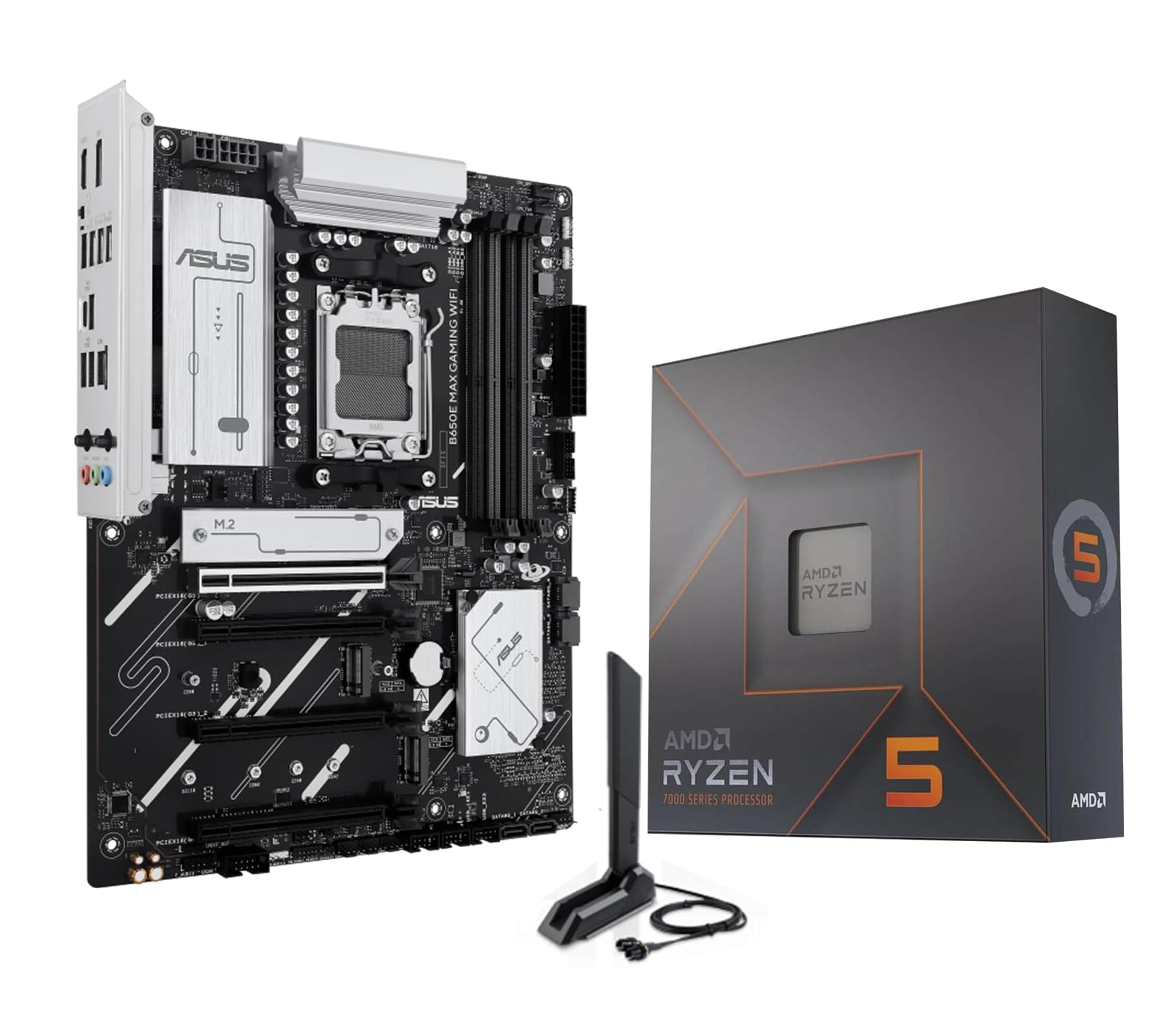
| AMD 7600X + ASUS B650E MAX GamingBest Value | First DDR5 build with fast gaming chip | 6 Cores / 12 Threads | DDR5, 8000 MHz | 256 GB | Amazon |
| AMD 7800X3D + GIGABYTE B650 AORUS Elite AX ICE | Gaming-first builds | 8 Cores / 16 Threads | DDR5, 8000 MHz | 256 GB | Amazon |
| Intel i7-14700K + ASUS TUF Z790-Plus WiFi | Long-session gaming and streaming | 20 Cores / 28 Threads | DDR5 (DDR5 board) | — | Amazon |
Detailed Reviews
1. AMD 5500 Processor ASUS TUF Gaming A520M Plus Motherboard
Our pick — 4.0+★ from 90+ verified ratings; the strongest balance of quality and price.
The cheapest way onto this list that still boots Windows 11 without a compatibility argument.
If your goal is a working Windows 11 desktop for everyday tasks and popular games without spending on the newest platform, this pairing gets you there. The Ryzen 5 5500 runs 6 cores and 12 threads and boosts to 4.2 GHz, which the listing claims is enough for 100-plus FPS in the most popular games. The board underneath is a micro-ATX AM4 model with four memory slots, one M.2 socket, and four SATA ports for older-style drives.
What makes this bundle easy to live with is the DDR4 memory — you can fit up to 128 GB across those four slots, and DDR4 kits are the least expensive way to fill them. It also includes the AMD Wraith Stealth cooler, so the box is genuinely complete. A discrete graphics card is required, since the 5500 has no built-in video output.
The catch is age. DDR4 tops out at 4400 MHz here against 8000 MHz on the DDR5 boards, and the chip carries 19 MB of cache versus 40 MB on the 7700X bundles. Its PCIe 3.0 support is also the oldest on the list. That matters if you plan to add the fastest storage later — this board will not feed it fully.
What earns its keep
- Wraith Stealth cooler included, so no separate cooling purchase
- Four memory slots and up to 128 GB of DDR4
- Board carries 802.11ac Wi-Fi, DisplayPort, HDMI, and a BIOS FlashBack button
- Buyers praise the board’s functionality and value more than anything else
Where it runs out of road
- DDR4 only, capped at 4400 MHz
- PCIe 3.0 rather than 5.0
- Needs a separate graphics card to show a picture
Reach for this if: you want a complete, cooled, Windows 11-ready AM4 build with the smallest outlay.
Look elsewhere if: you already own a PCIe 5.0 drive or fast DDR5 kit you intend to reuse.
2. AMD 7600X Processor ASUS B650E MAX Gaming WF Motherboard
Your entry ticket to DDR5 and PCIe 5.0 without paying for eight cores you may not use.
The 7600X is a 6-core, 12-thread chip that boosts to 5.3 GHz and carries 38 MB of cache. It slots into the AM5 platform, so this bundle accepts Ryzen 9000, 8000, and 7000 series processors — you can swap the chip later and keep the board. The ASUS B650E MAX board is a full ATX unit with three M.2 slots, one of them PCIe 5.0 x4, plus Wi-Fi 6E and Bluetooth 5.3.
Step up from the A520 bundle and you feel it in the memory ceiling: 8000 MHz on this board versus 4400 MHz on the A520. Storage headroom improves too, going from a single M.2 socket to three. Buyers describe this pairing as working flawlessly from the start.
Budget for a cooler — the 7600X listing states the cooler and thermal solution are not included. That is the one real errand this bundle adds. Everything else, including the pre-mounted I/O shield and BIOS FlashBack for updating firmware without a chip installed, is done for you.
The build-friendliness factor: a pre-mounted I/O shield, Q-Antenna for the Wi-Fi aerial, Q-LED Core for quick boot diagnosis, and BIOS FlashBack all come on the board. First-time builders get less to worry about.
Who this fits: the builder moving to AM5 who wants modern connectivity more than maximum core count.
The one errand: no cooler in the box, so add one before you start.
3. AMD 7700X Processor ASUS B650E MAX Gaming WF Motherboard
Eight cores, sixteen threads, and a memory ceiling that leaves room for a fast kit down the road.
Video editors and multitaskers are the reason this bundle reads the way it does. The Ryzen 7 7700X packs 8 cores and 16 threads, boosts to 5.4 GHz, ant) and 28 threads, boosting to 5.6 GHz. Rendering a video while a browser holds forty tabs is exactly the workload that shape is built for, and the listing leans into multitasking and faster content creation.
Storage flexibility is another edge. The MSI PRO Z790-P WIFI carries PCIe 5.0 plus four PCIe 4.0 M.2 slots and six SATA ports — more drive connections than any AM5 bundle on this list. Memory runs dual-channel DDR5 at 7000 MHz and up to 192 GB, with a 14+1+1 power design using 55A DrMOS and a 6-layer 2 oz copper PCB.
Two things to know before you commit. This is an Intel LGA 1700 platform, so none of the AMD chips above will fit it later. And the board’s memory clock rating of 7000 MHz is the lowest ceiling in this group, which will not bother most builders but is note if you plan an aggressive memory kit.
Why it wins on workload
- 20 cores and 28 threads for heavy multitasking
- Four PCIe 4.0 M.2 slots plus six SATA ports
- 5.6 GHz boost ceiling
- Integrated Intel UHD Graphics 770 for basic display output
What it asks of you
- Intel LGA 1700 means no AMD upgrade path
- 7000 MHz memory ceiling is the lowest here
- 192 GB memory max, below the 256 GB AM5 boards
Made for: editors and streamers who need core count more than upgrade paths.
Not for: anyone planning to drop a future Ryzen chip into the same board.
4. AMD 7800X3D Processor GIGABYTE B650 AORUS Elite AX ICE Motherboard

A 104 MB cache pool aimed squarely at frame rates, paired with a white-themed AORUS board.
Cache is the spec that matters on this one. The Ryzen 7 7800X3D carries 104 MB of L2+L3 cache, well beyond the 40 MB on the 7700X bundles, and the listing credits AMD’s 3D V-Cache technology for the gaming performance. It runs 8 cores and 16 threads at a 5.0 GHz max boost, with a 120 W TDP — the highest on this list, and the reason the listing recommends a liquid cooler.
The GIGABYTE B650 AORUS Elite AX ICE keeps power steady under load with a twin 12+2+2 phase digital VRM (the power stages that feed the CPU). It gives you four DIMM slots (memory slots) that accept both AMD EXPO and Intel XMP profiles (one-click memory speed settings), so your RAM runs at its rated speed. Three M.2 connectors, including one PCIe 5.0 x4, let you add fast storage without unplugging a drive. Networking is 2.5GbE LAN (wired Ethernet at 2.5 gigabits per second) plus Wi-Fi 6E and Bluetooth 5.3. EZ-Latch covers both the PCIe x16 slot (the long slot for your graphics card) and the M.2 connectors, so upgrades go screwdriver-free.
Notice the boost clock sits below the 7700X and 9700X bundles at 5.0 GHz. That is the trade for the cache — you are not buying the fastest clock here, you are buying the biggest pool of memory the chip can reach quickly. Q-Flash Plus also lets you update the BIOS without a CPU, memory, or graphics card installed, which is a genuine rescue feature if a board ships with old firmware.
The gaming arithmetic: between the 7800X3D’s 104 MB cache and the 7700X’s 40 MB, the difference is the reason a gaming-first build pays the premium — that cache is what the chip leans on when frames matter.
Pull the trigger if: gaming is the priority and you want the cache-heavy chip plus a 2.5GbE board.
Hold off if: you are not shopping for a liquid cooler — the listing recommends one for that 120 W TDP.
5. Intel i7-14700K ASUS TUF Gaming Z790-Plus WiFi DDR5 Motherboard

The same 20-core Intel chip, but on a board built to keep cool through marathon sessions.
ASUS takes the TUF line seriously on cooling, and this Z790-Plus shows it: a VRM heatsink, a fanless PCH heatsink, an M.2 heatsink, and hybrid fan headers managed by the Fan Xpert 4 utility. For a 20-core i7-14700K that boosts to 5.6 GHz with 28 threads, that thermal kit is the difference between a fast burst and a machine that holds pace for hours.
Power delivery is 16+1 DrMOS on a six-layer PCB with ProCool sockets, alloy chokes, and durable capacitors. Connectivity runs PCIe 5.0, USB 3.2 Gen2x2 Type-C, front USB 3.2 Gen 2 Type-C, and a Thunderbolt 4 header for adding that port later. Realtek’s S1200A codec handles audio, and ASUS AI Noise Canceling Mic processing cleans up voice chat.
Compared with the other 14700K bundle on this list, you are choosing between four PCIe 4.0 M.2 slots on the MSI pair and the ASUS board’s thermal framing plus Thunderbolt 4 header. Neither is wrong — it depends on whether you are adding drives or adding devices. Build-friendly touches include SafeDIMM, a PCIe 5.0 Safeslot, Q-LED, an M.2 Q-Latch, and a pre-mounted I/O shield.
The TUF argument
- 16+1 DrMOS power stages with ProCool sockets
- VRM, PCH, and M.2 heatsinks with Fan Xpert 4 control
- Thunderbolt 4 header support for later expansion
- 20 cores and 28 threads at up to 5.6 GHz
Weigh before buying
- Still LGA 1700, so no AMD upgrade path
- Fewer M.2 slots than the MSI Z790-P bundle
- The 20-core chip wants a serious cooler, which is not included
The strongest fit: a gaming-and-streaming rig that runs for hours and wants headroom for a Thunderbolt add-in card.
Look at the MSI 14700K pair instead if: you are stacking four NVMe drives and need every slot.
Know the Specs
TPM 2.0 and Windows 11 readiness
TPM 2.0 is a security chip built into the platform that Windows 11 checks for during install. Without it, Setup stops and tells you the PC is unsupported. On these boards you enable it in the BIOS under a security or trusted-computing menu; the setting is often labeled with the firmware version of the module. Every combo here is a recent platform, which is why each one can clear the check.
Core count and threads
Cores are the workers; threads are the queues each worker can handle. A 6-core, 12-thread chip like the Ryzen 5 5500 handles everyday tasks and games. A 20-core, 28-thread i7-14700K spreads heavy jobs like video encoding across far more workers, which is why it appears on the multitasking picks. More cores rarely hurt, but they add heat and cost.
TDP and cooling
TDP, or thermal design power, is a rough wattage figure for how much heat a chip produces under load. A 65 W chip like the 5500 or 9700X is easier to cool than a 105 W 7700X or a 120 W 7800X3D. The higher the number, the more you should spend on a cooler — and most of these bundles ship without one.
Memory type, speed, and capacity
DDR4 and DDR5 are different generations of memory and do not mix. DDR4 boards cap lower on speed; the A520 bundle lists 4400 MHz. DDR5 boards here range from 5200 MHz up to 8200 MHz. Capacity is the other axis: four slots hold up to 128 GB on the A520 bundle and 256 GB on most AM5 boards. Pick your memory generation before you buy anything else.
PCIe generations and M.2 slots
PCIe is the data highway between the processor and your drives and graphics card. Each generation doubles the lane speed, so a PCIe 5.0 M.2 slot feeds a fast NVMe drive far better than a PCIe 3.0 one. Count the M.2 slots before you buy: the budget A520 board has one, while the B650E and B850 boards offer three.
Wi-Fi and LAN on the board
Networking is often decided by the board, not the processor. The older A520 bundle uses 802.11ac Wi-Fi; the B650E boards step to Wi-Fi 6E; the B850 boards here offer Wi-Fi 7 with a 5G LAN port, or Wi-Fi 6 with GbE. If you game over wireless or move big files across a network, check this line first — it is the spec you cannot easily upgrade later.
Common Questions
Will these combos install Windows 11 without a workaround?
Do I need a graphics card with the Ryzen 5 5500 bundle?
Is DDR4 still a reasonable choice for a Windows 11 build?
Can I put a newer Ryzen chip in the AM5 bundles later?
Do these bundles include a CPU cooler?
How many M.2 drives can I fit?
What does TDP actually mean for my build?
Is Wi-Fi 7 worth choosing a board for?
Which pick is best for video editing and streaming?
What is the difference between the two 7700X bundles with B650E and B850 boards?
The Bottom Line
For most builders, the motherboard cpu combo for windows 11 winner is the AMD 5500 with the ASUS TUF A520M Plus. It is the only bundle here that ships with a cooler, and it clears every Windows 11 requirement at the lowest price on the list. If you want modern DDR5 memory (the newer RAM generation), PCIe 5.0, and three M.2 slots, the 7600X with the ASUS B650E MAX is the value step up. And for a machine that can show a picture before the graphics card arrives, the Ryzen 7 9700X with the MSI PRO B850-P pairs the newest chip on this list with built-in Radeon graphics and Wi-Fi 7.
If gaming frames are the whole point, the 7800X3D with the GIGABYTE B650 AORUS Elite AX ICE carries 104 MB of cache (fast on-chip memory the CPU reuses) — far more than the 40 MB on the 7700X bundles — and that pool is what the chip leans on under load, so games stutter less. For heavy multitasking and editing, the i7-14700K with the ASUS TUF Z790-Plus spreads 20 cores and 28 threads (the parallel workers that keep exports and background apps moving) across a board with VRM, PCH, and M.2 heatsinks (metal plates that keep those parts cool). Whichever you pick, confirm your cooler and your memory generation before the box arrives — those two details still trip up first builds.
How we choose
We do not accept paid placement. Every pick is matched to a real buyer and a real use-case; we do not hands-on test units.
Sources
Specifications: manufacturer listings and product documentation. Review insights: verified customer reviews, as of November 2026. Pricing: not shown on this page (it changes often); check the current price via the retailer link.
As an Amazon Associate, Tactical Gear Guy earns from qualifying purchases. This does not affect which products we feature.