Specs are compiled from manufacturer listings and verified buyer reviews and can change over time — please confirm the key details on the product page before buying.
If you want live channels without a cable contract, the Roku Ultra is the safest pick for most people — it streams free live TV, handles 4K HDR, and ships with a voice remote and a set of headphones for private listening. Everything below is split by how you plan to watch: free live channels, an app-driven Android setup, or a service-provider box. Read the small print on each one before you commit, because not all of these play the same way.
This guide is built by comparing the manufacturers’ published specifications and the patterns across verified customer reviews, so you get each pick’s real strengths and trade-offs instead of marketing spin.
The trick with this category is knowing whether the box ships with channels and apps or arrives as bare hardware. This breakdown covers the honest differences between the six leading options for a live tv streaming box so you can pick the right one for your living room.
Top Picks

How To Choose The Best Live TV Streaming Box
The first question to settle is not which box looks best — it’s where your live channels come from. Some boxes pull free channels from a built-in app store. Others are bare hardware that only work once a third-party provider sets them up. Pick the wrong lane and the box leaves your TV blank on night one.
App store boxes versus provider-configured hardware
An app-store box lets you install what you want and search across channels with a remote. A Linux set-top box like the MAG models is hardware only — no channels, no subscriptions, and no Android apps inside. It needs a compatible third-party provider you configure yourself. That’s fine if you already have one; a headache if you don’t.
Picture format: 4K, HDR, and Dolby Vision explained
4K is the sharp-detail resolution tier, and HDR (high dynamic range) is what brightens highlights and deepens shadows. Dolby Vision and HDR10+ are upgraded versions of that same idea. For live sports these matter less than a stable connection; for film nights on a good TV they matter a lot.
RAM, storage, and the chipset inside
RAM is the short-term memory apps live in while they run, and storage is where downloads and recordings sit. More of both means apps open faster and you can keep more installed. The chipset is the processor doing that work — names like Amlogic S905Y4 appear in the specs, and the reviews tend to reflect how well it keeps up.
Wired or Wi-Fi, and how much it matters
Live TV is unforgiving of a weak signal. An Ethernet port gives you a fixed wire connection, while dual-band Wi-Fi (2.4GHz and 5GHz) or Wi-Fi 6E can be enough if your router is close. If channels buffer on your current setup, a wire often fixes it before a faster box does.
Side-by-Side Comparison
| Model | Best For | Memory | Connectivity | Weight | Amazon |
|---|---|---|---|---|---|
| Roku Ultra Streaming Media Player 4K/HD/HDR★ Best Overall | All-round live TV streaming | — | Ethernet, HDMI, USB | 8 ounces | Amazon |
| Roku 3920RW-SW PremiereBest Value | Budget second TV | 1 GB | HDMI | 9.92 ounces | Amazon |
| BuzzTV B5 Android 11 TV Box | Android app tinkerers | 16 GB | Ethernet | — | Amazon |
| MAG540w3 Set-Top Box | Existing MAG providers | 4 GB | Ethernet | 110 g | Amazon |
| MAG544w3 Set-Top Box | Wired MAG setups | 4 GB | Ethernet, HDMI, USB, Wi-Fi | 170 g | Amazon |
| Formuler Z12 Ultra | Home theater showcase | 128 GB | Bluetooth, Ethernet, HDMI, IR, USB, Wi-Fi | 464.4 g | Amazon |
Detailed Reviews
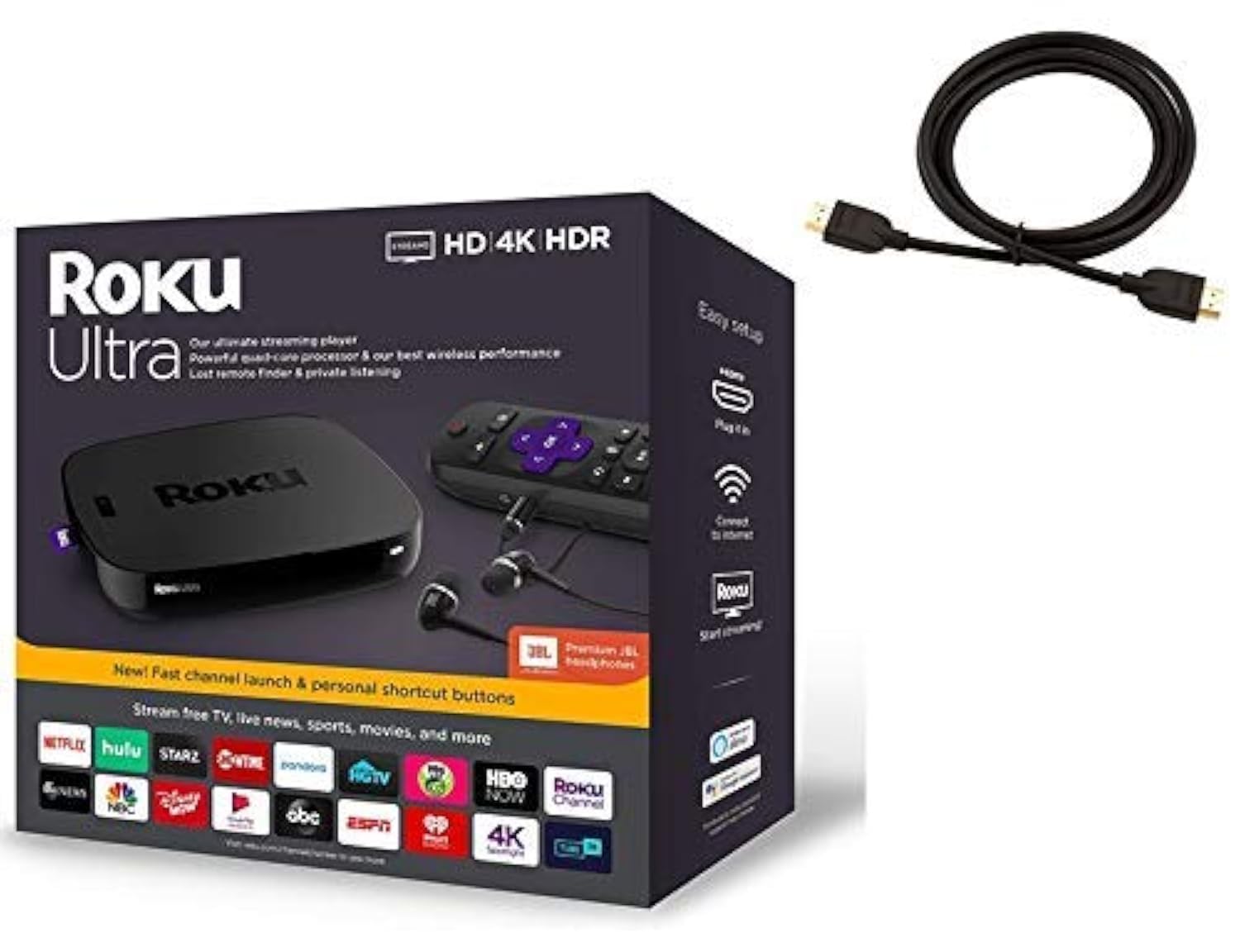
1. Roku Ultra Streaming Media Player 4K/HD/HDR
Our pick — 4.5+★ from 500+ verified ratings; the strongest balance of quality and price.
The set that quiets the room with headphones and still handles live channels in 4K.
The Roku Ultra is the crowd favorite here — 4.5+ stars across 500+ owners — and what wins people over is the overall build and streaming quality. It pulls free, live, and premium TV over the internet, so a local news channel or a live sports app lives right beside Netflix on the same home screen. The quad-core processor keeps channel launches quick, and the best-in-brand wireless on this model is what keeps 4K from stalling mid-broadcast.
Private listening is the feature you will tell friends about — the included JBL headphones plug into the remote so a late game stays out of the bedroom. The included Premium JBL headphones plug into the remote’s headphone path, so you can watch a late game at full volume while the rest of the house sleeps. There’s also a lost-remote finder, which is the kind of thing you don’t value until the remote vanishes under a cushion. Ethernet plus USB and microSD connectors mean you can wire it down and add storage later.
The honest trade-off is footprint. At 4.9″L x 4.9″W x 0.85″H it is a genuinely wide slab next to the compact Roku 3920RW-SW (3.3″L x 1.4″W x 0.71″H), so it needs more shelf real estate. At 8 ounces it is also lighter than the 9.92-ounce Premiere, so weight is not the issue — footprint is. If your TV stand is tight, measure first.
What earns the top spot
- Pull free, live, and premium TV straight over your internet connection
- Quad-core processor plus the best wireless in the Roku line for 4K playback
- Included JBL headphones enable private late-night listening
- Lost remote finder, USB, microSD, and Ethernet connections built in
Where it asks more of you
- The 4.9″ x 4.9″ footprint is wider than most compact boxes
- Costs more than the entry Roku, so budget shoppers may look lower
Pick it if: you want one box that handles live channels, 4K, and late-night private listening without extra gadgets.
Look elsewhere if: shelf space is scarce or you only need a basic second-TV streamer.
2. Roku 3920RW-SW Premiere, 4K/HDR Streaming Media Player
A tiny purple puck that pulls 300+ free live channels without a monthly bill.
For the second TV, or a first step into streaming without a contract, the Premiere makes the most sense. It open up a massive selection of free, live, and premium TV — including 300+ free live TV channels on The Roku Channel — so there is genuinely something to watch on day one. Picture is tune for your TV whether you stream in HD, 4K, or HDR.
What buyers value most here is that it just works — reviews praise the plug-in setup and the simple remote with channel shortcut buttons. Plug in the included Premium High Speed HDMI Cable, connect to the internet, and you are streaming. The simple remote adds shortcut buttons to popular channels, and the free Roku mobile app turns your phone into a second remote with voice search and private listening through wireless headphones.
Here is the number to weigh: 1 GB of memory storage. That is a 16 GB vs 1 GB gap against the BuzzTV B5’s 16 GB — meaning the BuzzTV has far more room for apps and downloads. For pure live-TV streaming the Premiere is plenty, but heavy app jugglers should note the difference. It is also the smaller box, at 3.3″L x 1.4″W x 0.71″H, so it tucks behind almost anything.
Where it shines: 4K and HDR support, 300+ free live channels, automatic software updates, and a footprint small enough to hide. If your goal is live TV with no bill attached, this is the cleanest route.
What to keep in mind: the 1 GB memory is on the lean side if you plan to install a lot of apps, and it lacks the Ethernet and USB connections of the Ultra above.
Reach for this if: you want free live channels and 4K on a spare TV for as little outlay as possible.
skip it if: you need wired Ethernet for a stubborn signal or want room for a big library of installed apps.
3. BuzzTV B5 Android 11 TV Box

An Android box for the tinkerer who wants to install the apps they choose.
If you would rather build your own lineup than live inside one brand’s channel grid, the BuzzTV B5 gets you there. It runs Android 11, so you install apps from that ecosystem instead of a closed collection. The 2GB of RAM keeps multitasking moving and the 16GB of internal storage gives you room to keep them installed.
Two features push it toward live TV specifically: PVR and TimeShift. PVR is recording to storage, and TimeShift pauses and rewinds live broadcast — the two things a cable box does that most streamers skim past. Output is 4K UHD over HDMI to any compatible display, and Ethernet is the wired connection on board.
The catch is the rating — 3.5+ stars across 100+ owners tells you this box divides its audience. It is the more hands-on option of the group, so expect to configure apps yourself rather than plug in and go. If you want the smoothest path to live channels, the Roku Ultra above is the easier ride. If you want control over what runs on your screen, this is that box.
The draw: Android 11 flexibility plus PVR and TimeShift for recording and pausing live broadcast — features the Roku boxes do not list. 16GB of storage and 2GB of RAM support a real app loadout.
The caution: a 3.5+ star average says setup and day-to-day behavior vary by user. Budget time for configuration before you have a channel lineup you love.
Built for: Android users who want PVR and TimeShift control over their own app choices.
Think twice if: you want a plug-in-and-watch experience with a curated channel guide.
4. MAG540w3 Set-Top Box

Bare hardware for MAG subscribers — no apps, no channels, no surprises if you read first.
Read this one carefully: the MAG540w3 is a Linux set-top box that is hardware only. No TV channels, no subscriptions, no content, and it does not run Android apps. It plays media through a compatible, user-configured third-party service — one you sign up with yourself. If your provider supports this model, it slots in as your box. If they don’t, it does nothing.
The hardware itself is straightforward. 4K HDR output with AV1/HEVC decoding (video compression formats that keep streams smooth at high resolution) on a modern TV, driven by the Amlogic S905Y4 chipset. Dual-band Wi-Fi at 2.4GHz and 5GHz plus Ethernet keep the network path flexible. Dolby Digital Plus audio pass-through works when your TV or sound system supports it.
Weight is where it separates from its sibling — at 110 g versus 170 g for the MAG544w3, it is the lighter of the two, which matters if you wall-mount or hang it behind a TV. Storage sits at 4 GB, same as its sibling. Confirm compatibility with your provider before you buy, because that single question decides whether this box earns its place.
Why it fits a MAG household
- 4K HDR with AV1/HEVC decoding on the Amlogic S905Y4 chipset
- Ethernet plus dual-band Wi-Fi for a stable wired or wireless feed
- Dolby Digital Plus audio pass-through for surround setups
- 110 g — lighter than the MAG544w3’s 170 g if you mount it
Before you click buy
- No channels, subscriptions, or content of any kind in the box
- Does not run Android apps, so no app store to fall back on
- Only useful if your provider confirms this model works
The right buy if: your existing provider already supports the MAG540w3 and you want a light, quiet 4K HDR unit.
The wrong buy if: you expect to open a box and start watching without a provider account.
5. MAG544w3 Set-Top Box
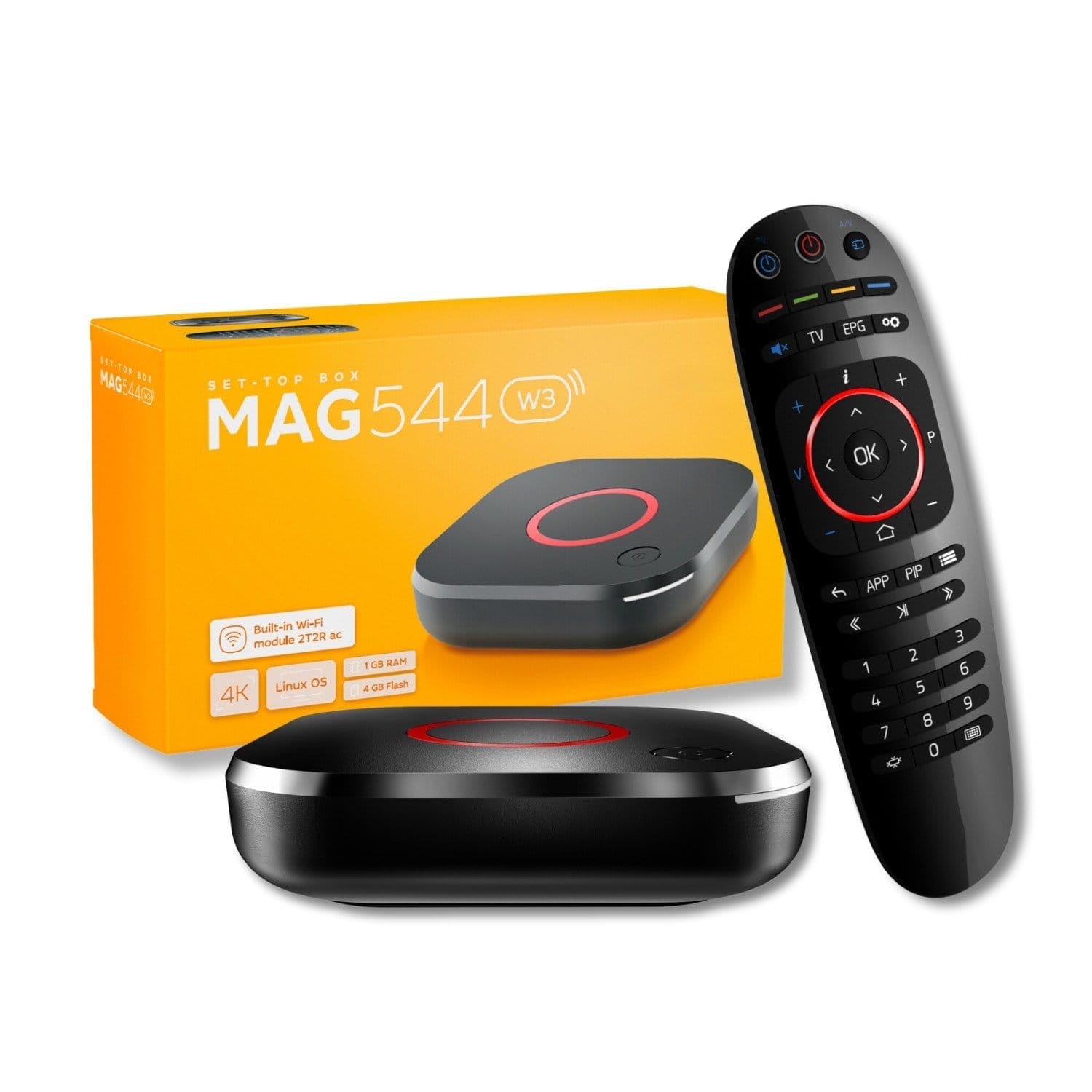
The bigger, heavier MAG sibling — same core hardware, wider connection list.
The MAG544w3 is the same story as its brand-mate with slightly different numbers. It is also a Linux box, hardware only, with no channels and no Android apps, designed for a compatible third-party provider you configure. What you are comparing here is mostly physical: this unit weighs 170 g against the MAG540w3’s 110 g, so it is the heavier of the pair if you plan to hang or mount it. The extra weight pays off in connectivity — this one lists Ethernet, HDMI, USB, and Wi-Fi together.
Under the shell it matches its sibling: Amlogic S905Y4 chipset, 4K HDR output with AV1/HEVC decoding, dual-band Wi-Fi, Ethernet, and Dolby Digital Plus audio pass-through. The IR remote, HDMI cable, and power adapter all sit in the box, so once a provider is set up you are ready to watch.
Honesty time: reliability feedback on this model is mixed, with some units reported working fine and others stopping or refusing to power on. Value is the other sticking point — buyers feel it asks a lot for hardware that needs outside setup. Treat this as the pick for someone who already has a compatible provider and wants the fuller connection list; anyone without one should look at the Roku boxes instead. Satisfaction runs higher when the provider question is answered before the box arrives.
The practical case: Ethernet, HDMI, USB, and Wi-Fi on one box, with the same Amlogic S905Y4 and 4K HDR output as its lighter sibling, plus 4 GB of storage.
The honest caveat: reliability and value come in for mixed marks, and the box is a doorstop without a supported provider — verify compatibility first.
Worth it if: you are already set up with a MAG-compatible provider and want the fuller port list.
Hold off if: you want a guaranteed smooth out-of-box experience with no provider setup.
6. Formuler Z12 Ultra

Dolby Vision, 128GB of storage, and Wi-Fi 6E — the biggest home-theater swing here.
On paper, the Z12 Ultra is the most loaded box in this list. A quad-core processor with 4GB of DDR4 RAM and 128GB of storage means apps open fast and recordings have somewhere to live — 128GB against the BuzzTV B5’s 16GB is a wide gap for anyone who records a lot. Add Dolby Vision and Dolby Atmos for cinematic picture and object-based surround sound, HDR10+ and HLG formats, and 4K 60fps 10-bit playback across AV1, H.265 (HEVC), and H.264.
What wins people over on this model is raw performance — the quad-core chip, 4GB of DDR4 RAM, and 128GB of storage. The 4.0+ star average spans 300+ owners, and the speed and picture quality are the parts buyers single out. The GTV-BT3 Bluetooth voice remote has backlit keys, programmable hotkeys, and a “Find My Remote” feature — a smart touch for a dark room. Gigabit LAN and Wi-Fi 6E (the newer wireless standard built for less interference) keep 4K feeds moving. Standby power draw is listed at 0.5W.
The trade-off is that reliability is the sore spot. Random reboots, freezing, and buffering show up enough that this is a box to buy with a return window in mind. It is also heavy at 464.4 g, so it wants a shelf, not a hanging mount. If you can live with some rough edges for the best picture and storage in the group, this delivers; if you want reliability above all, the Roku Ultra is the safer buy.
Why it tempts
- 128GB of storage and 4GB RAM — the largest capacity here by far
- Dolby Vision, Dolby Atmos, HDR10+, and HLG in one unit
- 4K 60fps 10-bit playback with AV1, H.265, and H.264 decoding
- Wi-Fi 6E, Gigabit LAN, and a backlit voice remote with a finder
Where it falls short
- Reliability complaints of reboots, freezing, and buffering
- Value split between buyers, in part over price-to-finish
- 464.4 g is heavy for a TV-back or hanging setup
Made for: home-theater owners who want Dolby Vision, Atmos, and 128GB of recording space and can handle a return window.
Not for: anyone who needs a set-and-forget box with zero babysitting.
Know the Specs
4K and HDR output
4K is the high-resolution tier that keeps small details sharp on a large TV, and HDR (high dynamic range) widens the range from bright to dark. Dolby Vision and HDR10+ add a frame-by-frame version of that same idea. For live channels these mostly sharpen the picture; the actual channels still come from your apps or provider.
RAM and internal storage
RAM is the working memory apps run in, and storage is the permanent shelf they sit on. 2GB of RAM supports multitasking, while 16GB or 128GB of storage sets how many apps and recordings you can hold. More of both usually means faster launches and fewer stutters during a live broadcast.
The chipset and decoding formats
The chipset is the processor doing the video math — the Amlogic S905Y4 is one example here. AV1, HEVC, and H.264 are video compression formats that keep high-resolution streams small enough to travel smoothly. When a box lists AV1 and HEVC, it can handle newer streams at 4K without choking.
Wi-Fi standards and the Ethernet option
Dual-band Wi-Fi means it can use 2.4GHz (longer reach, slower) or 5GHz (faster, shorter range). Wi-Fi 6E is a newer standard built to reduce interference in busy homes. Ethernet is a fixed cable connection and remains the most dependable way to keep live TV from buffering.
Common Questions
Do these boxes come with live TV channels included?
Can I watch live TV without a cable subscription?
What does hardware only mean on the MAG boxes?
Will the Formuler Z12 Ultra run regular Android streaming apps?
Is Wi-Fi 6E better than regular Wi-Fi for live streaming?
How much storage do I need for recording live TV?
Do I need a 4K TV for these streaming boxes?
How do I set up private listening on the Roku Ultra?
Will a MAG box work with any TV provider?
What is the difference between AV1 and HEVC decoding?
The Bottom Line
For most people, the winner is the Roku Ultra because it handles free live channels, 4K HDR, and private listening in one box with no provider setup. If you want a second TV streaming for the least outlay, grab the Roku Premiere. And for a home-theater showcase with Dolby Vision and 128GB of recording space, the Formuler Z12 Ultra is the one to reach for — just buy it with a return window in mind.
How we choose
We do not accept paid placement. Every pick is matched to a real buyer and a real use-case; we do not hands-on test units.
Sources
Specifications: manufacturer listings and product documentation. Review insights: verified customer reviews, as of November 2026. Pricing: not shown on this page (it changes often); check the current price via the retailer link.
As an Amazon Associate, Tactical Gear Guy earns from qualifying purchases. This does not affect which products we feature.