Specs are compiled from manufacturer listings and verified buyer reviews and can change over time — please confirm the key details on the product page before buying.
Buying the right one is harder, because what decides whether you enjoy simming is whether the base stays put, whether the pedals match, and whether your sim recognizes the controller on day one. The picks below cover every budget tier and every platform, from a pedals-included bundle to a Boeing-licensed replica with a metal core.
This guide is built by comparing the manufacturers’ published specifications and the patterns across verified customer reviews, so you get each pick’s real strengths and trade-offs instead of marketing spin.
You will see what each yoke’s rotation range, button count and platform support actually mean in a living-room sim pit, plus the one build quirk that shows up again and again across owner feedback. Here is the breakdown of the best flight yoke systems by budget and platform.
Top Picks
How To Choose The Best Flight Yoke System
Start with the platform question, not the hardware question. A yoke your simulator does not fully support is a paperweight with a nice grip.
Match the yoke to your simulator first
Microsoft Flight Simulator on PC is the safest bet for almost anything. Xbox Series X and Series S owners need officially supported hardware — the Turtle Beach VelocityOne and the Thrustmaster Boeing packs both list Xbox consoles, while the Honeycomb Alpha LITE is a PC product built around MSFS 20 and 24.
Decide if you need pedals in the same box
A rudder pedal set adds a whole axis of control you cannot fake with a twist grip. The Logitech bundle ships the Pro Flight Rudder Pedals alongside the yoke, including differential toe brakes — the separate left and right brake inputs you use to steer while taxiing. Buying pedals later costs more and adds another cable run under the desk.
Check how the base stays on your desk
Yoke bases slide when you pull back hard. The Turtle Beach unit uses a secure clamping system, while the Alpha LITE depends on its own weight — 9.92 pounds of it — plus grip underneath. If your desk has a rounded or glass edge, measure the clamp thickness before you commit.
Side-by-Side Comparison
| Model | Best For | Buttons | Yoke Rotation | Platforms | Amazon |
|---|---|---|---|---|---|
| Logitech G Pro Flight Yoke System + Rudder Pedals Bundle★ Best Overall | Pedals included in one box | 14 | — | Windows | Amazon |
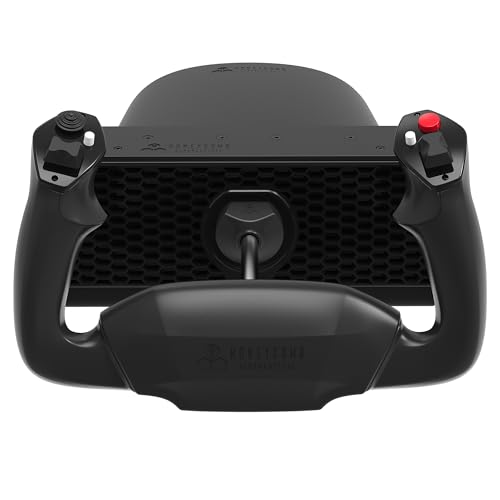
| Honeycomb Alpha LITEFirst Yoke Pick | First-time PC simmers | 4 programmable | 180° | PC (MSFS 20 & 24) | Amazon |
| Turtle Beach VelocityOne Flight Universal Control System | Xbox simmers wanting one box | 26 | 180° | Xbox One, Series X, Series S, PC | Amazon |
| Thrustmaster TCA Yoke & Quadrant Boeing Edition Flight Pack | Airliner realism on a budget | 35 | 8.3 in travel range | Xbox Series X, PC | Amazon |
| Thrustmaster TCA Yoke Pack Boeing Edition | Boeing cockpit feel | 35 | 8.3 in travel range | Xbox One, Series X, PC | Amazon |
| Honeycomb Alpha Flight Controls Yoke Bundle | Four-engine cockpit builders | — | — | PC | Amazon |
Detailed Reviews
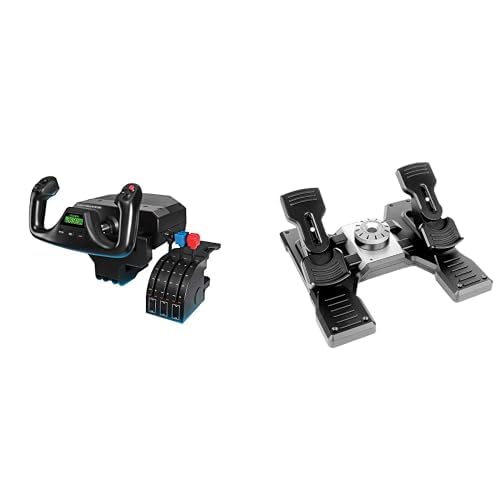
1. Logitech G Pro Flight Yoke System + Pro Flight Rudder Pedals
Our pick — 4.5+★ from 100+ verified ratings; the strongest balance of quality and price.
The one-box answer for simmers who want their feet flying the rudder on day one
This is the only pick in the line-up that ships with self-centering rudder pedals. They add a second axis of control you cannot get from a yoke alone — your feet handle the yaw while your hands fly the pitch and roll. And they are not a stripped-down afterthought: the foot rests adjust to fit a wide range of sizes and carry non-slip material, so your heels stay where you put them during a long approach.
The yoke itself runs 14 button controls with a POV hat and a 3-position mode switch, which Logitech puts at 54 programmable controls once you use the mode switching. That is a lot of mapping headroom for a single yoke, and it means you can keep gear, flaps and trim on the hardware instead of reaching for the keyboard mid-turn. Differential toe brakes are the other reason this bundle earns its keep — they give you independent left and right brake pressure for steering on the runway rather than relying on the yoke twist.
What owners keep coming back to is the functionality and the value as a training aid — the whole package works as a way to build the muscle memory of a real cockpit, and learning to steer with your feet rather than your hands is the experience it is built around. The honest catch: at 14 buttons against the Thrustmaster Boeing packs’ 35, this is the leaner mapping set, so complex airliner procedures will need more mode juggling. It is also a Windows-tied bundle — Xbox simmers should look at the Turtle Beach or Thrustmaster packs instead.
What earns it the top slot
- Rudder pedals ship in the same box, so taxiing is handled from the first flight
- 14 button controls plus a POV hat and 3-position mode switch add up to 54 programmable controls
- Foot rests adjust across a wide size range and grip with non-slip material
- Differential toe brakes give independent left and right brake pressure on the runway
Where it asks you to compromise
- 14 buttons is the smallest count among the multi-button yokes here — airliners will need more mode switching
- Windows-only compatibility means no Xbox support
Start here if: you are on a Windows PC and want pedals and yoke together without buying twice.
Look elsewhere if: you fly on an Xbox console, or you want 35-button mapping without leaving the yoke.
2. Honeycomb Alpha LITE
A stripped-back yoke that nails the 180° throw and leaves the extra switches behind
A full 180° of rotation makes the biggest difference to how a sim yoke feels, because it mirrors the throw of a real aircraft column rather than a short arc. The Alpha LITE pairs that with a self-centering mechanism and a minimal dead zone — dead zone meaning the slack at the centre where movement does nothing. With a small dead zone, small corrections actually register, which matters when you are trimming out on a long straight leg.
The control set is deliberately tight. On the left you get a POV switch, a 2-way rocker and 2 programmable buttons; the same layout sits on the right. Four programmable buttons total is enough for the essentials — views, gear, autopilot disconnect — and nothing more. Where this yoke gets its reputation is build quality: at 9.92 pounds it has real mass on the desk, and the precision components inside are the reason it feels planted rather than toy-like.
Honest fit note: smooth movement is the mixed part. Some owners find the action glides, others find the base slides around under a hard pull — a heavy unit still needs grip underneath or a mat. Compatibility is PC-only, tied to MSFS 20 and 24, and Honeycomb publishes setup guides for both. If you fly anything outside that ecosystem, check the mapping before buying. For a PC simmer starting out, the yoke throw and the heft are the two things you will notice every single flight.
What the 180° gives you: a long, even throw that makes fine pitch corrections feel natural rather than twitchy.
The honest trade-off: four programmable buttons and no pedals in the box — this is a yoke and nothing more.
Reach for this if: you are on PC and MSFS and want authentic rotation without paying for switches you will not map.
Think twice if: your desk surface is slick — plan on a grip mat under that 9.92 pounds.
3. Turtle Beach VelocityOne Flight Universal Control System
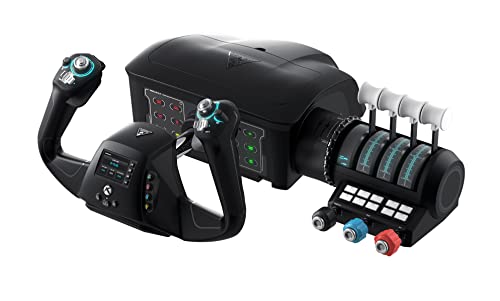
The only pick here that folds a yoke, throttle quadrant and rudder controls into one console-ready unit
If you fly on Xbox Series X, Series S or an Xbox One, this is the one to look at first. It covers all three consoles plus Windows 10 and 11 PCs, and it does it with a single box that includes the throttle quadrant, a trim wheel and integrated rudder and brake controls. That last part is the clever bit — you get rudder input at your fingertips without buying a separate pedal set, which keeps the whole cockpit on one surface.
The yoke handle rotates through 180° and reads your input with a non-contact hall effect sensor — a magnetic sensor that never physically touches the moving part, so there is nothing to wear out at the pivot. Around the handles you get 26 buttons, two POV switches and two 4-way HAT switches, plus 12 analog axes across the whole system. A full-colour flight management display walks you through configuration, and a dedicated pitch trim wheel gives you fine control of the aircraft’s surfaces without leaving the throttle. The secure clamping system is what keeps the base honest when you pull back.
Here is the fair caveat, and it is the big one: build quality is the mixed conversation around this unit. The metal-feel expectation of a premium yoke is not what you get here, and a dedicated clamping setup matters. The positive side is well documented too — compatibility with flight simulator titles is what people value most, because this thing just works once it is plugged in. For a console simmer who wants everything in one footprint, that trade is reasonable.
What makes the footprint work
- Yoke, throttle quadrant, trim wheel and rudder controls all in one unit
- Runs on Xbox One, Series X, Series S and Windows 10/11
- Non-contact hall effect sensor on the 180° handle rotation
- Secure clamping system holds the base during hard pull-back
The part to size up honestly
- Build quality divides opinion — this is not a premium-metal-feel yoke
- 26 buttons is generous, but the configuration display is needed to map them all
The console call: buy it if your sim time happens on an Xbox and you want one device covering yoke, throttle and rudder.
The desk call: if you expect airliner-grade metal construction, look to the Thrustmaster Boeing packs instead.
4. Thrustmaster TCA Yoke & Quadrant Boeing Edition Flight Pack
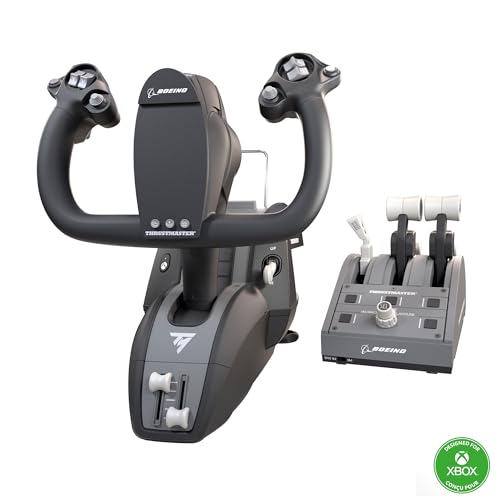
A 1:1 Boeing 787 replica with the pendulum motion of the real Dreamliner column
Scale is the whole pitch here. This is a 1:1 replica of the Boeing 787 yoke, licensed by Boeing and Xbox, and it sits in front of you at the size a real one would. The mechanism underneath is what sells it: the PENDUL_R design mimics the pendular movement of a Dreamliner column across an 8.3-inch (21-cm) range of travel. Push forward and the yoke arcs on a pendulum rather than sliding on rails, and that difference is what makes airliner hand-flying feel like the real thing.
Button count is where this pack gets serious. You get 35 action buttons across the yoke and quadrant — the largest count in this line-up, against the 14 on the Logitech bundle below it. That is a 2.5x gap in mapping headroom, and for an airliner cockpit it means more systems living on the hardware. Add 2 extra axes, magnetic sensing technology on all main axes, and a 100% metal internal structure, and you have a package built around durability and balanced weight. The throttle quadrant carries the iconic Boeing autopilot control for altitude, airspeed and heading, and the levers are swappable with the speed brake and flaps levers.
The catch worth knowing before you order: the yoke needs Thrustmaster TFRP or TPR rudder pedals, and those are sold separately. Durability is the other honest question — some owner reports mention the unit failing within a year, so weigh that against the metal core. Rudder control is the bigger structural gap, because this pack gives you none without the add-on pedals.
The 35-button advantage: the biggest mapping set in this group, so flaps, gear, autopilot and trim all live under your thumbs.
The hidden cost: rudder pedals are a separate purchase, so budget for a second box if you want full control.
Worth the step up for: airliner flyers who want Boeing-licensed scale and a 35-button cockpit under hand.
Second-guess it if: you need rudder control from the start — this pack does not include pedals.
5. Thrustmaster TCA Yoke Pack Boeing Edition
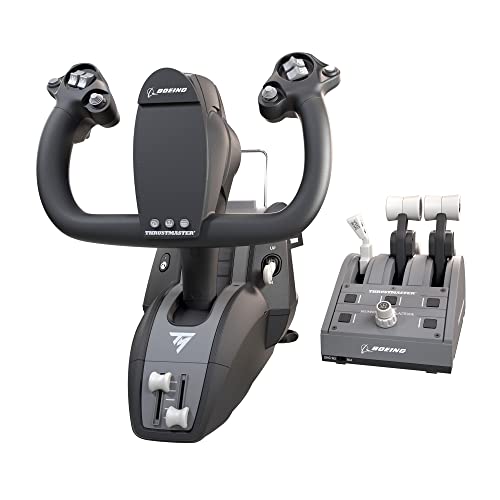
The full-size airliner yoke with a metal core and an autopilot panel on the throttle
Buy this one when you want the cockpit to feel like a cockpit. The 100% metal internal yoke structure is what does it — that internal frame is what gives the unit its balanced weight and its stiffness under hand, and it is the reason the yoke flexes less than plastic-bodied alternatives. Around that core sits the same 1:1 Boeing 787-inspired form, with the suspended PENDUL_R mechanism and its 8.3-inch (21-cm) travel range giving you that slow, arcing pendulum feedback rather than a spring-loaded snap.
Adjustable springs let you dial in how heavy the yoke feels, and because the resistances are linear you can match the feel to a light general aviation aircraft or a loaded airliner. On the quadrant you get the Boeing autopilot feature for altitude, airspeed and heading, plus four levers in total — throttle levers swap out for the speed brake and flaps levers, so you can set up for the aircraft you fly most. Magnetic sensing runs across the main axes on both yoke and quadrant, and MSFS picks the whole package up automatically on Xbox Series X|S and PC. Thirty-five action buttons round it out.
The follow-up question every buyer should ask is about longevity. Some owners of the Boeing packs report failures within a year, so treat the metal structure as a stiffness and feel benefit, not a lifetime guarantee. The other note is that pedals remain a separate purchase, the same as its sibling. On the plus side, the footprint and the adjustable springs mean this yoke sizes up against both the Turtle Beach all-in-one and the Logitech bundle — heavier, more tactile, more cockpit.
The cockpit chaser: this is your pick if a metal core and an airliner autopilot panel are what you are after.
The practical limit: no pedals included and no light-weight footprint — plan the desk space and the extra purchase.
6. Honeycomb Alpha Flight Controls Yoke Bundle

A yoke plus a configurable throttle quadrant that scales from a Cessna to a four-engine jet
Two boxes, one bundle: the Alpha Flight Controls yoke and the Bravo Throttle Quadrant. The Bravo is the draw if you fly more than one aircraft type, because its throttle setup reconfigures from single-engine general aviation all the way up to a four-engine commercial airliner. That range is why it earns a place here — most quadrants lock you to one engine layout, and this one does not.
Feature stack on the Bravo covers the pieces a real cockpit has: autopilot controls, an annunciator panel, gear and flap levers, and a trim wheel. There is an LED landing gear indicator tied to the gear lever, which gives you a visual check without looking at the screen. Build quality and appearance are what owners talk about most, and the feel of the switchgear is part of that. That is a lot of cockpit in one box.
Setup is the mixed part. This is a PC-oriented bundle with a considerable footprint, and getting the Bravo’s many levers and switches mapped across different aircraft takes some patience on first install. That effort pays off for anyone who flies a variety of aircraft and wants one throttle rig to serve them all. If you want a single plug-and-play device, this is more than you need — but if you are building a home cockpit around multiple aircraft types, the configurable throttle is the reason to spring for it.
The scale story: a throttle quadrant that reconfigures from single-engine general aviation to four-engine commercial airliners, with a trim wheel, gear and flap levers included.
The setup reality: mapping the full switch panel and quadrant across aircraft takes time on first install, and the desktop footprint is generous.
Build around this if: you fly several aircraft types and want one throttle rig that adapts to all of them.
Pass it by if: you want to plug in one yoke and fly — this bundle is for cockpit builders.
Know the Specs
Yoke Travel Range and Rotation
Rotation is how far the yoke turns left to right, and travel range is how far it moves fore and aft. A 180° rotation matches the throw of a real aircraft column, so small corrections register. The Thrustmaster Boeing packs quote an 8.3-inch (21-cm) range of travel on their pendulum mechanism, while the Logitech and Turtle Beach yokes are built around a 180° handle. More travel means smoother hand-flying, especially on approach.
Button Count and Mapped Axes
Button count tells you how many switches live on the hardware. Analog axes are the smooth inputs — pitch, roll, throttle, rudder — as opposed to a button that is either on or off. The Thrustmaster Boeing packs carry 35 action buttons, the Turtle Beach system lists 26 with 12 analog axes, and the Logitech bundle lists 14 with a 3-position mode switch. More buttons mean less reaching for the keyboard mid-turn.
Platform Compatibility and Sim Support
Yokes fall into PC-only and console-plus-PC camps. The Honeycomb Alpha LITE is a PC product tied to MSFS 20 and 24, while the Turtle Beach unit covers Xbox One, Series X, Series S and Windows 10/11. Officially licensed hardware tends to plug in and be recognized, which matters more than a long feature list if you want to fly tonight.
Clamping, Weight and Base Grip
A yoke only feels good if it stays where you put it. Clamping systems grip the desk edge, while weighted bases rely on mass plus non-slip material. The Turtle Beach unit uses a secure clamping system, and the Alpha LITE relies on its 9.92 pounds of weight. Check your desk edge shape before you buy, especially on glass or rounded surfaces.
Common Questions
Will a flight yoke system work on an Xbox Series X?
Do I need rudder pedals with a yoke?
What does a 180° yoke rotation actually change?
How does the Thrustmaster TCA Yoke Pack Boeing Edition differ from the Flight Pack?
Is a hall effect sensor better than a potentiometer on a yoke?
How many buttons do I need on a flight yoke?
Will a heavy yoke slide around on my desk?
Does the Honeycomb Bravo Throttle Quadrant handle airliners as well as small aircraft?
Can I add Thrustmaster rudder pedals to a Boeing yoke pack?
Is a metal internal yoke structure worth paying more for?
The Bottom Line
The pick that makes the most sense for the widest range of simmers is the Logitech G Pro Flight Yoke System + Rudder Pedals Bundle, because it includes the pedals that every other pick asks you to buy on top. It is the only one of the six that hands you yaw control the moment you unbox, and the adjusting non-slip foot rests mean a shared sim pit works for everyone in the house. If you fly an Xbox and want everything on one footprint, the Turtle Beach VelocityOne is the console choice. And for a full airliner cockpit with a metal core and a 35-button layout, the Thrustmaster TCA Yoke Pack Boeing Edition is the one to reach for — the premium-tier pick for a metal core and a 35-button airliner layout.
How we choose
We do not accept paid placement. Every pick is matched to a real buyer and a real use-case; we do not hands-on test units.
Sources
Specifications: manufacturer listings and product documentation. Review insights: verified customer reviews, as of November 2026. Pricing: not shown on this page (it changes often); check the current price via the retailer link.
As an Amazon Associate, Tactical Gear Guy earns from qualifying purchases. This does not affect which products we feature.