Specs are compiled from manufacturer listings and verified buyer reviews and can change over time — please confirm the key details on the product page before buying.
You want a drive that shows up as a letter in File Explorer the second you plug it in — no install disc, no formatting ceremony, no surprise. Every pick below works with Windows 10 straight from the box. The WD Elements 2TB takes the top spot because it combines true plug-and-play simplicity with 2TB of room for games, photos and backups, backed by a 4.5+ star rating across 130,000+ owners. The rest of the list splits by what you actually need: pure speed, a slim pocket shape, console compatibility, or the largest single-capacity unit here.
This guide is built by comparing the manufacturers’ published specifications and the patterns across verified customer reviews, so you get each pick’s real strengths and trade-offs instead of marketing spin.
The world of portable storage hides a few traps — a “1TB” that shows as 931GB in Windows, cables that throttle speed, and enclosures that feel like they’ll crack in a laptop bag. Below, every pick is checked against those realities so you can choose with clear eyes for the best external hard drive for Windows 10.
Top Picks


How To Choose The Best External Hard Drive for Windows 10
The single biggest reality check for Windows 10 shoppers is this: every drive here connects over USB, and every one of them will appear in File Explorer as a letter you can drag files onto. The differences that actually matter come down to four things — capacity, connection speed, physical size, and whether the drive arrives pre-formatted for Windows or needs a quick format first.
Capacity: How Much Space Do You Actually Need?
Capacity is measured in terabytes (TB), where each terabyte is roughly a trillion bytes of storage. A 1TB drive holds a lot of photos and documents, while 2TB doubles that and 5TB really opens the door to large video libraries and game backups. Windows itself measures storage in a slightly different way than the manufacturer does — that’s why a “1TB” drive can display as around 931GB inside the operating system. This is normal, not a defect.
Connection Speed: USB 3.0 vs USB 3.2 Gen 1
USB 3.0 and USB 3.2 Gen 1 describe the same physical connection — a USB-A plug that carries data at up to 5Gbps (five gigabits per second). Most Windows 10 laptops and desktops from the last decade have at least one of these ports. USB 2.0 ports will still work but transfer far more slowly, so always plug into a blue or SS-labeled port if you have one.
Portability, Form Factor, and Ruggedness
The 2.5-inch form factor — the standard small drive size — means every pick here slips into a pocket or laptop sleeve. Weight varies. The Kosbees drive tips the scale at 0.6 Lbs, which is light enough to carry in a jacket pocket all day. None of these drives are marketed as drop-proof, so treat the enclosure gently in a bag.
Side-by-Side Comparison
| Model | Best For | Capacity | Transfer Speed | Format | Amazon |
|---|---|---|---|---|---|
| WD Elements 2TB★ Best Overall | Everyday Windows backup | 2 TB | 5Gbps | Plug and Play | Amazon |
| Seagate Portable 1TBTop Performer | Fast transfers on a budget | 1 TB | 20Gbps | Plug and Play | Amazon |
| Toshiba Canvio Basics 2TB | Matte-finish PC storage | 2 TB | 5Gbps | NTFS pre-formatted | Amazon |
| WD Elements 1TB | Compact everyday carry | 1 TB | 1Gbps | Plug and Play | Amazon |
| WD 5TB Elements | Big archive for video | 5 TB | 5Gbps | Plug and Play | Amazon |
| WD 5TB My Passport | Password protection and backup software | 5 TB | 5Gbps | Plug and Play | Amazon |
| Kosbees 1TB Slim HDD | Tight budget, console use | 1 TB | 110 MB/s | Plug and Play (format for Mac) | Amazon |
Detailed Reviews
1. WD 2TB Elements Portable External Hard Drive
Our pick — 4.5+★ from 139,500+ verified ratings; the strongest balance of quality and price.
A pocket-sized slab of storage that shows up in Windows before you finish your coffee
You get the simplest fix for a full drive right here. The WD Elements packs 2TB into a small black case that slips into a pocket, and it works the moment you plug the USB cable into a Windows 10 machine. No installer, no setup wizard, no reformatting. The 5Gbps connection (that’s the same as USB 3.0) is fast enough that dragging a folder of photos onto the drive feels nearly instant. Copying a few dozen high-definition videos takes a couple of minutes rather than a coffee break.
The reason this drive takes the top spot isn’t just the spec sheet — it’s the crowd. It’s the most-loved pick on the list, with 4.5+ stars across 130,000+ owners, and the recurring theme in feedback is simple: it just works. People describe a quick plug-and-play handoff, a body compact enough to disappear in a bag, and room to hold a whole game library without constant cleanup anxiety. The enclosure is plastic and light, which is the trade-off for making it portable — treat it like a phone, not a hockey puck, and it lives happily in a backpack for years.
Compare it with the WD 1TB below and the choice is clean: the 2TB holds twice the files for a very similar footprint. Compare it with the 5TB models and you’re giving up long-term headroom for a price that’s more approachable. The recurring minor note in the reviews is about how much usable space Windows actually displays after formatting, which is normal binary math, not a flaw. A few people wish the cable were a bit longer — the included USB 3.0 cable is on the short side for desktop towers sitting on the floor.
What lands on day one
- 2TB of space for photos, videos, documents and backed-up games
- Plug-and-play USB 3.2 Gen 1 at 5Gbps — no software needed
- Small enough to disappear in a jacket pocket or laptop sleeve
- Huge owner base behind the design — dependable reputation
Where it asks for care
- Plastic enclosure — not marketed as drop-proof
- 1TB / 2TB / 5TB all choose from the same family, so pick your size up front
- Included cable is short for tower PCs on the floor
Reach for this if: you want the safest one-click decision — Windows 10 compatibility, 2TB of room, and a reputation grounded in tens of thousands of happy owners.
Look elsewhere if: you routinely back up massive video projects and need 5TB of headroom in a single drive.
2. Seagate Portable 1TB External Hard Drive HDD
The speed headline on this one blows past every other drive on the list
The headline spec on the Seagate Portable is its 20Gbps data transfer rating — twenty times the 1Gbps figure the WD 1TB Elements below carries. In real terms, that’s the difference between a drive that feels limited by its cable and one that genuinely keeps up when you’re moving large installers, virtual machine images, or raw game builds. Whether you’ll hit that ceiling depends on your PC’s port, and USB 3.0 will still be the practical limit for most Windows 10 laptops — but the drive’s headroom means you won’t be blaming the enclosure later.
You get plug-and-play for Windows, an 18-inch USB 3.0 cable in the box, and auto-recognition so you never install software. Seagate also includes a 1-year Rescue Service (a data-recovery plan) if confidence matters to you. The 1TB capacity is the practical balance for a second drive. It holds a photo library and a folder of backups without asking you to prune anything.
Buyers report a split: some get fast, near-instant transfers, while others describe slow performance in day-to-day use. A small group notes the drive doesn’t reformat cleanly for a Mac without extra steps. On Windows 10, the plug-and-play experience is what most buyers care about, and that lands reliably. The honest read: this drive rewards you with serious speed when your hardware cooperates. It’s a slightly riskier buy than the top pick if you want the same experience every single person loves.
The speed story: 20Gbps is the highest transfer rating on this list, a real advantage if your port and workload can feed it.
The trade-off: owner experiences with speed are polarised — some find it blazing, others not — so the safest expectation is “fast enough,” not “always fastest.”
Go here when speed is the priority: you want the strongest data-transfer rating on the list and a 1-year Rescue Service to back it up.
skip it if: you need a Mac-formatted drive from the start or an experience that every single owner praises.
3. Toshiba Canvio Basics 2TB Portable External Hard Drive

Ships pre-formatted in NTFS — the exact language Windows 10 speaks
The Toshiba Canvio Basics skips a step that most drives don’t: it leaves the factory already in NTFS, the native Windows file system. On a Windows 10 PC, that means the drive mounts in File Explorer with the right letter and lets you copy files at once — no reformat, no exFAT detour, no wondering why the drive shows as raw. For a lot of buyers, this is the difference between “I’ll deal with it later” and “done in five minutes.”
The 2TB capacity matches the WD Elements up top, and the 5Gbps USB 3.2 connection is the same speed class. Where the Toshiba stands apart is the enclosure: a matte, smudge-resistant finish on a polycarbonate shell that stays looking clean in a bag, unlike glossy drives that fingerprint up the second you touch them. In a world of black rectangles, this one is a little easier to keep tidy.
Owner reports are generally favourable on freed-up space — the phrase “finally cleared my PC” comes up in different forms — but reliability gets mixed notes. Some report years of steady service; a handful describe a unit that failed early and needed replacing. Honest read: the spec sheet and finish are quietly excellent, and the experience is what you’d want — but treat drive redundancy as a good habit regardless of what the box brand says.
Why it earns its place: NTFS pre-formatting is the single most Windows-friendly choice on this list — the drive just shows up and works.
The fair caveat: most owners log happy years of daily use; a few note early failures, so a phone case for your data is prudent.
Pick this for a no-friction Windows handoff: NTFS formatting, 2TB, and a matte shell that stays clean in a bag.
Think twice if: you share files constantly with a Mac — you’ll need to reformat the drive first.
4. WD 1TB Elements Portable External Hard Drive
The 1TB version of the Elements family — same shape, smaller numbers, similar reputation
This 1TB Elements is for a specific buyer: someone whose needs are already close to being met, who just wants the drive to slot in and stay out of the way. It’s formatted for Windows from the start and works with both USB 3.0 and older USB 2.0. Crucially for laptops with limited ports, it doesn’t ask for an external power brick.
The transfer rating on this drive is 1Gbps, which is six times lower on paper than the Seagate Portable’s 20Gbps figure — the biggest cross-product gap on the list. In real life, that’s the difference between a drive that moves a big video file in a couple of minutes and one that makes you wait noticeably longer. If your backup routine is mostly photos, music, documents and DRM’d video files, the gap rarely bites.
What owners consistently appreciate here is dependability over years — the drive has one of the cleanest reliability reputations in this category, with the strongest positive aspect vote count of any drive on the list. Mac compatibility is the mixed note: a subset of owners mention the drive needing reformatting, which is expected but worth flagging. On Windows 10 specifically, this drive is exactly what most people want — a small, black, no-drama box that shows up, stores files, and keeps doing that.
The quiet strengths
- 1TB of space in a pocket-sized WD enclosure
- Windows 8 / 7 / Vista / XP formatting — Windows 10 handles it fine
- USB 3.0 and USB 2.0 compatibility for older hardware
- Reliability reputation that quietly leads the field
The things to know
- 1Gbps transfer rating is on the slow side for big-file work
- Needs reformatting for Mac — not a Mac-ready drive
- 1TB fills up fast if you shoot video
The pick for a bulletproof everyday drive: Windows-ready, 1TB, and a reputation for simply keeping on working.
Better options exist if: you need faster transfers or more room — the Seagate above and the 5TB models below both go further.
5. WD 5TB Elements Portable External Hard Drive

Five terabytes in the same pocket footprint — enough for hundreds of hours of video
The number that matters here is 5TB, five times the capacity of the Kosbees 1TB pick below. In real terms, that’s the difference between archiving a few years of photos and archiving a decade of them. Owners describe it as a serious video library drive, with one comparison framing its 5TB as roughly 600 hours of stored footage. If you’re a videographer, a Plex hobbyist or someone who simply refuses to delete anything, the 5TB Elements is built for that appetite.
The 5Gbps USB 3.2 Gen 1 connection keeps pace with the top pick, and the plug-and-play setup means Windows 10 sees the drive immediately. from the start, it comes with a SuperSpeed USB-A cable and a quick install guide — no software layer, no account setup, no password prompt to get past. It’s just storage.
The honest story owners tell is split on reliability and speed: many describe smooth data transfers and years of use, while a smaller set report a unit that crashed early or felt molasses-slow on big files. Treat this like any mechanical hard disk — keep it backed up, don’t drop it, and don’t use it as your only copy of irreplaceable files. What wins people over most is the sheer capacity-per-slot — that one enclosure holds an entire professional video archive.
The headline: 5TB of portable storage with plug-and-play Windows 10 support — an enormous single-drive library without a wall of external boxes.
Fit note: owner experience on long-term reliability is mixed — the sensible move is to treat this as part of a backup routine, not the only place your files live.
Choose this for massive archives: video editors, photographers or anyone whose library has outgrown smaller drives.
Go smaller if: your needs are documents and photos — the 2TB Elements up top carries the same reliable formula with far less room to fill.
6. WD 5TB My Passport Portable External Hard Drive

The 5TB drive with a lock on the door — password protection and hardware encryption built in
Most drives on this list are storage. The My Passport is storage with a security layer. That’s the pitch, and it’s backed by hardware encryption — the lock lives in the drive’s circuitry, not in a software wrapper that anyone can bypass. It also ships with WD device management software offering scheduled backups and ransomware defence.
You get 5TB of space, matching the Elements above and five times the 1TB of the Seagate and Kosbees picks. The USB 3.1 / USB 3.0 connection is the same 5Gbps class as the rest of the family. from the start it comes with the drive, a SuperSpeed USB-A cable and a quick start guide. Windows 10 recognises it on the first plug-in, and you can install WD Backup software on top if you want scheduled jobs.
The ownership story is honest but mixed. Capacity is the most-praised aspect, with one comparison framing its 5TB as roughly 800 high-definition movies. Reliability and quality are more divided: some owners run it happily for years, others report failure at under four months. That pattern is typical for high-capacity mechanical drives and is why the sensible plan is to pair a drive this size with a second backup. The password setup is also a real decision — lose the password and the encryption that protects you also locks you out.
Why someone picks this over the Elements
- Password protection and hardware encryption at the drive level
- Backup software with ransomware defence included
- 5TB of capacity — the same top capacity as the Elements 5TB
- 3-year limited warranty from WD
The honest fine print
- Long-term reliability is mixed in owner reports
- Lose the password and the encrypted data is locked away
- The premium features come with a higher price than plain storage
Worth it if: you carry client files, tax records, or anything sensitive and want a password lock built into the drive itself.
Reconsider if: you just want raw, cheap storage — the Elements 5TB below offers the same capacity without the security layer.
7. Kosbees 1TB External Hard Drive — Ultra Slim HDD
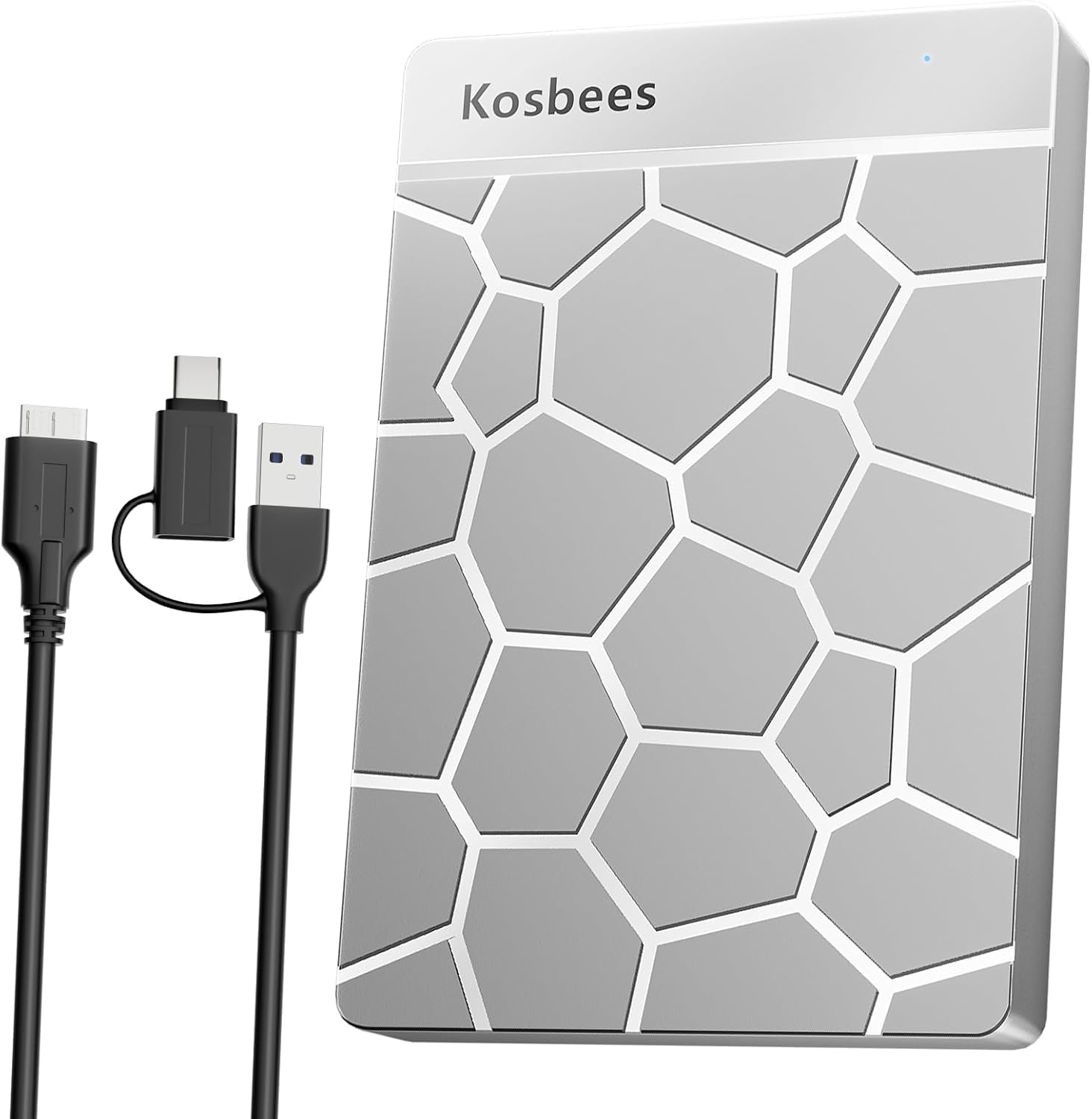
A slim silver 1TB workhorse with a 2-year warranty and a light, pocket-friendly body
This is the pick for someone whose budget is real and whose needs are simple. The Kosbees drive packs 1TB into a 2.5-inch enclosure that weighs 0.6 Lbs — light enough to forget it’s in a laptop bag. It connects over USB 3.0 with a theoretical read speed of 110MB/s-133MB/s and write speed up to 103MB/s. That’s not going to match the Seagate’s 20Gbps headline, but for backups and file moves it does the job without fuss.
The drive also earns a nod for the manufacturer’s honesty: the product listing spells out the exact reason a 1TB drive shows as 931GB in Windows — the difference between decimal and binary capacity. That’s not a defect, it’s math, and the fact that Kosbees writes it out front saves a lot of confused support tickets. It ships with 2 years of after-sales warranty, which for a budget drive is a genuinely reassuring number.
One thing worth knowing before you buy: the listing says you can play last-gen games (PS4 / Xbox One) directly from this drive. Current-gen games (PS5 / Xbox Series X|S) need to be copied to the console’s internal SSD first. That’s a real limitation if you’re a console gamer on the newest hardware. On Windows 10, though, the drive mounts cleanly, accepts your files, and — for the price — does exactly what the top picks do, just with a thinner margin of speed. There’s also a note that Mac users need to reformat first, same as most Windows-formatted drives.
The value argument: 1TB, a slim 0.6 Lbs body, a 2-year warranty and honest documentation of the 931GB visible-capacity question — all in a light silver shell.
Where it gives ground: 110MB/s-133MB/s read speed trails the Seagate’s higher rating, and current-gen console games must be copied to internal storage first.
The pick if the budget is tight: 1TB, 2-year warranty and Windows-ready plug-and-play at the most approachable price tier here.
Look up a tier if: you rely on current-gen console gaming — those titles have to be copied to internal storage before they’ll play from this drive.
Know the Specs
Capacity and the 931GB Question
All of these drives are rated in decimal terabytes — 1TB, 2TB or 5TB of raw decimal bytes. Windows 10 reads storage using a binary scale, so a 1TB drive will display as roughly 931GB inside File Explorer. That’s normal. The number on the box isn’t wrong; the two systems are just counting differently. Buyers who do their own math up front avoid the surprise when they see less free space than the label promised.
USB 3.0, USB 3.2 Gen 1 and What 5Gbps Means
USB 3.0 and USB 3.2 Gen 1 are the same interface under two names, and 5Gbps is that interface’s theoretical data ceiling. In practice, your laptop’s port and the drive inside decide how close you get. The Seagate Portable carries a higher 20Gbps transfer rating than the rest here, but 5Gbps remains the practical speed of most Windows 10 machines from the last few years. Always plug into the blue or SS-marked port for the fastest experience.
NTFS vs exFAT vs Plug and Play
NTFS is Windows’ native file system — drives pre-formatted in it, like the Toshiba Canvio Basics, mount instantly on Windows 10 with nothing to change. Drives that say “plug and play” typically ship in a Windows-friendly format and just work on the first plug-in. exFAT is worth knowing if you’ll ever swap files with a Mac, because both Windows and Mac can read and write it without reformatting. None of these choices affect how much data the drive holds — they just decide how the drive talks to your computer.
Portable HDD vs SSD
All seven drives here are mechanical hard disks — spinning platters and moving heads inside the case, which is why they’re affordable at large capacities and why they deserve a little care in a backpack. SSDs (solid-state drives) have no moving parts and tolerate bumps better, but cost far more per terabyte. For archive and backup duty on Windows 10, mechanical is the sensible default. For active daily editing, an SSD is the upgrade — but it isn’t what this list is built around.
Common Questions
Will these external hard drives work with Windows 10 without any setup?
Why does my 1TB external hard drive show only about 931GB in Windows?
Can I use an external hard drive with both Windows and Mac?
Do these drives need an external power adapter?
How long can I expect an external hard drive to last?
Is a 5TB drive worth it over a 2TB drive for Windows backups?
Can I run games from an external hard drive on Windows 10?
What’s the difference between the WD Elements and WD My Passport?
Should I plug my external drive into a USB 2.0 or USB 3.0 port?
Can I leave my external hard drive plugged in all the time?
The Bottom Line
The most reliable place to start is the WD 2TB Elements — 2TB of room, true plug-and-play on Windows 10, and a reputation grounded in more than a hundred thousand satisfied owners. That’s not a marketing line; it’s the pattern across the reviews. If fast file moves matter more to you than raw capacity, grab the Seagate Portable 1TB — its 20Gbps rating is the speed headline of the list. And for locking files away behind a password, the WD 5TB My Passport puts hardware encryption and backup software in the same enclosure as a matched 5TB capacity. Whichever you choose, plug it into a USB 3.0 port and keep a second copy of anything irreplaceable.
How we choose
We do not accept paid placement. Every pick is matched to a real buyer and a real use-case; we do not hands-on test units.
Sources
Specifications: manufacturer listings and product documentation. Review insights: verified customer reviews, as of November 2026. Pricing: not shown on this page (it changes often); check the current price via the retailer link.
As an Amazon Associate, Tactical Gear Guy earns from qualifying purchases. This does not affect which products we feature.