Specs are compiled from manufacturer listings and verified buyer reviews and can change over time — please confirm the key details on the product page before buying.
If your laptop already has a fast USB-C port but your network still feels stuck in slow motion, a 2.5 Gbps USB-C Ethernet adapter is the smallest fix with the biggest payoff. It adds a real wired network jack to your machine so your downloads, game updates, and file transfers stop fighting with everyone else on Wi-Fi. The catch most buyers miss is that the adapter is only one link in the chain — your router, your cable, and your actual internet plan all have to keep up. This guide walks you through which adapters genuinely deliver, where the honest limits sit, and which one fits the way you actually work.
This guide is built by comparing the manufacturers’ published specifications and the patterns across verified customer reviews, so you get each pick’s real strengths and trade-offs instead of marketing spin.
Stability is the reason people go wired, and these adapters deliver it in a form small enough to live in a laptop sleeve. Below you’ll find the strongest options for 2.5 gbps usb-c ethernet, ranked by what each one does best.
Top Picks

How To Choose The Best 2.5 Gbps USB-C Ethernet Adapter
Before you buy anything, check what your network can actually deliver. A 2.5 Gbps adapter is a speed ceiling, not a speed guarantee — it can only pass through what your router, switch, and internet plan hand it. If your router tops out at 1 Gbps, the adapter will still work beautifully, but it will link at 1 Gbps.
Check your router, cable, and port first
You need three things aligned to reach 2.5 Gbps: a router or switch that supports 2.5GbE, a cable rated Cat 5e or better, and a USB-C port that carries data at USB 3.0 speed or faster. A charge-only USB-C port will bottleneck the adapter hard. So will a cheap USB-A converter.
Plug and play versus driver setup
Most of these adapters claim no drivers needed on current Windows, macOS, ChromeOS, and Linux. In practice the pain point is older operating systems, where a Realtek USB 2.5G Ethernet Controller driver install smooths things out. If you run an old Linux kernel or Windows build, budget five minutes for that step.
Aluminum housing and cable durability
A small adapter gets shoved into bags and yanked out of ports, so build quality matters more than it looks. Aluminum housings shed heat during long transfers, and a braided pigtail cable resists fraying. A reinforced connector neck is the detail that survives repeated plugging.
Side-by-Side Comparison
| Model | Best For | Max Speed | Battery/Charging | Weight | Amazon |
|---|---|---|---|---|---|
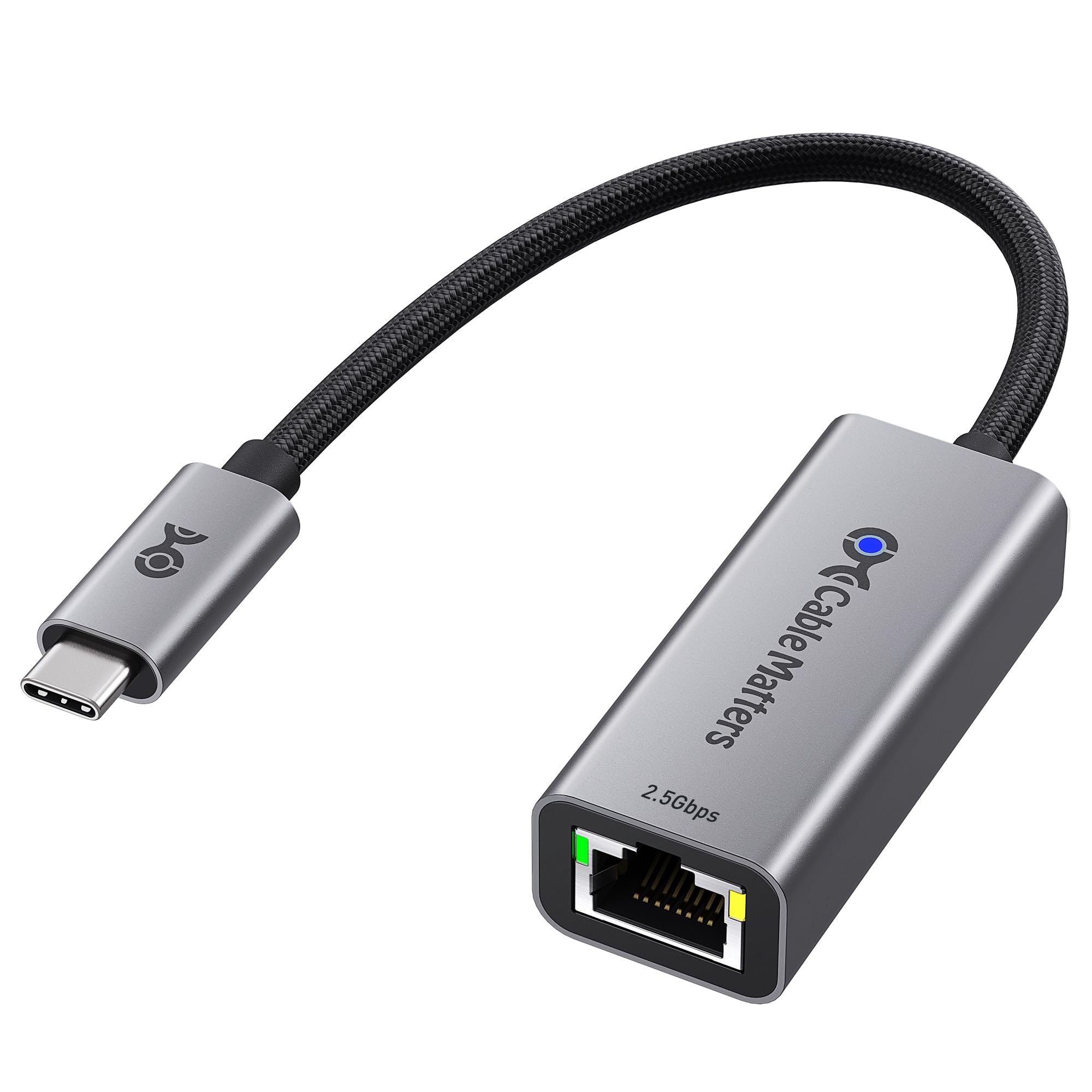
| Cable Matters USB C to 2.5Gb Ethernet Adapter★ Best Overall | Everyday wired reliability | 2500 Mbps | None | 0.03 kg | Amazon |
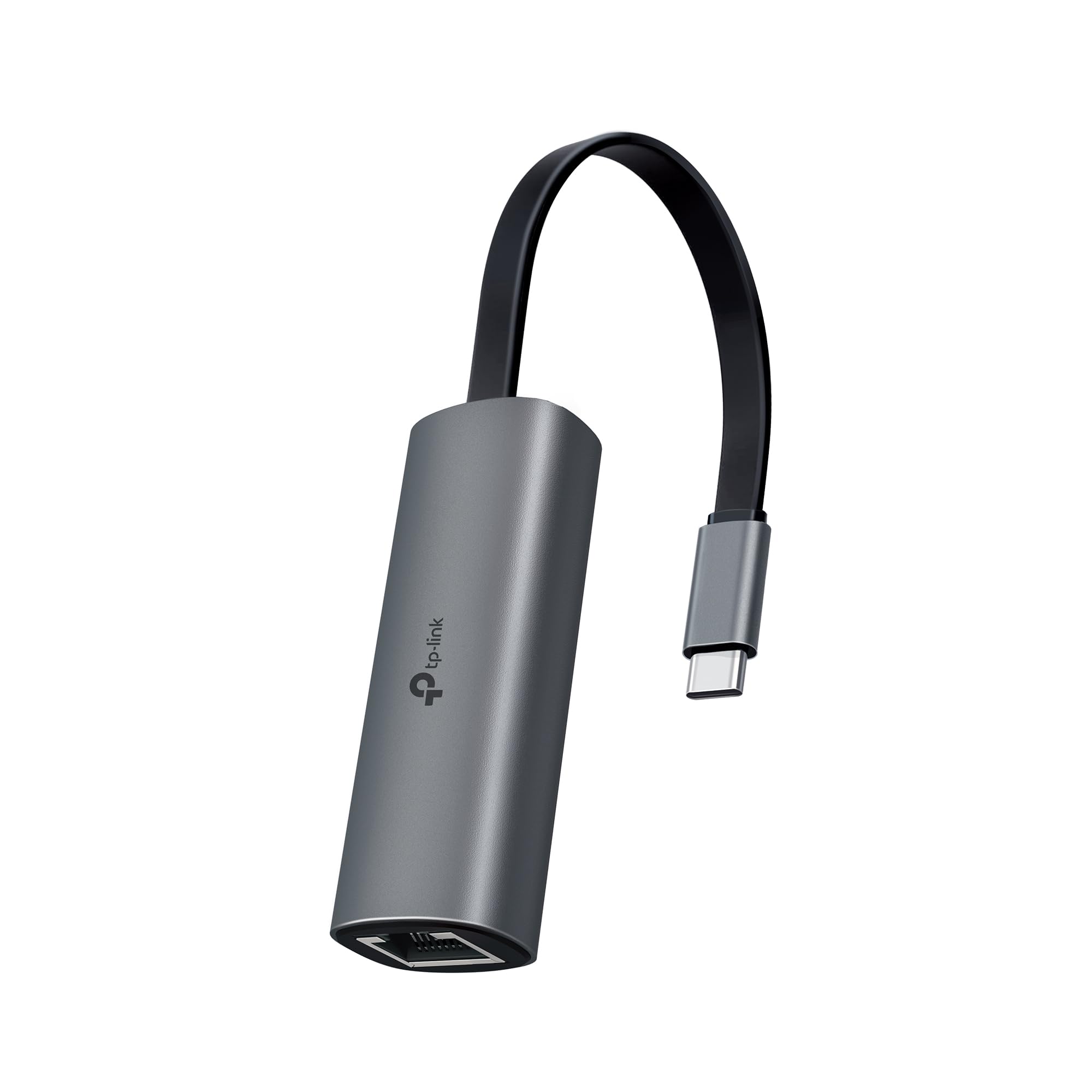
| TP-Link USB C to Ethernet Adapter (UE302C)Best Value | Plug and play on any device | 2.5 Gbps | None | 27.22 g | Amazon |
| SABRENT USB-C to 2.5Gbps Ethernet AdapterMost Versatile | Advanced control and Mac users | 2.5 Gbps | None | 1.52 ounces | Amazon |
| Satechi USB-C to Ethernet Adapter | Apple-heavy setups | 2500 Mbps | None | 35.6 g | Amazon |
| Plugable USB C to Ethernet Adapter 2.5Gb | Charging while wired | 2.5 Gbps | 100W PD passthrough | 1.12 ounces | Amazon |
| ASUS USB-C2500 V2 | Travel companion | 2.5G/1G/100Mbps | None | 1.6 ounces | Amazon |
| Lenovo USB-C to 2.5G Ethernet Adapter | Corporate desktops | 2500 Mbps | None | 18.14 g | Amazon |
| StarTech 2.5GbE USB C to Ethernet Adapter | Workstation power users | 2.5Gpbs (2.5G/1G/100M) | Bus-powered | 0.04 kg | Amazon |
| Belkin USB Type C to 2.5 Gb Ethernet Adapter | Certified Chromebook support | 2500 Mbps | None | 60 g | Amazon |
Detailed Reviews
1. Cable Matters USB C to 2.5Gb Ethernet Adapter
Our pick — 4.5+★ from 300+ verified ratings; the strongest balance of quality and price.
The adapter that quietly carries a full 2.5 gigabit link without needing a driver conversation.
For anyone who wants to plug in, watch the lights go green, and get on with the workday, this is the safest call on the list. It pushes 2500 Mbps versus the 1 Gbps of standard Gigabit Ethernet, through an aluminum housing that doubles as a heat sink. That matters when you are moving a 40 GB video project across a NAS and the adapter has to stay cool for half an hour solid.
The braided pigtail cable is the less obvious win. Small adapters fail at the cable joint long before the chip does, and the braid plus a reinforced connection means this one keeps its shape through daily bag life. It works across Windows, macOS, Linux, Chrome OS, and iOS, and covers Thunderbolt 3/4/5 and USB4 ports, so MacBook Pro, iMac, Dell XPS, iPad Pro, and Surface owners are all in range. The one hard exclusion is Android — this adapter does not support Android devices at all.
What earns it the top slot is how boringly consistent the experience is. The advanced chipset keeps power draw and heat down while holding a steady connection, which is exactly what you want from something you plug in and forget. There is one Linux quirk worth knowing: the adapter sometimes settles at 1.5 Gbps downstream rather than a full 2.5, so if you run a Linux workstation as your daily machine, expect a little tuning.
Where it earns the top slot
- 2500 Mbps ceiling gives you real multi-gig headroom for 4K/8K streaming and large transfers
- Aluminum body sheds heat so long transfers stay stable
- Braided pigtail resists the fraying that kills cheap adapters
- Works across Windows, macOS, Linux, Chrome OS, and iOS with USB-C and Thunderbolt 3/4/5
What to know before clicking buy
- Does not support Android devices
- Linux users may see speeds settle lower than a full 2.5 Gbps
- Older operating systems need the Realtek driver installed manually
Go for this if: you want the most dependable wired connection with the least setup fuss across mixed-OS devices.
Look elsewhere if: Android is part of your device mix or you need a charge passthrough port.
2. TP-Link USB C to Ethernet Adapter
A tiny aluminum slab that turns a 1G network jack into a 2.5G one in under five seconds.
Toss this in a bag for travel or leave it docked at a desk — it does the same job in either spot. The 2.5 Gbps ceiling is the headline, but the practical promise is the upgrade path: pair it with a 2.5Gb-capable router or switch and your older machine gets multi-gig speeds without a new laptop or a dock. It supports Windows 11/10/8.1/8/7, macOS, iPadOS, Chrome OS, Linux, and iOS, so it is genuinely hard to find a device it will not talk to.
Build-wise it is a premium aluminum shell with a reinforced connector and built-in indicator lights that show link status at a glance. Those lights save you the guesswork of whether the cable or the port is the problem. It also measures just 2.68″ long by 0.94″ wide by 0.75″ tall — slim enough to sit next to another adapter in a crowded laptop bag pocket.
The durability picture is more mixed than the speed picture. Some units stay solid through months of daily plugging, while others have been reported to burn out over time. For an occasional travel adapter that lives in a sleeve, this is fine. For a port you yank out of a dock ten times a day, treat it with a little care.
Speed without a driver fight: plug-and-play across Windows, macOS, Linux, Chrome OS, and iOS, with indicator lights for quick troubleshooting.
The honest caveat: long-term durability is the one thing reviews split on, so keep the load light if you plan on constant plug and unplug.
Reach for it if: you want multi-gig speed from a brand with a broad device compatibility list and a truly small footprint.
Think twice if: you plan to repeatedly plug and unplug it as a daily dock connector.
3. SABRENT NT-25GA
The power user’s adapter, with bandwidth controls and a MAC address most cheap dongles skip.
If you have ever tried to game and download a file at the same time, you know the frustration of the two fighting over the same airwaves. SABRENT solves that with Realtek Dragon software support, letting you prioritize bandwidth for gaming, streaming, or work. The adapter also carries its own MAC address, a detail that matters enormously on university or office networks that demand every device be registered by MAC.
Hardware-wise it runs the reliable Realtek RTL8156BG controller with status LEDs in a rugged aluminum housing that doubles as a heatsink — so a big transfer stays stable instead of throttling. It supports Wake-on-LAN and PXE boot, features IT teams care about when provisioning machines remotely. At 2.87″ long by 0.98″ wide by 0.65″ tall it is more compact than the TP-Link above, and its 1.52-ounce weight stays feather-light in a bag.
The honest friction is the setup discipline. On current Windows, macOS, Chrome OS, and Linux it truly is plug and play. On older OS versions you need to install the free Realtek RTL8156 driver first, and if the link drops after a long idle period you may need to disable USB selective suspend. Also note the host port requirement — a USB 2.0 port or a charge-only USB-C port caps things near 480Mbps, so check which port you really have. And on a 1 Gbps router, this correctly links at 1 Gbps, which is expected behavior, not a faulty unit.
What makes it different
- Realtek Dragon software lets you prioritize gaming, streaming, or work traffic
- Carries its own MAC address for managed office and campus networks
- Wake-on-LAN and PXE boot built in for IT provisioning
- Auto-negotiates to 2.5G / 1G / 100M on its own
The setup details that trip people up
- Older OS versions need the Realtek driver installed first
- Charge-only or USB 2.0 host ports cap it near 480Mbps
- No USB-A converter included
Land here if: you are the tinkerer who will use bandwidth prioritization, Wake-on-LAN, or a managed MAC on a corporate or campus network.
Pick something simpler if: you just want to plug in and never open a settings menu.
4. Satechi USB-C to Ethernet Adapter, 2.5 Gbps

Space Gray aluminum and a tangle-free braid — this one is dressed to sit next to a MacBook.
Satechi builds for the Apple ecosystem first, and the device list proves it. You get support for MacBook Pro 14/16-inch, MacBook Air 13/15-inch, iPad Pro 11/13-inch, iPad Air, iPad Mini, iPhone 17 and iPhone 16/15 series, Mac Mini, iMac, and Mac Studio. Downward compatibility with 1 gigabit devices means it stays useful during a network upgrade cycle rather than leaving an internal install as your only upgrade path.
The 2500 Mbps ceiling is the same top-end as most of the list, but two things lift it above a generic dongle: a reinforced neck on the braided cable, and Ethernet pass-through on PCs. That reinforced neck is what stops the cable from cracking at the housing joint, the single most common failure point in this product type. At 2.11″ long it is the shortest body on the full list — noticeably more compact than the SABRENT above.
It ships with a user manual and help files for installing the plug-in, so first-time setup stays simple. The one caveat is weight: at 35.6 g it is the heftiest of the compact picks, which is a direct consequence of the aluminum shell and braided cable. That weight makes it feel solid, but it will not disappear in a pocket the way an ultralight dongle does.
Why Apple owners gravitate here: compatibility spelled out across current MacBook, iPad, iPhone, and Mac lines, plus Ethernet pass-through on PCs.
Trade-off worth weighing: the aluminum-and-braid build pushes weight up, so a slim-sleeve traveler may feel the difference every day.
Say yes if: your setup is all Apple and you want an adapter that looks like it shipped in the box.
Say no if: you need the absolute lightest dongle for a pocketable travel kit.
5. Plugable USB C to Ethernet Adapter 2.5Gb

One port for the network, one for power — and a laptop that stays topped up while it downloads.
Here is the scenario this solves. You are at a desk with exactly one free USB-C port. You need the network cable connected and you need to keep charging. Most adapters force a choice; this one passes through up to 100W of power while delivering 2.5 Gbps Ethernet on the same connection. MacWorld called it the “Best simple, budget adapter for 2.5GbE,” and the spec sheet backs the simple part.
Software compatibility covers Windows 10 or later, macOS 11 and up on M1-M5 and Neo MacBooks, ChromeOS, plus iPhone 15, 16 Pro, and Pro Max. Plug-and-play means no driver dance on those systems. It also works with full-featured USB-C, USB4, and Thunderbolt 3/4 ports, so laptops from Dell, HP, Lenovo, Microsoft, and LG are all on the list.
Reliability is the reputation that carries it. The recurring theme in owner feedback is steady connections at full 2.5G speed on Linux — including running on Ubuntu with no driver installation and working with Linux Mint 22.3. The main trade-off is power capacity expectations: the passthrough is rated at 100W and pushes through that ceiling, so if your laptop ships with a beefier charger you may want that wired directly instead.
The clearest reason to buy: passthrough charging up to 100W and 2.5 Gbps Ethernet on a single USB-C port, so desk cables stop competing for space.
The limit to plan around: power capacity draws mixed feedback, so treat the passthrough as a convenience rather than a full charger replacement.
Best for: the laptop owner with one spare USB-C port who refuses to choose between charging and wired speed.
Not for you if: your laptop already has plenty of ports and you just want raw speed with no charging complexity.
6. ASUS USB-C2500 V2 2.5Gbps Wired Network Adapter

The adapter that genuinely slips into a jacket pocket without dragging your laptop down with it.
ASUS designed this one around portability first. At 1.6 ounces it is light enough that you will forget it is in your bag, and its small body is built for throwing in a travel pouch. The 2.5G Ethernet speed handles lag-free gaming, smooth streaming, and rapid file transfers, and the adapter auto-negotiates across 2.5G, 1G, and 100Mbps so it plays nicely with whatever network it lands on. It works with Windows, macOS, and Linux, with plug-and-play claimed across compatible systems.
The wide compatibility for USB 3.0 ports is the practical note. That spec means you need a real data-capable USB-C port, not a charge-only one. If you are upgrading a NAS, laptop, or desktop to 2.5G transfer speeds, this is the compact option for the job.
The one thing that separates it from the top picks is that ASUS keeps it minimal. No passthrough charging, no advanced bandwidth tools — just a bare, lightweight adapter that works. That is a feature if you want simplicity, and a limitation if you want a full dock in a dongle.
What travel buyers will like
- 1.6 ounces — genuinely pocketable for a go-bag or laptop sleeve
- Auto-negotiates 2.5G/1G/100Mbps without manual configuration
- Works on Windows, macOS, and Linux
- Plug-and-play setup with no driver install on compatible systems
What it leaves on the table
- No passthrough charging port
- No advanced software like bandwidth prioritization
- Requires a USB 3.0 data port to hit full speed
The right call if: you want a featherweight adapter for travel and do not need extra features.
Hold off if: your setup needs charging passthrough or bandwidth tools.
7. Lenovo USB-C to 2.5G Ethernet Adapter

A no-nonsense corporate adapter that adds a network jack without opening the case.
Lenovo’s play here is straightforward: give a desktop or laptop that lacks an Ethernet port a single 2.5GBase-T connection with no internal installation needed. That last part is the real value if you own a sealed workstation or a corporate laptop locked down by IT — you get wired reliability without cracking the chassis or waiting on a service ticket.
The 2500 Mbps transfer rate covers the usual: large file moves, video calls, and stable network access that does not wobble the way Wi-Fi does. It is built for Windows 10 and up and lists desktops as the primary compatible device category, so it is happiest in an office or home-office setup rather than a travel bag.
Weight is the physical stand-out: at 18.14 g it is the lightest unit of the group on paper. The catch is that the feature set stops at the basics — you get dependable connectivity and nothing extra. No passthrough charging, no bandwidth tools, no exotic compatibility list. That is fine for a desk adapter that stays plugged in.
The practical pitch: a 2.5GBase-T single-port connection that adds wired network access without opening the computer.
Where it stops short: the feature set is bare, so power users who want bandwidth controls or a charging passthrough will need a step up.
Made for: the office desktop or locked-down workstation that needs one dependable Ethernet jack.
Steer away if: you are shopping for a travel adapter or want extra ports bundled in.
8. StarTech 2.5GbE USB C to Ethernet Adapter

Built for content creators moving giant files, with enterprise-grade specs and jumbo frame support.
StarTech aims this at the people who push large files for a living — video editors, 3D artists, and anyone on a Mac Pro, MacBook Pro, Surface Book, HP ZBook, Dell Precision, or Lenovo P Series workstation. The adapter uses USB-C 3.2 Gen 1 (5Gbps) to pipe a full 2.5Gpbs Multi-Gigabit connection through a single RJ45 port, with three-speed auto-negotiation across 2.5G, 1G, and 100 Mbps.
The deepest spec on the full list is its NBASE-T support with a 9K jumbo frame, though that jumbo frame feature is no longer supported in macOS. NBASE-T is the tech that lets you hit 2.5 Gbps speeds over existing Cat 5e cables without the expense of Cat 6A or Fiber — a genuine budget-saver if your walls are already wired. It also supports WoL, VLAN tagging, and runs bus-powered, so no extra power brick is needed. The Realtek RTL8156BG chip under the hood is the same controller used across the better half of this list.
Operating system support skews technical: Windows 7 and up, Windows Server 2008 R2 and up, Linux LTS Kernel 4.19+, macOS 10.11 to 11, and iOS for the iPhone 15 line and newer. The honest limitation is macOS — that jumbo frame removal means Mac users lose one advanced feature, and the older macOS range tops out at version 11. Performance and consistent 2.5Gbps speeds are the areas owners highlight most, with speed running a close second.
The spec-sheet draws
- NBASE-T lets you hit 2.5 Gbps over existing Cat 5e cabling
- 9K jumbo frame support for bandwidth-heavy workstation loads
- WoL and VLAN tagging for managed network deployments
- Bus-powered — no separate power supply needed
Fine print to read twice
- Jumbo frame support is no longer available in macOS
- macOS support tops out at version 11
- Technical spec sheet assumes a workstation-class operator
Reach for this if: you run a Windows or Linux workstation, push huge files, and already have Cat 5e wiring in place.
Move along if: you are on a newer Mac — the macOS ceiling and dropped jumbo frame cost you features.
9. Belkin USB Type C to 2.5 Gb Ethernet Adapter

Two certifications and an LED light — this one is for buyers who want a paper trail, not a spec sheet guess.
Belkin’s angle is verification. It is certified by USB-IF, which means it meets industry standards for safety and performance rather than just claiming them. It also carries WWCB certification for Chromebook compatibility, a detail that matters if your school or workplace runs Chrome OS and you have been burned by an adapter that wouldn’t play nice. The 90mm/3.57in tethered cable connects to USB-C devices with a short, fixed lead that is unlikely to snag.
Speeds run up to 2,500Mbps for stable video streaming, large file transfers, and online gaming. A built-in LED indicator shows when you have a live connection, so you stop guessing whether the cable or the port is the problem. Reliability is the trait that draws the most praise — it works from the start with MacBook Air and delivers full performance on the first try — with build quality second on the list of things buyers value.
Weight is where it separates from the lighter competition. At 60 g it is, by a wide margin, the heaviest adapter here, a direct result of the tethered cable and reinforced construction. For a desk setup that is a non-issue; for a bag, it is a real heft. Value for money also draws mixed opinions, so weigh the certifications against what you personally get from them.
What the certifications buy you: USB-IF and WWCB certification plus a visible LED connection indicator, so compatibility is verified rather than hoped for.
What to accept: the 60 g weight and its price tier make it the least travel-friendly option on the list.
The match for: Chromebook and USB-C owners who want certified, verified compatibility and a visible connection light.
Not the match for: anyone whose priority is the smallest, lightest adapter for a laptop bag.
Know the Specs
What 2.5GBASE-T Actually Means
2.5GBASE-T is the networking standard that spells out how a device sends 2.5 Gbps over standard copper Ethernet cable. Every adapter here auto-negotiates, which means it will fall back to 1 Gbps or 100 Mbps when the other end of the cable can’t do more. So if you plug in and see 1 Gbps, your adapter isn’t broken — your router is just the limiting factor. NBASE-T is the broader family of multi-gig speeds, and it lets you hit 2.5 Gbps on existing Cat 5e cabling instead of upgrading to pricier cable runs.
Why the USB-C Port You Pick Matters
A 2.5 Gbps adapter needs a USB-C port that carries data at USB 3.0 speed or faster — often labeled USB 3.2 Gen 1 (5Gbps) or better. Plug the same adapter into a USB 2.0 port or a charge-only USB-C port and it gets capped near 480Mbps, nowhere near multi-gig. That single detail explains most “it doesn’t work” complaints on adapters like these. Check your port, or check the spec page, before you blame the dongle.
Passthrough Charging Explained
Some adapters, like the Plugable above, put a power passthrough channel next to the network jack, so a single USB-C port can carry both 2.5 Gbps Ethernet and up to 100W of charging. This matters most on thin laptops with one or two ports. If you have a full dock or five open ports, you can skip the passthrough and save complexity.
The Chip and the Driver Question
Most of these adapters use the Realtek RTL8156 family of controllers. That chip is well supported across Windows, macOS, Linux, and Chrome OS, and it is why most adapters claim plug and play. On older operating systems, the fix is usually a quick trip to the Realtek driver installer. On Linux, the occasional directional slowdown shows up, but the hardware itself is the same chip driving the top pick.
Common Questions
Why does my 2.5 Gbps adapter only show 1 Gbps?
Will a 2.5 Gbps adapter work on my older USB-C laptop?
Do I need to install drivers for a 2.5 Gbps USB-C Ethernet adapter?
Will my existing Cat 5e cable handle 2.5 Gbps?
Can I charge my laptop and use Ethernet at the same time?
Is a 2.5 Gbps adapter faster than Wi-Fi for gaming?
What is NBASE-T and do I need it?
Does a USB-C Ethernet adapter work with an iPad or iPhone?
Why does my adapter drop its connection after sleep?
Is USB-IF certification important on an Ethernet adapter?
The Bottom Line
For most people, the safest move is the Cable Matters USB C to 2.5Gb Ethernet Adapter — it carries the full 2500 Mbps and the broadest OS support in the group. If a single free USB-C port is all you have, the Plugable USB C to Ethernet Adapter solves the charge-and-connect tug-of-war with its 100W passthrough. And for a branded, certified connection on a Chromebook, the Belkin adapter brings the certification papers worth having.
Buy the adapter that matches your port and your router — not the one with the longest spec sheet. Get those two right and 2.5 Gbps stops being a number on a box and starts being the reason your downloads finish before your coffee does.
How we choose
We do not accept paid placement. Every pick is matched to a real buyer and a real use-case; we do not hands-on test units.
Sources
Specifications: manufacturer listings and product documentation. Review insights: verified customer reviews, as of November 2026. Pricing: not shown on this page (it changes often); check the current price via the retailer link.
As an Amazon Associate, Tactical Gear Guy earns from qualifying purchases. This does not affect which products we feature.