Specs are compiled from manufacturer listings and verified buyer reviews and can change over time — please confirm the key details on the product page before buying.
You want to know which Xbox cooling stand actually moves hot air out of your console, and which one just looks busy. The short answer: match the stand to your exact console first — a Series S cooler will not fit a Series X, and several of these are one-model-only. Then pick your priority: temperature control, controller charging, or a tidier desk.
This guide is built by comparing the manufacturers’ published specifications and the patterns across verified customer reviews, so you get each pick’s real strengths and trade-offs instead of marketing spin.
A Series S and a Series X vent in completely different spots, so a stand built for one console will not clip onto the other no matter how many fans it carries. Here is how each of the best Xbox Cooling Stand options earns its place on your desk. Also for Xbox One Cases & Storage buyers, this list tells you exactly which console each cooler fits.
Top Picks


How To Choose The Best Xbox Cooling Stand
Most buyers get this wrong in one way: they buy for the lights and forget about the fit. A cooling stand is a plastic shell with fans inside, and that shell is moulded to one console shape. Get the fit wrong and you own a pretty paperweight.
Confirm your console before anything else
The Series S is the small white box; the Series X is the tall black tower. They exhaust heat from different places, so a Series S cooler cannot sit on a Series X and vice versa. Several stands below also fit one specific controller battery door — check that before you count on the charging dock.
Decide if you want auto or manual fan control
Auto mode uses a temperature sensor to switch the fans on when your console heats up and off when it cools. That matters if you leave the console in standby and do not want a fan running all night. Manual mode gives you low, medium and high settings you pick yourself. Neither is better — auto suits a set-and-forget setup, manual suits someone who wants the fan on during every session.
Think about where the noise lands
Fans spin air, and spinning air makes sound. Higher fan speeds in RPM (revolutions per minute — how many times a blade turns each minute) usually move more air but also make more noise. If your console sits next to the TV you watch quietly at night, weight the low-speed behaviour heavily and treat maximum airflow as the second priority.
Count the USB ports you actually need
Most stands pass a charging port through to your controller and add a data port for a keyboard or adapter. Some powered dock models stop feeding power when the console sleeps. If you charge overnight, that detail decides whether your controller is full in the morning.
Side-by-Side Comparison
| Model | Best For | Fits | Fans / Speed | Extra Ports | Amazon |
|---|---|---|---|---|---|
| Mcbazel Cooling Fan (Series S, 3 Speeds)★ Best Overall | Quiet everyday cooling | Xbox Series S | 1 fan, low/medium/high | 1 USB 2.0 charge, 1 USB 3.0 data | Amazon |
| Mcbazel RGB Cooling Fan (Series S, Dust Filter)Budget Entry | Budget entry with dust cover | Xbox Series S | Dual fan, 3 speed levels | 1 charge only, 1 charge + data | Amazon |
| KOVA [LED Display] Auto Cooling FanBest Display | Temperature readout on the desk | Xbox Series X | Auto by temperature + manual low/medium/high | 2.0 USB hub, 5V/2A charge | Amazon |
| ZAONOOL Cooling Fan (Series S, White) | Fast airflow in white | Xbox Series S | 9 blades, 1500/1700/2000RPM | USB 2.0 charge, USB 3.0 data | Amazon |
| TanReginal Smart Cooling Fan | Full dust-and-port kit | Xbox Series X | 9-blade hydraulic, up to 2200 RPM | 2 USB 3.2 | Amazon |
| MENEEA RGB Cooling Fan with Dust Filter | Sliding dust cover design | Xbox Series X | 1 fan, auto + manual (3 speeds) | USB 2.0 data, USB 2.0 charge | Amazon |
| FYOUNG Vertical Cooling Fan Stand | Cooling plus controller dock | Xbox Series S | Dual cooling fans | USB 2.0 | Amazon |
| Klipdasse Cooling Stand & Charge Station | 15 lighting modes, dual dock | Xbox Series S | 2 fans, three air speeds | 1 USB data, 1 USB charging | Amazon |
| MENEEA RGB Charging Stand (Series X) | All-in-one Series X tower | Xbox Series X | Side-mounted fan, button control | 1 console link, 1 extended charge | Amazon |
Detailed Reviews
1. Mcbazel Cooling Fan for Xbox Series S
Our pick — 4.5+★ from 950+ verified ratings; the strongest balance of quality and price.
The quiet Series S cooler that plugs straight into the console and needs no wall adapter.
If your Series S sits on a shelf and you want it to breathe without hearing it, this is the one to start with. The fan pulls hot air outward from the console’s round exhaust vent and runs off the console’s own USB 5V supply — no separate power brick, no spare socket hunted down behind the TV. It weighs 0.4 kg and measures 6.5″L x 5.83″W x 5.83″H, so it stays put rather than sliding around when a controller cable tugs it.
Speed control is a touch panel with three settings, and the indicator colours tell you which one is live: orange for low, blue for medium, green for high. That is genuinely useful mid-match — you glance instead of hunting through menus. The lighting is handled by a separate button with four single-colour effects and three gradient modes, so dimming the room does not force you to slow the fan.
What makes it the pick for most Series S owners is the combination of quiet running and the two ports. You get a USB 2.0 port for charging a controller or phone, plus a USB 3.0 data port for a keyboard, gamepad or controller adapter. The catch is worth knowing up front: it is moulded for the Series S only and will not fit a Series X or any Xbox One model. Charging and fan power also stop when the console is off or in standby, so a controller left plugged in overnight will not top up.
What earns it the top spot
- Fan and both USB ports run off the console’s own 5V supply — one less adapter to find
- Touch speed control with orange, blue and green indicators you can read at a glance
- Separate light button lets you change or kill the RGB without touching fan speed
- Fits horizontal or vertical setups, so you keep your existing layout
- Weighs 0.4 kg and stays planted on the shelf
Where it asks something of you
- Series S only — not compatible with Series X or Xbox One consoles
- Charging and fan stop entirely when the console sleeps
- Needs a clear exhaust opening; blocked vents cancel the benefit
- Must connect only to the console’s USB 5V supply — a higher-voltage source can damage it
Reach for this if: you own a Series S and want quieter cooling plus a spare charging port without adding a wall adapter.
Keep looking if: your console is a Series X or Xbox One, or you want the fan running while the console is in standby.
2. Mcbazel RGB Cooling Fan for Xbox Series S
Two fans, a dust cover over the intake, and the lowest entry point on this list.
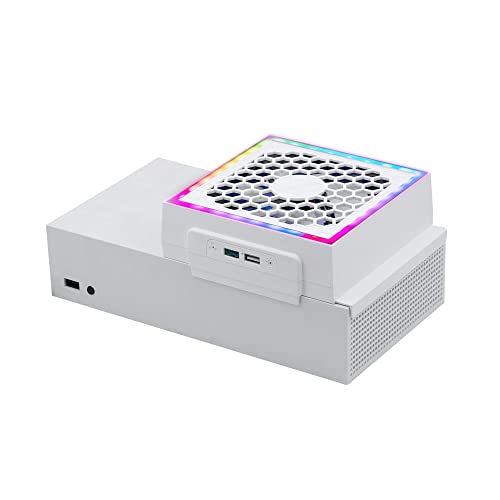
This is the cheapest way onto this list to cool a Series S, and it earns its spot with a feature most rivals skip: an ABS (a hard, impact-resistant plastic) dust-proof cover over the fan. That cover stops dust and stray objects from dropping into the console, so you are not fishing crumbs out of the vents later. It weighs 7 ounces and clips on top of the console case, where it pulls the running heat up and out. Under that cover sits a dual cooling fan with three speed levels you cycle through.
Compared with the LED display model further up, the lighting here is a simpler 7-mode RGB (coloured light) strip rather than 9 modes. That is a real gap if you like tuning your setup, and less important if you just want a glow behind the TV. The ports are practical: one is charging only, and the other handles both data transmission and charging. So a controller, mouse or keyboard all have somewhere to go.
Two things run hot with owners, and both are worth pricing in. Noise and brightness split opinion — some find the fans super quiet and the LEDs bright, others find the fan loud and the lights too strong in a dark room. Cooling itself is what the reviews keep coming back to, with the temperature drop named more often than any other point, and value close behind it. If you game with headphones on, the noise question generally disappears; if you share a living room, plan to run it on the lower speed settings.
The honest trade: this is the most affordable way onto this list and it cools well, but it is a noisier, brighter experience than the top pick. The lighting also cannot be dimmed, only switched to a different mode, so a dark room stays lit.
Good match for: a Series S owner on a tight budget who wants dust protection and does not mind fan noise during play.
Think twice if: the console lives in a shared, quiet room or you want fine control over light brightness.
3. Auto Cooling Fan for Xbox Series X
The only stand here that shows you the console’s actual temperature in numbers.
Every other cooler on this page leaves you guessing whether it is working. This KOVA model puts a real-time LED display on the front that reads the console temperature and switches between Fahrenheit and Celsius with a double press. The maker quotes 0.1°F accuracy — finer resolution than any other stand here.
That readout drives the fan, and this is the part that matters day to day. In automatic mode the fan wakes when the console passes 96.8°F (36°C) and steps through three stages: low between 96.8°F and 107.6°F, medium between 107.6°F and 118.4°F, and high above 118.4°F. If you would rather take the wheel, the fan button cycles low, medium and high manually. It holds 9 lighting presets — 7 colours plus 2 dynamic effects — and a three-second press saves whichever one you land on.
This model packs in more utility than its display suggests. A 2.0 USB hub (an older, slower USB standard) charges controllers and headsets at 5V/2A while you play, so your gear is topped up between matches. There is also an ergonomic headset mount with anti-slip silicone pads, and a body the maker describes as 20% more compact than others. Owners say it does the cooling job without running constantly, and they name the nine light modes as a highlight rather than an afterthought.
Why the screen changes the deal
- Live temperature display with °F/°C switching — you can see the cooler working
- Automatic mode starts at 96.8°F (36°C) and steps speed by temperature band
- 9 lighting presets with a saved-mode memory
- Headset hook with silicone pads plus a 5V/2A charging hub
The fine print
- Series X only — the Series S vents differently and this housing will not fit it
- Manual mode still needs the button pressed; there is no remote
- Two fan-button presses just switch the temperature unit, which is easy to do by accident
- The step-up in temperature bands means you hear more fan once the console runs hot
Built for: Series X owners who want proof the cooler is doing something, not just a light show.
Not the one if: you own a Series S, or you already own a headset stand and a USB hub.
4. Cooling Fan for Xbox Series S

The Series S side-clip cooler with the highest airflow figures on this page.
Speed is where this ZAONOOL fan separates itself from the cheaper Series S options. Inside sits a 9-blade fan running three adjustable levels at 1500, 1700 and 2000RPM — the only stand here that publishes its exact RPM at each setting. Higher RPM on a 9-blade fan means more air pushed through per minute, which is the difference between a console that recovers after a long session and one that stays warm.
It is also the quietest on paper, quoted at 16-24 dB — roughly the level of a quiet room, so it disappears under dialogue and cutscenes. The LED indicator doubles as a speed gauge: green for fast, blue for medium, orange for low, so you read the fan state without a menu. Seven RGB light modes run off their own touch switch, and the white shell matches the Series S body instead of fighting it.
Fitting is where this one asks for a little care. You fix it to the side of the console using eight lock points on the bottom of the fan, which is what keeps it steady whether the console stands vertically or lies flat. Buyers report the same thing: it fits, it installs in minutes, and long sessions stop ending with the console throwing you out of a game. One USB 2.0 port charges a controller or headphone, and a USB 3.0 port handles 4.8Gbps data transfer for moving game files.
The standout number: 2000RPM at the top setting with a quoted noise floor of 16-24 dB — you can have maximum airflow without a jet engine in the room.
The trade-off: the side-clip mount is fussier than a top plate, and eight lock points need the fan lined up square or it will not sit flush.
Choose it when: you want the strongest published airflow figures for a Series S and a white finish that blends in with the console.
Go another way if: you dislike side-mounted brackets, or you need a built-in controller charging dock rather than a plain USB port.
5. TanReginal Smart Cooling Fan for Xbox Series X
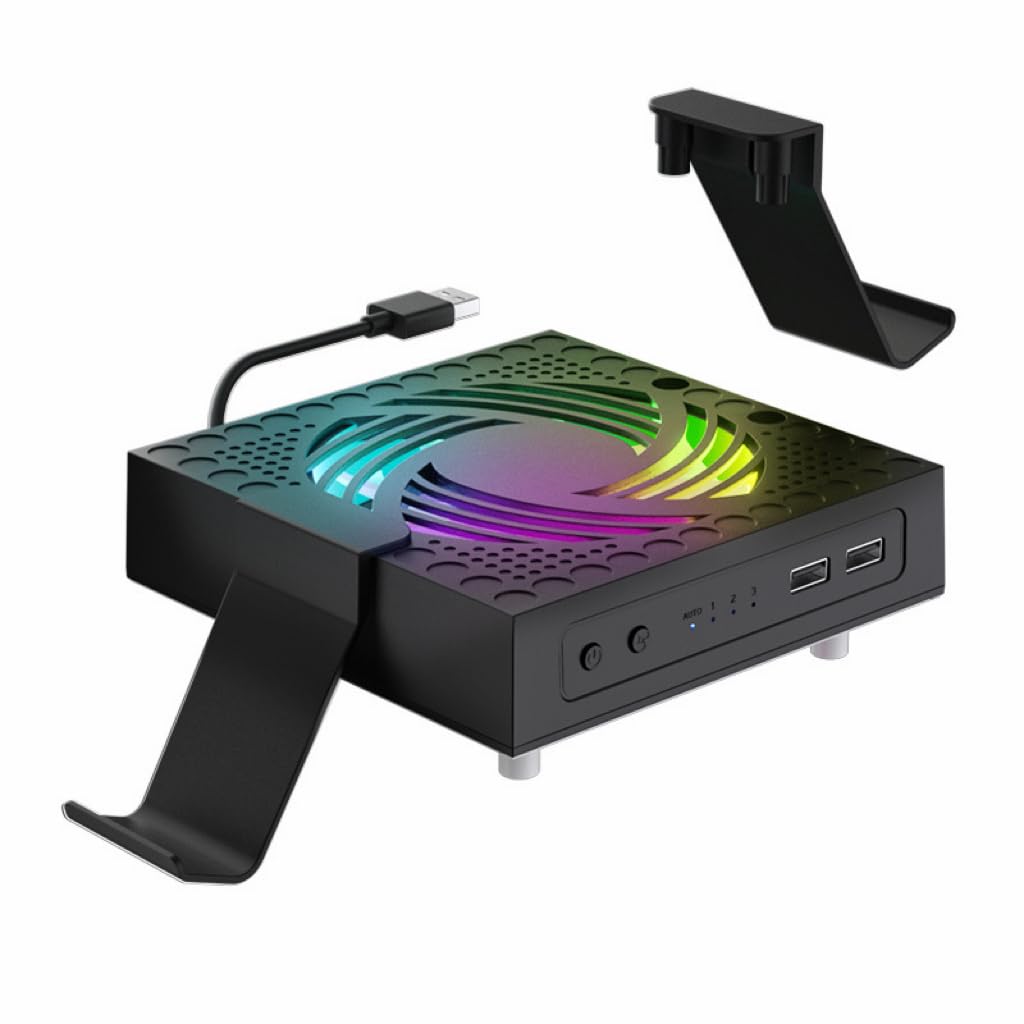
A cooler, a dust kit, joystick caps and a controller stand in one box.
If your Series X lives in a room with pets or a lot of foot traffic, the bundle here is the reason to pick it. Alongside the fan you get two dustproof mesh filters and eight custom dust plugs that seal every vent and port. That keeps pet hair out of your console instead of finding it months later. Two stands double as controller and headphone holders, and four pairs of height-boosting joystick caps are in the box if you want more grip.
The fan itself is a 9-blade hydraulic bearing design that runs up to 2200 RPM across low, medium and high settings. Hydraulic bearings are built to spin quietly, and the maker pitches near-silent running for late-night sessions. Auto mode triggers at 104°F (40°C) and shuts the fan off once temperatures fall, so the cooler only works when your console does.
The ports use the newer standard: two USB 3.2 ports (the faster, current USB connection) for controllers, headsets or anything else you want beside the console. Setup needs no tools: the fan drops on top, the stands attach, and the mesh goes in. Owners describe exactly that experience, and the maker leans on it. The one question worth asking is if you want a temperature screen. This model has no display, so auto mode runs without showing you the number.
Right for: a dusty, pet-friendly room where keeping debris out of the Series X matters as much as cooling it.
Pair it elsewhere if: you want to watch the temperature on a screen or prefer a lighter, single-purpose cooler.
6. MENEEA RGB Cooling Fan for Xbox Series X

A sliding cover that doubles as a shelf for your console.
The trick here is the sliding dust cover. Open it and air flows faster for heat dissipation; close it and the cover blocks dust and water, and becomes a flat surface you can sit on or use as a platform. It is a clever piece of double duty that no other cooler on this page offers, and it means the stand changes function depending on whether you are playing or packing up.
Cooling is handled by a smart chip that reads the air-outlet temperature and picks a fan speed itself. It powers on in auto mode with a green indicator, runs medium airflow for five seconds, then decides what the console needs. Touch the switch and you take over: blue for medium, orange for high, touch again to switch off. There are three fan speeds in total across both modes, plus 7 RGB lighting effects — running lights, water running lights, breathing lights and four monochrome colours — on a separate light button with a three-second save.
Owners talk about cooling performance more than anything else with this model, with lighting a distant second: the fan is the product, the glow is the extra. The honest caveat sits in the same breath. Noise divides opinion, with some calling it super quiet and others finding it a bit noisy, and the remote control gets mixed reports too. Two USB 2.0 ports handle the extras: one for data transfer, one for charging a controller or a small desk lamp. The box includes two dust covers plus a set of silicone dust plugs for the ports.
What the sliding cover buys you
- Sliding dust cover opens for airflow and closes to seal out dust and water
- Smart chip sets fan speed from outlet temperature, three speeds in total
- 7 RGB modes with a three-second saved-setting memory
- Two dust covers plus silicone port plugs in the box
- Works with the console horizontal or vertical, under a TV cabinet or on a desk
Where opinions split
- Noise is the divide — some find it near-silent, others find it noticeable
- Remote control reports are mixed, so expect to use the button
- Two USB 2.0 ports only, no USB 3.x speed
- Auto mode gives up manual fine control unless you tap through the switch
Made for: a Series X owner who wants dust protection that switches on and off, plus a flat top to sit things on.
Look past it if: your desk is already quiet and you would rather not gamble on fan noise, or you need USB 3.x ports.
7. FYOUNG Upgraded Vertical Cooling Fan Stand for Xbox Series S

Cooling, two controller batteries and a headset hook on one vertical stand.
This FYOUNG stand does not cool only — it also replaces the AA batteries in two controllers. Two 1400mAh rechargeable packs come in the box, one for each controller, and both sit on charging docks at the same time as your console rests on the base. A headset bracket hangs off the stand, so the whole gaming setup occupies one footprint instead of three. It is built for the Series S only.
Two high-speed cooling fans sit inside the stand to pull heat off the console during play. LED lighting shows the charging state of each controller — red while charging, green when full — and you lift a controller straight off the dock without pressing anything. That is the kind of detail that stops a desk turning into a nest of cables.
Two problems deserve honest space. The noise is the one that comes up most, with the complaint being the fan is genuinely loud during play rather than a whisper. And the batteries do not fit perfectly for some owners, so check that the pack seats cleanly before you rely on overnight charging. Everything else — the stand being functional, the cooling doing its job, how it looks on a desk — reads positively, which is why it holds its place as the tidy-desk option rather than the quietest one.
What you are really buying: two 1400mAh rechargeable packs and a dual charging dock that happens to cool your Series S — a desk-cleanup purchase as much as a thermal one.
Keep in mind: the cooling fans are audible, so this suits a headset player far better than someone gaming on TV speakers late at night.
The match: Series S owners tired of burning through AA batteries who want console and controllers in one tidy tower.
Not the match: quiet-room setups, or anyone unwilling to check battery seating on arrival.
8. Klipdasse Cooling Stand & Charge Station for Xbox Series S

Fifteen light effects, two charging docks and a fan system in one white tower.
Nobody on this list gives you more lighting choice. There are 15 RGB bottom effects here — 7 monochrome and 8 running and blinking patterns — and the stand remembers the mode you last picked, so it comes back exactly as you left it. The white body matches the Series S, and the whole thing is designed to sit on a desk as furniture rather than a gadget.
Underneath all that, two cooling fans run at three adjustable speeds on their own switch, and a set of fan LEDs shows which level you are on. The twin Type-C charging ports fill two controllers in 2-3 hours, with green showing full or standby and red showing charging. Two 1400mAh batteries, a headphone hook and a USB data cable are all in the box, along with one USB data port and one USB charging port.
The balance is worth being straight about. The stand is well liked for being functional and for looking good, and the lights are a genuine draw rather than a gimmick. But cooling draws a split verdict — some find it keeps the console cool, others say it does not cool enough — and charging draws the same mixed read. That is the shape of this pick: it is a display-and-dock purchase where the cooling is a bonus, not a thermal workhorse. It is also built for the Series S only; the Xbox One S and One X are not supported.
Why the light show wins people over
- 15 RGB effects with a memory that restores your last mode
- Two controllers charge from full to done in 2-3 hours
- Two 1400mAh batteries and a headphone hook included
- Three fan speeds on an independent switch with level indicators
- Clean white tower that tidies console, pads and headset into one spot
The part to weigh up
- Cooling splits opinion — adequate for some setups, not enough for others
- Charging reports are mixed, so test both docks early
- Only charges the supplied 1400mAh packs or the original battery
- Series S only, and the lighting is not dimmable beyond mode changes
Pick this one for: the Series S gamer who wants the desk to look organised and lit, with two controllers always charged.
Skip the trade if: cooling is your primary reason for buying — the dedicated fan stands above do that job more decisively.
9. MENEEA RGB Charging Stand with Cooling Fan for Xbox Series X

A vertical Series X tower that stores games, charges pads and cools the console.
This is the only Series X stand on the list that takes the console vertical and then handles everything else around it. Six functions stack into one footprint: the cooling fan, a dual controller charger, 15 RGB light modes, two 1400mAh rechargeable batteries, 10 game disc storage slots and a headset stand. If your shelf is already crowded, that consolidation is the whole pitch.
The fan mounting is unusual and worth understanding. Instead of blowing from below, the fan sits on the side so it can push air through the console’s internal circulation. A metal base with four vents lets the hot air rise out of the top without being blocked, so heat escapes instead of pooling. A button gives you control over the fan whenever you want it, and an anti-slip rubber base keeps the whole tower steady.
Controllers charge over Type-C with a smart chip guarding against over current, over voltage and overheat, and two controllers fill in 3.5 hrs. Here is the part that catches buyers out: the charger stops working when the console is off, though sleep mode will still charge, and the extended USB port does not carry data. There are 15 lighting effects with a long-press memory, and owners describe the LEDs as subtle enough not to pull attention from the game. Quality and functionality are what people like most about it, with cooling and lighting close behind and the fit getting a mixed read.
The consolidation win: console, two controllers, a headset and 10 game discs in one vertical tower — the biggest reduction in desk clutter on this list.
Know before you buy: charging halts when the console is fully off, and the extended USB port is for power only, not data.
Suits you if: you own a Series X, want it standing upright, and have discs and controllers that need a home.
Pass it over if: you switch the console fully off every night and want controllers charged overnight regardless.
Know the Specs
Fan speed and RPM
RPM stands for revolutions per minute — how many times the fan blade turns every sixty seconds. A cooler running 2000RPM pushes more air through than one running at a lower setting, which is why the higher-RPM stands are the ones to look at when your console is getting hot during long sessions. Speed is usually split into low, medium and high, and the lower settings are the ones you will use on a quiet evening.
Auto mode and temperature triggers
Auto mode uses a sensor to read the console’s heat and switch the fans on only once it climbs past a set point. That means the cooler can sit silent while the console idles, and spin up when you actually need it. A stand that shows you the temperature in numbers is useful here, because you can watch the number drop and see the fan working rather than trusting it blind.
Dust filters and port plugs
Dust settles into vents and port openings, and once it is inside a console it is difficult to clear. A dust filter over the fan, plus plugs over unused ports, keeps debris out and lets air still pass through. If your room has pets, sits near a window, or gets heavy foot traffic, this feature matters more than the light show.
Charging docks and battery packs
Dock models come with rechargeable battery packs — 1400mAh is the size used across the charging stands here — that replace the AA cells in your controller. Check one thing before ordering: whether the dock only charges the supplied pack or also accepts the original battery. And check whether the dock keeps charging when the console is off, because some stop entirely until the console wakes.
Common Questions
Will a Series S cooling stand fit a Series X?
Does a cooling stand actually lower console temperature?
Is the fan noise loud enough to hear during play?
Do I need a separate power adapter for these stands?
Will the fan keep running when the console is in standby?
What is the difference between auto mode and manual mode?
Can I charge my controller with these stands?
Do these stands work with the Xbox One or One X?
Should I run the console vertically or horizontally on a cooling stand?
Do the RGB lights add to the cooling?
The Bottom Line
If you want the one to reach for, it is the Mcbazel Cooling Fan for Xbox Series S. It cools quietly, runs from the console’s own USB supply, and gives you a charging port and a data port without a separate adapter. Series X owners should head straight for the KOVA LED Display Auto Cooling Fan, because the live temperature readout tells you the fan is working instead of asking you to trust it. And if a cluttered shelf is the real problem, the Klipdasse Cooling Stand folds two controllers, a headset and 15 lighting modes into the same footprint as your console.
Buy the stand that fits your console, not the one with the most features on the box.
How we choose
We do not accept paid placement. Every pick is matched to a real buyer and a real use-case; we do not hands-on test units.
Sources
Specifications: manufacturer listings and product documentation. Review insights: verified customer reviews, as of November 2026. Pricing: not shown on this page (it changes often); check the current price via the retailer link.
As an Amazon Associate, Tactical Gear Guy earns from qualifying purchases. This does not affect which products we feature.