Specs are compiled from manufacturer listings and verified buyer reviews and can change over time — please confirm the key details on the product page before buying.
If your novel is still three chapters long because your laptop keeps pulling you into browser tabs, the fix is a machine that can only do one thing. A word processor notebook strips away the browser tabs, the notifications, and the email ping, and leaves you with a keyboard and a screen that does nothing but hold your words. Below are six dedicated drafting machines, from paper-era electronic typewriters to cloud-syncing e-ink devices, sorted so you can pick the one that matches how you actually write.
This guide is built by comparing the manufacturers’ published specifications and the patterns across verified customer reviews, so you get each pick’s real strengths and trade-offs instead of marketing spin.
Every pick below is a single-purpose drafting machine with no browser, no apps, and no notifications. Each pick below is a single-purpose writing device, and the right one for you depends on if you want pages you can hold or drafts that sync to the cloud. The picks come from comparing the manufacturers’ published specifications and the patterns across verified customer reviews, so you get each pick’s real strengths and trade-offs instead of marketing spin. Here is the honest breakdown of each word processor notebook.
Top Picks

How To Choose The Best Word Processor Notebook
Your first decision is not brand or budget — it is if you want your words on paper or in a file. Electronic typewriters print as you type, so the page in the carriage (the roller that holds the paper) is your draft. Digital writing machines keep everything in memory and push it to the cloud, so you edit on a laptop later. Pick that lane first and half the list eliminates itself.
Paper Output Versus Digital Drafts
A typewriter gives you a physical manuscript with no file to corrupt and no sync to fail. The trade-off is that corrections happen on the page, and you retype anything you want to revise. A digital machine like the Freewrite family stores up to 1,000,000 words internally and backs drafts up over Wi-Fi, so revision is a copy-paste job later. If you outline by hand and hate screens, go paper. If you write long-form and revise heavily, go digital.
Screen Type And Eye Comfort
E Ink displays reflect light instead of blasting it at you, which is why they read like a printed page and why they sip battery. An LCD panel needs its own light, so it drains faster but works in a dark room without a lamp. If you write at night, check whether the screen is backlit and whether the brightness adjusts — the Freewrite Alpha offers five brightness levels for exactly this reason.
Keyboard Feel And Typing Speed
You will type tens of thousands of words on this thing, so the keys matter more than the screen. Mechanical switches give a pronounced click and a defined press; scissor switches are flatter and quieter; typewriter keys are a full physical stroke. On the paper machines, type speed is quoted in characters per second — 12 characters per second on both the Royal Scriptor II and the Nakajima WPT-150, so the print head keeps up with steady typing. Digital models are judged by typing delay, which is the lag between keypress and letter appearing.
Side-by-Side Comparison
| Model | Best For | Output Type | Keyboard / Keys | Weight | Amazon |
|---|---|---|---|---|---|
| Royal 69147T Scriptor II★ Best Overall | Paper drafts with spell check | Printed page | 45-key, 17-function | 11.3 pounds | Amazon |
| Nakajima WPT-150Home Office Workhorse | Simple home-office typing | Printed page | Built-in keyboard | 13 pounds | Amazon |
| Freewrite Traveler | Portable e-ink drafting | Cloud + internal storage | Full-size scissor switch | 0.71 kg | Amazon |
| Freewrite Smart Typewriter | Desktop drafting station | Cloud + internal storage | Kailh Box Brown mechanical | — | Amazon |
| Brother SX-4000 | Dictionary-assisted typing | Printed page | Professional touch keyboard | 12 pounds | Amazon |
Detailed Reviews
1. Royal 69147T Scriptor II
Our pick — 4.0+★ from 150+ verified ratings; the strongest balance of quality and price.
The paper machine that catches your typos before the page does.
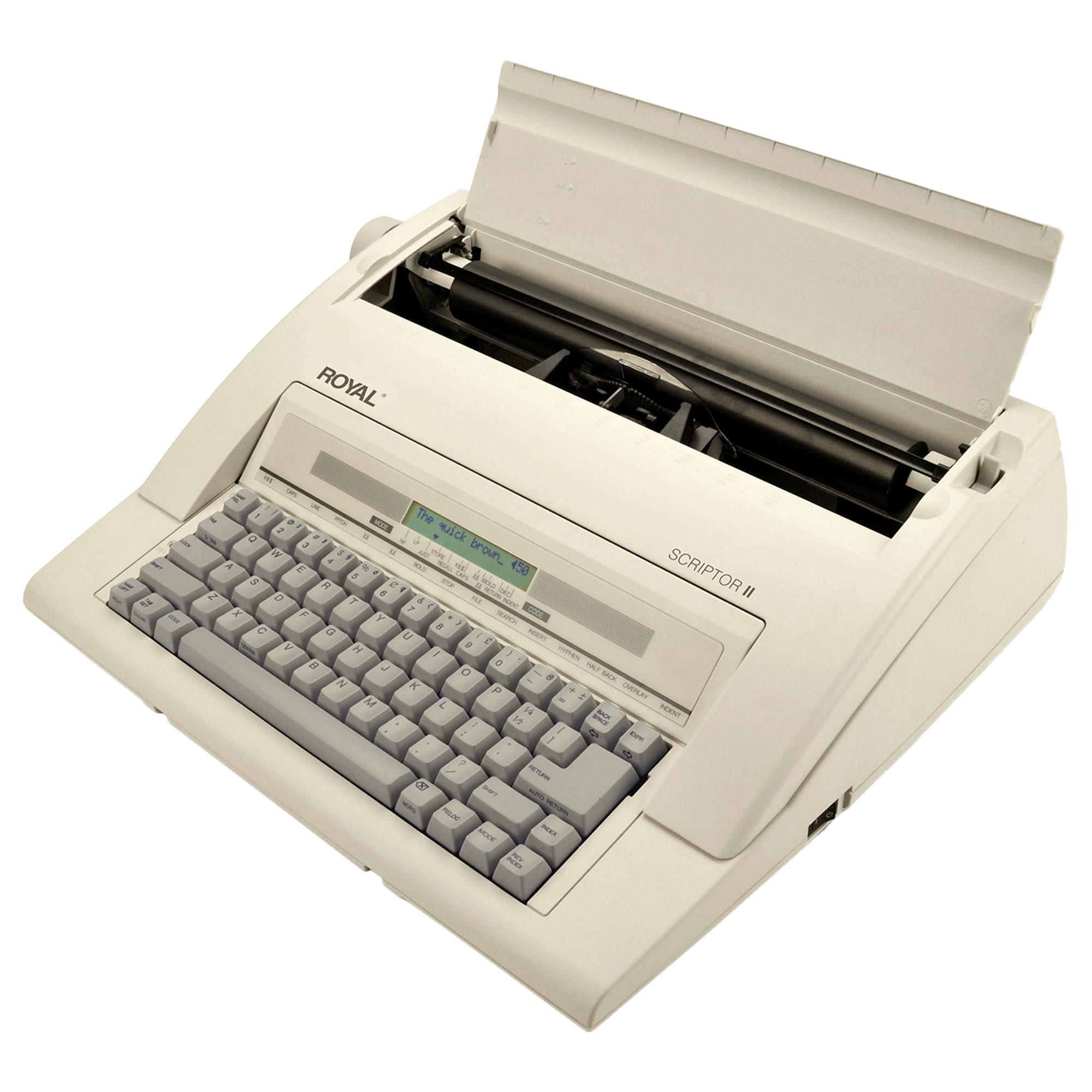
Here is the number that decides it for most people: an 80,000-word spell check built into a typewriter. That dictionary watches what you type and flags a misspelling on a 2-line LCD display before the character lands on paper. On a plain typewriter, a wrong letter means correction tape or a retype. Here it means a glance at the screen and a fix. If you write letters, forms, or manuscript pages and you want paper in hand at the end, this is the pick.
Wide documents fit without fuss, thanks to a 13″ carriage (the roller that feeds the paper) with a 9″ typing width. The 45-key, 17-function keyboard covers the controls you would otherwise hunt for. A 30-keystroke buffer (memory that holds your last few presses) keeps pace with fast typing at the 12-character-per-sec type speed, so the print head does not fall behind your fingers mid-word. It arrives ready to use as a complete typing unit, in white plastic. At 11.3 pounds it sits on a desk without sliding around — noticeably lighter than the 13-pound Nakajima WPT-150.
What buyers respond to most is the build and the overall quality of the machine — that is the note that runs through the feedback again and again, and it is why this one takes the top slot. Be straight about the two friction points. The correction function splits opinion, and the supplied instructions are thin, so plan to learn the function keys by trial. Typing performance also divides people: most find it works well, a minority hit problems. With a thin instruction booklet, expect to learn the function keys by trial rather than from the manual.
Where the Scriptor II Wins
- 80,000-word spell check plus 2-line LCD catches errors before they print
- 13″ carriage and 9″ typing width fit wide documents
- 45 keys and 17 functions put the controls on the keyboard, not in a menu
- 30-keystroke buffer holds fast typing at 12 characters per second
What To Expect Going In
- The instruction booklet is thin — budget an evening to learn the keys
- Correction draws split feedback; test it early on scrap paper
- 11.3 pounds means a permanent desk spot, not a lap machine
Reach for this if: you want printed pages and a spell checker riding shotgun on every line.
Pass it by if: you need to revise a draft on screen rather than retype it.
2. Nakajima WPT-150 Electronic Typewriter
A one-line correction memory that lets you fix a word instead of the whole page.
The feature to understand here is correction memory — the machine holds one line of what you just typed, so you can erase a character or a whole word and retype it clean. On a manual typewriter that mistake is permanent. On the WPT-150 you back up and carry on. Add automatic centering, underlining, and carriage return, and the chores that slow down form-filling and letter-writing mostly handle themselves. Three pitch and line-spacing settings let you switch between tight and roomy layouts without changing the paper.
It is a 13-inch carriage with a 9-inch print width, matching the Royal’s paper capacity, and the built-in keyboard is the straightforward typewriter layout rather than a computer deck. The LCD shows your settings so you are not guessing at pitch. At 13 pounds it is heavier than the 11.3-pound Royal, so treat it as a desk fixture. Dimensions run 21″ long by 9″ wide, and that length is the footprint you are committing to on the desk.
The home-office crowd tends to land here because setup is short and the machine does what a typewriter is supposed to do. Functionality and value come up as the reasons people stay happy with it, and the one-line correction is the daily win. Where views diverge is quality and value over the long run — opinions are genuinely split, not unanimous. Home office is the listed use, and that is the honest frame: it is a working tool for forms and correspondence, not a collector’s piece.
The everyday win: one-line correction memory plus word and character erase turns a typo into a ten-second fix instead of a retyped page.
The honest catch: long-term quality impressions are mixed, so judge it as a dependable office tool rather than an heirloom.
Best fit: the home office that fills forms and types letters and wants automatic centering to do the fiddly work.
Think twice if: you expect a typewriter to double as a portable — 13 pounds and 21 inches of length stay put.
3. Freewrite Traveler

The 0.71 kg, 11.3″ by 5″ drafting machine you throw in a tote and forget about until the words run out.
At 11.3″ long by 5″ wide and 0.71 kg, the Traveler is the slimmest thing on this list that still has a full-size keyboard. Compare that footprint to the Nakajima WPT-150 at 21″ by 9″ — the gap in desk and bag space is enormous, and it is exactly why this one lives in a backpack instead of on a table. The payoff spec is the display: E Ink (a screen that reflects light like paper instead of glowing), which draws almost nothing from the battery and is easy on the eyes in any light because there is no blue light coming at you. Battery is quoted up to four weeks.
Under the screen sits a full-size scissor switch keyboard — flatter and quieter than the Alpha’s mechanical switches, with a soft tactile bump at the bottom of each press. If you already type fast on a laptop, this is the closest transition of any device here. Internal flash storage holds up to 1,000,000 words and drafts sync to the cloud over built-in Wi-Fi. Turn it on and it is ready; no boot sequence stands between an idea and the page.
The writing experience is the thing people come back to praise, with the paper-like appearance and the portability running close behind — cafe tables and library carrels are where this machine gets named. The honest trade-off is speed. E Ink refreshes more slowly than LCD, so there is a typing delay that some writers notice and others tune out, and functionality overall reads as mixed rather than rave. Value also draws the sharpest objections of any Freewrite here, so buy it for the portability and the screen, not as a bargain.
Why Writers Pack It
- E Ink screen is easy on the eyes with no blue light, in any lighting
- Up to four weeks of battery makes charging a monthly chore
- 0.71 kg and 11.3″ x 5″ slips into a tote beside a notebook
- Full-size scissor switch keyboard feels close to a laptop
The Part To Weigh Honestly
- E Ink refresh creates a typing delay that some writers find noticeable
- It is the priciest route to portability in this group
The word for this one: unburdened — it drafts anywhere, charges monthly, and never asks for your attention.
The one caveat: if a visible lag between keypress and letter drives you up the wall, the E Ink refresh will be the sticking point.
4. Freewrite Smart Typewriter

A desktop drafting station in an aluminum frame, sized at 11.73″ by 9.33″ by 2.76″ to stay put on a dedicated desk.
The Kailh Box Brown switches are the feature: a pronounced, meditative clickety-clack under 104 keys. Kailh Box Brown key switches (mechanical keys with a tactile bump) under 104 keys give a pronounced, meditative clickety-clack — the mechanical thock that makes typing feel like an event rather than a chore. It sits in an aluminum enclosure, which is a sturdier frame than the plastic shells elsewhere on this list. The dimensions of 11.73″ by 9.33″ by 2.76″ make it a settled fixture on a desk rather than a bag item. The E Ink display (a screen that reflects light like paper) is blue-light-free, so a two-hour evening session leaves your eyes where a bright laptop panel would not.
A 3rd-generation model with Wi-Fi, it syncs drafts to the cloud and holds up to 1,000,000 words in internal flash storage. There is no browser and no app store, so the only thing this machine can do is take words. That single-purpose build is what owners describe as the reason they get more written on it than on anything else in the house. Come editing time, drafts transfer to your software of choice.
The typing experience is the clear highlight, with the appearance close behind — it looks like a writing instrument and people enjoy having it in view. Weigh that against two recurring complaints. Latency sits among the most-raised issues, and value for money is the loudest negative note in the feedback, so go in clear-eyed that you are paying for design and feel. Reliability and ease of use also split opinion. It is an aluminum-framed object that looks like a writing instrument, and its E Ink refresh sets a pace you have to accept.
The standout: 104 Kailh Box Brown keys in an aluminum frame deliver the most satisfying typing session on this list.
Fair warning: latency is a common gripe, so treat the E Ink refresh speed as part of the deal rather than a defect.
Who this suits: the writer with a dedicated desk who wants the ritual of mechanical keys and no way to open a browser.
Who should look on: anyone who needs to move drafts quickly — the latency and the outlay both push against on-the-fly drafting.
5. Brother SX-4000 Electronic Typewriter
A 70,000-word dictionary that finds your typos line by line.
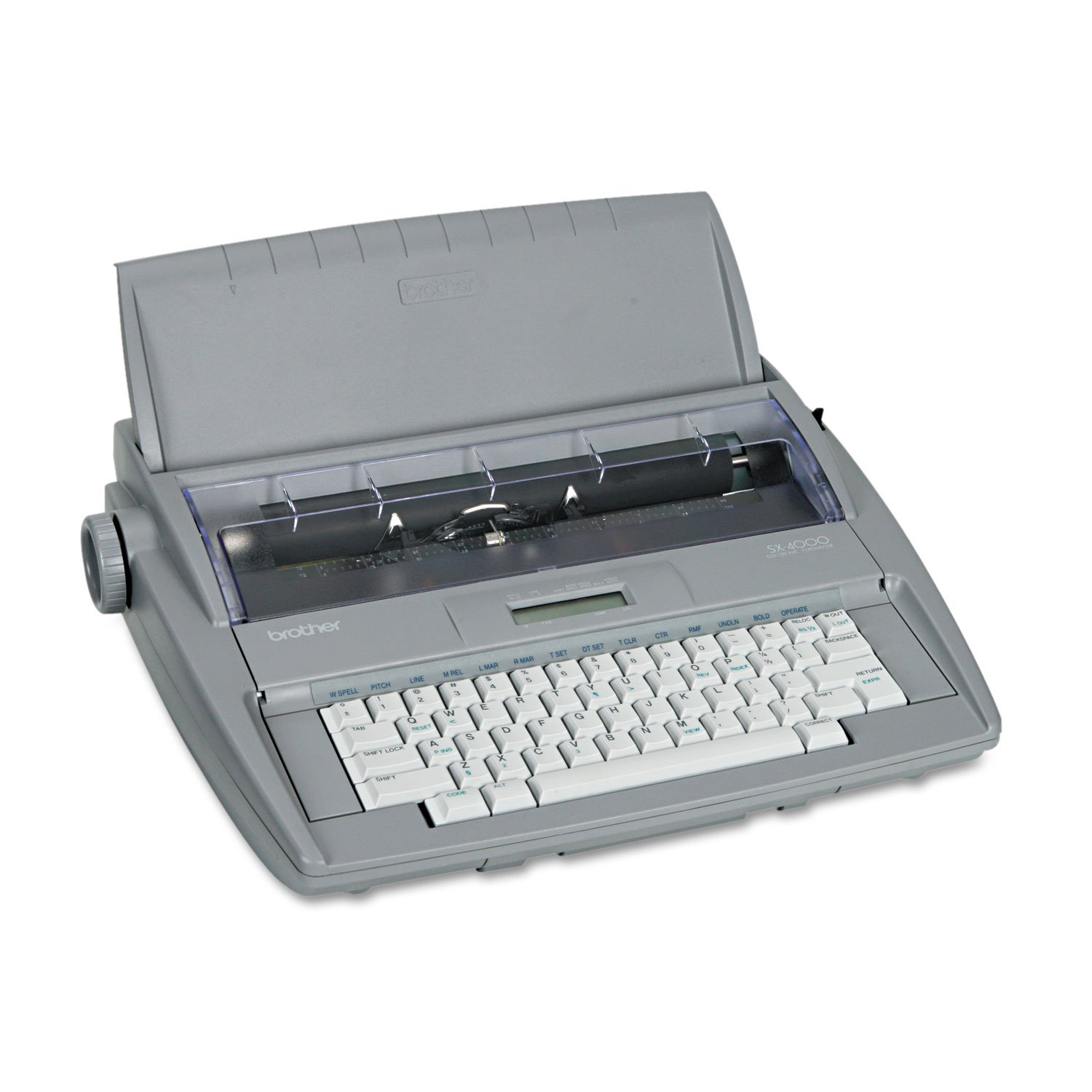
What sets the SX-4000 apart from the other paper machines here is its FIND feature — a 70,000-word dictionary that locates errors on the line you just typed. Add automatic relocation after correction, and the machine returns the carriage to exactly where you stopped so you can fix the word and keep going. Line-by-line printing means the page comes out as you type rather than in a final pass, which suits forms and correspondence you want in hand immediately. A professional touch keyboard sits underneath, and it comes with a one-year limited warranty.
At 12 pounds and 20 by 18.6 inches, this is the same desk-bound class as the Nakajima and the Royal — plan a permanent spot. It has been on sale since April 2002 and is an English-language model, so the manual and functions are aimed at US letter work. There is no cloud sync, no flash storage, and no screen to edit on. What lands on the paper is the draft, and correction happens on the page with the dictionary leading you there.
Ease of use and the long feature list are why people stay loyal to this one, and a fair number buy it as a gift for someone who writes. The caveat is real and worth naming plainly: functionality splits sharply, with some machines working fine and a portion arriving that never work from the first day. That is a lottery risk rather than a design flaw, and the one-year limited warranty is the safety net. Buy it for the dictionary-assisted typing, and open the box and test it the day it lands.
The Case For The SX-4000
- 70,000-word dictionary with FIND locates errors on the line
- Automatic relocation after correction returns you to your place
- Line-by-line printing puts the page in your hand as you type
- One-year limited warranty backs the purchase
The Honest Risk
- A portion of units arrive non-functional from the start — test immediately
- No cloud, no storage, no screen: paper is the only draft
The call: a dictionary-driven paper machine for forms and letters, backed by a one-year limited warranty.
The catch to own: unbox it and type a test page the day it arrives — the doa risk is the one thing you cannot design around.
Know the Specs
Display Type: E Ink Versus LCD
E Ink reflects light like paper and draws almost no power between refreshes, which is how the Traveler reaches up to four weeks on a charge. Its weakness is refresh speed — E Ink redraws more slowly, so there is a typing delay between keypress and letter. LCD panels like the Alpha’s refresh fast for instant letters but need their own light and drain a battery faster. If eye comfort and battery matter more than instant response, E Ink is the pick.
Internal Storage And Cloud Sync
The Freewrite models hold up to 1,000,000 words in internal flash storage and back drafts up over Wi-Fi to the cloud, so a lost device does not mean a lost manuscript. Paper typewriters have no storage at all — the printed page is the only copy, so a misfiled sheet is gone. Think about which safety net you need before you choose your lane.
Carriage Size And Typing Width
On a paper machine, the carriage is the track that moves the paper. The Royal Scriptor II and Nakajima WPT-150 both carry a 13-inch carriage with a 9-inch typing width, which covers standard letter and legal document widths. A narrower carriage limits you to shorter lines. Check carriage size if you type wide forms or landscape pages.
Character Buffer And Type Speed
The buffer is short-term memory for your keystrokes — the Royal Scriptor II holds 30 keystrokes, so fast typing does not overrun the print head at its 12-character-per-sec pace. On digital machines the equivalent is latency: how quickly the screen shows what you typed. A slow buffer or a long lag both break your rhythm, so weigh them against how fast you actually type.
Common Questions
Can a Freewrite device replace my laptop for writing?
How long does the Freewrite Traveler battery actually last?
Is a 13-inch carriage big enough for standard documents?
Does the Freewrite Smart Typewriter work without Wi-Fi?
Will a paper typewriter let me correct mistakes?
Is the typing delay on the Freewrite Traveler a problem?
Do these devices come with a warranty?
Can I print from a Freewrite device?
Which is better for a small apartment, the Smart Typewriter or the Traveler?
The Bottom Line
For most people, the word processor notebook winner is the Royal 69147T Scriptor II, because its 80,000-word spell check and 2-line LCD catch errors before they hit the page — a combination no other paper machine here offers. If portability and eye comfort lead your list, grab the Freewrite Traveler for its E Ink screen and 0.71 kg frame. And for pure typing pleasure at a dedicated desk, the Freewrite Smart Typewriter and its 104 Kailh Box Brown keys are the machine to reach for. Whichever you pick, you get one device with one job and no browser to click away to.
How we choose
We do not accept paid placement. Every pick is matched to a real buyer and a real use-case; we do not hands-on test units.
Sources
Specifications: manufacturer listings and product documentation. Review insights: verified customer reviews. Pricing: not shown on this page (it changes often); check the current price via the retailer link.
As an Amazon Associate, Tactical Gear Guy earns from qualifying purchases. This does not affect which products we feature.