Specs are compiled from manufacturer listings and verified buyer reviews and can change over time — please confirm the key details on the product page before buying.
A 3D printer that shakes mid-print leaves ringing and layer shifts in the finished part. That is the whole reason this category exists, and it is why you cannot just set your printer on any spare table. You need a bench that holds the machine rigid while the frame whips back and forth, stays flat under the load, and gives you a place to put the filament, the tools, and the power strip. The four benches below cover that job from entry-level to premium, and each one is built around a different idea of what a printing corner should look like.
This guide is built by comparing the manufacturers’ published specifications and the patterns across verified customer reviews, so you get each pick’s real strengths and trade-offs instead of marketing spin.
You will see load ratings, tabletop depths, height ranges, and the storage each bench actually includes. A bench with a 2000-pound load rating and a bench with a 300-pound rating are not the same purchase, and the difference shows up the first time your printer runs a long job. If you want the bench that carries the most weight and adjusts the most, the WORKPRO is the one — 4.5+ stars across 1,600+ owners points the same way. The rest of this guide walks through the best Workbench for 3D Printer options for a home printing setup.
Top Picks

How To Choose The Best Workbench for 3D Printer
Print quality is a mechanical problem before it is a software problem. Every time the print head changes direction, the machine pushes against whatever it is sitting on. A bench that flexes passes that push back into the frame, and the nozzle lands slightly off where it should. So the shortlist here is sorted by how rigidly each bench holds a printer, then by what it gives you around the machine.
Start with the load rating, not the look
The load rating tells you how much weight the bench is designed to carry — the printer plus filament plus tools plus whatever you lean on it. A steel-frame bench rated for 2000 pounds is handling printer weight as a rounding error. An engineered-wood bench rated for 300 pounds is still fine for one or two printers, but it has far less headroom. Match the rating to how many machines you plan to stack on it.
Height decides whether you can work on it standing
Printers need attention: bed levelling, nozzle changes, spool swaps. A bench stuck at one height forces you to bend or reach. An adjustable bench lets you set the surface where your hands actually work well. The WORKPRO offers 5 height positions from 31-1/2in to 39-3/8in, while the Northsky sits at a fixed 35.4-inch working height. If you stand while you tinker, an adjustable bench is worth the extra effort to set up.
Storage is where these benches really separate
Filament spools take up more room than people expect. So do the drawers of nozzles, hex keys, and spare parts. A bench with dedicated filament racks keeps spools off your work surface and out of the way. A bench with a pegboard keeps tools visible and within reach. Decide whether you are storing spools, tools, or both before you pick.
Built-in power stops the cable sprawl
Your printer needs one outlet. Your drying box, your light, and your laptop charger need more. A power strip built into the bench means one cord runs to the wall instead of a daisy chain under your feet. Check how many AC outlets and USB ports each bench includes, because that count varies a lot between models.
Side-by-Side Comparison
| Model | Best For | Load Capacity | Tabletop Size | Power Outlets | Amazon |
|---|---|---|---|---|---|
| WORKPRO 48″ Adjustable Workbench★ Best Overall | Heavy printers and adjustable working height | 2000 lbs | 48″ x 20.4″ | 4 AC + 2 USB-A | Amazon |
| 3D Printer Table with Filament Storage Rack | Keeping spools and tools organized underneath | — | 39.4″ x 23.7″ | 2 AC + 2 USB | Amazon |
| Northsky 48″ Garage Workbench | Wide surface with a pegboard and shop light | 1200 lbs top / 150 lbs shelf | 48″ x 23.6″ | 2 AC + 1 USB-A 1 USB-C | Amazon |
| PAKASEPT Rolling 3D Printer Stand | Moving the printer around on locking casters | 300 lbs | 39.4″ x 24.4″ | 2 AC + 2 USB | Amazon |
Detailed Reviews
1. WORKPRO 48″ Adjustable Workbench
Our pick — 4.5+★ from 1,500+ verified ratings; the strongest balance of quality and price.
A steel bench rated for 2000 pounds treats your printer’s vibration as a rounding error.
The number that decides this one is 2000 pounds. That is the load capacity of the 1.3mm steel frame — 1.3mm being the thickness of the steel tube, which is what makes the frame heavy and stiff rather than tinny. Your printer might weigh a tenth of that, so the bench barely registers the load. The practical result: when the print head slams to a stop at the end of a fast travel move, the bench absorbs that energy instead of passing it back into the frame. A rigid bench is the cheapest print-quality upgrade most people never buy.
The top is solid rubber wood, 1-3/16in thick and FSC-certified, over a 48in by 20in surface. A thick wood top does two jobs at once: it adds mass that damps vibration, and it gives you a flat, forgiving surface to set the printer on without scratching. You get 5 adjustable height positions from 31-1/2in to 39-3/8in, so you can raise the bench when you are swapping a nozzle and lower it when you sit to monitor a print. The power strip carries 4 AC outlets and 2 USB-A ports (USB-A being the standard rectangle USB plug), and it is ETL certified — a third-party electrical safety listing. Compared with the 3D Printer Table with Filament Storage Rack, this one gives you 4 AC outlets to that bench’s 2, and 2 USB-A ports to 1.
Assembly is quoted at 10 minutes with the included instructions and video guide. What wins people over, going by owner feedback, is the build: quality and sturdiness are the two things the review pages keep returning to, and the bench draws praise as a piece of furniture as much as a work surface. The honest caveat is stability. The steel frame is stiff, but 73 owners flag that it can wobble slightly, and a few say theirs never has. Worth knowing before you buy if your shop floor is uneven.
Where it earns its keep
- 2000-pound load capacity means printer weight is never the limit
- 5 height settings from 31-1/2in to 39-3/8in for standing or seated work
- 1-3/16in solid rubber wood top adds mass and stays flat
- 4 AC outlets and 2 USB-A ports on an ETL-certified power strip
- 10-minute assembly with instructions and a video guide included
What to weigh first
- 23.6-inch depth does not match the Northsky’s 23.6 in — this bench is the 20.4-inch one
- Some owners find it slightly unstable on uneven floors
- Rubber wood and steel make it heavy to move once assembled
Go with it if: you want one bench that never flinches under load and adapts to your working height.
Think twice if: your floor is uneven and you cannot level the feet — that is where the wobble reports come from.
2. 3D Printer Table with Filament Storage Rack
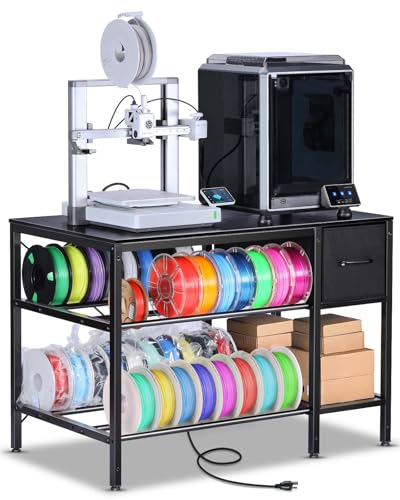
The only bench here built around spools first and the printer second.
If your printing corner currently looks like a spool graveyard, this is the bench that solves it. Two levels of storage sit under the tabletop, each with a metal tube rack on the middle and bottom shelves — that is where your filament goes. A metal tube rack holds the spool upright so it feeds cleanly and does not roll off the shelf mid-print. Fabric drawers underneath take the small stuff: screws, wrenches, nozzles, and the maintenance tools that otherwise disappear into a coffee can.
The top measures 39.4 inches long by 23.7 inches wide, and buyers report it comfortably takes two large printers side by side. That is a real advantage over the WORKPRO’s 48in by 20in top if you run a two-machine setup, because the extra depth leaves room for the printers plus your hands. The built-in power strip gives you 2 AC outlets and 2 USB ports on a 140 cm power cord, so the bench can stand away from the wall outlet and still be the only thing plugged in.
The frame is steel and the whole stand weighs 37 pounds, so it is movable by one person before you load it up. Assembly is reported as straightforward with clear instructions. What buyers keep mentioning is the space the design creates — the filament storage underneath is the feature that sells it, and owners consider it good value for what you get. The trade-off worth naming: fabric drawers are not rugged bins. They hold light items well and heavy items poorly, so treat them as organizers rather than toolboxes.
The two-printer argument: a 23.7-inch-deep top is what makes side-by-side machines practical here, and that is the same depth class as the Northsky’s 23.6 in. If one printer is all you run, this bench still gives you somewhere for the spools to live.
The honest limit: no published load capacity is stated for this stand, so if you plan to stack heavy equipment on it, pick a bench with a number you can read.
Reach for this if: you want the spools and tools organized underneath rather than on your work surface.
Look elsewhere if: you need a stated weight rating or a bench built to take heavy machinery.
3. Northsky 48″ Garage Workbench

A 48-inch top with a pegboard behind it and a lamp over it — the full shop-corner build.
Depth is where this bench makes its case. The engineered wood top runs 48 inches wide by 23.6 inches deep, and that depth beats the WORKPRO’s 20.4 inches — 23.6 in versus 20.4 in, in the raw numbers. On a 3D printer bench, extra depth matters more than extra width: it pushes the printer back from the front edge, leaving you room to reach the bed without leaning over the machine.
The structure is two-tier. The upper surface carries up to 1,200 lbs, and the lower shelf holds up to 150 lbs for toolboxes and bins. A 16-inch fixed metal pegboard sits at the back for hooks and organizers, and an integrated LED light strip throws light across the work surface from above. The bench stands 59 inches tall overall with a 35.4-inch working height, which is a comfortable standing bench for most people. Power comes from an integrated station with 2 AC outlets, 1 USB-A port, and 1 USB Type-C port (Type-C being the small oval reversible plug) on a 6.5 ft cord.
Quality and sturdiness are what the review pages praise, and the bench assembles easily with the included hardware. The mixed note is the lighting — it is listed in the feedback as a point of disagreement rather than a strength. A strip light at bench height is a helper, not a substitute for real room light, so plan on overhead lighting too. The other thing to know is the material: engineered wood is not solid timber, so keep it dry and do not drag heavy steel across the top.
Why the pegboard earns its place: hex keys, calipers, and scrapers hang in front of you at eye level instead of in a drawer you have to open mid-print.
The fit note: the LED strip splits opinion, and an engineered wood top rewards a little care.
Best matched to: a maker who wants a full wall-corner station with tools hung and a light overhead.
Worth skipping if: you need an adjustable height — this one is fixed at 35.4 inches.
4. PAKASEPT Rolling 3D Printer Stand
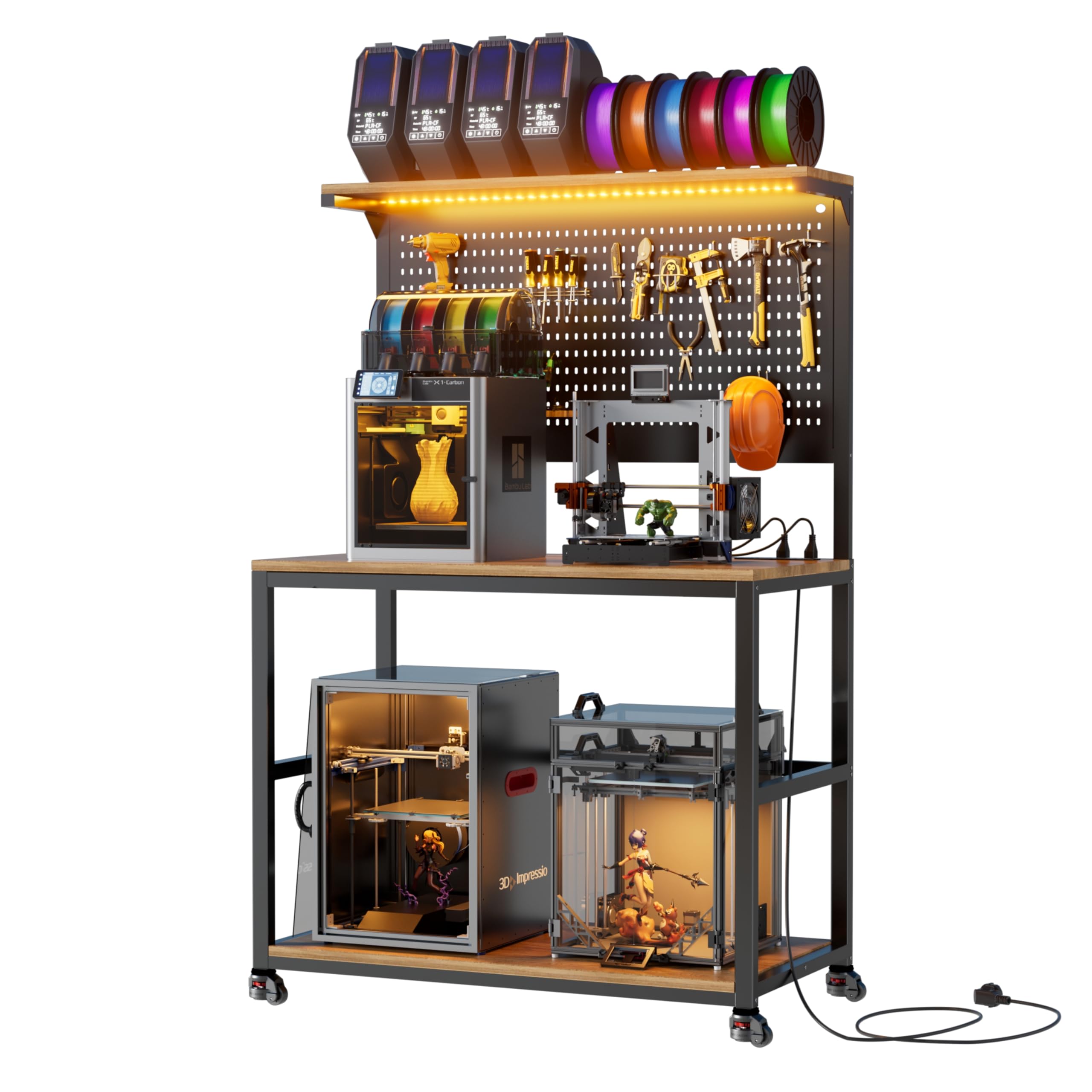
Locking casters that let a printer move when you want and stay put when it counts.
The casters are the whole idea here. These are leveling casters with a dual-wheel design, which means each wheel pair spreads the load and the feet can be adjusted to sit flat on an uneven floor. The positive locking system locks the wheel and stops drift, so the stand does not creep during a long print — drift being the slow walk a wheeled bench makes when vibration shakes it across the floor. That is the problem casters normally cause on a printer stand, and this design is built to answer it.
The desktop runs 24.4 inches deep by 39.4 inches wide on MDF panels with a metal frame, and the maker states it holds two printers at once and supports up to 300 lbs. The frame is described as resisting rust and wear. A pegboard keeps tools and spools in reach, and the built-in power hub gives you 2 AC outlets and 2 USB ports so you are not running a loose strip across the floor. Seven LED light colors let you set the mood over the machine — a small thing, but a printing corner you enjoy standing in gets used more.
Owners describe it as a sturdy piece of furniture that goes together in under 30 minutes, and the design draws consistent praise. The mixed feedback is compatibility: several report it barely fits their printers, which makes sense given the 39.4-inch width against a wide-format machine. Measure your printer’s footprint — plus clearance for the bed to move — before you order. Value draws mixed comment too. At 4.0+ stars, it is the lowest-rated bench on this list, and the fit question is the reason to check dimensions carefully rather than the build quality.
Why it stands out
- Dual-wheel leveling casters with positive locks for uneven floors
- 24.4-inch depth and 39.4-inch width for a two-printer layout
- Pegboard plus 2 AC outlets and 2 USB ports built in
- Seven LED colors over the work area
Where it asks for care
- 300-pound capacity is the lowest rating here, so keep the load light
- Owners mention it barely fits some printers — measure first
- MDF panels need to stay dry and away from damp garage floors
The one to pick when: your printing space has to double as something else and the bench needs to roll away.
The catch to size up: a 39.4-inch width and 300-pound rating leave no margin for a large-format printer.
Know the Specs
Load capacity in pounds
This is how much weight the bench is built to carry — printer, filament, tools, and you leaning on it. A higher rating means the frame is stiffer, which matters because a stiff bench soaks up printer vibration instead of passing it into the machine. The ratings here range from 300 lbs up to 2000 lbs, so read the number before you assume a bench can take a stack of equipment.
Tabletop depth in inches
Depth is how far the surface reaches front to back. A deeper top pushes the printer back from the edge and gives you room to reach the bed and the spool without leaning over the machine. The benches here run from 20.4 inches to 24.4 inches deep. If you plan to run two printers side by side, depth and width both have to be checked against your machines’ footprints.
Height adjustment range
An adjustable bench lets you set the surface where your hands work well, whether that is standing or on a stool. The WORKPRO spans 31-1/2in to 39-3/8in across 5 positions. A fixed bench gives you one working height, like the Northsky at 35.4 inches. If you spend time levelling beds and changing nozzles, the adjustable option reduces the bending.
Built-in power: AC outlets and USB ports
AC outlets take standard plugs for your printer and lights. USB ports charge or power smaller devices like a phone or a filament dryer with a USB feed. Count them: 4 AC and 2 USB-A on the WORKPRO, 2 AC and 2 USB on the 3D Printer Table and the PAKASEPT, and 2 AC plus 1 USB-A and 1 USB Type-C on the Northsky. One bench, one cord to the wall.
Common Questions
Will a workbench actually reduce shaking during a 3D print?
How much load capacity do I need for one printer?
Do I need an adjustable height bench for a printer?
Can a rolling printer stand stay still during a long print?
Is a pegboard useful next to a 3D printer?
How do I store filament spools on a workbench?
What is the difference between solid rubber wood and engineered wood tops?
Will a 48-inch bench fit a standard garage or spare room?
Can I plug a filament dryer and a printer into the same bench power strip?
How long does assembly take on these 3D printer benches?
The Bottom Line
For most people setting up a printing corner, the best Workbench for 3D Printer is the WORKPRO 48″ Adjustable Workbench. It carries 2000 lbs on a 1.3mm steel frame with a 1-3/16in solid rubber wood top, and it gives you 5 height positions from 31-1/2in to 39-3/8in plus 4 AC outlets and 2 USB-A ports. Nothing else here matches that combination of load headroom and adjustability. If organizing spools and spare parts is the bigger headache, grab the 3D Printer Table with Filament Storage Rack and let the metal tube racks hold your filament. And for a printing spot that has to double as a workbench by day, the PAKASEPT Rolling 3D Printer Stand is the one to reach for — lock the casters and it stays put.
The nudge worth acting on: the WORKPRO earns its place on 4.5+ stars across 1,600+ owners, and the thing they keep coming back to is the build quality. Match the bench to your floor and your printer’s footprint, and you will get years of use out of it.
How we choose
We do not accept paid placement. Every pick is matched to a real buyer and a real use-case; we do not hands-on test units.
Sources
Specifications: manufacturer listings and product documentation. Review insights: verified customer reviews, as of November 2026. Pricing: not shown on this page (it changes often); check the current price via the retailer link.
As an Amazon Associate, Tactical Gear Guy earns from qualifying purchases. This does not affect which products we feature.