Specs are compiled from manufacturer listings and verified buyer reviews and can change over time — please confirm the key details on the product page before buying.
You want edges that look like a machine made them, not something you eyeballed with a pencil. A router template solves that by giving your bit a fixed path to follow. But here is the catch most beginners miss: templates are not universal. A jig built for a compact trim router will not fit a full-size plunge base, and a corner-radius jig is useless if you actually need a circle. So this guide is organized around what you are trying to cut. If you cut circles, you want a circle jig. If you round over corners, you want a radius template. Below are nine real options, sorted by what kind of cut each one does best, with honest notes on what each one will not do.
This guide is built by comparing the manufacturers’ published specifications and the patterns across verified customer reviews, so you get each pick’s real strengths and trade-offs instead of marketing spin.
Every pick below was chosen because it locks your router to a repeatable path rather than a freehand guess, and that is the whole point of carrying a template in your kit. Below are nine router templates, each matched to a specific cut, so you can pick the one that fits the work you actually do.
Top Picks


How To Choose The Best Woodworking Router Templates
The first decision is not brand — it is the shape of the cut. Circles, corner radii, handle cutouts, letters and rectangular recesses are five different jobs, and no single template does all five well. Budget-tier templates are usually flat acrylic or thin metal. Premium ones add adjustable frames, metal rails and replaceable bushings.
Match the template to your router base first
This trips up more buyers than anything else. A circle jig or corner jig attaches to your router’s base plate, so the plate diameter has to match. Compact, trim and cordless routers — the small palm-sized ones — take different templates than full-size plunge routers. Check that specific compatibility chart before you order, because a jig that does not bolt on is a return.
Watch the wall thickness and bushing size
Every template has a wall the router bit or bushing rides against. Acrylic sets here run around 0.2 inches / 5 mm thick. That thickness plus your bushing diameter decides the actual offset of your cut. A bushing rides the template edge and holds the bit a set distance away, so the finished cut is smaller than the hole by that offset. Know your bushing before you commit to a template.
Decide between fixed-size templates and adjustable frames
A fixed acrylic template with pre-cut holes gives you that exact size and nothing else — fast, cheap, repeatable. An adjustable frame lets you dial a rectangular recess to any size within its capacity, which is what you want for hinges, inlays and panel work. Fixed is faster for one job. Adjustable covers many jobs. Neither is wrong; they solve different problems.
Side-by-Side Comparison
| Model | Best For | Material | Cut Range | Router Fit | Amazon |
|---|---|---|---|---|---|
| Jasper 290 Circle Jig★ Best Overall | Precision circles | Acrylic | 1½”–18 3/16″ | Compact/trim/cordless | Amazon |
| Frienda 6 Pcs Charcuterie TemplateBest for Handles | Handle cutouts | Acrylic | Multiple handle shapes | Trace-and-cut | Amazon |
| Hermit Tools 7pc Circle InlayBest for Inlays | Inlays and blemish repair | Hardened acrylic | Φ3″–Φ8″ | Trace-and-cut | Amazon |
| twinklemon 8PCS Router Templates | Craft variety | Acrylic | 8″ x 10″ sheets | Trace-and-cut | Amazon |
| POWERTEC 71622 Circle/Grommet | Grommet holes and ovals | Clear acrylic | 15 hole sizes | Trace-and-cut | Amazon |
| TANYO 7pcs Corner Radius | Rounded corners | Aluminum alloy | 18 radius sizes | Adjustable edge stops | Amazon |
| Kreg Corner Routing Guide PRS1000 | Radius and chamfer work | Metal | 5 radius, 3 chamfer | Trim/handheld/table | Amazon |
| Milescraft 1206 Signcrafter | Sign lettering | Metal, wood | 4″–36″ signs | Universal baseplate | Amazon |
| Trend Varijig | Rectangular recesses | Metal | 23.6″ x 23.6″ | Anti-tilt shoe | Amazon |
Detailed Reviews
1. Jasper 290 Circle Jig
Our pick — 4.5+★ from 200+ verified ratings; the strongest balance of quality and price.
One jig that covers 268 circle sizes — this is the one that does the most for the least fuss.
If you cut speaker holes, ring inlays or tabletop circles, the number that matters is 268. That is how many perfectly sized circles this jig cuts, from 1½” to 18 3/16″ in 1/16″ steps. In plain terms, that is a huge range of round openings from one tool, all butted against fixed pivot holes so the radius repeats exactly. You set the pivot pin, swing the router around, and the circle comes out the same size every time.
You get repeatable, exact circles because this Standard model is the hardened acrylic version of the Jasper family, which has earned 4.5+ stars from 2,000+ owners. It ships with a calibration disc (a round reference for setting the bit), a ¼-inch centering pin, two 1/8-inch pivot pins and the screws to mount it to your base plate. The pivot holes are CNC-machined, so the radius repeats exactly from one circle to the next. The build is clean, the geometry is exact, and it fits the router you actually own. The one thing to check before you buy is the compatibility chart — this fits compact, trim and cordless routers like the Bosch Colt, DeWalt DCW600/DWP611, Makita XTR01 and Milwaukee M18 FUEL, and it is not built for full-size plunge routers.
Here is the honest trade-off. This is not a cheap pickup, and the price is the thing buyers push back on most. If you cut one circle a year, a cheaper acrylic disc will do. If you cut speaker holes or inlays more than a few times a year, the repeatable radius pays for itself. It also weighs 12.6 ounces, which is light enough to leave mounted and forget about.
What Earns It the Top Spot
- 268 circle sizes from 1½” to 18 3/16″ in 1/16″ increments
- Fixed CNC-machined pivot holes give a repeatable radius
- Ships with calibration disc, centering pin and pivot pins
- Fits compact, trim and cordless routers
Where It Stops Short
- Not for full-size plunge routers — check the compatibility chart first
- Pricier than a simple plastic circle disc, and some find it steep
Grab this one if: you cut round openings repeatedly and want the size right on the first pass every time.
Think twice if: you run a full-size plunge router — this jig is built for the compact and trim bases.
2. Frienda 6 Pcs Charcuterie Board Template
Six handle shapes and three pens, so you can trace a cutout and get on with the build.
Making a charcuterie board that looks like it came from a shop starts with the handle. This set gives you six acrylic templates in 9.84 x 7.87 inch sheets, plus three pens. The idea is dead simple: lay the template on your board blank, run the pen around the inside edge, then cut to the line. You get straight handles, curved handles and some cuter shaped ones, so one board does not look like the last one you made.
The acrylic is about 0.2 inches / 5 mm thick, which is thick enough that it does not bow or deform under a pen or a marking knife. Both faces ship with a protective film to stop scratches, so peel them before you use the set. Six handle shapes in one set means you can practice the first cutout on scrap and still have five shapes left to use.
The catch worth naming: these are tracing templates, not riding templates. You draw the shape and cut it yourself — the template does not guide the router bit for you the way a pivot jig does. Pair it with a flush-trim bit and a steady hand, and you get clean handle openings. Your first traced handle will be rough; by the second board the pen line and the cut line start matching.
Why it earns a spot: six distinct handle shapes in one set covers the boards most people actually make, and the pens mean nothing extra to buy.
The one thing to know: you trace and cut by hand, so your first handle is practice, not production.
Reach for this if: you build serving boards and want a few handle shapes to rotate between.
Look elsewhere if: you want the router to ride the template directly rather than trace it.
3. Hermit Tools Pack of 7 Big Circle Inlay Template
Seven clear circle templates sized for inlay work and covering a knot before it splits wider.
Sometimes the job is not a perfect speaker hole — it is hiding a blemish or stopping a check from creeping across a tabletop. This set of seven circle templates runs from Φ3″ to Φ8″ and is built for exactly that: decorative detail, covering blemishes, and arresting cracks on tabletops and chests. The clear hardened acrylic lets you see the grain and the flaw underneath while you line up the cut, which is the whole reason it is see-through.
The material is 1/4″ hardened acrylic, and the sheets measure 12″L x 10″W. Compared with the twinklemon 8-pack’s 10″L x 8″W sheets, this set runs about 20% more surface, which buys you more room to clamp down on a big panel. If you have ever chased a template across a tabletop while the bit grabbed, extra footprint is the difference between a clean circle and a scarred one.
Two things to weigh. These are tracing-sized templates aimed at inlay and detail work, not a pivot-based circle cutting system — you still need to cut to your traced line. And the set is one pack of seven sizes, so if your project needs something outside Φ3″ to Φ8″, this is not the tool. Within that range and around a typical tabletop project, it is a clean, clear seeing aid that does not fight you.
Reach for this if: you repair or decorate tabletops and want to see the flaw through the template while you align it.
Look elsewhere if: you need a circle much larger than 8 inches across.
4. twinklemon 8PCS Router Templates

Eight templates split between board handles and tray recesses — the craft-day starter set.
The count tells the story: 8 pieces total, made up of 6 charcuterie board handle templates and 2 tray router templates, plus 3 pens. That is more variety than most beginners need on day one, and that is the point. You can cut handles on a board, then use the tray templates for a recessed serving channel without buying a second set. The clear acrylic lets you see exactly where the edge sits before you commit the bit.
The sheets measure 10″L x 8″W, and the acrylic is approximately 0.2 inches / 5 mm thick — thick enough not to bow, with a protective film to keep it scratch-free in transit. Peel that film off first; it is a common first-use stumble. The cut method is the same as the others in this family: mark along the edge with the supplied pen, then cut the wood to shape. Straight, curved and cute handle shapes are all in the box, so boards made weeks apart do not look identical.
One honest limit: like the Frienda set above, these are tracing templates. They guide your pen, not your router bit. If you want a bit to ride the template directly, you are shopping a different category. But for a hobbyist making gifts, an 8-piece set with both handle and tray shapes is a lot of project flexibility in one thin stack.
Best fit: crafters who want handle and tray shapes from one set and do not mind tracing and cutting by hand.
Keep in mind: the templates guide your marker, not the bit — you cut to the traced line yourself.
Pick it up if: you want the widest shape variety in one budget-minded bundle for DIY boards and trays.
Pass if: your goal is router-guided cutting rather than trace-and-cut work.
5. POWERTEC 71622 Circle/Grommet Templates

Fifteen finished hole sizes across two templates — grommets and ovals in one layout.
Grommet work is fussy, and the reason is sizing. This two-piece set puts 15 finished hole sizes on the table: 13 circles and 2 ovals, split between the two templates. The first carries 1-9/16″, 1-3/4″, 1-15/16″, 3-1/8″ and 2-3/8″ circles plus a 4-5/8″ x 2-3/8″ and a 6-1/8″ x 2-1/2″ oval. The second runs 1-3/8″, 2″, 2-1/4″, 2-1/2″, 2-3/4″, 3″, 3-1/4″ and 3-1/2″. If you make desk grommets or cable pass-throughs, one of those sizes will match your hardware.
The build is clear acrylic with visible, easy-to-read markings, and it weighs 1.5 pounds — heavy enough to sit flat under the router without dancing around. Multiple sizes on one layout means you are not swapping templates between every hole, and the see-through frame lets you center on the workpiece before the bit touches wood. That adds up to cleaner openings and fewer second attempts on a hole you cannot undo.
What you give up is range flexibility — the sizes are fixed, so it is this specific list or nothing. It is also a tracing and alignment template rather than a swing-arm circle system. For grommet holes and oval pass-throughs, though, having the exact finished size printed on a clear plate is the entire job done for you.
Reach for this if: you cut grommet holes, cable pass-throughs or oval openings and want the finished size right there on the template.
Look elsewhere if: you need a circle size that is not on this fixed list.
6. TANYO 7pcs Router Corner Radius Template
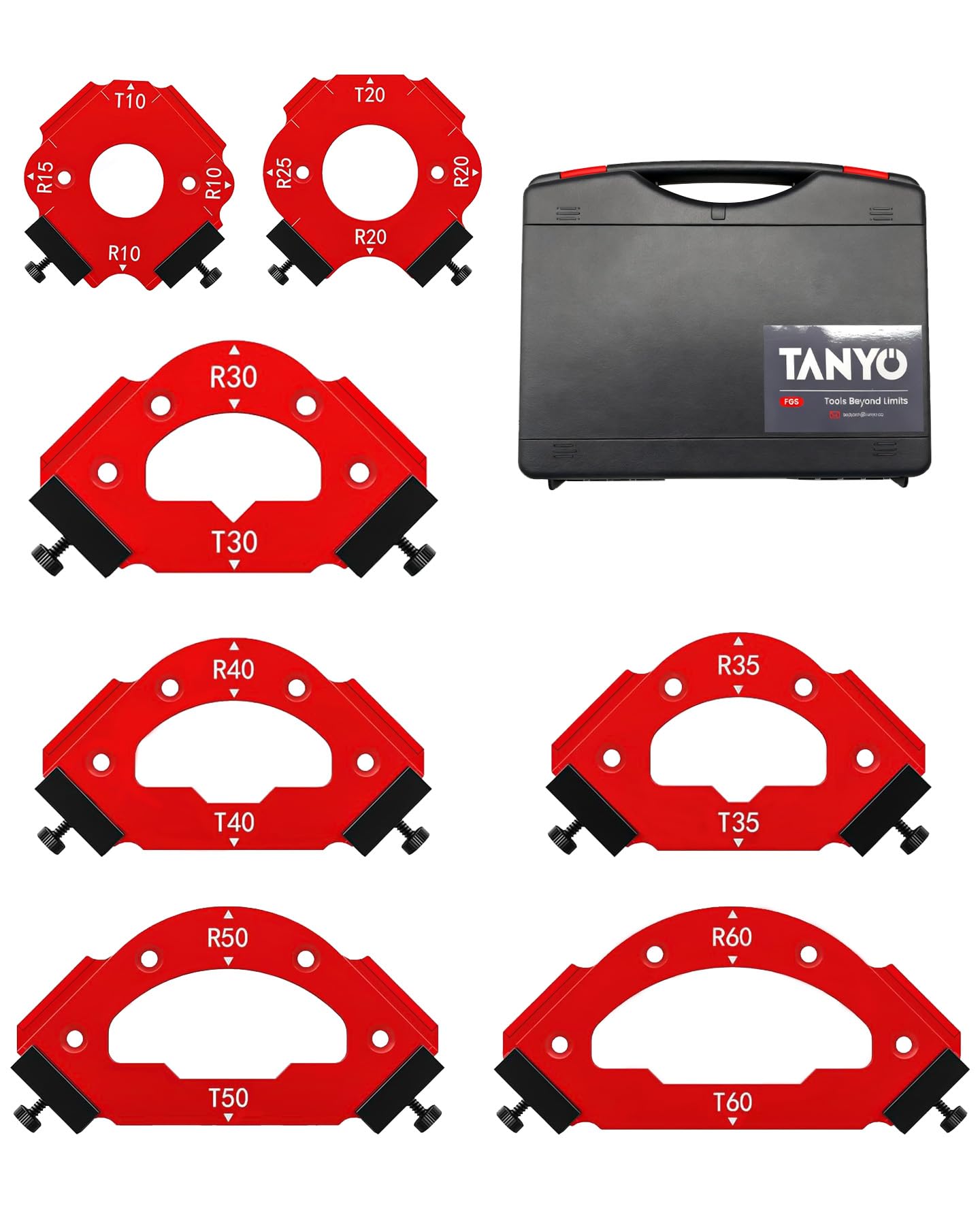
Aluminum instead of plastic, with 18 radius sizes so rounded corners stop being a guessing game.
Rounded corners are usually where a clean build goes crooked, and the reason is sanding. This set lets the router do the work instead. It packs 18 radius angles into a 7-piece set: R10/R15/R20/R25/R30/R35/R40/R50 and T10/T20/T30/T35/T40/T50/T60. It works as a 3-in-1 arc angle positioning template covering oblique angles, outer round corners and inner fillets, so one compact kit replaces the stack of corner jigs you would otherwise buy.
Where this jumps ahead of the acrylic sets: the body is high-hardness aluminum alloy, CNC machined, with an anodized surface for hardness and wear resistance. Translated, that means the edge will not deform or chew up under a router bushing the way a soft plastic template can. Adjustable edge stops let you set the template on the corner, tighten the screws and run the bit along the guide. The whole 7-piece set stores in a plastic box, which keeps the guides together between projects.
The part that gives some users pause is corner accuracy — the cuts can drift by about a sixteenth of an inch on the flat sides, so it rewards a slow, deliberate pass rather than a fast one. It is also a corner tool, not a circle tool; if you came for round openings, look at the Jasper above instead. For furniture edges, photo frames and table corners, its CNC-machined guides and adjustable stops do the bulk of the work for you.
The standout: 18 radius sizes in anodized aluminum covers oblique, outer-round and inner-fillet corners from one box.
Slow down for: the flat-side cut can come out about a sixteenth off, so take your time and verify with a square.
Pick it up if: you build furniture and frames and want a durable metal corner jig with a wide radius spread.
Pass if: you need circles or you cut corners with a fast, jam-it-through approach.
7. Kreg Corner Routing Guide Set PRS1000

A big-handled corner guide that holds the workpiece still while your router does the shaping.
Kreg built this one for control. You get five radius sizes and three chamfer sizes from one guide, and it works with any trim router, handheld router or router table. A chamfer is a flat angled cut along the edge; a radius is the rounded corner. Having both in one jig means you do not buy two templates for two finishes. The large handle gives you a place to grip the guide confidently while the bit runs.
The feature that does the real work is the GripMaxx surface plus adjustable edge stop posts. Those hold the workpiece firmly so it does not shift while you cut — and a workpiece that slides mid-cut ruins the corner. It weighs 400 g, so it is steady in hand without being a chore to reposition. For anyone routing radius and chamfer profiles on cabinet doors, drawers or small furniture, this is a purpose-built tool rather than a flat stencil.
The honest catch is alignment. The corner-cutting feature is where the guide shows its limits — some users find the shape goes on easily while others wrestle a slight offset, and alignment is the recurring gripe. It rewards patience with the edge-stop posts and a couple of test cuts on scrap before you commit to the good piece. For someone doing this work often, that setup time is a small price for repeatable corners when the guide is dialed in.
Best for: woodworkers who route radius and chamfer profiles often and want a handle to hold the guide steady.
The catch: expect to test-cut on scrap first — lining up the edge stop is where this jig asks for patience.
8. Milescraft 1206 Signcrafter

Eighty-two self-spacing letter and number templates that let you route a sign without a ruler.
Lettering a sign by eye is where most first-timers give up. This kit removes the measuring entirely: 82 self-spacing 2-1/2-inch number and letter templates, plus a 3/8-inch core box bit, a 5/8-inch bushing, end frames, guide rails and a universal turn-n-lock baseplate. Self-spacing means the letters lock together in a rail so the gap between each one is already set — you slide the next letter in and route, no pencil marks needed. Signs run from 4-inch to 36-inch.
Setup is fast enough to mention: it takes about 20 minutes to get going from the box, which for a sign-making rig is quick. The self-clamping side bars and four metal rails with joiners hold the template in place while you route each character. If you want to make personalized signs, name plaques or shop signs for gifts, this is a single kit that covers the whole job rather than a pile of loose stencils.
Two real cautions. The plastic parts are the weak point — several users report the plastic melting shortly after the bit starts working against it, so watch your bit speed and feed rate. And the clamps divide opinion: some find them ideal for holding the templates, others find they hold poorly. Neither makes the kit unusable, but understand you are buying speed and lettering variety, and you should treat the plastic guides with care rather than lean on them.
What makes it useful: 82 self-spacing 2 1/2-inch templates mean signs go together with no measuring, in about 20 minutes of setup.
Handle with care: the plastic can melt under a hot bit, and the clamps are a mixed bag — slow the cut and check the hold.
Choose this one if: you make signs and plaques and want lettering that spaces itself with no ruler involved.
skip it if: you push router bits hard and fast — the plastic guides want a patient hand.
9. Trend Varijig Adjustable Router Template System

An adjustable metal frame that cuts rectangular recesses to size instead of tracing them.
Where the acrylic sets trace shapes, this one is a frame you dial. The Varijig creates accurate square and rectangular recesses, slots and panel layouts with a router, and its working area adjusts up to 23.6 x 23.6 inches. That is the key difference: once you set the frame dimensions, it repeats the same cut on part after part — hinge mortises, inlays, panel recesses, cable slots. It replaces the shop-made jig you clamp together and throw away after one project.
It is made of metal and weighs 4.7 pounds, which is the heft that keeps the frame from walking. The dual scale guide helps you set dimensions quickly, and the anti-tilt shoe helps keep the router level across edges and openings, so the bit does not gouge as it crosses the frame. Setting the frame once and repeating the cut is where an adjustable system pulls ahead of a fixed template for panel and recess work.
The caveat that tests patience is the mounting hardware. The small screws are fiddly to work with, and the clamps are sold separately — a fact worth knowing before you plan around them. Build quality and mounting draw mixed reactions for exactly that reason, and the one-year material and workmanship warranty is your backstop. If hinges, inlays and panel recesses are on your list, the repeatability once it is set is what earns this frame its place.
Where it leads: a 23.6 x 23.6 inch adjustable metal frame that repeats rectangular cuts once set, plus an anti-tilt shoe to keep the router level.
The friction point: the small mounting screws are fussy and the clamps are not included — budget for that going in.
Best for: panel work, hinges and inlays where you need the same rectangular recess repeated to size.
Plan around it: the clamps are sold separately and the mounting screws take patience to thread.
Know the Specs
Circle jig range and increments
The range is the smallest and largest circle a jig can cut; the increment is the step between sizes. The Jasper 290 covers 1½” to 18 3/16″ in 1/16″ steps. A tighter increment means you can match a speaker cutout or inlay almost exactly. Fixed acrylic circle templates, by contrast, give you only the sizes printed on the plate.
Radius and chamfer sizes
A radius rounds a corner; a chamfer cuts a flat angled edge. Corner guides list how many sizes each offers — the Kreg carries five radius and three chamfer sizes, the TANYO carries 18 radius angles. More sizes means fewer templates to buy, but you still set the guide for each corner, and alignment is where these tools reward a test cut.
Wall thickness and bushings
Templates are about 0.2 inches / 5 mm thick in most acrylic sets here. That wall plus the bushing diameter sets how far your bit sits from the template edge, which decides the real cut size. Know your bushing before you commit to any template, or the opening comes out smaller than you planned.
Trace-and-cut vs router-riding
Charcuterie handle templates and circle inlay sets are trace-and-cut: you mark along the edge and cut to the line. Circle jigs and corner guides let the router ride or pivot against the template. Neither is better — they suit different jobs. Match the method to if you want your hand or the bit to follow the guide.
Common Questions
Will the Jasper circle jig fit my Bosch Colt or DeWalt trim router?
Can I use a charcuterie board template to route with a bit instead of just tracing?
What does the bushing do when I route against a template?
Why do people say the Milescraft Signcrafter plastic melts?
Do I need clamps for the Trend Varijig or are they included?
What is the difference between a radius and a chamfer on a corner guide?
How thick is the acrylic on these templates and does thickness matter?
Can the TANYO corner template cut circles or only corners?
What size opening does the POWERTEC grommet template cut?
Do I need a registration setup on my router base to use a circle jig?
The Bottom Line
For most woodworkers, the winner in the best Woodworking Router Templates category is the Jasper 290 Circle Jig — 268 circle sizes from 1½” to 18 3/16″, fixed pivot holes for repeatable cuts, and a fit that covers compact and trim routers. It takes the top pick because 268 fixed pivot positions get a round hole exactly right at a price nothing nearby matches.
If rounded corners on furniture and frames are your job, the aluminum TANYO 7pcs Router Corner Radius Template gives you 18 radius sizes from one box. For panels, hinges and inlays where the recess must repeat to size, the adjustable Trend Varijig frame does what flat templates cannot.
One last nudge: the Jasper line holds 4.5+ stars across 2,000+ owners, and that consistency on a precision tool is a real signal. Buy for the cut you make most often, and add a second template only when a project demands it.
How we choose
We do not accept paid placement. Every pick is matched to a real buyer and a real use-case; we do not hands-on test units.
Sources
Specifications: manufacturer listings and product documentation. Review insights: verified customer reviews, as of November 2026. Pricing: not shown on this page (it changes often); check the current price via the retailer link.
As an Amazon Associate, Tactical Gear Guy earns from qualifying purchases. This does not affect which products we feature.