Specs are compiled from manufacturer listings and verified buyer reviews and can change over time — please confirm the key details on the product page before buying.
If you play fighting games on an Xbox, the pad in the box is working against you. A fight pad fixes that by putting six face buttons under your right thumb instead of four, so heavy punches and kicks stop requiring a stretch. The three picks below cover the whole range: a leverless all-button board, a wired six-button classic, and a modular premium controller that swaps into fight-pad mode.
This guide is built by comparing the manufacturers’ published specifications and the patterns across verified customer reviews, so you get each pick’s real strengths and trade-offs instead of marketing spin.
You will see which layout suits your hands, why switch type matters more than button count, and how wired versus wireless changes your input timing. The short answer on the xbox fight pad is that the 8BitDo all-button board is the sharpest tool here for pure execution.
Top Picks

How To Choose The Best Xbox Fight Pad
Start with your grip, not the spec sheet. A fight pad lives or dies on whether your right thumb can hit six buttons without shifting your palm. Everything else — switches, wiring, price tier — is secondary to that fit.
Layout: six buttons versus a leverless board
A six-button layout keeps a familiar diamond plus two extra face buttons, so your muscle memory from arcade ports carries over. A leverless all-button board replaces the stick with four directional buttons, letting you press left and right at the same time. That second option is a bigger adjustment, but it removes the travel time a thumb stick needs to swing from one side to the other.
Switch type and how the buttons feel
Mechanical switches give you a defined actuation point, so you feel exactly when the input registers. Low-profile mechanical switches sit closer to the board, which shortens the press. Membrane and rubber-dome buttons feel softer but muddier under fast repeated taps. If a pad advertises hot-swappable switches, you can pull one out and drop in a different weight without soldering.
Wired or wireless for fighting games
A USB-C wired connection eliminates the pairing and charging variables that can interrupt a set. Wireless gives you a cleaner setup and, on the premium pick here, a rechargeable battery rated up to 20 hours. For tournament play, check the rules first — some events require a wired connection.
Side-by-Side Comparison
| Model | Best For | Button Count | Connection | Button Type | Amazon |
|---|---|---|---|---|---|
| 8BitDo All-Button Arcade Controller★ Best Overall | Pure execution on a leverless board | 16 | 2.4G Wireless | Kailh low-profile mechanical | Amazon |
| 8BitDo M30 Wired Controller | Budget six-button classic | 6 | USB-C wired | Standard face buttons | Amazon |
| Turtle Beach Victrix Pro BFG Reloaded | One pad for fighting games and everything else | 10 | Wired and wireless | Kailh microswitches (fightpad module) | Amazon |
Detailed Reviews
1. 8BitDo All-Button Arcade Controller
Our pick — 4.5+★ from 250+ verified ratings; the strongest balance of quality and price.
Sixteen hot-swappable Kailh switches and no analog stick — every input is a button press.
Sixteen buttons is the number that defines this board, versus six on the M30. That count is not padding. It buys you a quad-movement directional cluster plus the full attack row, so your left hand presses directions as buttons instead of swinging a thumb stick through its arc. In a fighting game, that difference shows up on wake-up and on back-dash cancels, where a stick needs travel time and a button needs only a press.
The switches are the other half of the story. Kailh Wizard low-profile mechanical switches sit close to the housing, so each press is short and has a clear actuation point you can feel. Because the PCB is hot-swappable, you can pull a switch and seat a different one without touching a soldering iron — swap your heavy buttons for lighter ones when a particular game demands faster repeated taps. What wins people over most is how satisfying those buttons are to press, and the build quality holds up as genuinely well-made rather than a flimsy experiment.
Two programmable buttons cover fast mapping, and replaceable lock caps let you lock out a button you keep brushing. There is an independent control panel for on-the-fly changes, plus a built-in 3.5mm audio jack and volume control so your headset and mix stay in reach. It runs 2.4G wireless on Xbox and Windows PC, and it is officially licensed for Series X|S, Xbox One, and PC. The catch is the layout itself: if you have spent years on a thumb stick, expect a genuine relearning period before your inputs feel natural again, and leverless boards are not for everyone.
Where this board earns its place
- Sixteen buttons give you a full directional cluster plus attack row
- Kailh Wizard low-profile mechanical switches with a hot-swappable PCB
- 2.4G wireless on Xbox and PC with official licensing
- Two programmable buttons, lock caps, and a built-in 3.5mm audio jack
Before you commit
- Leverless input is a real adjustment if you have always used a thumb stick
- No analog stick at all, so shooters and racing games are off the table
Worth it if: you play fighting games seriously and want the shortest possible path from intent to input.
Think twice if: your library is mostly shooters — you will miss the stick this board does not have.
2. 8BitDo M30 Wired Controller
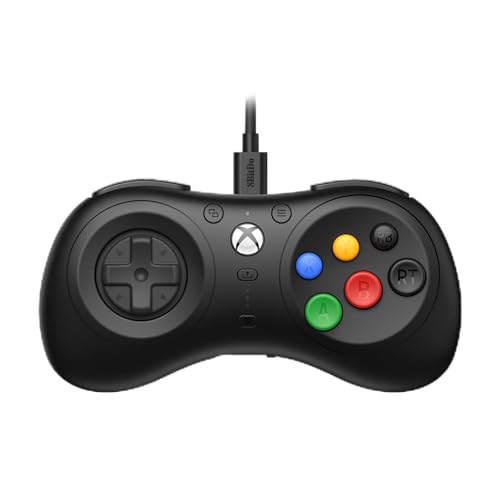
A Sega-style six-button pad with a USB-C wired connection and an 80 g body.
Six face buttons arranged for fighting games, and a USB-C wired connection that 8BitDo describes as virtually lag-free. For players raised on arcade ports, that combination is the draw. The controller weighs 80 g, which keeps it light in the hand during long sets, and it is officially licensed for Xbox Series X|S, Xbox One, and Windows. You also get two bumpers, two triggers, and two button layout switches, so it covers more than just the attack row.
The ergonomics are what people keep coming back to — the shape sits comfortably for players who came up on arcade ports. It supports 8BitDo Ultimate Software, which means you can remap and tune the pad rather than accept the factory setup. A custom profile switch button holds three profiles you can flip between on the fly, so you can keep one setup for combos and another for a different game. The 3.5mm audio jack and volume control round out the package.
Here is the honest part. The functionality and button responsiveness draw mixed feedback — some players find the buttons nice and responsive while others report the pad barely functions for them. Size is the most-discussed drawback, with a share of buyers finding it too small for larger hands. The cord length also splits opinion. None of that changes the core value, but if you have wide palms, this is the one pick where you should measure your expectations against its footprint before ordering.
The value read: a six-button pad at an entry-level tier that supports Ultimate Software and three on-the-fly profiles is a genuinely low-risk way to find out if the layout suits you.
The trade-off: the size complaint is the one pattern worth heeding — this pad suits smaller and medium hands better than large ones.
Reach for this if: you want the classic six-button feel without committing to a premium spend, and your hands run small to medium.
Look elsewhere if: you need a large-hand fit or you refuse to gamble on button consistency.
3. Turtle Beach Victrix Pro BFG Reloaded
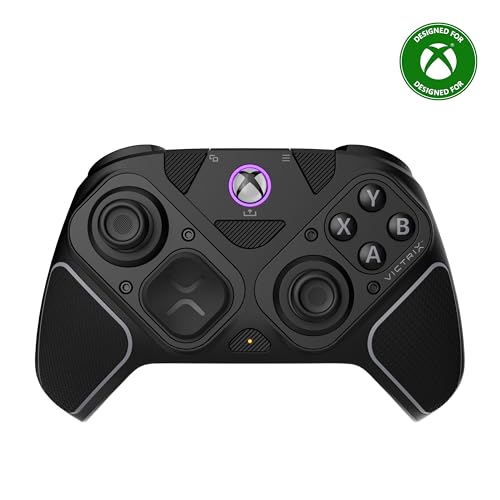
Three swappable modules let it run as a six-button fight pad or a standard controller.
You get three swappable modules, and the one that matters for fighting games is the ergonomically enhanced six-button fightpad module with Kailh microswitches (fast-clicking switches built for quick taps). Slot it in and the BFG acts like a dedicated fight pad. Pull it and swap in another module and you have a conventional controller again. That swappability is what separates it from the all-button 8BitDo, which does one job without compromise — the BFG does several jobs well instead.
The engineering underneath is serious. Hall-effect technology in the modules means the sensors read position without physical contact wear, and the stick and trigger setup benefits from it. The triggers are 5-stop hall-effect clutch triggers with a hair-trigger mode, so you can shorten the pull when a game rewards a quick press. Four mappable quick-action buttons, 11 interchangeable components, and a free Victrix Control Hub app on Xbox and PC let you reshape the layout to taste. A carrying case and module tool come in the box, which matters when you are actually swapping parts between sessions.
It measures 2.4 x 6.3 x 4.1 inches and weighs 9.28 ounces. It runs wired or wireless with a rechargeable battery rated up to 20 hours, and it is officially licensed by Xbox. Customizability is where it shines brightest, and the build quality reads as genuinely high-grade. Reliability and triggers land in mixed territory — trigger issues show up in the feedback, and stick drift gets mentioned alongside reports of zero drift. Treat this as the pick for someone who wants one controller for everything and is willing to learn its quirks.
Why it earns the premium slot: four mappable buttons, 11 interchangeable components, hall-effect clutch triggers, and a 20-hour battery make it the most adaptable pad in this group.
The honest caveat: module swapping adds a layer of complexity, and trigger reliability is the area to keep an eye on.
Pick this one when: you want fight-pad capability without giving up a normal controller for everything else.
Skip the splurge if: you only play fighting games — the all-button board gives you a purer tool for less complexity.
Know the Specs
Button count and what it buys you
Button quantity tells you how many distinct inputs sit on the face and shoulders. A six-button fight pad gives you the standard diamond plus two attack keys for the classic layout. A sixteen-button leverless board instead spreads direction control across four buttons, so your thumb presses a direction rather than pushing a stick. More buttons is not automatically better — it means more to learn and a bigger adjustment if you are switching from a stick.
Mechanical versus standard switches
Mechanical switches use an individual mechanism under each key with a defined point where the input fires, which is why fast repeated taps stay consistent. Low-profile versions sit lower to the board to shorten the travel. Standard face buttons feel softer but register less crisply under pressure. A hot-swappable PCB means each switch can be pulled and replaced, so you can change the feel without buying another controller.
Wireless versus wired input
A wired USB-C connection removes pairing and charging from the equation, which is why fighting-game players often prefer it. Wireless — whether 2.4G or Bluetooth — clears your desk and, on the Victrix, runs off a rechargeable battery rated up to 20 hours. The practical rule: if you play in tournament settings, confirm the event allows wireless before you rely on it.
Hall-effect sensors explained
Hall-effect sensors detect position through a magnetic field rather than physical contact between parts, so there is no rubbing surface to wear down in normal use. On the Victrix they appear in the modules and in the triggers, where the 5-stop clutch design and hair-trigger mode let you shorten the pull. This is an engineering choice about how the input is measured, not a guarantee against every possible fault.
Common Questions
Will an Xbox fight pad work on Xbox Series X and Xbox One?
Is a leverless all-button controller harder to learn than a six-button pad?
Are hot-swappable switches worth having on a fight pad?
What does the six-button layout actually change for fighting games?
Can I use a fight pad for shooters and racing games?
How long does the Victrix Pro BFG battery last?
Do I need the Victrix Control Hub app to use the fightpad module?
How do I clean a fight pad without damaging the switches?
Which pad is best if I have large hands?
The Bottom Line
For most players chasing cleaner fighting-game inputs, the winner is the 8BitDo All-Button Arcade Controller — sixteen hot-swappable Kailh switches and a leverless layout leave nothing between your intent and the input. If your hands run small to medium and you want the classic six-button feel at an entry-level tier, grab the 8BitDo M30. And if one controller has to cover fighting games plus everything else, the Turtle Beach Victrix Pro BFG Reloaded is the one to reach for, with its swappable fightpad module and 20-hour battery.
The all-button board scores highest of the three at 4.5+ stars, while the M30 has drawn more reviews overall. Pick by layout and hand size rather than review count.
How we choose
We do not accept paid placement. Every pick is matched to a real buyer and a real use-case; we do not hands-on test units.
Sources
Specifications: manufacturer listings and product documentation. Review insights: verified customer reviews, as of July 2026. Pricing: not shown on this page (it changes often); check the current price via the retailer link.
As an Amazon Associate, Tactical Gear Guy earns from qualifying purchases. This does not affect which products we feature.