Specs are compiled from manufacturer listings and verified buyer reviews and can change over time — please confirm the key details on the product page before buying.
You want your lights, plugs and sensors to answer instantly every time — not half the time, and not only when you are standing in the next room. That reliability depends on one thing: whether you picked devices that run on Zigbee, a low-power radio language that lets gadgets talk to a central hub instead of fighting for your Wi-Fi. This guide covers the Zigbee gadgets worth wiring into your home, from the relay-style switches that quietly strengthen your network to the sensors that catch motion and vibration your older gear misses.
This guide is built by comparing the manufacturers’ published specifications and the patterns across verified customer reviews, so you get each pick’s real strengths and trade-offs instead of marketing spin.
Some picks need a hub, some repeat the signal, and a couple run your whole routine without an internet connection at all. Below you will find the zigbee smart home devices ranked by what they actually do once they are on your wall.
Top Picks


How To Choose The Best Zigbee Smart Home Devices
The first thing that stops a new Zigbee buyer is a simple mismatch: the device arrives, and it refuses to pair because it only speaks to one brand of hub. Zigbee 3.0 is a shared standard, so most of these gadgets will talk to any hub built to that standard. But a few brands lock their devices to their own bridge. Check the hub requirement before you buy, not after.
Match the hub you already own
If you run an Echo speaker with a built-in hub, several picks here pair straight to it without a separate bridge. If you run Home Assistant, you want devices that list ZHA or Zigbee2MQTT support. A gadget that needs its own brand-specific hub is not a bad gadget — it is just a different shopping decision, and you need to budget the hub into the plan.
Nearly every hub-powered device doubles as a repeater
Here is the part most beginners miss. Mains-powered Zigbee gadgets — plugs and bulbs plugged into the wall — pass the radio signal along to their neighbors, forming a mesh. That means the plug in your hallway is not just a plug; it is a relay that keeps the sensor at the back door online. Battery sensors do not repeat, so place a couple of mains devices between the hub and your furthest sensor.
Decide what you need it to sense
A standard motion sensor needs movement — walk in and it fires, sit still and it goes quiet. A vibration sensor listens for a bump or a knock on a door, window or drawer. A presence sensor uses radar to detect a person sitting still. Pick the sense you actually need, because no single device covers all three.
Side-by-Side Comparison
Every row below is the same three dimensions, so you can scan a trade-off in seconds: what powers the device, how much current a plug can carry, and whether it extends your network.
| Model | Best For | Power Source | Current Rating | Repeater | Amazon |
|---|---|---|---|---|---|
| Shelly 1PM Mini Gen4★ Best Overall | Hidden in-wall control with power monitoring | Wired in-wall | 8 A | — | Amazon |
| Smart Multi-Mode GatewayHub Foundation | One hub for Zigbee and Bluetooth mesh | Plug-in hub | — | Hub itself | Amazon |
| THIRDREALITY ZL1 Bulb 4-PackColour & Reach | Colour lighting that also relays signal | Mains bulb | 40 W equivalent | Yes | Amazon |
| Aqara Smart Plug | Heavy appliances with energy tracking | Plug-in | 15 A | Yes | Amazon |
| THIRDREALITY Smart Plug 4-Pack | Whole-home plug automation on a budget | Plug-in | 15 A | Yes | Amazon |
| Aqara Presence Sensor FP1E | Detecting a person sitting still | 5V/1A adapter (not included) | — | — | Amazon |
| Sengled Smart Plug 4-Pack | Schedules and energy monitoring across a home | Plug-in | 15 A | Yes | Amazon |
| Aeotec SmartThings Motion Sensor | Room motion with a tilt-adjustable mount | Battery powered | — | No | Amazon |
Detailed Reviews
1. Shelly 1PM Mini Gen4 Smart Switch
Our pick — 4.5+★ from 450+ verified ratings; the strongest balance of quality and price.
A relay the size of a matchbook that turns an old heater into a metered smart appliance.
This is the pick for the buyer who wants to automate something ugly and old — a wall heater, a bathroom fan, a kitchen gadget — without putting a smart plug on show. The Shelly 1PM Mini Gen4 is an 8 A smart switch that lives behind the socket or inside the appliance casing. It pairs over Wi-Fi, Zigbee or Matter, so it fits whichever hub you already run, and it needs no separate hub of its own. 8 MB of memory and an upgraded processor keep relay switching quick, and setup takes under 10 minutes.
What makes it the strongest all-rounder here is the metering. It reads real-time and historical power draw from anything up to 8 A, so you can see what the fan in the spare room actually costs you per month and spot an appliance that is quietly wasting money. It also reports natively into Alexa, SmartThings, Google Home, Apple HomeKit and Home Assistant, which is rare for a device this small. The quality is the thing owners keep coming back to — the compact build that squeezes behind a standard switch plate earns just as much praise, because it does not force you to carve out extra wall space.
The honest limit is the switching current. At 8 A it handles fans, lights and kitchen gadgets comfortably, but it is not the unit for a space heater rated above that line — the Aqara plug below is the heavy-duty answer for those. Installation means working at the mains wiring, so plan on a qualified electrician unless you are experienced. It is also sold as a 2-pack, so a single-appliance project leaves you with one spare unit to find a job for.
Where it earns its place
- Meters real-time and historical power use on the 8 A channel, so you can hunt down wasteful appliances.
- Talks Wi-Fi, Zigbee and Matter with no hub required, easing the switch if you change hubs later.
- Fits behind a standard switch plate thanks to the compact build.
- Backed by a 3-year device warranty and professional support.
Where it stops short
- 8 A ceiling rules out big heaters and other high-draw appliances.
- Needs in-wall wiring work, which means an electrician for most buyers.
- Sold as a 2-pack, so a one-off job leaves a spare unit idle.
- The value question splits opinion — some feel the price sits high relative to the size.
Reach for this if: you want a hidden, metered smart relay for a fan, heater or kitchen appliance and you run a mixed Wi-Fi/Zigbee set-up.
Pass it over if: the appliance draws more than 8 A or you are not prepared to get inside the wall wiring.
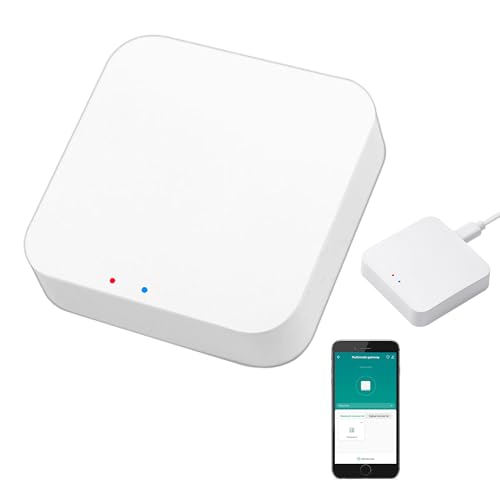
2. Smart Multi-Mode Gateway
One small bridge that pairs your Zigbee and Bluetooth mesh gear onto a single network.
If you are starting from nothing, this is the piece that lets the rest of the list talk to each other. The Smart Multi-Mode Gateway runs Zigbee 3.0 and Bluetooth mesh (SIG) at the same time, so one bridge handles devices of both protocols on your 2.4 GHz network. At 1.76 ounces it is lighter than the 3.04-ounce Aqara plug below, so it disappears on a shelf. One gateway handles up to 128 Tuya devices, mixing Zigbee sensors with Bluetooth finger bots and thermometers.
Functionality is where it proves itself. The gateway lets sub-devices act as trigger conditions, so a Zigbee sensor can fire a Bluetooth device in the same routine. It also hands control to Alexa and Google Home for voice commands, and the Smart Life app lets you add devices, reset them, group them and run everything remotely. Pairing in Home Assistant and with Bluetooth door locks and Wi-Fi gear has worked for plenty of buyers — the feature set is the reason this one sits near the top.
The one thing to be sure of before you buy: this gateway supports Tuya and Smart Life devices only. That is a real constraint if you have Aqara or Sengled gear in the house, because those will not pair here. Connectivity is also the split point — most setups hold a solid link, but the odd one needs a reset before everything settles. Keep it near the middle of the house so the bridge is not fighting distance on day one.
The compatibility caveat: this is a Tuya-only bridge, so treat it as the start of a fresh ecosystem rather than a hub you bolt onto existing Aqara or Sengled devices.
Start here if: you are building a budget Tuya/Zigbee network from scratch and want Zigbee and Bluetooth mesh on one bridge.
Look elsewhere if: you already own hub-locked gear from another brand — this will not adopt it.
3. THIRDREALITY Zigbee Smart Color Bulb ZL1 4-Pack
Four colour bulbs that light the room and quietly extend the Zigbee network while they do it.
A bulb that repeats the signal is the cheapest way to cure a dead spot at the far end of the house. These THIRDREALITY ZL1 bulbs do exactly that — each one acts as a Zigbee repeater, passing the radio signal along so sensors and locks in distant rooms stay connected. They are A19 shape with an E26 base, so they screw into standard fittings, and they throw 800 lumens at a 40 W incandescent equivalent. Colour range runs warm 2700K to cold 6500K, with brightness adjustable from 1% to 100%.
For a cheap four-pack, these plugs pair with a wide range of hubs. They need a Zigbee hub, but that hub can be an Echo with one built in — Echo (4th Gen), Echo Plus, Echo Studio, Echo Show 8 3rd Gen and Echo Hub all qualify — or Home Assistant via ZHA and Z2M, SmartThings, Hubitat or the Third Reality Hub Gen2 Plus. Buyers praise connectivity most, with reliability close behind. They also update firmware over the air, so you are not stuck with whatever shipped in the box.
Colour accuracy is the honest split. Some owners get rich, saturated colour; others find the rendering flatter than they hoped, and brightness lands on the softer side for a 800-lumen-rated bulb. If you want a colour bulb to be the main light in a room, set expectations accordingly — these are better at accent and mood lighting than they are at flooding a space. The 80 CRI figure is also note, since it means colours will not look as true as under a high-CRI bulb.
Best use case: accent lighting and mood scenes in rooms where you also want the relay benefit for your Zigbee mesh.
Trade-off to accept: do not count on these for a vivid, bright main-light replacement — the colour and brightness are the softer part of the package.
Pick these up if: you want four Zigbee colour bulbs that double as network repeaters and pair to an Echo you already own.
Skip them if: colour fidelity and maximum brightness matter more than the repeater benefit.
4. Aqara Zigbee Smart Plug with Energy Monitoring

A plug built to carry a window air conditioner, not just a table lamp.
The reason this one is worth a slot is the 15 A rating. That is enough to sit behind a window air conditioner, a space heater or an electric kettle — the appliances most smart plugs quietly refuse. It also meters the power those things draw, so you can see what the heater in the spare room is costing you. Add the schedule and timer functions in the Aqara Home app and you can automate a daily routine without thinking about it. It weighs 3.04 ounces in a plastic housing with a three-wire layout.
It is also a mesh repeater, which means it strengthens the Zigbee network around it as well as switching what is plugged into it. That matters if you have sensors at the far end of the house. Home Assistant integration and general responsiveness are what buyers keep coming back to, and the set-up is straightforward once it is paired.
Here is the catch, and it is a big one to plan around: the Aqara hub is required and sold separately, and the plug is only fully useful once paired to it. That makes this a device for a house already running Aqara, not a standalone starter plug. HomeKit also works well here, though the Hub M2/M1S Gen2/E1 and Camera Hub G2H Pro need a secured 2.4 GHz network to pair. skip it if you want a plug you can drop in with no brand commitment.
What it does well
- 15 A rating covers high-power appliances like window AC units and space heaters.
- Energy monitoring shows what each connected appliance is costing you.
- Doubles as a signal repeater to extend the Zigbee mesh.
- Schedule, timer and scene support through the Aqara Home app.
What to weigh up
- Requires an Aqara hub, sold separately, to be functionally useful.
- Hub pairing needs a secured 2.4 GHz network.
- Binds you into the Aqara ecosystem rather than a mixed-brand house.
Buy it for: the heaviest appliance in the house, if you already run Aqara hubs.
Cross it off if: you want a plug that works with no brand-specific hub in the picture.
5. THIRDREALITY ZigBee Smart Plug 4 Pack

Four plugs that spread automation around the whole house without filling the outlets next to them.
Four Zigbee plugs for the price of one branded bridge is the headline here, and the space-saving body is what makes them livable. Each one is shaped so it does not block the neighbouring socket, so you can put two in a standard wall plate without swearing at it. Every plug carries 15 A and doubles as a Zigbee repeater, which is the real reason a four-pack makes sense — you are buying mesh coverage as much as you are buying switches.
You can pair these plugs with a long list of hubs: Echo (4th Gen), Echo Plus, Echo Show 8 Gen3, Echo Show 10, Echo Studio, Eero 6, Eero Pro 6, Home Assistant, SmartThings 2015/2018, Aeotec, Hubitat, Homey Bridge, Homey Pro and the Third Reality Hub Gen Plus. On an Echo you plug in and say “Alexa, discover my devices” and they show up. Real-time energy monitoring works on Home Assistant, SmartThings, Hubitat and the Third Reality Hub Gen2, so the metering data lands wherever your dashboard lives. A state-restore option also lets Home Assistant (ZHA and Zigbee2MQTT) return each plug to its chosen on or off state after a power cut.
The 15 A limit is the one line to respect: this is fine for lamps, coffee makers and fans, but the manufacturer states Echo-linked plugs should not run appliances above that rating. Beyond that, these are the plug to buy in bulk when you want several rooms automated in one go without hunting down a repeater in each.
Where the value lands: four 15 A repeaters that fill a house with mesh coverage and switchable outlets from one purchase.
Go with the four-pack if: you want several rooms automated and a wider Zigbee mesh in one move.
Hold off if: you only need one outlet switched — the extra plugs would sit idle.
6. Aqara Zigbee Presence Sensor FP1E

The sensor that still sees you when you are sitting perfectly still on the sofa.
Standard motion sensors are blind to a person who is not moving, which is why the lights drop out while you are reading. This one runs mmWave radar at 60 GHz — a radio that reads subtle movement, including breathing and small shifts — so it holds your presence even when you are stationary. Coverage is a 120° field of view that widens to 180° at close range, reaching up to 6 m and a 35 ㎡ area. That is enough for a normal living room or bedroom.
The automation side is where it gets clever. It detects whether you are moving or still, and for how long, which lets you trigger routines on the still status. The Aqara Home app example is a prolonged-sitting reminder: if you are detected as still for over 30 min, it sends a notification and changes the colour of a light strip. Aqara’s AI also learns the room over time and filters interference like small pets. Home Assistant and HomeKit both pick it up quickly, and the magnetic plus adhesive bracket means it mounts on a wall, ceiling or corner in minutes.
The requirement to plan around is the hub. This sensor pairs only with an Aqara Zigbee 3.0 hub, not third-party hubs, and Zigbee2MQTT and similar USB dongles are not officially supported — full functionality may be limited or missing outside the Aqara ecosystem. It also needs a 5V/1A DC adapter, which is not in the box. Budget the adapter and the Aqara hub into the plan, or skip it in favour of a battery motion sensor.
What to know first: this is an Aqara-hub-only device that needs a separate 5V/1A adapter — price those in before you commit.
Why it is worth it anyway: the 6 m radar range and still-detection open automation routines a plain PIR sensor simply cannot do.
Best for: Aqara homes that want lights and reminders to respond to a person sitting still.
Not the pick if: you run a mixed-brand Zigbee network — this will only fully talk to Aqara hubs.
7. Sengled Smart Plug 4-Pack

Four plugs with a schedule that remembers the Christmas tree even after a power cut.
If you already run a Sengled hub or a SmartThings set-up, this four-pack pairs straight into that ecosystem and gives you the most value. Each plug is rated 15 A and 1800 W, with a small oval body that fits two into a standard double receptacle. The scheduling functions are the useful bit — set a lamp, a coffee maker or a Christmas tree to switch on and off at fixed times, and the plug remembers its last state through a power outage rather than starting dark.
The pairing options are wider than a first glance suggests. The plugs work with SmartThings Hub, Wink Hub, Hubitat Hub, and directly with Echo Plus or Echo Show 2nd Gen without a separate hub. Sengled rates one hub for up to 64 plugs, enough to cover a large house. HomeAssistant via Zigbee2mqtt, HomeKit and Google Home/Alexa all handle them, and the mesh-repeater function gets plenty of use across a house with several of these. UL, ETL and FCC certification back the internals.
The one hard rule printed in the listing is worth repeating: it is not suitable for appliances above 15 A or 1800 W, so air conditioners, microwaves and induction cookers are out. It is also not a Wi-Fi plug — it needs a Zigbee hub to be useful, and if you connect through an Echo, Echo Dot or Google Assistant speaker you need the additional hub. That extra purchase is the bit most buyers miss when they assume plug-and-play.
Why buyers lean on it
- Remembers its last state through a power outage, so schedules stay intact.
- Small oval body fits two into a standard double outlet.
- Works with SmartThings, Hubitat, Wink and directly with Echo Plus and Echo Show 2nd Gen.
- Supports up to 64 plugs per hub for a large home.
What catches people out
- Needs a Zigbee hub — not a Wi-Fi plug and not plug-and-play with an Echo Dot.
- Capped at 15 A / 1800 W, ruling out air conditioners and microwaves.
- Managed best from a Sengled or SmartThings set-up, so mixed-brand homes work harder.
The match for you if: you want scheduled, outage-proof switching across several rooms and already have a Sengled or SmartThings hub.
Walk past if: you have no Zigbee hub at all — the plugs will not switch a thing on their own.
8. Aeotec SmartThings Motion Sensor

A tilt-and-aim motion sensor that puts a 120-degree watch on one room.
For room-level motion — hallway, landing, garage — this is the reliable workhorse. It catches movement up to 15 feet across a 120 degree view range, and the magnetic ball mount lets you tilt it to aim before you tighten it down. It runs on battery, so there is no cable to run, and it works with the SmartThings app and Aeotec or Samsung SmartThings Hub Gen 3 as well as other compatible Zigbee hubs. You can set routines that turn devices on as people come and go, or fire an alert on unexpected movement.
Owners consistently find the motion detection accurate and dependable, and it pairs without fuss to SmartThings and other Zigbee hubs. Responsiveness is quick, and the built-in temperature reading is a bonus that lets you build routines on room warmth as well as movement. The 50 foot figure is the Zigbee radio range, not the 15 foot detection distance, so walls cut the link before they cut the sensing. Mount it with the ball joint and it can sit anywhere you can point it.
The trade-off is simple honesty about what it is not: it detects motion, so sit completely still and it eventually stops seeing you. If you need a sensor that reads a person sitting still, the Aqara presence sensor above is the one built for that job. This Aeotec is also battery-only, so it does not extend your Zigbee mesh the way the plugs and bulbs do. Plan a mains repeater nearby if it sits far from the hub.
Its strength: a tilt-adjustable magnetic mount and 120 degree view make it easy to aim exactly where you want motion watched.
The limit to accept: motion-only detection and battery power mean it will not see a still person or boost your mesh.
Choose it for: hallway or garage motion routines in a SmartThings or multi-Zigbee-hub home.
Leave it if: you need presence detection for a seated person — this will time out on you.
Know the Specs
Amperage on a smart plug
The amp rating is the ceiling on what the plug can safely carry. A 15 A plug handles a space heater or a window air conditioner, while an 8 A switch is better suited to a fan or kitchen gadget. Buying a plug with too low a rating for your appliance is the most common way to get an unreliable switch — match the rating to the load before you pair it.
Zigbee repeater vs. end device
A repeater is a mains-powered Zigbee gadget — a plug or a bulb — that passes the radio signal along to its neighbours. An end device is a battery sensor that only talks to the hub. A house with several repeaters holds its signal to the furthest sensor; a house with only battery devices tends to drop the far room first. Place a repeater between the hub and your hardest-to-reach sensor.
Hub requirements
Some Zigbee devices pair to any hub built to the Zigbee 3.0 standard, and some pair only to their own brand’s hub. An Echo speaker with a built-in hub counts as a hub for a number of these gadgets. Check the hub note on every device before buying, because a hub-locked device with no hub in the house is an ornament.
Motion, mmWave and vibration sensing
A motion sensor needs movement to fire. A mmWave radar sensor reads subtle movement, including a person sitting still. A vibration sensor fires on a bump or knock rather than a body moving through a room. The three solve different problems, and no single sensor covers all of them — pick the sense that matches the room or the object.
Common Questions
Do I need a hub to use Zigbee smart home devices?
Can Zigbee devices work with my existing Wi-Fi router?
What does a Zigbee repeater actually do for my network?
Can a Zigbee smart plug handle a space heater or air conditioner?
Will Zigbee devices work with Home Assistant?
Is a mmWave presence sensor better than a normal motion sensor?
How long do the batteries last in a Zigbee sensor?
Can I use devices from different brands on the same Zigbee network?
Do Zigbee devices stop working when the internet goes down?
The Bottom Line
The strongest pick in this set is the Shelly 1PM Mini Gen4, because it combines a hidden in-wall relay with real power metering, works across Wi-Fi, Zigbee and Matter with no hub, and fits behind a standard switch plate. If you are starting a network from scratch, pair it with the Smart Multi-Mode Gateway to bring Zigbee and Bluetooth mesh onto one bridge. And for the room where lights keep dropping out because nobody is moving, the Aqara Presence Sensor FP1E reads a person sitting still where an ordinary motion sensor goes quiet.
How we choose
We do not accept paid placement. Every pick is matched to a real buyer and a real use-case; we do not hands-on test units.
Sources
Specifications: manufacturer listings and product documentation. Review insights: verified customer reviews, as of November 2026. Pricing: not shown on this page (it changes often); check the current price via the retailer link.
As an Amazon Associate, Tactical Gear Guy earns from qualifying purchases. This does not affect which products we feature.