Specs are compiled from manufacturer listings and verified buyer reviews and can change over time — please confirm the key details on the product page before buying.
If your XRP sits on an exchange, the exchange holds the keys, not you. A cold wallet moves those private keys onto a physical device that stays offline, so no hacker, phishing page, or exchange collapse can reach them. The picks below all list XRP as an explicitly supported asset and all keep your keys on the device itself, never in a phone app or a browser tab. Which one fits you depends on how much hands-on signing you want to do.
This guide is built by comparing the manufacturers’ published specifications and the patterns across verified customer reviews, so you get each pick’s real strengths and trade-offs instead of marketing spin.
Some cards here carry no battery and no seed phrase at all, while others add a touchscreen, Bluetooth, or a secure chip for daily signing. Below you’ll find the full breakdown, from a tap-to-transact card to an air-gapped vault, so you can choose the best XRP cold wallet for how you actually hold.
Top Picks


How To Choose The Best XRP Cold Wallet
Most buyers get this wrong the same way: they buy the wallet with the biggest coin list and ignore how they will actually sign a transaction. A long coin list is cheap to advertise. What you live with every day is the signing method, the backup method, and whether the device needs a battery or a cable.
Start With the Signing Method
Every cold wallet keeps your private key offline, but they differ in how a transaction gets approved. An air-gapped device never touches a network and signs by scanning a QR code, which means nothing on the internet can reach it. A Bluetooth or NFC device is far quicker for small sends, but it does open a wireless path you have to trust the firmware to guard. Decide which of those two you want before you look at anything else.
Then Check the Backup Method
Some devices make you write down a 12- or 24-word seed phrase — the master backup that restores your funds on any compatible wallet. Others, like the Ballet card, skip it entirely and keep the key sealed inside the card. A seed phrase gives you portability between wallets; a no-seed card gives you nothing to lose or photograph, but also ties recovery to that one physical object.
Finally, Confirm XRP Is Really Supported
A wallet that supports “95% of the market cap” still has to name XRP to be worth your money here. Check the asset list on the listing itself, then confirm the companion app shows your XRP balance once you set it up. Firmware and app updates keep new assets working, so a device with an active update schedule ages better than one that has gone quiet.
Side-by-Side Comparison
| Model | Best For | Signing Method | Secure Element | XRP Support | Amazon |
|---|---|---|---|---|---|
| Arculus Cold Storage Wallet★ Best Overall | Tap-to-transact convenience | NFC tap | CC EAL6+ | Explicitly listed | Amazon |
| Ballet XRP Cold Storage Wallet CardSimplest Setup | No seed phrase to write | App scan (no electronics) | — | Built for XRP | Amazon |
| ELLIPAL X Card | Backing up an existing wallet | NFC tap | EAL6+ | Multi-chain app | Amazon |
| imKey Pro | Screen-and-buttons signing | Bluetooth 4.1 | Infineon CC EAL6+ / EMVCo | Explicitly listed | Amazon |
| OneKey Classic 1S | Open-source code checks | Bluetooth / USB-C | EAL6+ | Ripple listed | Amazon |
| ELLIPAL Titan 2.0 | Seeing every transaction on a big screen | QR code (air-gapped) | — | Explicitly listed | Amazon |
Detailed Reviews
1. Arculus Crypto Cold Storage Wallet
Our pick — 4.0+★ from 500+ verified ratings; the strongest balance of quality and price.
Three locks on one slim metal card, and no cable anywhere in sight.
Arculus earns the top spot because it is the one card here that layers three separate security checks before a single transaction goes through. You get a biometric lock, a 6-digit PIN, and the Arculus metal card itself with its private key encryption. That is a fingerprint plus something you know plus something you hold — a combination a phishing site cannot fake and a thief cannot talk you out of.
The keys live inside a CC EAL6+ secure element, which is a chip certified to a high security standard and built to resist physical probing and unauthorized access. XRP is named directly in the supported asset list, alongside Bitcoin, Ethereum, Tether, Cardano, Litecoin and Polkadot. The card syncs to your phone with NFC — near-field communication, the same tap tech you use for contactless payment — so there are no cords, no connections and no internet required on the card side.
Daily use here means tapping the card to your phone. The Arculus App lets you send, swap or receive in one motion, and owners single out the transfer flow between an exchange account and the key as the smoothest part. The card is metal and slim enough to sit in a wallet next to your bank cards. The trade-off for that convenience is the missing screen: you approve transactions on your phone, not on the card, so you trust the app display rather than a dedicated device screen.
What earns it the crown
- Three separate open up factors — biometric, PIN and the card itself
- CC EAL6+ secure element guarding the private keys
- XRP listed by name among supported assets
- NFC tap works with no cables and no internet on the card
The honest trade-off
- No screen on the card, so you confirm on your phone
- A slim metal card is easy to misplace if you do not store it deliberately
Made for this buyer: someone who wants strong layered security without learning a clunky interface — the tap-and-go flow keeps cold storage from feeling like a chore.
Look elsewhere if: you insist on checking every transaction on the hardware itself, because the approval screen here is your phone.
2. Ballet XRP Cold Storage Wallet Card
No battery, no seed phrase, no PIN — just a steel card built for XRP.
This is the wallet to hand to someone who has never held a hardware device and does not want to learn. There is nothing to charge and nothing to plug in. There is no 12- or 24-word seed phrase to write down and hide, which removes the single most common beginner mistake in cold storage: photographing your backup or losing the paper it was written on. There is no PIN or password to set either, so onboarding is essentially just scanning the card with the Ballet Crypto App on iOS or Android.
The card is stainless steel, which gives it a solid feel in the hand and makes it a reasonable long-term hold for XRP specifically — the model number is literally XRP, so this is not a multi-coin compromise. Owners praise its ease of use and value for the money, describing it as a straightforward, unbreakable way to keep keys offline.
Here is the catch, and it is a real one. Because there is no seed phrase, the steel card is your backup. Lose it or damage it and there is no second copy to restore from, so this is a device to store deliberately — a safe, a deposit box, a place you will not forget. It also has no screen or buttons, so you manage balances and transfers through the app, not on the card.
Best mental model: treat it like a bearer savings bond — the physical object carries the value, so its storage matters as much as its security.
The trade you accept: zero setup friction and zero seed-phrase risk, in exchange for a single point of physical failure you must protect yourself.
Reach for this if: you want to park XRP long-term with the least possible ceremony and no paper backup floating around your house.
Think twice if: you want a recovery phrase you can move to another wallet later — this card does not give you one.
3. ELLIPAL X Card Crypto Wallet
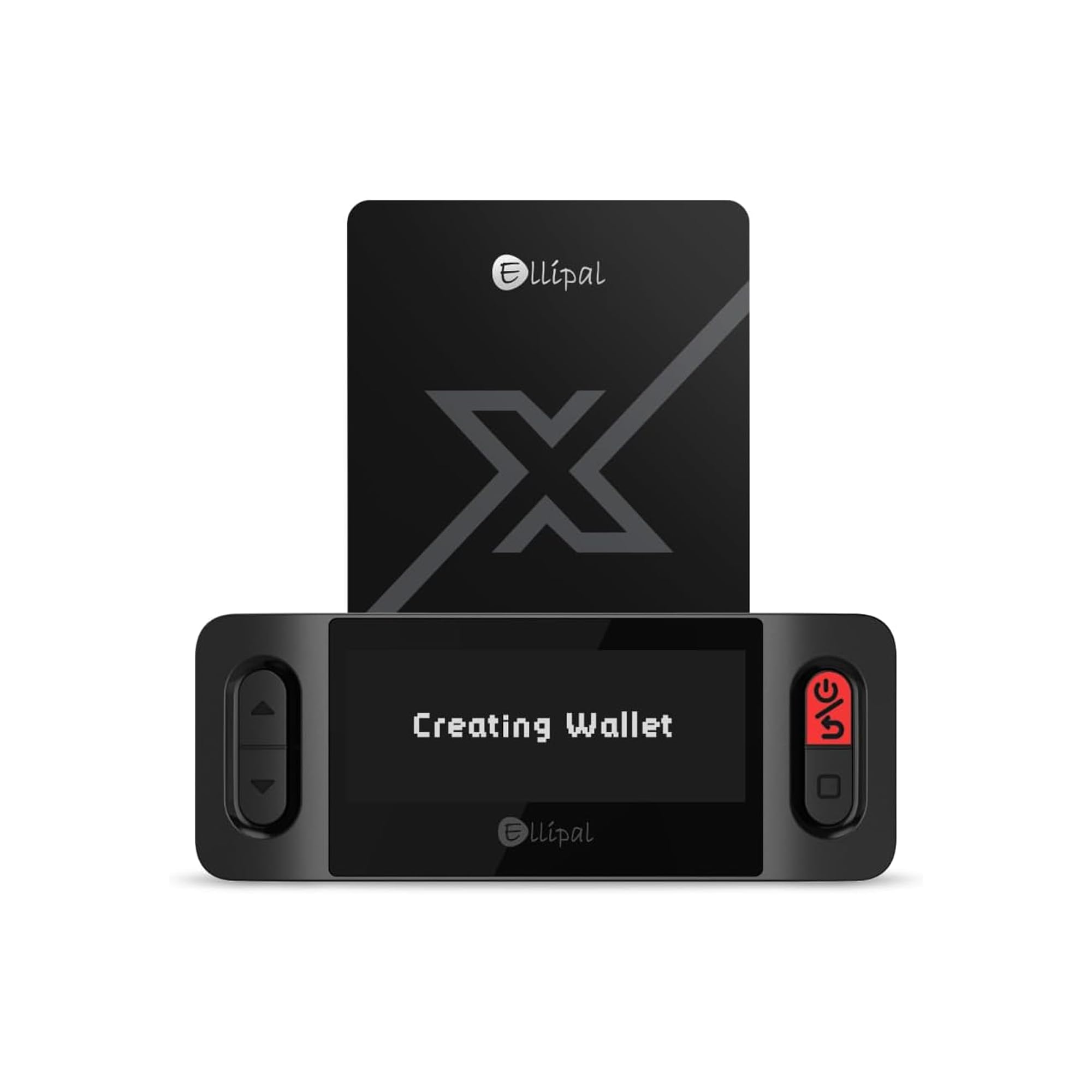
The card that clones an existing wallet instead of replacing it.
Most cold wallets ask you to start over. The X Card does the opposite: you import your existing recovery phrase from MetaMask, Trust Wallet, Ledger, Trezor or any compatible seed-phrase wallet, and it becomes a physical twin of the wallet you already use. No transfers, no new accounts, no rebuilding your history. If you already hold XRP somewhere and want a second offline copy without moving a single coin, this is the pick built for exactly that job.
Setup runs fast. You configure it on the offline Starter device, tap it to the ELLIPAL mobile app, and you are running — one buyer describes the whole thing as taking about 10 minutes to configure. Your private keys are generated and stored inside an EAL6+ secure chip, and they never reach your phone, the app, USB, Bluetooth or the internet. That makes it a genuinely no-Bluetooth, no-USB wallet, which is a meaningful difference from the wireless options further down this list.
One app covers the whole portfolio: 45+ blockchains and 10,000+ tokens, with buy, sell, swap, send, spend and earn in a single place. It is also a no-battery device, so there is no charging and no firmware updates to chase. The trade-off is that you sign by tapping the card to your phone, so like the Arculus you approve on the app screen rather than a dedicated display. Plastic construction also means it is a card to keep protected, not one that shrugs off abuse the way steel or zinc alloy will.
Where it pulls ahead
- Imports an existing seed phrase instead of forcing a fresh start
- Keys stay inside the EAL6+ chip, never touching phone or internet
- No battery, no charging, no firmware updates
- One app across 45+ blockchains and 10,000+ tokens
Where it asks patience
- Approvals happen on the app, not a hardware screen
- Plastic body needs more care than metal cards
Fits like this: you already run a software or hardware wallet for XRP and want an offline physical twin you can tap to sign.
Not the one if: you are starting from zero and want a screen to verify amounts and addresses before you approve.
4. imKey Pro Crypto Hardware Wallet

Under a credit card in size, and it shows you exactly what you sign.
The imKey Pro solves the one weakness the card-style wallets share: you never sign blind. Every transaction needs a manual confirmation on the physical buttons, and the clear display shows the amount and address before you approve. That is what the spec sheet calls “What You See Is What You Sign” — if the data was tampered with in transmission, the numbers on the device will not match what you intended, and you can stop.
The security hardware is genuinely serious. It runs an Infineon CC EAL6+ certified chip that is also certified by EMVCo, the standard used in bank payment and identity systems. Your private keys are generated and stored entirely offline inside that chip. Enter the wrong PIN 5 times in a row and the device wipes the private key, which means a stolen device is far less useful to a thief.
Portability is where this one leads the group: the body measures just 2.3mm thick and weighs approximately 17g, with a zinc alloy shell and PC panel, so it disappears into a pocket. A 33mAh lithium-polymer battery gives roughly four weeks per charge, and Bluetooth 4.1 (a short-range wireless standard) pairs it to the imToken app or a browser extension on your PC. XRP is listed among supported mainnets (the separate blockchains the device can hold). The honest caveat is the price-to-rating picture: this is a premium-tier device with a much smaller owner base behind it than the cards above, so you buy on the spec sheet and the chip pedigree rather than a long track record of user feedback.
Why the buttons matter: confirming amount and address on the device itself closes the blind-signing gap that phone-approved wallets leave open.
Who this is not for: anyone who wants a tap-and-forget card — this is a screen, buttons, and a Bluetooth pairing to set up.
Pick it when: verification on the hardware is non-negotiable for you and you want a device that fits in a coin pocket.
Weigh this first: the thinner owner feedback means you are trusting a bank-grade chip and a clear screen over a proven crowd of users.
5. OneKey Classic 1S Hardware Wallet

Full source code you can read, in a body light enough to forget.
If you do not want to take a company’s word for how its firmware behaves, the OneKey Classic 1S is the one to look at. It supports 100% open source, so the code can be reviewed independently, and it pairs that with an EAL6+ certified secure chip, anti-tamper construction, and a promise not to store private user data. For buyers who treat auditability as part of security rather than a nice extra, that combination is the whole argument.
The device itself is honestly tiny: 15.6g and credit-card sized, so it rides in a wallet without a bulge. You navigate through a big screen with 4 buttons — more hands-on than a tap-to-sign card, but far easier to verify than a phone screen. Bluetooth and USB-C are both on board, and the OneKey App runs on Windows 10+, macOS 10.8+, Linux, iOS and Android. Ripple sits in the supported list among roughly 70+ blockchains and 1000+ tokens, and the app updates every two weeks with firmware every one and a half months.
The trade-off is the community behind it. This is a young device with a small pool of owner experience compared to the Titan models or the Arculus card, so there is less independent feedback to lean on. Extended wallet support covers MetaMask, Trust Wallet, Rainbow and imToken if you already use those. It is a strong spec-driven pick for the security-minded — just go in knowing you are an early adopter rather than following a crowd.
The open-source case
- 100% open source with an EAL6+ secure chip
- 15.6g and credit-card size for pocket carry
- Big screen plus 4 navigation buttons
- Bluetooth and USB-C, with a frequent update schedule
The early-adopter risk
- Less owner feedback to draw on than the established cards and Titans
- Small buttons and screen mean a learning curve versus a tap card
For the audit-minded: buyers who want to inspect the code and carry a nearly weightless signing device.
Hold off if: you would rather follow a large, proven owner base than be among the first to trust a newer firmware.
6. ELLIPAL Titan 2.0 Air-Gapped Crypto Wallet
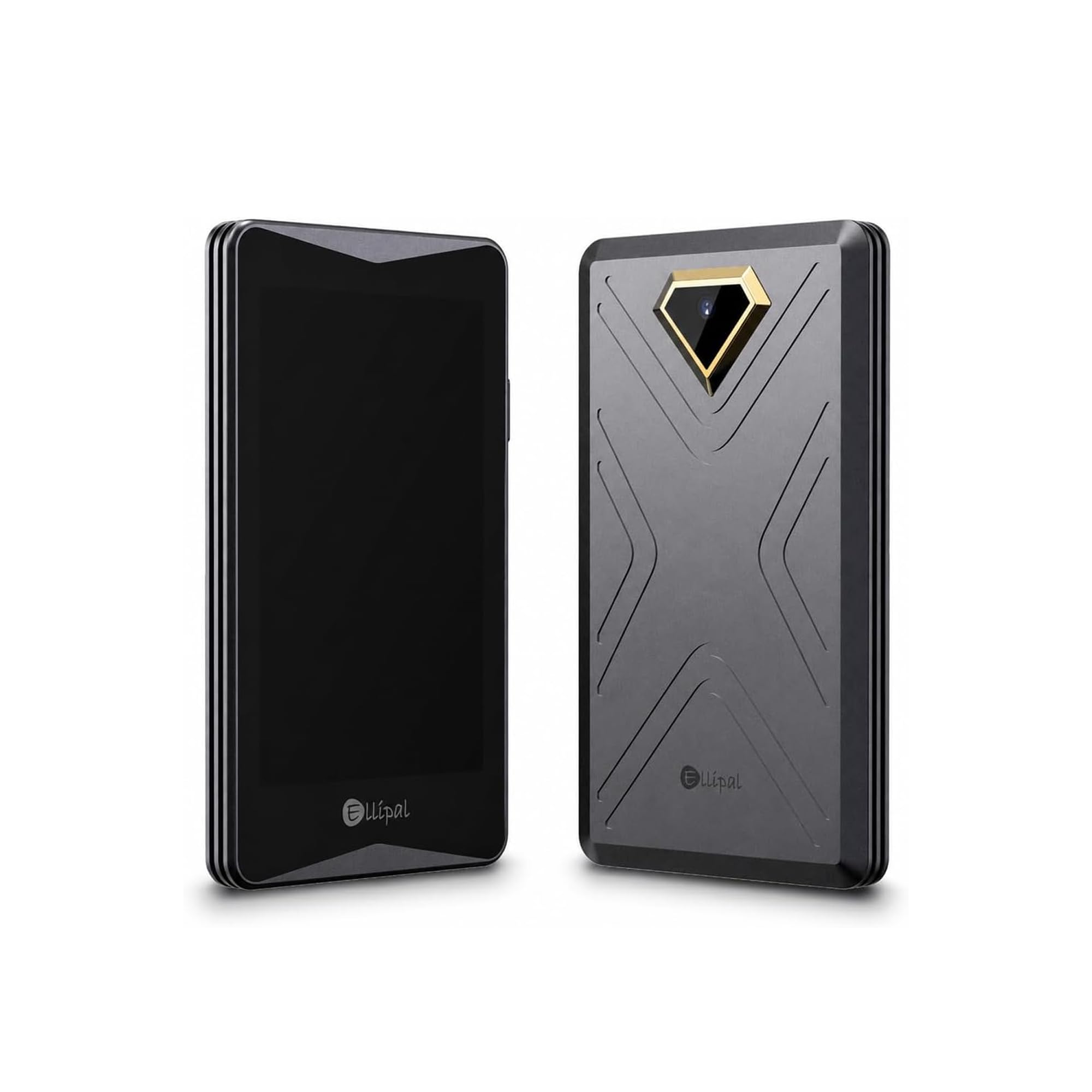
A 4-inch screen that spells out every transaction in plain words.
The Titan 2.0 is what you buy when blind signing is the thing that keeps you up at night. That massive 4-inch touchscreen lays out every transaction in plain readable words: who you are paying, how much you are sending, and what smart contracts you are authorizing. It double-checks everything between your phone and the device before anything is signed. No squinting at a tiny two-line display and hoping the address matched.
It is fully air-gapped, which means exactly what it sounds like — no WiFi, no Bluetooth, no network cables, ever. You create and recover accounts entirely offline and sign by scanning QR codes, so nothing on a network can reach the keys. The other headline feature is account separation: one device holds up to 5 completely separate accounts, so daily spending, long-term savings, trading and family funds can each live in their own silo without buying more hardware.
Pair it with the ELLIPAL App and you can buy, sell, swap, send and earn across 45+ coins and more than 10,000 tokens, with XRP named directly. Setup and daily use are where owners are happiest — cold storage and the tamper-resistant body draw the most praise, and the build genuinely feels substantial at roughly 0.14 kg. The trade to accept is speed: QR-code signing is deliberate and slower than a Bluetooth tap, and moving files or scanning codes gets tedious if you transact often.
The transparency win: a 4-inch screen reading out payee, amount and contract is the clearest anti-blind-signing setup in this lineup.
Where it slows you down: QR-only signing is the price of full air-gapping, so frequent small sends feel heavy.
Best for the long haul: savers who move XRP rarely and want to see every detail before signing.
Skip the big screen if: you trade short-term and need fast, repeated approvals — a tap card will serve you better.
Know the Specs
Air-Gapped vs. Wireless Signing
Air-gapped means the device never connects to any network — no WiFi, Bluetooth, or data cable — and signs via QR codes. That is the strongest remote-attack defense you can buy, but it is slower to use. Bluetooth and NFC devices trade some of that isolation for one-tap convenience, so pick based on how often you transact.
Secure Element (EAL6+)
A secure element is a dedicated chip that stores and generates your private keys in isolation from the rest of the device. EAL6+ is a certification level indicating the chip is hardened against physical and logical attack. It means your key is protected even if someone gets their hands on the hardware, not just the software.
Seed Phrase vs. No-Backup Card
A seed phrase is your master recovery code — 12 or 24 words that restore funds on any compatible wallet. A no-seed card keeps the key sealed inside with no phrase to write. A seed phrase gives portability and a second backup; a no-seed card removes a common leak point but makes the physical card your only copy.
Multi-Chain Support and XRP
A long coin list is a feature list, not a promise of XRP support. What matters for XRP is that XRP or Ripple is explicitly named on the listing and shows up in the companion app once set up. Firmware and app updates keep new assets working, so a device with an active update schedule ages better than a dormant one.
Common Questions
Will a cold wallet actually hold my XRP?
Is an air-gapped wallet better than a Bluetooth one?
What happens if I lose my Ballet XRP card?
Can I back up an existing wallet onto a cold wallet?
Do these wallets need charging or firmware updates?
How many accounts can one cold wallet hold?
What does the EAL6+ rating actually guarantee?
Can I sign transactions without a screen?
Is the Titan’s IP65 rating worth paying for?
How long should I test a new cold wallet before loading funds?
The Bottom Line
For most people holding XRP, the xrp cold wallet winner is the Arculus Cold Storage Wallet because its three open up factors — biometric, PIN and the metal card — give you layered security without a clunky setup, and XRP is named directly in its supported assets. If you want a zero-ceremony long-term hold with no seed phrase to hide, grab the Ballet XRP Cold Storage Wallet Card. And if verifying every transaction on a screen is what you need, the ELLIPAL Titan 2.0 is the one to reach for — its 4-inch display and air-gapped design (kept off any network) leave no room for blind signing.
How we choose
We do not accept paid placement. Every pick is matched to a real buyer and a real use-case; we do not hands-on test units.
Sources
Specifications: manufacturer listings and product documentation. Review insights: verified customer reviews, as of November 2026. Pricing: not shown on this page (it changes often); check the current price via the retailer link.
As an Amazon Associate, Tactical Gear Guy earns from qualifying purchases. This does not affect which products we feature.