Specs are compiled from manufacturer listings and verified buyer reviews and can change over time — please confirm the key details on the product page before buying.
You want to plug a real microphone into your laptop without buying a studio full of gear. The cheapest route is an XLR-to-USB cable, and the proper route is a small audio interface. The cable costs less and needs no setup. The interface adds a gain knob, a headphone output and live monitoring, which you need the moment you sing or stream regularly. Two things decide which suits you: whether your mic needs phantom power (a voltage that powers certain microphones), and if you need to hear yourself while you record. One honest note up front: this list uses flexible matching for the XLR input to USB output category, so not every pick is the exact model you searched. Each entry below states what it does and where it stops.
This guide is built by comparing the manufacturers’ published specifications and the patterns across verified customer reviews, so you get each pick’s real strengths and trade-offs instead of marketing spin.
Every cable below shares one job: turn a three-pin XLR feed into something your computer can read. A few carry a converter chip inside the plug that digitises the signal. Others are just copper with no converter at all — and those cannot do the job alone. That chip question, plus whether your microphone needs +48V phantom power, decides more than any spec sheet. The right pick for xlr to usb starts with knowing which mic sits in front of you.
Top Picks


How To Choose The Best XLR to USB
The biggest mistake buyers make is assuming every XLR-to-USB cable works with every microphone. It does not. Some cables contain a small analogue-to-digital converter chip (A/D, the part that turns a microphone’s electrical wobble into digital bits your computer understands). Some do not. A cable with no chip is only wire, so the audio never reaches your recording software.
Check whether your microphone needs phantom power
Condenser microphones need +48V phantom power — a charge the mic draws through the cable to run its internal circuitry. Dynamic microphones generally do not need it and run straight off plug and play. A cable alone cannot supply phantom power, so a condenser mic paired with a plain cable will record silence or hiss. An interface or adapter with a +48V switch solves that in one step.
Match the plug to your device first
USB-A is the rectangular port on older laptops and desktops. USB-C is the small oval on newer phones, tablets and MacBooks. Buy the wrong end and nothing else about the cable matters. If you record on a phone, choose a USB-C variant and confirm it moves signal in the XLR-to-USB-C direction only, since many cables physically cannot run in reverse.
Sample rate and bit depth in plain words
Sample rate measured in kHz is how many times per second the converter takes a reading of your voice. 44.1 kHz is the standard for music and podcasts, and higher figures like 96 kHz capture more detail if your software supports it. Bit depth, usually 16-bit or 32-bit, affects the noise floor — how quiet the silent spaces between words stay.
Where the cable stops and an interface begins
A cable does one job: it carries signal. An interface adds gain (the preamp that raises a quiet mic to usable level), a headphone output for monitoring, and a volume knob. For an interview or a quick Zoom call, a cable is enough. For singing, streaming or anything where you need to hear yourself in real time, the interface earns its place.
Side-by-Side Comparison
| Model | Best For | Connection Type | Sample Rate | Cable Length | Amazon |
|---|---|---|---|---|---|
| Behringer U-PHORIA UM2★ Best Overall | Solo musicians recording properly | USB interface, XLR input | 48 kHz | — | Amazon |
| Pyle PDUSBPP10Best for Condenser Mics | Condenser mics on a desk | USB adapter, XLR input | — | — | Amazon |
| Devinal XLR to USB-CBest for Phones | Phone and tablet recording | USB-C, XLR female | 44.1 kHz | 3 meters | Amazon |
| CableCreation XLR to USB-C | Apple and Android USB-C phones | USB-C, XLR female | 44.1 kHz | 10 feet | Amazon |
| Disino XLR to USB | Plug-and-play desktop recording | USB-A, XLR female | 44.1 kHz | 6 feet | Amazon |
| SiYear USB to XLR | Karaoke and home recording | USB-A, XLR female | 48000 hertz | 10 feet | Amazon |
| NCGGY XLR to USB-A | Budget home studio recording | USB-A, XLR female | 96 KHz | 2M/6.6FT | Amazon |
| Mugteeve XLR to USB | Long-run laptop recording | USB-A, XLR female | 44.1 kHz / 48 kHz | 10 feet | Amazon |
Detailed Reviews
1. Behringer U-PHORIA UM2 USB Audio Interface
Our pick — 4.0+★ from 17,500+ verified ratings; the strongest balance of quality and price.
A XENYX mic preamp, direct monitoring and a phones output in a USB-powered box that sits on your desk.
This is the pick for the solo musician who wants a real recording chain and not just a wire. The XENYX mic preamplifier inside gives you a 100 dB dynamic range — that figure is the gap between the quietest breath and the loudest shout the preamp can hold without clipping. In practice it means a dynamic mic comes through clean and controlled instead of thin. Bandwidth runs from 10 Hz to well above 30 kHz.
That 48 kHz resolution is the standard working rate for music tracks, and it arrives via a USB connection that also powers the unit. There is no wall adapter to hunt for. A Direct Monitor switch lets you hear yourself the instant you speak, which is the single biggest difference between this and a bare cable — you are not listening back after the take, you are hearing it live. Status and Signal Clip LEDs sit on the front so you can see when a loud passage is running hot before it ruins the take.
What wins buyers over is the sheer amount of quality packed into one small box; quality is the thing buyers praise most here by a wide margin over any other trait, with value following closely. The honest catch sits in the mixed reports on sound quality and noise — a few units arrive with loud static, and noise is a recurring gripe that is loudest when gain is pushed hard. It also does not play nicely with ASIO4ALL or older Mac OS Mojave systems, so check your software stack before you commit. Weigh that against an established record: a 4.0+ rating across 17,000+ owners is not a fluke.
Where It Delivers
- XENYX preamp with 100 dB dynamic range and 10 Hz to 30 kHz+ bandwidth
- 48 kHz resolution with direct monitoring and a phones output
- USB-powered, so no separate power brick
- Works inside Pro Tools, Ableton Live and Cubase
What To Watch
- Static and hum surface on some units at high gain settings
- Reported compatibility friction with ASIO4ALL and Mac OS Mojave
- Measures 9.12 ounces, so it stays on the desk rather than in a pocket
The sensible starting point: buy this if you sing, play or stream regularly and want a preamp, monitoring and a volume control in one small unit.
Worth knowing: the mixed noise reports mean you should test yours the day it lands, while a return is still simple.
2. Pyle PDUSBPP10 XLR-to-USB Signal Adapter
The one that finally powers a condenser mic without a separate phantom box.
Here is the argument settled in one line: the Pyle supplies +48V phantom power, and a plain XLR-to-USB cable cannot. If you own a condenser microphone, that single difference decides the matter. Condenser mics need that voltage to run, so the cable-only picks in this list will leave them silent. The Pyle feeds them properly and adds a headphone output with its own volume dial for monitoring.
A second dial gives you mix control, which blends your microphone against whatever audio is playing back on the computer. That is a small thing until you are tracking a vocal against a backing track and need the balance to sit right. The housing is engineered aluminium alloy and the whole thing weighs 6.4 ounces, light enough to sit on a desk without shifting.
On sound, the picture is genuinely split. Owners are very happy with the build and the value, and streaming and vocal recording are exactly where this adapter finds its fans, who call the convenience worth having. The other side of that review page reports a low hum at times, and the volume control draws a mixed reaction. Nothing here is fatal, but the hum is the one to test for on arrival. A 4.0+ rating across 700+ owners tells you the majority are content with what they got. Note the mic is not in the box — this is the adapter and its USB cable, nothing more.
The phantom power point: if your microphone is a condenser, this is the shortest path to getting it working, and no plain cable in this roundup can match that.
Set expectations on the dial: the mix and volume controls add real convenience, but a low hum can creep in, so run a test recording before you rely on it for a paid job.
Reach for this if: you already own a condenser mic and want phantom power, monitoring and mix control from one desk unit.
Look elsewhere if: you only need a short cable run for a dynamic mic — a simpler cord does the same job with less clutter.
3. Devinal XLR Female to USB C Cable 3M
A ten-foot run from a real microphone into the phone already in your pocket.
Phone recording is where this cable lives. The Devinal ends in USB-C, so it plugs into an iPhone 15 series, a Samsung Galaxy S8 or newer, an iPad Pro 2018, a MacBook, a Pixel or a Chromebook and lets the handset capture the signal. The build leans practical: a nylon braided cover, a spring strain relief at the input plug to stop the cord folding at that weak point, oxygen-free copper centre conductors and a high-density copper shield to keep hum out of a voice track. The digits come from a 16-bit / 44.1 kHz converter chip inside (16-bit depth and 44.1 kHz sample rate, the standard combo for spoken word and music sketches).
Here is where it separates from its nearest rival. The NCGGY below runs 96 KHz against this cable’s 44.1 KHz, so the Devinal captures a lower-resolution read of the same performance, though in a voice recording the difference is rarely the thing you notice first. On the other side of the ledger, it measures 3 meters (roughly ten feet), which buys you room to move at the mic. The build quality is the strength that gets singled out most often, with compatibility the largest talking point overall — and that compatibility is mixed, with reports that it will not drive a Shure SM7B. Treat the SM7B question as a fit mismatch rather than a fault, and confirm your specific mic is on the working list before you buy.
Wins on the scenario: the USB-C end plus 3 meters of length is a tidy pairing for podcasting from a phone or tablet.
Two real limits: there is no power supply in the cable, so a condenser mic still needs its own 48V, and the SM7B is a known non-starter.
Made for: the podcaster or musician recording into a USB-C phone or tablet who needs length and a sturdy braid.
Think twice if: your microphone is a Shure SM7B or a condenser, because neither will run on this cable alone.
4. CableCreation XLR Female to USB-C Recording Cable
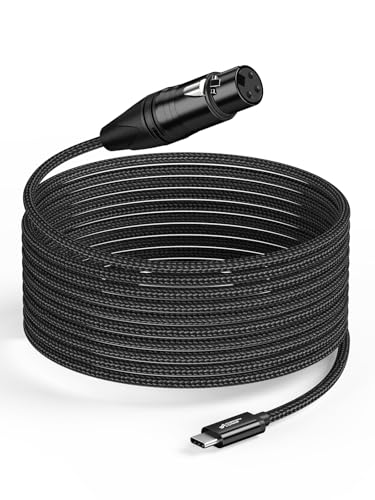
Ten feet of polypropylene-braided cable with the two-year cover most rivals skip.
Start with the length. This CableCreation runs 10 feet, which is long enough to set a mic stand across a room from the laptop rather than leaning over it. The jacket is polypropylene fibre braid — flexible enough to coil tightly and tough enough to survive a bag — and the core uses oxygen-free copper shielding with two separate audio transmission wires so the signal arrives without interference between them. Inside sits a 16-bit / 44.1 kHz digital-to-analogue converter chipset (16-bit depth and 44.1 kHz sample rate), the part that turns the analogue mic feed into something a USB-C device can read.
Compatibility is broad here: iPhone 15 series, Samsung Galaxy S8 and newer, MacBook, iPad, iMac and other USB-C hardware, across Windows, macOS, iOS, Android and Linux, with no driver install. Quality and functionality are what purchasers talk about most in a positive light. The two caveats are plain and worth hearing. It supplies no power, so a condenser mic needs its own 48V phantom supply. And signal only flows from the XLR end to the USB-C end, never the reverse, which rules out using it as a playback lead.
A frayed jacket or a dead converter chip kills the session with no warning, which is why the two-year warranty matters here. That makes the included two-year warranty a meaningful part of the value here. Against the Devinal above, both run 44.1 KHz and near-identical lengths, so this one’s edge is the braided jacket and the warranty cover.
Why it earns its spot: the polypropylene braid and two-year warranty make it the cable most likely to still be working a few seasons in.
The line to remember: it sends audio one way only, from XLR to USB-C, so plan around that when you design your setup.
Pick it for: USB-C phone, tablet or laptop recording where a braided jacket and two-year cover matter to you.
Not the one for: condenser microphones, which will sit silent without a separate phantom supply.
5. Disino XLR Female to USB Mic Link Converter Cable 6 feet

A six-foot shielded cord for a dynamic mic on the same desk as your laptop.
Six feet is the right length for a mic on a desk next to a laptop, and it keeps the cord out of a chair’s wheels. This Disino does the basics well. It recognises as an audio input and installs its own drivers, no software to hunt down. It supports all dynamic microphones directly, and a condenser mic needs its own phantom power supply, which the listing states plainly. The converter chip sits inside with audio signal boost powered over USB and an LED indicator showing it is alive.
The build is the quiet selling point. 22AWG oxygen-free copper (a thicker copper gauge than the 24-gauge cord from Mugteeve further down, and a gauge figure buyers watch because thicker copper carries signal with more stability) runs through foil and metal braid shielding to block interference, so you get no hum and no noise. The connectors are 24k gold-plated, which resists corrosion and keeps the contact surface clean over time. The jacket is flexible PVC with a 6.0mm outer diameter, and a cotton yarn wrap helps damp vibration noise.
Ease of use is the thing buyers praise most — it does the job with no fuss, and that is exactly what most people want from a cord. A few gripes are real and sized fairly. The recurring one is mic compatibility: some Audio Technica models and condenser mics do not play ball, and the quieter output can land with static. If your mic is on the working list, this is a sound six-foot run.
On the copper: 22AWG with dual shielding is a sensible spec for short desk runs, and the six-foot length keeps cable noise low.
Check before you buy: Audio Technica models and condenser mics are the known trouble spots, so confirm yours first.
Go for it when: you want a short, well-shielded cord for a dynamic mic on the same desk as your computer.
One to skip: if your mic is an Audio Technica or needs 48V, this cord is the wrong tool.
6. SiYear USB to XLR Female 3 Pin Cable 10FT

Ten feet of plug-and-play with a 48 kHz sample rate.
Here is the number that sets this cable apart: 48,000 hertz. That is 48 kHz to the rest of us, against the 19,000 hertz frequency figure of the Mugteeve cable below. A higher sample rate means the converter takes more snapshots of your voice per second, so a live take keeps finer detail at the top end. Whether that gap is audible in a podcast is debatable, but for music capture it is a genuine edge.
The converter is embedded with audio signal enhancement through the USB interface, and an LED indicator shows the connection is live. Plug and play means no driver install before recording. It works with Mac OS X and the Windows family from 98SE through Windows 8. The 10-foot length gives you stand-and-strum room for guitar or karaoke. Any device with a male XLR output, from a mixer to a guitar DI, feeds in cleanly.
Buyers report it works and reads as a bargain, though compatibility feedback is mixed. The recurring snag is condenser microphones — they need separate phantom power, and this cable just cannot provide it. On a dynamic mic, though, setup is a straight plug and go, and the 48 kHz rate does the heavy lifting.
The rate advantage: 48,000 hertz matters if you record music; for speech it is more headroom than most people use.
Set the record straight: condenser mics need their own phantom supply, and this cable will not substitute for one.
Fits nicely: karaoke singers, guitarists and home recordists wanting a long cord and a 48 kHz sample rate.
Look past it if: you record on a condenser mic, where no cable-only solution will work.
7. NCGGY XLR Female to USB-A Recording Cable 2M
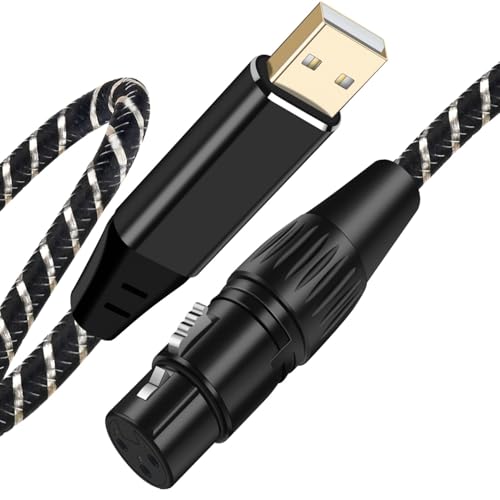
The 96 KHz outlier — a budget cord that out-specs every other cable here on resolution.
Two numbers make this NCGGY worth a look. Its converter runs 96 KHz, against 44.1 KHz on the CableCreation and Devinal above. It also uses 22-gauge copper, against 24-gauge on the Mugteeve at the bottom, and a thicker gauge carries signal more stably. For anyone who cannot afford the interface route, this is the highest-resolution cable in the group.
The rest of the build keeps pace. A nylon and cotton braided jacket adds flexibility and resists tangling, an oxygen-free copper centre conductor aids transmission, and PVC insulation with high-density stranded copper shielding suppresses noise. Heavy-duty metal-shell XLR plugs give it a sturdier feel than the price suggests. The 2M length, 6.6 feet, suits a mic-on-desk setup, and it ends in the common USB-A rectangle for older laptops, desktops and sound cards.
96 KHz and 22-gauge copper lead the plain cords here, but there is no phantom power. Dynamic microphones drop right in with no fuss, and music, karaoke and home recording are the jobs it was built for. Where it checks out on paper, the resolution is rarely the deciding factor in a spoken-word track. Treat 96 KHz as headroom you may never use rather than a feature you must have.
What stands out: 96 KHz and 22-gauge copper make this the spec leader among the plain cords in this list.
Not the deciding factor: if you record voice, the extra resolution will not change your output; buy it for the build and the price.
Suits you if: you want the highest resolution available on a plain cord with a USB-A end and a sturdy braid.
Drawback to note: no phantom power means condenser mics are out of scope here.
8. Mugteeve XLR Female to Computer USB Cable 10 Feet

The long-braid cable with a +10dB boost built in, for reaching across the desk.
Length plus a gain boost is the whole pitch. This Mugteeve runs 10 feet (3 meters) of nylon-braided cord with a metal XLR female connector on one end and USB-A on the other, and it carries a +10dB boost to lift a quiet mic without extra gear. That boost and the length are the two features that make this the practical pick for the home studio spread across a room.
The spec sheet has more than you might expect at this level. It supports both 16-bit and 32-bit at 44.1 kHz and 48 kHz, a signal-to-noise ratio of 78dB, an input impedance of 8.2K Ohm and that +10dB gain figure. In plain terms, 78dB of signal-to-noise means the voice comes through clearly above the background hiss, and 8.2K Ohm impedance is the electrical match a typical mic expects. No drivers need installing; the computer finds it once you plug in.
Two limits sit under the braid and both come from the spec sheet, not guesswork. One, the boost is +10dB and fixed, so it will not carry a genuinely quiet mic forever; if your levels need more, only an interface gives you the headroom. Two, the 48 kHz ceiling keeps this at the standard recording rate, while the NCGGY above reaches 96 KHz. At 44.1 kHz and 19,000 hertz frequency, it does not lead any spec table here. For a 10-foot budget cord with a built-in boost, it is still a well-made starter.
The case for it: 10 feet of nylon braid, a +10dB boost and a wide 16/32-bit bit-depth range make it a capable budget cord.
Set your ceiling: +10dB is the limit and 19,000 hertz is the frequency figure, so a demanding mic will want more than this.
Choose it for: a first cord on a tight budget where the room is long and the mic is dynamic.
Move up if: your signal needs more than +10dB of boost — an interface is the next step.
Know the Specs
Phantom Power and the +48V Question
Phantom power is a +48V charge a condenser microphone draws through the cable to run its internal electronics. A plain XLR-to-USB cable carries signal only and cannot supply it, so a condenser mic plugged into one records silence or hiss. Dynamic microphones generally do not need it. If you see +48V on a product’s feature list, as on the Pyle adapter, it can feed a condenser mic directly. Without it, you need a separate phantom supply in the chain.
Sample Rate and Bit Depth Explained
Sample rate in kHz is how often per second the converter takes a reading of the sound. 44.1 kHz is the standard for music and speech, and 96 kHz captures more detail for demanding recording. Bit depth sets the noise floor — how quiet the gaps between words stay. 16-bit is standard for most recording, and 32-bit gives extra headroom. A higher rate is nice to have, but it will not fix a noisy room or a mismatched microphone.
Common Questions
Will an XLR to USB cable work with my condenser microphone?
What is the difference between an XLR to USB cable and an audio interface?
Do I need a driver for my XLR to USB cable?
Will an XLR to USB-C cable work with my iPhone or Android phone?
How long should the cable be for a home recording setup?
Is a higher sample rate cable actually better?
Can I plug a guitar into an XLR to USB cable?
Why is my XLR to USB cable recording static or hum?
Which cable works with a Shure SM7B?
Can I use an XLR to USB cable for live streaming?
The Bottom Line
For most people, the xlr to usb winner is the Behringer U-PHORIA UM2 because the XENYX preamp, 48 kHz resolution and direct monitoring handle a condenser mic and a live session in one unit. If you want the shortest path from cable to computer and a condenser mic needs +48V, the Pyle PDUSBPP10 is the adapter to reach for. And for a phone-bound recording setup, the Devinal XLR to USB-C is the one to grab. If a plain cord will do — dynamic mic, short desk run — the Disino earns its keep on ease of setup, and that alone is enough to justify it.
How we choose
We do not accept paid placement. Every pick is matched to a real buyer and a real use-case; we do not hands-on test units.
Sources
Specifications: manufacturer listings and product documentation. Review insights: verified customer reviews, as of November 2026. Pricing: not shown on this page (it changes often); check the current price via the retailer link.
As an Amazon Associate, Tactical Gear Guy earns from qualifying purchases. This does not affect which products we feature.