Specs are compiled from manufacturer listings and verified buyer reviews and can change over time — please confirm the key details on the product page before buying.
Your Series X pushes hot air out of the top vent, and anything that blocks or fights that airflow makes the console work harder than it should. The right cooling accessory mounts over that top vent, pulls heat away faster, and adds a USB port or two you actually need. The wrong one spins loud as a hair dryer and barely moves air through the vent. This guide separates the two, because most add-on fans look alike on the listing page and only a few move air well.
This guide is built by comparing the manufacturers’ published specifications and the patterns across verified customer reviews, so you get each pick’s real strengths and trade-offs instead of marketing spin.
You will see which fans run automatically by temperature, which mount to a wall, and which bundle dust covers with the cooler. Every pick here is built specifically for the Series X, so the shape and the vent cutouts line up with your console. Here is the honest breakdown of the Xbox Series X cooling accessories worth putting on your shelf.
Top Picks


How To Choose The Best Xbox Series X Cooling Accessories
A cooling fan for the Series X does one job: move hot air out of the console’s top vent faster than the console does on its own. Everything else — RGB lights, USB ports, headset hooks, dust screens — is a bonus layered on top. Buy the fan for airflow first, then pick the extras you will actually use.
Fan speed versus real airflow
Fan speed is measured in RPM (revolutions per minute — how many times the blades spin each minute). Higher RPM usually means more airflow, but not always more useful airflow. A fan spinning at 5300 rpm pushes hard, while one at 1800 rpm pushes gently. The catch is noise: a fast fan is louder, and a slow one is easier to live with in a bedroom. Look for a fan whose speed setting matches where the console sits. A living-room setup can take a louder fan. A bedroom shelf usually cannot.
Auto temperature control versus manual speeds
Auto mode uses a built-in temperature sensor to change fan speed on its own. When the console heats up, the fan speeds up; when it cools, the fan eases off. Manual mode gives you a touch button to switch between low, medium, and high speed whenever you want. Auto is better if you want to set it and stop thinking about it. Manual is better if you want direct control over noise during a late-night session.
Dust protection is not a gimmick
Dust buildup inside a console slowly clogs the vents and drags on cooling. Several coolers here bundle mesh filters or silicone dust plugs that seal the vents and ports when the console is off. If your room is dusty or you have pets, that bundle is worth more than a couple of extra light modes. Just remember the dust cover has to come off while you play, or it blocks the very airflow you bought the fan for.
Check the USB ports before you buy
A cooling fan usually gets its power from the console’s own USB port, then gives one or two ports back to you. Read carefully which port does what. Some offer a single USB 3.0 data port plus a charging-only USB 2.0 port. Others offer three ports with one for data. If you charge controllers or a headset while you play, the port count and type matter as much as the fan.
Side-by-Side Comparison
| Model | Best For | Max Fan Speed | Auto Temp Mode | Extra USB Ports | Amazon |
|---|---|---|---|---|---|
| KOVA Auto Cooling Fan with LED Display★ Best Overall | Hands-off cooling with a live temperature readout | 3 auto/manual levels | Yes, activates above 96.8℉ | 2.0 USB Hub (5V/2A) | Amazon |
| Raryars Cooling Fan with 3 USB PortsBiggest Airflow | Maximum airflow on a tight budget | 5300 rpm | No | 3 ports | Amazon |
| Raryars Silent Absorb Fan with Dust CoverQuietest Pick | Quiet rooms and dust-prone shelves | 1800 rpm | No | 2 ports | Amazon |
| Iesooy Cooling Fan with 3 Levels & RGB | Manual speed control with six light colours | 2000 rpm | No | 3 ports (1 data, 2 charge) | Amazon |
| CATZARMOR Auto Cooling System | Cooling plus a full dust-plug kit | 2400 rpm | Yes | 1 USB 2.0 + USB-C power | Amazon |
| TanReginal Smart Cooling Fan | A complete accessory bundle in one box | 2200 rpm | Yes, activates at 104℉ | 2 USB 3.2 ports | Amazon |
| Mcbazel Wall Mount with Cooling Fan | Wall-mounted setups that free up shelf space | 2100 rpm | No (three touch speeds) | 1 USB 3.0 + 2 USB 2.0 | Amazon |
| MENEEA RGB Cooling Fan with Dust Filter | Big airflow with seven light modes | 3 auto/manual levels | Yes | 1 data + 1 charge | Amazon |
| MENEEA Auto Cooling Fan Dust Proof | Dust-first setups with a colourful light strip | 3 manual gears | Yes | 1 USB 3.0 + 1 USB 2.0 charge | Amazon |
Detailed Reviews
1. KOVA Auto Cooling Fan for Xbox Series X
Our pick — 4.5+★ from 900+ verified ratings; the strongest balance of quality and price.
The fan that reads your console’s temperature out loud and reacts before you notice the heat.
What makes this one worth first place is the display. A small LED screen on the fan shows your Series X’s temperature in real time, in either Fahrenheit or Celsius, and the maker lists it as accurate to 0.1°F. For a long session that runs into the small hours, that readout turns a guess into a number you can watch climb and fall. The crowd agrees it does the job — 4.5+ stars across 900+ ratings, with buyers flagging the automatic cooling and the lights as the reasons they keep it.
Cooling runs on two rails. In auto mode the fan wakes when the console passes 96.8℉ (36℃), steps to medium between 107.6℉ and 118.4℉, and goes full speed above 118.4℉ (48℃). In manual mode you tap the fan switch yourself and pick low, medium, or high. That dual approach means you are not locked into one behaviour: leave it alone for everyday use, take the wheel when you want quiet. With 9 lighting presets (7 solid colours plus 2 dynamic effects) and a headset hook on an anti-slip silicone pad, it earns its place on a desk.
The extras are honest ones. There’s a 2.0 USB hub that charges a controller or headset at 5V/2A while you play, and the whole unit is listed at 0.36 kg — light enough that it stays put on top of the console. The catch is straightforward: the LED readout and the lighting are the draw, so if you want a bare-bones cooler with nothing to configure, you are paying for features you will not use. For everyone else, this is the smoothest set-and-forget pick of the bunch.
What earns it top spot
- Live LED temperature display with a 0.1°F accuracy claim from the maker
- Auto mode kicks in above 96.8℉ and scales to full speed above 118.4℉
- 9 lighting presets and a memory function that saves your favourite
- 2.0 USB hub charges controllers and headsets at 5V/2A
Where it is not the answer
- You pay for the display and lights, not just airflow
- Four-pin power connector is specific to this unit’s wiring
Reach for this if: you want the console to cool itself while you focus on the game, and you like seeing the temperature instead of guessing.
Look elsewhere if: a plain cooler matters more to you than a screen and a light show.
2. Raryars Cooling Fan for Xbox Series X with 3 USB Ports
Two fans spinning at 5300 rpm — the rawest airflow you can bolt onto a Series X.
The single number that dominates this pick is 5300 rpm, the fastest fan speed on this list by a clear margin. Compare it with the Raryars Silent Absorb fan at 1800 rpm and the gap is nearly threefold in rotational speed. Two fans sit under the console and drive air through the vent, and the whole thing runs off the console’s own USB port with no separate power supply. It doubles as a vertical stand, and at 5.91″L x 3.94″W x 1.18″H it is the most compact unit here.
What wins people over is the easy setup and build quality — the fan snaps into place and the plastic-and-metal body feels solid. But cooling is where verdicts split, and honestly so: some players say it keeps the console cool, while others feel it does not push enough air to change much. That is the fair trade-off to know about. If you want the loudest airflow available and a quick install, this is your pick. If you want quiet, keep reading.
The speed case: 5300 rpm and a 30 db noise rating put it in the fast-and-audible column, not the whirr-you-forget column. That speed suits a hardcore player who wants maximum air movement during a hot run and does not mind hearing it.
The verdict: buy it for the airflow and the three USB ports, and accept that noise is part of the deal.
The limit: mixed cooling feedback means it is not the safest pick if you want guaranteed temperature drops.
3. Raryars Silent Absorb Fan Cooler
Built for the bedroom shelf, where a howling fan is worse than a warm console.
This one runs at 1800 rpm and uses what the maker calls an absorb-type fan — it pulls air rather than just blowing, and pairs a top dust cover with the exhaust path so dust does not settle into the vent while the console idles. That is the design that makes it the quietest option on this list, rated at 30 db. The console cooling and functionality are what buyers praise most, and the noise level gets its own share of positive nods too.
Where it differs from its faster sibling above is temperament. The 5300 rpm Raryars is a hairdryer by comparison; this one trades that raw speed for a gentler pull you can sit next to without noticing. You still get two USB ports, plug-and-play DC 5V from the console’s own USB port, and a vertical-stand form factor. For a room where the Series X shares space with a TV and a bed, that quietness is the whole point.
Why it earns its label
- 1800 rpm absorb fan rated at 30 db — the gentlest option here
- Top dust cover reduces dust falling into the vent
- Plug and play via the console’s USB port, no adapter
- Doubles as a vertical stand with two USB ports
What to weigh
- Lower speed means less aggressive cooling than the 5300 rpm model
- Two USB ports rather than three
The fit: a quiet room, a TV shelf, a light-sleeping household — anywhere noise is the deciding factor.
The trade: you give up peak airflow for that silence, so it suits moderate sessions more than marathon heat.
4. Iesooy Cooling Fan for Xbox Series X

Three touch-selected fan speeds, six light colours, and a footprint that fills a desk corner.
This is the biggest cooler of the group at 8.27″L x 7.87″W x 2.36″H — noticeably more shelf-hungry than the compact Raryars units. It sits under the console rather than on top, which is a different airflow route: the ducts pull air from the bottom four corners and push it upward, feeding the Series X’s natural convection instead of fighting it. Fan speed runs 1800-2000 rpm across three touch levels, with green, blue, and orange indicator lights showing which gear you are in.
Reliability is what buyers talk about first, and the general read is that it works reliably and looks good doing it. The lighting adds a sixth solid colour plus one mixed mode, and there is an independent touch switch for the lights so you can keep the fan running with the colour off. You also get three USB 2.0 ports, one blue for data and two white for charging only. It is a plug-and-play install that drops straight onto the console base.
Straight talk on cooling: the cooling and noise feedback both split, with some players finding the airflow modest and the fan audible at higher speeds. That lines up with the 2000 rpm ceiling — this is a mid-power cooler, not an aggressive one, and the RGB is the real headline.
Choose it if: you want a good-looking stand with colour you can toggle and three usable ports, and your sessions are more casual than hardcore.
Pass if: raw airflow at high temperature is your only metric.
5. CATZARMOR Auto Cooling System for Xbox Series X

An auto cooler that comes with the dust screens most rivals make you buy separately.
Two things stand out here. The first is the dust kit: the box ships with 2 silicone dust screens and 8 silicone dustproof buttons that plug the ports and vents you do not use. The second is the fan itself, a 9-blade unit that runs at three levels of 1600 rpm, 2000 rpm, and 2400 rpm. Auto mode reads the console’s temperature and picks the level for you. The design and the way it works are what buyers like most about it, and it is easy to install to boot.
The lighting is the most configurable on the list at 11 modes — 7 solid colours plus dynamic effects — and the independent touch buttons split lighting control from fan control. There’s an LED screen showing the console’s temperature and current fan gear, plus a built-in anti-touch guard that keeps your fingers off the blades. A USB 2.0 port on the back charges a controller or phone, while the USB-C port is the one that powers the fan from the console.
The catch is that cooling feedback is mixed, and the unit is heavier than most at 12.6 ounces. Think of it as a lighting-and-dust accessory that happens to cool — the 2400 rpm ceiling is decent but not the strongest here. If your room is dusty and you want the plug kit in the same box, that bundle is the reason to pick it.
Best match: a household with pets, or a room where dust collects fast, and you want the port plugs in the box.
Not the pick if: you want the most cooling power for the same kind of spend.
6. TanReginal Smart Cooling Fan for Xbox Series X
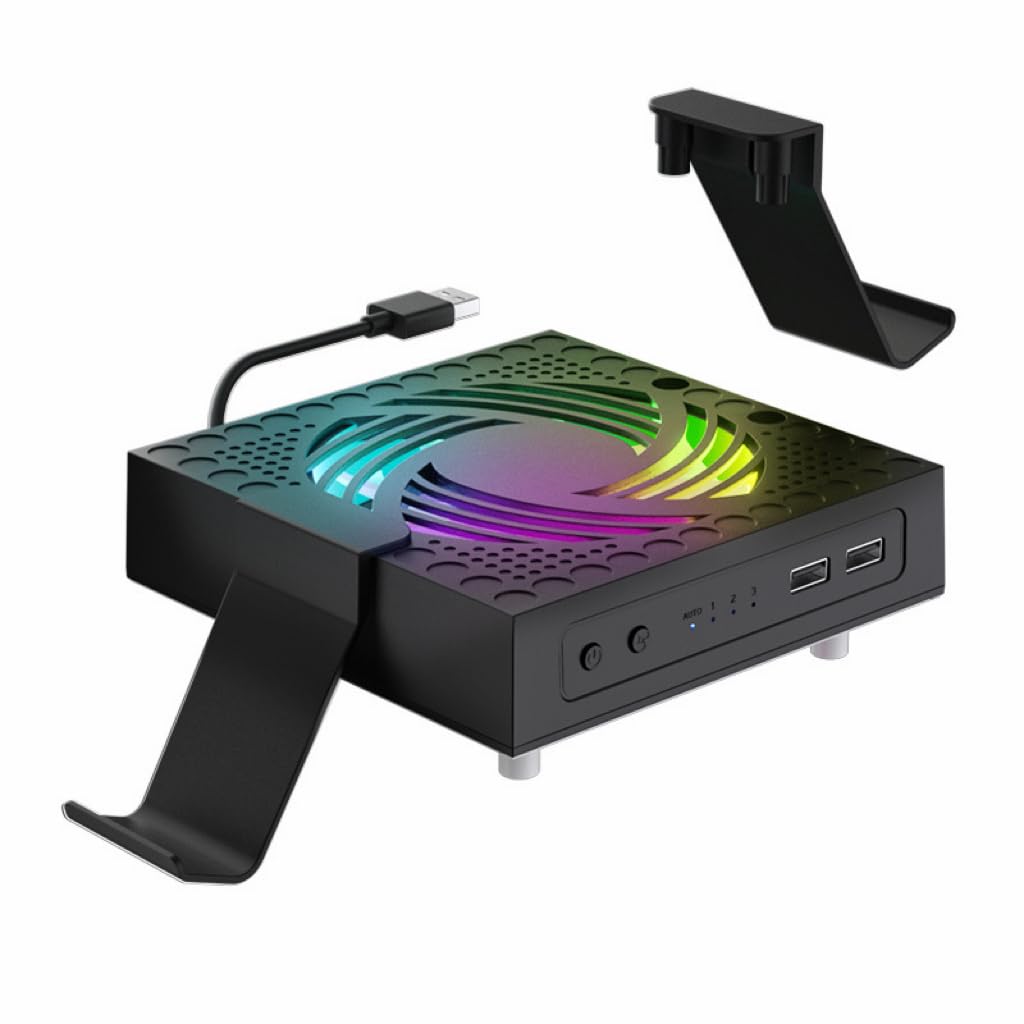
One box that covers cooling, dust, controllers, and joystick grip in a single buy.
The 9-blade hydraulic bearing fan is the engine here, running to a top speed of 2200 rpm across low, medium, and high settings. Hydraulic bearings are built to be quiet, and the maker describes the noise as almost inaudible — that suits late-night play in a shared room. Auto mode wakes the fan when the console hits 104°F/40°C and shuts it down as temperatures drop. That means it is active only when it needs to be, not humming all night.
The bundle is the differentiator. Alongside the fan you get two stands for controllers and headphones, two dustproof mesh filters, eight dust plugs, and four pairs of height-boosting joystick caps with different textures for grip. There are also 2 USB 3.2 ports for extra accessories. That makes it the closest thing here to a full setup kit — you will not be buying dust plugs separately or hunting for a headset hook. The top fan speed of 2200 rpm also edges out the 2000 rpm ceiling on the Iesooy unit.
Why the bundle wins
- 9-blade hydraulic bearing fan up to 2200 rpm
- Auto mode starts at 104°F/40°C and stops when cool
- Two USB 3.2 ports for controllers and headsets
- Ships with dust mesh, 8 plugs, dual stands, and joystick caps
What to think about
- Setup takes a few steps — fan, stands, mesh, plugs
- More parts to keep track of than a bare fan
Buy it because: you would rather unbox once and have everything — cooling, dust defence, controller parking, and thumbstick upgrades.
skip it if: you want a single piece you drop on and forget.
7. Mcbazel Wall Mount for Xbox Series X with Cooling Fan

The only pick that takes the console off the shelf entirely and hangs it on the wall.
This is a different animal from the top-mounted coolers. The console sits vertically against the wall, and fans built into the mount pull air through from underneath at three touch-selected speeds up to 2100 rpm. The ABS body is rated to hold 10kg, shipped with screws, and adds three removable hooks for controllers and a headset. Setting it up is the part buyers find easiest — the console seats and locks into place, and the whole thing frees up the shelf it sat on.
Lighting and speed are both touch-controlled with no app or remote to lose, and the light bar switches fully off for a bedroom. There is a practical rule to know: the fan, the lights, and the ports all draw power from the console, so none of them run while it is asleep. The USB loadout is one USB 3.0 for data plus two USB 2.0 for charging. Stability is the mild split in feedback — it holds securely, with a few buyers wanting more reassurance.
Mounting reality: it is cut to the Series X body only, not the Series S. The controller cradles do fit both consoles, so a mixed household still gets use out of the holders even if only one Series X is going up on the wall.
The case for it: a desk or shelf is precious, and hanging the console high both cools it and clears clutter.
Use wall anchors: drive the supplied screws into anchors suited to your wall, not straight into plasterboard.
8. MENEEA RGB Cooling Fan for Xbox Series X with Dust Filter

The one where cooling is the thing people rave about, not the lights.
What wins people over here is pure cooling performance — it is the aspect that comes up most, and by a wide margin, ahead of the lighting and the looks combined. That reputation rests on a smart chip that reads the exhaust temperature and picks one of three fan speeds on its own. Auto mode is the default at power-on, with a green indicator, and it checks conditions after a five-second medium-speed start before settling in. You can also take manual control: a touch switches to medium (blue), another to high (orange), another to off.
The 7 lighting modes run red, green, blue, and cyan monochromes plus running, water-running, and breathing effects, each with an independent switch and a memory that saves your last setting. Two USB ports are split the smart way — a black 2.0 for data, a white 2.0 for charging — and you get 2 sets of dust covers plus 1 set of silicone dust plugs in the box. With 4.0+ stars across 500+ ratings, it is the most-reviewed pick on this list, which says a lot about how many people trust it.
The honest caveat: noise and the remote control both split feedback, with some finding it super quiet and others finding it a bit loud at speed. Treat the remote as a nice-to-have rather than the control you will always use — the touch switch on the unit does the main job.
The short version: if cooling is the only scoreboard that matters and you still want colour and dust covers, this is the safest bet of the top-mounted group.
One thing to note: it has more ratings than the top pick, but the top pick scores higher at 4.5+ to this unit’s 4.0+.
9. MENEEA Auto Cooling Fan Dust Proof for Xbox Series X

The white-shelled one built around a full dust-defence kit and a colourful light strip.
This is the sister unit to the MENEEA fan above, and the split is clear. Here the emphasis shifts to dust protection and a light strip, with a smart chip that reads temperature and adjusts the fan speed in auto mode. A green indicator shows auto, and a touch drops it to medium (blue), high (orange), then off. It comes with 2 sets of dust covers and 1 set of silicone dust plugs that seal the USB and HDMI ports when they are not in use.
The light strip carries 6 monochromes plus 2 mixed colours on an independent touch switch, so you can set the fan running while changing colour whenever you like. Ports are the smart two-way split — a blue USB 3.0 for data and a white USB 2.0 for charging controllers or phones. The one quirk to know: the maker says to remove the top fan’s dust cover while the console is working so it can exhaust heat freely, then re-seat it when you are done. Treat that as part of the routine.
Who this suits: a dusty room with a white setup to match, where the console’s ports and vents get sealed whenever it is off.
Pick this for: a white console shelf and a dust problem you want to get ahead of, with USB 3.0 data speed on tap.
Remember: lift the top dust cover before long play sessions, or you throttle the airflow yourself.
Know the Specs
RPM and airflow
RPM stands for revolutions per minute — how fast the fan blades turn. A higher number usually means more air moved, but the noise rises with it. The quietest fan here runs at 1800 rpm, while the fastest reaches 5300 rpm. Pick the speed band that fits the room the console lives in, not just the biggest number on the page.
Auto temperature mode
An auto mode uses a sensor to read the console’s heat and change fan speed by itself. Several coolers here wake at a set temperature and shut off when the console cools. That means no buttons to press and no fan running while you stream or sit in a menu. Manual mode gives you a touch button instead, which is better when you want direct control over noise.
Dust covers and filters
Dust settling inside the vents and ports is a slow drag on cooling. Many of these kits include mesh filters for the top vent and silicone plugs for unused USB and HDMI ports. The rule that matters: take the top cover off while the console is running so heat can leave, then put it back when you are done. A cover left on during play blocks the airflow it was meant to protect.
USB passthrough ports
These fans run off the console’s own USB port, then hand ports back to you. Read the spec closely — a data port (often USB 3.0) is different from a charge-only port (often USB 2.0). Charging a controller or a headset needs only the charge type, but moving files needs the data type. Know what you plan to plug in before you assume all ports are equal.
Noise level in decibels
A decibel (db) is how loud a sound is. Quiet coolers land around 30 db, roughly the noise of a soft conversation across a room. Higher fan speeds push that number up. If the console shares a bedroom, a fan rated near 30 db is the one to look for.
Mount form and fit
Coolers come as top-mounted fans, bottom-mounted stands, or wall brackets. A wall mount clears shelf space and cools from below, but it is cut to the Series X body only — the Series S will not seat correctly. Match the form to where the console sits before you buy.
Common Questions
Will a Series X cooling fan actually lower the console’s internal temperature?
Do I need a separate power supply for a Series X cooling fan?
What is the difference between auto mode and manual fan speed?
Should I leave the dust cover on while I am playing?
Can I charge my controller from the cooling fan’s USB ports?
Is a 5300 rpm fan too loud for a bedroom?
Will the Mcbazel wall mount fit an Xbox Series S?
Does higher RPM always mean better cooling?
Do cooling fans help extend the console’s lifespan?
How many extra USB ports do these coolers give me?
The Bottom Line
The strongest all-round pick of the xbox series x cooling accessories group is the KOVA Auto Cooling Fan, because the live temperature display and dual auto-or-manual cooling let the console manage its own heat with nothing to fiddle with. If you want the most airflow for the least fuss and a fast install, the Raryars 3-USB fan cranks to 5300 rpm. And if the console is going up on a wall to free your shelf, the Mcbazel wall mount is the one to reach for. Whichever you pick, the cooler that earns its keep moves air quietly and gives you a port or two back — the top pick is the crowd favourite at 4.5+ stars across 900+ ratings, and that record is the strongest reason to trust it.
How we choose
We do not accept paid placement. Every pick is matched to a real buyer and a real use-case; we do not hands-on test units.
Sources
Specifications: manufacturer listings and product documentation. Review insights: verified customer reviews, as of November 2026. Pricing: not shown on this page (it changes often); check the current price via the retailer link.
As an Amazon Associate, Tactical Gear Guy earns from qualifying purchases. This does not affect which products we feature.