Specs are compiled from manufacturer listings and verified buyer reviews and can change over time — please confirm the key details on the product page before buying.
The frustrating truth about Zigbee dead spots is that a sensor does not tell you it lost signal — it just quietly stops reporting. Your door sensor stops triggering, your curtain switch stops answering, and the mesh you built looks fine in the app while half of it is barely holding on. Mains-powered Zigbee devices act as routers (repeaters that pass signal along to neighbours), so the fix is usually not a new hub but the right plug or extender sitting in the right hallway. This guide covers the seven picks worth your time, sorted by what each one actually does on the mesh — plus the one that is useless outside a single brand’s ecosystem.
This guide is built by comparing the manufacturers’ published specifications and the patterns across verified customer reviews, so you get each pick’s real strengths and trade-offs instead of marketing spin.
A repeater only helps if your hub speaks to it, so the first question is compatibility, not range. Read this before you buy any zigbee range extender.
Top Picks

How To Choose The Best Zigbee Range Extender
A Zigbee range extender does one job: it sits between your hub and a device that keeps dropping off, and it relays the signal for you. The catch is that Zigbee is a mesh, so a repeater only works when it can hear the hub and the far device can hear the repeater. Placement matters more than any spec on the box, and the second-biggest mistake buyers make is forgetting that a hub is required in the first place.
Confirm your hub is Zigbee, not Wi-Fi
Almost every pick here needs a Zigbee hub (the main box that runs your Zigbee network) to talk to. That means an Echo (4th Gen), Echo Plus (1st & 2nd Gen), Echo Show 8 Gen3, Echo Show 10 (Gen2 & Gen3), Echo Studio, Eero 6, Eero Pro 6, a SmartThings hub, Home Assistant running ZHA or Z2M (two common Zigbee control apps), Hubitat, Homey Bridge or Pro, or a manufacturer hub. If your smart home runs on Wi-Fi bulbs and a phone app, none of these repeaters will do anything for you.
Look at current rating before you plug anything in
A repeater that doubles as a smart plug is only as useful as the load it can safely switch. The current rating in amps tells you that. A 15 A outlet handles a heater or a washing machine; a 1 A rated switch is meant for a motorised curtain, and nothing else. Match the rating to the appliance or you have bought a decorative plastic block.
Decide whether it needs to be the whole package
A dedicated extender is small and discreet, so it hides in a hallway without drawing attention. A smart plug gives you switching and energy monitoring on top of the repeating, so one socket does two jobs. A night light with a built-in motion sensor covers another job entirely. Choose a discreet dedicated extender if you want the repeater to disappear, or a smart plug if you want the socket to also switch and meter.
Read the compatibility line twice
The most common buyer regret in this category is a repeater that only works with its own brand’s gateway. If the listing says it does not work with third-party Zigbee devices, believe it. That product is excellent for one ecosystem and completely useless everywhere else.
Side-by-Side Comparison
| Model | Best For | Current Rating | Hub Compatibility | Extra Function | Amazon |
|---|---|---|---|---|---|
| THIRDREALITY Smart Plug Gen3 4-Pack★ Best Overall | Whole-house mesh building | 15 A | Home Assistant, SmartThings, Hubitat, Homey, Echo Zigbee hubs | Real-time power meter (±1%) | Amazon |
| Aeotec Range Extender ZiDedicated Extender | Filling one stubborn dead spot | — | SmartThings, Home Assistant and other Zigbee networks | Dedicated repeater, 2.4 GHz | Amazon |
| SONOFF MINI-ZBRBS 2-Pack | Curtain motors in small wall boxes | 1 A | Home Assistant (ZHA & Z2M), Alexa, Google Home | Percentage curtain control | Amazon |
| THIRDREALITY Smart Dual Plug 2-Pack | Two metered outlets in one socket | 15 A | Home Assistant, SmartThings, Homey, Hubitat | Independent dual-outlet power monitoring | Amazon |
| LinkTap Zigbee Extender | Large gardens on a LinkTap system | — | LinkTap devices only | IP66 weatherproof mesh node | Amazon |
| Innr Smart Plug 4-Pack | Philips Hue households | 15 A | Philips Hue Bridge, Home Assistant, Homey, Hubitat, SmartThings | ±0.5% energy monitoring | Amazon |
| THIRDREALITY Multi-Function Night Light 2-Pack | Hallways that need light and signal | — | Home Assistant, SmartThings, Alexa, HomeKit via Smart Bridge MZ1 | Motion, light sensor, RGB night light | Amazon |
Detailed Reviews
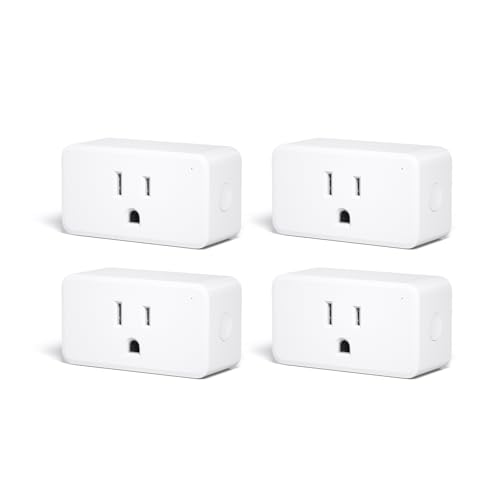
1. THIRDREALITY Smart Plug Gen3 4 Pack
Our pick — 4.5+★ from 100+ verified ratings; the strongest balance of quality and price.
Four sockets that quietly rebuild your entire Zigbee mesh while they switch your appliances.
You get four mains-powered plugs in one box, and each one is a Zigbee router — a device that receives the signal and passes it on, thickening the mesh instead of just reaching into it. That is the difference between buying one extender for a problem corner and actually solving a weak network across a whole floor. Scatter two in the hallway and kitchen and you have added four new relay points to a mesh that previously had one.
The repeater side is genuinely the point here, not an afterthought. An upgraded Zigbee chip, an enhanced RF module (the radio part that handles signal strength), and an tune router relay algorithm all describe a plug built to extend coverage rather than to be a plug that happens to repeat. What wins people over most, though, is plain reliability — it just keeps responding, week after week. Zigbee 3.0 (the current version of the Zigbee standard) keeps it on speaking terms with Home Assistant (ZHA and Z2M), SmartThings 2015/2018, Hubitat, Homey Bridge/Pro, Aeotec, and the Echo devices with a built-in Zigbee hub.
Each outlet also meters power to ±1% accuracy — meaning the wattage it reports is close enough to trust for tracking what your fridge or space heater really draws. It pairs with Home Assistant, SmartThings, Hubitat, the THIRDREALITY Smart Hub Gen 2 and the Bridge MZ1, and takes OTA firmware updates on compatible platforms. The caveat: every plug here needs a Zigbee hub, so a Wi-Fi-only smart home gets nothing from this box. The 15 A rating is also the ceiling — do not expect it to switch anything heavier.
Where it earns the top spot
- Four Zigbee 3.0 routers in one purchase — the fastest way to thicken a thin mesh
- 15 A current rating switches a heater or washing machine safely
- ±1% power metering inside Home Assistant, SmartThings and Hubitat
- Space-saving body that leaves the neighbouring socket usable
- Customizable power-on state after a reconnect, on THIRDREALITY Hub Gen2 and Home Assistant
What to plan around
- A Zigbee hub is mandatory — Wi-Fi-only setups get nothing from it
- Power monitoring needs a compatible platform to show up; not every hub surfaces it
- Four plugs is more sockets than a small flat may need
Buy it when: you are building a Zigbee mesh from scratch or rescuing one that keeps dropping sensors, and you want repeaters that earn their sockets back.
Hold off when: you only own one problem corner — a single dedicated extender will do the job for less clutter.
2. Aeotec Range Extender Zi — Zigbee Network Extender
The one-trick extender that does the trick instead of switching your kettle.
Not every dead spot needs a smart plug in it. The Range Extender Zi is a single-purpose device: it exists to bridge a gap in your Zigbee network for SmartThings, Home Assistant, or any other Zigbee mesh, with a stated range of up to 100m to the next node (the next device in the chain). When your battery-powered sensor at the far end of the garden keeps going offline, this is the piece that closes the distance — no plugs, no schedules, no app clutter to manage.
Its most useful trait is that it leaves the other outlet free. The body plugs directly into a wall socket without covering the second one, which matters in a kitchen where sockets are already contested. Owners talk about exactly this kind of reach, with garden-edge coverage as the recurring theme — the kind of signal that stops dropping before it hits the boundary of your property.
The trade-off is that you get nothing else for the socket — no switching, no metering, no automation triggers. It also needs a compatible hub to be useful, and it is worth saying clearly that the 100m figure is a manufacturer claim rather than a tested wall-penetrating guarantee. In a brick house, plan the placement rather than trusting the number.
What it actually buys you: a clean, discreet gap-filler that frees the second socket, runs on 2.4 GHz Zigbee alongside your existing mesh, and comes with a 1 Year Manufacturer warranty.
The thing to weigh: it is a repeater and nothing more. If you want the socket to do a job as well as repeat, the smart plugs above and below are the smarter layout.
Reach for this if: you have one specific far-away sensor or switch that keeps falling off and you want the smallest possible fix.
Look elsewhere if: your whole floor is patchy — one extender will not cover a whole house, and a multi-plug box will.
3. SONOFF Zigbee Smart Roller Shutter Switch MINI-ZBRBS 2-Pack

A blind-motor switch that hides inside the wall box and repeats Zigbee on the side.
This one is a different animal to the rest of the list. The MINI-ZBRBS is a roller shutter controller first — it drives motorised curtains and blinds with percentage control, so you can set a blind to open 40% rather than all-or-nothing. It is built to fit the small wall-mounted junction boxes common in European homes, including the standard 60/80 box, at 1.56 x 1.3 x 0.66 inches.
As a repeater, it works as a Zigbee router device and helps extend the network from inside the wall — a genuinely clever place to put a relay point, since a switch at the far end of a hallway is usually exactly where the signal is weakest. It joins Home Assistant through ZHA and Zigbee2MQTT, and takes Alexa and Google Home commands. Scheduled open-and-close routines are built in, so the curtains move on your timetable rather than a button press.
The current rating tells the real story: 1 A (amp, a measure of electrical current). That is a motor rating, not a general-purpose one, and it is the biggest difference between this and the 15 A smart plugs on this list. It also requires a neutral wire in the wall box — if your switch wiring lacks one, this product cannot be installed at all. The IP00 rating (no water protection at all) means it belongs inside the wall, not near a bathroom or outdoors. Buy it for the curtains, and treat the Zigbee repeating as the bonus.
Why it earns a place: percentage curtain control, a 2-pack so two windows get covered, and a Zigbee router hidden at the point where the mesh usually needs it most.
The deal you accept: 1 A and a neutral wire requirement rule out most homes and every general appliance.
Fits the buyer who: already has motorised blinds and a neutral wire, and wants them scheduled plus their mesh strengthened from the same wall box.
Not your part if: you need to switch a lamp or a heater — the 1 A ceiling makes this the wrong tool entirely.
4. THIRDREALITY Smart Dual Plug 2 Pack
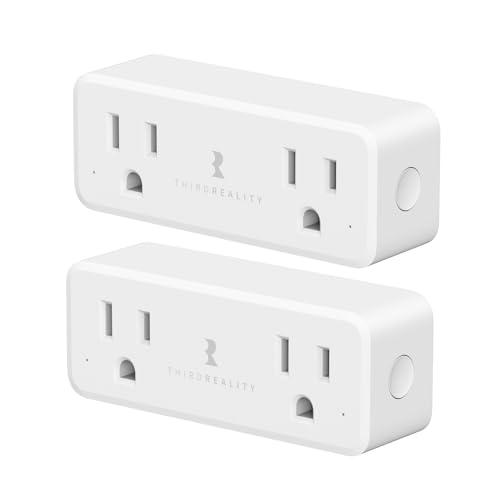
Two horizontally arranged outlets that each switch and meter on their own — times two plugs in the box.
Where the Gen3 plug gives you four separate bodies, this dual plug doubles up per socket. Each of the two horizontally aligned outlets can be controlled and monitored independently, and the 2-pack expands a single wallplate into four smart, metered outlets. Both outlets share 1800W max at 120V (15A total), which covers everyday appliances comfortably but means you should not stack two high-power devices on the same plug.
Function is what people come back to — it does the job it advertises in Home Assistant through ZHA and Z2M, and the build quality lands right behind it. It also works with SmartThings 2015/2018 and SmartThings Station, Aeotec, Homey Bridge, Homey Pro, Hubitat, and the THIRDREALITY hub or Smart Bridge. Repeating-wise it delivers identical RF and chip performance to the Gen3 plug, so you are not sacrificing mesh strength for the dual-outlet layout.
The safety details are note because they are unusual at this level: zero-cross detection (switching the load at the exact moment the AC wave crosses zero, which is gentler on the relay) and ETL certification. Energy monitoring per outlet needs a compatible platform to surface it. The one thing to know honestly is that connectivity experiences vary — most setups join without fuss, but this is the model where pairing occasionally needs a second attempt. Add the Smart Bridge MZ1 separately if you want Apple HomeKit or Google Home control.
Why the layout wins
- Two independently switched and metered outlets per plug, four in the pack
- Same RF and chip performance as the Gen3 plug, so repeating is not compromised
- Zero-cross detection and ETL certification for safer long-term switching
- Horizontal alignment lets you fit two plugs and reach four outlets
- Works across Home Assistant, SmartThings, Homey, Hubitat and THIRDREALITY hubs
What to watch
- Pairing can take a second attempt on some setups
- 1800W is the total across both outlets, so no two big loads together
- HomeKit and Google Home need the Smart Bridge MZ1, sold separately
The socket saver: pick this if wallplates are scarce and you want two metered smart outlets per plug instead of one.
Think twice if: you are pairing into a hub you have not tested before — allow time for a retry.
5. LinkTap Zigbee Extender

The outdoor-only extender that keeps a smart irrigation system talking across a large garden.
Start with the restriction, because it decides everything: this extender works with LinkTap devices and nothing else. It will not repeat for your SmartThings sensors or your Hue bulbs. If you run a LinkTap watering system, though, it is the missing piece for a big garden — it builds a self-healing mesh (a network that reroutes around a weak link) that keeps the irrigation stable across large plots and awkward terrain, where the gateway alone struggles to reach.
The IP66 rating is the headline for outdoor use. That is a weatherproofing standard meaning it is sealed against dust and against strong water jets — so it can live outside through rain rather than being tucked in a shed. It weighs 45 g, small enough to mount almost anywhere, and powers three ways: the included AC-DC adapter, a solar panel with rechargeable batteries, or any 5-12V DC input such as a garden light supply. That flexibility is what makes it practical at the far end of a yard with no socket.
Setup is genuinely simple — no wiring or technical skill, paired through the LinkTap app in minutes. The honest limit is that it also needs a LinkTap Gateway, and the maker notes that in most cases a single Gateway already covers an entire property, so the extender is only worth adding for genuinely large or obstructed plots. The other thing worth noting: LinkTap products use Zigbee for coverage that, according to the maker, beats Wi-Fi in most cases, but that advantage stays inside the LinkTap ecosystem.
Where it makes sense: a wide garden, a sloped yard, or a LinkTap valve that keeps losing its gateway signal, with solar or 5-12V power available on site.
Where it does not: any home that expects a general-purpose Zigbee repeater. This is a single-brand accessory by design.
Worth it for: LinkTap irrigation owners whose garden is big or obstructed enough that one Gateway is not reaching every valve.
Wrong purchase for: anyone outside the LinkTap system — the incompatibility is stated plainly and it holds.
6. Innr Zigbee Smart Plug 4-Pack

Four repeaters that slot straight into a Hue Bridge household without a second hub.
If your smart home already runs on a Philips Hue Bridge, this 4-pack is the path of least resistance. It pairs with the Hue Bridge plus Home Assistant, Homey, Hubitat, SmartThings and Echo devices with a built-in Zigbee hub, and each mains-powered plug acts as a Zigbee router to extend coverage. The Hue caveat is printed clearly: HomeKit, Hue Sync and Hue Secure are not supported.
The relay inside is a step above the average plug. It is TV-8 rated (a switching-duty standard for the relay component) and qualified for 25,000 high-inrush switching cycles, with resettable overload protection and a 15 A load limit. Energy monitoring is the most accurate on this list at ±0.5%, tracking real-time power, voltage, current and accumulated energy — precise enough to see exactly how much a fridge really costs you to run.
Setup is its strongest point — owners widely describe pairing and daily use as simple. The caveat is pairing: this is the model where owner experiences divide most, with some Hue setups connecting cleanly and others refusing. Some households get a clean Hue pairing, others find it refuses to connect, and value opinions split too. If you are outside the Hue ecosystem or unsure of your bridge setup, weigh that fit risk before ordering four at once.
The case for the pack: four 15 A routers with ±0.5% metering, a 25,000-cycle TV-8 relay, and a manual button on the plug itself for when the app is not to hand.
The case against rushing: the Hue route is not universal — test one plug’s pairing before committing a whole home to the set.
Best household fit: an established Philips Hue Bridge home that wants extra Zigbee reach plus genuinely precise energy tracking.
The wrong buyer: someone on HomeKit or Hue Sync who expects those features — the listing excludes them outright.
7. THIRDREALITY Multi-Function Night Light 2 Pack

A night light that repeats Zigbee, senses motion, and changes colour — three jobs in one plug-in.
This is the pick for the hallway or bathroom where you wanted a repeater and a light anyway. The 3-in-1 combines a motion sensor, an illumination sensor (it reads how dark the room is) and an RGB colour night light (RGB means red, green and blue, so it can show any colour), with brightness adjustable from 1% to 100% — from a barely-there glow to a bright, energising green. Pair it with other devices and the motion and light sensors can trigger them, so a midnight trip to the bathroom can switch on a hallway bulb instead.
Build quality is the part that lands best — it feels durable and looks tidy in any decor, and it is built from plastic with a polished finish. The adapters are included for both units, and the 2-pack covers two rooms. Pairing with Home Assistant is straightforward, and adding the Smart Bridge MZ1 (sold separately) brings Apple HomeKit, Google Home, Amazon Alexa and SmartThings control, plus OTA firmware updates.
Be clear-sighted about the motion sensor, because it is the weak link — buyers report very poor motion detection, and that is the recurring note. If your plan hinges on it catching every movement, that is the risk to weigh. A Zigbee hub is required and not included. The colour and brightness controls are well liked, so buy it as a repeater and a light first, and treat the motion sensing as the extra rather than the reason.
What it does well: repeat Zigbee, light a hallway, and give you adjustable 1–100% colour brightness across two plug-in units.
What to discount: motion detection reliability — the sensor is the part most likely to disappoint, so do not build your automations on it alone.
Pick it for: hallways, nurseries or bathrooms where you want signal and soft light from the same socket.
Skip the sensor job: if you need dependable motion triggers, use a dedicated motion sensor and let this handle light and repeating.
Know the Specs
Zigbee Router and Repeater
A repeater is a mains-powered Zigbee device that receives the wireless signal and passes it along to the next node in the mesh. Battery sensors cannot do this — they sleep to save power — which is why plugging in a repeater is the standard fix for dead spots. The repeating happens automatically once the device joins the network; you do not switch it on.
Current Rating in Amps (A)
The amp figure is the maximum current a smart plug can switch safely. A 15 A outlet handles high-draw appliances like a heater or washing machine; a 1 A switch is a motor rating for a curtain controller. Match it to the load or you risk a trip, or worse. Total wattage limits, such as 1800W across two sockets, work alongside the amp figure.
Power Monitoring Accuracy
This tells you how close the reported wattage is to the truth. ±1% means within one percent; ±0.5% is tighter still. Accuracy matters if you are tracking energy use over time or trying to find which appliance is costing you the most. Some hubs or platforms do not display the data, so check compatibility first.
IP66 Weatherproofing
The IP rating describes how well a device is sealed against dust and water. IP66 protects against dust and strong water jets, which makes it suitable for outdoor mounting in rain. Ordinary smart plugs and switches carry no such protection and belong indoors only. A rating like IP00 means no water protection at all.
Neutral Wire Requirement
Some in-wall switches, like roller shutter controllers, need a neutral wire in the wall box to power themselves. Older homes often lack one. Check your wiring before buying an in-wall device, because without a neutral it simply cannot work. Plug-in repeaters avoid this entirely.
Zigbee 3.0 and Hub Support
Zigbee 3.0 is the current standard, which improves interoperability between brands. It still does not mean universal — a hub is usually required, and some devices are brand-locked on purpose. Check the compatibility list against your own hub before ordering anything.
Common Questions
Do I need a Zigbee hub for these repeaters to work?
Will a Zigbee repeater work with Philips Hue bulbs?
How far apart should I place Zigbee repeaters?
Can a smart plug really repeat Zigbee signal?
Is a dedicated extender better than a smart plug for repeating?
Why does my Zigbee device keep dropping off even with a repeater in place?
What does the current rating difference between 15 A and 1 A mean for me?
Can I use the LinkTap Zigbee Extender with my SmartThings hub?
Do power-monitoring repeaters need a specific platform to show their data?
Will an in-wall Zigbee switch work in an older home?
The Bottom Line
For most people building or fixing a Zigbee mesh, the THIRDREALITY Smart Plug Gen3 4-Pack is the right call — four Zigbee 3.0 routers in one purchase, each capable of switching a 15 A load and metering power to ±1% inside Home Assistant, SmartThings or Hubitat. Its 4.5+ star rating is the highest in this pack, and owners consistently report the same week-after-week reliability the spec sheet claims. If you only have one stubborn dead spot and no desire for extra plugs, the Aeotec Range Extender Zi is the cleaner, more discreet fix. And for a Philips Hue household that wants precise energy tracking, the Innr 4-Pack slots in without a second hub. Match the repeater to your hub first, then to how many sockets you need to fill.
How we choose
We do not accept paid placement. Every pick is matched to a real buyer and a real use-case; we do not hands-on test units.
Sources
Specifications: manufacturer listings and product documentation. Review insights: verified customer reviews, as of November 2026. Pricing: not shown on this page (it changes often); check the current price via the retailer link.
As an Amazon Associate, Tactical Gear Guy earns from qualifying purchases. This does not affect which products we feature.