Specs are compiled from manufacturer listings and verified buyer reviews and can change over time — please confirm the key details on the product page before buying.
You want one thing from a keyboard on your Xbox Series X: it has to actually connect and keep working. Plenty of shiny mechanical boards say “console ready” and then leave you staring at a pairing screen. The picks below are the ones that make the console the home of your typing, Chatpad style or full desktop plank. The winner, the 8Bitdo Retro 87, is a full 87-key wireless mechanical board with the same hot-swappable switches and Xbox-flavoured design that made it a crowd favourite — 4.5+ stars across 400+ owners.
This guide is built by comparing the manufacturers’ published specifications and the patterns across verified customer reviews, so you get each pick’s real strengths and trade-offs instead of marketing spin.
You can type one-handed on your lap with a tiny clip-on Chatpad, or you can game properly at a full-size board with RGB and knobs. Pick the form factor that matches how you’ll actually type on the console.
Top Picks


How To Choose The Best Xbox Series X Keyboard
Before you look at a single keycap, decide what you’re plugging into. An Xbox Series X takes a wired USB connection or a 2.4G wireless receiver without fuss. Bluetooth is the wildcard — some boards pair straight to the console, others only pair to a PC or phone and leave your console out cold. Always check the listing names Xbox explicitly.
Clip-on Chatpad or desktop keyboard?
A Chatpad clicks into your Xbox controller and turns it into a tiny thumb-typing keyboard for chat and messages. It draws power from the controller itself and adds almost no weight. A desktop keyboard sits on a lap or desk and gives you full-size keys — better if you’re typing long messages, using the console as a media centre, or playing keyboard-and-mouse games.
Layout: how many keys do you actually need?
60% layouts drop the number pad and function row to save desk space. 75% adds back the arrow keys and function row. 96% squeezes in the number pad while keeping the footprint tight. A full-size board with 100+ keys gives you macro and media keys but eats desk. Match the layout to the keys you actually press.
Mechanical or membrane — and why it matters for comfort
Mechanical switches give a defined click and last millions of presses; hot-swappable sockets let you pull one out and drop in a replacement without soldering. Membrane boards are quieter and softer but feel mushier after long sessions. For a console, a quieter switch keeps you from annoying anyone in the room while you’re messaging.
Side-by-Side Comparison
| Model | Best For | Connection | Keys | Battery | Amazon |
|---|---|---|---|---|---|
| 8Bitdo Retro 87★ Best Overall | All-round console keyboard | 2.4G / Bluetooth / USB-C | 87 | Rechargeable | Amazon |
| MoKo Xbox ChatpadBest for Chat | Chat while playing | 2.4G wireless | 47 | Controller-powered | Amazon |
| Ussixchare 68-KeyBudget Compact | Small, cheap desk board | USB-A wired | 68 | Wired | Amazon |
| Corsair K55 RGB PRO | Quiet typing sessions | USB-A wired | 110 | Wired | Amazon |
| FR-TEC Dragon Ball Super | Fans of the show | USB 2.0 wired | 87 | Wired | Amazon |
| RK ROYAL KLUDGE F99 | Marathon gaming and typing | 2.4G / Bluetooth 5.0 / USB-C | 100 | 5000 mAh | Amazon |
| RedThunder K75 | Knob control and compact desk | 2.4G / Bluetooth 5.0 / Wired | 80 | 4000 mAh | Amazon |
| BlueFinger 60% | On-the-go and travel | 2.4G / Bluetooth / USB-C | 68 | 4000 mAh | Amazon |
| Aula F99 Pro | Long battery and creamy sound | 2.4G / Bluetooth 5.0 / USB-C | 99 | 8000 mAh | Amazon |
Detailed Reviews
1. 8Bitdo Retro 87 Mechanical Keyboard — Xbox Edition
Our pick — 4.5+★ from 450+ verified ratings; the strongest balance of quality and price.
A translucent-green Xbox tribute that behaves like a proper mechanical board, not a gimmick.
What makes this worth the top spot is how much it lets you change. The 87 keys sit on hot-swappable sockets, so you can pull a switch and push in another without a soldering iron — a real help if a single key starts feeling soft. It connects three ways (2.4G wireless, Bluetooth and USB-C), which means you can pair it to the console over a receiver and still switch it to a PC without re-pairing everything.
The build is the part owners come back to. It’s a solid ABS housing with a nostalgic Xbox look, and the translucent green shell is the sort of thing that ends up on a desk as a display piece as much as a tool. An ambidextrous hand orientation means lefties aren’t fighting a molded right-hand curve, and the rechargeable battery saves you from hunting for AA cells mid-session.
The trade-off is honest: an irregular board with lighting and volume controls means the feature set is broad rather than specialised, and some owners find the brightness and volume steps not perfectly tuned from the start. Expect to fine-tune the lighting and volume steps yourself after unboxing.
What makes it the pick
- 87 hot-swappable keys you can customise without soldering
- Three connection routes: 2.4G, Bluetooth and USB-C
- Xbox Edition translucent green shell that stands out
- Rechargeable battery, no disposable cells
Where it falls short
- Lighting and volume controls can feel slightly untuned from the start
- Pricier than the entry-level wired options
Best for: anyone who wants one board that works on the console, the PC and the laptop without swapping cables.
Think twice if: you want a plug-and-play board with no tinkering — this one rewards a little setup time.
2. MoKo RGB Backlight Keyboard for Xbox One Controller
The one that turns your controller into a text machine without leaving the sofa.
This one earns its spot on size alone: it clips onto your Xbox controller, so it lives in your hands rather than on a desk. It’s a 47-key chatpad that measures 5.59″ long by 2.13″ wide — a fraction of the 19-inch span of the Corsair K55 elsewhere on this list. At 2.17 ounces it adds barely any weight to a controller you’re already holding.
It’s built for the job it’s given: typing messages mid-game. The RGB backlight has three modes (rainbow breathing, trichrome and monochrome), and the silicone keys are shaped so you can find letters in the dark. There’s a 3.5mm audio jack on board for wired headphones, and the 2.4G receiver slots into the console for a connection rated to hold within 10 meters.
Here’s the catch, and it’s a real one: the pad draws its power from the controller, so you’ll want the controller above 20% charge or it won’t behave. Some buyers also find the responsiveness hit-and-miss when typing fast. Treat it as a messaging accessory, not a full-size typing board.
Setup in one line: plug the controller into the console, seat the keyboard, drop the 2.4G receiver into the console and hold the pairing key — you’re typing in under a minute.
The honest limit: 47 thumb-sized keys will never match a full board for long-form typing, so treat it as a messaging accessory.
Reach for this if: you mainly want to type chat messages, party invites and quick searches without putting the controller down.
Look elsewhere if: you need a keyboard for documents or extended text — get a full-size board instead.
3. Ussixchare 60 Percent Gaming Keyboard, 68 Keys
A desk-friendly 68-key mechanical board for players who want their mouse close at hand.
This is a compact 68-key board with a 60% footprint, and that’s the whole sell. It measures 13.78″ by 6.3″, so it leaves you room for a wide mouse sweep. The ABS keycaps are shaped ergonomically and the red switches are linear, which means a smooth press with no audible click — good for late-night messaging while someone else sleeps.
Where it earns its keep is the full-key rollover. On a console, that means combos and fast keypresses register without dropping, so if you’re using keyboard and mouse for a game, inputs land when you press them. It also connects over USB-A to Xbox, PS4/5 and PC, so one cable covers multiple setups.
The honest limit: it’s a single-colour backlight, not full RGB, and 18 lighting modes dress that up as best they can. If you want a rainbow ceiling, this isn’t it. As a cheap wired board for playing close to the screen, though, it does the job without fuss.
Worth it for: keyboard-and-mouse console players who want a short board that keeps their mouse arm free.
Pass if: you rely on a number pad or want per-key RGB colours.
4. Corsair K55 RGB PRO Membrane Wired Gaming Keyboard

A quiet, spill-resistant full-size board for long typing sessions and messy desks.
This is the full-size option: 110 keys across a 19-inch width. Compare that with the MoKo Chatpad’s 47 keys and 5.59-inch length, and you get a sense of the difference — this is a desk keyboard, not a handheld one. At 1.8 pounds it stays planted rather than sliding around when you type hard.
The membrane design is the reason it’s so quiet, and that quiet is the thing buyers keep coming back to for coding, data entry and late-night messaging on the console. It’s rated IP42 against dust and spills, which is protection against the accidental drink knock rather than a dunking. Six dedicated macro keys and a detachable padded palm rest make long sessions easier on your wrists.
There’s no battery here — it’s USB-A wired, so you don’t have to think about charging. The trade-off is the lighting: the RGB zones are there, but some buyers find the effects more distracting than useful on a work-focused board.
Why desk workers like it
- Membrane keys keep typing quiet for anyone sharing the room
- IP42-rated for dust and accidental spills
- Six macro keys plus dedicated media and volume keys
- Detachable palm rest for long sessions
The trade-offs
- Full 19-inch footprint eats desk space
- Lighting effects can feel busy for a work board
The right buy for: anyone who types a lot, shares a room, and wants a wired keyboard that won’t need charging.
Skip if: you need a small board for a cramped desk — this one is wide and heavy.
5. FR-TEC Dragon Ball Super Keyboard

A licensed Dragon Ball Super board for fans who want the show on their desk.
Start with the fact that this is officially licensed Dragon Ball Super hardware — the keys are decorated in line with the licence, which is the entire reason to buy it. Under the graphics it’s a proper 87-key TKL mechanical board, so you get arrow keys and function row without the number pad. It connects over a 1.8m blue-and-orange braided USB 2.0 cable.
The double-injected keys are built so the characters don’t rub off, and the 9 backlight modes give you an ice-blue glow for late sessions. Anti-ghosting runs across 25 keys, which keeps certain key combos from locking each other out. It’s plug and play with no configuration needed, and it works across PC, Mac, PS5, Switch and Xbox Series S/X.
The honest caveat: it’s a relatively low-volume product, so getting hands-on to test the feel is harder. It’s a fan-first board first and a typing tool second. If you’re buying it for the licence, that’s a fair trade; if you’re buying it purely for feel, look at a plainer mechanical board.
Made for: Dragon Ball Super fans who want a desk piece with the show’s artwork on the keys.
Not for you if: the licence means little and you care only about switch feel and keycap quality.
6. RK ROYAL KLUDGE F99 Wireless Mechanical Keyboard

A 5000 mAh slab that won’t beg for a charger every night.
Battery life is the headline here. Its 5000 mAh cell is rated for up to 550 hours with the RGB off and 30 hours with it on, and a full charge takes around 10 hours. For a console board that’s a serious advantage — you can leave it on the sofa for a month of chat sessions and only think about a cable when the indicator warns you.
The rest of the package backs it up. It’s a 100-key, 96% layout with the number pad and arrow keys kept, so you can type messages and numbers without a second keyboard. The gasket mount and three layers of internal padding — bottom foam, an IXPE switch pad and a latex dampener — take the hollow sound out of every press. Keycaps are oil-resistant Cherry profile PBT, which resists shine.
The trade-off is connectivity nuance. The 2.4G and wired routes work cleanly, but macOS only works through the web driver, and the software is the only way to remap keys fully. If you want a plug-and-type board with no software, the hot-swap switches will still let you customise the feel.
Battery maths that matters: with the backlight off, the F99 is built to run far longer than a typical weekend of Halo messaging — you’re charging it a handful of times a year, not weekly.
The honest catch: full customisation lives behind the RK software, so it’s a board for someone happy to install a driver.
Right for you if: you want one wireless board for gaming, work and console chat with a number pad and months of battery.
Better to pass if: you refuse to install companion software for key remapping.
7. RedThunder K75 Wireless Mechanical Gaming Keyboard
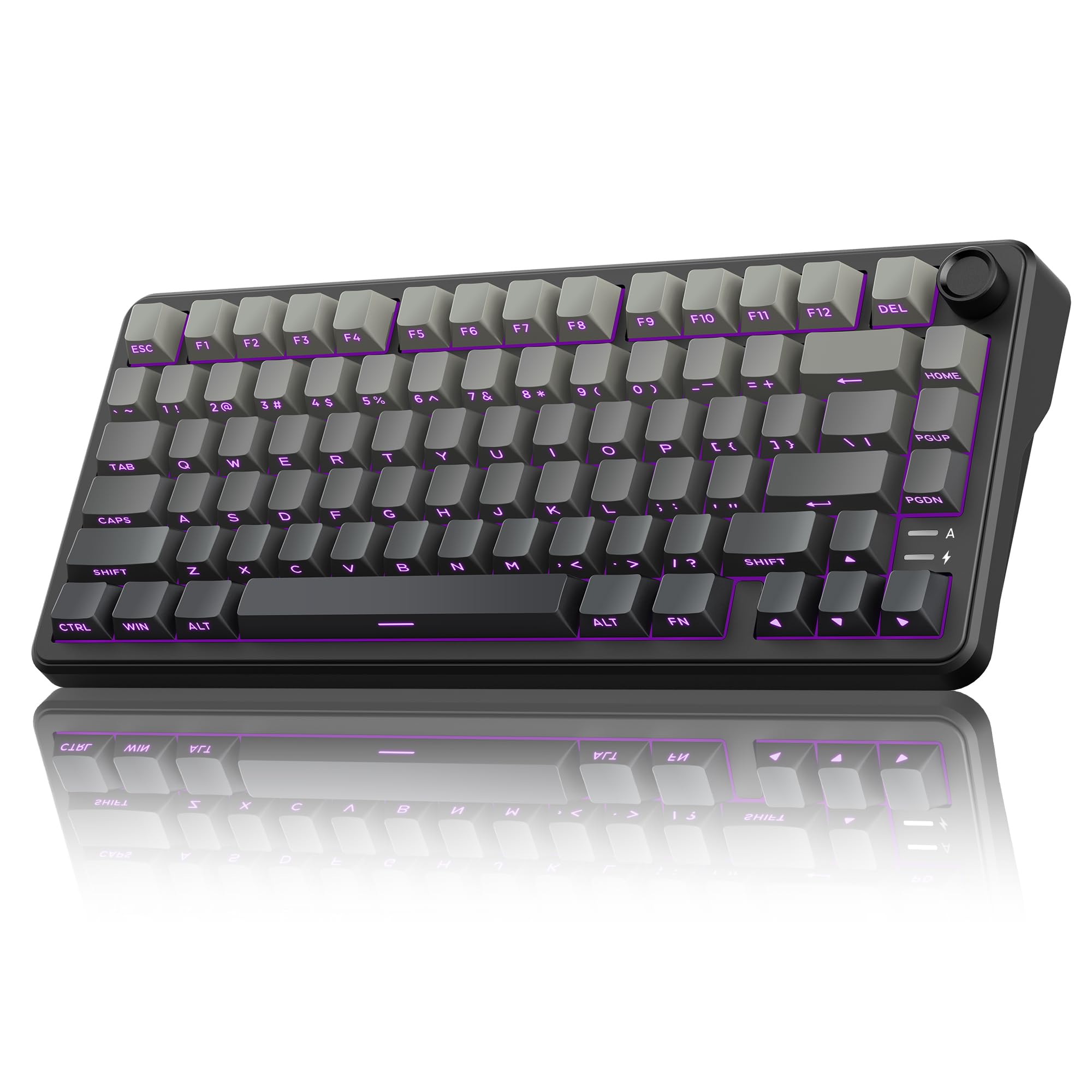
A 75% board with a physical knob for volume and light — useful, not gimmicky.
The knob is the reason to consider this one. A long press of about five seconds flips it between lighting mode and volume mode, so you can spin it up and down for brightness in game mode or for volume in office mode. It’s a tactile control that beats hunting through key combos on a controller setup. The 4000 mAh battery backs that up with rechargeable power.
It’s a 75% board with 80 keys, so you lose the number pad but keep the arrow keys — a good middle ground for a desk where space is tight. The gasket design uses five layers of shock absorption and a single-key positioning plate for a softer, more even press. Dual-colour PBT keycaps keep their colour without fading, and the side-engraved translucent caps are designed to be readable in low light.
The honest caveat: this is not a beginner keyboard. The listing itself says as much, and side-engraved legends are harder to read for anyone used to legends on top. If you’re new to mechanical boards, either pick up a spare set of front-printed caps or start with something simpler.
The drawcard
- CNC knob toggles between volume and light control
- 75% layout keeps arrows while saving desk space
- 4000 mAh rechargeable battery
- Gasket mount with five layers of damping
The caution
- Side-engraved legends take getting used to
- Not recommended for keyboard beginners
Pick this one if: you like turning a real dial for volume and you want a compact board that still has arrow keys.
Look past it if: you’re brand new to mechanical keyboards and want legends you can read at a glance.
8. BlueFinger 60% Wireless Mechanical Gaming Keyboard
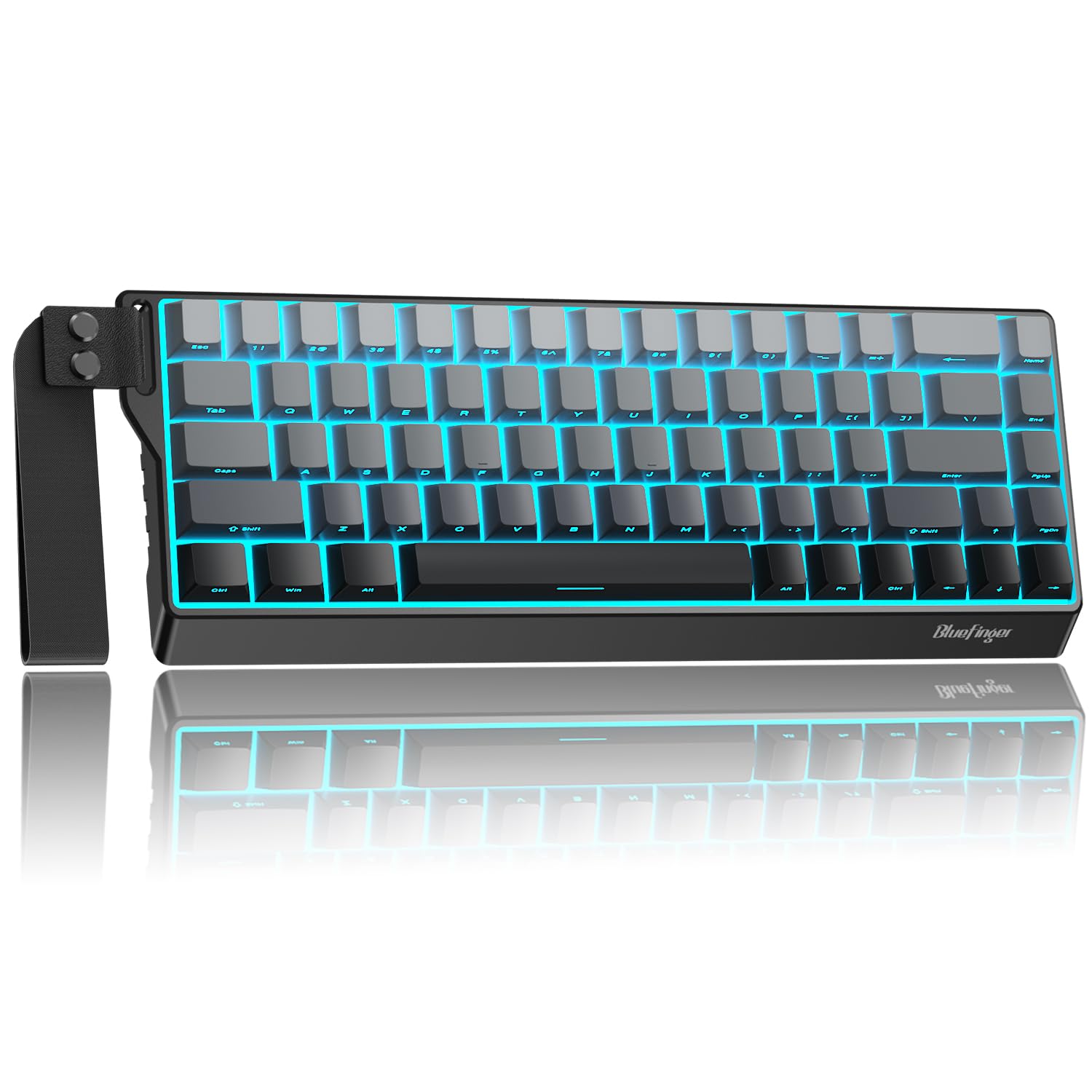
A 68-key board with a carrying strap that wants to leave the house with you.
This one is built around portability. The 68-key layout keeps arrows and function keys while staying compact, and a built-in strap means you can sling it in a bag without a case. It connects three ways — 2.4G, Bluetooth and USB-C — and a switch on top lets you flip between them, with FN+Q/W/E handing three separate Bluetooth devices.
The battery is a 4000 mAh cell, and FN+Spacebar shows the remaining charge so you’re not caught out. The hot-swappable linear white switches are rated for up to 50 million keystrokes, so you can swap a worn one without a soldering iron. Side-printed PBT caps are oil-resistant and add to the thocky feel the listing promises.
The honest caveat: three connection modes and a compact layout means a lot of key combos to memorise, and the 60% size will feel cramped if you type long messages. It’s a board for someone who values portability over full-size comfort.
The board for you if: you want a mechanical keyboard that fits in a bag and switches between console, PC and phone.
Give it a miss if: you steady-type long documents on a console — you’ll miss the number pad.
9. Aula F99 Pro Mechanical Keyboard
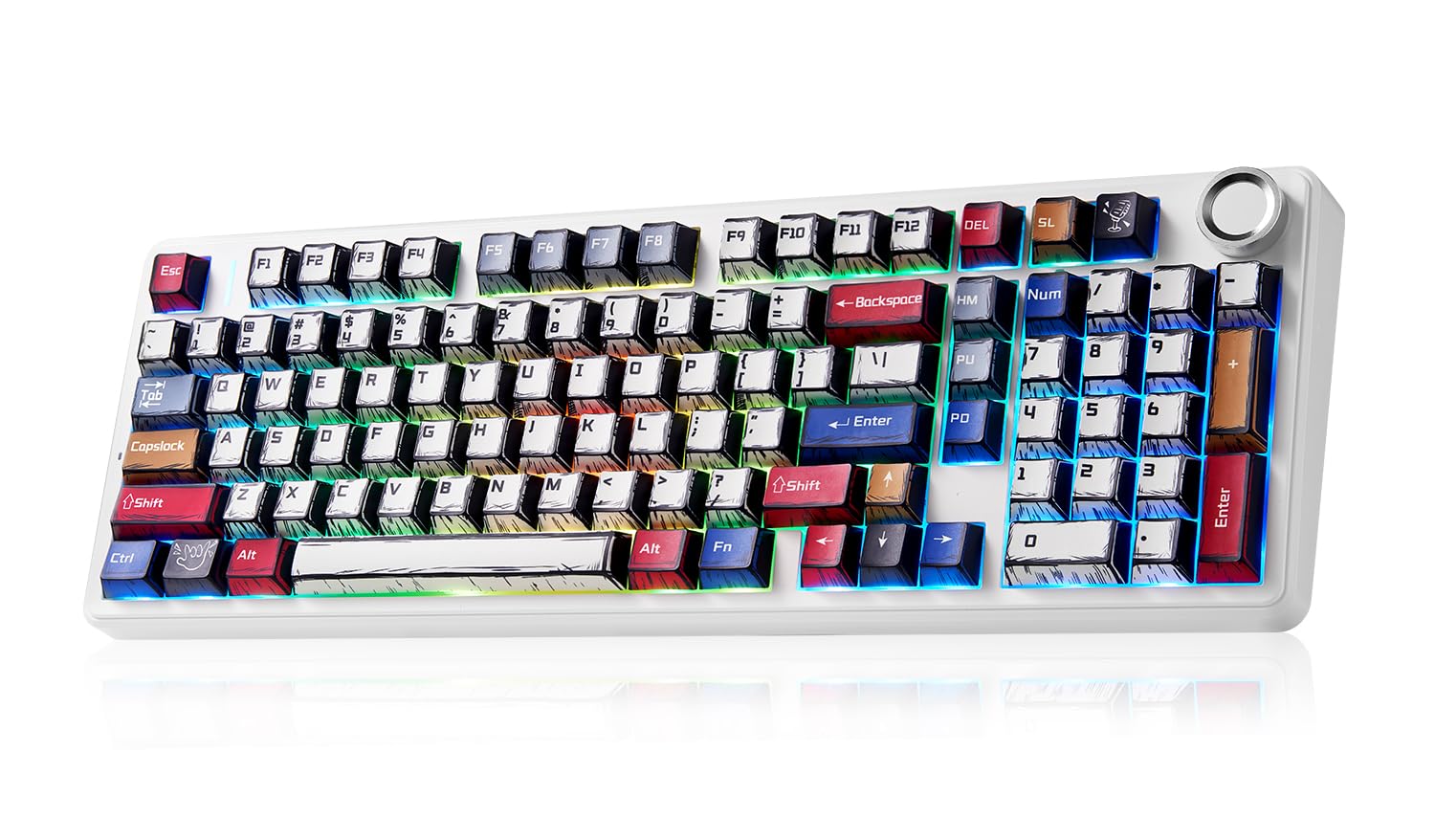
An 8000 mAh monster with a creamy sound and a full number pad.
If battery life is the deciding factor, this is the one to beat. An 8000 mAh battery sits inside the F99 Pro — a bigger cell than the 5000 mAh in the RK Royal Kludge F99 and the 4000 mAh in the RedThunder K75 and BlueFinger. That’s a console board you can wire up occasionally rather than weekly, which suits a living-room setup where a cable is an eyesore.
It’s a 99-key, 96% layout with arrow keys and the number pad kept intact. The gasket structure, extended silicone pad and PCB single-key slotting combine with five layers of internal silencer to cut the cavity noise of each press, which owners describe as a creamy sound. The knob adjusts brightness and speed, and 16 RGB effects with 16.8 million colours handle the light show. Double-shot PBT keycaps keep their lettering sharp.
The honest limit: as a 99-key board it’s big, so on a tight console desk you may feel the footprint. And the creamy sound is a taste thing — if you want a silent board, the RedThunder’s silent-switch option or the quiet Corsair membrane is a better fit.
What wins people over
- 8000 mAh battery for the longest runtime in this list
- 99 keys with number pad and arrows intact
- Gasket structure and five damping layers for a creamy press
- Knob plus 16 RGB effects to set the mood
What to weigh up
- Big 96% footprint on a small console desk
- Not the quietest choice if silence matters
Best for: console owners who want the longest time between charges and a full number pad for media and apps.
Think again if: your desk is small or you need a near-silent board.
Know the Specs
Connection type: the make-or-break spec
A keyboard only works on an Xbox Series X if the console recognises it. USB-A wired is the safest — plug it in and go. A 2.4G receiver (a tiny USB dongle that handles wireless) also works if the listing names Xbox. Bluetooth is the wildcard: some boards pair to the console, others only to a PC or phone. Check the listing names Xbox explicitly before you buy.
Battery capacity in mAh
Milliamp-hours (mAh) measures how much charge a battery holds. A larger number generally means longer runtime between charges, but the backlight matters just as much — RGB lighting can drain a battery quickly. A 4000 mAh board with the lighting off will usually outlast an 8000 mAh board that’s blazing colour all night.
Hot-swappable switches
These are sockets that let you pull a switch out and push a new one in without soldering. It matters if a key starts feeling soft or you want to change from clicky to quiet. A hot-swap PCB that accepts 3-pin and 5-pin switches gives you the widest choice.
Layout: 60%, 75% and 96%
These percentages describe how much of a full-size keyboard you keep. 60% drops the number pad and function row for maximum desk space. 75% brings back the arrows and function row. 96% squeezes in the number pad while keeping the footprint tight. Choose the layout by the keys you actually press.
Common Questions
Will any USB keyboard work with an Xbox Series X?
Does a Chatpad replace a full keyboard on the console?
What does hot-swappable mean on a keyboard?
How long does a wireless keyboard battery last between charges?
Is a membrane keyboard better than mechanical for a console?
Can I use a 60% keyboard for console gaming if I need arrow keys?
What is PBT and why does it matter for keycaps?
Do I need software to set up an Xbox Series X keyboard?
Will a wireless keyboard add input lag while gaming?
Can a keyboard meant for PC work on the Xbox Series X as well?
The Bottom Line
Across the whole range, the one that gets the balance right is the 8Bitdo Retro 87. It gives you hot-swappable switches, three connection routes and an Xbox-coded shell that holds up as a display piece too. If you type chat messages more than documents, the MoKo Chatpad is the smart grab, because it clips to the controller and weighs 2.17 ounces. And when battery life is the point, the Aula F99 Pro carries an 8000 mAh cell that keeps it off the charger the longest.
How we choose
We do not accept paid placement. Every pick is matched to a real buyer and a real use-case; we do not hands-on test units.
Sources
Specifications: manufacturer listings and product documentation. Review insights: verified customer reviews, as of November 2026. Pricing: not shown on this page (it changes often); check the current price via the retailer link.
As an Amazon Associate, Tactical Gear Guy earns from qualifying purchases. This does not affect which products we feature.