Specs are compiled from manufacturer listings and verified buyer reviews and can change over time — please confirm the key details on the product page before buying.
Most keyboards that advertise “wood” give you a plastic shell wrapped in a wood-grain sticker, and you find out the moment your fingers touch it. This list only includes boards with a real wood case or wood frame, so the warmth you feel under your palms is the actual material. You will see which layout fits your desk, which connection type suits your setup, and where each board makes you compromise.
This guide is built by comparing the manufacturers’ published specifications and the patterns across verified customer reviews, so you get each pick’s real strengths and trade-offs instead of marketing spin.
The picks below split into three clear jobs: a typewriter-style showpiece, a compact space-saver, and a gaming board with magnetic switches. Everything you need to judge a wood mechanical keyboard is covered here, and the full breakdown of the best wood mechanical keyboard follows below in plain terms.
Top Picks

How To Choose The Best Wood Mechanical Keyboard
A wood mechanical keyboard is a typing instrument first and a desk ornament second, so start with how your hands will actually meet it. The case material sets the feel and the sound, the layout sets your desk space, and the switches set how the keys respond. Get the case, layout and switches right and the board earns its desk space.
Check the case is real wood, not a wrap
A solid walnut or sapele case has visible grain that changes from board to board, and it feels cool and slightly textured under your palms. Some listings call a plastic case “wood” because of the colour, so look for words like solid walnut shell, sapele wood, or a wooden bottom case in the description. The Akko MU02 uses a warm-tone walnut wooden bottom case with a matching wood wax in the box to keep it conditioned.
Pick your layout by how much desk you have
A 65% board gives you the letters plus arrow keys in a shorter footprint, which suits small desks and laptop-then-desktop swaps. A 75% layout adds a function row without going full size. A TKL, or tenkeyless, keeps arrow and function keys but drops the number pad. The YUNZII WOOD68 packs 68 keys into 12.8 inches of length, while the YUNZII QL75 runs 12.9 inches long and 8.4 inches wide to fit its typewriter rows.
Decide between wired simplicity and wireless freedom
A USB-C wired board is plug-and-play with no battery to think about, and the GLENCREAG WK84 goes that route with its 84 keys. Tri-mode boards add Bluetooth and 2.4GHz wireless so one keyboard can hop between a desktop, a laptop and a tablet. If you move between machines during the day, a tri-mode model lets one board switch between them by keystroke.
Why hot-swap sockets are worth having
Hot-swappable means you can pull a switch out and press a new one in without soldering. If you like clicky switches for typing and linear switches for gaming, one board with hot-swap sockets covers both moods. Most of the picks here accept both 3-pin and 5-pin switches, so the choice stays open long after you buy.
Read the sound and dampening story
Wood cases resonate differently from plastic, and makers fight that with foam layers. A board with several layers of sound-absorbing foam tends to give a deeper thock instead of a hollow clack. The YUNZII WOOD68 runs a five-layer noise reduction system with silicone, PET film, sound-absorbing cotton and thick case foam to tighten the acoustics.
Side-by-Side Comparison
| Model | Best For | Layout / Keys | Connection | Case Material | Amazon |
|---|---|---|---|---|---|
| YUNZII QL75 Retro Typewriter★ Best Overall | Typewriter look with a tablet stand | 75% / 84 keys | Bluetooth, 2.4GHz, USB-C | Plastic enclosure, wood finish | Amazon |
| YUNZII WOOD68Smallest Footprint | Small desks and travel | 65% / 68 keys | Bluetooth, 2.4GHz, USB-C | Solid walnut wood shell | Amazon |
| GLENCREAG WK84 | Wired, no-fuss desk setup | 75% / 84 keys | USB-C wired | Sapele wood | Amazon |
| XVX MU68 FujiWave | One-of-a-kind grain | 65% / 68 keys | Bluetooth, 2.4GHz, USB-C | Solid walnut | Amazon |
| Womier WD75 V2 | Big battery, wireless workspace | 75% / 82 keys | Bluetooth, 2.4GHz, USB-C | Walnut wood shell | Amazon |
| Akko MU02 | Gasket softness and sound | 75% / — | Bluetooth, 2.4GHz, USB-C | Walnut wood bottom, aluminum top | Amazon |
| Keychron K8 HE | Competitive gaming | TKL (80%) / 87 keys | Bluetooth, 2.4GHz, USB-C | Wood sidings, aluminum frame | Amazon |
Detailed Reviews
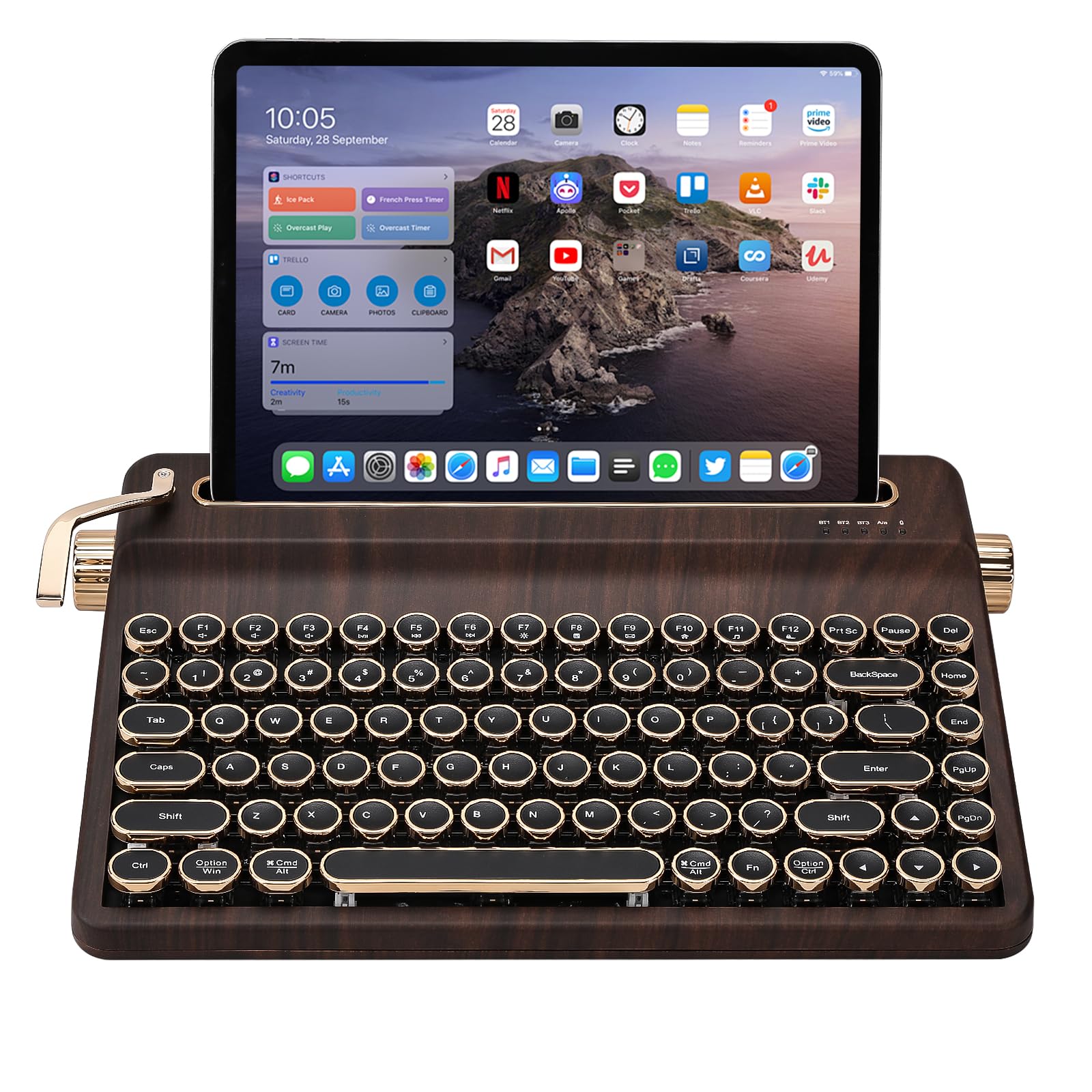
1. YUNZII QL75 Keyboard
Our pick — 4.5+★ from 450+ verified ratings; the strongest balance of quality and price.
Round typewriter keycaps and a built-in stand that turns your tablet into a vintage desk piece.
The draw here is the look, and it is doing real work: the QL75 sets 84 round keycaps on rows that climb gradually in height, so your hands sit at a gentle angle instead of flat. Owners describe an iPad docked on the built-in stand that suddenly reads like an old school typewriter, and that visual hit is the thing the review pages gush about more than anything else.
Sound is the second win. The pre-lubed switches give a soft clicky note that stays quiet enough for a shared room, and the customers-say summary backs that up with typing sound landing among the most-praised traits. You get three ways to connect — Bluetooth, 2.4GHz wireless and USB-C wired — and you can pair up to 5 devices, which covers a pc, a tablet and a phone without unplugging. QMK/VIA support means every key can be remapped later.
Here is the honest catch: the enclosure material is listed as plastic, not solid wood. If you came looking for a genuine walnut or sapele case, this board gives you the wood-tone retro styling rather than a wood block under your fingers. Weigh that against the 4.5+ star reputation and the fact that the typing experience and connectivity both get consistent praise, and it holds up as the board most people will be happiest with.
What earns the top spot
- Graduated key rows put your wrists at a comfortable angle for long sessions
- Built-in stand holds a phone or tablet right above the keys, saving desk space
- Tri-mode connection with pairing for up to 5 devices
- QMK/VIA lets you remap any key and tune the RGB
- Pre-lubed switches deliver a quiet clicky note that suits an office
Where it gives ground
- Enclosure is plastic, so the “wood” is a finish rather than a solid case
- Round keycaps take a few days to get used to if you type by touch
Reach for this if: you want a showpiece board that doubles as a tablet stand and you are happy with retro styling over a genuine wood block.
Look elsewhere if: a solid sapele or walnut case is the whole reason you are shopping.
2. YUNZII WOOD68 Keyboard
A real walnut shell in a 65% body that gives back half your desk.
Squeeze a genuine wood case onto a small desk and the WOOD68 is what you get. It runs 68 keys in 12.8 inches of length and 4.57 inches of width, which is a slimmer deck than the QL75 above at 8.4 inches wide — the QL75 measures roughly 1% wider overall but spreads that across a far deeper footprint. Fewer keys, more mouse room.
The case is a polished solid walnut shell, and the internals get the same care: a five-layer noise reduction system with silicone, a switch pad, PET film, sound-absorbing cotton and thick case foam. That stack is why it produces a soft cushioned press and a deeper thock instead of a hollow knock. A 4000mAh battery runs the wireless side, and tri-mode covers Bluetooth, 2.4GHz and USB-C wired. Cherry-profile PBT double-shot keycaps resist shine and oil, and south-facing RGB spreads light under the keys with 22 lighting effects.
This board carries a lower customer score than the top pick and fewer voices behind it, so treat it as the specialist choice rather than the crowd favourite. The trade you make is straightforward: you lose the number row and some dedicated keys to gain a smaller, genuinely wooden board. If you type mostly prose and game on the side, the missing keys rarely bite.
Wood where it counts: solid walnut shell, five-layer dampening, PBT keycaps and hot-swap sockets that take both 3-pin and 5-pin switches.
Space maths: the 65% layout trades keys for desk real estate, so measure your mouse swing before you commit.
Built for: cramped desks and anyone who wants actual walnut under their wrists.
Think twice if: you live in a spreadsheet and need a dedicated number pad on the board.
3. GLENCREAG WK84 Keyboard

No battery to charge, no pairing to fuss with — just sapele wood and a cable.
Plug it in and type. The WK84 skips wireless entirely and runs a USB-C connection, which suits a fixed desk where the keyboard never moves. It carries 84 keys in a 75% layout — versus the WOOD68’s 68 keys, and the difference is a full function row plus a couple of navigation keys you will miss if you code or use shortcuts all day.
The case is cut from sapele wood, and the switches are hot-swappable green switches with PBT keycaps on top. Twenty RGB lighting effects let you repaint the deck, and QMK/VIA compatibility opens up key remapping and macros. The consensus among people who own one is that the build quality is the standout — it is the trait mentioned most — with the appearance close behind. Owners describe the sapele case and green switches as feeling almost like playing an instrument.
What you give up is mobility. A cable-only board cannot follow you to the couch or the tablet on the counter, so this is the wrong pick if you switch machines during the day. For a single desktop that never budges, though, it removes a whole category of hassle — nothing to charge, nothing to reconnect.
Why it earns a spot
- Real sapele wood case with a natural finish
- 84 keys keep the function row and navigation keys
- Hot-swap sockets plus QMK/VIA for full remapping
- No charging or pairing — plug in and go
What you trade away
- Wired only — no Bluetooth or 2.4GHz pairing
- Green switches are a specific feel; confirm you like clicky before committing
The right call for: a permanent desktop station where the keyboard never leaves the desk.
Skip if: you rotate between a laptop, tablet and desktop and want one board to follow you.
4. XVX MU68 Keyboard
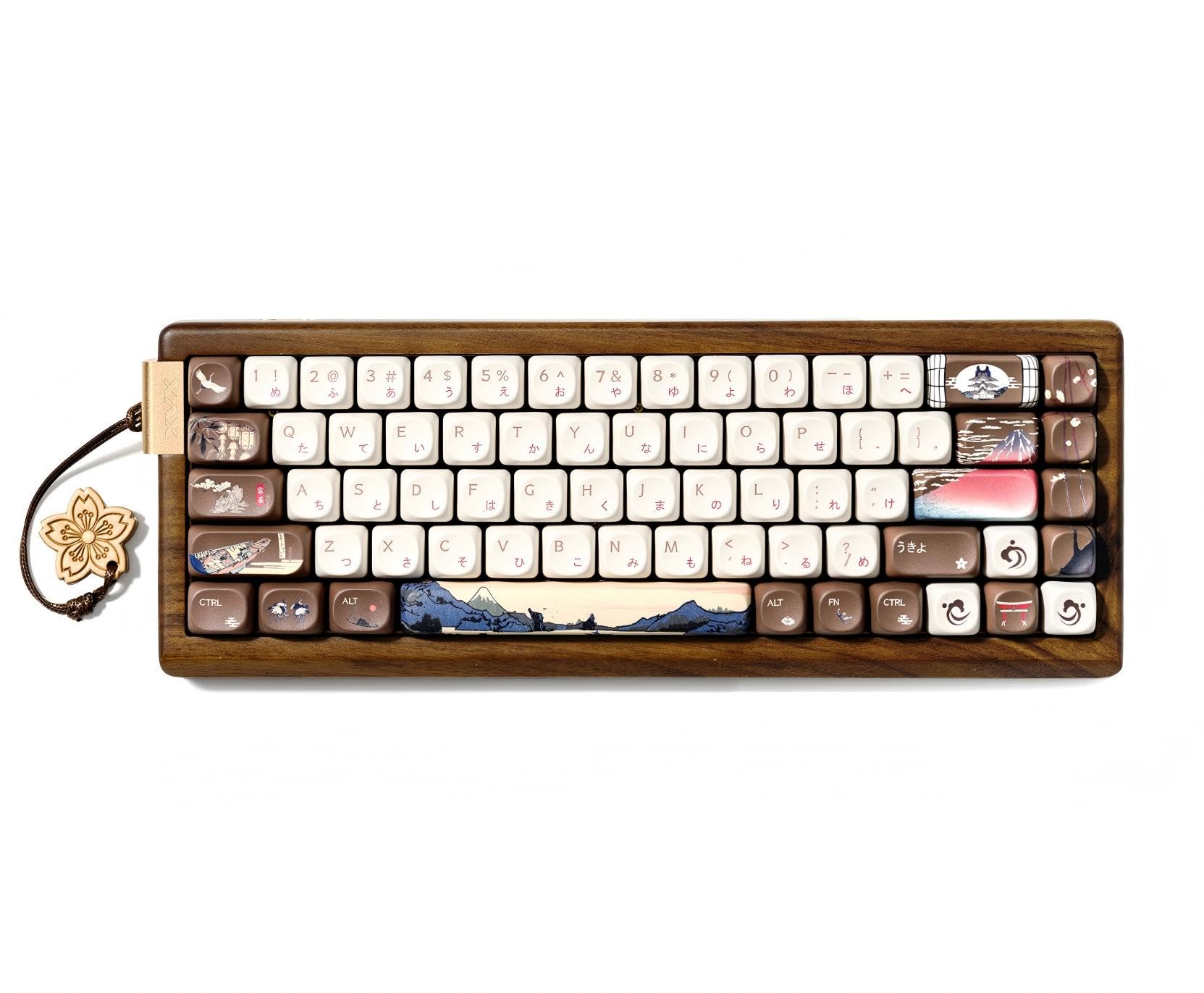
Two MU68s will never look the same — each walnut shell is cut from its own block.
Every shell is cut from real walnut, so the grain pattern on yours is not the one on the listing photo. A matte oil finish keeps fingerprints from showing after a long day at the desk. It is a 65% board with 68 keys, matching the WOOD68’s key count, and it packs a 4000mAh battery for weeks between charges on the wireless side.
The clever bit is the mode switch hidden under the CapsLock keycap. Bluetooth, 2.4GHz and USB-C wired all toggle from that concealed switch, so you get three-device switching without an exposed slider breaking up the wood look. Pair up to three devices and jump with a keystroke. Tray-mount construction with foam dampening keeps the typing feel solid and quiet, and VIA support lets you remap keys and build macros.
The lower customer score here tells you this is a board people either love or find quirky, and the smaller pool of owners means fewer opinions to lean on. The hardware story is strong — genuine walnut, hidden switch, VIA — so the score is more about fit than flaws. It suits someone who wants a board nobody else at the office owns.
The walnut difference: each case is its own cut of wood, so the finish you receive is genuinely one of a kind.
Clean look, real function: hiding the mode switch under CapsLock keeps the deck free of exposed sliders while still giving you three-way switching.
Fits you if: a keyboard that looks like nobody else’s matters more than a big safety net of reviews.
Worth weighing: the second-lowest score on this list, so read the fine print and buy with a clear return path.
5. Womier WD75 V2 Keyboard
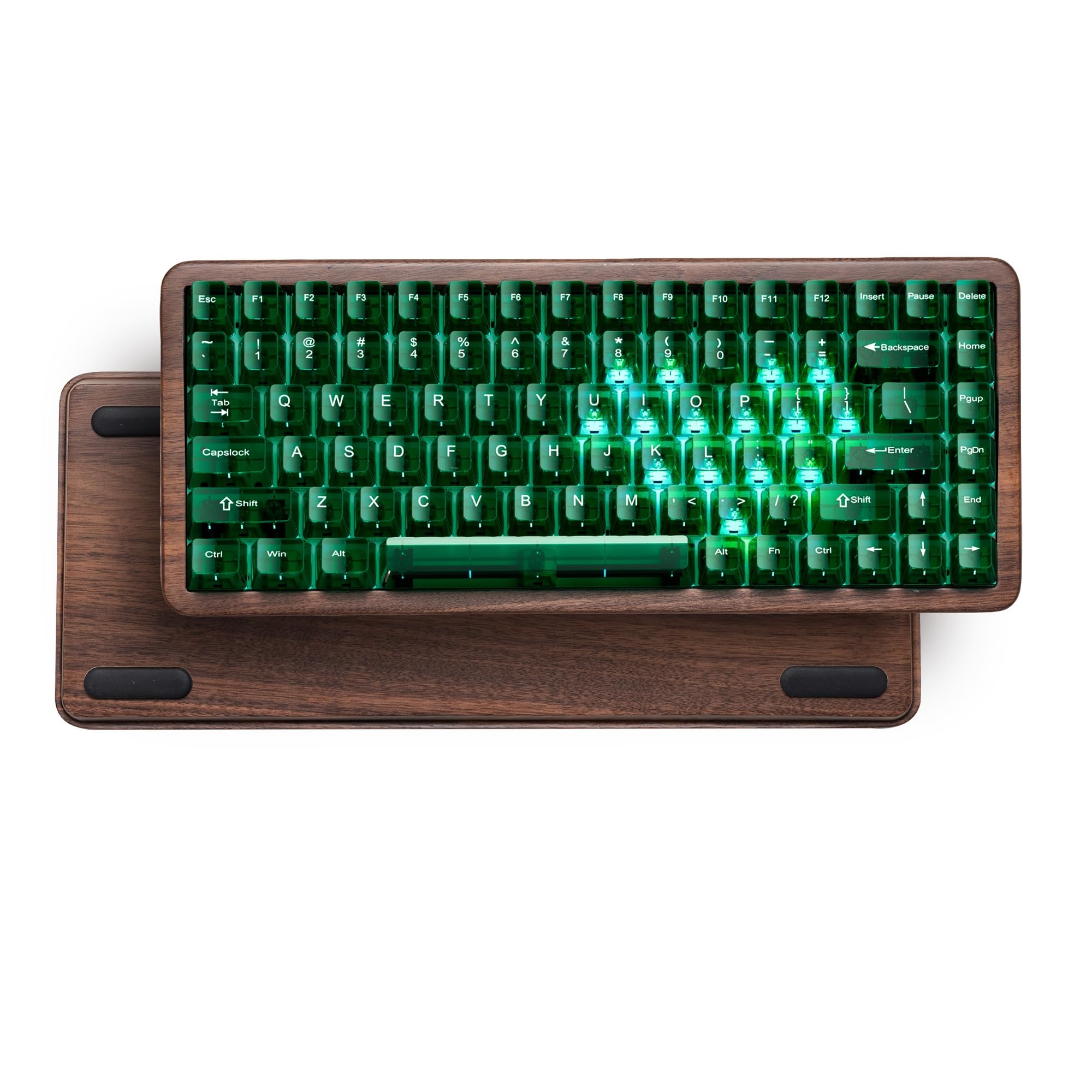
An 8000mAh battery that simply refuses to make charging part of your week.
Most wireless boards name a 4000mAh cell; the WD75 V2 doubles that with 8000mAh, so the days you think about charging get a lot rarer. The walnut wood shell is polished until it feels smooth and delicate, and the dark brown finish pairs with pre-installed green translucent keycaps. It is a 75% layout with 82 keys, so you keep the function row without the number pad.
Under the hood sit full POM linear switches — 55 gf of drive force and 2.0mm of pre-travel, which is a light, quick press that still guards against accidental hits. Five layers of sound-absorbing filling soften the feel and shape the note into something creamy rather than sharp. QMK/VIA lets you remap keys, but do it in wired mode first: the note in the listing says the keymap you set then carries over to wireless. South-facing RGB under MDA-profile keycaps spreads the light evenly.
The recurring grip in owner feedback lands on functionality — specifically a spacebar that occasionally arrives dead — so test every key the day it shows up. That is a small, checkable risk rather than a design flaw, and the quality, appearance and sound all draw steady praise. Owners of working units praise the build, sound and walnut finish.
Where it shines
- 8000mAh battery versus the 4000mAh boards here
- Full POM linear switches with 55 gf force and 2.0mm pre-travel
- Walnut shell with five layers of sound dampening
- QMK/VIA remapping plus south-facing RGB
Keep in mind
- Remapping only works in wired mode first, then carries to wireless
- Functionality is the mixed note — test the spacebar and every key on arrival
Your board if: you want to charge it rarely and like a light, quick linear press.
Do not overlook: run a full key check the day it lands, especially the spacebar.
6. Akko MU02 Keyboard

Gasket mounting takes the sting out of every keystroke — soft, cushioned, and quiet.
A gasket-mounted board floats its plate on soft material, so the whole deck gives a little when you press. That is the MU02’s headline: a cushioned, springy feel straight from the start. The case pairs an aluminum top with a warm-tone walnut wooden bottom, and it ships with a stick of wood wax so you can keep the timber conditioned over the years.
The sound story is serious. Akko built a five-layer noise reduction system and added a PET layer plus 3mm poron case foam with socket cut-outs to lock the sound in. PBT dye-sub keycaps in the MOA profile outlast ABS and resist the oily shine that builds up on cheaper keys. A 4000mAh battery runs it over Bluetooth 5.0, 2.4GHz or wired Type-C, and the Akko Cloud Driver handles per-key RGB with more than 12 media hotkeys preset for volume, mute and calculator.
What people rave about first is how it all works together — functionality is the most-praised trait, with the sound close behind — and owners describe a board with real heft and a sturdy build. The honest caveat is that the value and the RGB both draw mixed feelings, so if you need every key glowing perfectly even, look at a different deck. For the feel and the sound, this is one of the softest wooden boards you can put on a desk.
The feel: gasket mount plus five-layer dampening including 3mm poron foam makes bottoming out gentle and quiet.
The upkeep: real walnut wants occasional waxing, and Akko includes wood wax in the box for exactly that.
Choose this if: your hands are tired of harsh bottoming-out and you want a soft, cushioned keystroke.
Consider the trade: the RGB and overall value split opinion, so buy it for the feel and sound, not the lighting.
7. Keychron K8 HE Keyboard

Magnetic switches with a 0.2 mm to 3.8 mm actuation range — tuned to your touch, not the factory’s.
Hall Effect switches use a magnet and a sensor instead of metal contacts, so nothing physically touches to register a press. That is what lets the K8 HE set its actuation point anywhere from 0.2 mm to 3.8 mm of travel. You tune the depth to your own hands and the Rapid Trigger feature resets each keystroke by distance, which is the reason competitive players chase this board.
Wireless side: 2.4GHz, Bluetooth 5.2 and USB-C wired, with a 1000Hz polling rate in 2.4GHz and wired modes. That polling rate means the board reports its state to your computer a thousand times a second, so your input lands on the next frame. The 80% TKL layout keeps arrow and function keys while freeing desk space for the mouse, and the frame mixes wood sidings with aluminum for weight and rigidity — it tips the scales at 700g.
Double-shot PBT keycaps in the OSA profile resist shine and wear, and the Keychron Launcher web app remaps keys and sets actuation depth with nothing to download. This is the highest-scoring board here, and the praise centres on the build and the ergonomics of typing on it. The caveat is audience: Hall Effect and Rapid Trigger are for people chasing reaction time in shooters, and a writer who just wants a wood deck may never use any of it.
The gaming case
- Adjustable actuation from 0.2 mm to 3.8 mm tunes the press to your hands
- Rapid Trigger resets by travel distance for quick strafe response
- 1000Hz polling in 2.4GHz and wired modes
- TKL layout keeps arrow and function keys while freeing mouse room
- Web-based remapping with no software download
The reality check
- Hall Effect tuning is overkill if you mostly type documents
- Wood is limited to the frame sidings, not the full case
Right for: competitive players who want tuneable magnetic switches inside a wood-and-aluminum frame.
Not for: someone hunting a solid walnut block — here the wood is a trim detail.
Know the Specs
Layout and Key Count
Layout size tells you how much desk the board eats and which keys survive. A 65% board packs the letters and arrows into around 68 keys, a 75% adds a function row to reach roughly 82 to 84 keys, and a TKL keeps arrows and function keys while dropping the number pad. Fewer keys free up mouse room; more keys keep the function row and shortcuts you already know. Measure your mouse swing before you downsize.
Switch Type and Hot-Swap
Linear switches press straight down with no bump, which suits fast gaming. Tactile and clicky switches add a bump or a click at the actuation point, which many typists prefer. Hall Effect switches are different again — they sense a magnet and let you set the actuation depth. Hot-swap sockets let you change any of them without soldering, so the board can outlive your taste in switches.
Battery Capacity (mAh)
Milliamp-hours measure how much charge a wireless board’s battery holds, and more usually means fewer charging days. The boards here run cells from 4000mAh up to 8000mAh. A bigger cell adds a little weight but pushes charging further out, which matters most if you carry the keyboard between rooms. If your board lives on a cable, capacity is a non-issue.
Mount Style and Dampening
Tray mount bolts the plate tight to the case for a firm, direct feel. Gasket mount floats the plate on soft material so the whole deck gives slightly under your fingers, which feels softer and sounds deeper. Layers of foam, silicone and PET film control resonance, and more layers generally mean a tighter thock instead of a hollow clack.
Connectivity Modes
Tri-mode means three ways to connect: Bluetooth for tablets and laptops, 2.4GHz wireless through a USB dongle for low-latency desktop use, and USB-C wired for zero battery worry. A wired-only board is simpler and never needs charging. If you switch between machines during the day, look for multi-device pairing so one keystroke moves you from desktop to laptop.
Keycap Profile and Material
PBT keycaps resist oil and shine far better than ABS, and dye-sub or double-shot legends stay crisp instead of wearing off. Profile describes the shape and height of the caps — Cherry and OSA and MOA each sit differently under your fingertips. Since you cannot swap the case as easily as keycaps, pick a profile you have typed on before.
Common Questions
Is a wood mechanical keyboard actually solid wood or a veneer?
Will a wood case warp or crack over time?
Can I change the switches on these wood keyboards?
How many devices can a tri-mode wood keyboard pair with?
Is QMK or VIA support worth paying for?
What does 65% versus 75% versus TKL actually change?
How does a Hall Effect keyboard differ from a regular mechanical one?
Will these wood keyboards work with a Mac?
Can I use a wireless wood keyboard for competitive gaming?
Do wood keyboards sound different from plastic ones?
The Bottom Line
For most people, the wood mechanical keyboard to buy is the YUNZII QL75, because its round keycaps, tablet stand and 5-device tri-mode pairing make it the board that fits the most desks and the most moods. If a genuine walnut case is non-negotiable, the YUNZII WOOD68 gives you solid wood in a 65% body that reclaims your desk. And if reaction time in games is the whole point, the Keychron K8 HE with its 0.2 mm to 3.8 mm adjustable actuation is the one to reach for.
Whatever you pick, the smart move is to confirm the wood is real, measure your desk for the layout, and decide whether a cable suits you before you fall for a photo. Then buy the board whose layout and switches match how you actually type.
How we choose
We do not accept paid placement. Every pick is matched to a real buyer and a real use-case; we do not hands-on test units.
Sources
Specifications: manufacturer listings and product documentation. Review insights: verified customer reviews, as of November 2026. Pricing: not shown on this page (it changes often); check the current price via the retailer link.
As an Amazon Associate, Tactical Gear Guy earns from qualifying purchases. This does not affect which products we feature.