Specs are compiled from manufacturer listings and verified buyer reviews and can change over time — please confirm the key details on the product page before buying.
A ZBook docking station is the one purchase where guessing gets expensive. Buy the wrong one and your laptop either refuses to charge, drops a monitor, or throttles under a heavy render because the dock cannot push enough watts. Get it right and you plug in a single cable, your two or three screens wake up, and the machine charges while you work. This guide covers eight docks that list HP ZBook models in their compatibility data, and it tells you plainly which one fits which ZBook generation and workload.
This guide is built by comparing the manufacturers’ published specifications and the patterns across verified customer reviews, so you get each pick’s real strengths and trade-offs instead of marketing spin.
Power delivery, port count and ZBook generation support are the three things that decide whether a dock works on your desk, so every pick below is judged on those first. Here is the honest breakdown of the best hp zbook docking station for your setup.
Top Picks

How To Choose The Best HP ZBook Docking Station
The spec sheet on a docking station is short, but three of those numbers decide whether it works on your desk at all. Check them in this order and you will not waste a return.
Match the dock’s wattage to your ZBook’s charger
A dock charges your laptop by feeding it watts over one cable — the same watt number printed on the charger brick that shipped in your ZBook’s box. A dock rated at 120W feeds 120 watts. A dock rated at 280W feeds far more. If the dock’s number sits below your laptop’s charger rating, the ZBook may still run, but it can charge slowly or warn you about insufficient power during heavy work. Look up your HP charger first, then look for a dock at or above that number.
Confirm your ZBook generation appears in the compatibility list
Every dock on this list names specific HP models in its compatibility data — ZBook 14u G5 and G6, ZBook 15 G5 and G6, ZBook 17 G5 and G6, ZBook Studio G5, ZBook x2 G4, ZBook Fury, ZBook Firefly and ZBook Power. Find your own model on that list before anything else. A dock can be perfect on paper and still refuse your laptop if your generation is not named.
Decide how many displays you actually run
Two monitors is the common desktop setup, and most docks here handle it through one HDMI and one DisplayPort. Three displays needs a dock that says so. Four simultaneous 4K displays is a different tier entirely. Count your screens before you shop, because paying for a 4K quad-display dock to run one 1080p panel wastes money, and a two-port dock will not grow a third output later.
Side-by-Side Comparison
| Model | Best For | Power Delivery | Ports | ZBook Support | Amazon |
|---|---|---|---|---|---|
| USB-C Docking Station 5TW10AA★ Best Overall | Charging and dual monitors on one cable | 120W adapter | 9 | ZBook 14u/15u/15/17 G5–G6, Studio G5, x2 G4 | Amazon |
| HP Thunderbolt Dock G2HP-Branded Pick | HP-branded Thunderbolt for mixed HP fleets | — | — | ZBook 14u/15u/17 G3, 15 G4 | Amazon |
| USB-C Dock G2Speed & Security | Fast USB data plus a Kensington lock | USB-C power output | 9 | ZBook 14u/15u/15/17 G5–G6, Studio G5, x2 G4 | Amazon |
| HP 26D32AA Docking Station G5 | Full cable bundle from the start | 120W adapter | 9 | ZBook 14u/15u/15/17 G5–G6, Studio G5, x2 G4 | Amazon |
| HP ZBook 200W Thunderbolt 3 Dock | Older G3 ZBook workstations | 200W | 14 | ZBook 17 G3, 15 G3, Studio G3 | Amazon |
| USB-C G6 100W Docking Station | Compact desks and travel between sites | Up to 100W | 10 | ZBook 14u/15u/15/17 G5–G6, Studio G5, x2 G4 | Amazon |
| Plugable Thunderbolt 5 Dock | High-refresh 8K editing rigs | 140W | 16 | ZBook Fury G1i 16 and 18 | Amazon |
| HP Thunderbolt 4 Ultra 280W G6 Dock | Four 4K displays plus maximum charging | 280W | 13 | ZBook Firefly, Fury, Power Series | Amazon |
Detailed Reviews
1. USB-C Docking Station 5TW10AA
Our pick — 4.0+★ from 200+ verified ratings; the strongest balance of quality and price.
The dock that ships with its own 120-watt brick, so your ZBook charges the moment you plug in.
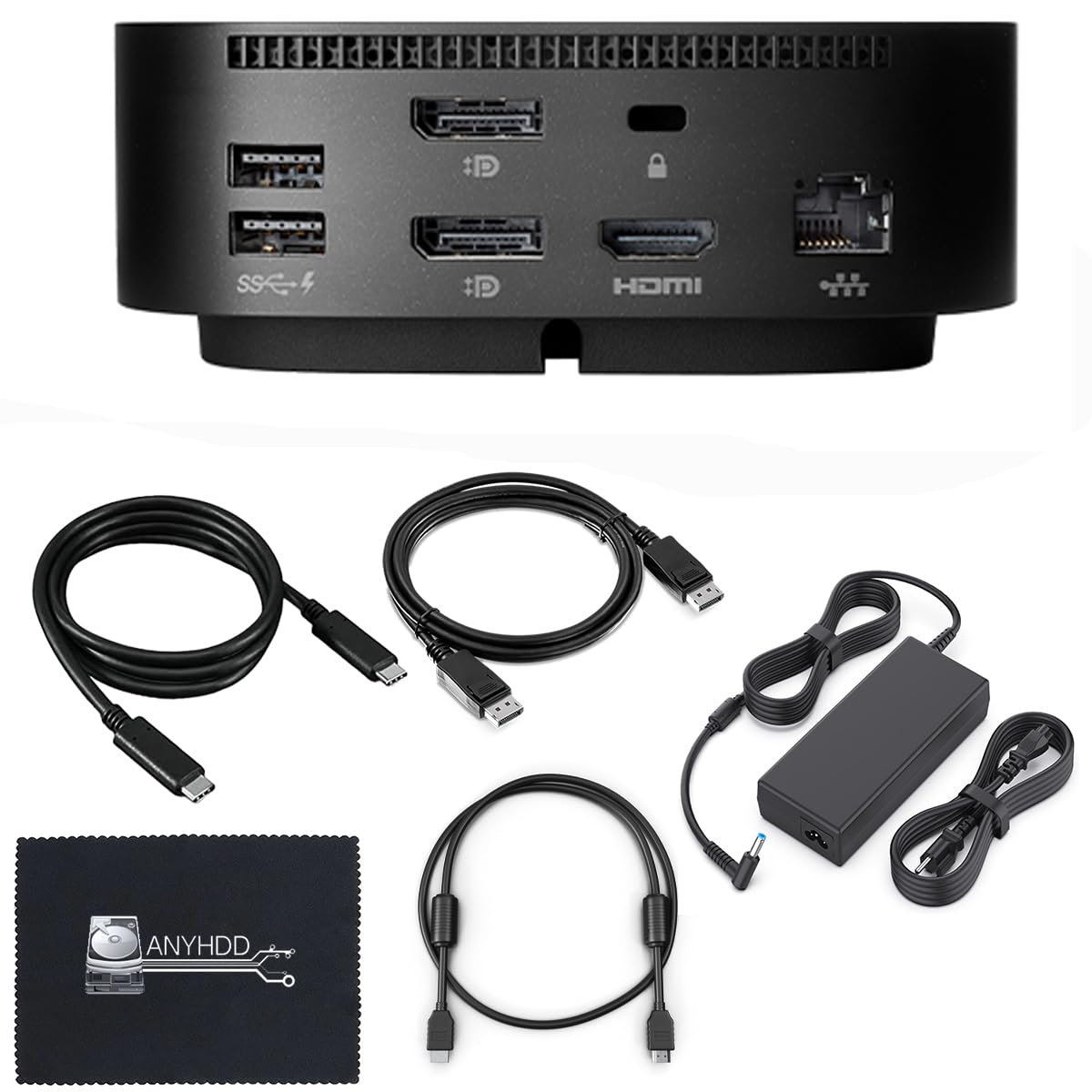
Here is the number that decides this one: a 120W power adapter is included in the box. That is the wattage that keeps a mid-range ZBook topped up while it drives two monitors, because the dock is feeding your laptop real power over the single USB-C cable rather than sipping from it. The dock itself measures 4.8 by 4.8 by 1.8 inches and weighs 23.98 ounces, so it takes a small square of desk behind your screens and stays put.
The port lineup covers the everyday desk without adapters. You get 1 powered USB 3.0, 1 USB-C power port, 1 USB-C data port, 1 audio jack, 1 SuperSpeed USB 3.0, 1 network port, 2 display outputs split across DisplayPort and HDMI, and Gigabit Ethernet for a wired connection. The compatibility list is long and specific — ZBook 14u G5 and G6, ZBook 15u G5 and G6, ZBook 15 G5 and G6, ZBook 17 G5 and G6, ZBook Studio G5, and ZBook x2 G4 all appear by name. That covers every ZBook generation from 14u G5 up to 17 G6.
What wins people over is the value — buying the dock and the 120W adapter as one box costs less than chasing the two separately. Setup is quick, and the all-in-one bundle means most buyers are running dual monitors within minutes rather than hunting for a spare power brick. The honest fit note is compatibility, because it draws more discussion than anything else on this listing and the HDMI output is where the friction tends to show up. Update the dock firmware first if a monitor does not wake — the maker says so plainly in the listing. It holds 4.0+ stars across 200+ ratings, the strongest owner record of the mid-range picks here.
What earns the top spot
- 120W adapter arrives in the box, so charging works from day one
- Nine ports including Gigabit Ethernet and both DisplayPort and HDMI
- Names the widest ZBook generation spread, from 14u G5 up to 17 G6
- Compact 4.8 x 4.8 x 1.8 inch body keeps the desk clear
Where it asks for patience
- Compatibility is the most-discussed topic on the listing and it splits both ways
- The HDMI output is the usual culprit when a screen will not wake
- Firmware updates are part of getting the ZBook talking reliably
Go this way if: you run a ZBook 14u through 17 G6 and want one cable for charging plus two monitors.
Pause first if: you cannot update the dock firmware, because that is the step that solves most setup snags.
2. HP Thunderbolt Dock G2
The genuine HP Thunderbolt dock, built for fleets that want the manufacturer’s own part number on the desk.
This one is larger than the tiny square docks — 9.4 by 9 by 5.3 inches, versus the 4.8 by 4.8 by 1.8 inch footprint of the 5TW10AA on the previous pick. That size is the trade-off you accept for the HP badge and the part number 3TR87UT#ABA stamped on the thing, which matters in an office where IT wants matched hardware. It weighs 1.8 pounds and connects over Thunderbolt, not plain USB-C.
The ZBook compatibility here is the older end: ZBook 14u G3, 15u G3 and 17 G3, plus ZBook 15 G4. If your machine is a G5 or G6 era ZBook, this is not the dock for you — go back to the 5TW10AA or the USB-C Dock G2. If your fleet runs the G3 and G4 generation, this is the one wired for exactly that, and the Thunderbolt interface is the language those machines expect.
Setup is where this dock earns its keep — getting it running is the thing people like about it. The real caveat is uptime, because functionality is the most-discussed topic on the listing and it does not land cleanly for everyone. Some units simply stop responding and need a power cycle. Port availability is the other split opinion, with more HDMI wanted than the dock provides. The chassis also draws a few hard words for its bulk and sturdiness. Plug the combo cable in once and the desk mostly just works — right up until it does not.
Who this fits: a G3 or G4 ZBook sitting on a desk that has to keep an IT department happy with HP-branded hardware.
The honest catch: the dock’s reliability record is uneven and it takes up nine inches of desk width, so a smaller, newer dock beats it for most home setups.
Reach for it if: you are on ZBook 14u G3, 15u G3, 17 G3 or 15 G4 and want the original HP part.
Look elsewhere if: your ZBook is newer than G4 — the compatibility list stops before it reaches you.
3. USB-C Dock G2 Docking Station
Built for the shared desk — a 10Gbps front port and a Kensington lock slot to stop the dock walking off.
The standout here is a single front-facing USB 3.2 Gen 2 port. That is a 10Gbps data pipe versus the 5Gbps ports beside it, which matters when an external SSD copies a big project folder. Around it sit two USB 3.2 Gen 1 ports at 5Gbps, one on each side, and each will charge a device while it transfers data. There is also a standard Kensington lock slot, with the lock sold separately.
Nine ports total, split across DisplayPort, HDMI, USB-C and USB 3.0, with one HDMI output. That is enough for a dual-monitor ZBook desk: DisplayPort to the main screen, HDMI to the second, and the USB ports left free for a keyboard, a mouse and a headset. The ZBook list runs the full modern sweep — 14u G5 and G6, 15u G5 and G6, 15 G5 and G6, 17 G5 and G6, Studio G5, and x2 G4. Newer than the HP Thunderbolt G2 above, which stops at G4.
The caveat is the record: this dock is the newest listing of the group, so its track record is still thin compared with the others. What the spec sheet does show is a sensible desktop dock with a genuinely fast front port and a physical lock point, and that is a rare combination at this tier.
Worth it for: a ZBook 14u G5 or newer where you shuffle large files and want the dock physically secured.
Think twice if: you need a proven long-term reliability record — this is the freshest listing on the list.
4. HP 26D32AA#ABL Docking Station G5

A six-piece bundle that hands you the dock, the 120W brick and every display cable in one purchase.
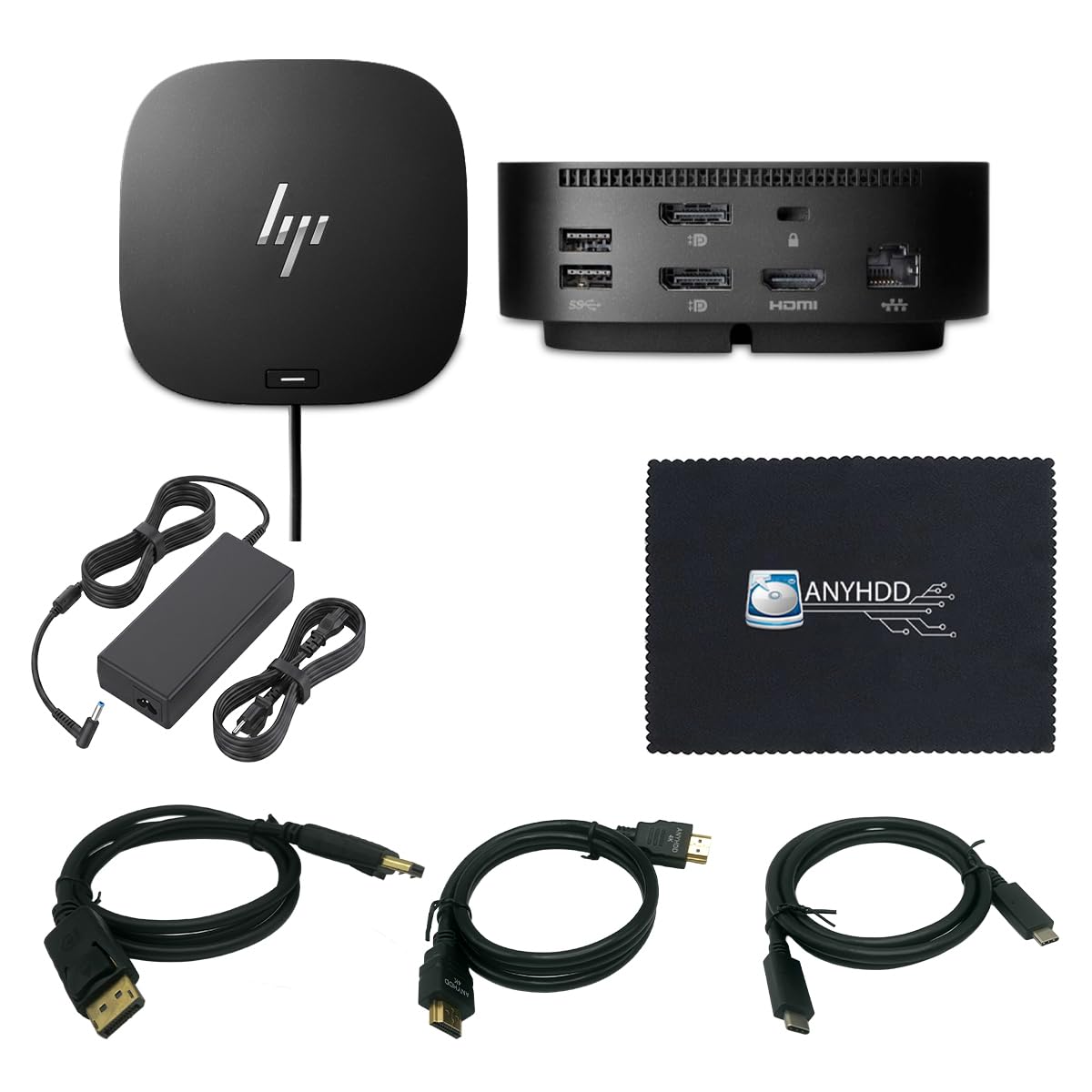
Buying a dock usually means buying cables next. This bundle heads that off: the box holds the dock, a 120W power adapter, an HDMI cable, a DisplayPort cable, a USB-C cable and a microfiber cloth — six items, one order. The dock body measures 4.8 by 4.8 by 1.8 inches and weighs 23.98 ounces, matching the compact footprint of the 5TW10AA rather than the sprawling HP Thunderbolt G2.
The port set is the same nine-port layout: 1 powered USB 3.0, 1 USB-C power port, 1 USB-C data port, 1 audio jack, 1 SuperSpeed USB 3.0, 1 network port, and two display outputs across DisplayPort and HDMI, plus Gigabit Ethernet. ZBook support covers 14u G5 and G6, 15u G5 and G6, 15 G5 and G6, 17 G5 and G6, Studio G5 and x2 G4 — the same modern spread the 5TW10AA names, so a G5 or G6 workstation is covered.
Here is the honest part: this is a renewed unit, and the dock’s record is the thinnest of the mid-range picks. Where the 5TW10AA reassures with a wider body of owner experience, this bundle leans on the sheer convenience of nothing left to buy. If you are setting up a desk from scratch and want one box that closes the loop, it delivers that. If you want the safest bet in the tier, the 5TW10AA above has the longer history behind it.
The real value: three cables and a 120W adapter included means a working dual-monitor desk from a single package, on ZBook G5 and G6 machines.
The trade-off: it is a renewed unit with less owner history than the top pick, so inspect it on arrival.
Best for: building a full ZBook desktop from one order with no loose ends to chase.
Skip if: a renewed unit with a short track record makes you uneasy.
5. HP ZBook 200W Thunderbolt 3 Dock (P5Q61UT)

The 200W dock built specifically for G3 ZBook workstations — a number no USB-C dock on this list reaches.
Two hundred watts is the figure that matters, and only the Ultra G6’s 280W tops it here. That wattage exists for a reason: G3-era ZBook mobile workstations were hungry machines, and a plain 100W USB-C dock would have left them short. This dock is purpose-built for those laptops, with 3x USB 3.0 plus 1x Powered USB 3.0, 2x DisplayPort 1.2, 1x VGA, 1x RJ-45 Ethernet, combo audio, one Thunderbolt 3 port and a Thunderbolt 3 power cable. Fourteen ports in total, and an AC adapter is included.
The compatibility is narrow by design: HP ZBook 17 G3, ZBook 15 G3 and ZBook Studio G3. Nothing newer. If your ZBook is a G5 or G6, this dock will not talk to it, and you want the 5TW10AA instead. If you are still running one of those three G3 workstations on a CAD or render desk, this is one of the only docks on the market wired for it, and the VGA port is a genuine rarity that still connects older projectors and monitors.
What works here is functionality — that is the thing that holds up. Value is a different story, and opinions on it are split. At 9.06 by 9.06 by 0.69 inches, it is thin enough to slide under a monitor riser rather than eat the whole desktop. Buy it as a fit-specific tool, not a general dock.
Its specific job: 200W of charging plus a VGA output, aimed at exactly three ZBook G3 models.
The cost of that focus: nothing past G3 works, and the value question is the one point that does not land cleanly.
It suits: a ZBook 17 G3, 15 G3 or Studio G3 workstation that needs serious wattage and a legacy VGA port.
Not for you if: your ZBook is newer than G3 — you need a USB-C dock instead.
6. USB-C G6 100W Docking Station
Ten ports, up to 100W delivery, and a form factor built to disappear behind your screens.
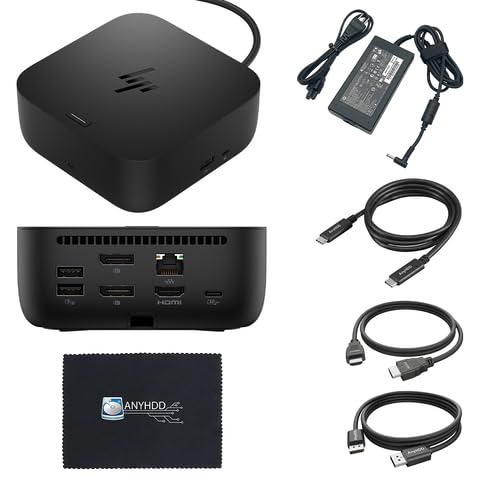
A hundred watts of power delivery is the ceiling on this one. That is enough to keep a ZBook fed on a normal desk day, though it sits below the 120W and 200W docks on either side of it here — check your HP charger rating before you commit. The upside shows up on the desk itself: a space-saving body, integrated cable management so the Thunderbolt cable tucks away when not in use, ambient LED indicators and on-screen status notifications that tell you what is connected.
The port count is ten, covering 5 USB ports, 1 HDMI output, DisplayPort, USB-C and Ethernet, all over a single-cable USB-C link. ZBook coverage matches the modern generation: 14u G5 and G6, 15u G5 and G6, 15 G5 and G6, 17 G5 and G6, Studio G5 and x2 G4. The silver finish is a pleasant break from the usual black boxes, and the replaceable components and plastic-free packaging fit the way fleets are being bought now.
The trade-off you need to weigh honestly: this is a very new listing, so there is almost no owner history yet. The spec sheet is solid on ports and design, but it is not the dock to buy if you want to see a long pattern of use before you spend. Buy it for the compact form and the cable management, not for a proven track record.
What it does well: ten ports including 5 USB connections, up to 100W delivery, and integrated cable management that keeps the desk tidy between sessions.
What it will not do: out-power the 120W and 200W docks here, and it has little owner feedback behind it yet.
Made for: a tidy ZBook G5 or G6 desk where cable clutter bothers you more than raw wattage.
Better elsewhere if: your ZBook’s charger sits above 100W — step up to a higher-wattage dock.
7. Plugable Thunderbolt 5 Dock
Sixteen ports, two HDMI 2.1 outputs and 140W charging for a ZBook Fury on a Thunderbolt 5 desk.
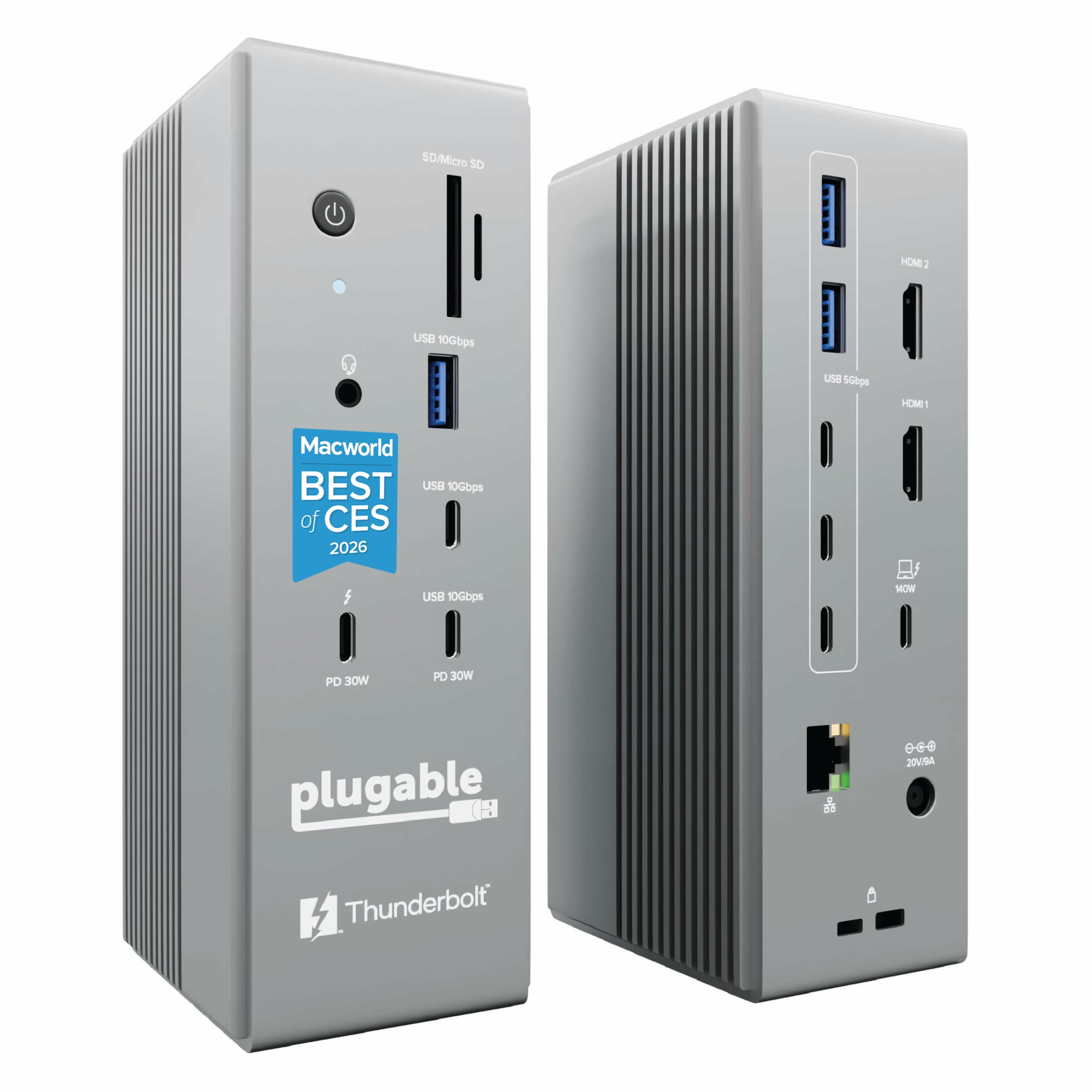
The spec that separates this dock from every other on the list is display bandwidth. Two native HDMI 2.1 ports push up to 8K at 60Hz or 4K at 144Hz with a Thunderbolt 5 host, and dual 4K at 120Hz with a Thunderbolt 4 host — no adapters required. If you edit high-frame-rate footage or work on a 144Hz panel, that refresh rate is a real workflow difference, not a marketing line. Charging runs at 140W, and the dock carries 16 ports in total, including 6 USB-C connections with two front-facing 30W charging ports.
The rest of the hardware is built for serious desks: 2.5Gbps Ethernet for fast network transfers and UHS-II card readers for camera media. It is fanless and driverless, which means it runs silent and plugs into a Windows 11 or macOS 13+ machine without hunting for drivers. The ZBook support is specific and current — HP ZBook Fury G1i 16-inch and 18-inch. If your machine is a G5 or G6 ZBook, look at the 5TW10AA or the G6 100W dock instead, because this one is not wired for those generations.
The compatibility list that comes with it is explicit and worth reading before you buy. Thunderbolt 3, USB-C and Windows ARM hosts are not supported, nor are gaming laptops with a DisplayPort MUX. Base M1, M2 and M3 chips drive only a single external display. What holds up is quality and build — the dock feels solid, and the port mix of Thunderbolt, USB-A and USB-C is what people point to. It is also the lightest dock here at 253 grams, light enough to pack between office and home.
Where it pulls ahead
- Dual HDMI 2.1 for 8K 60Hz or 4K 144Hz on a Thunderbolt 5 host
- 140W laptop charging and 16 ports, including 6 USB-C
- 2.5Gbps Ethernet and UHS-II readers for media-heavy work
- At 253 g, it is the lightest dock in this guide
Where it narrows the field
- Needs a Thunderbolt 5 or Thunderbolt 4 host — Thunderbolt 3 is not supported
- ZBook support stops at the Fury G1i generation
- Gaming laptops with a DisplayPort MUX will not work
The right call for: a ZBook Fury G1i owner running a 144Hz or 8K panel who needs the bandwidth.
Not the right call for: an older ZBook, a Thunderbolt 3 machine, or a gaming laptop with a MUX switch.
8. HP Thunderbolt 4 Ultra 280W G6 Dock

Two hundred and eighty watts of delivery, four 4K screens at once, and a three-year HP warranty.
Start with the number that no other dock here touches: up to 280W of power delivery. That is 280W versus the 120W docks above it, and it exists to keep a fully loaded ZBook working flat out while it drives displays. Speaking of displays, this dock runs a single 5K screen at 5120 x 2880 up to 60Hz, or up to four simultaneous 4K screens at 3840 x 2160 up to 60Hz. A 13-port count backs that up, with 7 USB ports, 1 HDMI 2.1, 2 DisplayPort 1.4, Ethernet, and a bi-directional Thunderbolt 4 port at 40 Gb/s.
The build leans into fleet life. Parts are replaceable to stretch the dock’s lifecycle, and a built-in power module tracks energy use. It ships plastic-free and carries a three-year warranty. The ZBook compatibility spans Firefly, Fury and Power Series by name, alongside a long list of EliteBook, ProBook and OmniBook models. It also handles Windows, Linux, Mac, ThinPro and Chrome OS, so one dock serves a mixed fleet.
The one caution: 280W delivery only works if your laptop’s USB-C port actually supports charging and display. Check that first, because Thunderbolt 4 will not save you on a port that does not charge. What owners find is that compatibility is the thing that holds up. At 1.7 pounds and 4.76 by 4.76 by 1.95 inches it is compact for what it does — but the 330W power adapter in the box is a substantial brick to plan desk space for.
The headline: 280W delivery and four 4K displays make this the dock for a ZBook running the heaviest setup.
The one thing to verify: your ZBook’s USB-C port must support charging and display for any of that power to arrive.
Choose it when: you run a ZBook Firefly, Fury or Power Series on four screens and need every watt.
Overkill if: you run two monitors and a ZBook that a 120W dock already satisfies.
Know the Specs
Power Delivery in Watts
Wattage is the amount of electricity the dock sends to your laptop over the single cable. Match it to the rating on your ZBook’s own charger. A dock rated lower than your charger can leave the laptop short on power during heavy work, and a dock rated at or above it keeps the machine topped up while driving your monitors.
Thunderbolt vs USB-C
Thunderbolt is the faster, more capable version of the USB-C connector, and a dock that uses it can carry displays, power and data over one cable. A plain USB-C dock does the same job for most desks but offers less display bandwidth. Check which connector your ZBook has before buying — a Thunderbolt dock needs a Thunderbolt-capable port to deliver its full capability.
Display Outputs
The number of display outputs decides how many screens you can run. DisplayPort tends to carry high resolution and refresh rate, HDMI is the most universal, and DisplayPort 1.4 and HDMI 2.1 are the newer versions that support higher resolutions. Count your screens and match the output count to them before you buy.
Ethernet and USB Data Speeds
Gigabit Ethernet is the wired network standard, and some docks offer 2.5Gbps for faster transfers. USB speed matters for external drives: USB 3.2 Gen 1 runs at 5Gbps and USB 3.2 Gen 2 at 10Gbps. If you move large project files to an external SSD, the faster port makes a noticeable difference in daily use.
Common Questions
Will the 5TW10AA dock work with my ZBook 15 G6?
What wattage dock does my ZBook need?
Do I need Thunderbolt or can I use a USB-C dock with my ZBook?
Can the Plugable Thunderbolt 5 dock connect to a ZBook G5 or G6?
How many monitors can I run from a ZBook dock?
What does Gigabit Ethernet on a docking station mean?
Why does my monitor not wake up when I plug into the dock?
Does the HP 26D32AA bundle include the cables and the power adapter?
Is the HP Thunderbolt 4 Ultra G6 dock compatible with a ZBook Firefly?
Can I use a ZBook dock with a non-HP laptop?
The Bottom Line
For most ZBook owners, the hp zbook docking station to buy is the USB-C Docking Station 5TW10AA because it ships with a 120W adapter, covers the widest ZBook generation spread, and handles charging plus two monitors on one cable. If your ZBook is a G3-era workstation that needs 200W and a VGA port, the HP ZBook 200W Thunderbolt 3 Dock is the one built for it. And for a ZBook Firefly, Fury or Power Series running four 4K screens, the HP Thunderbolt 4 Ultra 280W G6 Dock delivers the most power and the most displays of anything here. The 5TW10AA earns its top spot on breadth of fit: it names ZBook 14u G5 through 17 G6, Studio G5 and x2 G4, and ships with the 120W adapter.
How we choose
We do not accept paid placement. Every pick is matched to a real buyer and a real use-case; we do not hands-on test units.
Sources
Specifications: manufacturer listings and product documentation. Review insights: verified customer reviews, as of November 2026. Pricing: not shown on this page (it changes often); check the current price via the retailer link.
As an Amazon Associate, Tactical Gear Guy earns from qualifying purchases. This does not affect which products we feature.