Specs are compiled from manufacturer listings and verified buyer reviews and can change over time — please confirm the key details on the product page before buying.
You are buying a workstation laptop because your current machine stalls the moment a render, a compile, or a 70B model hits it. The fix is not a faster badge on the lid — it is more RAM, better cooling, and a GPU that holds its clock for hours instead of throttling after ten seconds. Here is the short answer: the NIMO 16″ Ryzen AI Max+ 395 is the strongest pick for heavy local AI and 8K editing, and the Lenovo ThinkPad P14s Gen 6 with the Ultra 7 255H is the practical choice for CAD and office work that travels with you. Everything below explains why, in plain terms.
This guide is built by comparing the manufacturers’ published specifications and the patterns across verified customer reviews, so you get each pick’s real strengths and trade-offs instead of marketing spin.
Most buyers overpay for a dedicated GPU their software never fully uses, then skimp on RAM, screen brightness, and cooling — the three specs that decide whether a workstation holds its speed. Each pick below names the workload it suits and the spec it compromises on, so you can match the machine to your CAD, rendering, or local-AI work.
Top Picks

How To Choose The Best Work Station Laptop
A workstation laptop is a portable machine built to run professional software — the CAD assemblies, simulation runs, and 4K timelines that stall a thin office laptop. Its spec sheet reads like any other laptop’s; the difference is memory capacity, sustained cooling, and ISV certification. What separates the good ones is how much memory they carry, how well they shed heat, and whether the software vendor has certified them.
Memory capacity decides what you can open at once
RAM is your desk space. If you run Docker containers, virtual machines, or a large IDE build, memory runs out long before the processor does. Look at the total gigabytes first, then the type (DDR5, LPDDR5X) and the transfer speed in MT/s, which is how fast data moves between your apps and the chip.
Cooling is the quiet spec nobody lists
A chip that hits a high clock speed for ten seconds and then drops is slower in real work than one that holds a lower speed for an hour. Heat pipes and fan count matter here. The NIMO pairs its chip with a triple-fan, 5-heat pipe system specifically so long AI training runs don’t throttle.
ISV certification is the professional seal
ISV certification means the software maker tested the machine against its own application. For CAD, simulation, and rendering packages, that stamp tells you the drivers won’t fight your tools. Both the ThinkPad P-series machines and the HP ZBook carry it for apps such as SolidWorks, AutoCAD, ANSYS, Revit, and MATLAB.
Screen: brightness, color, and refresh rate
For color grading you want wide gamut and high brightness. For modeling and animation, refresh rate in hertz (how many times per second the screen redraws) affects how smooth motion feels. A 165Hz panel is noticeably smoother than 60Hz, which matters when you drag a scene around.
Side-by-Side Comparison
| Model | Best For | Memory | Processor | Display | Amazon |
|---|---|---|---|---|---|
| NIMO 16″ Ryzen AI Max+ 395★ Best Overall | Local AI and 8K editing | 128GB LPDDR5X | Ryzen AI Max+ 395, 5.1 GHz | 16:10 QHD+ 165Hz, 500 nits | Amazon |
| Lenovo ThinkPad P14s Gen 6 (Ultra 7 255H)Most Portable | Portable CAD and office work | 32GB DDR5 | Intel Core Ultra 7 255H, 5.1 GHz | 14.5″ WUXGA anti-glare, 400 nits | Amazon |
| Lenovo ThinkPad P16s Gen 4 OLED | Color-accurate creative work | 32GB DDR5-5600MT | AMD Ryzen AI 7 PRO 350, 5 GHz | 4K OLED touch, 60Hz | Amazon |
| HP ZBook 8 G1i AI | Dedicated GPU rendering | 64GB DDR5 | Intel Core Ultra 7 255H, 5.1 GHz | 16″ WUXGA touch, 300 nits | Amazon |
| Lenovo ThinkPad P14s Gen 6 (Ryzen AI 9 HX PRO 370) | Thin workstation with max memory | 64GB DDR5-5600MT/s | AMD Ryzen AI 9 HX PRO 370, 5.1 GHz | 14″ IPS, 60Hz | Amazon |
Detailed Reviews
1. NIMO 16″ Ryzen AI Max+ 395 Laptop
Enough memory to run a large language model offline, on a battery that clears airport rules.
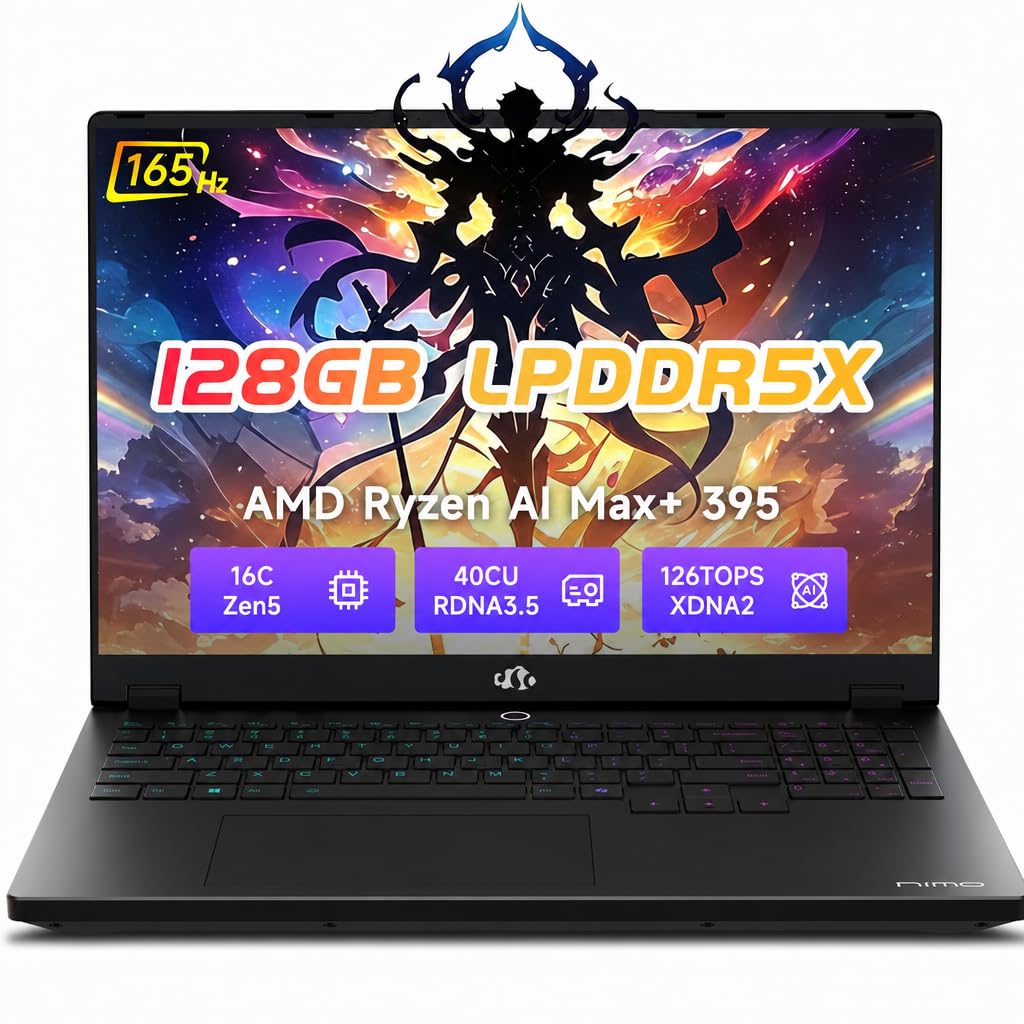
If your work involves fine-tuning large language models, the number that defines this machine is 128GB of LPDDR5X memory (a fast, low-power laptop memory type). That is enough headroom to fine-tune a 70-billion-parameter model such as Llama 3 locally, which means your proprietary data never leaves the machine. The same pool of memory lets you run dozens of Docker containers, virtual machines, and massive IDE builds at once without the system choking on a memory bottleneck.
The graphics side is handled by a Radeon 8060S with 40 RDNA 3.5 compute units — integrated graphics built to behave like a discrete card. In practice that shows up as stutter-free 4K video playback and fluid 3D rendering in Blender or Unreal Engine. The processor is the Ryzen AI Max+ 395 running at up to 5.1 GHz, paired with a 126 TOPS total AI compute figure (trillions of operations per second), and a 256-bit bus pushing 8000MT/s of memory bandwidth.
The screen is a 16:10 QHD+ panel at 500 nits with 100% sRGB coverage, and its 165Hz refresh rate is where it pulls away from the ThinkPad P16s Gen 4 below, which sits at 60Hz — 165Hz versus 60Hz in how often the picture redraws. For grading color or dragging a 3D scene, that difference is visible. Endurance is a 99Wh battery, the maximum airlines allow, rated for 9 hours of life and 12.75 hours of standby, with a 230W adapter for fast refills. A triple-fan, 5-heat pipe system is there to keep the 154W of sustained performance from fading during long training runs.
Where it pulls ahead
- 128GB LPDDR5X memory makes local model training viable without cloud fees
- 165Hz QHD+ display at 500 nits with 100% sRGB for accurate, smooth visuals
- 99Wh battery — the air-travel ceiling — rated for 9 hours of use
- Dual USB 4.0 at 40Gbps plus HDMI 2.1 for a triple-screen 8K setup
- Two-year warranty, 90-day returns, IR face plus fingerprint login
What to weigh first
- This is a premium-tier machine, the heaviest single outlay on this list
- 16 inches and a 230W adapter make it a desk-first, travel-second laptop
- A 1TB SSD fills quickly once 8K footage or large model weights land on it
Made for: developers, AI researchers, and 8K editors who want a private compute lab that fits in a backpack.
Think twice if: you mostly write documents and join calls — the memory and cooling here are built for far heavier work than that.
2. Lenovo ThinkPad P14s Gen 6 Business Laptop
The workstation that survives a checked bag and still runs your CAD suite.
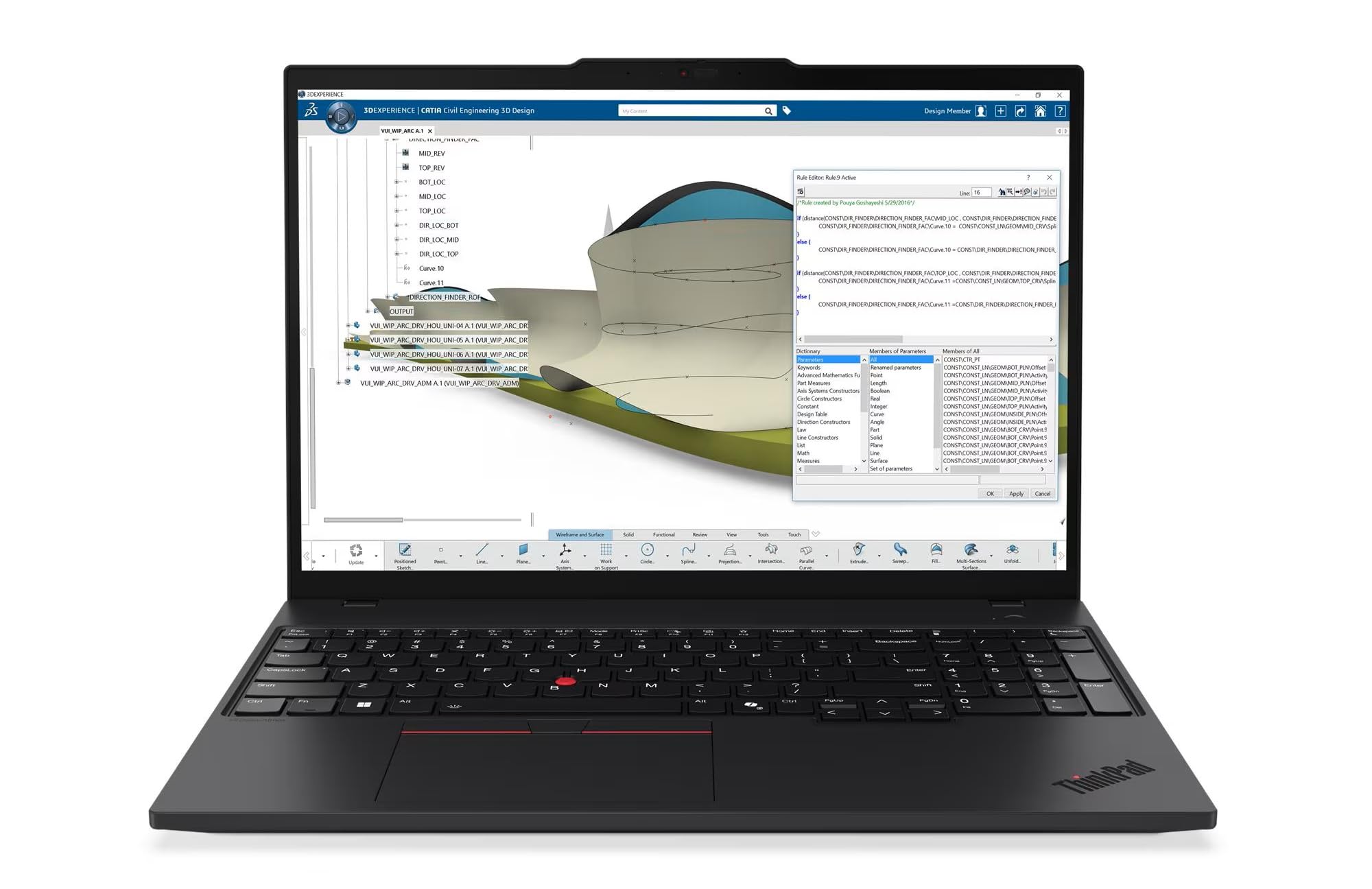
Weighing from 3.53 lbs and tested to MIL-STD-810H (a military durability standard covering shock, vibration, and extreme conditions), this is the pick for engineers who work from client sites and construction trailers rather than one fixed desk. The 14.5″ WUXGA display at 1920×1200 and 400 nits carries an anti-glare finish, so a bright window behind you doesn’t wash out your model. It is the practical answer for someone who needs certified professional software to run reliably in places that aren’t an office.
Under the lid sits an Intel Core Ultra 7 255H at up to 5.1 GHz with 24MB of L3 cache (fast on-chip memory that shortens repeat lookups). Memory is 32GB of DDR5 and storage is a 1TB SSD. ISV certification is the detail that earns it a workstation badge — it’s checked for compatibility with professional CAD, engineering, and creative applications. Two Thunderbolt 4 ports and an HDMI output drive up to three external 4K monitors at 60Hz without a docking station, so your desk setup travels in a bag.
Battery capacity is 75Wh in this configuration, larger than the ThinkPad T14 it’s positioned above, and Rapid Charge refills up to 80% in one hour. Wi-Fi 7 and Bluetooth 5.4 handle wireless, a 5MP RGB IR webcam with a privacy shutter covers calls, and Windows 11 Pro brings BitLocker encryption, Remote Desktop, Hyper-V virtualization, and Group Policy management. One practical note: the machine is brand new but resealed to upgrade the memory and SSD, with a three-year warranty from the upgrading seller on those parts and a one-year Lenovo warranty on the rest.
The everyday read: this is the one you carry. At 3.53 lbs the weight stays manageable on a commute, and the anti-glare 400-nit screen is genuinely readable under office lighting.
The honest catch: at 1920×1200 you get fewer pixels than the 4K panels elsewhere on this list. For detailed CAD work on a small screen, that’s a real difference in how much you see at once.
Reach for this if: you split time between an office and job sites and need certified CAD performance that travels light.
Look elsewhere if: a high-resolution display is the point of the purchase for you.
3. Lenovo ThinkPad P16s Gen 4 OLED
A 4K OLED touchscreen for the people who get judged on how the frame looks.
Color graders, retouchers, and designers should start here. The panel is a 4K OLED touchscreen at 3840×2400 claiming 100% DCI-P3 (a wide color range that covers the tones film and print work depend on) with Dolby Vision support. OLED means each pixel makes its own light, so blacks go fully dark and contrast reads deeper than an LCD panel can manage. If your deliverable is judged on color and detail, this is the screen in the group worth paying attention to.
Powering it is an AMD Ryzen AI 7 PRO 350 at up to 5 GHz, matched to 32GB of DDR5-5600MT memory and a 1TB SSD. The dedicated neural processing unit (a chip built for AI calculations) is what earns the Copilot+ label, automating repetitive tasks and optimizing workflows. A numeric keypad is fitted for spreadsheet and data entry work, and the battery is pitched for all-day use. Here is the contrast worth knowing: this panel runs at 60Hz, while the NIMO above runs 165Hz, so motion feels smoother there even though this one wins on resolution and color depth.
Ports cover two USB-C with Thunderbolt 4 and USB4 at 40Gbps including Power Delivery 3.0 and DisplayPort 1.4, two USB-A at 5Gbps, HDMI 2.1 up to 4K/60Hz, Ethernet, a headphone jack, and a security keyhole. Wi-Fi 7 and a 5MP RGB+IR camera with premium mics handle connectivity and calls. ThinkShield provides the security suite with data encryption, and the chassis is tested against 12 military-grade standards and 200+ quality checks covering temperature, pressure, humidity, and vibration.
Why it earns a slot: pixel density and color range are the two things creatives actually stare at all day, and this is the only 4K OLED touch panel in the group.
Where it gives ground: 60Hz refresh is the trade-off for that resolution — fine for stills and grading, less silky for timeline scrubbing or 3D fly-throughs.
Your pick when: the screen is your work product and you need touch plus 4K color accuracy in a portable chassis.
Not the one for: buyers who prioritize motion smoothness or maximum GPU muscle over color fidelity.
4. HP ZBook 8 G1i AI Mobile Workstation Laptop

A dedicated graphics card and two terabytes for the engineers running simulations.
If your workload is SolidWorks, ANSYS, Revit, or MATLAB, the deciding part is the dedicated GPU. This ZBook carries an NVIDIA RTX 500 Ada with 4GB of GDDR6 dedicated memory — a real graphics card with its own RAM rather than integrated graphics sharing the main memory. That matters for 3D rendering and simulation, where the card does the heavy lifting. ISV certifications cover SolidWorks, AutoCAD, ANSYS, Revit, and MATLAB, so your professional tools are checked for compatibility.
The processor is an Intel Core Ultra 7 255H running up to 5.1 GHz with 16 cores, 16 threads, and 24MB of L3 cache. Memory is 64GB of DDR5 and storage is a 2TB PCIe NVMe M.2 SSD — the largest storage figure in this group, which is how you keep several simulation datasets and project files resident at once. On raw clock speed it edges the ThinkPad P16s Gen 4’s 5 GHz with its 5.1 GHz, a small but real gap. The display is a 16″ WUXGA touchscreen at 1920×1200 and 300 nits with anti-glare treatment.
Multi-display support reaches 8K at 60Hz over Thunderbolt 4 and 4K at 60Hz over USB-C and HDMI 2.1. Connectivity runs two Thunderbolt 4, USB-C 3.2 Gen 2×2, USB-A 3.2 Gen 1, Ethernet, HDMI 2.1, and a headphone combo jack, with Wi-Fi 7 and Bluetooth 5.4 wireless. A 5MP IR webcam with a privacy shutter, a fingerprint reader, a backlit keyboard, and a numeric keypad round it out. A 140W AC adapter is included. As with the P14s, the unit is resealed to upgrade memory and SSD, backed by a three-year warranty from the upgrading seller on those parts and three years from HP on the rest.
The verdict from the spec sheet: dedicated RTX 500 Ada graphics plus 64GB of RAM and 2TB of storage is the most render-focused combination here. For a designer or engineer whose day revolves around simulation, this is the machine that fits.
The trade-off to accept: the 300-nit WUXGA panel is the dimmest and lowest-resolution screen on this list. If you also grade footage, that display will feel like a step down.
Best matched to: engineers, architects, and animators who need certified software and a dedicated GPU in one chassis.
Weigh before buying: the screen is built for utility, not color-critical creative review.
5. Lenovo ThinkPad P14s Gen 6 AMD Ryzen AI 9 HX PRO 370

Lenovo’s thinnest mobile workstation, with 64GB crammed into a 14-inch frame.
Lenovo calls this its thinnest and lightest mobile workstation, and the payload is an AMD Ryzen AI 9 HX PRO 370 processor at up to 5.1 GHz. Memory is 64GB of DDR5-5600MT/s and storage is 1TB — the same memory ceiling as the HP ZBook above, but in a much smaller 14-inch chassis. For data scientists who crunch datasets on the move and don’t want to carry a 16-inch brick, that combination of capacity and footprint is the whole argument.
Because it’s a Copilot+ PC, it carries a dedicated neural processing unit (an on-chip AI accelerator) that speeds up dataset crunching and automates repetitive tasks while keeping power draw efficient. The 14″ IPS display runs 1920×1200 at 60Hz, aimed at detailed work rather than gaming smoothness. Ports mirror the P16s: two USB-C with Thunderbolt 4 and USB4 at 40Gbps including Power Delivery 3.0 and DisplayPort 1.4, two USB-A at 5Gbps, HDMI 2.1 up to 4K/60Hz, headphone jack, Ethernet, and a security keyhole. Wi-Fi 7 handles wireless.
Durability testing is the same 12 stringent standards and more than 200 quality checks as its larger sibling, covering temperature, pressure, humidity, and vibration. Security is ThinkShield with data encryption, fingerprint login handles sign-in, and the machine ships unopened in retail packaging with a one-year Lenovo courier or carry-in warranty, extendable up to five years on registration. Compared with the 32GB Ultra 7 version of this same P14s body, you get 64GB versus 32GB and trade a little of the Intel machine’s wider port spread — but this one is the pick when capacity beats everything.
Standout strengths
- 64GB DDR5-5600MT/s memory in Lenovo’s thinnest mobile workstation body
- Ryzen AI 9 HX PRO 370 at up to 5.1 GHz with a dedicated neural AI unit
- Dual Thunderbolt 4 / USB4 at 40Gbps plus Ethernet and HDMI 2.1
- Tested to 12 military-grade standards and 200+ quality checks
Where it concedes
- The 14″ 1920×1200 IPS panel at 60Hz leaves fewer pixels and less motion smoothness than the 4K or 165Hz screens here
- Integrated Radeon graphics rather than a dedicated card, so GPU-heavy rendering trails the ZBook
Choose it for: heavy-memory workloads that need to travel — datasets, VMs, and multitasking on a 14-inch frame.
Pass on it if: you need a dedicated graphics card or a high-resolution color panel as the core of your work.
Know the Specs
TOPS and AI compute
TOPS stands for trillions of operations per second — a way of measuring how much AI math a chip can chew through. The NIMO rates 126 TOPS across its processor and neural hardware, which is the figure that lets it run local model training instead of paying for cloud time. Higher TOPS generally means faster AI tasks, but only where your software uses that accelerator at all.
Dedicated vs integrated graphics
A dedicated GPU is a separate graphics chip with its own memory, while integrated graphics share the system’s main RAM. The HP ZBook’s NVIDIA RTX 500 Ada with 4GB GDDR6 is dedicated; the NIMO’s Radeon 8060S is integrated but built with 40 compute units to behave like a discrete card. For certified CAD and rendering suites, a dedicated card is often the safer bet.
Refresh rate in hertz
Refresh rate is how many times per second your screen redraws the image. A 165Hz panel refreshes far more often than a 60Hz one, so motion looks smoother — noticeable when you rotate a 3D model or scrub a video timeline. For static design and reading work, 60Hz is perfectly fine.
Battery watt-hours and the 99Wh ceiling
Watt-hours (Wh) measure battery capacity — how much total energy it stores. US aviation rules cap carry-on batteries at 99Wh, which is why the NIMO’s 99Wh pack is described as flight-ready. A larger Wh figure generally means more hours away from a socket, though what you’re running at the time matters just as much.
Common Questions
Can a workstation laptop actually run a large language model without the cloud?
What does ISV certification mean for CAD and engineering software?
Is a dedicated NVIDIA GPU better than integrated Radeon graphics for rendering?
Why do some workstation laptops stop the battery at 99Wh?
Does a 4K OLED screen drain more battery than a standard panel?
Can I connect three external monitors to a workstation laptop without a dock?
Is 32GB of RAM enough for virtual machines and large IDE builds?
Why does a resealed workstation laptop carry two different warranties?
Does refresh rate matter for CAD work or only for gaming?
What does MIL-STD-810H testing actually prove on a ThinkPad?
The Bottom Line
For the heaviest work in this group, the winner is the NIMO 16″ Ryzen AI Max+ 395. Its 128GB of LPDDR5X memory and 126 TOPS of AI compute turn it into a private compute lab, and its 165Hz QHD+ panel is the smoothest screen here. Owners rate it a perfect 5.0 stars, though from a small pool of reviewers. If you need a certified workstation you can sling in a bag for client sites, grab the ThinkPad P14s Gen 6 with the Ultra 7 255H at 3.53 lbs and MIL-STD-810H durability. And when a dedicated GPU plus 2TB of storage is what your simulation work demands, the HP ZBook 8 G1i is the one to reach for. Match the memory and screen to your workload — 128GB for local AI, 32GB for CAD on the road — and the machine will hold up for years.
How we choose
We do not accept paid placement. Every pick is matched to a real buyer and a real use-case; we do not hands-on test units.
Sources
Specifications: manufacturer listings and product documentation. Review insights: verified customer reviews, as of November 2026. Pricing: not shown on this page (it changes often); check the current price via the retailer link.
As an Amazon Associate, Tactical Gear Guy earns from qualifying purchases. This does not affect which products we feature.