Specs are compiled from manufacturer listings and verified buyer reviews and can change over time — please confirm the key details on the product page before buying.
The short answer: buy a kit with a spare battery, not just a dock. A controller that dies mid-match ends your session, so what you actually want is one pack charging while the other runs in your pad. A spare pack is what separates a kit you use nightly from a dock that sits in a drawer — check for it before you read a single spec sheet.
This guide is built by comparing the manufacturers’ published specifications and the patterns across verified customer reviews, so you get each pick’s real strengths and trade-offs instead of marketing spin.
You will see how capacity, charge time and fit vary wildly between kits, and why some batteries only power one generation of controller. Below are nine tested-by-owners options, laid out so you can match one to your play style and never lose a match to a blinking low-battery icon. The right Xbox Remote Charger keeps a spare pack charged, so the low-battery icon stops ending your sessions.
Top Picks


How To Choose The Best Xbox Remote Charger
Most controller batteries fail you on two things: they run dry too fast, or the cover will not fit your controller. Fix both and the rest is comfort. Here is what to check in order.
Match the battery cover to your controller generation
The battery door is a physical shell, and Xbox Series X|S controllers use a different door shape than Xbox One controllers. A kit that ships both door types covers a mixed household. A kit with only one door type is fine if every pad in your house is the same generation.
Read the capacity in mWh, not mAh
A mWh rating (milliwatt-hours) bundles voltage into the number, so it compares fairly between a rechargeable pack and a plain AA cell. A 6200mWh pack and a 4800mWh pack are not close — the first holds noticeably more charge. Look at this figure before you look at play-time claims.
Decide between a spare battery and a stand
Two packs plus a charger give you a hot swap: the dead one goes on the dock, the fresh one goes in the pad, and you never wait. A single-controller stand that charges through the pad is neater on a desk but pins you to the cable while the battery fills. Choose based on whether you play in long sittings or short bursts.
Check what protects the cell
Overcharge, overheat, overcurrent and short-circuit protection are the four names to look for. With them, charging overnight is a normal routine rather than a gamble. Without them, you are trusting the cell to look after itself.
Side-by-Side Comparison
| Model | Best For | Capacity | Packs Included | Claimed Play Time | Amazon |
|---|---|---|---|---|---|
| Ukor 2x6200mWh with Charger★ Best Overall | Long sessions | 6200 mWh each | 2 | Up to 28 hours | Amazon |
| DINOSTRIKE 2x4800mWh KitBest Value | Budget backup | 4800 mWh each | 2 | 8–12 hours | Amazon |
| PowerA Solo Charging StandDesk Display | Desk display | 1100 mAh | 1 | — | Amazon |
| Svetaecho 2x4800mWh | Marathon gaming | 4800 mWh each | 2 | 10–12 hours | Amazon |
| YUANHOT LED Display 2 Pack | Reading exact charge | 1400 mAh each | 2 | — | Amazon |
| RJAD 2x4800mWh Dock | Three charging routes | 4800 mWh each | 2 | 28–30 hours | Amazon |
| 8BitDo Charging Dock | Desk tidiness | 1100 mAh | 1 | — | Amazon |
| OSTROGEAR Elite Series 2 Dock | Elite Series 2 owners | — | — | — | Amazon |
| DINOSTRIKE 4x6200mWh Station | Whole household | 6200 mWh each | 4 | 15–20 hours | Amazon |
Detailed Reviews
1. Ukor 2x6200mWh Battery Packs with Charger
Our pick — 4.5+★ from 9,500+ verified ratings; the strongest balance of quality and price.
Two 6200mWh packs that outlast a weekend session before either needs a top-up.
If you play long sessions and hate stopping for a charge, start here. Each pack is rated 6200mWh, and Ukor quotes up to 28 hours of running time — the sort of buffer that covers several evenings of play before you think about the dock. Space is the real win: with two packs in the kit, one can sit in the charger while the other runs the pad.
Speed is the second reason it sits at the top. Ukor rates a full charge at 2.5 hours, and the station fills two packs at once as long as the input clears 5V/1A. Compare that with the DINOSTRIKE 4800mWh kit, which quotes 4 hours and 8-12 hours of play time — the Ukor holds 6200mWh against 4800mWh and runs roughly 28 hours against 8-12.
The charger carries its own USB-C cable on the side, plus a Micro-USB port, so a phone brick, console port or PC will all feed it. An LED flips green at full and stays red while charging, which makes overnight charging easy to read. Over-charge, over-current, over-heat and short-circuit protection are all built in, so leaving it plugged in overnight is the intended use. The crowd agrees — this is the favourite of the group at 4.5+ stars across 9,900+ ratings.
Where it pulls ahead
- 6200mWh per pack, double the headroom of a 4800mWh kit
- 2.5-hour top-up with both batteries filling at the same time
- Cable built into the charger — nothing to lose in a drawer
Worth knowing first
- Plastic shell feels utilitarian next to a dock-style stand
- Batteries live inside the charger, so it takes desk space rather than sitting under a pad
Buy this one if: you want the longest gap between charges and a spare always ready.
Keep looking if: you would rather have a stand that holds the controller itself upright on your desk.
2. DINOSTRIKE Xbox Battery Pack Rechargeable with 4 Back Covers
Four covers in one box, so a mixed Xbox One and Series X|S house is covered.
The reason to pick this over the rest is the door count. You get two 4800mWh packs and four covers — two shaped for Xbox One and two for Xbox Series X|S — so a household with both controller generations does not have to buy twice. The white shell stands out from the usual black, which makes it easy to spot in a cable drawer.
Play time lands at 8-12 hours per pack on a 4-hour charge. That is a shorter run than the Ukor’s 28 hours and a slower fill than its 2.5 hours, so treat this as the sensible pick rather than the endurance pick. The trade is simple: you swap packs when needed instead of squeezing three days out of one.
Charging is flexible — plug the 1.5m cable straight into the pack while it sits in the controller and keep playing, or leave a spare on charge. The LED by the port glows red while filling and goes dark when done. Overcharge, overvoltage, overcurrent, overheating and short-circuit protection cover overnight sessions, and the cells are rated for 2000+ recharge cycles. Note the fit limit: these are cut for official Xbox controllers, not third-party pads.
What buyers notice: the battery life is what gets talked about most — 21 separate mentions of it — with the charge-it-while-you-play trick close behind.
If your shelf holds both an Xbox One pad and a Series X|S pad, the four covers mean you buy once instead of twice.
The natural home for it: a household running both an Xbox One pad and a Series X|S pad.
Move on if: your controllers are third-party models — the covers will not seat.
3. PowerA Solo Charging Stand for Xbox Series X|S
A licensed stand that turns your controller into part of the desk setup.
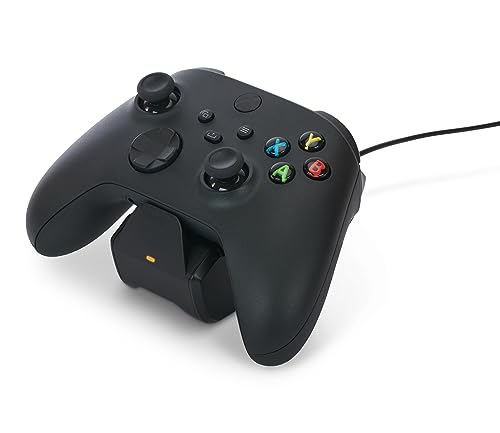
Sometimes the job is less about hours and more about how your desk looks at the end of the night. The PowerA Solo holds the controller upright and charges it through a 1100 mAh pack, so the pad has a home and the battery fills while you are away from it. It ships with two battery doors and a 3.3 ft (1m) USB cable, and it is officially licensed for Xbox — worth knowing if you care about warranty cover, since this one carries a two-year limited warranty.
Setup is quick and the routine is pleasant: drop the controller in the cradle and walk off. The one thing to watch is fit — the battery door has to seat properly in your specific controller, and it is the detail that trips people. Check the door against your pad at the start rather than discovering a loose seat a week later, and you will have no trouble.
Nice to own
- Charges and shows the controller at once
- Officially licensed with a two-year limited warranty
- Includes two battery doors and a 3.3 ft cable
Set your expectations
- One 1100 mAh pack — no spare in the box, so charging time is your downtime
- The door fit is the thing to verify on arrival
Goes well with: a setup where the controller lives on the desk and you charge between sessions.
Think twice if: you want a spare pack ready to swap mid-evening.
4. Svetaecho 2x4800mWh Battery Pack

Two 4800mWh packs with four covers, built for marathon evenings.
Here is a kit that understands what a long session needs. Two 4800mWh packs come with four covers — two for Xbox One, Xbox One S, Xbox One X and Xbox One Elite, two for Series X|S — so a mixed collection gets sorted. Charging lands at roughly 2.5-3 hours per pack, and play time is quoted at 10-12 hours.
Charging gives you two routes. Leave the pack in the pad and run the included USB-C cable straight in while you keep playing, or pop it out and charge separately. That second option is the one that keeps a spare warm in the background. A small LED by the port runs red while filling and green at full, and overcharge protection makes an overnight charge a routine rather than a risk. The cells are rated for 2000 recharge cycles, so the packs should last years rather than months.
The evidence from owners is strong on staying power — this is the pick people keep recommending for how long it holds. Battery life and overall quality are the two things it gets praised for most, and the fit is described as seating nicely in the pad. One honest note: the shell and cover seating is the area that occasionally draws grumbles, so seat the door firmly once and leave it alone. For a heavy gamer replacing disposable AAs, that is a small ask.
The real-world result: a fresh pack goes in, the dead one goes on the cable, and you stop thinking about batteries for the evening.
The honest caveat: 4800mWh is not the biggest number on this page. If raw hours matter more than flexibility, the 6200mWh packs hold more.
Your pick if: you play long evenings and want a spare waiting rather than a cable attached.
Different route: you want the absolute longest run time per pack.
5. YUANHOT Battery Pack with LED Display

A percentage readout on the pack itself, so the low-battery surprise stops.
Most packs tell you nothing until the controller blinks. This one puts a small LED display on the battery and shows the charge as a percentage, which means you can see the number dropping and top up on your terms. That single feature is the argument for buying it, and it is the one you will notice every evening.
Two 1400mAh lithium-polymer packs come with a 5ft Type-C cable, so you can keep playing with the cable in or charge a pack on its own. The pack and cover are one sealed unit rather than a battery plus a separate door, so there is no door to lose and no seating ritual. The build is certified to UL 2056, CE, RoHS and FCC standards, with safeguards against overcurrent, overheating and overcharging.
This is the pick where the honest note matters most. The percentage display and play length are what owners like, but the connection between pack and controller is the weak point — a few report the pack not staying seated, and the contact prongs are the part to treat gently. Fit it once, do not yank it in and out, and you get the best of it. Do not force it into a third-party pad either; it is shaped for Xbox Series X and Series S only.
Reach for this if: you want an exact percentage in front of you instead of a guess.
Look elsewhere if: your controllers get rough handling — the prongs prefer a gentle install.
6. RJAD Battery Pack with Charging Station

A full dock, two 4800mWh packs and three separate routes to a full charge.
Three ways to charge is unusual, and it is the reason this one earns a spot. The two Ni-MH packs can fill on the station, in the controller, or separately through the Type-C cable. A 3-hour window gets both packs topped up on the station, and each pack is quoted at 28-30 hours of continuous play — the longest claimed figure on this page.
Four covers ride along — two for Series X|S and two for Xbox One, One X, One S and Elite — so the kit spans both generations. The station itself sits on four anti-slip pads, which keeps the controller steady while it charges. Status lights sit on both the station and the packs, running grey for standby, red for charging and green for full.
The charging side is what wins over buyers most, and the price-to-feature read is a close second. An honest note on the other hand: the battery’s endurance gets a more divided response than the docking performance, so treat the 28-30 hour figure as the maker’s claim and let your own sessions tell you. Built-in over-charging, over-voltage, over-current, over-heating and short-circuit protection covers the overnight case, and the packs are rated for 2000+ recharge cycles, so they should outlast years of nightly sessions.
Why it earns its place: a station, two packs, four covers and three charging routes in a single box, with a one-year quality support cover.
The trade-off: the longer play-time claim is the piece to verify against your own habits rather than take on trust.
Best fit: someone who wants a dock on the shelf and a spare pack in the drawer.
Less ideal for: a buyer who wants the plainest possible setup with no station to place.
7. 8BitDo Charging Dock for Xbox Wireless Controllers

Magnets pull the controller into the right spot, so you never miss the contact.
Placing a controller on a dock usually means nudging it until it catches. Here, built-in magnets take over — the pad is pulled into position and charging starts on contact. That magnet alignment matters most in a dark room, when you are setting the pad down without looking.
The dock is officially licensed by Xbox and made to sit alongside the first-party controller, with a black finish that matches it. A storage compartment sits in the back for cables or small parts, and the light output can be adjusted. The LED runs amber while charging and white when full. One 1100 mAh pack and two battery doors come in the box, so the controller is ready to go from the first evening.
What owners talk about is how it looks on a desk and how cleanly the controller sits in it — it reads as furniture rather than an accessory. The power side is modest, though: a single 1100 mAh pack means the dock is your charger and your play time. You trade a spare pack for a tidy desk, and the controller stays off the floor and out of the cushions.
Fits best: a tidy desk where the controller should have a proper home and charge between sessions.
Not for you if: you want two packs swapping all evening — this kit ships one.
8. OSTROGEAR Charging Station Dock

Cut for the Elite Series 2 only — and that narrow fit is exactly the point.
Most chargers on this page are generalists. This one is built for the Elite Series 2 and Elite Series 2 Core (Model 1797), and the payoff is a dock that matches the original charging cradle for speed. If that is your controller, the fit question disappears — the stand is shaped around it.
Magnets hold the pad in place, which means you can set it down without pulling off the back paddles first. Charging stops automatically once the pad hits full, so leaving it docked overnight does not risk overcharging. A USB Type-C cable powers the stand, and the LED shows the charge state before going solid green at the end. The base is non-slip rubber, so the whole unit stays put on a desk and doubles as a display stand.
The build and charging performance are the two things that land well with owners, and the look on a desk gets a mention too. The weight is 198 g, which is heavy enough to feel planted rather than tippy. The limitation is simple and worth saying plainly: it is only for the Elite Series 2, so it does nothing for a standard Xbox pad.
Where it wins: purpose-built fit for the Elite Series 2, automatic shut-off at full, and a base that does not slide.
Read before buying: check your controller model. This dock is not made for a standard Xbox Series X|S pad.
Made for: Elite Series 2 and Series 2 Core owners who want a clean stand that matches the pad.
Wrong tool for: any standard Xbox controller in the house.
9. DINOSTRIKE 4X 6200mWh Battery Pack with Charging Station
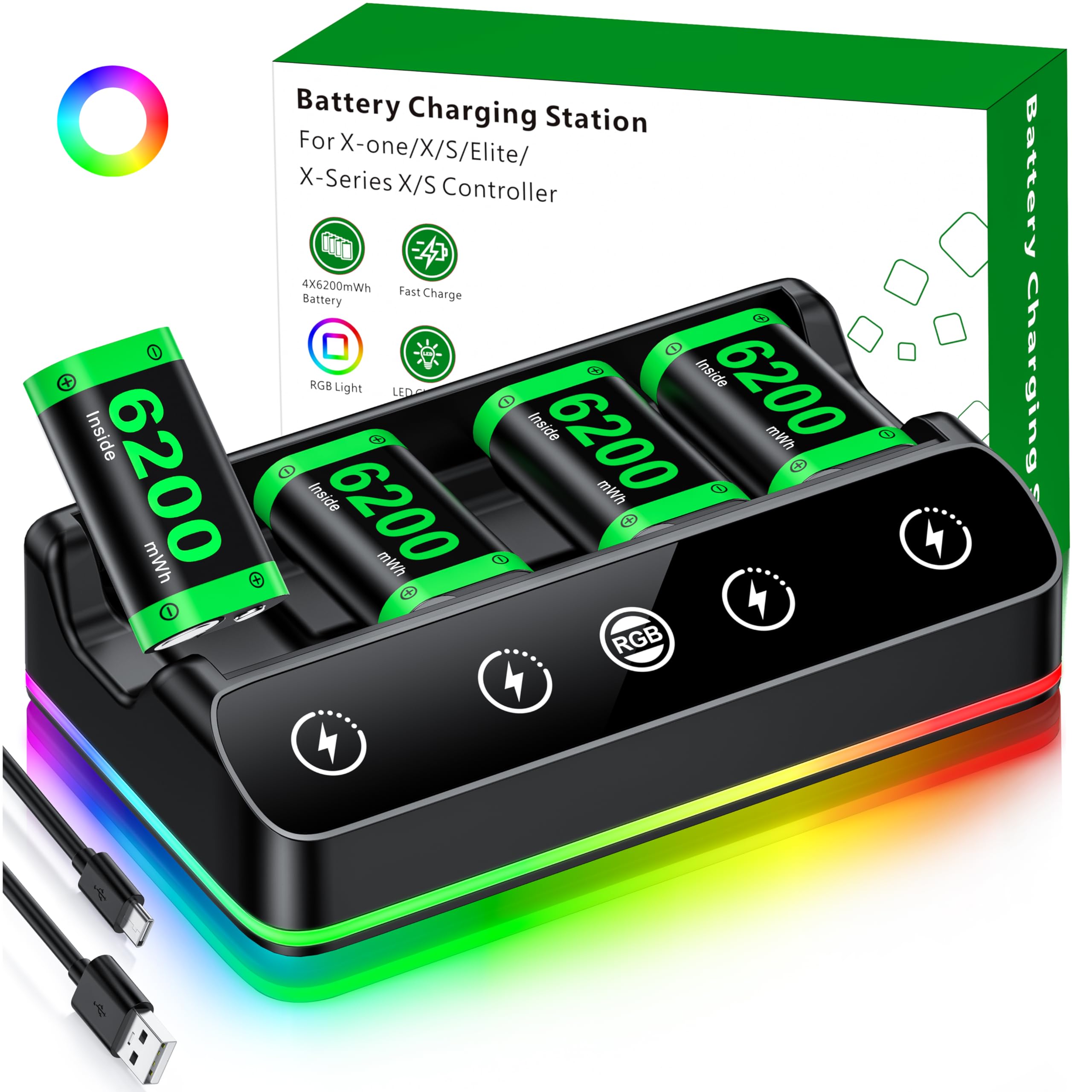
Four 6200mWh packs on one stand, enough for the whole living room.
Four batteries in one box is the reason this exists. Each pack is rated 6200mWh — the same capacity as the top pick — so a four-player household can keep every pad fed without shopping twice. Play time is quoted at 15-20 hours per pack, and a full charge takes 4-5 hours on the station.
The stand is where it gets odd in a good way. It carries 7 LED modes, including breathing, running and monochromatic static light, adjusted by a single touch button and switched off with a 3-second hold. A silicone pad underneath keeps it from sliding and dulls the sound. The LED status lights run red while charging and green at full, which is easy to read across a room.
Owners like it for the play length and for skipping the battery-cover fiddle, and the colour-changing lighting gets its own fans. It is also portable — the 4.25 x 7.55 x 1.57 inch body slips into a backpack for a friend’s house or a trip. What it is not is subtle: if the ambient lighting would distract on a shared desk, you can switch it off, and the capacity advantage over a 4800mWh kit is worth the extra size.
The right call when: several controllers share one room and one charger.
Skip the size if: you want something that disappears behind the TV — this stand wants to be seen.
Know the Specs
mWh vs mAh: why the number matters
Milliwatt-hours (mWh) fold voltage into the rating, so a 6200mWh pack and a 1400mAh pack are not measured the same way. The mWh figure gives you the honest capacity, and the higher it is, the longer the pack tends to run before a top-up. Read this before you read any play-time claim.
Charge time and hot-swapping
A two-pack kit lets you run one battery while the other fills. On a two-pack kit you are rarely waiting, because the spare is always warm. That is why kits with a spare pack beat a single-battery stand for longer sessions.
Battery covers and controller generations
Xbox Series X|S and Xbox One controllers take differently shaped battery doors. A kit with covers for both means one purchase covers a mixed house. A kit with one shape only works when every controller matches it.
Protection circuits worth checking
Over-charge, over-voltage, over-current, over-heat and short-circuit protection are the five names to look for. With them in place, charging overnight is a normal routine. Without them, you are trusting the cell to regulate itself.
Common Questions
Will a rechargeable pack work in an Xbox Series X|S controller and an Xbox One controller?
How many hours does a rechargeable pack actually last?
Is it safe to charge an Xbox battery pack overnight?
Can I play while the battery is charging in the controller?
What is the difference between a charging stand and a battery pack kit?
Will these packs fit third-party Xbox controllers?
What is 6200mWh compared to 4800mWh in practice?
Does the Elite Series 2 need its own charger?
How long will the battery packs last before they need replacing?
The Bottom Line
For most players, the xbox remote charger to buy is the Ukor 2x6200mWh kit because its two high-capacity packs and 2.5-hour charging station give you the longest gap between top-ups of anything here. If a mixed-controller household is the situation, grab the DINOSTRIKE 4800mWh kit with its four covers. And for Elite Series 2 owners who want a matched stand, the OSTROGEAR dock is the one built for the job. Whichever you choose, pick a kit with a spare pack — that is the difference between playing and waiting on a cable.
How we choose
We do not accept paid placement. Every pick is matched to a real buyer and a real use-case; we do not hands-on test units.
Sources
Specifications: manufacturer listings and product documentation. Review insights: verified customer reviews, as of November 2026. Pricing: not shown on this page (it changes often); check the current price via the retailer link.
As an Amazon Associate, Tactical Gear Guy earns from qualifying purchases. This does not affect which products we feature.