Specs are compiled from manufacturer listings and verified buyer reviews and can change over time — please confirm the key details on the product page before buying.
Picking a writing tablet stylus is really one question: does the pen match the screen? An Apple Pencil clone will never wake up a Kindle Scribe, and a battery-free EMR pencil is dead weight on an iPad. The seven picks below split cleanly along that line, and each one earns its place for a specific screen and a specific hand.
This guide is built by comparing the manufacturers’ published specifications and the patterns across verified customer reviews, so you get each pick’s real strengths and trade-offs instead of marketing spin.
Start with your tablet model, then match the tip to your handwriting. That order saves you a return, and it is the thinking behind every entry in this writing tablet stylus list.
Top Picks


How To Choose The Best Writing Tablet Stylus
Two pens can look identical in a product photo and behave nothing alike once the tip meets the screen. The difference sits in the technology inside the barrel, and that technology is decided by your tablet, not by your taste.
Match the pen technology to your tablet first
Active pens carry a small battery and pair with the screen; EMR pens draw power from the tablet’s own electromagnetic layer and never need a charge. Apple iPads, most Microsoft Surface models and Android tablets with Wacom EMR support can each take a different family of pen. Check your model before you fall for a barrel shape.
Pressure levels and tip size decide how your handwriting looks
More pressure levels mean the line thickens and thins the way a real pencil does when you lean on it. Tip size works the other way: a fine tip gives you control for small letters, while a slightly broader tip can feel steadier for fast cursive.
Battery life, charging time and standby
An active pen that charges in minutes and holds power for hours of writing suits a busy lecture schedule. A pen that sits unused for weeks needs long standby, so check the standby figure if you write in bursts.
Eraser, magnets and grip shape
An eraser at the tail saves you swapping tools mid-sentence, and a magnet keeps the pen on the tablet instead of at the bottom of a bag. Grip shape matters over long sessions, and a hexagonal or triangular barrel feels closer to a wooden pencil in the hand.
Side-by-Side Comparison
| Model | Best For | Technology | Pressure Levels | Charging | Amazon |
|---|---|---|---|---|---|
| Kobo Stylus 2★ Best Overall | Kobo Libra Colour and Sage readers | Active, rechargeable | — | USB-C | Amazon |
| HATOKU Stylus Pen for iPadBest Value | iPad note-taking and drawing | Active, rechargeable | — | 15 minutes | Amazon |
| Metapen Stylus Pen M1 | Surface and MPP tablets | Active, rechargeable | 1024 | 40 minutes | Amazon |
| STAEDTLER Noris Digital | EMR tablets, plain and simple | EMR, battery-free | — | None | Amazon |
| Defitch 2Pack iPad Pen | Two-pen households | Active, rechargeable | — | 20-25 minutes | Amazon |
| STAEDTLER Noris Digital Jumbo | Long writing sessions with an eraser | EMR, battery-free | 4,096 | None | Amazon |
| LAMY AL-Star EMR | Design-conscious EMR users | EMR, battery-free | over 4,000 | None | Amazon |
Detailed Reviews
1. Kobo Stylus 2
Our pick — 4.5+★ from 650+ verified ratings; the strongest balance of quality and price.
The pen built so a reader can scribble in the margin without hunting for a toolbar.
If your library lives on a Kobo Libra Colour or a Kobo Sage, this is the pen that open up the built-in notebook feature. It marks up eBooks and PDFs directly, and on the Libra Colour it writes notes and makes highlights in colour. That colour markup is the difference between a grey annotation you skim past and a note your eye actually catches.
A highlighter button sits where your thumb lands, so you can sweep a passage without leaving the page. Mistakes come off with the eraser on the back of the barrel, turned over just like a wooden pencil. It recharges over USB-C and carries a 30-day standby figure, so it survives weeks on the nightstand between reading sessions. At 0.35 inches wide against the HATOKU’s 0.28 inches it is the chunkier barrel of the two, which some hands find easier to hold through a long chapter.
The build and finish are what reviewers praise most — the barrel feels like a considered piece of hardware rather than a plastic afterthought. The catch is the battery. Most report it holds up well, but enough units have stopped taking a charge that it is worth registering the pen early. Two replacement tips ship in the box, which softens that worry.
Why readers keep it clipped on
- Colour markup on the Kobo Libra Colour turns highlights into something you spot instantly
- Highlighter button and tail eraser cover both jobs without opening a menu
- 30-day standby means it is ready after weeks off the charger
- Two replacement tips included, so tip wear does not end the pen
Where it stops
- It only works with Kobo Libra Colour and Sage — no other tablet takes it
- Charging reliability is the recurring gripe across the review pages
Reach for this if: your reading device is a Kobo Libra Colour or Sage and you want real margin notes on the page.
Look elsewhere if: you own a different brand of e-reader, because this pen will not talk to it.
2. HATOKU Stylus Pen for iPad
Fifteen minutes on the cable buys you a full day of notes.
For a student moving between lectures, the number that matters is 15 minutes — that is how long this iPad pen sits on a USB-C charger before it delivers a claimed 10 hours of writing or drawing. Compare that to the Metapen M1 below, which needs 40 minutes for its fill. If you are grabbing a cable between classes, the shorter wait is the whole argument.
It works across iPad generations from 2018 through 2026, covering iPad 6 through 11, Air 3 through 5, the 11-inch and 12.9-inch and 13-inch Pro models, and Mini 5 through 7. There is no Bluetooth pairing step — switch it on and write. Palm rejection and tilt sensitivity are both here, so your resting hand stays ignored and the line thickens as you lean the tip over. A magnet holds it to the tablet’s side for storage.
Functionality is what reviewers praise most: the pen behaves like an Apple Pencil for a fraction of the commitment. Compatibility is the honest sticking point. A few owners find their particular generation is fussier than the list suggests, so confirm your exact model before ordering. Keep to the maker’s 5V/2A adapter guidance and skip overnight charging to keep the cell healthy.
The real draw: a 15-minute charge, palm rejection, tilt sensitivity and magnetic storage — the practical core of an Apple Pencil without the pairing dance.
Read the fine print: iPad model coverage is broad but not universal, and the pen wants a specific charger, so verify both before you commit.
The short version: the pick for anyone on an iPad from 2018 onward who wants fast top-ups and no pairing ritual.
One caution: check your exact iPad generation against the supported list first, since a mismatch is a return.
3. Metapen Stylus Pen M1

A Surface companion with a 5-minute top-up that covers a whole workday.
Surface owners get the short end of the stylus market, and this pen is the answer for most of them. It reads 1024 pressure levels, so digital ink flows from the 1.0 mm tip in real time with no visible lag. An eraser button sits right where your thumb naturally rests, which means corrections happen without lifting your train of thought.
The battery figures are the headline. A full charge takes 40 minutes, and a quick 5-minute charge delivers up to 80 hours of use. Standby runs to 300 hours, so a pen left in a bag over a break still answers when you pick it up. The aluminum-alloy body has flat sides that stop it rolling off a desk, and two built-in magnets hold it to the Surface.
The cone-shaped tip is a deliberate choice over the old tubular design, and the claimed result is stronger signal detection. One compatibility warning matters more than any spec: this pen does not work with the Surface Laptop Go, a different series from the Surface Laptop and Surface Go. Beyond Surface, it also covers select HP, ASUS, Dell, Acer, Sony and ViewSonic models, plus Kobo Libra Colour, Sage, Elipsa and Elipsa 2E. A 12-month warranty and a spare tip come in the box.
What the specs buy you
- 5 minutes on the cable yields up to 80 hours of use
- 1024 pressure levels keep line weight responsive under the tip
- Flat-sided aluminum barrel resists rolling off the desk
- Two magnets hold it to the tablet instead of a pocket
The fine print worth reading
- Surface Laptop Go is explicitly unsupported
- Full charge takes 40 minutes, slower than the 15-minute iPad pen above
Matched to: Surface Pro, Book, Laptop and Studio owners who want fast partial charges and a proper eraser button.
Not for: Surface Laptop Go owners, who need a different pen entirely.
4. STAEDTLER Noris Digital Stylus Pen

At 8.8 g it weighs less than most wooden pencils and never asks for a cable.
There is no battery, no charging and no pairing here — the pen draws its power from the EMR layer in a compatible screen. That means it is always ready, whether you last touched it yesterday or last season. It suits Samsung Galaxy Tab, Kindle Scribe, ReMarkable and other EMR devices, and it will not work on an iPad or a Surface.
The hexagonal barrel mirrors the classic Noris pencil, so the writing angle and grip feel familiar from the first line. Ergonomics is what reviewers praise most, and the practical result is that you can fill pages for hours without your hand cramping. At 6.89 inches long it is a touch longer than the Kobo Stylus 2 at 6.09 inches, and at 8.8 g it is well under the iPad pen’s weight in the same bag.
Grip and durability get more divided reactions. Some hands love the pencil feel; others find the barrel slippery in a long session, and a few report it does not survive a hard drop. Treat it as a precision instrument rather than a toss-in-the-backpack pen and it should serve for years.
Where it earns its keep: battery-free EMR operation plus a genuine pencil silhouette for people who write on Samsung, Kindle Scribe or ReMarkable hardware.
Handle with care: the wood-look barrel is not built for rough handling, so give it a sleeve or a case slot.
Pick this when: you want a pen that works the instant you grab it and never sits dead on a charger.
Think twice if: your tablet is an iPad or a non-EMR device, because it simply will not register.
5. Defitch 2Pack Active iPad Pen
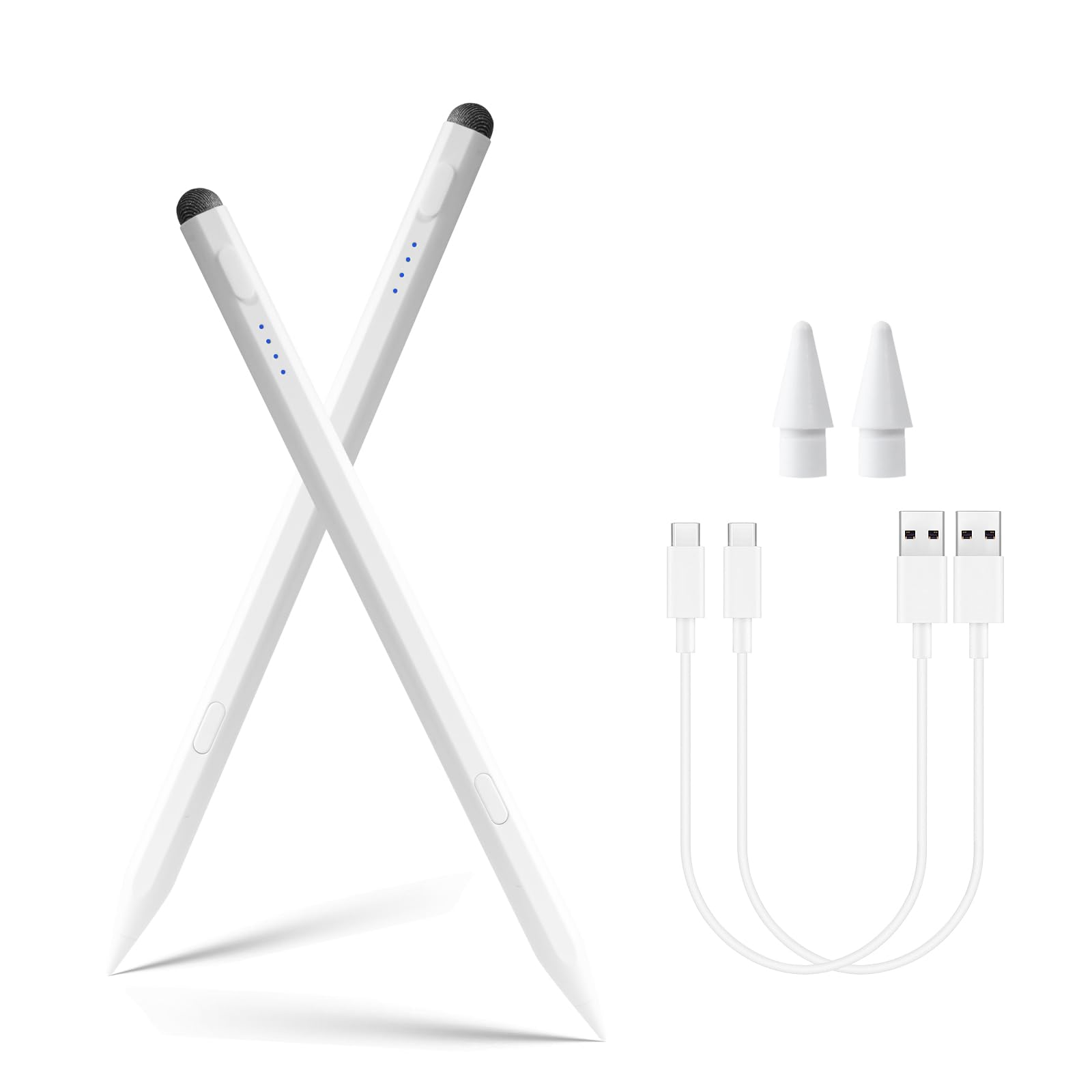
Two pens in the pack, which solves the household argument before it starts.
A shared iPad usually means one person loses the pen. This pack ships two, so a student and a parent — or two kids on one tablet — each keep their own. The 1.5 mm fine tip is built for small handwriting and fine detail lines, and it holds a steady stroke without breakpoints or visible delay.
Charging takes 20-25 minutes for a claimed 8 hours of use, and the pen powers down after 10 minutes of no activity to protect that reserve. A one-minute warning flash tells you before it sleeps. A triple-indicator display shows remaining power at a glance, which removes the guesswork that sends most people hunting for a cable.
Compatibility covers iPad from 2018 through 2025, including the 11th A16 and 10th generation, Air 3 through 6, Mini 5 through 7, and Pro models across 11-inch, 12.9-inch and 13-inch sizes. Two things will bite you: models before 2018 are unsupported, and the maker recommends using it with a glass screen protector. If your iPad is older or you hate screen film, look elsewhere.
The value read: two active iPad pens in one box with palm rejection, tilt sensing and a battery readout that actually tells you what is left.
Before you buy: confirm your iPad generation and your willingness to run a screen protector, since both are part of the deal here.
Best suited to: a household sharing an iPad who would rather not buy a replacement every few months.
Skip if: your iPad predates 2018 or you object to fitting a glass protector.
6. STAEDTLER Noris Digital Jumbo

The thick triangular barrel and 4,096 pressure levels are built for long handwriting.
Where the slimmer Noris above is a pencil for quick marks, this Jumbo is a pencil for people who fill notebooks. The triangular barrel gives you a grip your fingers settle into without pinching, and 4,096 pressure levels let the line width and stroke intensity follow how hard you press. Handwriting comes out looking like handwriting rather than uniform digital strokes.
The soft eraser at the tail is the feature people stop noticing because it works so naturally — flip the pencil and erase, exactly as you would on paper. It is battery-free EMR, so no charging and no pairing, and palm rejection ignores your resting hand while the tip registers. Five replacement nibs and a tool ship in the box. It works with Samsung Galaxy Tab, Kindle Scribe and other EMR screens, and it will not work on Apple devices.
Effectiveness is what reviewers praise most — plenty of owners find it outperforms the pen that came with their e-notebook. Durability is the one uneven note; a handful report wear at the tip sooner than expected, which the five spare nibs largely cover.
Built for volume writers
- 4,096 pressure levels make line weight respond to your hand
- Triangular barrel keeps a relaxed grip through long sessions
- Tail eraser flips like a real pencil for corrections
- Five replacement nibs and a tool included
Worth knowing first
- EMR only — no iPad or non-EMR tablet support
- Tip wear shows up for some users sooner than they expected
Right for: students, sketchers and note-takers on Samsung, Kindle Scribe or ReMarkable who want paper-like control.
Wrong for: anyone on an iPad, since the EMR pen has nothing to talk to there.
7. LAMY AL-Star EMR

A metal-bodied EMR pen for people who care how the tool feels on the desk.
The AL-star brings LAMY’s familiar ergonomic profile into digital writing, with a metal enclosure that gives the pen real presence in the hand. It carries over 4,000 pressure levels, which covers the same ground as serious drawing hardware — long text and layered sketches both respond to pressure rather than sitting at one flat weight.
Because it runs on Wacom EMR, there is no battery and no charging — it works whenever you pick it up, on compatible Android tablets, phones and notebooks. A function button handles shortcuts in supporting apps. The PC/EL tip is replaceable, and two spare 0.35 mm tips plus tweezers ship in the box, so tip wear is a swap rather than a replacement purchase.
Cross-device flexibility is the real selling point here. Owners run it across Samsung tablets and e-ink notebooks such as the Onyx Box Max Lumi, and the weighted feel gets compared favourably to dedicated drawing stylus hardware. The trade-off is weight. At 24 g it is noticeably heftier than the battery-free Noris at 10 g, and that extra mass will feel like substance to some hands and like fatigue to others after a long session.
Why it costs more: a metal barrel, a replaceable PC/EL tip system with two spares, and EMR operation that never needs a cable.
The honest trade-off: at 24 g it is the heaviest pen here, so try it for a full writing session before committing to it as your daily.
For you when: you split writing between an Android tablet and an e-ink notebook and want one pen that feels substantial doing both.
Consider the lighter Noris instead if: a heftier barrel tires your hand during long handwriting sessions.
Know the Specs
Active Pen vs EMR Pen
An active pen has a battery inside and needs charging, which is why you see charge times like 15 minutes or 40 minutes on a spec sheet. An EMR pen pulls power from the tablet’s electromagnetic layer, so it carries no battery at all and never needs a cable. Active pens typically work with iPads and Surface devices, while EMR pens pair with Samsung Galaxy Tab, Kindle Scribe, ReMarkable and similar screens. Pick the technology your tablet supports first, then shop for shape and feel.
Pressure Levels
Pressure levels describe how finely the pen senses how hard you press. A pen with 1024 levels reads your hand well enough for everyday notes and sketches. A pen with 4,096 levels picks up subtler pressure changes, so line width and stroke intensity vary more naturally. If you draw or write cursive, the higher figure is worth having. For quick lists and margin notes, the difference is smaller than the spec sheet suggests.
Tip Size and Feel
A finer tip gives you more control for small letters and tight detail work, while a broader tip can feel steadier for fast handwriting. Tip size is also a durability question, because tips wear with use. Pens that ship replacement tips or a replaceable tip system let you keep writing instead of replacing the whole stylus. Check what comes in the box before you buy.
Palm Rejection
Palm rejection tells the screen to ignore your resting hand and register only the pen tip. Without it, your palm leaves stray marks every time you settle your hand to write. On active pens this is an electronic feature; on EMR pens the tablet handles it because it recognises the pen’s own signal. Either way, it is the difference between writing naturally and hovering your hand off the glass.
Common Questions
Will an iPad stylus work on a Samsung Galaxy Tab?
Is a battery-free EMR pen better than a rechargeable one?
How long does a writing tablet stylus battery last on a charge?
Can I use these styluses with a Kindle Scribe?
Do I need a screen protector for a stylus?
What do pressure levels actually change in my handwriting?
Can I replace the tip when it wears down?
Does the stylus need Bluetooth pairing to work?
Why does my stylus leave stray marks when my hand rests on the screen?
Will a Surface pen work on a Kobo e-reader?
The Bottom Line
For most people shopping for the best writing tablet stylus, the right answer starts with the tablet in your hand. Kobo Libra Colour and Sage readers should take the Kobo Stylus 2, because the colour markup and tail eraser turn margin notes into something you actually use. iPad owners from 2018 onward get the most practical package from the HATOKU pen and its 15-minute charge. Surface users should head straight to the Metapen M1, and anyone on an EMR screen who writes for hours will get the most from the Noris Digital Jumbo and its 4,096 pressure levels. Whichever you choose, match the pen technology to your screen first and pick the barrel second — that is the decision that keeps you writing instead of returning.
How we choose
We do not accept paid placement. Every pick is matched to a real buyer and a real use-case; we do not hands-on test units.
Sources
Specifications: manufacturer listings and product documentation. Review insights: verified customer reviews, as of November 2026. Pricing: not shown on this page (it changes often); check the current price via the retailer link.
As an Amazon Associate, Tactical Gear Guy earns from qualifying purchases. This does not affect which products we feature.