Specs are compiled from manufacturer listings and verified buyer reviews and can change over time — please confirm the key details on the product page before buying.
You want one small box on the shelf that feeds your cameras and access points power and data down a single cable — and you want it to still be running next year. That is the whole job. The tricky part is that “small PoE switch” covers a wide spread: 4-port desktop pucks, 8-port fanless metal bricks, and a couple of slightly cleverer units with VLAN isolation or a web menu. This guide sorts them by what actually matters on a desk or in a weak-current box.
This guide is built by comparing the manufacturers’ published specifications and the patterns across verified customer reviews, so you get each pick’s real strengths and trade-offs instead of marketing spin.
One honest note before you scroll: this list uses flexible matching for the “provides PoE power” requirement, so not every pick is the exact port count you typed into the search bar. Each entry lists its exact port count and total PoE budget so you can match it to your device load. Below is the practical shortlist of the small poe switch options worth your desk space.
Top Picks


How To Choose The Best Small PoE Switch
Start with the devices you already own, not with the switch. Count how many need power and how much each one pulls. That sum, not the port count, sets the minimum budget you can buy.
Add up the wattage before you count the ports
Every PoE switch publishes a total power budget — the ceiling on how much electricity it can hand out across all ports at once. A 65W unit can run a few cameras and an access point comfortably. A 120W unit gives you more headroom for a bigger camera cluster.
Each port usually caps at 30W, but the total budget is what bites first. If your devices add up past the budget, the switch starts dropping the lowest-priority ports to protect itself.
Match the speed tier to your recording setup
A 100Mbps port moves data at roughly a tenth of a Gigabit port’s rate. For one or two cameras and a phone handset, that is fine. For an NVR pulling several high-resolution streams at once, Gigabit ports on every connection keep the recording from stuttering.
Decide if you need a management menu
Unmanaged switches are true plug-and-play — you connect cables and walk away. Managed or “easy smart” models add a web page where you can set up VLANs (separating traffic into private groups) and prioritize video traffic. If all you want is power and data, skip the menu.
Side-by-Side Comparison
| Model | Best For | PoE Ports | Total PoE Budget | Port Speed | Amazon |
|---|---|---|---|---|---|
| NETGEAR GS305P★ Best Overall | Set-and-forget desktop power | 4 PoE+ | 63W | 1Gbps | Amazon |
| Tenda 5 Port PoEBest Value | Tightest space and lowest spend | 4 PoE+ | 58W | 1Gbps | Amazon |
| STEAMEMO 8 Port ManagedMost Configurable | Budget VLAN control | 8 PoE+ | 120W | 100Mbps | Amazon |
| Binardat 5 Port Gigabit | Gigabit on a mini chassis | 4 PoE+ | 65W | 1Gbps | Amazon |
| YuanLey 8 Port Gigabit | Eight powered Gigabit ports | 8 PoE+ | 120W | 1Gbps | Amazon |
| TP-Link LS108GP | Long cable runs to outdoor cameras | 8 PoE+ | 65W | 1Gbps | Amazon |
| TP-Link TL-SG105PE | Small desk with smart features | 4 PoE+ | 65W | 1Gbps | Amazon |
| REOLINK RLA-PS1 | Reolink camera and NVR setups | 8 PoE+ | 120W | 1Gbps | Amazon |
| NETGEAR GS308PP | Bigger camera counts, no fiddling | 8 PoE+ | 83W | 1Gbps | Amazon |
Detailed Reviews
1. NETGEAR GS305P 5-Port PoE Gigabit Switch
Our pick — 4.5+★ from 450+ verified ratings; the strongest balance of quality and price.
Four powered Gigabit ports, a 63W ceiling, and nothing to configure — the desk switch that just runs.
Four PoE+ ports deliver up to 30W each, capped by a 63W total budget. In plain terms, you can hang a couple of cameras and an access point off it and still have headroom in reserve. The fifth port is a plain Gigabit uplink that carries everything back to your router.
What makes this the pick is dynamic PoE allocation. The switch moves unused power from idle ports to whichever device is drawing hardest, instead of locking a fixed slice to every port. So a camera that reboots and surges still gets what it needs without tripping the budget.
Reliability is what keeps buyers loyal here — the box works from the start, runs Polycom handsets and Aruba access points without argument, and never needs a visit. The metal case is fanless, so it is silent on a shelf, and a wall-mount kit is in the box for a weak-current cabinet. One caveat: the chassis is on the larger side at 9.5 inches long, so measure your shelf if space is tight.
Where it earns the crown
- Dynamic allocation shuffles unused watts to the port that needs them
- All five ports run auto-negotiating Gigabit speeds
- Fanless metal shell, wall-mount kit included, zero configuration
- Best score in this group at 4.5+ stars, with a deep review base behind it
What to weigh first
- 63W total is the smallest budget among the 8-port-capable crowd
- At 9.5″ long it is the bulkiest desktop option here
- No VLAN or management menu — unmanaged only
Take this one: you want a handful of cameras or APs powered with zero setup and the strongest track record in the lineup.
Hold off: your device list is already pushing past 63 total watts, or you need traffic separation.
2. Tenda 5 Port PoE Gigabit Switch
A palm-sized metal puck that undercuts everything else here and still throws in a VLAN switch.
The Tenda measures 3.94″L x 3.94″W x 1.02″H and weighs 195 g, so it disappears behind a router or sits on a shelf without anyone noticing. For comparison, the NETGEAR GS305P above is listed at 9.5″L x 6.7″W x 3.4″H on paper. Four PoE+ ports at up to 30W each run off a 58W total budget, with one Gigabit uplink out.
Where it beats its price class is the one-touch VLAN toggle. Flip it and ports 1-4 get isolated from each other, which cuts down broadcast storms and DHCP spoofing on a shared home or shop network. There is also 6kV surge protection built in — a buffer against lightning-induced spikes on your cabling — plus a fanless metal shell for silent 24/7 duty.
The honest caveat is longevity. Most units run for years, but a small run of buyers report the switch dying inside the first year. Tenda backs it with a 3-year warranty and free technical support, which softens that risk considerably. If this is running a security system you depend on, consider the NETGEAR or TP-Link picks above instead.
The space-saving win: 58W across four PoE+ ports in a 3.94-inch square makes it the most compact powered switch in this group.
Size the risk: a 3-year warranty covers the durability question, but this is the one pick where long-haul service is worth thinking about before you commit a camera system.
Suits you if: space and spend are your two biggest constraints and you want VLAN isolation without a management menu.
Think again if: you are building a camera rig that has to run untouched for years.
3. STEAMEMO 8 Port Managed PoE Switch
Eight powered ports at a 120W budget — double the Tenda’s headroom — with a web menu on a budget.
Eight PoE+ ports give you up to 30W each, and the total budget is 120W — the Tenda above tops out at 58W. That extra 62W is what lets four or more cameras run at once without ports dropping. Each port pushes 100Mbps, not Gigabit, so record your streams with that in mind.
The management layer is the real differentiator at this tier. A web interface, desktop software, or mobile app lets you set 802.1Q VLANs, prioritize video with QoS, and watch traffic in real time. There is also automatic cable quality detection and storm control. Switch it to unmanaged mode and it behaves like a plain plug-and-play box.
Now the fair warning. This is the one pick where reliability divides people — plenty report it working exactly as expected, and a chunk report it stopping or failing. Power supply failures come up too. The 1-year replacement warranty is the shortest in this lineup. Buy it as a budget experiment, not as the spine of a system you cannot afford to lose.
What you get for the money: 120W of PoE plus genuine VLAN, QoS, DHCP snooping, and port mirroring — features you usually pay a lot more to reach.
The trade-off to own: mixed reliability reports and a 1-year replacement window mean you are trading long-term certainty for configuration depth.
Pick it when: you want to learn VLANs and QoS on a real network without spending much, and 100Mbps ports cover your cameras.
Leave it when: uptime is non-negotiable or your NVR needs Gigabit throughput.
4. Binardat 5 Port Gigabit PoE Switch
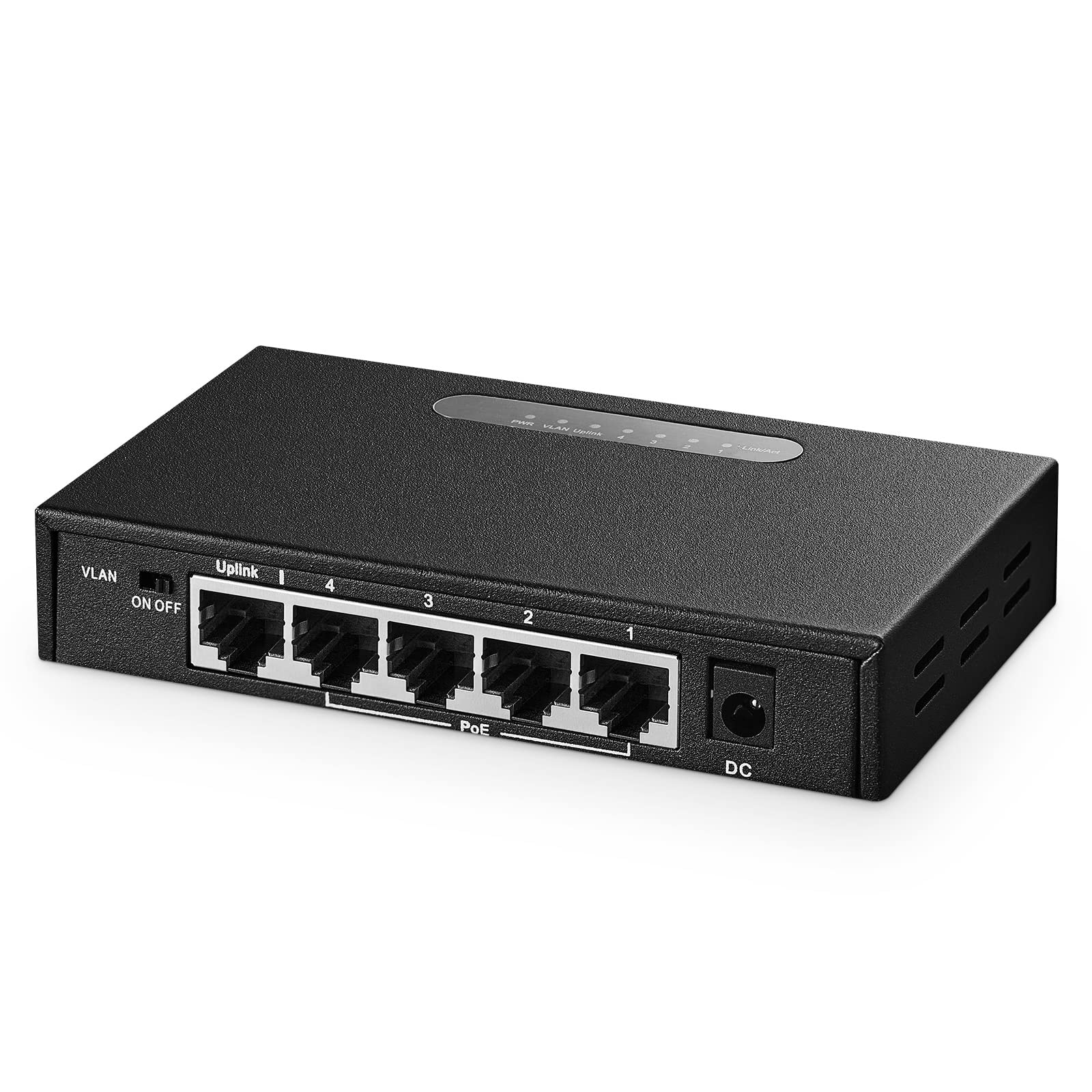
Gigabit on four powered ports with a 65W supply, packed into a case small enough to hide in a cabinet.
This is the speed story of the group. All four PoE ports run 1000Mbps with a Gigabit uplink, for 10Gbps of total bandwidth across the switch. Compare that to the STEAMEMO’s 100Mbps ports above — for a camera that records at higher resolution, the Binardat keeps the stream clean instead of compressing it down.
The 65W power supply is external rather than built in, which keeps the box slim, and each port can push up to 30W. Output follows the IEEE 802.3af/at standard at 44–57V, so it powers active PoE devices — it will not feed passive 24V gear. Auto-detection means non-PoE devices get data only and no accidental voltage.
Mount it on a wall, drop it in a weak-current box, or stand it on a desk. Fanless operation keeps it silent, and the metal housing is built for a cabinet that never gets opened. LED indicators show link and power status at a glance. There is no management menu or VLAN toggle here — the win is Gigabit speed in a cabinet-sized case.
Why it’s here: full Gigabit on all four PoE ports with a 65W external supply, at a footprint that fits where larger switches will not.
Read the label first: 802.3af/at only — passive 24V PoE devices will not power up.
Good match: you need Gigabit throughput on powered ports and the switch is going into a cramped enclosure.
Wrong turn: your cameras or phones expect passive 24V PoE rather than the standard 802.3af/at.
5. YuanLey 8 Port Gigabit PoE Switch

Every one of its eight ports is Gigabit and powered — the widest Gigabit PoE spread in this lineup.
Eight 1000Mbps ports, a 12Gbps backplane, and a 120W PoE budget with up to 30W per port. Most 8-port PoE switches at this price drop to 100Mbps ports to cut costs. Many 8-port PoE switches — the STEAMEMO above included — run 100Mbps ports to keep costs down. The YuanLey does not.
All eight ports support PoE and auto-detect what is plugged in, so PoE cameras, APs, computers, and routers all work. Every port can act as an uplink, which means you can chain this switch or feed it from any position rather than hunting for a dedicated uplink jack. Hanging ears are built into the metal case for wall mounting, and the fanless design runs silent with built-in power.
What owners keep coming back to is steadiness — it runs smoothly and holds full speed, and the case is compact enough for a shelf. The bump in the road is the power side: some units report no PoE output on a port, and a few find the footprint larger than expected. It is a minority, but check the 9.06″L x 7.48″W footprint against your shelf and test your PoE ports on day one.
Where it plays strongest: you get eight powered Gigabit ports (each up to 1,000Mbps) sharing a 120W power budget — the best port-to-bandwidth ratio in this guide, so several cameras can run at once without running short on power.
Set it up smart: test every PoE port the first day you plug it in, because a few units arrive with a dead port.
Made for you: you are wiring a full camera set with Gigabit streams and want all eight ports powered.
Keep looking: a 100Mbps camera setup is plenty, or desk space is genuinely tight.
6. TP-Link LS108GP, 8 Port PoE Gigabit Ethernet Switch

Two buttons do the heavy lifting — one pushes power 820 feet down a cable, the other reboots dead cameras.
Eight PoE+ Gigabit ports at up to 30W each, a 65W total budget, and 16Gbps of switching capacity. Those numbers put it in the same territory as the YuanLey above on ports, though the YuanLey carries the larger 120W budget. What the TP-Link gives you that nothing else here does is cable reach.
Extend Mode stretches PoE transmission to 820 ft, which matters when a camera sits at the far corner of a yard or warehouse and a standard run loses the link. PoE Auto Recovery is the second trick: if a camera freezes or drops off the network, the switch reboots that port automatically so you do not drive out to power-cycle it.
Setup is pure plug-and-play, and the fanless metal case keeps quiet rooms quiet. Where it stumbles, honestly, is cabling durability — a share of owners mention burned ethernet cables, and port capacity drew mixed notes. Inspect outdoor cable runs for heat damage, and keep the switch itself in a dry enclosure. Give the cabling a check if you run it in harsh conditions.
The standout spec: 820 ft of PoE reach plus auto-recovery reboots — features built for cameras at the end of long, hard-to-reach runs.
The honest note: 65W is modest for 8 powered ports, and a few report cable damage over time with long outdoor runs.
Fits your plan: outdoor or warehouse cameras sit far from the switch and you would rather not drive out to reset them.
Look past it: all eight ports need serious wattage at once, or your cable runs are all short and indoor.
7. TP-Link TL-SG105PE 5 Port Gigabit PoE Switch

A 3.93-inch box that gives you VLANs and QoS without needing a rack or a network admin.
Four PoE+ ports at up to 30W each, a 65W total budget, and one extra Gigabit port for uplink. That matches the NETGEAR GS305P on paper. The difference is that this one is “easy smart” — a web interface lets you segment traffic with VLANs, prioritize video with 802.1p/DSCP QoS, cap bandwidth per port, and snoop IGMP for cleaner multicast video.
The chassis is 3.93″L x 3.85″W x 0.98″H and weighs 0.22 kg, so it fits on a crowded desk or a shelf beside the router. Note the case is plastic here rather than metal, which is the main corner cut to hit this price. Shielded ports are included, and TP-Link backs the switch with a 3-year warranty and weekday technical support.
If you want configuration reach at a tiny footprint, this and the STEAMEMO are your two options — and the TP-Link wins on size and brand support while the STEAMEMO wins on port count and budget watts. Set it up with the web utility once, then leave it alone.
The value play: VLANs, QoS, and rate limiting in a 3.93-inch box with a 65W PoE budget.
Fair caveat: plastic housing instead of metal, and only four powered ports.
Reach for it: you want smart features and a 3-year warranty in the smallest possible footprint.
Pass on it: you need a metal case for a rough or hot enclosure, or more than four powered ports.
8. REOLINK RLA-PS1 PoE Switch
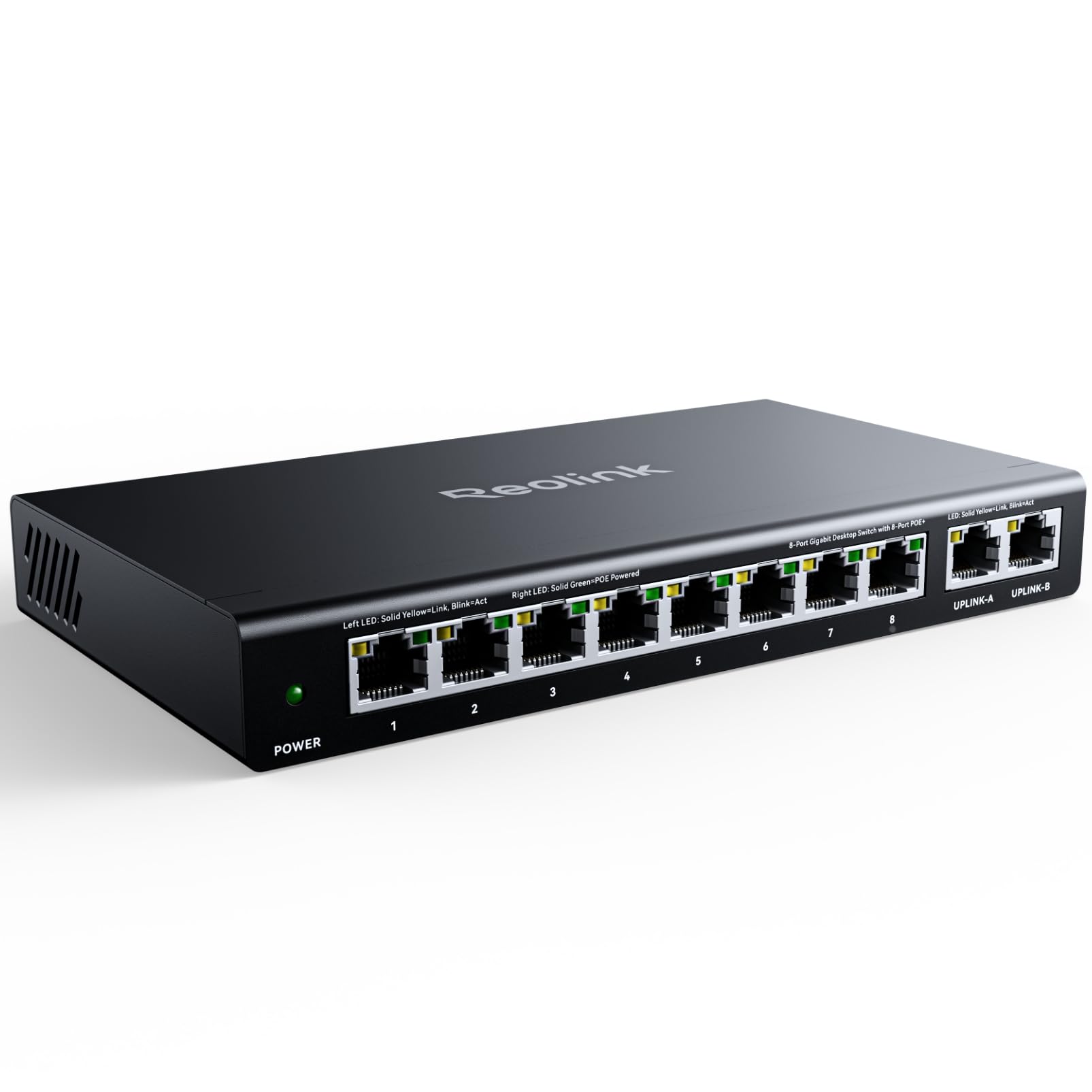
Ten ports total, 120W to spend, and it speaks Reolink’s language from the start.
Eight PoE ports and two Gigabit uplink ports, all at 10/100/1000Mbps, with up to 30W per PoE port and a 120W total budget for as many as eight powered devices. That 120W matches the YuanLey above and beats the TP-Link LS108GP’s 65W. It is enough to run a full camera set with headroom.
Intelligent power management kicks in when the total load passes 120W: lower-priority ports power down one at a time until the draw fits, so the critical cameras keep running and nothing overloads. Auto-detection means non-PoE devices get data only, with no voltage sent to gear that does not want it.
If your cameras are Reolink, this switch plugs straight into a Reolink NVR (network video recorder) or joins the same LAN (your local home network), and it works fine without an NVR too. The catch is speed: customers note regular ports landing near 90Mbps rather than full Gigabit (1,000Mbps), so a large file copy can feel slower than the label suggests. Own Reolink cameras and a Reolink NVR? The fit is excellent. Need guaranteed speed on every port? Weigh that against the NETGEAR GS308PP below.
Best-fit scenario: a Reolink setup where one cable per camera, 120W of budget, and direct NVR pairing make the whole install simpler.
Check the speeds: some regular ports measure near 90Mbps, so confirm full-speed throughput if your recording depends on it.
Right answer for: Reolink camera owners who want a matching 8-port powered switch with a 120W budget.
Not the answer for: mixed-brand networks where guaranteed Gigabit on every port matters more than ecosystem fit.
9. NETGEAR GS308PP 8-Port PoE Gigabit Switch

Eight powered Gigabit ports with an 83W budget — more headroom than the GS305P, still set-and-forget.
Eight PoE+ ports run at 1.0Gbps and share an 83W total budget, with dynamic PoE allocation moving unused power to heavier devices. That is more headroom than its little brother, the GS305P above, which caps at 63W. For a camera cluster that has outgrown four ports, this picks up where the 5-port drops off.
Everything is unmanaged and plug-and-play: no software, no configuration, no menu to learn. Ports auto-negotiate speed and work with existing Cat5e or Cat6 cable. The metal case supports desktop or wall-mount placement, and IEEE 802.3az Energy Efficient Ethernet trims power draw when ports are idle.
Owners point to reliability as the reason they keep buying NETGEAR — it runs without issues from the start, and the installation is as simple as it gets. The one thing to plan for: 83W across eight ports means roughly 10W each if all eight run simultaneously. If those are high-end PoE cameras or access points, the 120W REOLINK above buys more headroom. For most home or small-shop camera sets, 83W is comfortable.
Why it wins the budget slot: the largest PoE budget in the lineup at 83W, delivered across eight Gigabit ports with nothing to configure.
The ceiling to know: run all eight ports hard and each gets about a tenth of the budget — good enough for cameras, thin for power-hungry access points.
The pick for you: you want eight powered Gigabit ports and a proven name without touching a settings page.
Step up instead: every port hosts a high-draw device, where the 120W options above fit better.
Know the Specs
PoE Budget (Watts)
The total power the switch can hand out across all ports at once. A 58W switch and a 120W switch may both offer 30W per port, but the 58W unit runs out of total capacity faster. Add up your devices’ wattage, then buy a budget with headroom above that sum.
802.3af vs 802.3at
These are the two common PoE standards. 802.3af is the lower tier and covers basic devices. 802.3at, also called PoE+, delivers more power per port, up to 30W. Every pick here supports both, but check your camera or access point’s spec sheet to confirm it uses standard PoE and not passive 24V power.
Port Speed: 100Mbps vs Gigabit
A 100Mbps port moves data at about a tenth of a Gigabit port’s rate. If your NVR records several high-resolution streams, Gigabit ports keep up. For a couple of standard cameras or a VoIP phone, 100Mbps often works fine — and it is where the cheaper 8-port switches save cost.
Managed vs Unmanaged
Unmanaged switches are pure plug-and-play. Managed or easy-smart models add a web page for VLANs (private traffic groups), QoS (priority rules for video), and monitoring. You only need these if you want to separate camera traffic from your main network or control bandwidth per port.
Common Questions
Can a small PoE switch power my security cameras without a separate power supply?
What happens if my devices draw more than the switch’s PoE budget?
Do I need Gigabit ports or will 100Mbps be enough for my cameras?
What is the difference between 802.3af and 802.3at PoE?
Can I mount a small PoE switch on a wall or inside a cabinet?
Will a PoE switch work with non-PoE devices like a regular computer or router?
Do I need a managed switch or is unmanaged fine for a home network?
How far can a PoE switch send power over ethernet cable?
Is a fanless PoE switch safe to run 24/7?
Can I daisy-chain PoE switches to add more ports?
The Bottom Line
The all-round winner here is the NETGEAR GS305P, because it pairs dynamic PoE allocation and fanless metal construction with the strongest reliability record in the group — the switch that just runs, with nothing to learn. If you need more powered ports and a bigger budget, the YuanLey 8 Port Gigabit delivers eight Gigabit PoE ports at 120W. And for Reolink camera owners who want a direct NVR match, the REOLINK RLA-PS1 is the one to reach for.
Whichever you pick, decide from the wattage sum of your own devices first and the port count second. Sizing by wattage first prevents the most common return: a switch that browns out under load.
How we choose
We do not accept paid placement. Every pick is matched to a real buyer and a real use-case; we do not hands-on test units.
Sources
Specifications: manufacturer listings and product documentation. Review insights: verified customer reviews, as of November 2026. Pricing: not shown on this page (it changes often); check the current price via the retailer link.
As an Amazon Associate, Tactical Gear Guy earns from qualifying purchases. This does not affect which products we feature.