Specs are compiled from manufacturer listings and verified buyer reviews and can change over time — please confirm the key details on the product page before buying.
Your Starlink dish pulls a strong signal from the sky, but the router it ships with has no place to plug in a cable. That single missing port is why game consoles stutter, smart TVs buffer, and desktop PCs sit on shaky Wi-Fi. A Starlink Ethernet Adapter adds that wired port back, and the right one depends entirely on which dish model you own — Gen 2 Actuated, Gen 3, or Mini. Pick the wrong generation and it simply will not fit. Get it right and you get a stable, lower-latency line for a console, desktop, or TV. This guide sorts the compatible adapters by generation, port count, and speed so you can match one to your exact kit in a couple of minutes.
This guide is built by comparing the manufacturers’ published specifications and the patterns across verified customer reviews, so you get each pick’s real strengths and trade-offs instead of marketing spin.
Most buyers only need to confirm their dish generation and how many wired devices they want to feed. From there, a compatible best starlink ethernet adapter should add a stable RJ45 port to your router in about a minute of plug-and-play work.
Top Picks

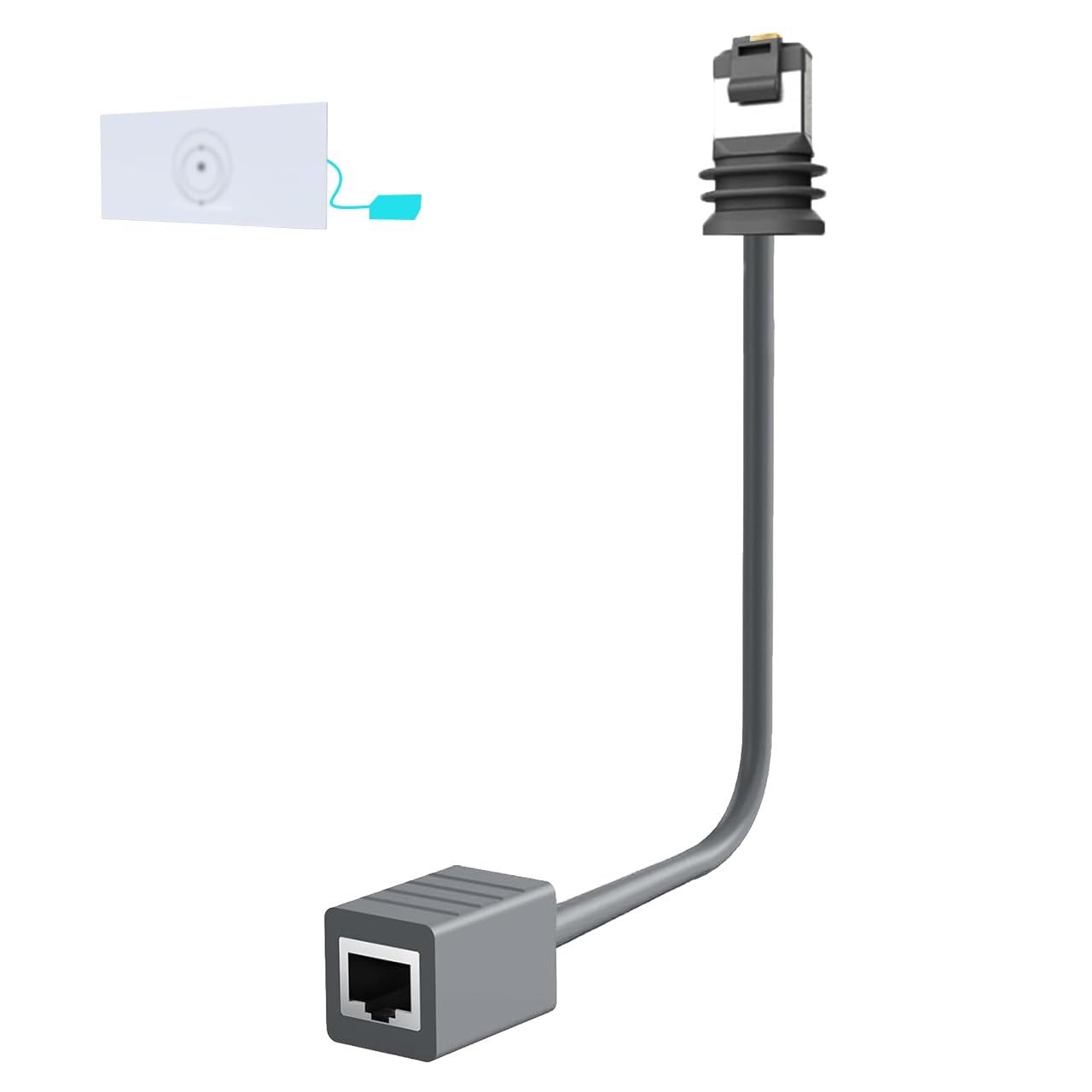

How To Choose The Best Starlink Ethernet Adapter
The biggest mistake buyers make is treating these adapters as universal. They are not. Starlink has shipped several dish and router generations, and the connector on each one is physically different. An adapter built for the Gen 2 Actuated rectangle dish will not seat into a Gen 3 kickstand router, and a Gen 3 adapter will not fit a Gen 2 dish. So the first job is not comparing speeds. It is confirming which hardware you actually own.
Match the adapter to your dish generation first
Gen 2 Actuated dishes use the rectangular satellite kit, and adapters for that model are the most common on the shelf. Gen 3 and the newer Standard 4X use a different connector, and the Mini portable dish has its own. Several listings warn outright that they do not work with the latest Standard Kit with the kickstand base. Check the model label on your router before you order anything.
Decide how many wired ports you need
A single-port adapter gives you one RJ45 jack. That is plenty if you only want to hardwire a console or a desktop. If you have several devices, you can attach a network switch to a single-port adapter, or buy a multi-port adapter that gives you four jacks at once. Count your wired devices before you choose.
Speed ratings and what they mean in practice
These adapters quote data transfer rates in Mbps, which measures how much data can move per second over the wired link. The figures here range from 1000 Mbps to 1200 Mbps. For gaming, streaming, and video calls, the real win is stability and lower latency from a cable rather than raw headline speed. Most home internet plans never approach the adapter’s ceiling anyway.
Indoor, outdoor, and RV considerations
If your adapter lives outside or travels in an RV, waterproofing matters. An IP67 rating means the connector is sealed against dust and water spray, which is what you want for an exposed outdoor run. Cable length is the other practical factor — a short pigtail keeps the install tidy but can leave you reaching for an extension cable if your router sits far from where the cable enters.
Side-by-Side Comparison
| Model | Best For | Dish Compatibility | Data Transfer Rate | Ports | Amazon |
|---|---|---|---|---|---|
| FONKEN Rectangular V2 Adapter★ Best Overall | Best Overall for Gen 2 | Gen 2 Actuated | 1000 Mbps | 1 RJ45 | Amazon |
| Jachee Gen 3/Mini AdapterBest for Outdoor | Camping and outdoor runs | Gen 3 / Mini | 1000 Mbps | 1 RJ45 | Amazon |
| Frafode Star Link AdapterMost Versatile | Repeater mode flexibility | Gen 2 Actuated | 1200 Mbps | 1 RJ45 | Amazon |
| LUCMO Gen 2 Adapter | Value on Gen 2 hardware | Gen 2 Actuated | — | 1 RJ45 | Amazon |
| LIVINGTHING Upgraded Adapter | Extending to mesh routers | Gen 2 Actuated | 1000 Mbps | 1 RJ45 | Amazon |
| GUUGEI Gen 2 Splitter | Plug-and-play simplicity | Gen 2 | 1000 Mbps | 1 RJ45 | Amazon |
| Seynli Star Link Adapter | Residential everyday use | Gen 2 Actuated | 1 Gbps | 1 RJ45 | Amazon |
| STARGEAR Gen 3/Mini Adapter | All-weather outdoor installs | Gen 3 / Mini | 1200 Mbps | 1 RJ45 | Amazon |
| EAZUSE Multi-Port Adapter | Hardwiring four devices | Gen 3 / Mini | — | 4 RJ45 | Amazon |
Detailed Reviews
1. Starlink Ethernet Adapter V2
Our pick — 4.5+★ from 400+ verified ratings; the strongest balance of quality and price.
One extra RJ45 jack, and suddenly your whole wired setup has somewhere to go.
If you own the rectangular Gen 2 Actuated kit, this FONKEN adapter is the one that fits and simply works. It turns the dish-to-router run into a wired link rated up to 1 Gbps (1000 Mbps), so downloads and streaming hold steady instead of stuttering on Wi-Fi. Setup is plug-and-play with no driver installation, which means you seat it in-line and you are online — no software to wrestle with.
What wins people over is that it just works: one RJ45 jack, no drivers, no settings. This is the adapter that Gen 2 owners reach for when they want a second wired port for a console, a desktop, or a third-party router. Build quality feels solid, and the install is quick enough that non-technical buyers get it done without help. It also plays nicely with Ethernet switches, smart TVs, and other wired gear, so you can hardwire a whole little network off one jack.
Expect strong downloads but weaker uploads on this wired line — upload figures can drop lower than owners expect, and real-world results vary by plan and location, so it is not a guaranteed gigabit in both directions. Check your dish first: if you have the newer Gen 3 Standard Kit with the kickstand base, this unit will not fit, and you need a Gen 3 adapter instead.
What earns its keep
- Supports up to 1 Gbps for a fast, stable wired line
- Plug-and-play with no drivers — in-line in under a minute
- Works with third-party routers, switches, smart TVs, and desktops
- Solid build quality that holds up in daily use
Where it stops short
- Upload speeds can come in lower than owners anticipate
- Not compatible with the newest Standard Kit with kickstand base
Grab this one if: you run a Gen 2 Actuated rectangle kit and want one reliable wired port for a console, PC, or router.
Keep looking if: your dish is the newer Gen 3 Standard Kit — the connector here will not seat.
2. Jachee Ethernet Adapter Gen 3/Mini with 11.8″ Cable
Built for the Gen 3 and Mini crowd who leave a cable exposed to the weather.
This Jachee adapter is aimed squarely at Gen 3 Standard and Mini dishes, and it arrives with an 11.8-inch cable already attached. That pigtail of roughly a foot gives you a little slack between the dish connector and your RJ45 run — handy when the router and the cable entry point are close together. It handles data at up to 1000 Mbps over Cat 5e/6 cabling, which is plenty for smooth video and gaming.
The standout feature is the IP67 waterproof sealing rubber ring. In plain terms, that is a dust-tight, water-resistant seal, so the connector survives rain and spray when you mount it outside for a home install or a camping setup. The dedicated Starlink connector on one end and a standard T568B RJ45 female port on the other mean no cutting or crimping of your original cables. You plug it in and you are done.
Weatherproof first: the IP67 seal is the reason to pick this over a bare Gen 2-style adapter if your run lives outdoors or travels in an RV. The 11.8-inch length keeps things tidy without forcing you to buy an extension.
Measure before you commit: the listing metadata rates this as an indoor part, so if you mount it outside, only the connector seal is covered, not the whole assembly. Also confirm your router uses the Gen 3/Mini connector, not the older Gen 2 one.
Reach for it if: you have a Gen 3 or Mini dish and your install sees weather.
Look elsewhere if: you are still on the Gen 2 Actuated kit — this connector is the wrong generation.
3. Frafode Star Link Ethernet Adapter
Two modes up its sleeve, and a top speed that edges past the standard Gen 2 adapters.
If you own the V2 rectangular dish and want the most speed headroom here, the Frafode adapter is the fastest Gen 2 unit on paper — 1200 Mbps versus the 1000 Mbps that the FONKEN and several others top out at. At 0.11 kg it is also a touch lighter than the LUCMO Gen 2 adapter at 0.12 kg. That extra rating means more carrying capacity for big downloads, though your real-world throughput still depends on your Starlink plan.
Two working modes set it apart. In repeater mode you attach a third-party router to push coverage into rooms where the signal is weak, so phones, tablets, and laptops all get a stronger connection. In LAN mode you hardwire TVs, switches, consoles, printers, and security cameras for a steadier line. Setup is plug-and-play with no driver installation, so either mode is just a matter of where you plug in.
Compatibility is strict, and that is the one thing to weigh. This is designed specifically for the Gen 2 rectangular dish and will not work with other models — the listing states that plainly. So if your kit is Gen 3 or Mini, stop here and pick one of the Gen 3 adapters below.
Speed and flexibility: at 1200 Mbps it carries the highest transfer rating among the Gen 2 picks in this guide, and the repeater/LAN switch gives you room to grow the network.
Gen 2 only: no cross-compatibility, so verify your dish before ordering.
Best suited to: Gen 2 Actuated owners who want the option to extend a mesh network or hardwire devices on the fly.
Not for you if: your hardware is a Gen 3, Mini, or flat high-performance dish.
4. LUCMO Starlink Gen 2 Ethernet Adapter

The straightforward Gen 2 workhorse that owners keep calling great value.
The LUCMO adapter does one job and does it for the Gen 2 Actuated kit specifically. You seat it between the router and the cable, it clicks into both ends, and you have a hardwired line for consoles, PCs, and smart TVs. There are no drivers and no complex setup — the install is a physical connect-and-go. A single RJ45 port is what you get, which is all most single-device setups need.
For a Gen 2 owner who just wants one wired port without paying premium money, that is a hard combination to beat.
The trade-off is scope. It is built exclusively for Gen 2 Actuated and will not work with Gen 3, the flat high-performance dish, or anything else — the listing says so in bold. That is not a flaw so much as a fit boundary: if your kit is Gen 2, you are in the right place, and if it is not, you are not.
Why it earns the value tag
- Costs noticeably less than the Starlink original for the same basic job
- Genuinely quick plug-and-play install
- Single RJ45 port feeds a console, PC, or TV directly
- Solid build for a small accessory
The limits to know
- Gen 2 Actuated only — no fit for Gen 3 or other dishes
- One port, so multiple wired devices need a switch
Pick it when: you have the Gen 2 Actuated dish and want the cheapest reliable way to add one wired port.
Pass if: you are running any newer or high-performance Starlink hardware.
5. LIVINGTHING Ethernet Adapter

Made for spreading Starlink into the far corners of the house via mesh.
If you are building out a home network, the LIVINGTHING adapter sits on the Gen 2 router and hands Starlink’s signal to a third-party mesh system — EERO, Netgear Orbi, and similar — so Wi-Fi reaches the garage, the bedrooms, and the spots the base router never covered. It supports up to 1 Gbps (1 gigabit per second) speeds, and the Cat 6 cabling spec (a higher-grade Ethernet cable standard) means it can carry that signal for a wired backbone.
Setup is a plug-and-play affair the listing frames as roughly a 60-second connection. There is no activation and no driver installation, so you connect it to the Gen 2 interface and extend the network from there. The neat part is that it does this without making you upgrade from the Gen 2 router to a Gen 3 — you keep your existing kit and just add the wired pathway for mesh routers and devices.
Treat one spec with a raised eyebrow: the listing writes the data transfer rate in gigabytes per second, which is a mislabel — the intent is a gigabit-class wired link, and the item’s own text says up to 1 Gbps. Judge the adapter on what it actually does, extending your Gen 2 network to wired mesh hardware, not on that stray unit.
The mesh angle: if you already run or plan to add a third-party mesh router, this is purpose-built to bridge Starlink into it over a Cat 6 wired connection.
Fit check: it is for the Actuated Gen 2 Standard kit only and will not work with the newest kickstand-base Standard Kit.
Ideal if: you want to push Starlink through EERO or Orbi and cover a whole house.
Think twice if: you are on Gen 3 or Mini, where a different connector is required.
6. GUUGEI Ethernet Adapter

A small dongle that gets a wired line out of your Gen 2 router without fuss.
The GUUGEI unit is a compact splitter-style adapter for the Gen 2 kit. It exposes an RJ45 Gigabit port that meets the maximum network demands of the Starlink V2 system, delivering up to 1000 Mbps over a wired connection. The pitch is lower packet loss and latency, which is what cuts the stutter in online games and video calls when Wi-Fi is doing the work.
Where it fits best is simplicity. There are no additional settings, which the maker markets as a true plug-and-play step, and the slim body tucks away without taking up shelf space. It is compatible with third-party routers, switches, desktops, smart TVs, and other wired devices, so one port can feed whatever you want to move off Wi-Fi. The listed minimum system versions cover Windows 10, Mac OS 10.15 Catalina, and Ubuntu 20.04 if you are plugging into a computer.
Keep your expectations in line with what a single small dongle can do. It is one RJ45 port, so a household with several wired devices will want a switch attached or a multi-port adapter instead. There is also no waterproofing claim here, so keep it indoors where the router lives.
Straightforward and space-friendly: a compact Gigabit port with zero settings to configure, ideal for a single wired device.
One port only: plan on a switch if you want to hardwire more than one thing.
Worth it for: Gen 2 owners hardwiring one console, PC, or TV who want an unobtrusive dongle.
Skip if: you need multiple ports or weatherproofing.
7. Seynli Ethernet Adapter for Starlink Standard Actuated Gen 2

The one whose own copy talks speed and latency, not just ports.
For a smoother gaming line, the Seynli adapter is a plug-and-play unit for the Gen 2 Actuated kit that supports 1 Gbps speeds. Its selling point is latency (the delay before data starts moving) and throughput: the listing pitches it as a fix for weak signal and thin bandwidth on video calls, online gaming, and general browsing.
The design is compact and easy to store, which suits a living-room install or any indoor spot where you want a wired connection without a bulky box on the shelf. It connects in-line with the dish cable or plugs directly into the router, and it is compatible with the Gen 2 router and rectangular dish. For residential users running ordinary internet tasks, that covers what you need.
The catch is the same story every Gen 2 adapter tells: it is tied to the Gen 2 Standard Actuated hardware. Newer dishes need a different connector. Also note the listing’s oversized dimension figure — treat the adapter’s practical size as compact and store-friendly rather than reading that number literally.
What stands out
- Supports 1 Gbps for wired speed and stability
- Built around lower latency for gaming and calls
- Compact body that stores easily indoors
- Gen 2 router and rectangular dish compatibility
What to weigh
- Gen 2 Actuated only — not for Gen 3 or Mini dishes
- Single port, so multiple devices need a switch
It suits: Gen 2 owners who care most about a stable, low-latency line for gaming and video.
Not the one for: newer Starlink kits or anyone needing several wired ports.
8. STARGEAR Ethernet Adapter for Gen 3/Mini with 1FT RJ45 Cable
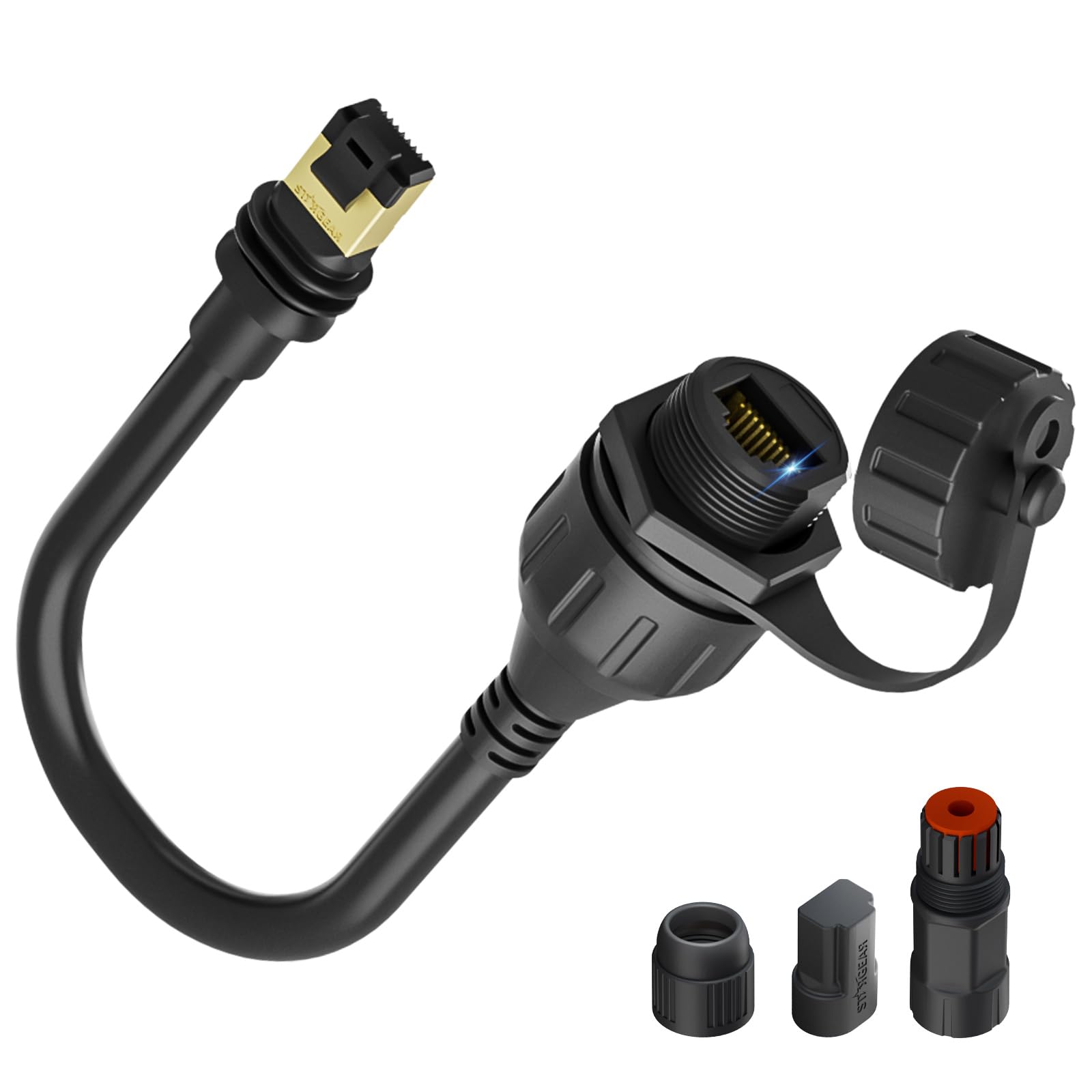
Engineered for the road — sealed connectors and a copper build that shrugs off the weather.
STARGEAR builds this adapter for Gen 3 and Mini dishes, and it shows up ready for hard use. The male-to-female extender is made of 24AWG 100% pure copper, which is a thicker-gauge wire that carries a stronger signal, and it handles data at up to 1200 Mbps. A full-metal shielding layer cuts down signal interference, so the wired line stays clean. The 1-foot cable keeps the run tight and tangle-free.
The waterproofing earns its RV credentials. The RJ45 coupler carries an IP67 seal against moisture and dirt, and the patented soldering-type connectors are built for all-weather, heavy-duty use. Compatibility is what the pages rave about — it pairs with Gen 3 Standard 4/4X/V3/REV4 and the Mini, and it lets you extend or repair a Starlink run without cutting or crimping the original cable. Just keep any extension cable under 175ft (50m), which is the maker’s guidance to keep the signal reliable on long runs.
One practical note for RV and PoE setups: the maker recommends regular 23AWG-or-better Ethernet cable not exceeding 75ft, and Cat6A or better with high-quality RJ45 ends where you run an extender. Handled within those limits, this is a tough little adapter — go past them and long cable runs get finicky, which is true of wired runs in general, not just this unit.
Road-ready build: 24AWG pure copper, 1200 Mbps, metal shielding, and IP67 sealing make this the pick for weather and travel.
Mind your cable length: the maker’s 175ft ceiling for extensions and 75ft guidance for PoE runs are worth honoring to keep performance clean.
Go here if: you have a Gen 3 or Mini dish and your setup lives outdoors or on the road.
Wrong pick if: you are still on the Gen 2 Actuated kit — this connector is Gen 3/Mini only.
9. EAZUSE Starlink Ethernet Adapter
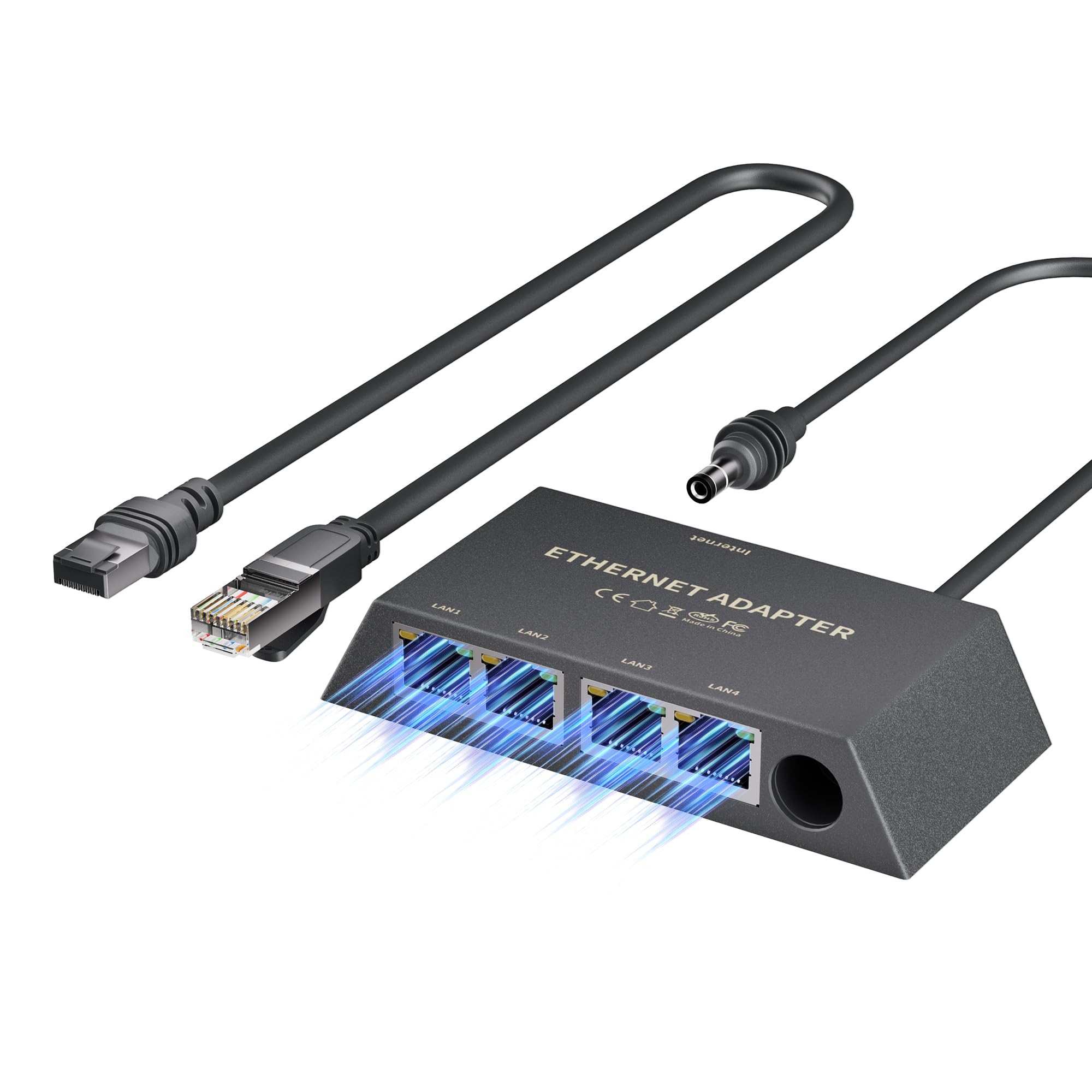
Four jacks at once — the fix when one port is not enough for your house.
The EAZUSE adapter is the odd one out in the best way: it gives you 4 RJ45 ports, so you can hardwire four devices at the same time instead of feeding a switch off a single jack. It is built for the Starlink Standard 4X/Gen 3 and the Mini portable dish, and it makes the case that wired beats Wi-Fi for videoconferencing and online gaming where the signal needs to be rock-steady. An instruction sheet is included to walk you through setup.
The functionality story here is strong, particularly for Mini users, and people also like the water resistance and the snug fit of the connector. For a household that wants to hook up a TV, a console, a desktop, and maybe a streamer all at once, four ports removes the need to chain a separate switch.
The recurring gripe is the cable — the included cord is 8 inches, which a fair number of people find tight when the router sits a little farther from where they want the adapter. Plan the placement around that short run, or add your own cable if you need more reach. Also note the Mini caveat: it is not compatible with Starlink Mini X.
Where it pulls ahead
- 4 RJ45 ports for four devices at once
- Water resistance for a bit more placement freedom
- Simple install with included instructions
- Fits Starlink Mini snugly
What to plan around
- 8-inch cord runs short for some layouts
- Not compatible with Starlink Mini X
Built for: Gen 3, Standard 4X, or Mini households with several things to hardwire.
Check first if: your router sits far from your devices — the short cord may not reach, so you may need to reposition or extend.
Know the Specs
Data Transfer Rate (Mbps)
This is the maximum speed the wired link can carry, measured in megabits per second. The adapters here range from 1000 Mbps to 1200 Mbps. In everyday terms, that is gigabit-class speed — far more than most Starlink home plans will actually deliver to your devices. The reason to care is stability: a cable avoids the dropouts and interference Wi-Fi picks up, which is what actually smooths out a game or a video call.
Dish Compatibility (Gen)
Starlink’s connectors changed between generations, so compatibility is the single most important spec. Gen 2 Actuated adapters fit the rectangular satellite kit. Gen 3, Standard 4X, and Mini adapters use a different connector. Several listings warn they will not work with the latest Standard Kit that has a kickstand base. Check the model on your router before you buy — the wrong generation simply will not seat.
RJ45 Port Count
Each adapter gives you a number of RJ45 jacks — the standard square Ethernet port. Most are single-port, which is fine for one console or PC. A multi-port adapter gives you four at once, or you can attach a network switch to a single-port unit to multiply it. Count your wired devices to decide which you need.
IP Rating and Cable Length
An IP67 rating means the connector is sealed against dust and can withstand water spray, which matters for outdoor or RV installs. Cable length on the pigtail ranges from an 8-inch cord to 11.8 inches to a 1-foot run. A short cord keeps things tidy but can fall short if your router is far from the entry point, so line up your placement before you commit.
Common Questions
Will a Gen 2 Ethernet adapter work with a Gen 3 Starlink dish?
How do I know which Starlink generation I own?
Do these Ethernet adapters need any software or drivers?
Will a Starlink Ethernet adapter actually make my internet faster?
Can I plug more than one device into a single-port adapter?
Are these adapters safe to use outdoors or in an RV?
What does the 1000 Mbps or 1200 Mbps on the box mean in real use?
Do I need the official Starlink Ethernet Adapter or will a third-party one work?
Can a short adapter cable be extended if it does not reach?
Will the adapter fix weak Wi-Fi in far rooms?
The Bottom Line
For most Gen 2 Actuated owners, the FONKEN Rectangular V2 adapter is the safe, reliable choice — it delivers a stable 1000 Mbps wired port, installs in a minute with no drivers, and handles third-party routers, switches, and TVs alike. Want repeater mode or the highest transfer rating among the Gen 2 picks at 1200 Mbps? Then the Frafode adapter is the one. And if your dish is a Gen 3 or Mini and you want to hardwire a whole cluster of devices at once, reach for the EAZUSE 4-port adapter. Before you order anything, confirm your dish generation — that one detail decides which of these actually fits and saves you a return.
How we choose
We do not accept paid placement. Every pick is matched to a real buyer and a real use-case; we do not hands-on test units.
Sources
Specifications: manufacturer listings and product documentation. Review insights: verified customer reviews, as of November 2026. Pricing: not shown on this page (it changes often); check the current price via the retailer link.
As an Amazon Associate, Tactical Gear Guy earns from qualifying purchases. This does not affect which products we feature.