Specs are compiled from manufacturer listings and verified buyer reviews and can change over time — please confirm the key details on the product page before buying.
The short answer: most laptop Wi-Fi upgrades go wrong before the card is even from the start, because the buyer never checked whether their machine takes an M.2 slot or a Mini PCIe slot. Match the slot type and the swap takes minutes. Mismatch it and the card will not seat, whatever the box claims. This guide lines up nine genuine internal cards — not USB dongles — and sorts them by what actually matters: which machines they fit, how much bandwidth they open up, and whether the drivers land cleanly.
This guide is built by comparing the manufacturers’ published specifications and the patterns across verified customer reviews, so you get each pick’s real strengths and trade-offs instead of marketing spin.
You will see the same problem echoed across every review page: speed is rarely the complaint, and socket mismatch is almost always the culprit. Here is the honest breakdown of the best Wi-Fi cards for laptop upgrades, sorted by fit first and throughput second.
Top Picks


How To Choose The Best Wi-Fi Cards for Laptop
Start with the socket, not the speed number. A Wi-Fi card for a laptop is a small internal module that clicks into a slot on the motherboard and plugs into two tiny antenna leads. A module that will not seat in your slot delivers zero throughput. Bands, Bluetooth version, and peak rate come second.
Find out which slot your laptop actually has
Open the bottom panel and look at the card already installed. An M.2 card is a flat rectangle roughly the size of a postage stamp, held by one screw. A Mini PCIe card is a longer, narrower board that slots in at an angle and lies flat. Write down the marking on the module, usually something like 2230 for M.2 size code or a model name. That label narrows the list to the picks that physically fit.
Check whether your machine speaks CNVio2
Some Intel-based laptops use a CNVio2 interface, which routes Wi-Fi through the chipset rather than through a standard PCIe lane. A CNVio2 slot will not accept an ordinary PCIe card, and an ordinary PCIe slot will not accept a CNVio2 card. You will see this spelled out clearly in the compatibility notes for each pick below. A wrong guess here means a return.
Understand what the CPU generation limit really means
Several cards in this list state a minimum CPU generation or an outright exclusion of AMD processors. That is not sales talk — it reflects which driver stacks the chipset supports. On an AMD laptop, skip every pick that states an Intel requirement. On Intel 12th generation or newer, the Wi-Fi 7 picks are in play.
Side-by-Side Comparison
| Model | Best For | Max Speed | Slot Type | Bluetooth | Amazon |
|---|---|---|---|---|---|
| AX200NGW Wi-Fi 6 Card★ Best Overall | Cheapest safe Wi-Fi 6 upgrade | 2.4 Gbps | M.2 2230 Key A+E | 5.2 | Amazon |
| EDUP Intel AX201NGWNarrow Fit | Intel 10th-gen and newer laptops | 2400 Mbps | M.2 CNVio2 | 5.2 | Amazon |
| EDUP Intel AX210 Wi-Fi 6ETop Performer | Fastest tri-band on a budget | 5400 Mbps | M.2 2230 A/E Key | 5.3 | Amazon |
| MPE-AX3000H Half Mini PCIe | Older Mini PCIe laptops | 3000 Mbps | Half Mini PCIe | 5.2 | Amazon |
| WiFi 6E Mini PCIe Tri-Band | Mini PCIe with 6GHz access | 5400 Mbps | Mini PCIe | 5.3 | Amazon |
| Intel Killer BE200 1750x | Low-latency gaming on Intel | 5.8 Gbps | M.2 PCIe Key E | 5.4 | Amazon |
| AX1650i Killer Wi-Fi 6 | CNVio2 laptops needing QoS | 2.4 Gbps | M.2 2230 Key E CNVio2 | 5.2 | Amazon |
| Binardat BE200 Wi-Fi 7 | Windows 11 tri-band speed | 8774 Mbps | M.2 Key A or E | 5.4 | Amazon |
| GigaPlus BE200 NGW | Intel 12th-gen and newer on a budget | 5800 Mbps | M.2/NGFF | 5.4 | Amazon |
Detailed Reviews
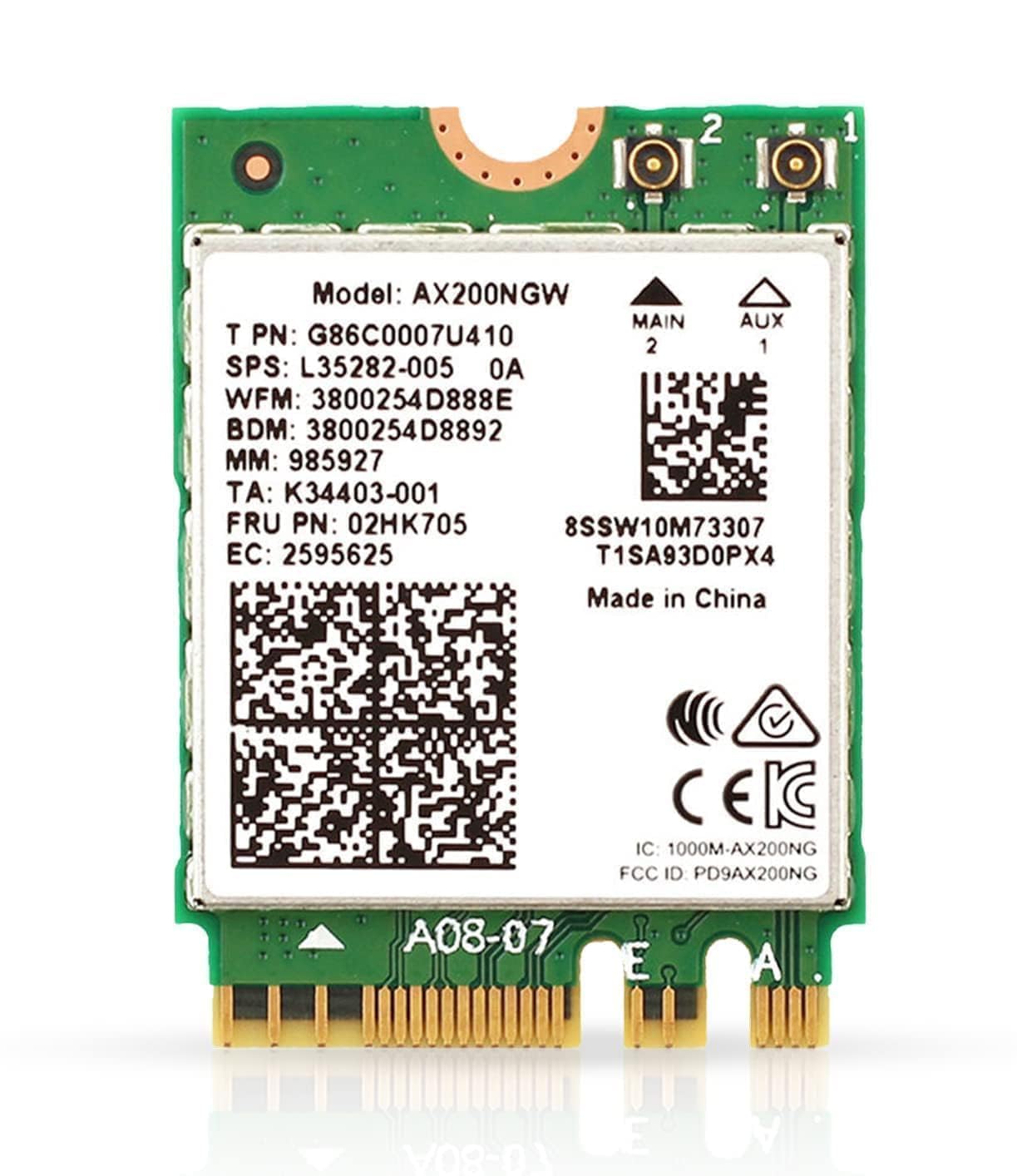
1. AX200NGW Wi-Fi 6 Card
Our pick — 4.5+★ from 700+ verified ratings; the strongest balance of quality and price.
The safe Wi-Fi 6 swap that most Intel laptops will swallow without an argument.
This is the card to buy if you want a fast, boring, well-understood upgrade. It runs 2×2 802.11ax (the Wi-Fi 6 standard) on 2.4 and 5 GHz, with MU-MIMO for sharing bandwidth across devices and OFDMA for packing more traffic into each channel. The headline rate is 2.4 Gbps — that figure is a theoretical 5 GHz link rate and it needs a 160 MHz Wi-Fi 6 router to get anywhere near it. There is no 6 GHz band here, so if you already own a Wi-Fi 6E router this card will not use that lane.
The thing that wins people over is that it simply works after a reboot. Automatic driver pickup is the most repeated theme in owner feedback, and real-world download figures land in the 400 to 500 Mbps range on a good network. Bluetooth 5.2 rides along for your headset and mouse. Physically it is tiny: 0.87″L x 1.18″W x 0.09″H and 2.86 g, which means it disappears into the chassis. Compare that with the MPE-AX3000H below at 5.5″L x 5.5″W x 1″H — a 6.3x gap in footprint — and you can see why slot type rules everything here.
The catch is compatibility, and it is a real one. This card needs an M.2 2230 Key A/E socket with PCIe for Wi-Fi and USB for Bluetooth, plus OEM or BIOS approval. It will not fit Mini PCIe or M-Key SSD sockets. Owner reports are genuinely split on AMD Ryzen CPUs and some Intel chipsets including i7-10* versions. Also note this is a discontinued model: drivers remain available, but stock will not last forever. The card alone is in the box — no antennas, no screws, no adapter.
Where the value sits
- 2×2 Wi-Fi 6 with MU-MIMO and OFDMA for busy households
- Drivers pick up automatically on Windows 10/11 64-bit and Linux
- 2.86 g and 0.09″ thick — vanishes inside the chassis
- Bluetooth 5.2 included for headsets and peripherals
Where it stops
- No 6 GHz band, so a Wi-Fi 6E router gains nothing
- AMD Ryzen and some Intel chipset buyers report failures
- Discontinued production, so stock is finite
- Ships as a bare module — antennas and screws are extra
Reach for this if: you have an Intel laptop with an M.2 2230 A/E slot and want dependable Wi-Fi 6 with zero drama.
Look elsewhere if: your machine is AMD-based or a Mini PCIe design — the socket simply will not take it.
2. EDUP AX201NGW Wi-Fi 6 Wireless Card
A 10th-gen-and-newer Intel card that demands the exact right socket before it plays.
Two bands, split as 2400Mbps on 5GHz and 574Mbps on 2.4GHz. The AX201 is built for laptops that are already a few years old and still running a slow AC card, and it brings Bluetooth 5.2 with LE Isochronous Channels for lower latency on audio. There is a genuine benefit in the power handling too: Bluetooth 5.2 adds LE Power Control, which is the part that helps a wireless mouse or earbuds run longer between charges.
Here is the part that decides the sale. This card only works in a CNVio2 M.2 slot on a motherboard paired with 10th-generation Intel CPUs or newer. CNVio2 is Intel’s chipset-routed interface, and it is not the same socket as a standard M.2 PCIe Wi-Fi slot. Owners on Dell desktops and laptops report it working perfectly, and the quality of the module itself draws consistent praise. Others hit a wall at around three weeks of use. That split is the honest picture: when the platform matches, it is solid; when it does not, it fails.
Driver installation is manual here — you download from Intel’s site or EDUP’s, not from a pop-up. Supported systems are Windows 10 and 11 in 64-bit, Chrome OS, and Linux on kernel 5.2 or above. At 0.05 kg it is heavier than the 0.03 kg MPE-AX3000H, though the difference is not something you will feel in a laptop bag.
The platform question: confirm your CPU generation and that the existing module is CNVio2 before ordering — this is the single make-or-break detail on this card.
This one earns its place when: your laptop is Intel 10th-gen or newer with a CNVio2 slot and you want Wi-Fi 6 plus Bluetooth 5.2 in one swap.
Walk on by when: you are on AMD or an older standard M.2 slot — this card cannot bridge that gap.
3. EDUP M.2 WiFi Card Intel AX210
Three bands, 5400Mbps, and the upgrade most people should be comparing against.
This is the AX210 chipset, and it is the one to study if you want Wi-Fi 6E without paying Wi-Fi 7 money. You get tri-band coverage: 574Mbps on 2.4GHz, 2400Mbps on 5GHz, and 2400Mbps on the 6GHz band, for a combined 5400Mbps. That is 2.2x the 2400Mbps ceiling of the EDUP AX201NGW above. The 6GHz band is the real prize for anyone in a crowded apartment block, because it is a newer slice of spectrum with far fewer neighbouring networks fighting over it.
The chipset brings MU-MIMO, 160MHz bandwidth, OFDMA, and 1024-QAM — the last of these is a denser modulation scheme that squeezes more data into each transmission. Bluetooth 5.3 adds lower latency and stronger interference resistance than 5.2. On the security side it supports WPA, WPA2, and WPA3 protocols. What wins people over with this card is plain reliability: it runs cleanly under Arch Linux and Wi-Fi 6 alike, and speed tests climb well past 270 MBPS with downloads reaching 1.1Gbps on a good link.
There is a catch worth naming. This needs a laptop with an Intel CPU and an M.2 2230 A/E key slot — it will not work in CNVio2 protocol M.2 slots or Mini PCIe. Windows 10 and 11 in 64-bit are the supported systems, with Wi-Fi and Bluetooth drivers from Intel’s official site. At 0.05 kg it matches the weight of the EDUP AX201 above, so neither is a burden. The 1-year warranty and lifetime technical support round it out.
The honest read: this is the best balance of price against genuine tri-band capability on the whole list.
What to weigh: Linux users get a working card, but expect to compile or source drivers rather than rely on Windows Update.
Pick this one if: you want 6GHz access and Bluetooth 5.3 on an Intel laptop with a standard A/E key slot.
Leave it alone if: your slot is CNVio2 or Mini PCIe — the key will not line up.
4. MPE-AX3000H WiFi 6 Card

The one for the ageing laptop nobody wants to replace yet.
If you are still running an Intel 7260 or 7265 card, this is the direct replacement. It delivers up to 2.4Gbps on 5GHz and 574Mbps on 2.4GHz over a 160MHz channel, and it handles OFDMA plus MU-MIMO for households with a dozen connected devices. Bluetooth 5.2 comes built in, and the whole thing sits in a Half Mini PCIe footprint — 5.5″L x 5.5″W x 1″H and 0.03 kg. Compare that against the AX200NGW above at 0.87″L x 1.18″W x 0.09″H and the 6.3x size gap makes the point: this is a different generation of laptop entirely.
What wins people over is raw improvement on old hardware. Owners on HP EliteBook 8570p machines report speeds climbing from 120mbps to 460mbps, and the range holds up on both 2.4GHz and 5GHz bands. Windows 10 often recognises the card without any driver hunt. Value lands squarely in no-brainer territory for a machine that would otherwise be scrapped.
The catch is compatibility, and it bites hard. This is Mini PCIe ONLY — not NGFF M.2, not CNVio. It does not work with most Lenovo machines including ThinkPad, nor with IBM or some HP laptops, because of BIOS whitelists or hardware design. Windows 10 and 11 64-bit only. Also note both Wi-Fi and Bluetooth drivers need separate manual downloads from Fenvi’s site. The antenna connectors are delicate, and reports of them ripping off are rare but real.
It suits: older Dell, Acer, Asus, MSI and Clevo laptops with a Half Mini PCIe slot and a BIOS that allows a third-party card.
It does not suit: any Lenovo or IBM machine, or anything with an M.2 slot — verify in your service manual first.
5. WiFi 6E Mini PCIe Card

Six-gigahertz spectrum for laptops old enough to predate M.2 entirely.
Combine the MPE-AX3000H above with a 6GHz band and you get this card. It covers 2.4GHz for whole-home range, 5GHz up to 2400Mbps for streaming and calls, and 6GHz up to 2400Mbps for a dedicated low-latency lane, for 5400Mbps combined. The 6GHz band provides 7 exclusive 160MHz channels, which is the practical reason it matters: your neighbour’s router is not sitting on them. Bluetooth 5.3 arrives with 4× the range of BT 4.2 and stays backward compatible with older devices.
What wins people over is how well it revives genuinely old machines. For laptops that never had Bluetooth at all, this adds it — no dongle required. Owners mention download and upload speeds approaching 600 Mb/s on hardware that had been crawling, and installation draws praise for being about as simple as a card swap gets.
The pre-purchase reading is non-negotiable. This needs a Mini PCIe slot and works with Dell, ASUS, Samsung, Acer and others. It is not compatible with Lenovo, HP, or IBM, where BIOS whitelisting blocks third-party cards. Download the Intel driver installer to your desktop before you remove the old card, because Windows 10/11 64-bit is the only supported path and Windows 7, 8, and 32-bit are out. Your existing antennas can be reused. Note that 6GHz needs a Wi-Fi 6E router to mean anything.
Why it stands out: far and away the easiest route to 6GHz for a Mini PCIe machine.
What to plan for: grab the driver file first — you cannot download it once the old card is gone and you have no connection.
Choose it when: your older Dell, ASUS, Samsung or Acer has a Mini PCIe slot and you want tri-band plus Bluetooth in one move.
Pass on it when: the badge on your lid says Lenovo, HP, or IBM — the whitelist will reject it.
6. Intel Killer BE200 Wi-Fi 7 Card

Built for the gamer who cares about ping more than raw throughput.
Killer’s whole pitch is latency, and this card carries it into Wi-Fi 7. It runs tri-band 802.11BE across 2.4GHz, 5GHz, and 6GHz with max speeds up to 5.8 Gbps. Those figures need a compatible Wi-Fi 7 router, and distance and configuration will pull them down in practice. What the BE200 adds beyond the AX210 above is the Killer software layer, which prioritises your game or call traffic when everything else in the house is competing for bandwidth.
The consensus on this one is unusually clean: connectivity just works, with Wi-Fi 7 and Bluetooth both behaving. Bluetooth 5.4 is the newest standard on the list. Installation is quick and painless, and drivers often need no download at all — Windows picks the card up and runs. Buyers who moved from an older module describe the speed and consistency improvement as the main event.
Before you buy, check two things: your laptop must run 64-bit Windows 11 and have a free M.2 PCIe slot with Key E (the notch position that matches this card). This card does not work on AMD-based systems — the listing says so, and AMD customers note it simply will not work. It also requires an Intel processor, full stop. If you have an Intel 12th-gen or newer CPU and Windows 11, this is among the most capable cards here.
What it delivers
- Tri-band Wi-Fi 7 up to 5.8 Gbps with a matching router
- Bluetooth 5.4, the newest version on this list
- Drivers frequently install without intervention
- Killer traffic prioritisation for gaming and calls
What it demands
- Windows 11 64-bit only — no Windows 10 path
- Does not support AMD systems at all
- Needs a Wi-Fi 7 router to hit the stated speeds
- M.2 PCIe Key E slot required
Made for: Intel 12th-gen-plus laptops on Windows 11 where a low ping in games matters more than a spec sheet trophy.
Not made for: AMD owners or anyone still on Windows 10 — check both before you order.
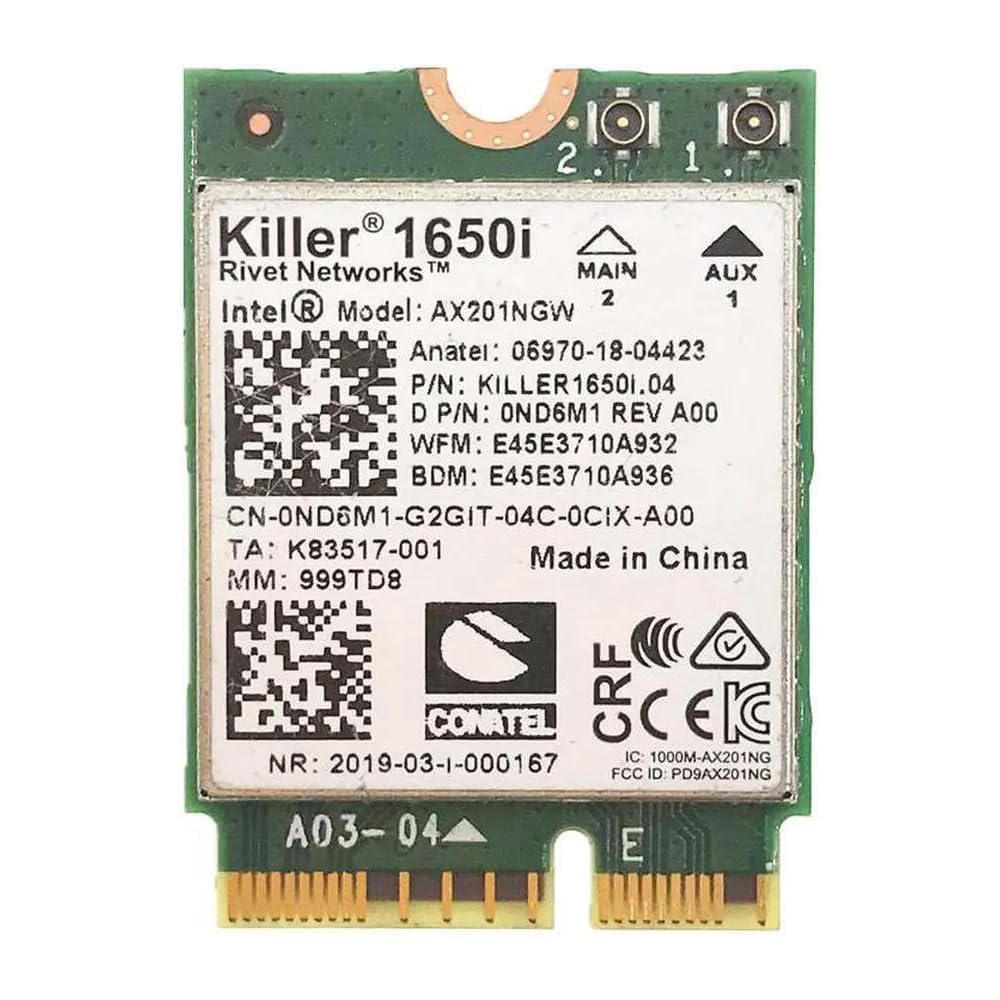
7. AX1650i Killer Wi-Fi 6 Card
A drop-in replacement for one very specific family of Intel laptops.
This is a Wi-Fi 6 card rated to 2.4 Gbps with 2×2 and 160 MHz support, plus Bluetooth 5.2. What separates it from a plain AX201 is application prioritisation: the Killer software pushes your game, call, or stream ahead of background traffic. It is 0.87″L x 1.18″W x 0.1″H and 2.86 g, so it fits the same 2230 slot as the AX200NGW at the top of this list.
Reliability is what carries this card in owner experience — it installs cleanly, behaves as advertised, and reconnects quickly. Speed gets consistent credit too. It is for Intel laptops approved for the Killer AX1650i CNVio2 interface, with BIOS support and an M.2 2230 Key E fit. It will not work with AMD systems, PCIe or USB Wi-Fi slots, or first-generation CNVio.
Intel 10th to 14th generation is the target range, but generation alone is not a guarantee. Confirm your existing module, exact laptop model, CNVio2 interface, and whether your OEM lists the AX1650i as a supported replacement. Windows 11 64-bit or a supported Linux setup is the software path; Windows 10 needs an older driver package. Antennas, screws, and adapters are not in the box, and two MHF4-compatible antenna leads are required. Value is the one place opinion splits — some find the Killer premium worthwhile, others do not.
Worth it for: a confirmed CNVio2 laptop where you want traffic prioritisation on top of Wi-Fi 6 and Bluetooth 5.2.
Skip the hassle for: desktops, AMD builds, or first-gen CNVio machines — none of them are supported.
8. BE200 WiFi Network Adapter

The highest raw speed on this list, split across three bands.
8774 Mbps is the number, broken down as 574Mbps on 2.4GHz, 2400Mbps on 5GHz, and 5800Mbps on 6GHz. It runs the Intel BE200NGW chipset on the 802.11be standard and stays backward compatible with 802.11a/b/g/n/ac/ax, so older routers still work with it. The 6GHz band opens a 320MHz channel, which is the widest on this list and the reason it can push that much throughput toward a Wi-Fi 7 router.
Connectivity is the headline in owner experience — it works without fuss and stays reliable over long stretches, with signal strength improving over the card it replaced. Installation is straightforward for anyone who has opened a laptop before. OFDMA and MU-MIMO keep latency down when several devices are pulling at once, which is what actually matters on a busy network with 8K video or a NAS transferring in the background.
Two limits are firm. It needs Windows 11, or Windows 10 Dev version 64-bit — not standard Windows 10. And it does not support AMD CPUs. It fits Key A or E M.2 slots and will not work in the Key M or B slots used for SSDs, which is a common mistake. Drivers come from Intel’s site by searching BE200NGW. WPA3 encryption is on board.
What you are buying: the broadest bandwidth ceiling here, provided your machine is Intel and running Windows 11.
The trade-off: peak speeds require a Wi-Fi 7 router — on an older router this card behaves like any other.
Best matched to: Intel Windows 11 laptops with Key A or E M.2 slots and a Wi-Fi 7 router already in the house.
Not the one for: AMD builds or anyone unwilling to move to Windows 11.
9. Intel BE200 NGW WiFi 7 Wireless Card

A tri-band Wi-Fi 7 card with a one-year warranty attached.
The BE200 NGW chipset runs the 7th-generation IEEE802.11a/b/g/n/ac/ax/be standard with tri-band coverage: 574Mbps on 2.4GHz, 2400Mbps on 5GHz, and 5800Mbps on 6GHz over a 320MHz channel, for up to 8774Mbps combined. It also trims power consumption as part of the design, which matters in a laptop running on battery. Bluetooth 5.4 handles phone, controller, and peripheral connections with downward compatibility for older gear.
Installation is the easy part here — the card slots into an M.2/NGFF interface and drivers come from Intel’s site by searching BE200NGW. Speed gets consistent credit once it is running. The honest complication is that the picture is split: some machines run it beautifully and others refuse to recognise it at all, and that divide tracks the platform almost exactly. On supported Intel hardware, it is a strong Wi-Fi 7 option. On an AMD board, it is a paperweight.
Compatibility is stated plainly: it supports Intel 12th generation and above CPUs only, and AMD is not supported. It supports most platforms after 2015 and runs Linux as well as Windows 10/11 64-bit. MU-MIMO is on board for handling multiple simultaneous devices. The 1-year warranty is a real difference against the bare-module cards here. At 0.03 kg it matches the MPE-AX3000H and the WiFi 6E Mini PCIe card above.
Where the value lands: modern Wi-Fi 7 spec plus a stated warranty, for buyers whose CPU generation clears the bar.
What to verify: your Intel CPU generation — this is the one requirement that decides everything, and it is not negotiable.
This is your card if: your laptop carries an Intel 12th-gen or newer CPU, an M.2/NGFF slot, and you want tri-band Wi-Fi 7 with Linux support.
This is not your card if: your processor is made by AMD, or is older than the 12th generation.
Know the Specs
Slot type and key — the one spec that decides everything
A Wi-Fi card is a module that clicks into a slot on your laptop’s motherboard. You will meet three types here: M.2 2230 (a small flat rectangle held by one screw), M.2 with CNVio2 (the same physical size but a chipset-routed interface), and Half Mini PCIe (a longer, narrower board for older machines). The “Key A/E” label describes the notch position on M.2 cards. If the notch does not match your socket, the card will not seat, no matter what the box claims. Check the model on your existing card before ordering anything.
Peak rate in Mbps and what it actually means
The Mbps figure on the box is a theoretical link rate, not the speed you will see on a download. For example, a 2400Mbps card needs a 160MHz channel on a Wi-Fi 6 router to reach that ceiling at all. Real-world results tend to land well below it. The number is still useful for comparing cards against each other — a 5400Mbps card carries twice the ceiling of a 2400Mbps one — but treat it as a ladder, not a promise.
Wi-Fi 6, 6E, and 7 — what the bands add
Wi-Fi 6 covers 2.4GHz and 5GHz. Wi-Fi 6E adds a 6GHz band. Wi-Fi 7 adds 6GHz with wider channels. The practical gift of 6GHz is breathing room: it is newer spectrum, so your neighbours’ routers are rarely sitting on it. If you live in a dense apartment building, a 6GHz-capable card can transform call quality and game ping. If you live somewhere quiet, the 6GHz gain is smaller and a solid Wi-Fi 6 card will serve you just fine.
Bluetooth versions and antenna leads
Bluetooth 5.2, 5.3, and 5.4 appear across this list. Each step adds lower latency, better interference resistance, and in 5.2’s case LE Power Control, which helps connected devices run longer. Most cards need two MHF4-compatible antenna leads, which are the thin wires currently clipped to your existing card. Reuse them — most listings state that existing antennas work, but always confirm before you remove anything. Antennas, screws, and adapters are frequently sold separately.
Common Questions
How do I know whether my laptop takes M.2 or Mini PCIe?
Will a Wi-Fi 6E card work if I only have a Wi-Fi 6 router?
Why do some of these cards say they do not support AMD?
Do I need to download drivers before I install the card?
Can I reuse the antennas already inside my laptop?
What is the difference between an M.2 Wi-Fi card and a CNVio2 card?
Does a faster Wi-Fi card speed up my actual internet connection?
Will a new Wi-Fi card add Bluetooth to a laptop that never had it?
Does a Wi-Fi 7 card need a Wi-Fi 7 router to be worth buying?
Can I install one of these cards in a desktop PC?
The Bottom Line
The card that suits the widest slice of buyers here isthe EDUP Intel AX210 Wi-Fi 6E, because it delivers three bands up to 5400Mbps and Bluetooth 5.3 without pushing into Wi-Fi 7 cost territory. If your laptop predates M.2 entirely, reach for the WiFi 6E Mini PCIe Tri-Band, which brings that same 6GHz lane to an older Half Mini PCIe chassis. And if you are chasing the lowest possible ping on an Intel machine running Windows 11, the Intel Killer BE200 puts traffic prioritisation ahead of everything else on this list.
One last thing worth saying plainly: the card with the biggest number on the box rarely decides whether the upgrade works. Your slot type, your CPU generation, and your operating system do that. Confirm all three against the listings above, save your drivers to the desktop before you open the chassis, and this becomes a job you finish in a single sitting.
How we choose
We do not accept paid placement. Every pick is matched to a real buyer and a real use-case; we do not hands-on test units.
Sources
Specifications: manufacturer listings and product documentation. Review insights: verified customer reviews, as of November 2026. Pricing: not shown on this page (it changes often); check the current price via the retailer link.
As an Amazon Associate, Tactical Gear Guy earns from qualifying purchases. This does not affect which products we feature.