Specs are compiled from manufacturer listings and verified buyer reviews and can change over time — please confirm the key details on the product page before buying.
Your server build fails in one of two places: the frame sags under the weight, or the parts inside refuse to talk to each other. This guide covers both halves — the rack or cabinet that holds your gear, and the motherboard and memory that make it run. Every pick below is a currently sold component, sorted by load rating, depth and memory compatibility rather than by price.
This guide is built by comparing the manufacturers’ published specifications and the patterns across verified customer reviews, so you get each pick’s real strengths and trade-offs instead of marketing spin.
The most common first-build stall is a 288-pin DDR4 module that seats in the slot but is the wrong ECC type for the board. The rack picks below are sorted by load rating and depth first, then the compute side, so you can match a frame to your gear and a board to your memory. Match the frame to your gear’s depth and the board to your memory type, and the build goes together once.
Top Picks

How To Choose The Best PC Server and Parts
You are really making two purchases at once here. One is a physical frame that has to hold weight without flexing. The other is a set of electronic parts that have to match each other exactly or the machine will not post. Get the frame wrong and your rails flex under load or the cabinet will not fit your closet. Get the parts wrong and the board will not post with the memory you bought.
Start with rack units and usable depth, not outer size
A rack unit, written as U, is one standardized slice of vertical space — each 1U equals three mounting holes on the rail. A 25U rack gives you 25 of those slices stacked up, which is how you count whether your switches, servers and patch panels will all fit.
Depth is the number that catches people out. The outer cabinet can be deep while the usable mounting depth is shorter, because the door, the cable bend radius and the frame all eat into it. Measure the deepest piece of equipment you own and buy a rack whose adjustable rail range covers it with room to spare.
Match the load rating to how the rack will stand
Racks are rated in pounds, and the rating often changes depending on whether the weight sits on casters (the wheels) or on leveling feet. A frame rated for a high figure on feet can carry noticeably less when rolling. If you plan to wheel the rack around a garage or lab, check the caster figure, not the headline number.
Get the memory type right before anything else
Server memory comes in ECC Registered form, and ECC (error-correcting code) means the module can detect and fix small data errors on its own. That is different from the unbuffered memory a normal desktop uses, and the two cannot be mixed in the same system. Check your motherboard’s supported memory list before you order a kit, because a 288-pin module that physically slides into the slot can still refuse to boot.
Confirm the socket and chipset pair
A motherboard’s socket is the physical CPU seat, and its chipset is the chip that governs how the board talks to drives, network ports and expansion cards. An LGA 1700 board takes Intel 12th and 13th Gen processors, while an AM4 board takes AMD Ryzen chips. A CPU that drops into the socket but is a generation the chipset does not support is the second most common stall.
Side-by-Side Comparison
| Model | Best For | Rack Units / Format | Load Rating | Depth | Amazon |
|---|---|---|---|---|---|
| VIVO 25U Freestanding Server Rack Cart★ Best Overall | Rolling home lab cart | 25U open frame | 1200 lbs | 22″–40″ adjustable | Amazon |
| AxcessAbles 22U Open Frame Server RackBest Value | Budget homelab starter | 22U open frame | 330 lbs on casters / 440 lbs on feet | 18″ | Amazon |
| VEVOR 22U Network Cabinet Wall MountSpace Saver | Lockable wall cabinet | 22U enclosed | 300 lbs | 23.6″ overall / 18″ install | Amazon |
| ASUS Pro WS W680-ACE Motherboard | Intel workstation build | ATX, LGA 1700 | — | — | Amazon |
| A-Tech 64GB Kit (4x16GB) DDR4 2400MHz ECC RDIMM | Mid-capacity ECC upgrade | 4 x 16GB RDIMM | — | — | Amazon |
| RIVECO 42U Adjustable Depth Server Rack | Full-height floor rack | 42U floor standing | 1700 lbs on leveling feet | 24″–38″ adjustable | Amazon |
| ASRock Rack X570D4U-2L2T | AMD AM4 server board | Micro-ATX, AM4 | — | — | Amazon |
| Sysracks 27U Wall Mount Server Rack Cabinet | Enclosed wall cabinet with cooling | 27U enclosed | 133 lbs | 24″ overall / 20″ usable | Amazon |
| A-Tech 128GB Kit (8x16GB) DDR4 2133MHz ECC RDIMM | Maximum capacity upgrade | 8 x 16GB RDIMM | — | — | Amazon |
Detailed Reviews
1. VIVO 25U Freestanding Server Rack Cart
Our pick — 4.5+★ from 100+ verified ratings; the strongest balance of quality and price.
The wheeled 25U that holds 1200 lbs and still rolls out of the closet on demand.
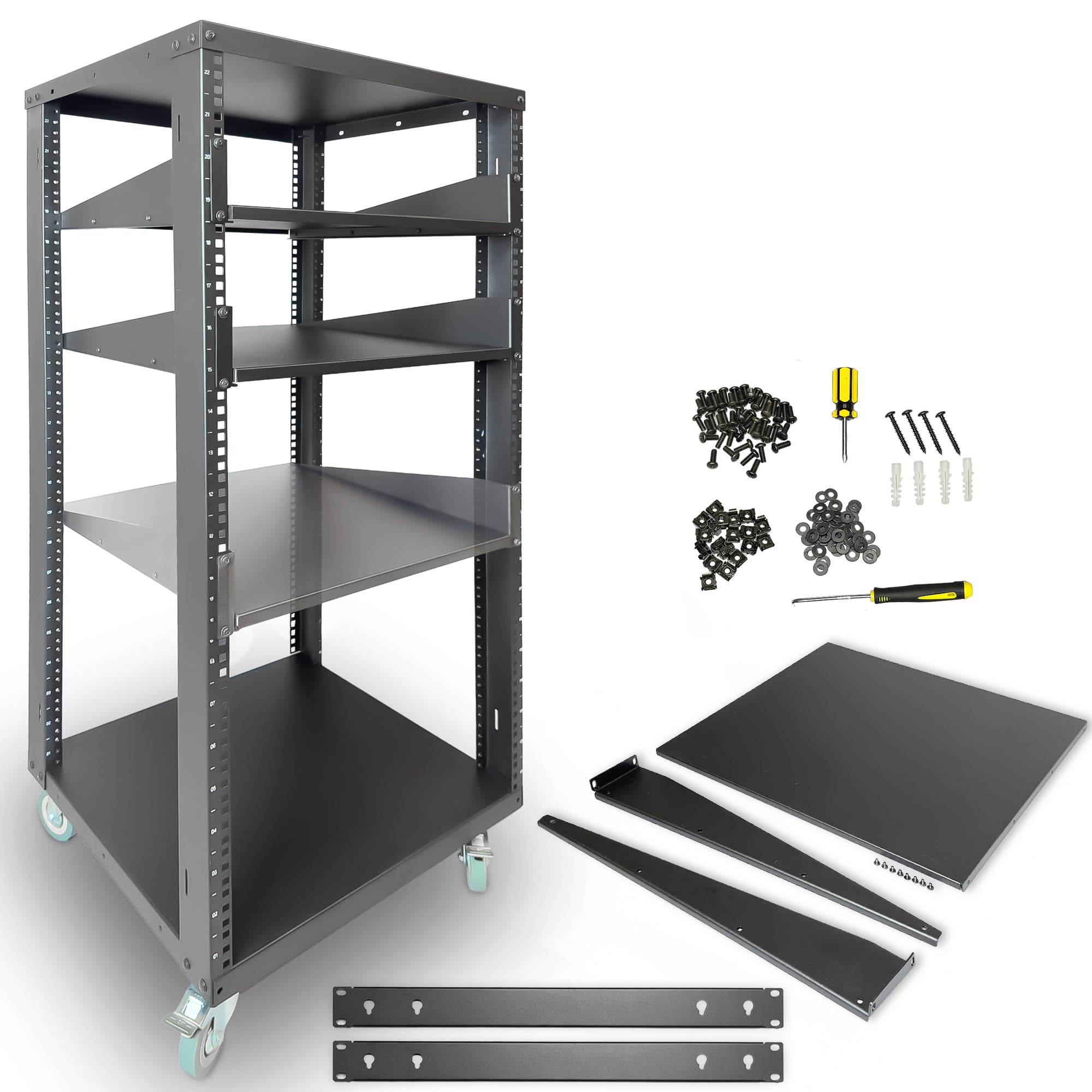
Here is the frame that makes the whole build possible. You get 25 rack units of vertical space across four steel support rails, with a 23.5″ width and a 51″ height — a stack tall enough for servers, UPS units, patch panels and switches on one cart. The structure is open on all sides, so air moves freely across every piece of equipment and heat does not build up the way it does inside a closed box.
The number that separates this cart from everything else on the list is its 1200 lb steel capacity. It is worth saying plainly how far ahead that is: the RIVECO 42U lower on this page sits at a 1700 lb rating on its leveling feet, and the VEVOR cabinet manages 300 lbs. Meanwhile its 51″ height towers over the 2.8″ thickness of the ASUS W680 board sitting in a box beside it. Those are the extremes of what is on this page — one pick lifts, the other slips into a socket.
Buyers on the review pages praise two things together, not one headline spec: the welded steel frame holds firm, and the depth adjusts from 22″ to 40″ in precise 1″ steps. That range lets you fit equipment of varying sizes and still squeeze the rack into a utility closet. The 1″ step ladder is the quietly useful part — set the rail depth to the deepest unit you own and leave it there.
Four casters handle the rolling on most floor types, and VIVO includes leveling feet so you can plant it stationary when you are done moving it. Assembly is straightforward with all hardware and step-by-step instructions in the box, and at 58.2 pounds it is light enough for two people to lift into position. The honest catch is the physics of caster rolling: a cart this tall and heavy is stable when parked, but it is not something you want to wheel across a sloped driveway fully loaded. Treat it as a rack you reposition occasionally, not a trolley you drive around daily.
The case for the VIVO
- 1200 lb steel rating with four support rails for servers, UPS units and switches
- 22″ to 40″ depth adjustment in 1″ steps fits both shallow switches and deep chassis
- Open frame gives maximum airflow for cooling, which matters more as gear gets denser
- Casters plus included leveling feet cover both rolling and fixed setups
Where it asks for care
- At 51″ tall and loaded, roll it gently rather than treating it as a daily trolley
- Open frame means no locking door, so it belongs in a closet or controlled room
Go with this one if: you want one mobile 25U frame with the highest steel capacity on this list and depth that adapts to whatever you bolt in.
Think twice if: you need a lockable door for a shared office or a public classroom, where the open frame leaves your gear visible and reachable.
2. AxcessAbles 22U Open Frame Server Rack
A four-post starter frame that ships with three shelves and honest load numbers.
If you are setting up your first rack and do not yet know what you will put in it, this is the forgiving place to start. It gives you 22 rack units in a four-post open frame that takes all standard 19-inch equipment — servers, switches, patch panels, NAS units, even analog stereo gear and amplifiers. That last part matters if you are building a combined AV and network corner rather than a pure server room.
The listing spells out the details that trip up newcomers elsewhere. It measures 20 inches wide by 18 inches deep, and the corner pillars carry both square cage nut holes and 10-32 threaded holes, installable four ways. An 18-inch depth option means equipment up to 18 inches deep fits. Three 2U shelves arrive in the box, and as plain arithmetic, 22U minus three 2U shelves leaves 16U for your actual equipment. Each tray holds 40 lb, and the total is 330 lb on the casters or 440 lb placed evenly without them.
Compared with the VIVO cart above, the depth story is the real divider: this frame stops at 18 inches, while the VIVO goes all the way out to 40 inches and carries 1200 lbs. So if you own deep server chassis, the VIVO’s adjustable rails win. If your gear is standard network depth, this frame is the better value because it arrives with shelves already included.
Four 3-inch casters, two locking and two swivel, let you position it and then lock the wheels to stop it moving. A wall-secure kit with two panels, four drywall anchors and four screws anchors the rack at floor level, and it is not designed for raising off the ground. The recurring honest note in the reviews is that assembly instructions could be clearer, and the manufacturer does warn that the casters are for repositioning rather than frequent transport. A one-year warranty backs it up.
Who it suits: a homelab builder or school AV room that needs shelves on day one and standard network depth is enough. The included M5 cage nuts, 10-32 screws, insertion tool and screwdriver mean you can mount gear the same evening it arrives.
What to plan around: the 18-inch depth cap is the thing to verify before ordering — measure your deepest switch or server first, because a deep chassis will overhang this frame where the VIVO would swallow it.
Best fit: first-time rack owners who want shelves and mounting hardware bundled in.
Look elsewhere if: your equipment runs deeper than 18 inches, which is where the VIVO’s adjustable rails take over.
3. VEVOR 22U Network Cabinet Wall Mount
A lockable 22U cabinet that turns a bare classroom or retail corner into a closed closet.
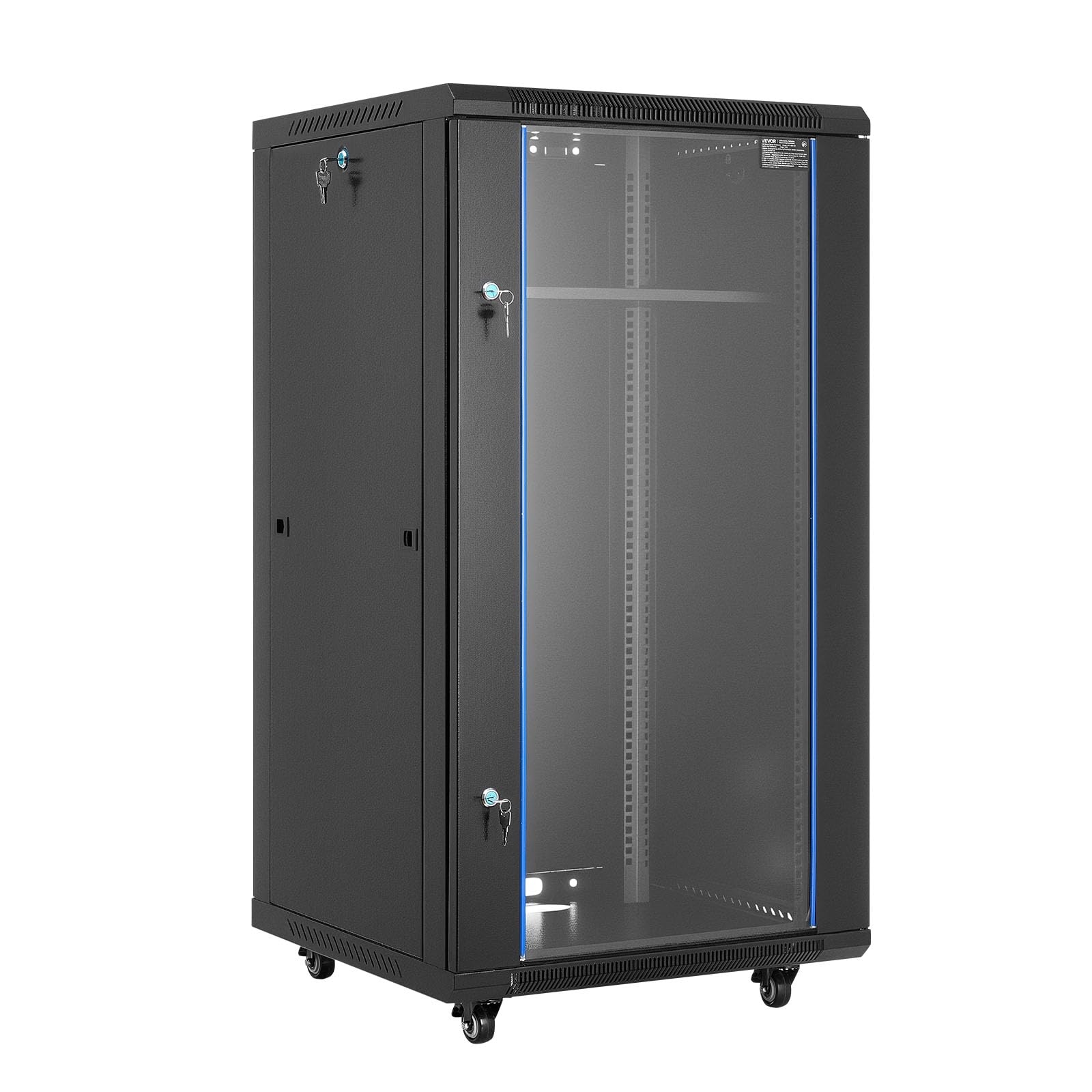
This one solves a different problem: not “where do I put the rack” but “how do I keep people out of it.” It is an enclosed 22U steel cabinet with a lockable tempered glass door, built for offices, public spaces and classrooms where gear needs guarding from walk-by hands. Ventilation slots and cooling holes run through the cabinet, and the square-hole mounting rails adjust, so 19-inch devices mount at the depth you want.
The footprint numbers matter here. It runs 23.6″ deep and 23.6″ wide at a 45.87″ height, and calls for an 18-inch installation depth, which is the figure that actually decides whether it goes on your wall. That overall width leaves the ASUS W680 board’s slim 10.8″ profile nowhere close — those two are different objects entirely. The welded frame rates to 300 lbs, which comfortably handles a stack of switches and patch panels but not the fully loaded server chassis a 1200 lb frame like the VIVO would carry.
The review record is honest about the split. Assembly earns praise, with instructions buyers can actually follow. Build quality and door operation are where opinions divide — reviewers repeatedly note some units arrive with doors that do not shut cleanly or a lock that fights back. A handful of buyers found mounting holes that did not line up or a frame bent in transit.
The shelving reality: the cabinet’s adjustability and multiple cable-routing holes are the strongest parts of the buy — easy to route wiring, easy to set rail depth, and a glass door that shows you everything at a glance.
One thing to check on arrival: open the box and inspect the door alignment and pillar holes before you mount anything — spotting a bent frame early saves a return headache.
Worth it if: the cabinet needs to be locked and visible in a shared room, and your gear is depth-friendly.
Pass if: you are mounting heavy servers or want the depth range an open adjustable frame gives you.
4. ASUS Pro WS W680-ACE Workstation Motherboard

The Intel platform choice where ECC memory and dual PCIe 5.0 both matter.
This board answers the one question that sends builders back to the drawing board: how do I get error-correcting memory and fast drive lanes in the same box. It runs the Intel W680 chipset on the LGA 1700 socket, ready for 13th Gen and 12th Gen Intel Core processors plus Pentium Gold and Celeron, and it accepts ECC memory.
The connectivity is the real selling point. You get dual PCIe 5.0 SafeSlots (the fastest graphics and add-in card slots) plus dual PCIe 3.0 slots, 3 x M.2 PCIe 4.0 (fast stick-shaped storage slots), SlimSAS, dual Intel 2.5Gb Ethernet (two fast network ports), front panel USB 3.2 Gen2x2 Type-C, a Thunderbolt 4 header, a TPM header and an LPT header. Four memory slots run at 1600 MHz and take the ECC kits on this page. Getting the board and the RAM to line up is the job here: pair it with the 64GB 2400MHz A-Tech kit, and the 128GB 2133MHz kit fits the same slot layout, so you pick based on capacity, not compatibility.
Cooling is handled by a large VRM heatsink, M.2 heatsinks and hybrid fan headers under Fan Xpert 4 control. ASUS Control Center Express gives you USB port management and Regedit on/off controls from one panel. The story that keeps coming back in the reviews is split on reliability: many boards run 24/7 without complaint for months, and some buyers report crashes early in their build. The stability and connectivity feedback is largely positive; the reliability noise is the honest part of the picture. If you are running a mission-critical box, plan a burn-in period before you trust it with live data.
Selling points worth the money
- W680 chipset with ECC memory support — data integrity with Intel platform performance
- Dual PCIe 5.0 SafeSlots plus 3 x M.2 PCIe 4.0 gives storage lanes for days
- Dual Intel 2.5Gb Ethernet on board saves a network card slot
- USB 3.2 Gen2x2 Type-C on the front panel and Thunderbolt 4 header for expansion
Builders should know
- Run a burn-in before trusting live data — early-crash reports exist
- Memory compatibility check is on you; ECC kits are a short list
Choose this if: you want an Intel workstation board with ECC and dual PCIe 5.0 without jumping to server-chip pricing.
Consider the AMD route instead if: you already own Ryzen hardware — the ASRock below handles AM4 chips.
5. A-Tech 64GB Kit (4x16GB) DDR4 2400MHz PC4-19200 ECC RDIMM

Four matched 16GB sticks that fill your four slots in one move.
Memory is the cheapest place to find real headroom in a server, and this kit is the middle rung of the ladder. You get four 16GB modules for 64GB total, each a 288-pin DDR4 DIMM running up to 2400MHz on the PC4-19200 standard with CL17 latency, built as ECC Registered RDIMM in 2Rx4 dual-rank form at the JEDEC 1.2V spec. Four sticks fill a four-slot board completely, which is how most workstation boards like the W680 are laid out.
The one warning the listing puts in bold is the one that saves you a return: this will not work in desktop or laptop computers, only ECC Registered servers and workstations. It also cannot be mixed with ECC Unbuffered, ECC Load Reduced or Non-ECC Unbuffered modules, so any existing sticks in your system need to match the RDIMM type. The 2400MHz speed here is faster than the 2133MHz the bigger kit lower on this page runs, so if your board supports both speeds, this one gives you a touch more throughput per channel.
A-Tech builds and tests every module and covers the whole line with a limited lifetime warranty plus a support team that will talk compatibility with you before you commit. That support line is the underrated part of buying server memory — the specifications that matter most, like which RDIMM type your board accepts, are rarely printed on the board itself.
Buy this when: you have four empty DIMM slots and want to double your room for virtual machines, databases or a home-domain controller without buying a whole new server.
The catch: 16GB sticks cap how far this kit scales — for a machine that needs more than 64GB total, the eight-stick 128GB A-Tech kit at the bottom of this list is the path.
Right for: four-slot boards that need honest ECC memory at a middling capacity.
Not for: desktop PCs or any board that expects unbuffered memory — this stick will not boot there.
6. RIVECO 42U Adjustable Depth Server Rack
Forty-two units of cold-rolled steel that stands on its own feet.
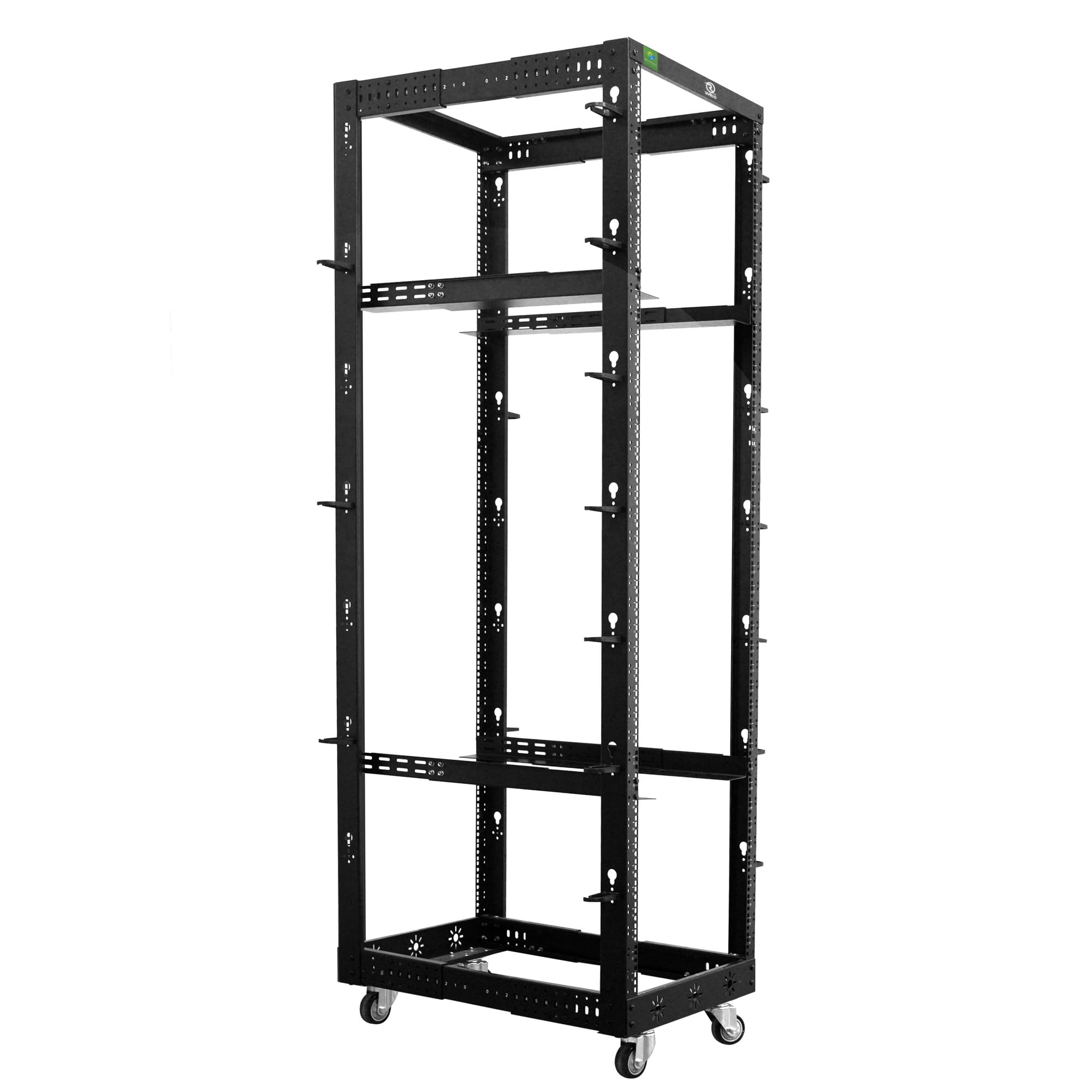
This is the rack you buy when you are done buying racks. It stands 42U tall — a 78.8″ height, a 38″ depth and a 21″ width — on a frame built from 2.0mm cold-rolled steel joined with all-rivet connections. It is rated for a 1200 lb static load on its 3-inch casters, or up to 1700 lbs on the leveling feet, so the frame does not care what you stack on it. That load figure on feet is the highest on this page, and only because the VIVO’s 1200 lb rating comes on casters instead.
The adjustable depth runs 24″ to 38″, and the top and bottom frames slide forward or backward to set the mounting depth, which is how it accommodates 19-inch networking devices of varying depth. Horizontal L rails add structural stability whether or not equipment is installed, and they spread the load across the frame instead of dumping it on the mounting screws. Cable management rings are part of the package, which becomes the difference between a tidy setup and a rat’s nest as you fill 42 units.
What keeps coming up across the reviews is the frame itself: buyers describe it as sturdy and built like a tank, with clear assembly directions and a fit that holds together. Installation is the one spot with mixed notes — the frame is heavy, and setting it upright with the load-bearing casters is a two-person job that some buyers found harder than expected. Two years of warranty backs the frame, and it ships double boxed with all assembly accessories. The honest trade-off is floor space — this is not a closet rack; it is a data-centre tribute that needs its own corner.
The strongest part: the L rails and 2.0mm steel mean a fully loaded 42U does not flex or lean, and the depth slides to match whatever you install.
Before you order: measure the ceiling clearance and floor footprint first — 78.8″ is taller than most closets, and the 1200 lb caster rating changes to 1700 lbs only when you drop to the leveling feet.
Built for: home labs, test benches and small data centres that need 42U of depth-adjustable floor rack.
Skip if: floor space is scarce — the wall-mount Sysracks and VEVOR options save the floor entirely.
7. ASRock Rack X570D4U-2L2T Socket AM4 Server Motherboard

An AM4 server board with four DIMM slots for builders already in the Ryzen camp.
If your parts drawer already holds Ryzen silicon, this is where the AMD build starts. It supports 3rd Gen and 2nd Gen AMD Ryzen processors with Radeon Graphics on the AM4 PGA 1331 socket, runs the AMD X570 chipset, and handles a 105W power design. Four DIMM slots in 2DPC (two modules per channel) layout take DDR4, so you can grow memory as workloads demand.
The form factor is the quiet advantage: it is a micro-ATX board at 1 kg, which slides into compact chassis that full ATX boards like the W680 above will not fit. So if your rack enclosure or small case runs short on depth or width, this is the one designed to go there. The 32GB memory storage capacity figure is the board’s own starting spec — pair your sticks against the four slots and the installed memory list before ordering.
Compatibility is the thing reviewers come back positive on: owners mention the board working with their systems and appreciate its ports. Build quality also draws praise, and the port selection is a real part of the sell for a server board — plenty of what you would otherwise add via a card is already there. Nothing in the listing suggests this board is a compromise; it is simply the AMD half of the choice, and its X570 chipset is what you are paying for.
Why this over an Intel board: it is the AMD AM4 route with the same four-slot memory layout, and micro-ATX means it fits enclosures the W680’s ATX footprint will not.
Plan around: this board wants Ryzen hardware — a modern 5000-series chip is not on the supported list, so check your CPU generation before you commit.
Made for: compact AMD builds that need a server board in micro-ATX size.
Not your board if: you already own an Intel CPU — the LGA 1700 W680 is where you shop.
8. Sysracks 27U Wall Mount Server Rack Cabinet

A 27U wall cabinet that arrives with the fan, PDU and shelves already in it.
Most enclosed cabinets make you buy the box, then buy the extras. This one breaks that pattern: the 27U wall-mount cabinet ships with two fixed shelves, a PDU (the power strip for your rack gear), brush cable entry panels and the full mounting hardware. You get 27 rack units of enclosed storage with a tempered glass front door and removable side panels. It also lifts everything off the floor — a real advantage if your “server room” is a hallway or utility wall.
Plan against the usable numbers, because they are shorter than the outer cabinet: the overall depth is 24″, but 20″ of that is usable mounting depth, and the whole cabinet measures 24″ wide by 53″ high. It carries up to 133 lbs of installed equipment. That is the lowest load figure on this page, so this is a cabinet for routers, switches, patch panels and AV gear — not for the heavy server chassis a 1700 lb floor rack takes. Material quality is the highest-rated part of the buy across the review record, so the steel and finish outclass the weight limit.
Two things need honest flagging. Assembly draws mixed notes — some buyers put it together easily, others find the manual light on detail, so watch the door and side panel alignment as you go. The top fan also makes noise, and some buyers find it louder than they want in a quiet room. The lighter sturdiness reports come from buyers pushing beyond what a 133 lb cabinet is meant for. Sized to its spec, it works.
The fan is the difference between a sealed box that heats up and one that actively moves air, so it is worth keeping. Pair it with short depth switches and your gear will live comfortably.
Go here if: you want a self-contained wall cabinet with cooling and power built in, and your gear is network-scale rather than server-scale.
Verify first: the 133 lb load limit and 20″ usable depth — shallow switches fine, deep servers over the line.
9. A-Tech 128GB Kit (8x16GB) DDR4 2133MHz ECC RDIMM

Eight sticks of ECC memory to carry the heaviest virtualised workloads.
Eight 16GB modules add up to 128GB here, and that is the point — this kit is for the machines that run multiple virtual systems, large databases or in-memory caches where 64GB starts to feel tight. Each stick is a 288-pin DDR4 DIMM running up to 2133MHz on the PC4-17000 standard at CL15 latency, built as ECC Registered RDIMM in 2Rx4 dual-rank form at 1.2V. Every module is tested by A-Tech and backed by a limited lifetime warranty.
The trade-off versus the 64GB kit above is worth spelling out: that kit runs at 2400MHz and fills four slots, while this one runs at 2133MHz and fills eight. If your board has only four DIMM slots, this kit is not for you — it needs eight slots to land. If it has eight, this is the higher ceiling, and the slower per-stick speed is the price you pay for the extra capacity.
The same hard compatibility rule applies in bold: this is for ECC Registered server and workstation systems only, and it will not work in any desktop, laptop or PC. Nor can it be mixed with ECC Unbuffered, ECC Load Reduced or Non-ECC Unbuffered modules, so your existing sticks need to be the same type. Check the memory list for your board before ordering, because this is the last place a wrong part bites hardest.
Where it shines: 128GB of ECC memory in a single order fills an eight-slot server board and leaves room for the workloads that choke a smaller box.
Before you buy: count your DIMM slots and confirm your board accepts 2133MHz RDIMM — eight slots and the matching spec are both required.
Perfect for: eight-slot servers that need maximum memory capacity from a single kit.
Not the kit for: four-slot boards or any desktop — the 64GB kit suits those better.
Know the Specs
Rack units and adjustable depth
A rack unit, or U, is one standard vertical slice — each 1U equals three mounting holes on the rail. A 25U rack gives you 25 slices, and a 42U gives you 42, which is how you count whether all your switches and servers will fit. Depth is the companion number: the outer cabinet’s depth is often longer than the usable mounting depth, because the door, frame and cable bend radius eat into it. Compare the deepest piece of equipment you own against the usable mounting depth, not the outer size.
Load rating on casters versus feet
Racks are rated in pounds, and the number changes depending on how the weight is supported. Casters (the wheels) usually carry a lower figure than leveling feet, which is why the same frame can be rated for less when rolling and more when planted. Match the rating to how you plan to use the rack: a rolling cart needs the caster number, while a rack that stays put can use the foot number.
ECC Registered memory explained
ECC (error-correcting code) memory can detect and fix small data errors on its own, and RDIMM means the module carries a register chip that lets a server board address many modules at once. Both make this memory different from what a desktop uses, and neither form can be mixed with standard unbuffered RAM. The DIMM slot is 288-pin DDR4 in both cases, which is why a wrong stick can seat perfectly and still refuse to boot.
Motherboard socket and chipset
The socket is the physical CPU seat, and the chipset is the chip that governs drives, network ports and expansion cards. An LGA 1700 board takes Intel 12th and 13th Gen processors, while an AM4 board takes AMD Ryzen chips. PCIe 5.0 is the latest expansion standard on some boards here, meaning faster drive and card lanes; Intel 2.5Gb Ethernet is the network chip, giving faster wired speeds than the typical 1Gb port.
Common Questions
Will the A-Tech ECC memory kits work in an ordinary desktop PC?
Can I mix two different types of ECC memory in one server?
How many rack units do I get if I install the shelves?
Can the VIVO cart be rolled around fully loaded?
Does the RIVECO 42U rack hold more weight on its casters or its feet?
Will an Intel W680 motherboard work with AMD Ryzen processors?
How much usable depth does a wall-mount cabinet have compared with its outer size?
Is a rack with wheels as stable as one on leveling feet?
What is the difference between the two A-Tech memory kits besides capacity?
Can I put an ATX board in a compact micro-ATX server case?
The Bottom Line
For most builds, the pc server and parts winner is the VIVO 25U Freestanding Server Rack Cart because it pairs a 1200 lb steel frame with depth that adjusts from 22″ to 40″ in 1″ steps — the widest range on this page. If you need the full-height floor anchor, grab the RIVECO 42U Adjustable Depth Server Rack for its 1700 lb leveling-foot rating. And for the machine itself, match the ASUS Pro WS W680-ACE to the A-Tech 64GB ECC RDIMM kit so the memory type and slot layout line up before you power on.
Build the frame around your deepest piece of gear, then build the compute around your memory type. Measure your deepest chassis before you buy the frame, and confirm your board’s memory type before you buy the sticks.
How we choose
We do not accept paid placement. Every pick is matched to a real buyer and a real use-case; we do not hands-on test units.
Sources
Specifications: manufacturer listings and product documentation. Review insights: verified customer reviews, as of November 2026. Pricing: not shown on this page (it changes often); check the current price via the retailer link.
As an Amazon Associate, Tactical Gear Guy earns from qualifying purchases. This does not affect which products we feature.