Specs are compiled from manufacturer listings and verified buyer reviews and can change over time — please confirm the key details on the product page before buying.
The right rolling pc cart does one job extremely well: it lifts a heavy computer tower off the floor and lets you slide it out on wheels when you need to reach a cable. If you want the shortest answer, the ZUAVIALA Computer Tower Stand pairs a 6-level height range with 88 lbs and 110 lbs shelf ratings and a 4.5+ rating. Below you will find nine real carts, sorted by what they actually do, so you can match one to your desk, your tower size, and your floor.
This guide is built by comparing the manufacturers’ published specifications and the patterns across verified customer reviews, so you get each pick’s real strengths and trade-offs instead of marketing spin.
Some towers are wide, some are slim, and some sit in a corner collecting dust on the base panel. The picks below cover each case, and this guide to the best rolling pc cart keeps the size checks front and center.
Top Picks

How To Choose The Best Rolling PC Cart
Most buyers get this wrong in the same way: they measure their tower’s height, buy a cart, and discover the side rails squeeze the case or the shelf is too shallow. Width is the number that decides whether a cart works, because the clamps or side walls have to grip the case without pressing on a glass panel. Get the width right and the height range, shelf depth, and caster brakes all fall into place.
Measure the case, not the room
Put a tape across the widest part of your tower and write it down. A cart with an adjustable width range, like a 7.87″ to 14.17″ span, covers most ATX and EATX cases. A fixed-width cradle only suits slim desktops and UPS boxes. If your case has feet or a raised base, note that too, since the platform needs to sit flat beneath it.
Decide if you need shelves or a cradle
A cradle grips the tower by its sides and keeps the footprint tiny. A two-tier shelf cart gives you a second surface for a printer, a router, or a headset, and usually adds height adjustment so the top aligns with your desktop. If your desk is short on surface, a two-tier shelf cart adds a second platform for a printer or router. If you only need to get the tower off the carpet, a side-clamp cradle keeps the footprint to the case itself.
Check caster count and brakes before anything else
Four casters roll straight; two casters plus fixed feet stay put. Locking brakes on at least two wheels are the difference between a cart that parks and one that drifts when you nudge the desk. A cart with all four casters braked is the safest choice if you keep the tower beside a walking path or on a hard floor.
Match the weight rating to your real load
A loaded full-tower gaming PC with a heavy graphics card can run well past what a light shelf tolerates. Look at the lower shelf rating specifically, because that is where the tower sits. A lower shelf rated for triple digits in pounds leaves headroom for a printer stacked above. Thinner engineered wood shelves carry lower numbers, so check the spec against what you plan to put on it.
Side-by-Side Comparison
| Model | Best For | Height Range | Weight Capacity | Caster Setup | Amazon |
|---|---|---|---|---|---|
| ZUAVIALA Computer Tower Stand★ Best Overall | All-round pick for most desks | 21.34″ – 28.3″ | 88 lbs top / 110 lbs lower | 4 × 2″ casters, all braked | Amazon |
| JANE EYRE Computer Tower Stand with Power OutletBuilt-In Power | Charging station built into the cart | 23.03″ – 28.3″ | 90 lbs top / 120 lbs bottom | 4 casters, 2 lockable + 4 fixed feet | Amazon |
| Tyfnry 24In Large PC StandMost Shelf Space | Two full towers or a tower plus printer | 21″ – 29″ | 88 lbs upper / 120 lbs lower | 4 × 360° casters, 2 lockable | Amazon |
| HOOBRO Computer Tower Stand | Warm wood-look home office | Fixed (23.8″ tall) | 44 lbs lower shelf | 4 wheels, 2 with brakes | Amazon |
| VIVO Premium Large Mobile PC Cart | Large cases plus a top shelf for a printer | 21.5″ – 33.3″ | 88 lbs per shelf | 4 casters, 2 lockable | Amazon |
| VIVO Adjustable Mobile PC Cart | ATX cases on a tight footprint | 7.8″ – 14″ width span | — | 4 casters, 2 lockable | Amazon |
| Syba Slim PC or UPS Floor Stand | Slim desktops and UPS boxes | 7.4″ – 10.6″ base plate | — | Locking and swiveling casters | Amazon |
| Bytesium PC Tower Stand | Wide ATX and EATX cases, from the floor | Fixed, 87mm clearance | 110 lbs | 4 locking wheels | Amazon |
Detailed Reviews
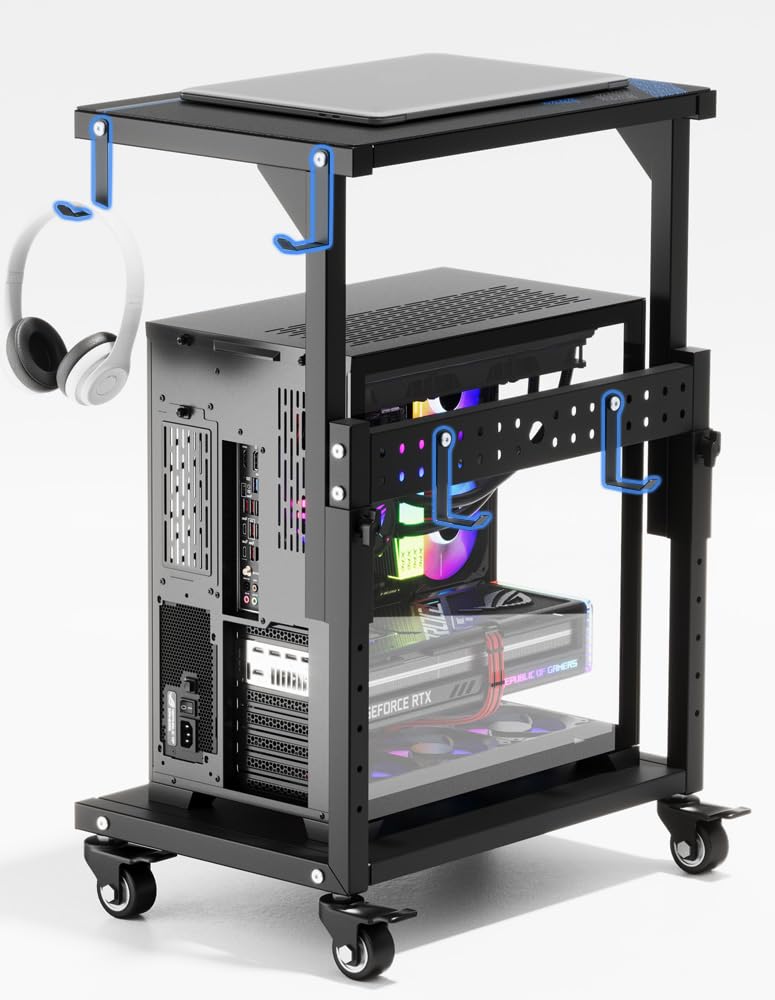
1. Computer Tower Stand 6 Level
Our pick — 4.5+★ from 550+ verified ratings; the strongest balance of quality and price.
Six height stops and four braked casters turn tower shuffling into a two-second slide.
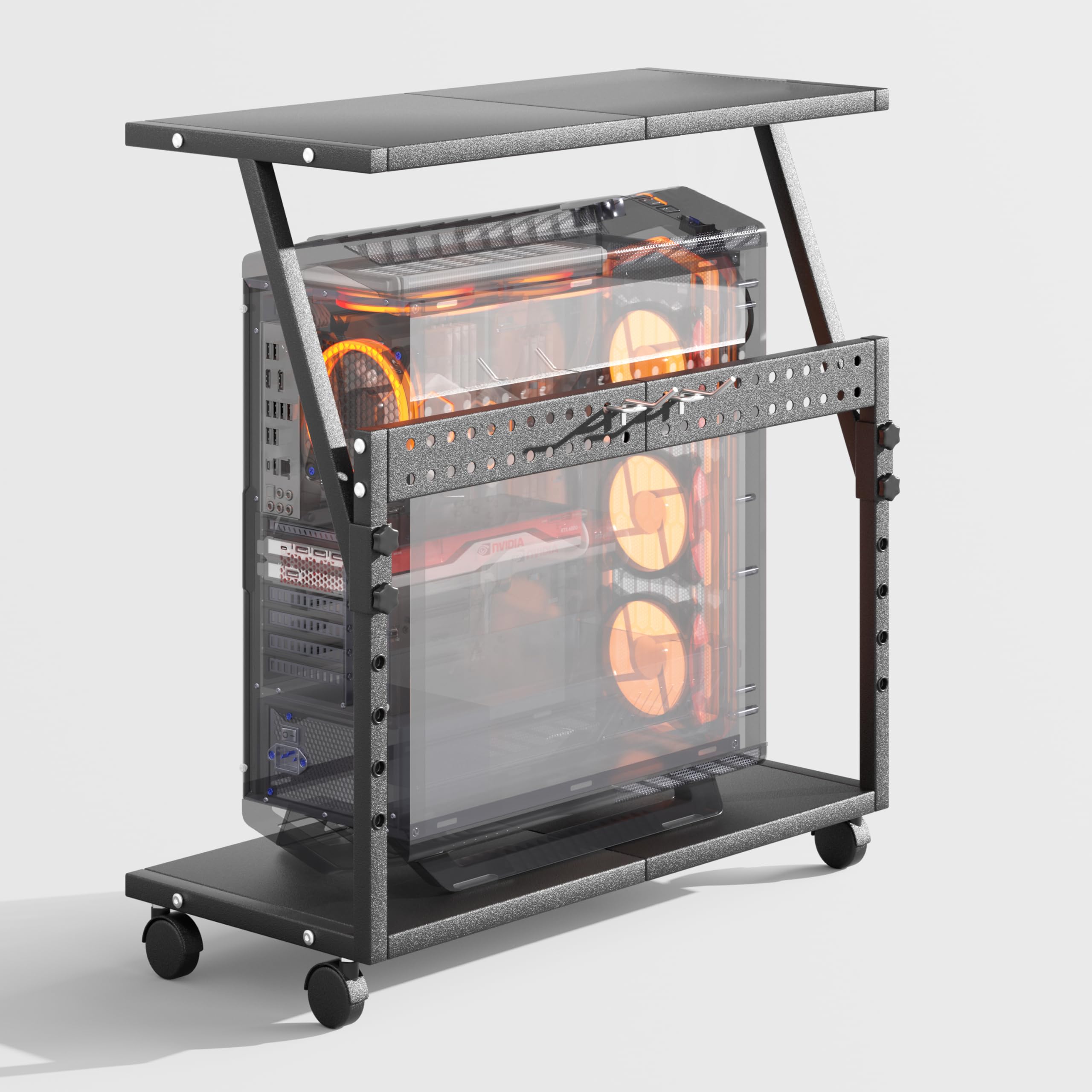
The knob on this ZUAVIALA stand moves the top shelf through six stops between 21.34″ and 28.3″, which is roughly chair-armrest to desktop height. That range means you can tuck it under your desk when space is tight, or park it beside the desk as a side table that adds about 19 × 13 inches of surface. The two shelves carry 88 pounds on top and 110 pounds on the lower deck, so a printer up top and a loaded tower below both stay put.
You get a frame that feels solid once the bolts are snug — the metal build reads sturdy rather than tinny, and the assembly steps come together fast enough that most people are done before the coffee cools. The wheels are 2-inch heavy-duty 360° casters (small swivel wheels that turn in any direction), and all four have brakes. Quiet rolling matters here: on hardwood and carpet alike you can pull the tower out for a cable swap without dragging anything.
On storage, four hooks and a rear pegboard hold a power strip and spare cables, and there is a waterproof mousepad included so the top shelf doubles as a usable surface. The honest trade-off is the footprint: this thing wants a spot roughly the size of a small side table, so it is not a hidden cradle. Several owners also found it a touch smaller than the photos implied, so measure your tower’s width against the shelf before you commit. It holds a 4.5+ rating overall, and the crowd numbers back the build quality claim, making it the safest all-round pick here.
Where it earns its keep
- Six height stops from 21.34″ to 28.3″ let you line the top shelf up with your desktop.
- Upper shelf rated at 88 lbs and the lower at 110 lbs, so a printer and a full tower can share the cart.
- All four 2-inch casters lock, so the cart parks firmly instead of drifting.
- Four hooks, a rear pegboard, and a waterproof mousepad add real storage.
What to weigh first
- It takes up side-table floor space rather than tucking into a narrow gap.
- A few owners found the shelves smaller in person than expected, so measure your case width.
The verdict: If you want one cart that raises the tower, holds a printer, and rolls out for cleaning, this is the one to start with.
Look elsewhere if: your tower is unusually wide or you need it hidden entirely under a low desk.
2. Computer Tower Stand Power Outlet
Two outlets and two USB ports ride along with the tower, so the desk cable nest shrinks.
If your desk sits far from a wall socket, this JANE EYRE cart solves the problem before it starts. The built-in hub carries dual 120V/12A AC outlets and dual USB ports, which powers four devices at once — phone, headset, smartwatch, and tablet — without a power strip on the floor. The stand itself adjusts through 10 levels between 23.03″ and 28.3″, so you can align the top shelf with your desk or chair.
Load ratings are the highest in this group: 90 lbs on the top shelf and 120 lbs on the bottom, on a 19.2 in × 11.5 in base with heavy-gauge steel and solid wood shelves. Four heavy-duty casters roll the cart out for cable changes, and two of them lock. When you want it planted for good, swap in the four fixed feet and the cart stops moving entirely.
The wood-grain top surface grips a laptop or router instead of letting it slide, and four hooks keep a headset within reach. What buyers praise most consistently is the combination of easy assembly and the charging hub actually being handy rather than a gimmick. The trade-off worth naming: the sturdiness of the frame draws mixed feedback, with some owners finding real wobble once a heavy tower goes on, so keep the load centered. The two AC outlets and two USB ports are the reason to buy this one over the cheaper carts.
Best fit for: a gaming or work setup where the cart doubles as the charging station and the tower rides below.
Think twice if: you plan to stack a very heavy tower plus a printer and want a frame that never flexes.
3. 24In PC Stand 5 Levels
Two shelves measuring 23.6″ × 11.8″ each, big enough for two towers or a tower plus printer.
This Tyfnry stand is the space answer. Each shelf measures 60cm × 30cm, which is 23.6″ × 11.8″, and the lower shelf offers the same space as the upper. That capacity fits up to two PC towers, or one tower plus a printer, console, or office supplies. The upper shelf holds 88 lbs and the lower 120 lbs, so heavy equipment has headroom.
Height adjusts through five gears from 55cm to 75cm, or 21″ to 29″, using a large one-hand knob with no extra tools. The idea is to line the top shelf up with your desktop so it acts as extended tabletop. Four casters rotate a full 360° and roll even on carpet, and two of them lock with a step-on brake. Two hooks on the back hold headphones or cables, and the hollowed-out hole plate on the shelf leaves room for DIY add-ons later.
Owners consistently flag the appearance as the standout, with the hidden-wheel design keeping the cart looking tidy, and the fit for full tower PCs as a close second. The recurring gripe is stability — some find it rock solid and others note it can feel unsteady once loaded, so keep weight centered and low. Assembly feedback splits between simple and odd, so set aside a bit of patience for the instructions. As a two-tower station, its two 23.6″ × 11.8″ shelves are hard to match on shelf area.
What you get: two 23.6″ × 11.8″ shelves, 88 lbs and 120 lbs ratings, and five height gears set by a one-hand knob.
Weigh this: stability is a split verdict once a heavy tower sits high, so load the lower shelf first and brake the wheels.
Pick it for: a dual-tower or tower-plus-printer station where surface area matters more than a small footprint.
skip it if: you need a compact cradle that hugs a single slim case.
4. HOOBRO Computer Tower Stand 2-Tier
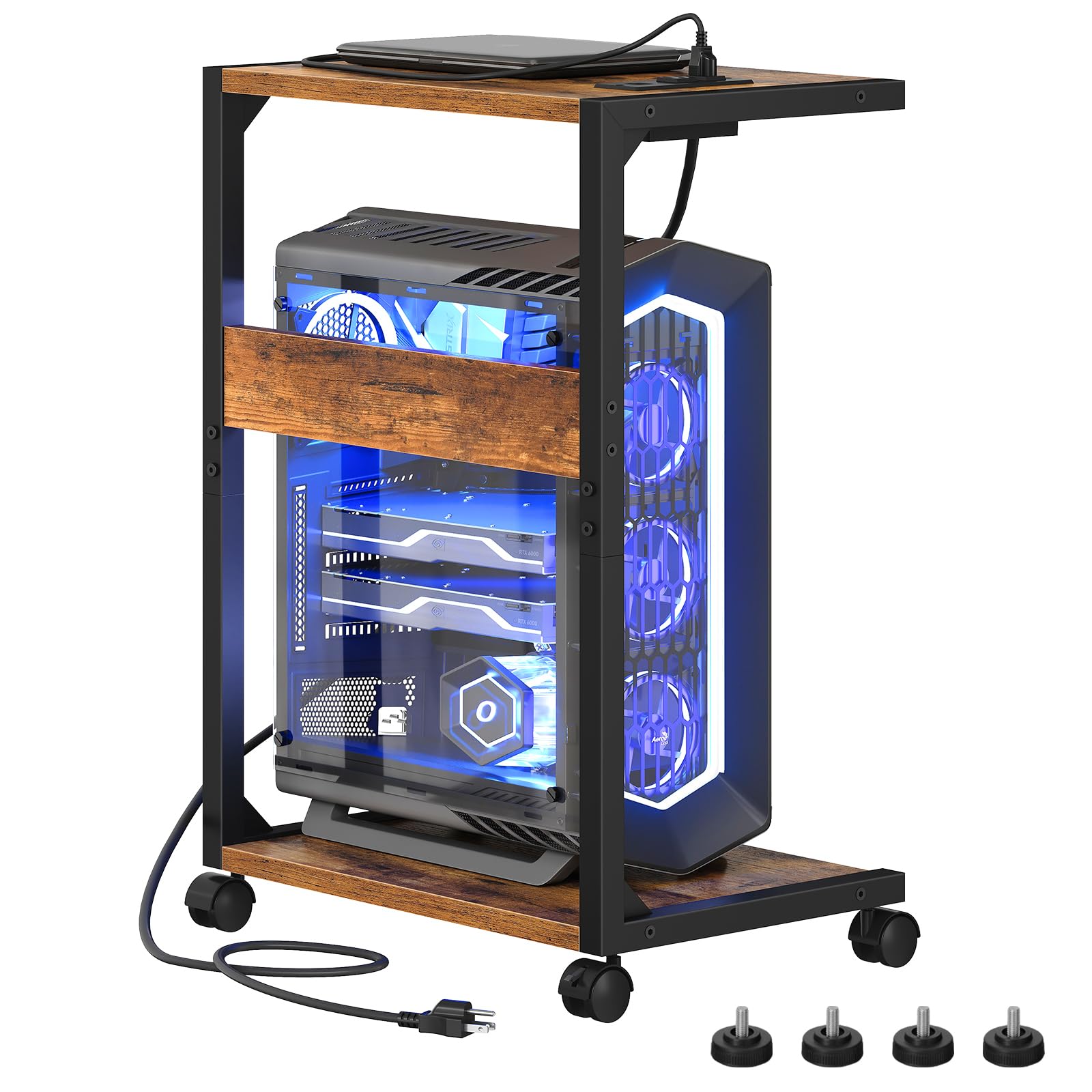
A rustic brown cart that reads like furniture instead of a workshop bracket.
Most carts in this group wear powder-coated black and disappear into the background. This HOOBRO stand goes the other way, pairing a distressed rustic brown finish with black metal so it fits a bedroom or a living-room corner. The frame measures 17″L × 11.4″W × 23.8″H, which suits most computer tower servers, and the particle board and metal mix resists scratches and dents.
Power comes built in: two AC outlets, one USB port, and one Type-C port sit on the stand, with cable clips to keep the run tidy. The cart rolls on four wheels, two of which brake, and a set of adjustable feet swaps in when you want it fixed instead of mobile. HOOBRO also pitches it as a bedside table, printer stand, or sofa table, so it earns its floor space even outside the office.
Buyers call the quality decent and the look a genuine upgrade over steel-only carts, and assembly lands around 15 to 20 minutes with no special skill needed. The real caveat is capacity: the lower shelf bears up to 44 lbs, which is fine for a mid-tower but not for a fully loaded workstation, and a share of owners found the footprint smaller than the listing photos suggested. Measure before you buy. For a lighter case and a room where looks count, the wood finish is the draw.
Reasons it works
- Two AC outlets, one USB port, and one Type-C port build a charging station into the cart.
- Rustic brown over black metal fits a home office or bedroom far better than plain steel.
- Four wheels with two brakes switch to adjustable feet for a fixed setup.
Where it holds back
- The lower shelf is rated to 44 lbs, so a heavy loaded tower pushes the limit.
- Size reads smaller in person than the photos, and the stability verdict is split.
Worth it for: a mid-tower in a visible room where the cart needs to look like furniture and charge a phone.
Not the one if: you run a loaded full-tower workstation that needs a triple-digit weight rating.
5. VIVO Premium Large PC Cart 2-Tier
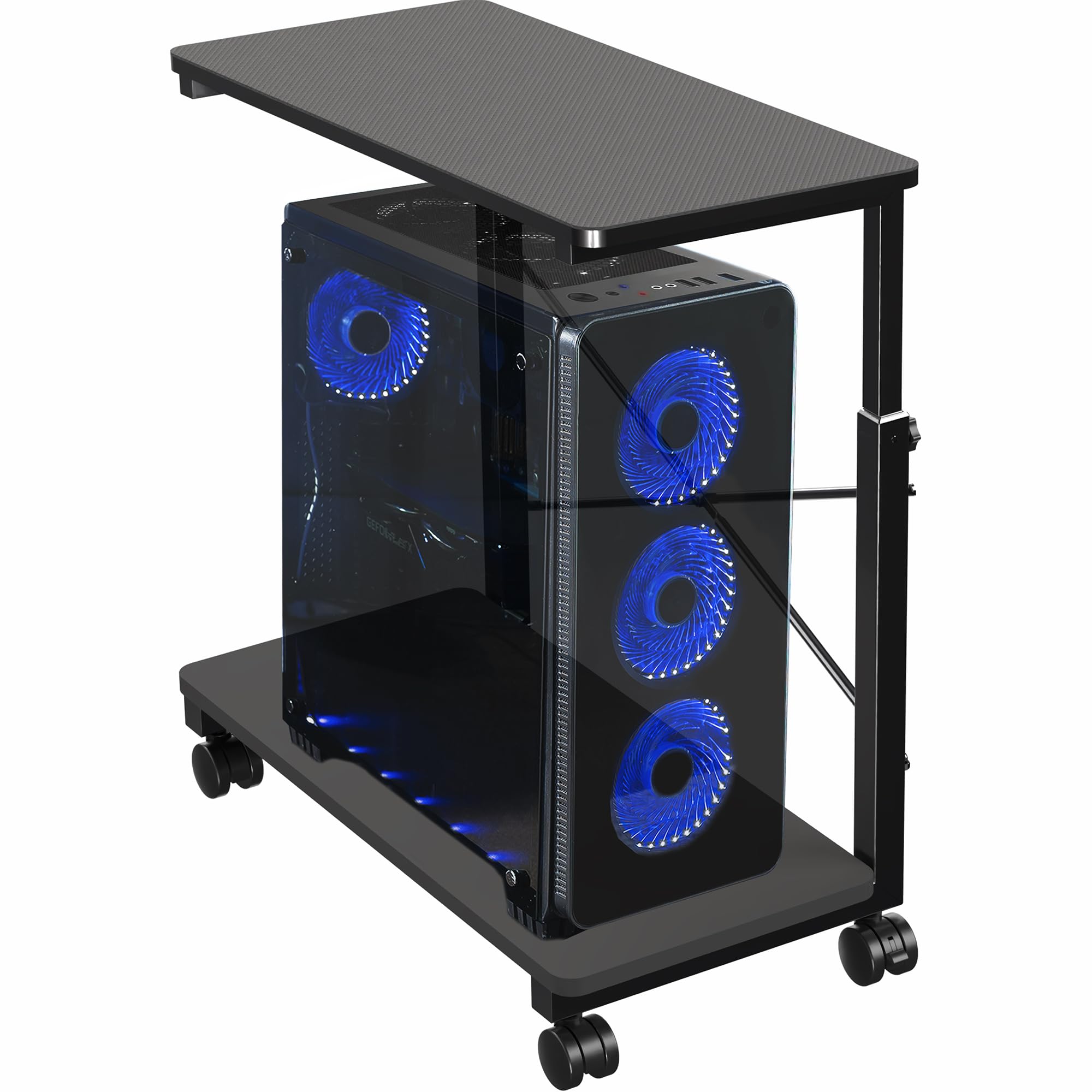
Full-tower clearance up to 27.1″, on shelves wide enough that nothing overhangs.
For a full-tower ATX build, the numbers here read generous: each shelf measures 25.3″ × 11.8″, the cart fits PC case heights up to 27.1″, and the height range runs 21.5″ to 33.3″. That top figure is taller than the ZUAVIALA’s 28.3″ maximum, so a standing desk or a tall chair setup still lines up. Each shelf holds up to 88 lbs.
The C-shaped open frame is the clever part. It leaves the back of your case exposed so you can reach the ports without pulling the tower out, and it keeps airflow moving for cooling instead of boxing the machine in. Four casters roll across different floor types, and two lock so the cart stays put beside the desk.
What people notice first is how the cart looks — clean design and a sturdy feel with large computers sitting comfortably wide. The honest friction sits in setup: assembly instructions are mixed, and a few buyers hit alignment trouble putting components together, so budget a calm half hour. Once built, it holds up as a premium two-tier cart that swallows an oversized case and still gives you a top platform for a printer.
Room to spare: 25.3″ × 11.8″ shelves, case height clearance to 27.1″, and 88 lbs capacity per shelf.
Worth knowing: the build is praised for looks and sturdiness, but assembly instructions leave some buyers working it out themselves.
The right call for: a large or oversized case that needs real breathing room plus a top shelf for a printer.
Hold off if: you want the fastest, simplest build with no head-scratching over the manual.
6. VIVO Mobile Large PC Cart

A side-grip cradle that adjusts from 7.8″ to 14″ and keeps your floor clear.
Where the shelf carts take up side-table space, this VIVO cart hugs the tower itself. The side clamps adjust from 7.8″ to 14″, which accommodates most ATX cases on the market, and inside padding protects the case from scratches. The steel frame has a matte black powder coat that blends with most setups, and lifting the PC off the floor keeps it cleaner and better ventilated.
Four caster wheels roll it smoothly, and two lock so the cart stays stationary when you want it planted. Assembly is minimal — hardware and step-by-step instructions come in the box. As a get-it-off-the-carpet solution, this is the simplest design in the group and the easiest to fit into a tight gap between desk legs.
Owners mention the cart works well and is easy to assemble, with good build quality for the money. The split feedback lands on sturdiness and wheels — some find it solid and easy to move, while others describe it as flaky with wheels that fight them. Large cases also push past what the clamp span allows, so check your width against 14″ first. Think of it as a light-duty cradle for a standard ATX tower rather than a platform for a loaded workstation.
Why owners like it
- Clamps adjust from 7.8″ to 14″ to suit most ATX cases.
- Inside padding protects the case from scratches while side walls hold it steady.
- Minimal assembly with hardware and instructions included.
Where the fit gets tight
- Feedback on sturdiness and wheel quality splits — expect light-duty behavior.
- Cases wider than 14″ will not clamp in.
Go here for: a standard ATX tower and a tight under-desk gap where a shelf cart will not fit.
Keep looking if: your case is oversized or you want a platform that doubles as a shelf.
7. Slim PC or UPS Metal Floor Stand
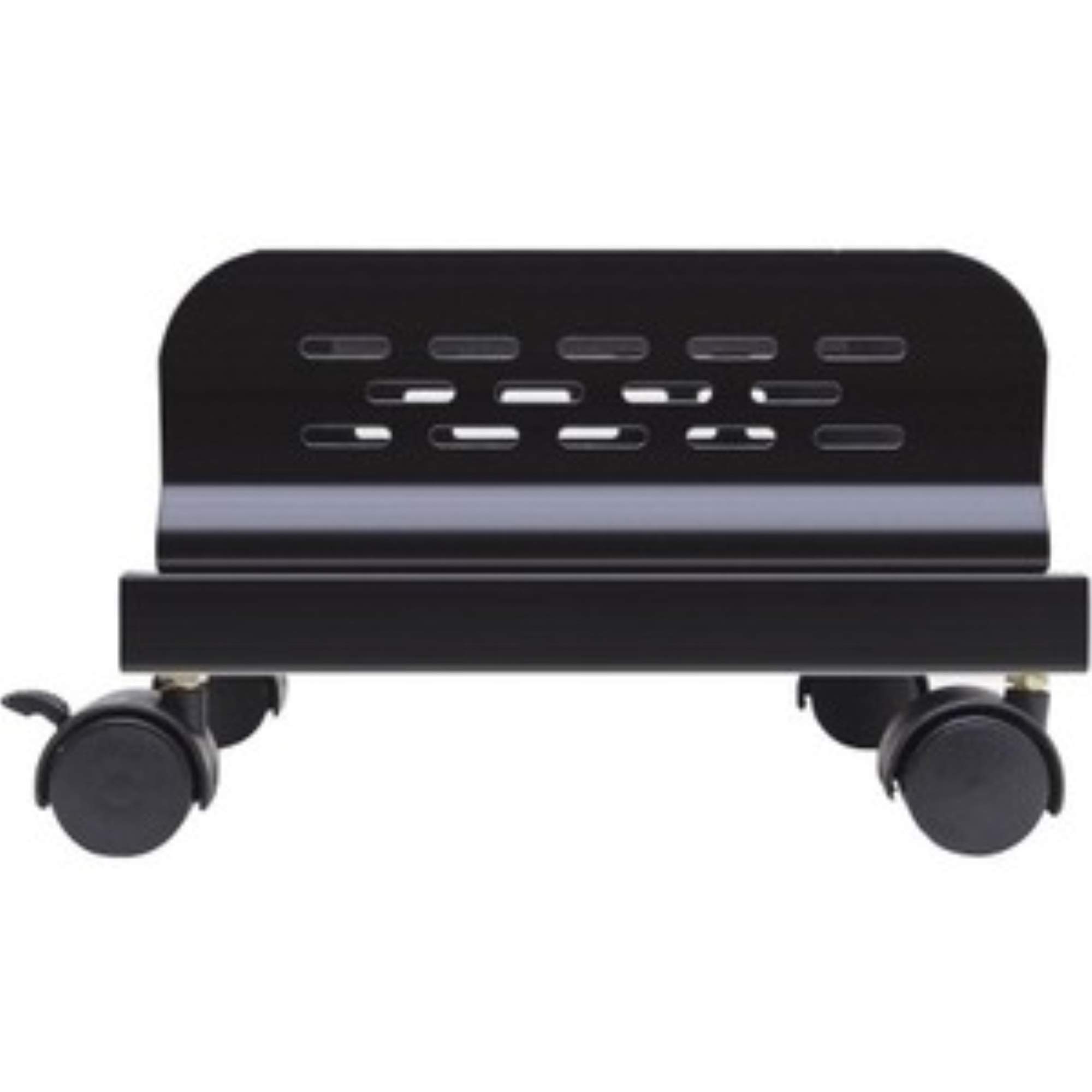
A slim-line cradle sized for desktop towers and backup power boxes, not full ATX rigs.
This Syba stand is a different species. The base plate adjusts across 7.4″ to 10.6″ and the clamps carry rubber pads that grip a slim PC or a UPS without scratching it. At 4.3 pounds the whole thing is light enough to reposition one-handed, and the locking swiveling casters let you spin the tower around to reach the back ports. It also raises a desktop off the floor to improve airflow and free desk space.
For sheer footprint, this is the smallest option here — the base plate tops out at 10.6″, which fits a slim desktop or an APC-style UPS far better than any of the shelf carts. The metal build holds its shape, and the clip-style fastening means no tools are needed after the initial setup.
Buyers describe the stand as sturdy and a good match for slim PC towers, with the wheels rolling as they should. The honest split is on assembly and fit — some find it very easy to put together, others say it takes some thought, and while it holds an APC UPS (a battery backup box) perfectly for many, a share of buyers find it too big for their device. Measure both your tower’s width and its depth before ordering, because this one is built around the slim format.
Made for the narrow case: a 7.4″ to 10.6″ adjustable base plate with rubber-padded clamps and a 4.3 lb metal body.
The catch: it will not swallow a wide tower, and fit feedback splits around what device you put in it.
Matches well with: a slim desktop tower or a UPS box that needs to sit up off the floor and slide out occasionally.
Wrong shape for: mid- or full-tower gaming cases that exceed the 10.6″ base plate.
8. Bytesium PC Tower Stand Metal Frame

Adjusts on two axes — width and length — and locks to hold your exact case size.
Most stands stretch in one direction. This Bytesium cart adjusts both width and length, from 200mm to 360mm wide (7.87″ to 14.17″) and 360mm to 645mm long (14.17″ to 25.39″), then locks in place. That covers most modern ATX cases, and the corner supporting plates give the case feet a wide platform to sit on. Cork padding under the case prevents movement and protects the finish.
The metal frame holds up to 50kg, or 110 lbs, which puts it at the top of this group on raw capacity. An open bottom structure leaves 87mm, about 3.42″, of clearance, so the tower gets extra airflow and less dust collects underneath. Four locking wheels roll on hard floors and carpets alike, and all four lock when you want the cart stationary.
Owners praise the steel frame for keeping the PC solidly in place and the tools-included build for going together easily, with the stand arriving mostly pre-assembled. The recurring gripe is cosmetic — paint chips and wheel coating flake over time — so handle it with a bit of care during moves. The wider adjustability is the real reason to pick it over the VIVO cradle’s 7.8″ to 14″ span, particularly if your case is unusually long front to back.
What stands out
- Adjusts width 7.87″–14.17″ and length 14.17″–25.39″, then locks to your exact case size.
- Holds up to 110 lbs on a steel frame with cork padding to protect the case.
- 87mm of clearance under the tower for airflow and less dust buildup.
Worth a second look
- Paint and wheel coating can chip or flake with rough handling.
- Two-axis adjustment pairs with a higher price than the basic cradles here.
Built for you if: your case is long, wide, or both, and you want one locked-in fit instead of a compromise.
Overkill if: a standard mid-tower and a simple cradle already do the job.
Know the Specs
Width and length range
This is the number that decides whether a cart fits at all. A width span like 7.87″ to 14.17″ or 7.8″ to 14″ covers most ATX cases, while a slim base plate of 7.4″ to 10.6″ only suits narrow desktops and UPS boxes. Measure the widest part of your tower across the panels, and if the case has feet, check the length too, since two-axis stands adjust front to back as well.
Load capacity per shelf
Capacity is listed per shelf, not for the whole cart. A lower shelf rated at 110 or 120 lbs has plenty of headroom for a loaded tower, while a 44 lb rating suits a mid-tower without much extra. Keep the heaviest item on the lower shelf, which sits closer to the floor and the casters, and leave lighter gear for the top.
Casters, brakes, and fixed feet
Four casters roll a cart in any direction; two lockable ones let it park. A cart with all four braked stays put best, and a design that swaps in fixed feet gives you the option to stop it rolling entirely. Caster size matters for carpet, where a smaller wheel digs in and a larger one rolls over the pile.
Height adjustment and clearance
Height ranges from roughly 20″ to a little over 33″ let you line a top shelf up with your desktop or chair. Under-tower clearance is a separate number — a stand with around 3.42″ of open space below the case lets air move and keeps dust from gathering. Both figures matter if your tower sits on carpet.
Common Questions
Will a rolling PC cart fit a full-tower ATX case?
Do all four wheels need brakes on a rolling PC cart?
Can I use a rolling PC cart for a UPS battery box instead of a computer?
How much weight can a two-tier PC cart hold?
Does raising a PC off the floor actually help airflow?
Will a rolling cart roll smoothly on carpet?
Can I lock a PC cart in place permanently?
Do these carts come with a power strip built in?
How long does assembly take on a rolling PC cart?
Is a cradle cart or a shelf cart better for a home office?
The Bottom Line
The winner for most setups is the ZUAVIALA Computer Tower Stand, because it pairs six height stops across 21.34″ to 28.3″ with 88 lbs and 110 lbs shelves and four braked casters — a combination you can set up in one place and leave alone. If your case is a wide or loaded full tower, the PUTORSEN cart clears a 10 5/8″ width and 26 3/8″ height where narrower stands will not. And if you want the desk’s power strip to disappear into the cart itself, the JANE EYRE stand puts two outlets and two USB ports right beside your tower. Measure your case’s width once, pick the cart whose clamp or shelf range covers it, and you can stop lifting that tower for good.
How we choose
We do not accept paid placement. Every pick is matched to a real buyer and a real use-case; we do not hands-on test units.
Sources
Specifications: manufacturer listings and product documentation. Review insights: verified customer reviews, as of November 2026. Pricing: not shown on this page (it changes often); check the current price via the retailer link.
As an Amazon Associate, Tactical Gear Guy earns from qualifying purchases. This does not affect which products we feature.