Specs are compiled from manufacturer listings and verified buyer reviews and can change over time — please confirm the key details on the product page before buying.
Buying a video and audio mixer is really a decision about how many cameras you run and how much control you want over your sound. Get the input count wrong and you are unplugging cables mid-broadcast. Skimp on the audio side and your microphone levels fight you all night. This guide separates the units that genuinely mix both signals in one box from the ones that only pretend to.
This guide is built by comparing the manufacturers’ published specifications and the patterns across verified customer reviews, so you get each pick’s real strengths and trade-offs instead of marketing spin.
Some switchers here are compact two-camera boxes you can learn in an afternoon. Others are full production desks with XLR preamps and T-bar control. Every pick below combines video switching with real audio mixing — EQ, faders or phantom power — in one chassis. Here is what separates a solid video and audio mixer from a dead box on your desk.
Top Picks


How To Choose The Best Video and Audio Mixer
Most buyers walk in asking which switcher has the best picture. The real question is which one handles your camera count, your microphones and your streaming destination at the same time. Answer those three and the shortlist writes itself.
Count your cameras before anything else
A two-camera switcher (two HDMI inputs) suits a solo teacher, a podcaster or a gamer with a face cam and a screen capture. Four inputs let you cover a worship service or a panel without swapping cables. If you already own three cameras, buying a two-input box means one sits idle every week.
Then look at the audio side honestly
Every unit here mixes audio, but the depth varies. Some offer simple level knobs on the mic and line inputs. Others give you a multi-channel digital mixer with EQ, a limiter, delay per channel and 48V phantom power for condenser microphones. If your broadcast lives or dies on clean speech, the audio section deserves as much attention as the video section.
Decide how you actually go live
You can push the stream straight from the mixer over Ethernet to platforms like YouTube or Facebook. Or you can feed a USB webcam signal into OBS or vMix on a laptop and let the software handle the broadcast. Direct Ethernet streaming skips the computer entirely, which removes a crash risk. The USB route gives you more overlays and scene flexibility.
Check the power and the firmware notes
Several switchers in this category want a specific USB-C power adapter rated above a certain wattage, and some ship needing a firmware update before first use. Read the manual note for your shortlisted model before your event date, not on the morning of it.
Side-by-Side Comparison
| Model | Best For | HDMI Inputs | Audio Mixing | Weight | Amazon |
|---|---|---|---|---|---|
| Osee GoStream Deck★ Best Overall | Three-platform streaming without a PC | 4 | 2 audio inputs, EQ and limiter | 1.1 lbs | Amazon |
| RGBlink Mini-pro V3Touchscreen Control | Touchscreen PTZ control on a desk | 4 (4K) | Balanced DAC, MIC and LINE inputs | 0.42 kg | Amazon |
| Roland V-02HD MK IISimplest Setup | Plug-and-play two-camera teaching | 2 | 10-channel digital mixer | 1.3 kg | Amazon |
| CINETREAK C1 | Four-camera PTZ live events | 4 | Calibrated audio input mixing | — | Amazon |
| Osee GoStream Duet | Mixed SDI and HDMI camera rigs | 4 | On-board audio control | 1 kg | Amazon |
| FoMaKo M1 | Audio delay and sync control | 4 (4K) | 2 mic inputs, ALC noise reduction | 1 kg | Amazon |
| Blackmagic ATEM Mini Pro ISO | Recording five isolated feeds | 4 | 6-input 2-channel mixer | — | Amazon |
| Roland V-1HD | Broadcast-style preview switching | 4 | 12-channel digital mixer | 4.5 lbs | Amazon |
| FoMaKo KC602 | XLR microphones and phantom power | 4 | XLR balanced, 8-source, 5-band EQ | 1.2 kg | Amazon |
| RØDECaster Video S | Podcast studios with XLR mics | 3 | 2 Neutrik combo jacks, Revolution Preamps | 875 g | Amazon |
| RØDECaster Video | Six-source studio productions | 4 | 2 Neutrik combo jacks, Revolution Preamps | 1275 g | Amazon |
Detailed Reviews
1. Osee GoStream Deck HDMI Pro
Our pick — 4.5+★ from 350+ verified ratings; the strongest balance of quality and price.
Four camera inputs, three streaming platforms and a hard T-bar, all without a laptop in the chain.
The GoStream Deck earns the top slot because it solves the whole job in one box. You get 4 HDMI inputs and 2 HDMI outputs for multiview and monitoring, so four separate cameras and two displays can live on your desk at once. Press the T-bar and you cut between angles like a broadcast operator. It holds 4.5+ stars across 400+ ratings, with reviewers calling it a good little switcher that simply works.
What wins people over is breadth of connectivity. Beyond the HDMI ports, there are 2 Type-C ports for webcam in and out, SSD connection and PC hookup, plus Ethernet for streaming and an SD card slot for recording or playing MP4 files straight from the card. You can push to 3 platforms at once — YouTube, Facebook, Zoom or any RTMP server — without a computer, or switch to the USB output and stream through OBS or vMix if you prefer software overlays. Landscape and portrait modes cover both a widescreen service and a vertical feed.
The audio side is deeper than the price tier suggests. There are 2 audio inputs and a headphone output for monitoring, with dedicated knobs and professional effects including EQ, a limiter and faders. You can record your program feed to an SD card or USB SSD while playback of intro and break clips runs from the same card. Downstream and upstream keyers handle logos, lower thirds, green screen, chroma key, PIP and pattern effects.
Why this one leads the pack
- 4 HDMI inputs and 2 outputs for a full four-camera multiview setup
- Streams to 3 platforms at once over Ethernet, no PC required
- Audio EQ, limiter and faders built into the same panel
- Records to SD card or USB SSD while playing back MP4 clips
The honest friction points
- There is a genuine learning curve before the keyers feel natural
- The chassis warms up noticeably during long sessions
Reach for this if: you run three or four cameras across multiple platforms and want one hard panel to do the switching, audio and recording.
Think twice if: you only ever shoot two angles — the depth of the menus is more than a two-camera job needs.
2. RGBlink Mini-pro V3
A 2.1-inch colour touchscreen and a joystick replace the bank of buttons you normally learn by memory.
This is the switcher for someone who wants to nudge a PTZ camera with a thumb rather than dig through a menu tree. The 2.1-inch full-colour IPS touchscreen (a small bright display that shows your layers and settings) pairs with a precision 5-direction joystick, and together they handle layer adjustments, aspect ratio changes, PTZ camera management and chroma key. Save and recall PTZ presets so a camera move you like is one press away.
You can plug in four cameras and still stream to four places at once. That comes from 4 x 4K HDMI inputs (HDMI carries video and audio on one cable) and dual HDMI outputs for multiview (seeing all your sources on one screen) and monitoring. Streaming goes out over Ethernet (a wired network cable) via RTMP or RTMPS (the standard formats for sending live video to platforms). It matches the Osee GoStream Deck on camera count at 4 inputs each, but the RGBlink leans harder on the 4K label. Its 12 ports versus the GoStream Duet’s 16 make it the leaner chassis. At 0.42 kg it is the lightest four-input box here by a clear margin; the Roland V-02HD MK II weighs 1.3 kg, so this is the one that disappears into a bag.
Audio gets real attention with true balanced DAC circuitry on the MIC and LINE inputs, which keeps noise down on long cable runs. Colour space support covers RGB 4:4:4, YUV 4:4:4 and YUV 4:2:2. Recording goes to an external SSD with up to 2TB capacity for continuous operation, and the USB 3.0 output supports YUY2, MJPEG and H.264 encoding formats. One practical warning in the manual: update to the latest firmware before your first session, and use a 35W+ USB-C power adapter for stable performance.
What the touchscreen buys you: faster PTZ framing and preset recalls than a button-only panel, without dragging a laptop into the room. It is the most compact four-input switcher in this list.
Where it asks patience: the firmware-first rule is real — plan a setup evening before the event, not a five-minute plug-in.
Suits: the operator who manages moving cameras and wants visual feedback on a screen built into the unit.
Less suited to: anyone who never touches PTZ and would rather spend the budget on analog audio inputs.
3. Roland V-02HD MK II Streaming Video Mixer
Two cameras, one USB-C cable to your streaming platform, and a ten-channel audio mixer underneath.
The V-02HD MK II is the pick for someone who wants to stop using a webcam and has no interest in becoming a switcher technician. You connect two HDMI cameras, switch between them, and send the result straight to your streaming platform over USB-C. Roland calls it plug-and-play, and the physical layout backs that up — there is no dense menu system to memorise for a basic two-angle teaching setup.
The audio section is where this small box gets interesting. Inside sits a built-in 10-channel digital audio mixer carrying Roland’s sound quality, and you can mix sources from the dedicated inputs as well as audio embedded in the HDMI feeds. Video effects and transitions are on the panel too. For a solo teacher splitting between a face shot and a desk shot, that is more audio headroom than the setup ever demands.
Weight is the trade-off worth naming. At 1.3 kg it is 3.1 times heavier than the RGBlink Mini-pro V3’s 0.42 kg, so this is a stay-on-the-desk unit rather than a pocket companion. It supports up to two optional BOSS footswitches or expression pedals, which is genuinely useful if you need to cut shots while both hands are busy. A remote control app for iPad, macOS and Windows covers the rest.
Go here if: two camera angles and clean audio are the whole brief, and you want to be streaming by the end of the afternoon.
Look elsewhere if: you already own three cameras, because two inputs will leave one parked on the shelf.
4. CINETREAK C1

A 5.5-inch multiview screen and control for four PTZ cameras at once, built for the room rather than the desk.
Where the two-camera Roland boxes keep things minimal, the C1 is aimed at the multi-camera live event. It controls up to 4 PTZ cameras simultaneously, which means camera movement, zoom, focus and iris adjustments all run from the switcher. That is the difference between one operator covering a stage and two people fighting over the same job.
Two things stand out. First, the 5.5-inch LCD multiview screen (one display showing every camera feed at once), paired with direct access shortcut keys so you are not hunting through layers. Second, dual streaming and recording — push live to two platforms simultaneously, for example YouTube and Facebook, while recording in H.264 format at the same time. Archiving the event while it airs costs you nothing extra in gear.
The production toolkit includes cinema-grade chroma keying and a LUMA key, over 30 transition effects and customisable picture-in-picture windows. Audio mixing gets its own attention with precise input calibration to match the visual standard. Remote control runs over smartphone, iPad or PC. Buyers keep returning to build quality and how the whole package hangs together.
The build story: owners describe the interface as straightforward and the hardware as solid, which matters when a unit lives in a rack and travels between venues.
The follow-up question: if your workflow never leaves a laptop screen, the large on-board display is paying for space you may not use.
Built for: worship teams, conference producers and event crews running four roaming PTZ cameras.
Not the first fit for: a one-person podcast that never switches more than two sources.
5. Osee GoStream Duet
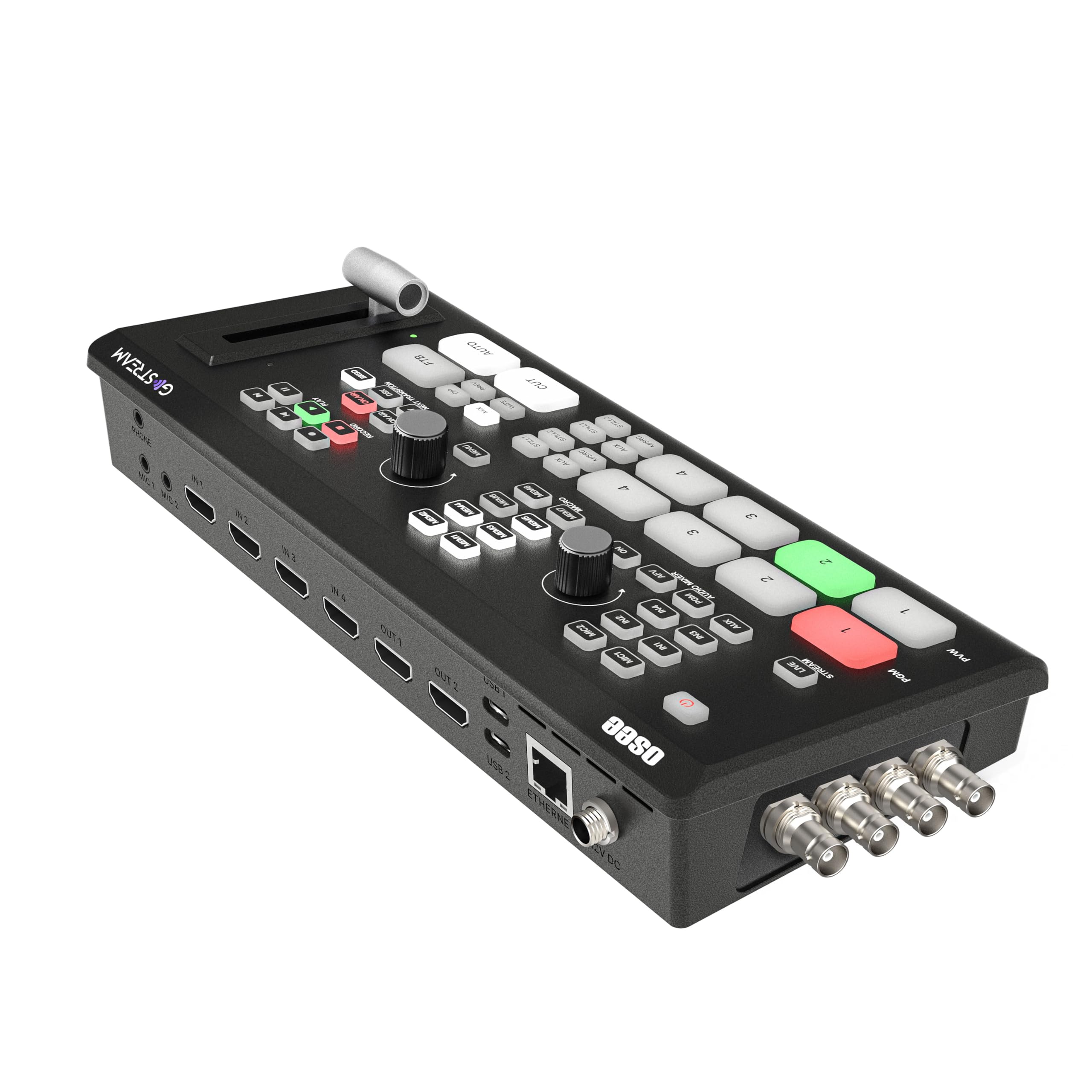
Eight camera sources across SDI and HDMI, plus a free NDI HX licence once the firmware is updated.
The Duet is the answer for anyone whose camera bag mixes connector types. It takes 4 SDI inputs and 4 HDMI inputs — the Osee GoStream Deck offers 4 total, while this one more than doubles the input count to 4 HDMI inputs on the Duet’s SDI-plus-HDMI array. Add USB-C and an NDI HX source and you are selecting from whatever the venue hands you. Landscape and portrait modes apply to inputs and outputs alike.
Control comes three ways: the built-in GUI on the unit, GoStream computer software on Mac or Windows, and Bitfocus Companion if you already run a stream deck style controller. Key effects cover Luma Key, Chroma Key, Pattern Key, PIP and DSK, with MIX, DIP and WIPE transitions plus a T-Bar for manual cuts. Streaming reaches up to 3 platforms at once over Ethernet or a phone hotspot through a USB cable, and OBS and vMix are supported through software.
Osee positions the Duet as a GoStream Deck plus a 4 HDMI and SDI converter plus a free NDI HX licence, provided you download the latest firmware to open up it. At 1 kg in a 10.6-inch-wide chassis it stays desk-friendly. Owners lead with functional reliability and multichannel capability, and several note how well it slots into OBS and vMix.
Pick this when: your rig includes broadcast-style SDI cameras and you need them mixed alongside HDMI sources without a pile of converters.
Skip the upgrade if: every camera you own is HDMI — the Deck covers that need for less complexity.
6. FoMaKo M1 4K HDMI Video Mixer Switcher
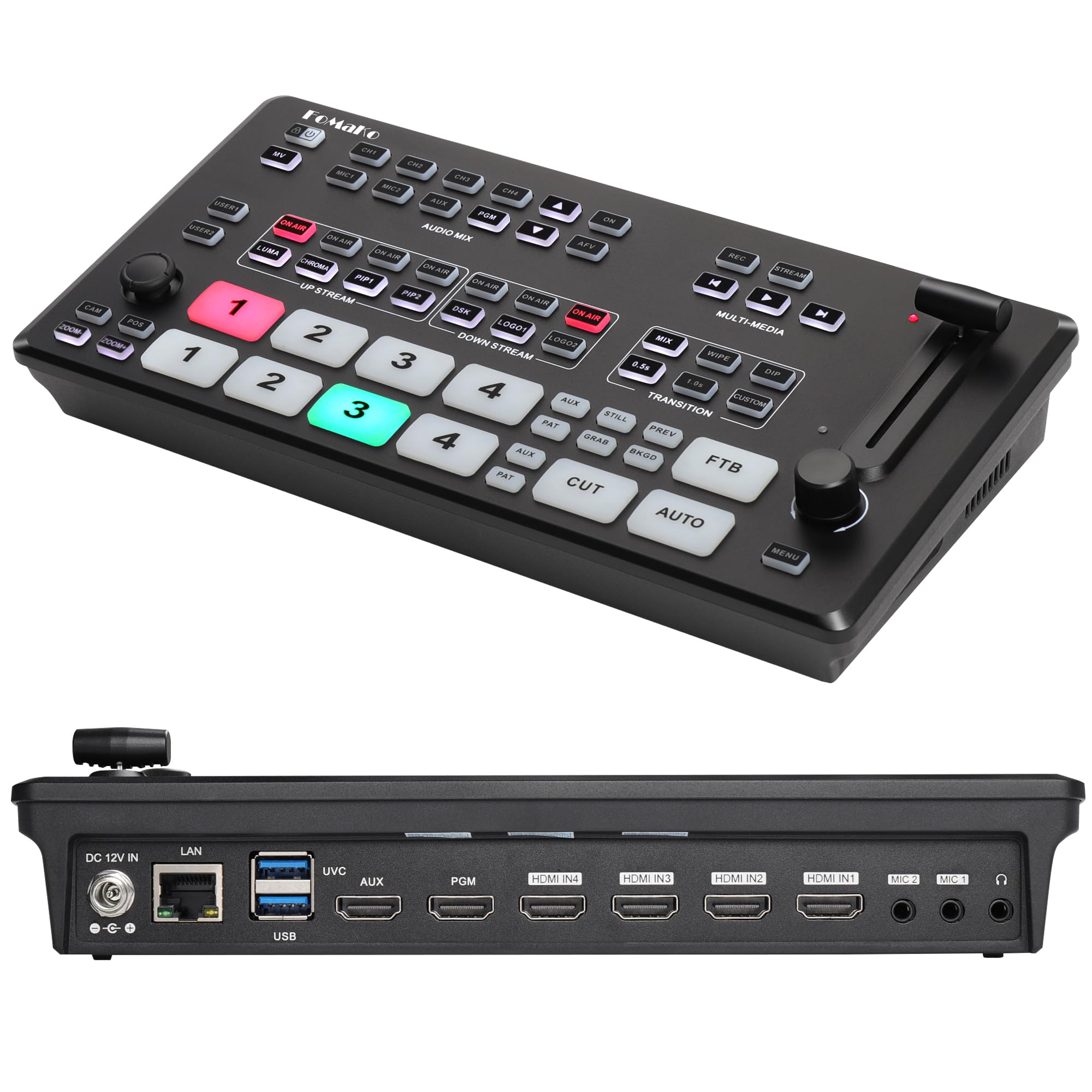
Six video sources, a 0-1s audio delay dial for perfect lip sync, and a built-in fan that keeps it cool.
Audio drift is the quiet killer of livestreams, and the M1 attacks it head-on. Its audio section pairs mixing with delay adjustment and ALC (automatic level control, which keeps microphone volume steady without you riding a fader). There are 2 mic and line inputs plus 4 HDMI inputs with independent channel control over volume, mix and delay. AFV mode ties audio to the video switch, so the mic follows the camera. The 0-1s delay range lets you nudge speech back into sync when a camera introduces lag.
Input flexibility runs wide: 6 video sources covering 4K HDMI x2, 1080P HDMI x2, 2 USB and a webcam, with NDI HX input supported and an upgrade path if your unit needs it. Outputs total 3 — 2 HDMI plus a UVC streaming feed. Recording can run simultaneously to both USB and SD cards. A built-in fan is a deliberate choice for long sessions, and heat management on this category of gear is the difference between a five-hour service and a five-hour outage.
You can go live two ways: IP streaming (sending video over a network) to 2 platforms at once, or USB-A 3.1 plug-and-play into a computer. Up to 30 transitions include Mix, Dip and Wipe, plus a T-bar (a physical slider) for manual control of transition speed. Luma key and chroma key (cutting out a background by brightness or by color), logo insertion, PIP (picture-in-picture) and DSK (downstream key, an overlay layer) round out the effects. A built-in web server lets you control the unit and monitor inputs, audio status and recording from a browser or by scanning a QR code on a phone — genuinely handy when the switcher sits in a rack behind you.
The sync advantage: adjustable audio delay and per-channel control make this the strongest pick here for matching speech to picture.
What to plan around: six sources and a web control panel mean a real setup session; treat day one as configuration, not broadcast.
Best match for: productions where microphone sync, noise reduction and long uptime matter more than touch controls.
Second-guess it if: you want a panel you can unbox and stream from in ten minutes.
7. Blackmagic Design ATEM Mini Pro ISO

It records five separate H.264 streams at once, so every camera angle survives the edit.
The ISO badge is the whole reason to buy this one. Most switchers give you one program recording; the ATEM Mini Pro ISO writes up to 5 separate H.264 video streams in real time, which means a clean isolated file from each camera lands on your drive for post-production. If you have ever wished you could recut a live show because the switched feed missed the moment, this is the fix.
Video handling is professional throughout. Inputs are 4 x HDMI Type A at 10-bit 4:2:2 YUV with 2-channel embedded audio, plus 2 x 3.5mm stereo analog audio and an RJ45 Ethernet port. Outputs include an HDMI Type A feed, a multiview output and a USB Type-C 3.1 Gen 1 port for webcam output, panel connection and external drive recording. Transitions cover Cut, Mix, Dip, Wipe and DVE, with Luma, Linear, Chroma and Pattern upstream keys plus a downstream keyer.
The audio section is a built-in 6-input, 2-channel mixer, so microphone and line sources get mixed alongside the HDMI audio without a second console. Four-camera multiview keeps every feed visible on one screen. The bundle also ships with a 6-foot HDMI cable, a 7-foot Cat5e patch cable and a 5-pack of cable ties — small things, but they remove a trip to the shop on setup day.
Where the ISO earns its place
- Records 5 isolated H.264 streams in real time for editing later
- 4 HDMI inputs at 10-bit 4:2:2 with embedded audio
- Built-in 6-input audio mixer handles mic and line sources
What to weigh first
- No SDI inputs, so broadcast cameras need converters
- The ISO recording workflow expects you to edit afterwards, not just stream
The right call for: creators who want every camera on its own file for post-event editing.
Not necessary if: you publish live and never touch the footage again.
8. Roland Professional A/V V-1HD HD Video Switcher

Back-lit buttons, a T-fader and a twelve-channel audio mixer in a box built to be punched live for years.
The V-1HD is the workhorse of the group. Four HDMI inputs accept 1080p, 1080i and 720p, and both progressive and interlace signals can run at the same time — so an older camera and a newer one can share the desk without complaint. The buttons are large and back-lit, which matters in a dark booth, and they light up to tell you which inputs actually have a live source attached.
Switching follows broadcast convention with Preview and Program buses, so you line up your next shot before you cut to it. Effects include picture-in-picture, a split function for side-by-side comparisons, chroma key and luminance key for green screen work or title overlays. The T-fader gives you manual transition control rather than a hard cut only.
Audio is where this unit quietly outguns smaller rivals: a 12-channel digital audio mixer handles 4 stereo audio inputs from the HDMI ports, a stereo line level input and a mic level input. Every channel carries a delay function to line audio up with video, and the audio follow mode ties sound to the video transition. Owners describe the build as extremely well made and setup as a breeze, with clean picture and no video or audio artifacts. The on-screen menu appears on the preview screen and is driven by hardware buttons and the T-fader rather than a touch layer.
The durability read: construction quality is the most-praised trait here, which suits a unit that lives in a rack and gets pressed nightly.
The size note: at 4.5 lbs it wants a fixed home; this is not a switcher you toss in a backpack.
Best suited to: venues and studios that want familiar broadcast controls and deep audio routing from a proven panel.
Look past it if: you need Ethernet streaming built in — this unit feeds a capture setup rather than pushing the stream itself.
9. FoMaKo KC602
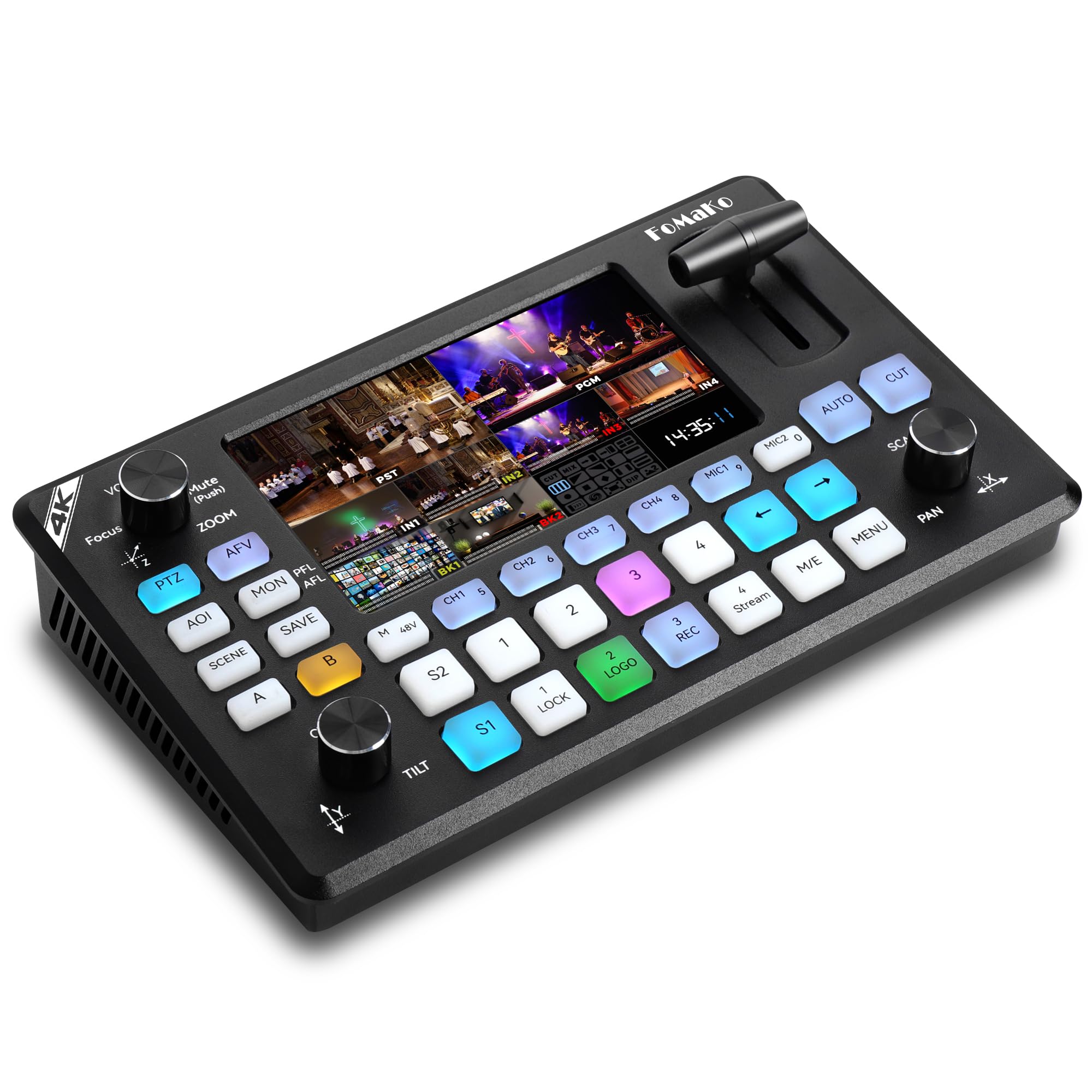
Professional XLR inputs with 48V phantom power turn this from a switcher into an audio console too.
If your microphones are serious, the KC602 is the point where this category stops being a video accessory. It carries professional XLR balanced inputs (the locking three-pin connector used on studio mics), stereo and mono switching, and built-in 48V phantom power for condenser microphones. That phantom power is the detail that decides whether a broadcast condenser mic works at all without a separate preamp.
Your sound gets more shaping than most mixers here allow. You get a sound card-grade 5-BAND EQ (five sliders that shape bass, mids and treble), support for both 6.35mm and 3.5mm connections, and 4 analog inputs including XLR (the round 3-pin mic plug) and TRS (a balanced jack plug). Add 4 HDMI digital audio inputs and you can process up to 8 audio sources. Dual AUX independent mixing (two separate monitor or feed mixes), AFV (audio-follow-video, so sound switches with the camera) and Free MIX modes, MON independent monitoring and audio delay adjustment cover a full live mix. For a service with a lectern mic, a wireless handheld and a playback feed, that headroom matters.
On the video side you get 4K 60FPS input with 4K loop-through output and 1080P 60FPS output, with what the maker describes as ultra-low latency signal processing. The loop-through enables multi-screen setups or backup recording. Four HDMI inputs sit alongside a PGM out, a multiview out and a dedicated loop out on input 3. PTZ control reaches 4 cameras through the T-bar lever and backlit keypad with 9 savable presets. The 5.5-inch high definition display, 31 buttons, 3 knobs and T-bar drive the whole thing, and it streams to 3 platforms at once over UVC or RTMP/RTMPS.
Audio depth wins: 8 sources and XLR phantom power make this the most complete audio front end in the list outside the RØDE units.
The trade-off: 20 transitions against the C1’s 30 means slightly fewer wipe options if creative switching is your priority.
Choose it for: church and corporate productions running several microphones that need phantom power and EQ from the switcher itself.
Overkill when: a single USB microphone is your entire audio plan.
10. RØDE RØDECaster Video S
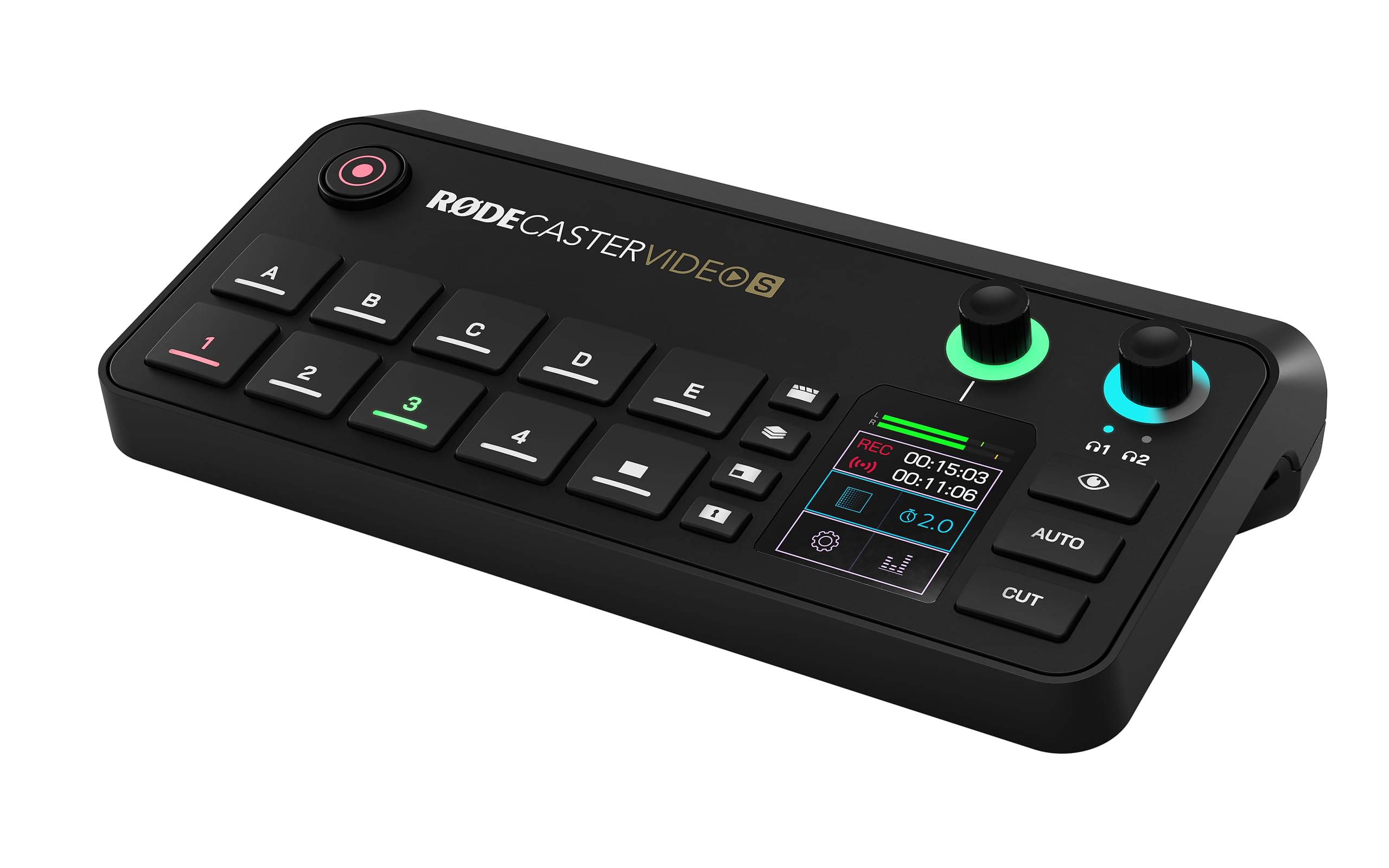
Four video sources and five scenes, with two studio-grade Neutrik combo jacks built for XLR microphones.
RØDE built this for the podcast desk rather than the event stage. You switch between up to four video sources — 3 HDMI and 1 USB — and call up five fully customisable multi-source scenes with a single button press. That scene approach is a different mindset from a T-bar cut: you build a shot, save it, and recall it live. The front panel carries dedicated buttons for media playback, graphic overlays, automatic chroma keying and transitions.
The audio hardware is the pitch. Two studio-grade Neutrik combo jacks feed ultra-low-noise, high-gain Revolution Preamps, capturing audio from XLR microphones, instruments or any other source without an external interface. If your show runs on two microphones and a video call feed, this replaces a mixer and an audio interface in one chassis. At 875 g it sits comfortably on a desk next to a laptop.
Streaming goes direct to major platforms over Wi-Fi or Ethernet, or through USB to streaming software. Recording writes to an external USB storage device and includes isolated (ISO) recording so each source can be edited separately afterwards. Inspect Mode lets you preview an input safely before going live, and intelligent auto-switching moves between video sources and scenes based on which audio input is active — hands-free switching that follows whoever is speaking. Output runs at 1080p60.
Made for: two-host podcasts and interview shows where microphone quality and scene recall beat multi-camera gymnastics.
Only four sources though: a five-camera production needs the bigger RØDECaster Video instead.
11. RØDE RØDECaster Video

Six inputs, seven saved scenes and the same Revolution Preamps, scaled up for a full studio desk.
This is the larger sibling and the number that separates it is six. Where the Video S handles four sources and five scenes, the full RØDECaster Video switches up to six video sources — 4x HDMI and 2x USB — and calls up seven fully customisable multi-source scenes. Both run 1080p60. For a studio with a wide camera, a close camera, a screen capture, a guest laptop and two USB devices, six inputs is the difference between a tidy desk and a drawer full of unused gear.
The audio engine matches the S: two studio-grade Neutrik combo jacks with ultra-low-noise, high-gain Revolution Preamps for XLR microphones and instruments. A frequency range reaching 20 KHz and 6 channels of processing cover a multi-person panel. Balanced 1/4-inch TRS output is on hand for feeding monitors or a house system. Media playback, graphic overlays, automatic chroma keying, transitions and scene creation all sit on the front panel behind dedicated buttons.
You can go live over Wi-Fi or Ethernet direct to major platforms, or through USB to your software. Recording to external USB storage includes isolated (ISO) recording, which saves each camera as its own file for post-editing. Inspect Mode previews an input safely before you cut to it. Intelligent auto-switching moves between sources and scenes based on which audio input fires — useful when a panel of six talks over each other and you cannot cut fast enough by hand. At 1275 g it is a desk fixture, and in this category that is normal.
Where it stands out: six inputs plus ISO recording plus pro preamps make it the most complete single-box studio solution in this list.
Be ready to learn it: the depth of scene building comes with a genuine learning curve before it feels quick.
Pick it if: you are building a permanent studio with multiple HDMI cameras, USB sources and XLR microphones that all need to live on one panel.
Save the budget if: two cameras cover your show — the Video S does the same job with fewer inputs.
Know the Specs
HDMI Input Count
Each HDMI input is one camera or source you can switch to live. A two-input switcher covers a host and a screen. Four inputs let you cover a stage, a lectern and a wide shot at once. Some units here also accept SDI, the locking broadcast connector used on professional cameras, and USB sources for laptops and webcams. Count the sources you own today, then add one for the laptop you will inevitably plug in.
Audio Mixing Depth
A basic mixer gives you level knobs on mic and line inputs. A deeper one adds EQ, a limiter to stop sudden peaks, per-channel delay to line sound up with video, and 48V phantom power for condenser microphones. Some units process eight audio sources with dual independent mixing. The more inputs you run, the more that depth matters — a single host can survive a simple knob, a panel of four cannot.
Streaming Route
Ethernet streaming pushes the broadcast straight from the mixer to platforms like YouTube, Facebook or any RTMP server, skipping the computer entirely. USB output sends a webcam signal into OBS or vMix, where software adds overlays and scenes. Some units do both. Direct Ethernet removes one crash risk; USB gives you more creative control on screen.
PTZ Control and Presets
PTZ stands for pan, tilt and zoom — a motorised camera you steer remotely. When the switcher controls PTZ, one operator can reposition cameras between cuts. Presets save a framing you like so you can recall it instantly. Units here control anywhere from two to four PTZ cameras, and that number decides how much of the room one person can cover alone.
Common Questions
Do I need a computer to stream with a video and audio mixer?
What is the difference between HDMI and SDI inputs on a switcher?
How many cameras can a two-input switcher handle?
What does 48V phantom power do on a mixer?
Can I record my stream and edit it later?
Why does my audio drift out of sync with the video?
Does a mixer with a T-bar switch differently from one with buttons?
How many streaming platforms can these mixers broadcast to at once?
Do these switchers need a firmware update before first use?
Can this replace my separate audio interface and mixer?
The Bottom Line
For most people hunting a video and audio mixer, the Osee GoStream Deck is the pick that keeps giving — four HDMI inputs, a hard T-bar, real audio EQ and recording to SD or SSD, all without a laptop in the chain. If your rig runs SDI cameras (the pro broadcast connector) alongside HDMI, the Osee GoStream Duet covers both connector types in one box. And when microphone quality is the whole show, the FoMaKo KC602 brings XLR inputs, 48V phantom power (power sent up the mic cable for condenser mics) and a 5-band EQ straight to the switcher.
One practical nudge before you commit: the top pick sits at 4.5+ stars across 400+ ratings, with functionality and build quality leading the feedback. Read the power adapter and firmware notes for whichever unit you choose, then set it up once before the event that matters.
How we choose
We do not accept paid placement. Every pick is matched to a real buyer and a real use-case; we do not hands-on test units.
Sources
Specifications: manufacturer listings and product documentation. Review insights: verified customer reviews, as of November 2026. Pricing: not shown on this page (it changes often); check the current price via the retailer link.
As an Amazon Associate, Tactical Gear Guy earns from qualifying purchases. This does not affect which products we feature.