Specs are compiled from manufacturer listings and verified buyer reviews and can change over time — please confirm the key details on the product page before buying.
If you print school forms, shipping labels, and the occasional tax document at home, an inkjet will dry out and bleed your wallet dry between jobs. A laser printer melts toner powder onto the page instead, so the output stays sharp and the cartridge sits ready for months without clogging. That is the real reason home buyers switch. This guide covers nine machines that fit on a desk, print black-and-white (and sometimes color) documents fast, and come with the scanners and copiers most households actually use.
This guide is built by comparing the manufacturers’ published specifications and the patterns across verified customer reviews, so you get each pick’s real strengths and trade-offs instead of marketing spin.
Some machines here print one color only; others handle full color for school projects and small side businesses. I ranked them by how well they handle a home workload, how fast the first page drops, and how much control you keep over toner cost. The result is a shortlist that tells you exactly which machine earns desk space as the best laser printer for home use.
Top Picks


How To Choose The Best Laser Printer for Home Use
Home printing is bursty, not steady. You might print nothing for eleven days, then need forty pages of permission slips by morning. That pattern changes what matters. A laser printer with a fast first page and a drum that holds its charge beats a machine with a big monthly duty rating you will never touch.
Decide monochrome or color before anything else
Black-and-white laser printers cost less to run and print faster for the same money. Color laser printers carry four toner cartridges instead of one, so replacement cost multiplies. Buy color only if homework posters, flyers, or small-business invoices genuinely need it.
Check the first-page-out time, not just the top speed
Pages-per-minute tells you how fast a long job finishes. First-page-out time tells you how long you stand there waiting for one page. For home use, the second number matters more. A machine that warms up and drops the first page quickly feels faster than its rated speed suggests.
Look hard at the toner cartridge lock
Some brands chip their cartridges so third-party refills get blocked by firmware. That is not a dealbreaker, but it caps your savings. Brother’s machines accept its stated genuine toner lines; HP’s listings here state the printer works only with HP-chipped cartridges. Know which model you are buying into before you commit.
Side-by-Side Comparison
| Model | Best For | B&W Pages/Min | First Page | Functions | Amazon |
|---|---|---|---|---|---|
| HP LaserJet Pro 3101sdw | All-round home office | 35 ppm | 7 seconds | Print, scan, copy | Amazon |
| Brother HL-L2480DW | Fastest small-office output | 36 ppm | 8.5 seconds | Print, scan, copy | Amazon |
| Canon imageCLASS MF652Cw | Color on a tighter budget | 22 ppm | ≈10.3 seconds | Print, scan, copy | Amazon |
| Brother HL-L3280CDW | Compact color printing | 27 ppm | — | Print only | Amazon |
| HP Color LaserJet Pro MFP 3301cdw | Fax and document feeder | 26 ppm | — | Print, scan, copy, fax | Amazon |
| Canon imageCLASS MF665Cdw | High-volume color with ADF | 26 ppm | ≈10.3 seconds | Print, scan, copy, fax | Amazon |
| HP LaserJet MFP M140w | Small footprint, tight budget | 21 ppm | — | Print, scan, copy | Amazon |
Detailed Reviews
1. HP LaserJet Pro 3101sdw
The one that warms up faster than your laptop finishes booting and treats a three-page job like it matters.
Here is the number that decides whether a home printer feels quick: first-page-out time. This HP turns out that first page in 7 seconds — you send a return label, walk to the printer, and it is already lying in the tray. That beats the Brother HL-L2480DW’s 8.5 seconds, and for a household that prints small batches rather than long runs, it is the difference you actually feel every single day.
Sustained speed is no slouch either, at 35 pages per minute black — that is 71% under the 36 ppm of the Brother above, but in practice both machines clear a 40-page document in a hurry. The 250-sheet input tray means you can load half a ream and forget about it for weeks. A 50-sheet automatic document feeder (the tray that pulls pages in one at a time for scanning or copying) handles multi-page forms without you lifting the lid each time, and automatic two-sided printing halves your paper use on longer jobs.
The catch is firmware. This printer is built to accept only cartridges carrying HP chips or circuitry, and HP pushes periodic updates that enforce it. That means third-party refills are off the table, so budget for genuine toner as a fixed part of owning it. The other honest note is wireless: some buyers connect on the first try through the app, others fight the network. If your router sits far from the desk, run the Ethernet cable it accepts instead.
Why it holds the top spot
- Fastest first page in this group at 7 seconds, so single documents never feel like a wait
- 35 ppm black with automatic duplex and a 250-sheet tray for unattended long jobs
- Scan, copy, and a 50-sheet document feeder in one footprint
- Buyers praise the 7-second first page and 35 ppm output most, with reliability and setup close behind
Where it asks something of you
- Chip-locked to HP cartridges, and firmware updates keep it that way
- Wi-Fi is hit or miss — wired Ethernet is the safe path
- Black and white only; no color output at any price
Reach for this if: you print forms, invoices, and letters at home and want the smallest possible gap between hitting print and holding paper.
Look elsewhere if: you need color pages for school projects or want to run third-party toner to cut costs.
2. Brother HL-L2480DW
Thirty-six pages a minute from a box that fits under a shelf, and a touchscreen that skips the button-hunting.
The HL-L2480DW prints 36 pages per minute — faster than the HP 3101sdw at 35 ppm and well clear of the little HP M140w at 21 ppm. If you print in long runs, packing slips or worksheet packets, that edge shows up over a stack. The 2.7-inch touchscreen is the surprise here: you can print straight from Google Drive, Dropbox, Evernote, or OneNote without touching a laptop, which is a genuinely useful shortcut in a home office.
Buyers praise the 36 ppm output and clean copies most. Copies come out clean and the scanner pulls accurate pages, and owners consistently bring up reliability alongside it — the machine is expected to just work, and mostly does. Dual-band wireless (both the 2.4GHz and 5GHz bands) gives you a lane that is less crowded than the one most smart-home gadgets hog. Ethernet and USB are there for anyone burned by Wi-Fi before.
Two things to plan around. First, the toner: it takes Brother Genuine TN830 or TN830XL, and a free trial of Brother’s subscription service is bundled in, but there is no chip-only lock mentioned for third-party cartridges the way HP’s listings spell out. Second, wireless is the mixed bag here — plenty of households connect instantly, and a real minority lose the Wi-Fi link over time. If the printer sits far from the router, the Ethernet port settles it. Setup, once it lands, is quick enough that first-timers manage without a manual.
What it does best: raw throughput. Pair the 36 ppm engine with automatic duplex and a 250-sheet tray and you can clear a family’s worth of paperwork in one sitting without reloading paper.
The thing to watch: the touchscreen and cloud-app printing are the polish, but they do not save you if the network drops — keep a cable handy for the first week until you trust the connection.
This one is for: work-from-home setups and small offices that print in volume and want the cloud-app shortcut.
Not the pick if: you need color output or prefer a proven-wired-only setup out of caution.
3. Canon Color imageCLASS MF652Cw
The cheapest way into genuine color laser pages, with a three-year warranty that outlasts most home printers.
Color laser printing usually means a premium jump, and this is the least painful step up. It prints 22 pages per minute in both color and black, with the first page out in roughly 10.3 seconds. Canon backs it with a 3-year limited warranty — three times the one-year coverage the renewed HP 3301cdw carries — which is a real confidence signal for a home buyer who plans to keep the machine for years.
Print quality is the star. Quality feedback leads the field, and buyers describe the resolution and color depth as genuinely good for a home machine — parents printing school projects and small sellers making flyers will both notice the difference from an inkjet. A 250-sheet cassette plus a single-sheet multipurpose tray means you can keep letter paper loaded and still slip in a photo sheet or label without pulling the stack.
Two honest caveats. It prints one side at a time, so two-sided jobs mean manually flipping the stack — a real chore for big documents. And while the printer is compact, color toner means four cartridges (Canon Genuine Toner 067) to eventually replace, so factor that into the long run. The setup process is hit or miss: some pair it to Wi-Fi in minutes, others wrestle with the wireless config steps. Use the mobile app to walk through it, and the odds improve considerably.
Go with this when: color documents matter and you want the strongest warranty term in this group without spending premium money.
Pass if: automatic two-sided printing is a must-have for your print volume.
4. Canon Color imageCLASS MF662Cdw

Color laser output at 27 pages a minute, with a touchscreen that pulls files straight out of your cloud drive.
This is a printer-only machine, so it scans nothing and copies nothing. What it does is put down color pages fast: 27 pages per minute in both color and black, with automatic duplex and a 2.7-inch touchscreen that connects to Google Drive, Dropbox, and Evernote directly. If your workflow is documents and files already in the cloud, you skip the laptop entirely.
Setup wins the most praise with this model, and the 27 ppm print engine is quick once it is running. The 250-sheet tray keeps a ream loaded, and it takes the TN229 toner family across standard, high-yield, and super-high-yield cartridges — so you can trade upfront cost for longer stretches between replacements depending on your print volume.
The two honest frictions are color quality and reliability, both of which get genuinely mixed reports. Some buyers describe the color as wonderful; others call it muddy and faded. That split matters if color accuracy is the reason you are buying. Treat this as a documents printer that can do color, not a photo printer. Print quality is not the celebration here — a fair number of owners flag it — so buy with modest expectations on color and you will be happier with the fast, tidy black-and-white output.
The case in its favor
- 27 ppm color and black with automatic duplex built in
- Cloud-app printing straight from the touchscreen, no computer required
- Accepts standard, high-yield, and super-high-yield TN229 cartridges
- Fast setup and quick operation are the most reliable feedback points
The honest trade-off
- Print only — no scanner, no copier
- Color output divides opinion; do not count on it for photo-quality work
- Reliability reports are mixed, so buy with a return window in mind
Choose it if: you already have a scanner, print color documents regularly, and want cloud printing without a middleman computer.
skip it if: you need one box to print, scan, and copy.
5. HP Color LaserJet Pro MFP 3301cdw
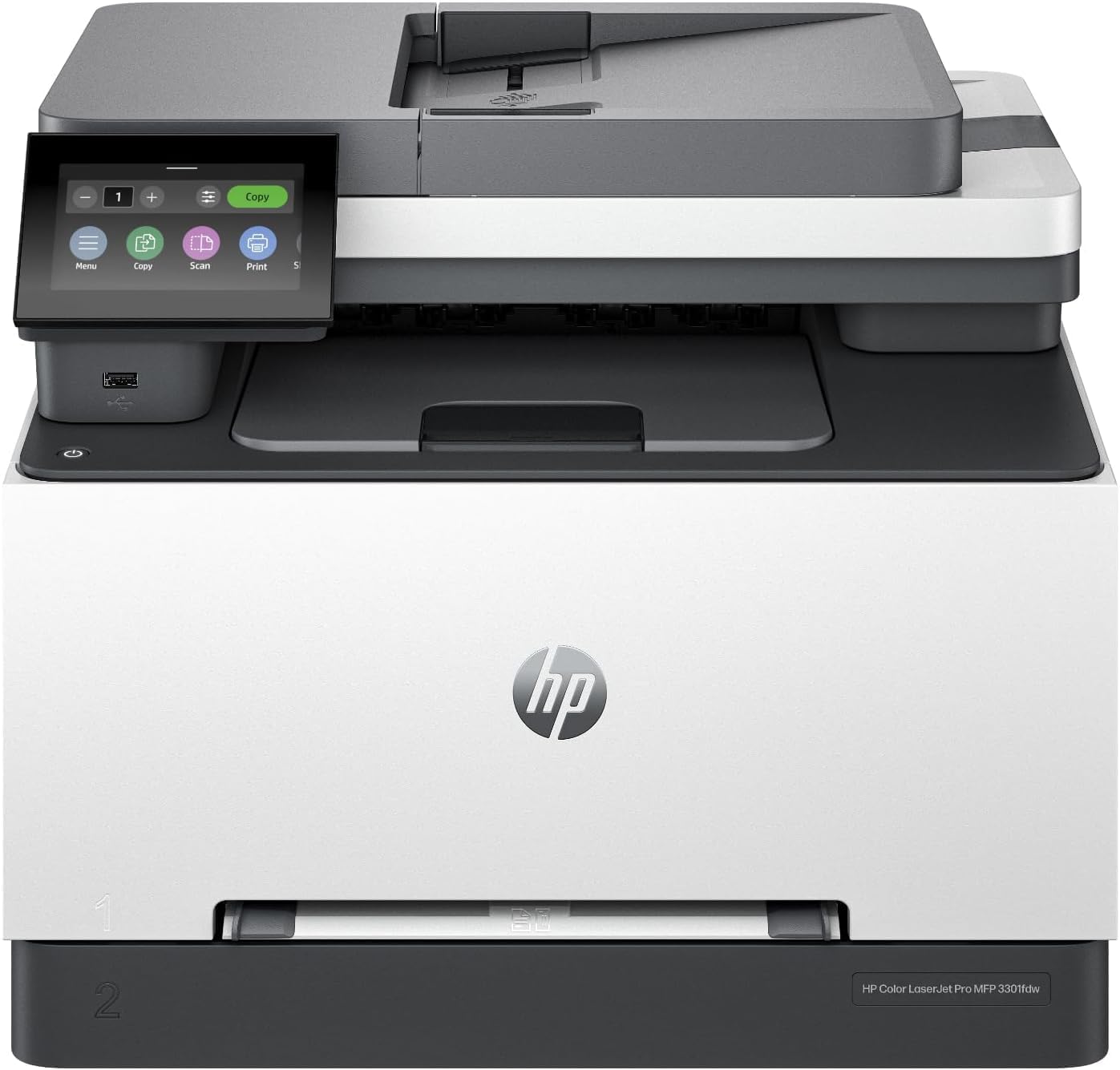
The kitchen-sink machine: print, scan, copy, and fax at 26 pages a minute, with a document feeder for the stack.
If a home office still receives faxes — and plenty of small trades and clinics do — this is the pick. It prints 26 pages per minute in color and black, scans, copies, and faxes, and adds a 50-sheet automatic document feeder with two-sided single-pass scanning. That means a double-sided contract goes through the feeder once and comes out scanned on both sides. The 250-sheet input tray rounds out the paper handling.
This is a renewed unit from HP’s official refurbishment program, which comes with a one-year warranty and genuine parts and toner. Print quality is the reliable strength: buyers describe the output as excellent, and setup is quick once the printer is running. Dual-band Wi-Fi with self-reset tries to auto-detect connection problems, which is a smart touch for a household with a crowded network. HP Wolf Pro Security is bundled for anyone who shares the network with work devices.
The honest notes stack up honestly. At 35 pounds, plan where it lands and leave it there. Color quality gets mixed reviews — some love it, some find it flat. And ink consumption is the sharpest complaint, with multiple reports of toners arriving empty or draining quickly, so buy a spare early. The chip lock is present here too: HP cartridges only, firmware enforced.
The differentiator: fax plus a 50-sheet duplexing ADF in one color laser box — a combination that is rare among home-priced machines.
The thing to know going in: it is a renewed unit, so check the warranty paperwork on arrival, and factor toner replacement into the first few months given the consumption reports.
Suits you if: your work still leans on fax lines and you want one box that prints, copies, scans, and faxes.
Think twice if: you want a color-accurate printer — the color feedback is genuinely split.
6. Canon Color imageCLASS MF665Cdw

A color laser that scans fast in both directions, with a document feeder that handles the two-sided paperwork.
Four functions live here: print, scan, copy, and fax. The 50-sheet duplex automatic document feeder is the reason to pick this over the MF662Cdw — it takes a two-sided stack, pulls pages through once, and captures both sides without a manual flip. Print speeds run 26 pages per minute in color and black, first page out in about 10.3 seconds, and automatic two-sided printing is standard for the output side.
Print quality is the standing strength. Copies come out crisp and sharp and color pages get genuinely good feedback — school projects, photo prints, and client documents all land clean. Canon’s 3-year limited warranty is the same strong term you get on the color entry pick, and the starter toner runs 500 pages of each color with 700 of black, so you have breathing room before restocking. Mobile printing runs through the Canon PRINT app, AirPrint, and Mopria.
The friction is real and worth seeing clearly. Wireless is the weakest link here, with frequent disconnections coming up more than anything else. Setup also splits: some connect easily, others find the software non-intuitive and the Wi-Fi walk-through difficult. If you have an Ethernet option — the printer takes USB and can be wired through a compatible setup — that sidesteps the issue. Reliability gets mixed reports too, so treat the warranty as your safety net and keep the box for the first couple of weeks.
What sells it
- 50-sheet duplex ADF with single-pass scanning for two-sided paperwork
- 26 ppm color and black with automatic duplex printing
- Crisp copies and sharp color are the most consistent praise
- 3-year limited warranty
What to plan around
- Wireless is the most-discussed frustration — frequent drops
- Setup software is not the friendliest for first-timers
- Takes four genuine Canon toner cartridges, so running costs add up
The right call for: anyone whose day involves scanning multi-page, double-sided paperwork rather than printing long runs.
Not for you if: you want a walk-through-free first setup and rely on Wi-Fi alone.
7. HP LaserJet MFP M140w

The smallest footprint here, and the one that fits a tight desk without sacrificing scanning or copying.
At 11.9 pounds, this is the printer that disappears into a corner and does not remind you it is there. Black-and-white output runs 21 pages per minute — the slower end of this group — but for a household printing forms and shipping labels, that pace gets the job done. It prints, copies, and scans, and the Auto-On/Off technology powers it down when idle and wakes it when a job arrives, which trims standby energy use.
Print quality is the consistent bright spot: buyers call the output good and setup fast once it is running, and the compact design gets steady approval. For a first laser printer in a small apartment, that combination is what matters — a clean page and a machine that is not a hassle to live with.
The two real caveats are automatic duplex and the renewed status. This unit is renewed, so check the warranty on arrival and keep the packaging handy. And while the listing names duplex, buyers who expect easy flip-free two-sided printing may be better served by the HP 3101sdw or Brother HL-L2480DW, both of which are explicit about automatic duplex and faster overall. Functionality and setup feedback split on this model, so the return window is your friend. It is a budget tool, not a workhorse.
Pick it when: space and budget are the top constraints and black-and-white printing is all your home needs.
Look up the list if: you print in volume or need two-sided output without thinking about it.
Know the Specs
Pages Per Minute (PPM)
This is the rated number of finished pages a laser printer puts out in a minute during a steady run. Higher numbers clear long jobs faster, and 26 to 36 ppm is the useful band for home and small-office work. For short jobs, PPM tells you almost nothing about how fast the machine feels — that is the next spec’s job.
First-Page-Out Time
This is the seconds between hitting print and the first page landing in the tray, and it is the number home buyers should check first. Laser printers warm up a fuser (the heated roller that melts toner onto paper) before they can print, so a quick 7-second figure saves a genuinely noticeable wait on single-page documents. Short-job households should weigh this over raw PPM.
Automatic Duplex
Duplex means the printer prints both sides of a sheet without you flipping it. Automatic is the version you want. It halves your paper use on longer documents and eliminates the manual flip that piles up on the desk. Some printers in this list print one side at a time, so check before you buy if two-sided jobs are routine.
Toner and Cartridge Lock
Toner is a fine powder, not liquid ink, which is why the page does not smear and the cartridge does not dry out sitting idle. Some brands lock their printers to cartridges with their own chips or circuitry, enforced by firmware updates, which keeps third-party refills out. That affects your long-term cost: a locked machine runs only on genuine toner.
Paper Trays
A 250-sheet cassette is the common standard in this group and means you can load half a ream and leave it. A single-sheet multipurpose tray (a second slot for labels, envelopes, or photo paper) lets you slip in one special sheet without unloading your everyday paper stack.
Wireless Connectivity
Dual-band Wi-Fi runs on both 2.4GHz and 5GHz. The 5GHz band is less crowded, which helps if your home is packed with smart devices. Wi-Fi Direct skips your router entirely, letting a phone or laptop print straight to the printer. All of these can still trip up on placement, so a wired Ethernet or USB option is a helpful fallback.
Common Questions
Is a laser printer better than an inkjet for home use?
Will a chip-locked printer stop me from using cheaper toner?
How fast does a laser printer print the first page?
Can I print from my phone to a home laser printer?
Do I need a color laser printer at home, or is black-and-white enough?
What does automatic duplex mean, and why does it matter?
How much space does a home laser printer take up?
Do I need to replace all four color cartridges at once?
Can I scan and copy with a home laser printer?
How do I keep a wireless laser printer connected?
The Bottom Line
For a home setup that prints documents rather than artwork, the laser printer for home use that gets the most done is the HP LaserJet Pro 3101sdw. Seven-second first pages and 35 pages a minute mean a stray form never becomes a five-minute wait, and the scan, copy, and document feeder cover the paperwork that piles up.
If you print more pages than the average household, the Brother HL-L2480DW gives you 36 pages a minute and a touchscreen that pulls from the cloud without a laptop. Need color with a warranty that outlasts most printers? The Canon Color imageCLASS MF652Cw is the entry point. And if your desk needs the smallest box you can find for black-and-white pages, the HP LaserJet MFP M140w ends the search.
How we choose
We do not accept paid placement. Every pick is matched to a real buyer and a real use-case; we do not hands-on test units.
Sources
Specifications: manufacturer listings and product documentation. Review insights: verified customer reviews, as of November 2026. Pricing: not shown on this page (it changes often); check the current price via the retailer link.
As an Amazon Associate, Tactical Gear Guy earns from qualifying purchases. This does not affect which products we feature.