Specs are compiled from manufacturer listings and verified buyer reviews and can change over time — please confirm the key details on the product page before buying.
Most gaming mice are sold as a fixed object: one shape, one heft, and you learn to live with it. A mouse with weights flips that around — you open the tuning bay, drop in or pull out small metal cartridges, and the mouse becomes the weight your hand actually wants for the game you play tonight. If you are shopping for a gun that flick-turns on a hair trigger, lighter wins. If you hold a long angle in a tactical shooter, heavier steadies you. This guide covers the weight-tuning mice with real cartridge systems and what each one suits.
This guide is built by comparing the manufacturers’ published specifications and the patterns across verified customer reviews, so you get each pick’s real strengths and trade-offs instead of marketing spin.
Some of these mice let you add five tiny weights, some give you a single cartridge you pull out or push in, and one lets you reconfigure the shell itself. Below you will find the full breakdown of the mice with real tuning systems and what each one suits.
Top Picks


How To Choose The Best Mouse with Weights
Weight tuning is the headline here, but it is not the only thing that decides whether a mouse feels right in your hand. Two mice can both accept weights and still behave nothing alike in a firefight, because the sensor, the button count, and the shape do the rest of the work. Here is what to check first.
What the weight system actually lets you do
Some mice use a stack of small metal cartridges — the Logitech G502 line, for example, ships five weights at 3.6 g each. You seat them into a tray under the base, so you are adjusting both total weight and where that weight sits. Others use a single cartridge: the Lenovo Legion M500 takes one 10 g magnet weight, and the Logitech G703 takes a single 10 g optional weight. Both work, but a multi-cartridge tray gives you finer control. If you mostly play one genre, a single cartridge is plenty.
Sensor speed versus sensor sanity
DPI means dots per inch — how far the cursor travels for every inch you slide the mouse. The numbers climb into the tens of thousands on gaming mice, and that sounds impressive. In practice most players settle somewhere in the low thousands and never touch the ceiling. What matters more is how cleanly the sensor tracks at speed. Look for the IPS figure (inches per second, the fastest swipe the sensor can read before it loses the surface) and the acceleration rating in G. A sensor rated at 400 IPS and 50 G will keep up with a hard flick far better than a budget sensor with no published tracking figures.
Polling rate and what it does for your aim
Polling rate is how often the mouse reports its position to your PC, measured in hertz. At 1000 Hz it reports a thousand times a second, which is the standard for serious gaming. Some premium models push to 8000 Hz. Higher polling can feel snappier on a high-refresh monitor, but it also leans harder on your PC and rarely transforms your aim on its own. If the rest of the mouse fits you, 1000 Hz is not a compromise.
Buttons, grip, and the weight you can live with
Count the buttons you will actually bind. An MMO player with a hotbar full of abilities needs more side buttons than a tactical shooter player who binds three. Also think about grip: a mouse that fits your palm without your wrist curling will stay comfortable through a long session, no matter what it weighs. Buy the shape first — a weight tray only helps if the shell already fits your grip.
Side-by-Side Comparison
| Model | Best For | Max DPI | Weight System | Programmable Buttons | Amazon |
|---|---|---|---|---|---|
| Logitech G502 Proteus Core★ Best Overall | All-round tuning and everyday gaming | 12,000 | Five 3.6 g weights | 11 | Amazon |
| Logitech G502 Hero Special EditionSharpest Sensor | Highest-resolution sensor in the G502 line | 25,600 | Five 3.6 g weights | 11 | Amazon |
| Corsair M65 RGB UltraFastest Polling | Fast-polling FPS play with a metal frame | 26,000 | Optional weights | 8 | Amazon |
| Lenovo Legion M500 RGB | Simple single-weight setup on a budget | 16,000 | 10 g magnet weight | 7 | Amazon |
| Mad Catz R.A.T. 8+ ADV | Reconfiguring the shape itself | 20,000 | Tunable weight system | 11 | Amazon |
| Logitech G703 Lightspeed | Wireless play with a single weight | 16,000 | 10 g optional weight | 6 | Amazon |
| Lexip NP93 Alpha | Thumb-joystick control and ceramic glide | 12,000 | 3.6 g and 18 g weights | 6 | Amazon |
| Redragon M908 Impact | MMO hotbars on a budget | 12,400 | Weight tuning cartridge | 18 | Amazon |
Detailed Reviews
1. Logitech G502 Proteus Core Tunable Gaming Mouse
Our pick — 4.5+★ from 3,500+ verified ratings; the strongest balance of quality and price.
The tuning tray that lets you build the exact weight and balance your hand wants.
The five 3.6 g weights are the reason this one sits at the top. You open a magnetic hatch underneath, seat the little metal cartridges into channels near the front or the back, and the mouse changes both how heavy it feels and where that mass sits. Push the weights forward and the nose drops into a controlled, deliberate sweep. Pull them back and the mouse whips around faster. Moving the cartridges forward or back shifts the balance point, not just the total grams.
Your aim stays clean on any desk mat here, because this mouse adds a second tuning layer most weight-list mice skip: surface calibration. You tell the sensor (the part that reads your movement) which pad it slides on, so tracking stops fighting the texture. You also get 12,000 DPI (dots per inch — how far the cursor travels per inch you move) across five on-the-fly steps, an 11-button layout, and a dual-mode scroll wheel that clicks tooth-by-tooth for weapon swaps or free-spins down a long web page. This suits someone who wants every input defined on their terms. The 5.92 oz body is no featherweight, but the weights let you trim it or load it to taste.
Know this before you commit: the sniper button (a thumb key that slows the cursor for precise aim) on the left side sits back from the thumb rest. Buyers report split opinions on it — some bind it instantly and love it, others find it out of reach and leave it unused. The ergonomic shell and smoothed-out button presses win most people over, and the design has a reputation for hanging on for years rather than months. Two-tenths of a star below one of its own siblings, it still takes the top spot because it does the weight-tuning job better than anything else here.
What Makes It the Winner
- Five 3.6 g cartridges that change both total heft and balance point
- 11 programmable buttons plus a dual-mode scroll wheel for weapons or web pages
- Surface calibration tunes the sensor to your specific mouse pad
- 12,000 DPI with five on-the-fly steps for instant sensitivity swaps
Where It Gives You Pause
- The sniper button sits back far enough that some hands never reach it comfortably
- Heavier than a stripped-down esports mouse before you add a single weight
Reach for this if: you want to tune weight placement, not just total mass, and you bind a lot of macros.
Look elsewhere if: you want a bare, feather-light flick mouse with nothing extra bolted on.
2. Logitech G502 Hero Gaming Mouse
Same tuning bay, same shape, but twice the sensor resolution of the Proteus Core.
Put this next to the original G502 above and one number separates them: 25,600 DPI against the Proteus Core’s 12,000 DPI. That is a sensor ceiling most players will never touch, and it is not why someone buys this. The reason to pick the Hero is the newer HERO sensor — Logitech’s own design, which the brand quotes at zero smoothing, filtering, or acceleration — paired with the same five-weight tuning system, the same 11 programmable buttons, and the same dual-mode scroll wheel. You get the identical hand feel, just with a cleaner sensor under the hood and a black-and-white finish that separates it from the all-black original.
Weight tuning works exactly as it does on any G502: up to five 3.6 g cartridges seated in a tray below the base. Load all five for steady, deliberate control; empty the tray for a snappier swing. The metal-spring button tensioning on the left and right clicks gives a crisp, deliberate response rather than a mushy soft press, and LIGHTSYNC RGB ties the lighting into the rest of your setup. Owners consistently single out the performance and adjustability, and for many this shape is simply the mouse they will not move away from.
The honest wrinkle lives in the software and the clickers. A portion of the feedback reports clicks that occasionally fail to register, and a few mention the software itself being fussy — not enough to sink a mouse that most people love, but enough that you should test your primary buttons thoroughly during the return window. One more small thing: the lowest of the three thumb-side buttons sits in an awkward spot for shorter thumbs and is the most common bind people skip. Right-handed and after a weight-tunable mouse with the highest-resolution sensor in this entire lineup? This is your pick.
Sensor headroom in plain terms: 25,600 DPI is far beyond what a human hand can usefully aim at, so treat it as a clean-tracking badge of quality, not a setting you will run daily.
What the weights buy you: Load all five cartridges for steady tracking, or empty the tray for a lighter, faster swing.
Pick it when: you want the proven G502 grip and tuning tray but a sharper sensor generation.
Hold off when: you have short thumbs that cannot reach the third side button — it will go unused.
3. Corsair M65 RGB Ultra Gaming Mouse
An aluminum-bodied FPS mouse that reports your input eight thousand times a second.
Here is the number that breaks the mold: 8,000 Hz polling rate. Your PC hears from this mouse eight thousand times every second, where a standard gaming mouse checks in at 1,000 Hz. Slot that against the Redragon below and the gap is the same stark eight-to-one. Does that translate into a match-winning edge? Only if the rest of your gear is fast enough to keep up, and only if you are the sort of player pushing the margins. What it does mean is data loss between movements being almost impossible — no smearing of input during a frantic corner peek.
The sensor behind that is a native 26,000 DPI unit with 650 IPS tracking (650 inches of swipe per second before it loses the surface). That is the sharpest DPI figure in this whole group, sitting ahead of the Hero’s 25,600. The frame is anodized aluminum, matte and solid in the hand, with a right-handed shell and eight buttons including optical left and right switches. Sensor fusion — a six-axis gyro plus an accelerometer, which simply means two motion readers working together — lets you set an ultra-low lift-off distance so the cursor stops the instant you lift, not a millisecond after. The optional weights adjust balance to your hand.
This is the one pick in the lineup where the design divides people, so do not gloss over it. The ergonomics win praise for their feel, but the failure reports have to be taken seriously: some owners mention the right click giving out, some describe random disconnects, and connectivity through a USB passthrough port (a port that relays the mouse signal through your keyboard or hub) is a known snag. Alongside that come complaints of accidental clicks. The aluminum body means it is heavy before you even think about adding weights. Buy it for the polling rate (how often the mouse reports its position to your PC) and the metal-frame rigidity, and treat the durability reports as the reason to keep your receipt handy.
Where it shines brightest: competitive tracking scenarios where the polling rate and the gyro-assisted lift-off control both do real work.
What to weigh carefully: reliability is the most honest question mark here — buy the sensor and the frame, not the track record.
Best for: fast-twitch FPS players who want the highest polling rate and a metal body at this price point.
Think twice if: you need a mouse that is dependable across thousands of hours without babysitting it.
4. Lenovo Legion M500 RGB Gaming Mouse

One removable magnet weight, seven buttons, and no fuss in a palm grip.
If the five-cartridge trays on the G502 mice feel like overkill, this is the sane alternative. The Legion M500 carries a single 10 g magnet weight in a removable cartridge — you pop it out to shed a little heft, or leave it in for a settled, planted feel. One cartridge instead of five means no fiddling; you get two characters out of the mouse instead of a spectrum. That is enough for most players, and it keeps the whole tuning ritual down to a few seconds. Note the contrast with the Lexip further down, which pairs a 3.6 g and an 18 g weight: the M500 gives you one modest adjustment, not a wide range.
Around that weight sits a genuinely well-sorted package. The sensor tracks to 16,000 DPI with 50 G of acceleration and 400 IPS, five selectable stages, and a 1000 Hz polling rate. Seven programmable buttons and three onboard profiles mean your setup travels with the mouse. The Omron micro switches under the left and right clicks are rated for 50 million clicks. Textured side grips keep your palm locked in place, and three LED zones giving you 16.8 million colors in each let you match your keyboard. For a right-handed palm-grip player, that is a tidy, complete tool.
Check the fit first. Size is the most split aspect for this mouse — some hands love the shell, others find it cramped. If you have wide hands or a fingertip grip (fingers on the buttons, palm off the shell), measure against your current mouse first. The other watch item is long-term function: most units run without drama, but a share of the longevity feedback mentions mice giving out after a stretch of use, so you are paying for value here, not a lifetime warranty. Everything else — the price-to-performance read — lands firmly positive.
The Smart Parts
- One quick 10 g magnet weight instead of a fiddly tray of cartridges
- 50 million click Omron switches under the main buttons
- Three onboard profiles and three RGB zones to match your rig
- 16,000 DPI, 400 IPS, and 1000 Hz polling at an entry-level price
The Fit Notes
- Size divides opinion — cramped for some larger hands
- Single weight offers only one tuning step, not fine balance control
Great fit for: a right-handed palm gripper who wants tuning without a toolkit.
Skip if: you have unusually wide hands or prefer fingertip control on a smaller shell.
5. Mad Catz R.A.T. 8+ ADV Fully Adjustable Wired Gaming Mouse
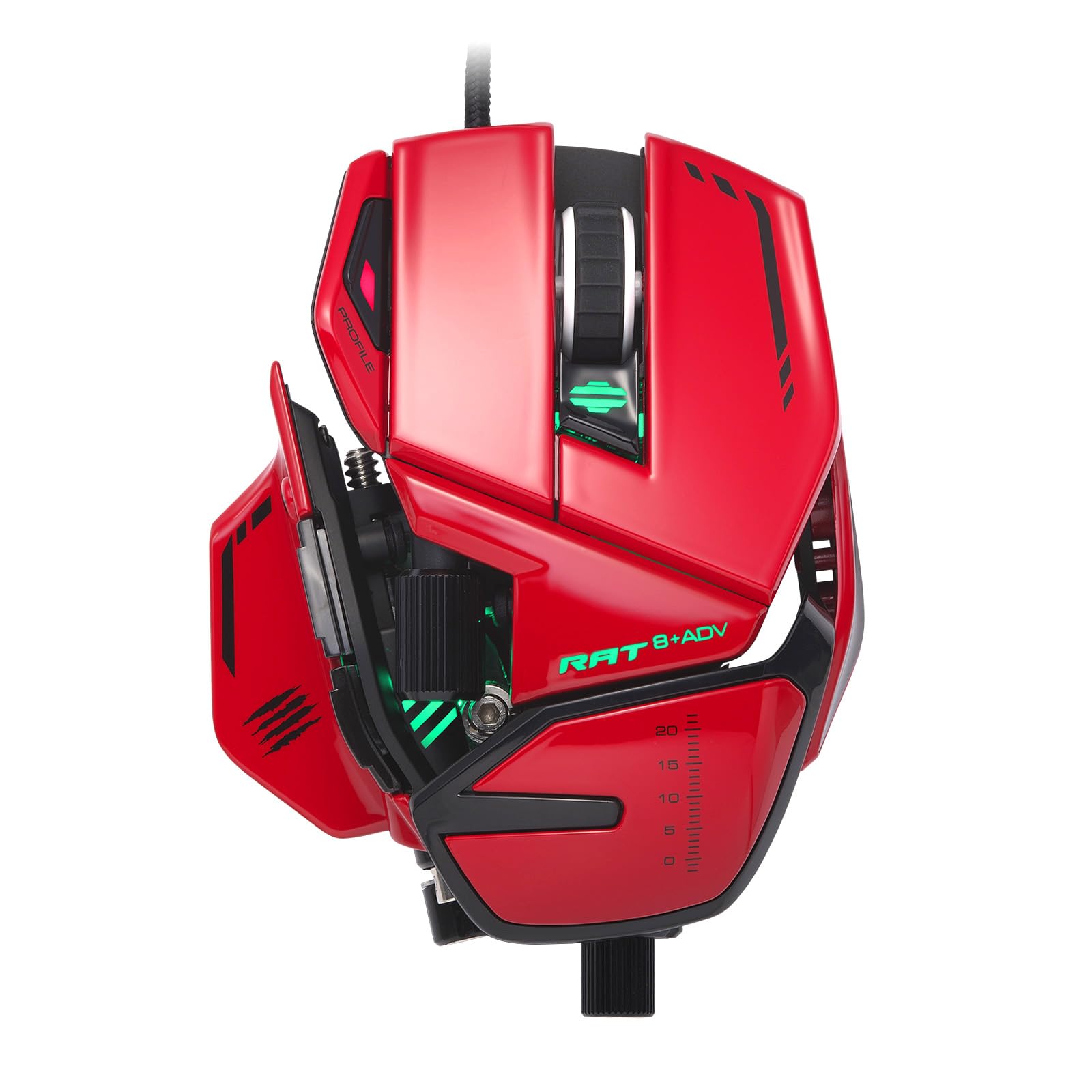
Tune the weight, then keep going and reshape the whole shell around your grip.
Every other mouse on this list stops at weight. This one keeps going. Beyond the tunable weight system, the R.A.T. 8+ ADV has adjustable and interchangeable key components — you slide pieces of the shell around to change its footprint and where your palm rests. If a standard mouse has never quite fit your hand, that reconfigurability is a genuinely rare feature, and it is the reason this pick exists even before you mention the weights. The metal base gives it a solidity that plastic shells do not match.
The numbers back it up as a gaming tool, not a gimmick. A 20,000 DPI sensor heads the spec sheet, with 11 programmable buttons and four user profiles stored directly on the mouse — so your binds and color scheme follow it to another machine. The left and right switches are premium high-durability units rated for 60 million clicks, and the RGB lighting is customizable. Weighing in at 0.22 kg, it is a substantial object in the hand, and the red finish is as loud as its silhouette. Owners who like it tend to like it a lot — the appearance and the pedigree both draw warm words, and it is the kind of mouse long-time R.A.T. fans describe as the best they have used.
What you are really weighing here is complexity. That adjustable shell is more moving pieces than a plain mouse has, and it takes a session or two of swapping and testing before you dial it in. The 0.22 kg body also means tuning the weight mostly means adding, not shedding. If you want plug-and-play with zero assembly, look elsewhere. If you enjoy swapping panels and testing grip positions, this is the one.
The shape-shifter’s appeal: You adjust the weights, then slide the shell panels to change the footprint and palm rest.
The real cost: a heavier, more intricate object that asks you to spend time learning its adjustments before it rewards you.
Your mouse if: you have never found a stock shell that fits and want to reshape one yourself.
Not your mouse if: you want plug-and-play simplicity with zero assembly.
6. Logitech G703 Lightspeed Pro-Grade Wireless Gaming Mouse
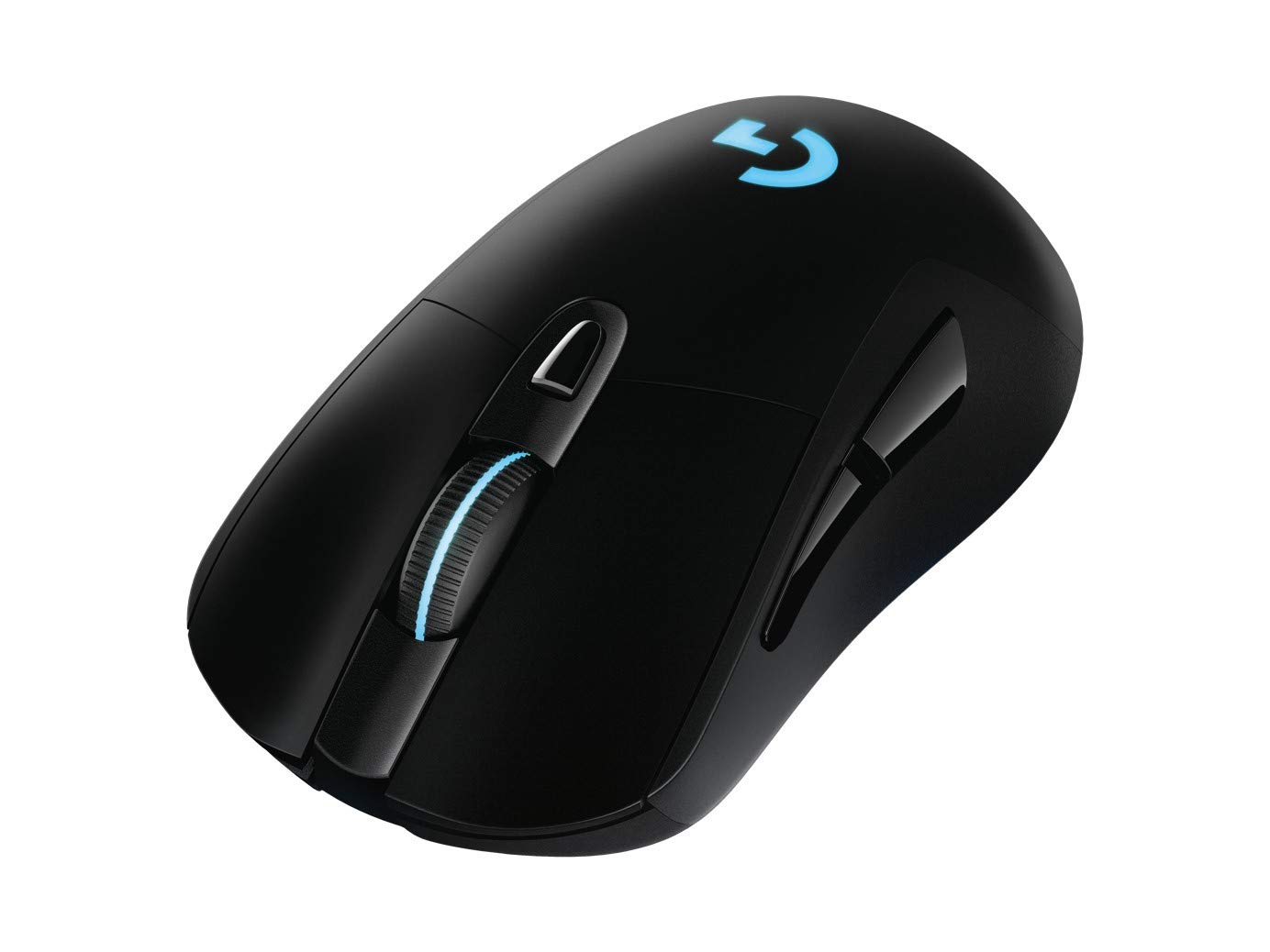
A wireless mouse that starts at 95 grams and still lets you tack on ten more.
The weight math is where this one earns its place. It begins as a 95 g mouse, then accepts a single 10 g optional weight — so if you find wireless mice too skittish, that little block settles it down. The trade-off runs the other way, too: there is no way to shed weight below 95 g. The 16,000 DPI HERO 16K sensor with 1:1 tracking, 400+ IPS, and zero smoothing or filtering handles the aiming, and Logitech’s Lightspeed wireless connection is built to feel as quick as a wired mouse. Six programmable buttons and onboard memory carry your setup with you.
Battery is the other headline: up to 35 hours of continuous play on a charge. You also get optional compatibility with the POWERPLAY wireless charging system, sold separately, if you want to top up while you game. The sensor is quoted at ten times the power efficiency of the previous generation, which is how that runtime holds up. Rubber side grips keep the hand planted, and metal-spring button tensioning keeps the primary clicks crisp and poised. A concern buyers should check: the bundled lithium battery is the wearable part of any wireless mouse, so battery health over the years is the long-term variable here.
Against the wired picks above, the G703 leads on freedom and falls behind on weight range — the G502s let you strip down or load up, while this one only goes one direction from 95 g. If wireless is non-negotiable and one extra weight block is enough to settle your aim, this is the cleanest execution of that idea on the list.
Why It’s Worth A Look
- Lightspeed wireless performance close to wired feel
- Up to 35 hours of play per charge, plus optional POWERPLAY charging
- HERO 16K sensor with 1:1 tracking and 400+ IPS
- Single 10 g weight for a bit of extra stability
The Compromises
- Cannot shed weight below the 95 g starting heft
- Just six programmable buttons — thin fare for an MMO loadout
Dial it in when: you want cable-free play and one adjustable weight to calm a twitchy wrist.
Steer away when: you need a mouse that can go ultralight or carry an MMO button set.
7. Lexip NP93 Alpha Gaming Mouse

The only mouse here with a thumb joystick — plus weights that reach 18 grams.
Most mice give you a weight tray at the back and call it done. This French design does something nobody else in the lineup does: a two-axis internal joystick under the thumb, so your thumb can trigger an action or steer an axis instead of just pressing side buttons. If you have ever wanted analog-style control from a mouse — smooth camera pans, gradual steering, a little more finesse than on/off buttons — that stick is the reason to look here. It sits alongside six programmable buttons, a sensor adjustable to the nearest single DPI step up to 12,000, and 12 programmable macros (recorded button sequences).
The weight system is broader than the single-cartridge mice above. Two different weights ship in the box — one at 3.6 g and one at 18 g — set into five weight containers so you can adjust the balance to your habits rather than just the total mass. The base glides on six ceramic pads. Ceramic cuts friction more than ordinary Teflon, and the maker says it lasts longer, plus the reduced drag eases strain on the wrist across long sessions. Where it contrasts with the Lenovo M500’s single 10 g cartridge, the Lexip gives you a genuine range to play with.
Two things temper the appeal. The first is mass: at 166 g the NP93 Alpha is a heavyweight, heavier than any other mouse in this lineup before you add a single weight. That is plenty of inertia for slow, stable aiming and a burden for fast flicks. The second is the thumb stick itself — an unfamiliar control that takes a while to retrain your thumb around, and the 12,000 DPI ceiling is the lowest sensor figure here. The thumb joystick takes a session or two to retrain your thumb around.
The standout feature: a thumb joystick plus up to 18 g of added weight — a combination you will not find on any other pick.
The honest caveat: 166 g before tuning, and a thumb control that rewrites how you play, so it rewards patience over impulse.
Ideal for: players curious about analog thumb control and broad balance tuning.
Not ideal for: anyone who wants a light, immediately familiar mouse with a massive sensor ceiling.
8. Redragon M908 Impact MMO Gaming Mouse
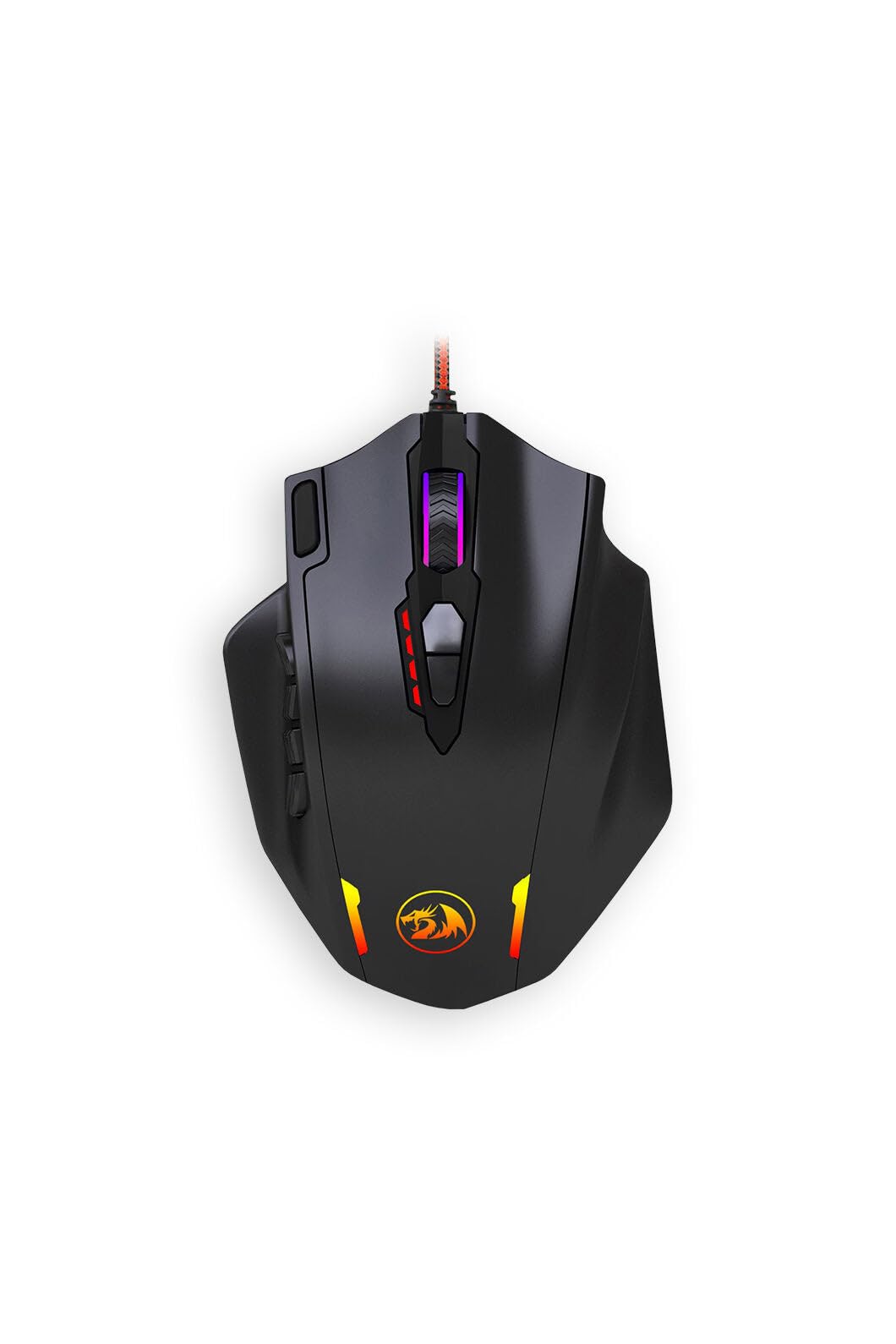
Twelve side buttons and a weight cartridge, for players who bind everything.
Three times over, this mouse out-buttons the Lexip above: 18 programmable buttons against 6. Twelve of those live on the thumb side, arranged into a grid you can map to a full MMO hotbar without lifting your hand from the mouse. For a healer juggling cooldowns or a builder throwing down abilities in quick succession, that side cluster is not a luxury — it is the whole point. And it still gives you a weight tuning cartridge tucked under the base, so the heft is adjustable to taste despite the budget-friendly positioning.
The sensor does its job at 12,400 DPI, selectable either through preset steps (500, 1000, 2000, 3000, 6200) via the buttons or by 100-step increments through the software. Tracking is optical. The polling rate tops out at 1000 Hz, switchable between 125, 250, 500, and 1000 Hz with 500 Hz as the default — that is the standard serious-gaming figure, though a fraction of the Corsair’s 8,000 Hz. The metal-and-plastic shell has a glowing finish, the mouse is ambidextrous in orientation, and 18 of the 19 buttons are customizable.
The honest trade-off is the sensor ceiling and the button sprawl. 12,400 DPI is the lowest-but-one on this list, so if you want the sharpest tracking available you are shopping elsewhere. And 18 buttons is a lot of real estate — the budget-minded build means some users will need time to memorize the thumb grid before muscle memory takes over. But if MMO hotbars are your world and you want weight tuning without a big spend, nothing here packs more control into one hand.
Button-count leader: 12 thumb-side buttons plus 18 customizable total make it the obvious pick for hotbar-heavy MMO play.
The limit to accept: a 12,400 DPI sensor and a crowded thumb grid that asks for a learning period.
The right call for: MMO players who want maximum bindable buttons and adjustable weight on a tight budget.
The wrong call for: FPS purists chasing the highest sensor resolution and a clean, minimal layout.
Know the Specs
DPI (Dots Per Inch)
DPI measures how far the cursor travels on screen for every inch you slide the mouse across the pad. Higher numbers mean the cursor moves farther per inch of movement, which translates to more sensitivity. Gaming mice climb into the tens of thousands, but a realistic setting sits far below the ceiling — the upper range mostly signals a quality sensor rather than a daily setting. A 12,000 DPI mouse and a 26,000 DPI mouse can feel identical at the sensitivity most players actually use. Treat a high ceiling as a sign the sensor is competent, not as a must-hit number.
Polling Rate (Hz)
Polling rate is how often the mouse sends its position to your PC, measured in hertz. At 1000 Hz it reports a thousand times a second; at 8000 Hz, eight thousand. A higher rate means less time between report and reaction, which can feel snappier on a fast monitor, but it also asks more of your PC’s processor and cable. For most players 1000 Hz is the sensible baseline. The step up to 8000 Hz is for the competitive edge case where every millisecond is worth chasing.
Weight and Balance Tuning
A weight system lets you add metal cartridges to a mouse, changing both how heavy it feels and where its center of mass sits. Multi-cartridge trays — like the five 3.6 g weights on the Logitech G502 line — give fine control and let you move mass forward or back. Single cartridges — a 10 g magnet on the Lenovo M500, a 10 g block on the G703 — give you one step in either direction. Match the system to how much fiddling you enjoy, not to how impressive the marketing sounds.
IPS and Acceleration (G)
IPS, inches per second, is the fastest swipe a sensor can read before it loses track of the surface. Acceleration in G is how much force that sensor can handle during a sudden movement. A sensor rated 400 IPS and 50 G keeps up with a hard flick that would overwhelm a cheaper sensor. These two numbers together describe how trustworthy the aim is during fast play — and they matter far more to your results than a big DPI figure.
Common Questions
Will adding weights make my aim more accurate?
How do I know if my hand will fit a weight-tunable mouse?
What is the difference between 1000 Hz and 8000 Hz polling rate?
Do I need a high DPI setting to play competitively?
Can a wired mouse with weights beat a wireless one?
How many programmable buttons do I really need?
Are ceramic skates better than Teflon?
How long should a gaming mouse last?
Is a heavier mouse better for shooters?
Can I run a weight-tunable mouse on a Mac?
The Bottom Line
For most buyers, the mouse with weights winner is the Logitech G502 Proteus Core, because its five 3.6 g cartridges let you tune both total heft and balance point better than anything else here, and it wraps that in 11 programmable buttons and a surface-calibration tool. If you want the same shape with the sharpest sensor in the lineup, grab the Logitech G502 Hero Special Edition at 25,600 DPI. And for MMO hotbar control on a tight budget, the Redragon M908 Impact is the one to reach for. Whichever you pick, do the one thing most buyers skip — seat the weights, empty them, and test both feels against the game you actually play before you settle.
How we choose
We do not accept paid placement. Every pick is matched to a real buyer and a real use-case; we do not hands-on test units.
Sources
Specifications: manufacturer listings and product documentation. Review insights: verified customer reviews, as of November 2026. Pricing: not shown on this page (it changes often); check the current price via the retailer link.
As an Amazon Associate, Tactical Gear Guy earns from qualifying purchases. This does not affect which products we feature.