Specs are compiled from manufacturer listings and verified buyer reviews and can change over time — please confirm the key details on the product page before buying.
You need a receipt printer that fires out tickets all night and never fades, and the safest starting point is the Star Micronics TSP143IIIU. It is the highest-rated USB model here, with a long record of reliable service in busy shops. But the smart pick depends on one thing most buyers get wrong: which cable your point-of-sale system actually speaks. This list sorts the whole field by that question first, then by paper loading, print speed, and build quality, so you end up with a machine that keeps printing instead of a machine that sits in the corner.
This guide is built by comparing the manufacturers’ published specifications and the patterns across verified customer reviews, so you get each pick’s real strengths and trade-offs instead of marketing spin.
Here is a practical read on the industrial receipt printers that actually survive a busy counter.
Top Picks


How To Choose An Industrial Receipt Printer
Most first-time buyers shop this category like they are buying a home printer, and that is where the money goes wrong. A counter printer is a plug-in appliance that has to talk to your point-of-sale app, swallow paper rolls without drama, and cut cleanly thousands of times. Get the interface wrong and the printer will not talk to your POS at all, no matter how good its specs look.
The interface decides everything, so buy it first
USB is the simplest cable and the one most Windows machines expect. Ethernet, also called LAN, puts the printer on your shop network so any till can reach it, which matters when you have more than one register. Serial is the older multi-pin cable still used on impact printers for legacy systems. Bluetooth frees you from the wire. Decide which of these your POS software and tablet or PC support, then shop within that group. The Star Micronics TSP143IIIU USB model, for example, uses a USB serial-number feature so a Windows machine finds it on any USB port.
Paper loading during a rush is a real buying factor
Look for a clamshell or drop-in design, where the paper simply drops into a slot and the lid closes over it. This saves you from threading paper through a track with a line of customers waiting. Several printers here use that exact approach, and the ones that do rank high on ease of use in owner feedback.
Print speed and cut durability
Speed is listed in millimeters per second (mm/s), and it tells you how fast paper feeds out. The Volcora model lists 350mm/s, while the Star Micronics TSP143IIIU lists 250mm/s. Faster is better in a peak, but only if the auto cutter — the blade that slices each receipt cleanly — is rated for that volume. Look for a stated cutter life if the manufacturer publishes one.
Side-by-Side Comparison
| Model | Best For | Interface | Print Speed | Paper Loading | Amazon |
|---|---|---|---|---|---|
| Star Micronics TSP143IIIU USB★ Best Overall | Busy single-till shops on USB | USB | 250mm/s (43 receipts/min) | Clamshell drop-in | Amazon |
| Volcora 350mm/s POS PrinterFastest Throughput | High-volume lanes needing flexibility | USB, Serial, Ethernet, Bluetooth | 350mm/s (140 receipts/min) | Front-exit | Amazon |
| Epson TM-M30Legacy Serial Pick | Wired network counters | Ethernet, USB | — | — | Amazon |
| Epson TM-T20III | Square Stand and Square Register users | USB | — | — | Amazon |
| Bixolon SRP-350PLUSIIICOG | Networked POS with 180 DPI output | Ethernet, USB | 200mm/sec | Drop-and-load | Amazon |
| Star Micronics TSP143IIILAN Ethernet | Multi-till networks and delivery platforms | Ethernet (LAN) | 250mm/s (43 receipts/min) | Clamshell drop-in | Amazon |
| Bixolon SRP-350PLUSIIICOSG | Tough environments on a small footprint | Serial, USB, Ethernet | 200mm/sec | Drop-and-load | Amazon |
Detailed Reviews
1. Star Micronics TSP143IIIU USB Thermal Receipt Printer
Our pick — 4.0+★ from 850+ verified ratings; the strongest balance of quality and price.
The proven workhorse that plugs into one USB port and simply prints.
This is the pick for the shop owner who wants zero fuss: one cable, one driver, done. Its USB serial-number feature means a Windows computer recognizes the printer on any USB port you use, so you are not hunting for “the right one” every time. It also carries certification with Postmates, Square, Chromebook, and Clover, which takes a lot of the guesswork out of whether your software will talk to it.
Paper swaps are quick thanks to the clamshell design, where the top lifts open and the roll drops straight in. The patented “De-Curl” function rolls the receipt out flat instead of springing back into a tight tube, so tickets lie still in a hand or on a spike. Owners consistently call it reliable and easy to use, and the quality of the build is what comes up most favorably in what they write.
Here is the honest part: this unit prints 43 receipts a minute at 250mm/s, so it trails the Volcora pick, which is rated at 350mm/s and 140 receipts per minute. It also has no Wi-Fi or Bluetooth — the mixed feedback on connectivity is almost entirely people expecting wireless from a USB-only machine. If your setup has a free USB port and a Windows or tablet POS, the missing wireless costs you nothing.
What earns its keep
- USB serial-number feature makes setup painless on Windows
- Certified with Square, Clover, Postmates, and Chromebook
- De-Curl keeps receipts flat and readable
- Embedded power supply and small footprint save counter room
Where it draws the line
- Wired USB only — no Wi-Fi or Bluetooth pairing
- 250mm/s print speed trails faster thermal models
Go here if: you run one register on a USB port and want a printer known for holding up.
Move on if: your POS needs wireless or multiple networked tills — you want an Ethernet model instead.
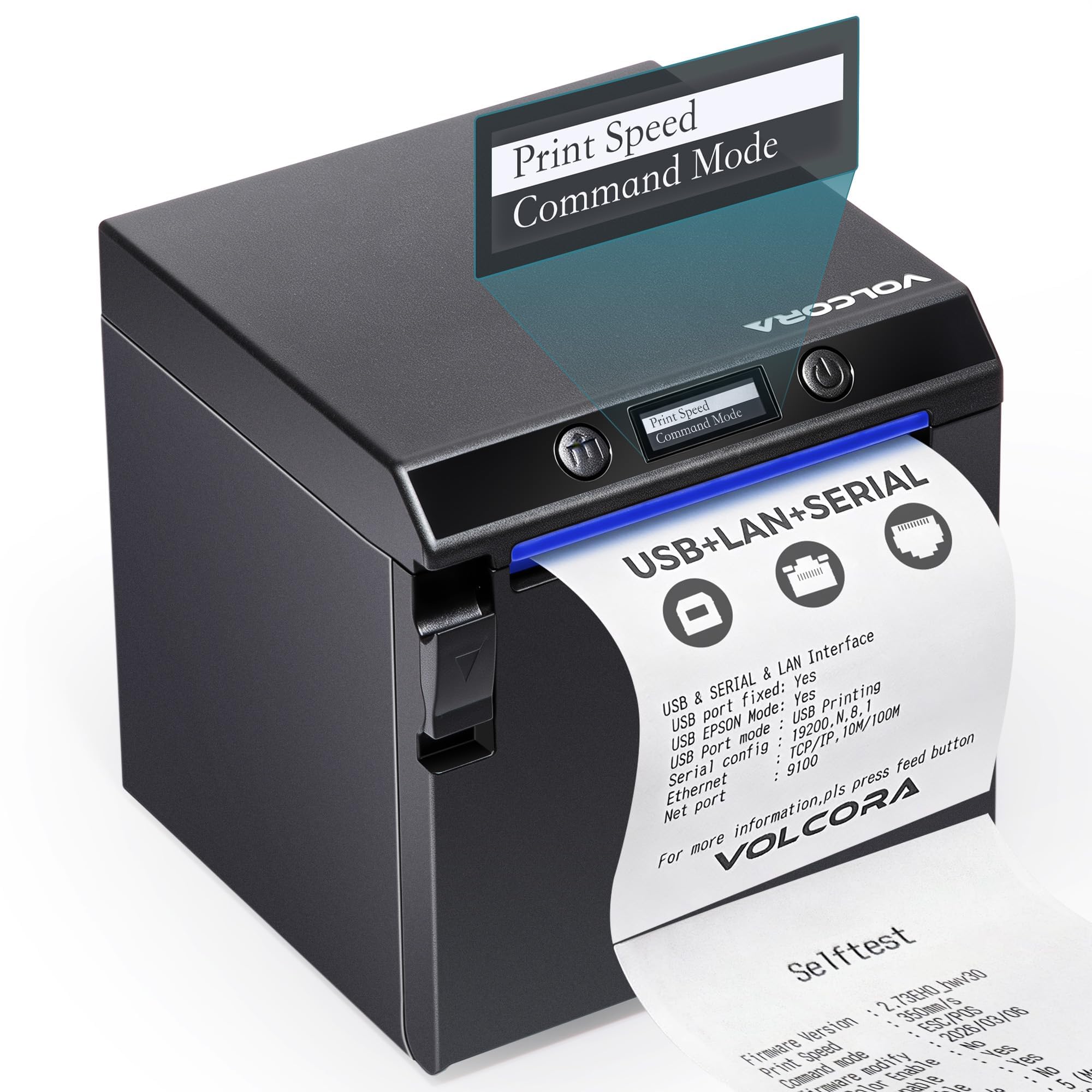
2. Volcora Thermal Receipt Printer with Smart Screen
The high-speed option that fires over 140 tickets a minute and speaks four cable types.
If your lanes queue up at lunch, this is the printer aimed at that exact problem. It pushes paper at up to 350mm/s and produces over 140 receipts per minute, which is a far faster rating than the Epson TM-M30’s equivalent throughput figure. The built-in automatic cutter slices cleanly after each receipt, so your staff is not tearing paper by hand with a customer waiting.
The interface list is the widest in this group: USB, RS232 serial, Ethernet, and Bluetooth all on one machine. It runs ESC/POS commands, which is the common language receipt software uses to talk to a printer, and it supports cash drawer control plus SDK support for Android and iOS development. The smart visual screen shows real-time status, so a low-paper or open-cover warning reaches you before a ticket fails to print.
It accepts both 80mm and 58mm paper rolls, which means it can match whatever format your shop standardizes on. A 256KB NV Flash buffer plus a large working buffer keep it running through high-volume stretches without stalling. The catch to weigh up: it is the newer name here with a smaller owner track record than the Star Micronics machines, so you are trusting the spec sheet and a shorter history. That said, the full starter kit — power adapter, cord, manual, driver CD, USB cable, and a paper roll — gets you running on day one.
Best lane-moving match: high-volume counters where cutting wait time matters more than a long legacy of reviews.
Fair warning: the visual status screen and four-interface spread are its edge; the shorter track record is what you accept in exchange.
Pick it when: you want maximum speed and you want to pick your own cable from USB, serial, Ethernet, or Bluetooth.
Skip it when: a long proven service history is your top priority.
3. Bixolon SRP-275IIIAOSG Impact Printer
A tidy network printer that installs fast and prints cleanly, built for a wired counter.
For a shop that wants the printer on the network rather than tethered to one PC, this Epson gives you both Ethernet and USB. Installation is where it shines — the owner feedback is uniform that getting it running is straightforward, and functionality is the thing it gets praised for most. It also carries an Energy Star rating, which is a published efficiency mark for power use.
Print quality lands positive in what buyers report, and the autocutter handles the clean slice at the end of each receipt. It lists an initial page print time of 60 seconds, so it warms up before the first ticket emerges, and it uses Epson-branded cartridges. Control is handled by remote or push-button, which suits a fixed counter install.
The connectivity picture is where you need to look closely: some owners expected Bluetooth and found the setup did not deliver it, so treat this as a wired machine and confirm your network plan before buying. It is also simplex, single-sided only. Buy it as a wired Ethernet or USB printer and it is a steady, tidy unit for a fixed counter.
Install experience: owners mention the setup as straightforward, which matters on a first commercial printer.
The connectivity question: plan on Ethernet or USB — do not buy this expecting Bluetooth pairing.
Reach for it when: you want an Ethernet printer on a fixed counter and value a clean install.
Look elsewhere if: you need wireless — a LAN or USB model is what this is.
4. Epson TM-T20III Monochrome Thermal POS Printer

The Square-native choice that sets up fast, as long as you have the Stand or Register.
If you run Square, this printer is the one built to slot into that ecosystem. It is compatible with the Square Stand and Square Register over USB, and that is the whole story of this machine. The maker’s own guidance is blunt: update the Square app if it does not connect, and you must have the Square Stand or Square Register for it to work at all. It is USB only — not Bluetooth, not Wi-Fi.
Speed is rated at 7 in the manufacturer’s pages-per-minute figure, and it prints in monochrome black. The quality of output and ease of setup are the two things that come up most favorably in owner feedback, and for a simple till install that is exactly what you want to hear. Print speed lands positive too.
Weigh the reliability picture honestly: most owners have a good run, but a few report a unit that stopped working after about five months, and constant disconnections come up alongside Square kiosk incompatibility. If your setup matches the Square Stand or Register, those early-failure and disconnection reports are a risk to watch rather than a dealbreaker. If you use a Square kiosk rather than the Stand, this is not your machine.
Reasons it clicks
- Built for the Square Stand and Square Register ecosystem
- Easy setup and good print quality stand out
Know before you buy
- USB only — no Bluetooth or Wi-Fi
- Not compatible with Square kiosks; needs the Stand or Register
Ideal for: a Square Stand or Square Register till that wants a matching printer.
Not for: Square kiosk users or anyone needing wireless connectivity.
5. Bixolon SRP-350PLUSIIICOG Thermal Receipt Printer

A network printer rated at 180 DPI, built to grind through a long service life.
Sharp, legible text on coupons, logos, and barcodes is what a higher dots-per-inch figure buys you, and this one lists 180 DPI. It prints direct thermal at 200mm/sec, so a steady stream of receipts without a fevered rush. Both Ethernet and USB are on board for a networked counter, and the power supply is included in the box.
The reliability numbers are what make this interesting for a high-volume install: an MCBF of 70M lines, meaning a mean count of 70 million printed lines between failures, plus an autocutter rated to 1.8M cuts. In plain terms, Bixolon is publishing the service life of the parts that wear out, which is more than many listings give you. It works with iOS (MFi optional), Android, and Windows RT 8.1.
At 3.4 pounds it is heavier than a compact counter unit, so set it where it will stay. The one thing to accept: the owner feedback pool is small, so this is a spec-driven choice rather than a well-worn crowd favorite. For a shop that reads MCBF as a buying signal, it is a sound networked pick — the owner feedback does not yet have the volume to back the numbers up, but the published wear figures are unusually transparent.
The numbers that matter: 180 DPI output with a 70M-line MCBF and a 1.8M-cut autocutter — published wear life you rarely see spelled out.
Weigh this: a modest owner base means you are trusting the spec sheet, not a long review trail.
Solid bet for: a networked counter that wants sharp text and disclosed parts-life figures.
Hold off if: you need a large proven track record to feel comfortable.
6. Star Micronics TSP143IIILAN Ethernet Thermal Receipt Printer

The networked Star that delivery kitchens lean on, printing 43 receipts a minute.
For a restaurant running delivery orders in from several apps, this LAN model is the one that keeps up. It prints 43 receipts a minute at 250mm/s, and the connection is Ethernet only — one network cable, no pairing. It is certified with Lightspeed, and owners regularly report it working with Ubereats, Grubhub, Clover POS, Square, and Loyverse on both Android and iOS.
Compatibility and easy setup both land positively in owner feedback. The clamshell design and the patented “De-Curl” function mean the roll drops in fast and each receipt emerges flat rather than curled. Quality and reliability are the two things owners praise most, and the embedded power supply plus small footprint keep the counter from turning into a cable nest. The unit’s own dimensions are listed at 5.6″D x 8″W x 5.2″H, a compact block for a busy pass.
Be clear-eyed on the durability and connectivity side: a few customers note units breaking down within a couple months, and losing connection comes up as a recurring gripe. That is the same mixed picture you find across network printers generally — treat it as a reason to keep the cable run tidy and the firmware current. On value, some owners call it a best investment while others find it expensive, which pretty much sums up a premium networked machine.
Where it earns praise
- Works across Ubereats, Grubhub, Clover POS, Square, and Loyverse
- Ethernet LAN means no Wi-Fi pairing headaches
- De-Curl keeps delivery tickets flat for the kitchen
Keep in mind
- LAN connection only — no USB or Bluetooth on this model
- A few units break down early and drop connections
Great matchup: delivery-heavy kitchens that need one printer on the network for every app.
Wrong fit if: you need USB or wireless — this is Ethernet only.
7. Bixolon SRP-350PLUSIIICOSG Thermal Printer

A small-footprint printer built to shrug off rough handling at 200 mm per second.
Rough-and-tumble counters get a purpose-built machine here. Bixolon says this printer “easily withstands the rigors of tough environments,” and it prints receipts, coupons, logos, or barcodes at 200 mm per second. The drop-and-load paper insertion means a roll swap takes a second, and a standard cable cover keeps the wiring out of the way — useful where staff are moving fast.
It comes with a power supply and USB cable and handles Serial, USB, and Ethernet, so it slots into whichever cabling your setup already uses. The compact body keeps it from eating counter space, which matters on a cramped prep line or a small kiosk. It prints at 200mm/sec, the same rated speed as the SRP-350PLUSIIICOG above, and it is a 3-inch POS printer.
The catch is the feedback trail: the owner pool here is thin, so you are buying on Bixolon’s engineering reputation and the rugged build claim rather than a large body of counterside experience. Accept the thin review base and this is a tidy, tough little unit for a space-constrained till.
Fits the tight spot: a small footprint plus a cable cover for cramped, fast-moving counters.
Honest note: a modest owner base means the rugged claim rests on Bixolon’s build, not a large review history.
Good match: a cramped or rough-handling till that needs serial, USB, or Ethernet.
Hold off if: you want a deep track record behind the durability claim.
Know the Specs
Print speed in mm/s vs receipts per minute
Print speed is how fast paper feeds through, measured in millimeters per second (mm/s). The Volcora model lists 350mm/s; the Star Micronics TSP143IIIU and TSP143IIILAN each list 250mm/s. Higher mm/s pushes a ticket out sooner, which shortens the wait at a busy counter. The “receipts per minute” figure is the manufacturer’s own translation of that feed rate — the Volcora lists 140, the Star USB and LAN models list 43, and the SP742ME impact lists 13. A thermal model is quick; an impact model is slower but prints on plain paper that survives steam.
Thermal vs impact: what the difference means for you
Thermal printing uses a heated print head against heat-sensitive paper — no ribbon, quieter operation, and a clean flat receipt. Impact printing strikes a ribbon against plain paper, which is why the SP742ME is aimed at hot, humid kitchens where thermal print fades. If your counter is cool and dry, thermal is simpler and faster. If orders go into a steamy kitchen and must stay legible, the impact format is worth the slower speed.
Interface: the cable that decides if it works
USB plugs into one device and is the simplest setup; the TSP143IIIU uses a USB serial-number feature so Windows finds it on any port. Ethernet (LAN) puts the printer on your network so any till can reach it — the TM-M30, TSP143IIILAN, SP742ME, and both SRP-350PLUSIII models offer it. Serial is the older multi-pin connection still used on impact printers. Bluetooth frees you from the wire but can drop, so treat it as a convenience rather than a backbone.
Dots per inch and cutter life
DPI means dots per inch — more dots means sharper text and barcodes. The SRP-350PLUSIIICOG lists 180 DPI and the SRP-275IIIAOSG lists 203 DPI. Cutter life matters too: the same Bixolon model publishes an MCBF of 70M lines and an autocutter rated to 1.8M cuts, which tells you how long the parts that wear out are expected to last. The Star TSP143IIIU’s De-Curl function keeps receipts flat, a small thing that makes tickets easier to read and file.
Common Questions
Will an industrial receipt printer work with my Square setup?
What is the difference between thermal and impact receipt printers?
Do these printers need a special paper roll size?
Can I connect one of these printers over Wi-Fi or Bluetooth?
How fast is a receipt printer in real use?
What does ESC/POS mean and do I need it?
Can an industrial receipt printer open a cash drawer?
How long should an industrial receipt printer last?
Why do receipts come out curled, and can I avoid it?
Is USB or Ethernet better for a busy counter?
The Bottom Line
The safe first pick among these industrial receipt printers is the Star Micronics TSP143IIIU, because its USB serial-number setup and its clear footing with Square and Clover mean it simply works on a single Windows or tablet till. If you want maximum speed and the freedom to pick your cable, the Volcora fires over 140 receipts a minute and speaks USB, serial, Ethernet, and Bluetooth. And if your tickets vanish in a hot, steamy kitchen, the Star Micronics SP742ME impact printer keeps the order legible on plain paper. Decide the interface first, then the paper format — get those two right and the printer will earn its place at your counter.
How we choose
We do not accept paid placement. Every pick is matched to a real buyer and a real use-case; we do not hands-on test units.
Sources
Specifications: manufacturer listings and product documentation. Review insights: verified customer reviews, as of November 2026. Pricing: not shown on this page (it changes often); check the current price via the retailer link.
As an Amazon Associate, Tactical Gear Guy earns from qualifying purchases. This does not affect which products we feature.