Specs are compiled from manufacturer listings and verified buyer reviews and can change over time — please confirm the key details on the product page before buying.
When a video call sounds bad, your internet is usually not the problem. The microphone a few inches from your face is. A laptop’s built-in mic picks up keyboard clatter, echo, and every passing truck. All eight cameras below have a built-in microphone, so one USB cable handles both picture and voice. For most people, the Logitech Brio 301 is the safest first stop, and it is our pick for Best Overall. What separates these picks is how much light each needs to look sharp, how well the mic isolates your voice, and whether the camera tracks you around the room.
This guide is built by comparing the manufacturers’ published specifications and the patterns across verified customer reviews, so you get each pick’s real strengths and trade-offs instead of marketing spin.
Some cameras here are plug-and-play sticks you clip on and forget, while others swivel, track, and reframe on their own.
Top Picks

How To Choose The Best USB Webcam with Microphone
Start with the room you actually sit in, not the spec sheet. A webcam that looks great in a bright office can look grainy and washed out in a dim spare bedroom. The camera’s sensor and its automatic light correction do more for your picture than a bigger resolution number. Work out your light first, then your budget, then how much camera control you want.
Match the field of view to your space
The field of view is how much of the room the lens can see at once, and it decides whether you look framed or tiny. A narrower angle like the 66-degree lens on the HP 320 keeps you centered and close. A wider 90-degree lens like the one on the EMEET C960 fits more people into a small meeting. A very wide 360-degree capture like the Meeting Owl 3 sees the whole table — but only makes sense when the whole table needs to be seen.
Take the microphone seriously
A built-in microphone with noise reduction filters out steady background sound so your voice comes through clearly. Dual mics pick up your voice from more than one direction, which helps when you turn your head or move around. The cameras here that use dual noise-reduction mics are the Acer A610, the EMEET C960, the Insta360 Link 2C Pro, the Logitech MX Brio, and the OBSBOT Tiny 3. Each one handles a room differently, so read the mic note on each pick.
Side-by-Side Comparison
| Model | Best For | Max Video | Field of View | Microphone | Amazon |
|---|---|---|---|---|---|
| Logitech Brio 301★ Best Overall | Everyday calls on a laptop | 1080p | — | Mono noise reduction | Amazon |
| Acer A610Budget Powerhouse | Work calls on a tight budget | 1080p | 83° | Dual noise reduction | Amazon |
| HP 320 FHDChromebook Ready | Chromebook and Windows laptops | 1080p | 66° | Built-in mic | Amazon |
| EMEET C960 | Exam takers and desktop setups | 1080p | 90° | 2 noise canceling | Amazon |
| Insta360 Link 2C Pro | Streamers with dim rooms | 4K | — | Directional beamforming | Amazon |
| Logitech MX Brio | Creators who want manual control | 4K at 30fps | — | Dual with beamforming | Amazon |
| OBSBOT Tiny 3 | Presenters who move around | 4K at 30fps | — | Triple-mic array | Amazon |
| Owl Labs Meeting Owl 3 | Whole conference rooms | 1080p | 360° | 360° pickup up to 18 ft | Amazon |
Detailed Reviews
1. Logitech Brio 301 Webcam
Our pick — 4.5+★ from 850+ verified ratings; the strongest balance of quality and price.
The webcam that quietly upgrades a MacBook call without a single driver download.
If your video calls look soft and washed out, start here. The Brio 301 captures 1920×1080 pixels and runs it through RightLight 2 (Logitech’s automatic light correction), so the camera brightens your face instead of leaving you a silhouette against a window. It is certified for Zoom, Microsoft Teams, and Google Meet, which means the software recognizes it without fiddling. It sits at 4.5+ stars across 800+ ratings, and reviewers single out the picture quality more than anything else.
The microphone is a mono noise-reduction design, so it filters steady background hum before it reaches your colleagues. It is not a stereo array, and that is fine for one person at one desk. The privacy shutter is the physical kind — you spin it over the lens when the call ends, and you can see it is closed. That is a real thing to value when your laptop lid is open all day in a shared space.
The catch is framing. The field of view draws mixed reactions, and several owners note they cannot control the zoom. There is a 1x digital zoom listed, but the camera does not let you tighten the shot when you want to. So it frames you wide and fixed, which is fine for one person at a desk and less useful if you want to crop in.
What earns its keep
- RightLight 2 corrects for backlit windows and dim rooms automatically
- Certified for Zoom, Teams, and Meet, so no setup hunting
- Physical spin shutter over the lens for real privacy
- Mono noise-reduction mic cleans up steady background hum
Where it stops short
- Field of view is fixed and split the room — no lens control
- Full HD only, with no 4K option
- Fixed framing leaves no room to tighten the shot
Best for: Anyone who wants a reliable 1080p call camera on a laptop without studying a manual.
Think twice if: You need to control your framing or want 4K detail.
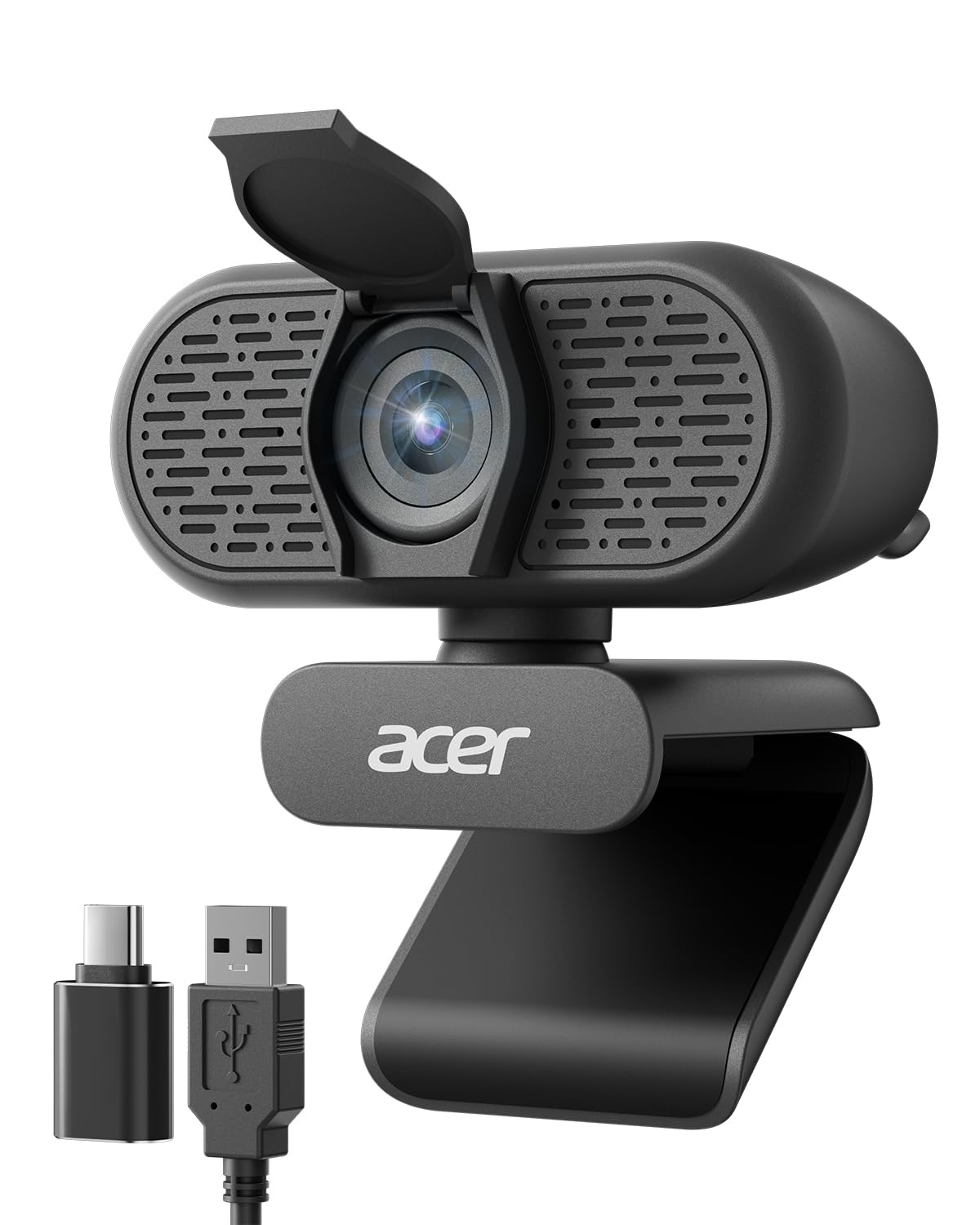
2. Acer A610 Webcam
Two noise-reduction mics and a head that swivels a full 360 degrees, on the thinnest budget.
It behaves like a camera that costs twice as much. The A610 runs 1080p through a new CMOS sensor (the light-catching chip inside) for better color and clarity. The head rotates a full 360 degrees and the lens holds an 83-degree field of view, so you can angle it toward your face instead of tilting your chair. Setup is plug-and-play, and the box includes a Type-A to Type-C adapter so a newer laptop with only USB-C ports still works.
The dual noise-reduction microphones are the real value here. Two mics catch your voice from more than one direction and cut background sound, which matters when you take calls near a kitchen or an open office. Remember to set A610 as the default microphone in both your system settings and the app itself. There are no built-in speakers, so your laptop speakers still handle playback.
Two things to know. The camera uses fixed focus, so everything in a set range stays sharp — the listing puts that range at 11.8 to 118.1 inches — and you cannot manually refocus a close-up. Compatibility draws mixed reactions, with some owners noting trouble in apps outside the mainstream ones. For Zoom, Skype, Twitch, and Google Meet, it plugs in and goes.
Picture and value: The 1080p picture and the dual-mic setup are what draw the strongest praise, and the automatic low-light correction keeps your face visible in a dim room. A privacy cover lowers over the lens when you step away.
The one gap: No zoom control and fixed focus mean you frame with your body and your chair, not the camera.
Reach for this if: You want clear video and a clean voice on a starter budget and a laptop that may lack a USB-A port.
Look elsewhere if: You need autofocus for close work or run niche software outside the big meeting apps.
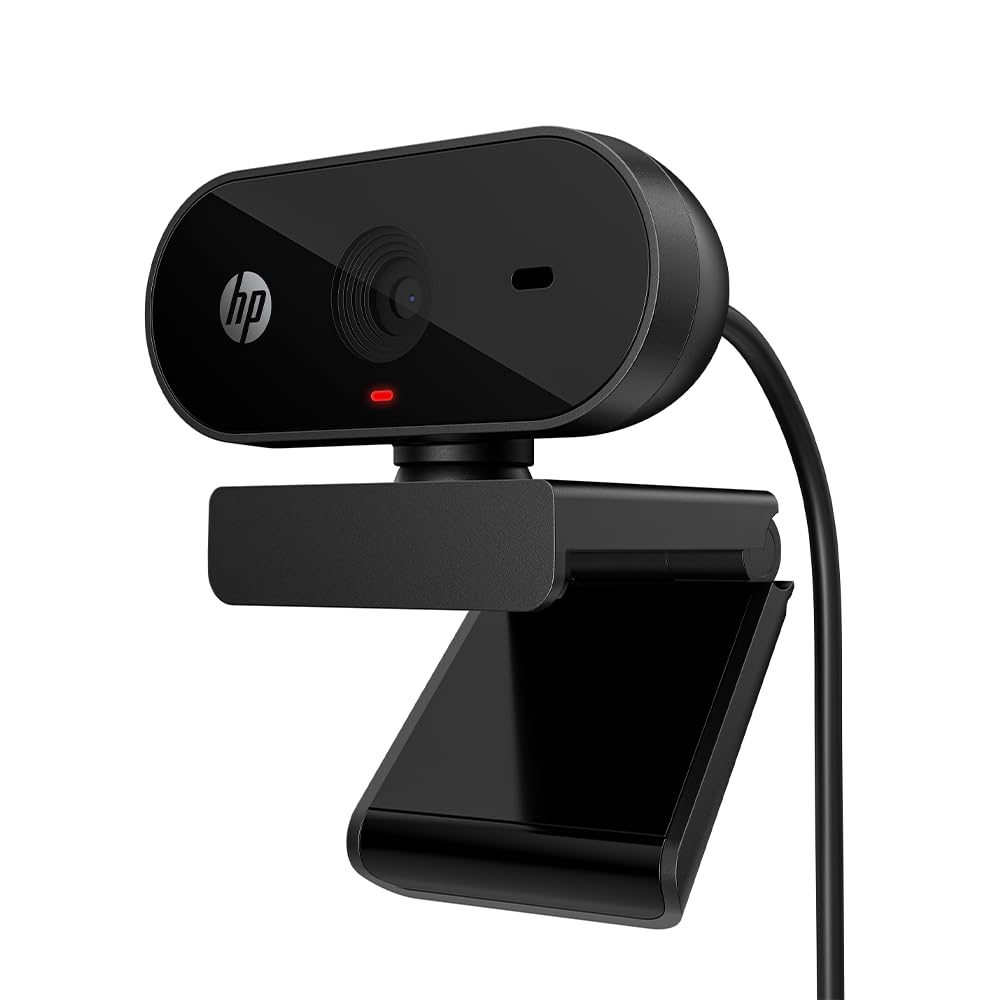
3. HP 320 FHD Webcam
Tuned specifically for Chrome OS, with a clip that swivels and a tripod thread underneath.
The HP 320 is aimed at a very specific buyer: the person running a Chromebook or Chrome OS device who keeps getting told their camera matters less. It is tune to work with Chromebook, and the platform list runs to Zoom, Microsoft Teams, Google Meet, XSplit, OBS, and YouTube across Windows 10, Windows 11, and macOS. Connect the USB-A cable, clip it to the lid, and the camera adjusts to the room’s light on its own.
The lens captures Full HD 1080p through a 66-degree field of view — narrower than most here, and that is the point. A tighter angle keeps your face larger in frame instead of leaving you a small figure in a wide room. The clip mounts to a laptop display or a desktop monitor, and the head swivels 360 degrees. There is also a tripod thread underneath if you would rather set it on a stand. A manual privacy cover and a red LED tell you when the camera is live.
Reliability is what the camera is known for, and the plug-and-play setup earns high marks. The weak point is the mount. Some find it does not stay put on certain monitors and is fiddly to position, and a few mention the lens cover or paint not holding up. Treat the clip gently and it does its job. At 3.84 ounces it is light enough to leave on a lid without noticing.
Worth it for: Chromebook owners and anyone who wants a tighter, more conversational 66-degree frame.
Skip the splurge for: Monitors with thick or curved bezels where the clip struggles to grip.
4. EMEET C960 Webcam

A tripod that climbs from 6.7 to 18.5 inches, built for standing up on camera.
This is the one for exam takers, teachers, and anyone who has to show a full body on camera. The included mini tripod adjusts through that full height range, so 6.7 inches gives you a close-up and 18.5 inches frames a standing body. The 360-degree swivel head turns smoothly from portrait to landscape. The base has a non-slip grip so the whole rig stays planted while you present.
The 1080p sensor holds a fixed focal length that keeps objects sharp from 11.8 out to 118.1 inches, which is exactly the range you sit in for a desk exam or a standing presentation. Two noise-canceling microphones pick up your voice and filter room noise, and the 90-degree field of view suits a small-to-medium meeting rather than a single head. Automatic low-light correction, color enhancement, and exposure adjustment work together when the room is dim. A privacy cover slides over the lens when you are done.
Be realistic about the tripod and the picture. The image quality gets mixed reactions — some find it clean, and others find it soft — so set your light carefully before an important exam. The tripod also draws split opinions: some love the mid-screen positioning, and others find it hard to keep standing. Give it a flat surface and it holds.
The case for it
- Height adjusts from 6.7 to 18.5 inches for full-body shots
- Two noise-canceling mics with a 90-degree view for small groups
- Plug-and-play with no software install needed
- Non-slip tripod base for standing presentations
What to weigh first
- Image quality gets mixed reviews, so lighting matters
- The tripod is a love-it-or-not addition depending on your desk
- Fixed focal length means no manual refocusing
Ideal for: Proctored exams, online teaching, and anyone who presents while standing.
Less ideal if: You just want a clip-on and prefer a camera to sit on your monitor lid.
5. Insta360 Link 2C Pro Webcam
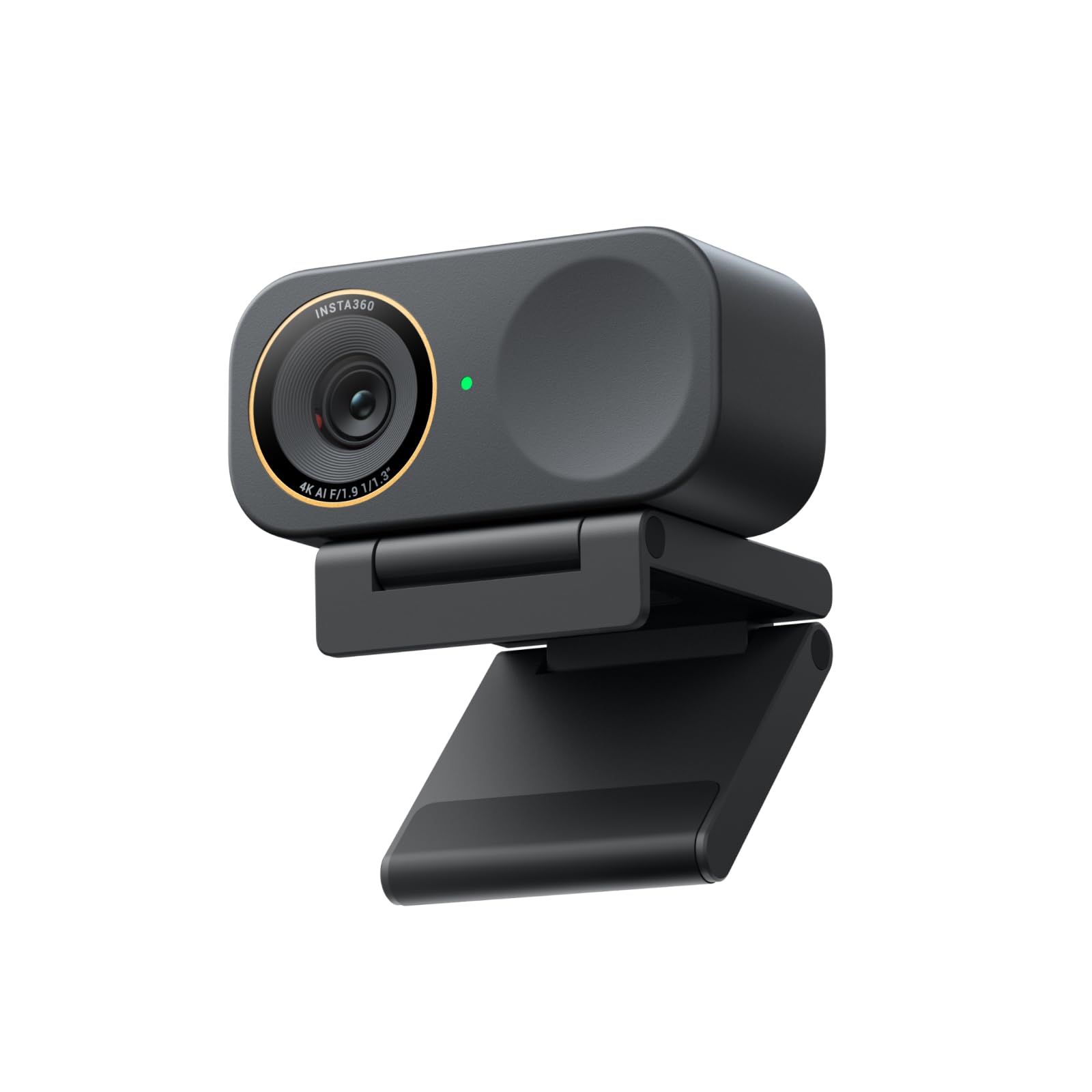
A big sensor in a small body, so a dim spare bedroom still looks like a studio.
Most webcams beg for light. This one carries a 1/1.3-inch sensor — a larger light-catcher than the sensors in the budget picks above, so each pixel has more room to gather light. The result is a cleaner, less grainy 4K picture in a room with one lamp on. Low-light performance is exactly what reviewers highlight, and they describe the image quality as phenomenal and crisp. Bokeh mode blends the background like a DSLR shot, and auto framing widens or tightens to keep one person or a group in view.
The microphone system here is a dual-mic setup with beamforming, which shapes pickup toward whoever is talking and pushes down chatter from the rest of the room. That matters in a busy home office. You also get gesture control and a smartphone remote for starting tracking or switching modes, plus DeskView, Whiteboard, and 4K Portrait modes. Elgato Stream Deck support lets you flip between setups with a button press.
Check your hardware first. This camera is not compatible with ARM-based Windows systems or Windows Hello Face Recognition, so confirm your machine before buying. The adjustability also draws mixed feelings — some find it easy to position and control, others find the AI stabilization makes the video feel unnatural. At 113.5 grams it is light enough to mount almost anywhere.
The takeaway: If your calls happen after dark or in a basement office, the larger sensor does more for you than any resolution claim. Buy this for the low-light picture and the beamforming mic, both of which draw steady praise.
Pick this for: Streamers and remote workers with stubbornly dim rooms who want a 4K image without adding lights.
Check first if: You run Windows on ARM hardware — this camera does not support it.
6. Logitech MX Brio Webcam

The one that lets you dial the picture by hand instead of trusting auto exposure.
Shooters who hate a camera deciding for them should start here. The MX Brio streams 4K at 30fps or drops to 1080p at 60fps when you want smoother motion — and its sensor packs more pixels than the Brio 301’s, which is the tradeoff you feel in fine detail. Both face-lighting and white balance can be controlled, or you can let Auto Mode run it. That manual control is rare, and it is the whole reason to pay more.
The microphones are a dual setup with noise reduction and beamforming, so background chatter gets pushed down before it reaches your audience. There is a Show Mode that tilts the lens down to share notes or sketches on your desk, which is handy for design reviews and whiteboard-style calls. A privacy protector covers the lens, and the built-in USB-C cable runs straight to a newer laptop.
Detail is the point of this camera. It captures at a higher effective still resolution than the Brio 301 above (8.5 mp versus 2 mp), so a frame pulled from a recording holds more information for thumbnails or screenshots. Costs are real — it is the priciest of the three Logitech-family options on this list, and you are paying for control and detail rather than ease alone.
This one is for: Presenters, teachers, and creators who want to set ISO, shutter speed, and tone by hand for a consistent look.
skip it if: You want to point the camera and forget it — Auto Mode works, but you are paying for controls you may never touch.
7. OBSBOT Tiny 3 Webcam
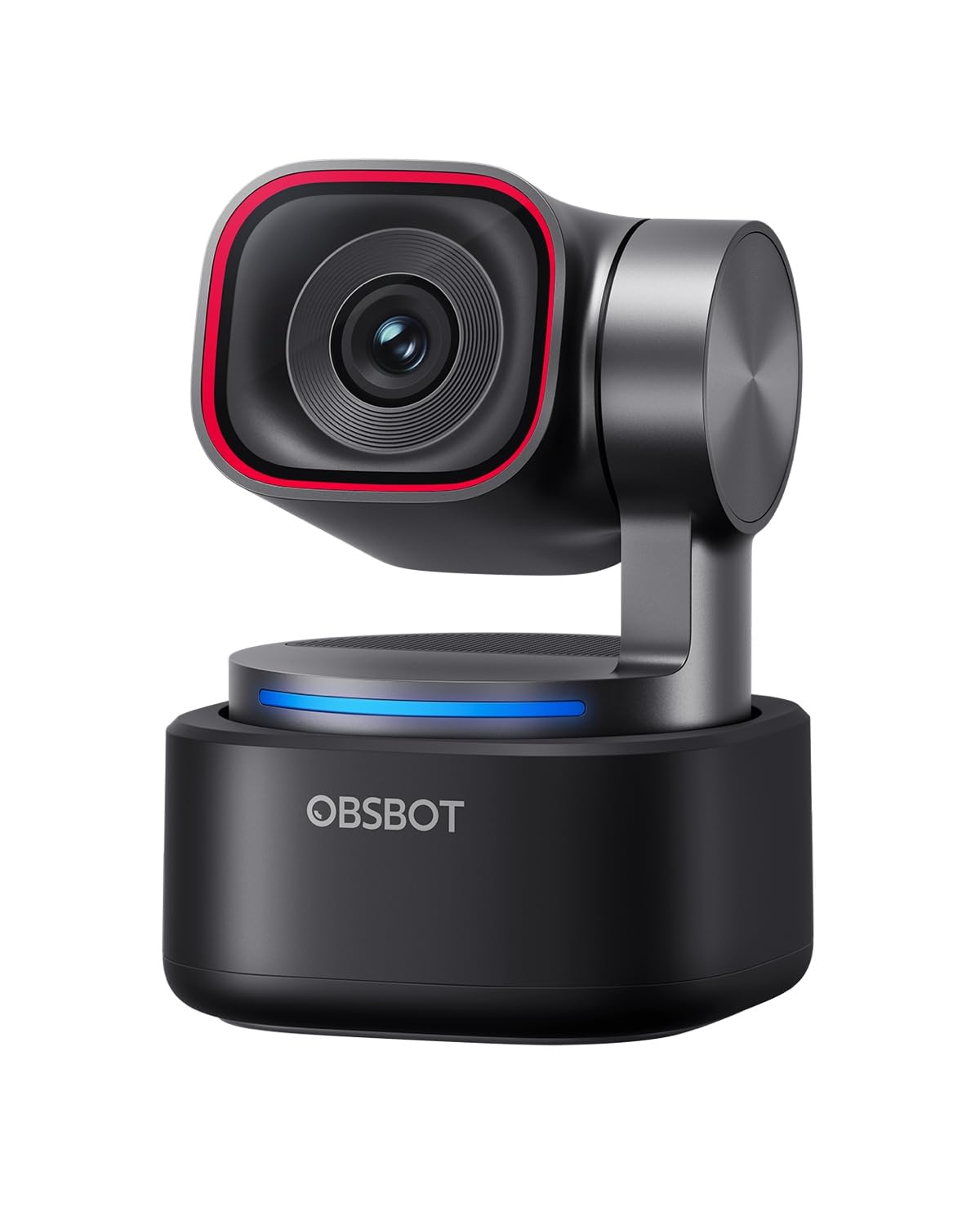
It pans, tilts, and tracks you across the room while three mics catch every word.
If your teaching or demo style involves getting up and walking around, this is the camera that follows you. The gimbal mounts a 1/1.28-inch CMOS and streams 4K at 30fps or 1080p at 120fps. A wide ISO range from 0 to 12800 and DCG HDR keep the picture balanced in low-light scenes. AI Tracking can lock onto one person, a whole group, or more than 200 types of objects — so a moving demo stays in frame without a camera operator.
The triple-mic array is the upgrade that matters for calls. One omnidirectional mic takes in the whole scene while two MEMS directional mics (tiny mics that aim at a voice) pin down whoever is talking. Five audio modes let you shift how aggressive the noise reduction is. The camera is also 48 percent smaller and 34 percent lighter than the previous model, which makes it easy to pack for a trip.
You control it with a voice command or a wave of your hand — wake it, track, zoom, or switch presets without touching a button. Setup is easy via USB to a Windows 10 (64-bit) or later PC or a macOS 11.0 or later Mac. The one thing to watch is smooth motion. The panning gets mixed reactions: some love how smoothly it glides, and others mention sudden movements or the camera pointing the wrong way. If gesture control misbehaves, the listing suggests turning it off.
Why presenters love it
- AI Tracking 2.0 follows you or a group automatically
- Three-mic array with five audio modes for clear pickup
- 4K at 30fps or 1080p at 120fps for smooth motion
- Smaller and lighter than its predecessor
Keep in mind
- Panning can jerk or point off-target for some users
- Gesture control may need turning off when it misbehaves
- Premium price puts it above the mid-range picks
Best for: Online instructors, live streamers, and anyone who moves while presenting.
Not for: People who sit still on every call — a fixed camera saves you the cost of a gimbal.
8. Owl Labs Meeting Owl 3 Camera

One gray cylinder that sees the whole table and hears everyone seated around it.
This is not a desk camera, and it should not be judged like one. The Meeting Owl 3 captures 360-degree video in 1080p HD and picks up 360-degree audio up to 18 feet (5.5 meters) away. Its Owl Intelligence System uses visual and audio cues to automatically focus on whoever is speaking while showing a 360-degree view of the room. That combination is what makes it the right tool for a real conference table, where the person talking changes with every minute.
Setup is the part buyers love. The listing promises a first meeting within 6 minutes of unboxing, and the plug-and-play USB setup delivers — this is widely described as user-friendly to install, with a simple interface. It is certified for Microsoft Teams and works with Zoom, GoTo Meeting, Google Meet, Cisco Webex, and more. The box includes the Meeting Owl 3 itself, a 12V power supply, a setup guide, and a USB-C 6-foot cable.
Two honest notes. Video quality gets mixed reactions — some praise the high-definition capture, and others find the image grainy, which is the cost of spreading one 1080p sensor across a full circle. Value is also weighed carefully by buyers; many find it worth the spend for a hybrid room, and some feel it does not justify the cost. At 16 mp effective still resolution, the detail is spread thin. For a boardroom that needs every face visible, that is a fair trade.
Where it shines: You walk into a room and are on a call in minutes. That easy deployment is the whole pitch, and the audio pickup across 18 feet (about the length of a large conference table) backs it up.
Be honest about video: Grain is the recurring gripe. This camera earns its place on audio and speaker-tracking, not on pixel-perfect video.
Made for: Offices and hybrid teams equipping a real meeting room where many people sit around one table.
Wrong tool if: You work solo at a desk — a standard clip-on camera does the same job for a fraction of the cost.
Know the Specs
Resolution and sensor size
Resolution is the number of pixels the camera records with — 1080p is Full HD, and 4K is roughly four times the detail. But a bigger sensor does more for a dim room than a higher resolution number. The Insta360 Link 2C Pro’s 1/1.3-inch sensor and the OBSBOT Tiny 3’s 1/1.28-inch sensor each gather more light per pixel, so they look cleaner in a low-lit room than a 1080p camera struggling in the dark.
Frame rate and motion
Frame rate is how many still images the camera captures each second, and it decides how smooth motion looks. A camera running 30fps handles a talking head fine. A camera running 1080p at 60fps or 120fps keeps moving hands and gestures smooth, which matters if you demonstrate something on camera. The MX Brio and the Tiny 3 both offer these higher-frame-rate modes.
Field of view
Field of view is how wide an angle the lens takes in. A narrower 66-degree lens like the HP 320 keeps your face large in frame. A wider 90-degree lens like the EMEET C960 fits more people. A 360-degree camera like the Meeting Owl 3 sees the entire room at once, which only helps when more than one person needs to be visible.
Microphone pickup and noise reduction
A noise-reduction mic filters steady background sound before it reaches the call. A dual-mic setup catches your voice from two angles, which helps when you turn your head. A triple-mic array like the OBSBOT Tiny 3’s uses directional mics to aim at a voice, while the Meeting Owl 3 uses 360-degree pickup to hear a full table from up to 18 feet away.
Common Questions
Do I need a USB webcam with microphone if my laptop already has one built in?
Will a 4K webcam look better than 1080p on a Zoom call?
Will the Acer A610 work if my laptop only has USB-C ports?
Does the Meeting Owl 3 work with Zoom and Google Meet?
Why does my webcam microphone sound quiet on calls?
Can I use a webcam tripod for an online proctored exam?
Does the OBSBOT Tiny 3 work with a Mac as well as a PC?
Is the Insta360 Link 2C Pro compatible with Windows Hello?
What field of view do I want for a small home office?
Can the webcam microphone pick up a whole conference table?
The Bottom Line
For most people, the usb webcam with microphone that gets the job done is the Logitech Brio 301, because its 1080p picture, automatic light correction, and noise-reduction mic make every call look and sound clean without setup. If you want the best picture money can buy in a dim room, the Insta360 Link 2C Pro pairs 4K with a 1/1.3-inch sensor. And for a full conference table, the Owl Labs Meeting Owl 3 hears everyone up to 18 feet away and tracks the speaker automatically. If you want zero fuss, take the Brio 301 — it is the one most buyers settle on and keep.
How we choose
We do not accept paid placement. Every pick is matched to a real buyer and a real use-case; we do not hands-on test units.
Sources
Specifications: manufacturer listings and product documentation. Review insights: verified customer reviews, as of November 2026. Pricing: not shown on this page (it changes often); check the current price via the retailer link.
As an Amazon Associate, Tactical Gear Guy earns from qualifying purchases. This does not affect which products we feature.