Specs are compiled from manufacturer listings and verified buyer reviews and can change over time — please confirm the key details on the product page before buying.
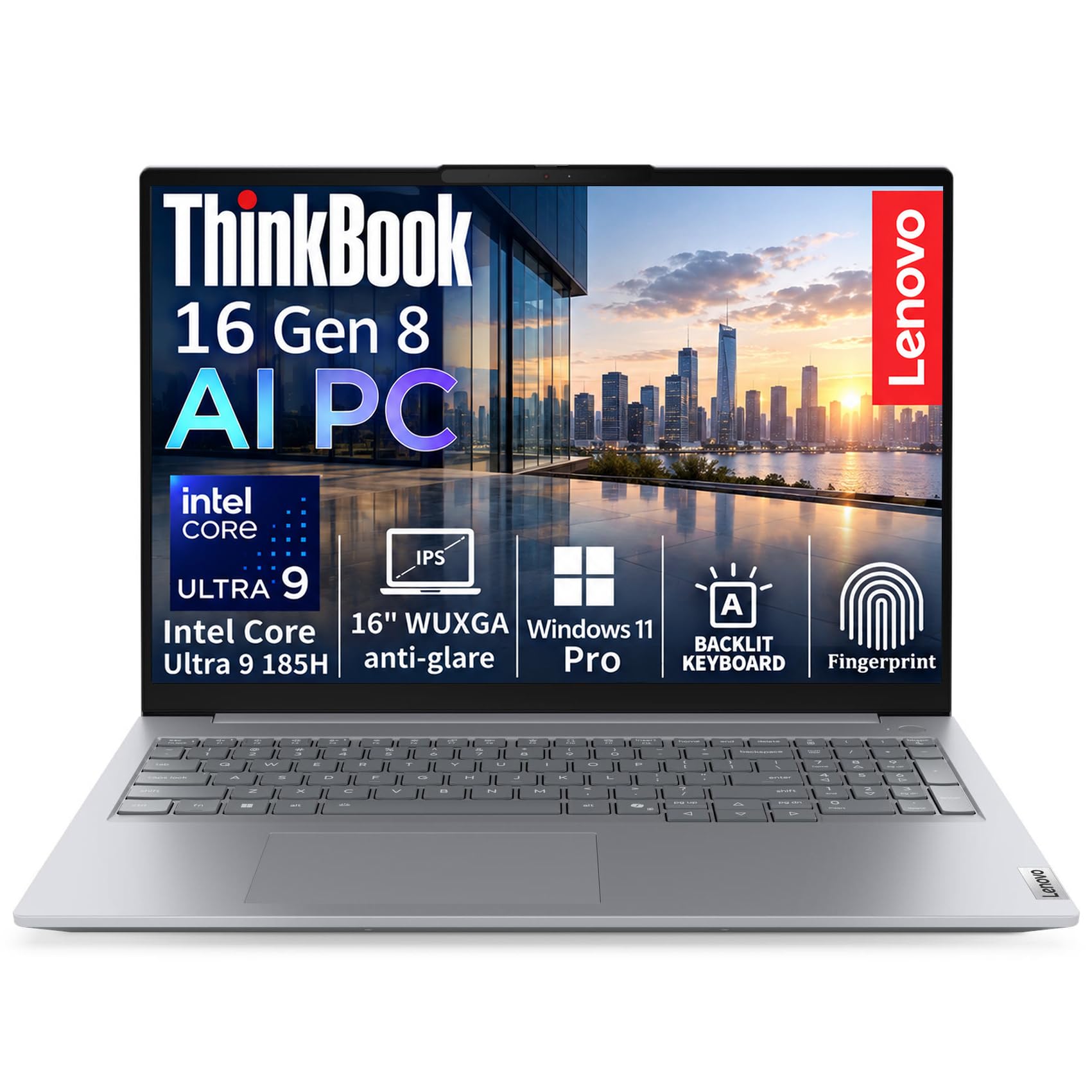
Buying an Intel Core Ultra 9 185H laptop starts with one question: which shell can actually cool that chip? The 185H runs 16 cores and 22 threads, and a thin body that cannot cool it wastes your money. Every pick below uses that exact processor, so the real differences are screen, memory, cooling and weight. The Lenovo ThinkBook 16 G8 leads because it pairs the chip with 64GB of DDR5 memory and a 1TB SSD — the most headroom here for heavy multitasking at any tier.
This guide is built by comparing the manufacturers’ published specifications and the patterns across verified customer reviews, so you get each pick’s real strengths and trade-offs instead of marketing spin.
You will see how memory and screen refresh change daily work, and which model fits a buyer watching weight as closely as speed. The four picks here cover the realistic spread of intel core ultra 9 185h laptops without padding the list with machines that only look fast on paper.
Top Picks
How To Choose The Best Intel Core Ultra 9 185H Laptops
Buying a laptop around one specific processor sounds simple, and it usually goes wrong in the same place: the machine looks right on the spec sheet but feels wrong in your hands or on your desk. Work through the four decisions below in order and the shortlist gets obvious fast.
Memory is the real fork in the road
The 185H is the same chip in every laptop here, so memory becomes the spec that actually splits these machines. One option carries 64GB of DDR5 memory — a type of memory that comes on a removable stick — while others run 16GB or 32GB of LPDDR5X, which is soldered to the board and cannot be swapped later. If you keep dozens of browser tabs open beside a photo editor and a video call, the 64GB machine gives you slack the others cannot match. If you mostly write, browse and stream, 16GB handles it, and you get a lighter, longer-lasting laptop in return.
Screen type changes how the laptop feels hour to hour
Two of these laptops use OLED panels — screens where each pixel makes its own light — and two use IPS panels, which light the whole screen from behind. OLED gives deeper blacks and stronger colour, which matters if you edit photos or watch video. IPS tends to hold up better in a bright room and is easier on the wallet. Refresh rate matters just as much: 120Hz redraws the screen twice as often as 60Hz, so text stays sharper while you scroll long documents.
Cooling and weight pull against each other
A processor with 16 cores produces real heat, and thin bodies have less room to move that air. That is why the lightest machines here are not automatically the fastest in sustained work. Weigh what you carry daily against what you actually run. A 3.64 lb laptop is easy in a backpack, but if your day is a three-hour render or a giant spreadsheet recalculation, a slightly heavier chassis with more cooling space usually finishes sooner.
Ports decide if you need a dock
All four picks include Thunderbolt 4 — a USB-C port that carries data, video and charging at once — but the count and the extras differ. One machine adds wired Gigabit Ethernet and a built-in SD card reader, which matters if you pull photos off a camera card or sit on office networks. Another leans on HDMI 2.1 and USB-A for older peripherals. Count what you plug in on a normal Tuesday before you decide which set of ports you can live with.
Side-by-Side Comparison
| Model | Best For | Memory | Display | Weight | Amazon |
|---|---|---|---|---|---|
| Lenovo ThinkBook 16 G8★ Best Overall | Heavy multitasking | 64GB DDR5 | 16″ 1920×1200 IPS, 60Hz | 3.75 lbs | Amazon |
| ASUS Zenbook Duo 14 OLED | Dual-screen workflows | 32GB LPDDR5X | Dual 14″ 2880×1800 OLED, 120Hz | 3.64 lbs | Amazon |
| Acer Swift Go 16 | Touchscreen on a budget | 16GB LPDDR5X | 16″ 1920×1200 IPS touch, 100% sRGB | — | Amazon |
| ASUS Vivobook S 16 OLED | Battery-first portability | 16GB | 16″ OLED | Just over 3 lb | Amazon |
Detailed Reviews
1. Lenovo ThinkBook 16 G8
Our pick — 4.0+★ from 100+ verified ratings; the strongest balance of quality and price.
Sixty-four gigabytes of memory at a weight that still leaves the house — this is the workstation that hides in a briefcase.
Start with the number that decides everything else: 64GB of DDR5 SODIMM memory. That SODIMM detail matters because the memory sits on a removable stick, so you can service or swap it later instead of living with a soldered ceiling. Pair that with 1TB of PCIe M.2 storage and the 16-core, 22-thread Intel Core Ultra 9 185H, and this is a machine built for the person who never closes anything. You keep the browser, the spreadsheet, the editor and the video call open at once, and the laptop does not start shuffling data to disk.
The chip itself runs up to 5.1GHz on its fast cores and carries 24MB of Intel Smart Cache, which is a chunk of memory built into the processor that it uses to keep frequent work close at hand. There is also an Intel AI Boost NPU — a small dedicated chip for AI tasks — rated at up to 11 TOPS, with Intel Arc graphics handling visuals. In practice the Arc graphics and the NPU offload work that used to slow a laptop to a crawl during background photo processing or a call with AI noise removal. It runs Windows 11 Pro, and a Match-on-Chip fingerprint reader in the power button logs you in with one press. An IR camera adds Windows Hello face login, a privacy shutter covers the lens when you are done, and a firmware TPM 2.0 chip stores your security keys.
You get a 16-inch WUXGA screen (1920×1200, a slightly taller 16:10 shape than a standard 16:9 panel) at 300 nits of brightness with an anti-glare finish, so glare stays down in a bright office. It is a 60Hz panel, so treat this as a work screen, not a gaming one. Connectivity is where it wins: Thunderbolt 4/USB4 at 40Gbps (a fast port that carries video and power) with display and power delivery, a second USB-C with DisplayPort 1.4, two USB-A ports, HDMI 2.1 that drives 4K at 60Hz, an SD card reader, Gigabit Ethernet and Wi-Fi 6E. It is the only pick here with a built-in card reader and a wired network jack, so you can skip the dock on a photography or office desk. At 3.75 lbs with an aluminum top and PC-ABS bottom, it is 3% heavier than the Zenbook Duo — a difference you will not notice in a bag, but it buys the bigger cooling space and full port set.
Where it earns its place
- 64GB of DDR5 memory on a removable stick — heaps of headroom for parallel heavy apps, and upgradeable later.
- 1TB PCIe M.2 SSD holds huge project files and photo libraries without a second drive.
- SD reader plus Gigabit Ethernet mean fewer dongles on a desk that handles camera cards and wired networks.
- MIL-STD-810H testing means the chassis was put through drop, vibration and temperature checks, so it takes travel in stride.
What to weigh first
- The 60Hz panel is the slowest refresh of the group — fine for spreadsheets, less fluid for creative scrolling.
- 300 nits and 45% NTSC colour is modest, so photo work in a bright room wants a calibrated external monitor.
- Memory this generous and a chassis this solid push it to the heaviest pick here at 3.75 lbs.
Reach for it if: you run several memory-hungry programs at once and want a machine that will not flinch when you open a fourth.
Look elsewhere if: you edit colour-critical photos on the go — the 45% NTSC gamut is the trade-off you accept for the memory and ports.
2. ASUS Zenbook Duo Dual 14″

Two screens that unfold from one slim body — the closest thing here to carrying a second monitor in a backpack.
Two 14-inch OLED panels face you at once, each at 2880 x 1800. That is 50% more pixels across than the ThinkBook’s 1920 x 1200, so text and spreadsheets arrive noticeably crisper. The refresh rate tells the other half of the story: these panels run at 120Hz against the ThinkBook’s 60Hz, a twofold gap that turns scrolling and window dragging into glassy motion. Each display is Pantone validated with 100% DCI-P3 coverage and 500-nit HDR peak brightness, so colour work holds up outdoors. And when you fold it shut, it looks and behaves like a normal laptop, which is the whole point.
Two full screens in one bag is the reason to pick this one. Inside sits the same Intel Core Ultra 9 185H at up to 5.10GHz, paired with 32GB of LPDDR5X memory (fast, low-power memory soldered to the board) and a 1TB SSD. Intel Arc graphics handles the visuals. The clever parts are the detachable Bluetooth keyboard and the built-in kickstand: set up Dual Screen mode for two full workspaces, Desktop Mode for sharing, or snap it back to Laptop Mode when you only need one panel. At 3.64 lbs and 0.78 inches thin, it slips into a normal bag, and the box includes a backpack, an ASUS Pen 2.0 stylus and a 65W USB-C charger. This is the lightest of the four, and its 32GB of memory is twice the 16GB the Vivobook and Swift Go carry.
Performance is the single most-discussed strength in the reviews, and the dual-screen setup draws near-universal praise for how much faster multitasking feels. The honest catches cluster in two places: reliability and battery life. Reliability and battery life both draw mixed feedback, with the 75Wh battery rated for up to 13.5 hours of video in Laptop mode and 10.5 hours in Dual Screen mode, so a second screen costs you playback time. Fast-Charge runs through the Thunderbolt 4 ports. The practical read: buy this for the dual-panel workflow, and plug in when you plan a long dual-screen session.
The dual-panel payoff: two 2880 x 1800 OLED touchscreens at 120Hz with 500-nit HDR and 100% DCI-P3 give you a colour-accurate secondary workspace you would otherwise carry as a separate monitor.
The realistic catch: battery life is the most-discussed weak spot here, and dropping to Dual Screen mode cuts playback from 13.5 hours to 10.5 — plan on the 65W charger for long days.
Built for: designers, traders and multitaskers who genuinely use a second display every day and value the fold-flat travel of 3.64 lbs.
Think twice if: you want a single screen and long unplugged sessions — the extra panel is the reason to buy it, and it draws power.
3. Acer Swift Go 16 Intel Evo

The one you can tap and swipe — a 16-inch touch panel with the fastest wireless standard in the group.
You can tap the screen instead of reaching for the trackpad — that is the dividing line for this Acer. The 16-inch WUXGA panel runs 1920 x 1200 with 100% sRGB coverage (the colour range most web and photo work is authored in), and it responds to fingers as well as a trackpad. If you sketch layouts with a stylus, tap through forms, or hand the laptop to someone to sign something, that layer changes how you work. Behind it sit the same 16 cores of the Intel Core Ultra 9 185H at up to 5.1GHz and Intel Arc graphics, with a dedicated AI engine in Intel AI Boost that moves AI tasks off the main processor. A single Copilot key opens Windows’ assistant with one press.
You cannot add memory later: it is 16GB of LPDDR5X, fast but fixed. Storage is a 1TB SSD, and there is one free M.2 slot (a slot for a second stick-shaped drive), so you can add a second drive rather than replace the first. Wireless is the standout: Wi-Fi 7 is the newest standard here, ahead of the Wi-Fi 6E in the ThinkBook and the older Bluetooth 5 on the Zenbook Duo, so on a modern router you get the most future-proof connection in the group. It is verified as an Intel Evo Edition machine, a badge that means the maker submitted it for responsiveness and battery checks. A fingerprint reader handles login, and the Swift Go ships as an AI-ready Windows 11 Home laptop with Intel Unison for calls, texts and file transfers to a phone.
Wireless edge and touch input: Wi-Fi 7 plus a 100% sRGB touch display is a combination none of the other three offer, and the spare M.2 slot lets you grow storage instead of swapping it.
The caveat to plan around: 16GB of LPDDR5X is soldered, so buy for the memory you will need in three years, not just today — there is no upgrade path.
Pairs well with: students, note-takers and anyone who works on a network with a recent router and wants tap-and-swipe input on a 16-inch screen.
Pass on it if: your workload already strains 16GB, because that memory is fixed for the life of the machine.
4. ASUS Vivobook S 16 OLED

Sixteen hours away from a wall socket, on an OLED screen — this is the one that survives the long day unplugged.
The headline is endurance: up to 16 hours of battery, more than three hours beyond the Zenbook Duo’s 13.5 hours of video playback. ASUS calls it the “Slim,” and at just over 3 lb it backs that up — easy in a shoulder bag, light enough that you stop thinking about it. The display is a 16-inch OLED that ASUS describes as nearly frameless, built to hold brightness and colour even outdoors. The processor is the same Intel Core Ultra 9 185H with Intel Arc graphics for AI-accelerated work, and it carries the Intel Evo Edition badge.
Memory is 16GB with a 1TB SSD, so large files and big apps fit without a second drive. Reviewers consistently call it lightning fast, and the OLED screen draws the same level of praise. The touchpad is the mixed note, so check the feel in the first few days and adjust sensitivity to taste. For calls there is a 1080p FHD IR camera with a shutter for Windows Hello login, plus multi-dimensional sound. A customizable RGB keyboard adds colour to the backlight, and the port set covers two Thunderbolt 4, two USB-A, HDMI, a combo audio jack and a micro SD reader, with a 75W adapter in the box.
Why it holds its own
- Up to 16 hours of battery — the longest listed playback of the four picks, for days that run past the nearest outlet.
- Just over 3 lb, so the endurance does not come with a heavy bag.
- 16-inch OLED screen with a near-frameless design for video and photo viewing.
- Customisable RGB keyboard backlight and a large touchpad.
Small print worth knowing
- 16GB of memory is fixed, so heavy multitaskers hit a ceiling the ThinkBook’s 64GB does not have.
- Touchpad responsiveness is where owner experiences split, so a quick settings tweak may be needed.
Made for: travellers and students who are rarely near a socket and want OLED colour on the move.
Not the one if: you routinely run memory-hungry software — 16GB is the ceiling here.
Know the Specs
Cores, threads and Turbo speed
More threads mean more heavy apps can run at once without stalling. A core is one processing unit inside the chip; a thread is a queue of work it handles. The Intel Core Ultra 9 185H in all four laptops runs 16 cores and 22 threads, with fast cores reaching up to 5.1GHz under short bursts — that is the Turbo ceiling, not a speed it holds all day. That is why the 64GB machine with room for those threads matters as much as the chip itself.
DDR5 versus LPDDR5X memory
Both are current, fast memory types. DDR5 in SODIMM form sits on a removable module, so you can swap or expand it — the ThinkBook’s 64GB is this type. LPDDR5X is low-power memory soldered to the board: it uses less battery and takes less space, but it is fixed for life, which is the situation on the Acer and the Zenbook Duo. Decide by whether you expect to add memory later.
Refresh rate and resolution
Refresh rate is how many times per second the screen redraws — 60Hz means 60 times, 120Hz twice that. A higher rate keeps scrolling and motion smooth. Resolution is the pixel count: 1920 x 1200 gives a taller 16:10 working area, while 2880 x 1800 fits more detail on the same footprint. Match both to your work — a 120Hz OLED suits video and design, a 60Hz IPS is fine for documents and code.
NPU and AI Boost
An NPU is a small dedicated processor for AI-style tasks such as background blur, noise removal and photo enhancement. The 185H’s Intel AI Boost NPU is rated at up to 11 TOPS, a measure of how many operations per second it can handle. Because the NPU takes this work off the main CPU, the laptop stays responsive during calls and editing instead of slowing down while the chip juggles everything.
Common Questions
Is the Intel Core Ultra 9 185H good for video editing and 3D work?
Can I upgrade the RAM in these Core Ultra 9 185H laptops?
Is a 120Hz OLED screen worth it over a 60Hz IPS panel?
Does the 185H run hot or throttle in a thin laptop?
How long does the battery last on these laptops?
Which of these has Thunderbolt 4 and can drive an external monitor?
Do I need 64GB of memory or is 16GB enough?
Is Wi-Fi 7 worth choosing the Acer Swift Go 16 for?
What does the Intel Evo Edition badge mean on the Vivobook and Swift Go?
Can I add a second SSD to any of these laptops?
The Bottom Line
Most people shopping intel core ultra 9 185h laptops should start with the Lenovo ThinkBook 16 G8: 64GB of upgradeable DDR5 memory, a 1TB SSD, Thunderbolt 4 at 40Gbps, an SD reader and wired Ethernet make it the most complete work machine of the four, and it holds the top rating here at 4.0+ stars across 100+ ratings. If a second screen is the point, the ASUS Zenbook Duo delivers dual 2880 x 1800 OLED panels at 120Hz that nothing else here matches. For the longest unplugged day at the lightest carry, grab the ASUS Vivobook S 16 OLED and its up-to-16-hour battery.
How we choose
We do not accept paid placement. Every pick is matched to a real buyer and a real use-case; we do not hands-on test units.
Sources
Specifications: manufacturer listings and product documentation. Review insights: verified customer reviews, as of November 2026. Pricing: not shown on this page (it changes often); check the current price via the retailer link.
As an Amazon Associate, Tactical Gear Guy earns from qualifying purchases. This does not affect which products we feature.