Specs are compiled from manufacturer listings and verified buyer reviews and can change over time — please confirm the key details on the product page before buying.
The shortest route to a smart home isn’t a hub or a rewired wall — it’s a plug that sits between your lamp and the socket and obeys Google Assistant. The decision that actually matters is simpler than the spec sheets suggest: does the plug connect on the Wi-Fi band your router actually broadcasts, and does it hold that connection once the novelty wears off? Every pick below talks to Google Home, and the differences that separate them are setup friction, outlet crowding, and how much data about your power use you want back.
This guide is built by comparing the manufacturers’ published specifications and the patterns across verified customer reviews, so you get each pick’s real strengths and trade-offs instead of marketing spin.
You’ll see which models survive a crowded power strip, which ones report live energy use, and which ones route through Matter (a smart-home standard that lets devices work across apps) so they don’t care which app started the party. The short version: my top pick pairs voice control with a schedule you can set once, and it happens to be among the most widely owned plugs for google home you can put in a cart today.
Top Picks

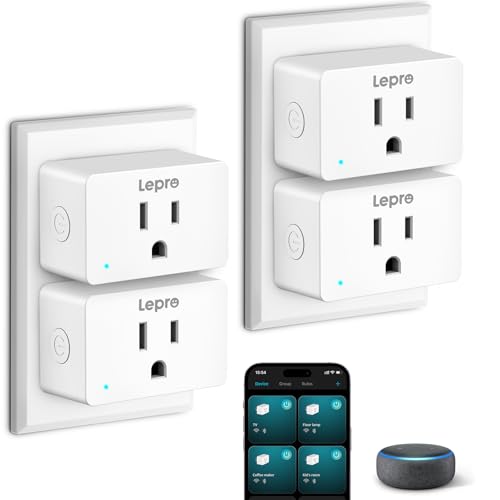

How To Choose The Best Plugs for Google Home
Buying a smart plug is a five-minute decision if you check three things first. Get those wrong and you’ll spend an evening on a ladder rebooting a router instead of telling your living room to dim.
Check the Wi-Fi band before anything else
Almost every budget plug talks only to a 2.4GHz network — the slower, longer-reaching band your router broadcasts alongside the faster 5GHz one. That matters because many modern routers merge both bands under one name, and the plug can’t tell them apart during setup. If yours does that, you may need to split the bands in your router settings before pairing. A plug that supports both bands skips the whole detour.
Match the amp rating to what you’re plugging in
A 15A rating with a 1800W ceiling is the standard for these plugs, and it covers lamps, fans, humidifiers, coffee makers, and string lights without drama. It is not a licence to run a space heater or an air conditioner through a plug that wasn’t built for that continuous draw. If the appliance has a motor or a heating element, read the plug’s stated wattage limit and stay under it.
Decide if you want energy data
Some plugs just switch power on and off. Others log how much electricity passes through them, which lets you see what a device actually costs to run. That’s the difference between guessing why your bill jumped and knowing the space heater in the spare room is the culprit.
Look at the physical footprint
A plug that covers both sockets of a wall plate forces every other device in that spot to find a new home. Compact bodies and 2-in-1 designs that split one outlet into two independently controlled sockets solve this without a power strip. If you’re working with a tight outlet behind a couch, this is the spec that decides the purchase.
Side-by-Side Comparison
| Model | Best For | Current Rating | Connectivity | Pack Size | Amazon |
|---|---|---|---|---|---|
| Kasa Smart Plug HS103P3★ Best Overall | Set-and-forget voice control | 15 A | Wi-Fi | 3-Pack | Amazon |
| Lepro P1 Smart PlugsBest Nightstand Pick | Silencing the indicator LED at night | 15 A | Bluetooth, Wi-Fi | 4-Pack | Amazon |
| HBN 15A Smart PlugBiggest Batch | Shared household control | 15 A | Wi-Fi | 4-Pack | Amazon |
| EIGHTREE 5GHz Smart Plug | Routers that run 5GHz only | 15 A | Wi-Fi | 2-Pack | Amazon |
| GE Cync Smart Plug | One plug across Alexa, Google and Apple | 15 A | Bluetooth, Matter, Wi-Fi | 3-Pack | Amazon |
| EIGHTREE Smart Plug 15A | High-power appliances | 15 A | Bluetooth, Wi-Fi | 4-Pack | Amazon |
| GHome Dual Smart Plug | Two devices in one outlet | 15 A | Bluetooth, Wi-Fi | 2-Pack | Amazon |
| Tapo P110M | Tracking energy costs | 15 A | Matter, Wi-Fi | 4-Pack | Amazon |
Detailed Reviews
1. Kasa Smart Plug HS103P3 3-Pack
Our pick — 4.5+★ from 150,500+ verified ratings; the strongest balance of quality and price.
Three plugs, one app, and a schedule that keeps running when you forget it exists.
If you want the least dramatic smart-home upgrade possible, this is it. The HS103P3 is a 15A plug rated for the ordinary stuff — lamps, fans, humidifiers, holiday lights — and it answers to both Google Assistant and Alexa. Three of them in one box means the living room lamp, the bedroom fan, and the string lights on the balcony all get a voice command without buying three separate products. Kasa holds UL certification for the electrical side — the safety stamp that matters on something permanently plugged into your wall.
The scheduling is where this plug quietly earns its keep. You can set a timer or a countdown so the porch light comes on at dusk and the bedroom lamp cuts out an hour after you normally fall asleep. Setup runs on 2.4GHz Wi-Fi — plug it in, open the Kasa app, follow the steps. Nothing about that is notable, and nothing about it should be. That’s the point of a plug: it should disappear into the wall.
Kasa is among the most widely owned smart plug brands on the market, with the crowd volume to match — 4.5+ stars across a huge buyer base. The honest trade-off is that this is the plainest option here: no energy monitoring, no Matter badge, no 5GHz support. If your router hides 2.4GHz behind a combined network name, you’ll need to sort that out before pairing. For a first smart plug or a whole-house batch of them, this is the one that behaves.
Where it earns its place
- 15A rating covers lamps, fans, and humidifiers without hesitation
- Voice control through both Google Assistant and Alexa
- Timer and countdown schedules run without your phone in the room
- UL certified — a real safety stamp on a permanently powered device
- Three plugs to a box, so one purchase covers several rooms
What you give up
- 2.4GHz Wi-Fi only — a combined-band router needs splitting first
- No energy monitoring, so you can’t see what a device actually draws
- No Matter support, so it stays inside the Kasa app ecosystem
Buy it if: you want a dependable voice-controlled plug for everyday lamps and fans and don’t need to track watts.
Look past it if: your router is 5GHz-only or you specifically want per-device energy data.
2. Lepro P1 Smart Plugs 4 Pack
The four-pack that lets you kill the little LED light before it ruins your sleep.
Four plugs, and the one detail that sells them sits on the front face: you can switch the indicator light off completely. A glowing green dot a metre from your pillow is a genuinely irritating thing to discover after you’ve already mounted the plug. Lepro thought about it. The body is also compact enough that it won’t block the second socket when you’re using several.
For a side-by-side with the Kasa set: the Lepro measures 2.32 x 1.14 x 1.5 inches, while the EIGHTREE 5GHz plug runs 1.7 x 2.5 x 2.5 inches — the Lepro’s narrower profile leaves more of a shared outlet plate usable. It’s a 15A plug rated to 1800W, so lamps, fans, coffee makers, and decor lights are all fair game. Pairing uses Bluetooth plus 2.4GHz Wi-Fi, which Lepro claims gives a steadier handshake than Wi-Fi alone. There’s also a power-outage memory that restores your settings after a blackout, and a physical safety lock to keep small fingers out.
Here’s the catch, and it’s a real one: this plug only works with the Lepro app. It will not join Smart Life or Tuya, so if you’ve already built your home around either of those, you’re adding a fourth app to your phone. The review pages back that up — the switching and reliability win people over, while the connectivity and app lock-in draw the honest gripes. ETL and FCC certified, IP40 rated, and a shade under eight ounces in the hand. Four plugs for a budget-friendly outlay is fair trade for the app compromise.
The app is the whole story: Lepro’s own app is mandatory here. Owners who already live in Smart Life or Tuya will find this plug can’t be folded in, so budget for one more icon on your home screen.
Worth it for: bedrooms and any spot where a glowing indicator would keep you staring at the ceiling.
Think twice if: your smart home already runs on Smart Life or Tuya — this plug refuses to play there.
3. HBN 15A Smart Plug 4 Pack
Four plugs for a house full of people who all want to control the same lamp.
HBN’s pitch is straightforward: 15A outlets, four to a box, and a family-share feature that lets everyone in the household open the app and run the same devices without passing a phone around. Group control pulls several plugs into one scene, so “goodnight” can kill the lamp, the fan, and the string lights in one tap. For elderly family members or a plug wedged behind a heavy bookshelf, voice control through Alexa or Google Home is the practical fix.
The HBN Smart app handles timer and countdown schedules, so you can have lights come on at dusk and cut off at sunrise without thinking about it again. Setup is a 2.4GHz connection with no hub needed, and the unit carries ETL certification. That’s the clean part of the story.
The less clean part: this is a plug with a split personality across its review history. Build quality is the bright spot — the hardware itself draws strong marks, and the outlet feels solid in the wall. But the long-term reliability thread is thinner, with a recurring theme of units that work fine and then quietly stop. It’s not universal, and a lot of these plugs run for years. Treat it as the pick for low-stakes devices you won’t miss — a reading lamp, a fan — rather than the one running your fridge or a space heater.
What buys the goodwill: the physical build. Owners come away impressed by how solid the plug feels, and the ETL certification backs the electrical side.
The honest caveat: reliability is the most-discussed theme in this plug’s history, and not all of it lands positive. Use it where a surprise shutdown costs you nothing.
Reach for this if: you want four plugs and shared household control without one person babysitting the app.
Pass if: the plug will sit behind something expensive that must never cut out unexpectedly.
4. EIGHTREE 5GHz Smart WiFi Plug 2 Pack
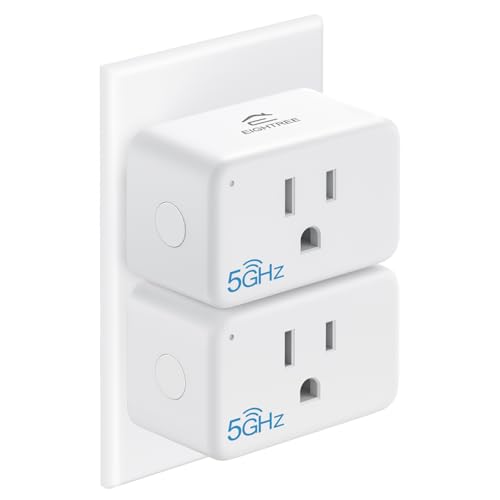
The plug that finally doesn’t care that your router only speaks 5GHz.
Most smart plugs are 2.4GHz creatures, and half of Google Home setup frustration is born from that single limitation. This EIGHTREE connects on both 5GHz and 2.4GHz, so you skip the band-splitting ritual entirely. Pairing runs over Bluetooth plus the Smart Life app — plug in, connect your phone to Wi-Fi, tap the app, and the plug surfaces itself. Voice control works with Alexa, SmartThings, and Google Home.
It’s also a two-in-one squeeze: the body measures 1.7 x 2.5 x 2.5 inches, and the shape is built so two plugs share one outlet at the same time. Energy monitoring is the other headline — you can watch what a given device draws and make a real decision about that always-on space heater. ETL and FCC certified with a two-year customer-service window behind it.
This is the most consistently liked plug in this lineup — reliability and connectivity dominate its review pages, with setup described as quick and the app as intuitive. It’s rated 4.5+ stars across nearly a thousand buyers — a strong showing for a two-pack. The one soft spot is value: some owners feel the two-pack is priced for the convenience. If you have a 5GHz-only router, that convenience is worth it. If you’re on 2.4GHz and patient, the Kasa pack covers more sockets for less.
Standout spec: dual-band Wi-Fi support — rare in this price class and the single biggest setup headache it removes.
Best match for: anyone whose router hides 2.4GHz or who wants to see real power draw per device.
The trade-off: only two plugs in the box, so a multi-room rollout costs more than the Kasa set.
5. GE Cync Smart Plug 3 Pack
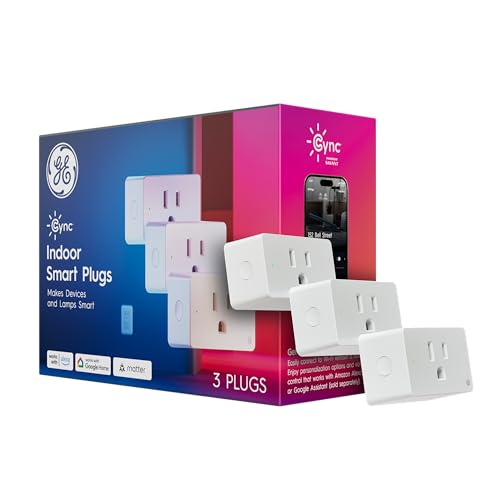
Matter inside means this plug moves into whichever smart home app you settle on later.
Matter is the cross-brand standard that lets devices from different makers talk to a single platform — and this Cync plug carries it. That means it works with Amazon Alexa, Google Assistant, Samsung SmartThings, and Apple Home, so if you switch phones or platforms next year the plug doesn’t need replacing. It’s the only plug in this lineup with Apple Home on the compatibility list, which matters in mixed households where one person lives in Google and another in iPhone land.
Physical design is where it quietly wins: the slim body keeps the second outlet on a standard wall plate free, so you don’t sacrifice a socket to gain a smart one. Schedules run through the Cync app — the fan that comes on before you get home, the curling iron you kill from an armchair, the holiday lights on a timer. It’s a 15A plug with Bluetooth, Matter, and Wi-Fi on board, IP20 rated, and three to a box.
Cync’s reputation is good on setup and functionality, and it’s rated 4.0+ stars across a few hundred buyers. The recurring note is connection stability — a plug that drops off the network and needs re-adding. That’s the thing to watch, and it’s the honest reason this doesn’t top the list. If your home is spread across more than one smart platform, though, that Matter badge is worth the occasional reconnect.
The Matter advantage: this plug is platform-agnostic by design — Alexa, Google, SmartThings, and Apple Home all on one compatible list.
The watch item: reliability is the most-discussed theme in its review history and the feedback is split. Budget a little patience for re-adding it if your Wi-Fi is busy.
Pick it when: your household spans Google, Alexa, and Apple and you want one plug that keeps up.
Skip if: you want the most airtight connection in the lineup — that title belongs elsewhere.
6. EIGHTREE Smart Plug 15A 4-Pack
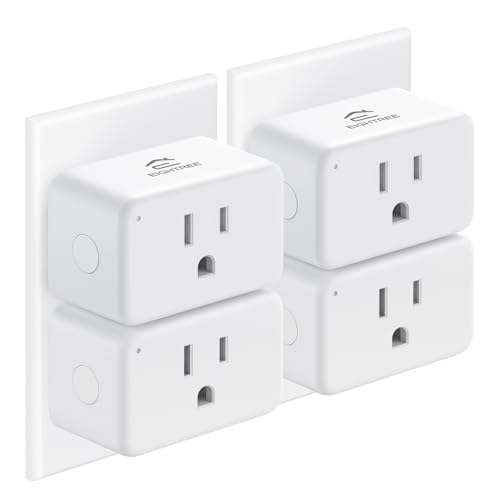
Four plugs built for the hard-drawing end of your house — kettles included.
This is the EIGHTREE set for appliances that actually pull power. The 15A, 120V rating means electric kettles and other high-draw devices are fair game, and the casing is built from fire-resistant materials with ETL and FCC certification behind it. Four plugs to a box makes it the broadest rollout here. Voice control reaches Alexa, Google Home, and SmartThings, and group control handles several appliances in one command. There’s also a share feature so the whole household can run the same plugs.
Compare it directly to its sibling above: this one is a 2.4GHz plug with Bluetooth-assisted pairing, while the smaller EIGHTREE handles both 5GHz and 2.4GHz. If your router is 2.4GHz-friendly, this 4-pack stretches much further per dollar. Pairing goes through the SmartLife app, and the plugs surface automatically once Bluetooth is on.
What owners like is the practical stuff — setup is the strongest theme, alongside reliability, build quality, and ease of use through the app. It’s rated 4.5+ stars across 800+ buyers. Durability is the split topic; a minority report units that stop within a year, which is a fair expectation-setter for anything permanently plugged in. Assign the plugs to low-stakes devices first and you’ll be pleased with the run.
Built for the big stuff: 15A / 120V with fire-resistant materials — this plug can carry a kettle, not just a lamp.
The honest edge: durability is the mixed theme. Most plugs in the box run long, but plan for the occasional early failure.
Choose this for: a four-plug sweep across appliances that pull real amps, especially in a 2.4GHz home.
Skip if: your router is 5GHz-only — the sibling two-pack is the one that connects there.
7. Dual Smart Plug 15A 2 Pack
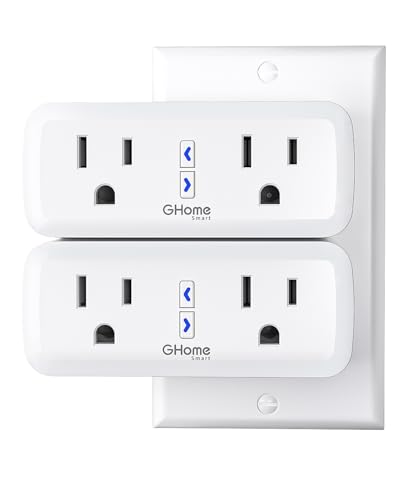
Two sockets inside one plug body, each answering to its own command.
GHome solved outlet crowding by building two independently controlled outlets into a single plug. Two of these packs give you four controllable sockets while only occupying two wall positions. That’s a real win behind a desk or a media cabinet where you’ve got a lamp, a fan, and a phone charger all wanting the same spot. The 15A / 1800W rating means you can run heavy-duty devices through it, and pairing uses Bluetooth plus 2.4GHz Wi-Fi with a 2.4GHz-only restriction — 5G isn’t supported.
Voice control reaches Alexa and Google Home, but the setup order matters: you have to connect the plug to the GHome app first before it becomes visible to your voice assistant. Skipping that step is how most pairing complaints start. Once it’s in, you get scheduling, grouping, family sharing, and remote access through the GHome, Smart Life, or Tuya apps — so no new ecosystem to learn if you’re already there. The casing is V0 fire-resistant, with overload and surge protection, and a two-year warranty behind it.
The dual-outlet design is what people love most about this plug — the split sockets draw genuine praise. Ease of use and overall quality are the next strongest themes, so daily operation is smooth. Reliability is the split one; a minority report a plug that quit within a week. It’s rated 4.5+ stars across several hundred buyers. For the outlet-hungry home, that’s a fair bet.
Why it’s the space-saver: two independent sockets per plug body, so four controlled devices fit where two plugs normally would.
Made for: desks, media cabinets, and any wall plate you’re tired of filling with power strips.
One thing first: connect it to the GHome app before you try linking Alexa or Google — the opposite order fails.
8. Tapo Smart Plug P110M 4-Pack
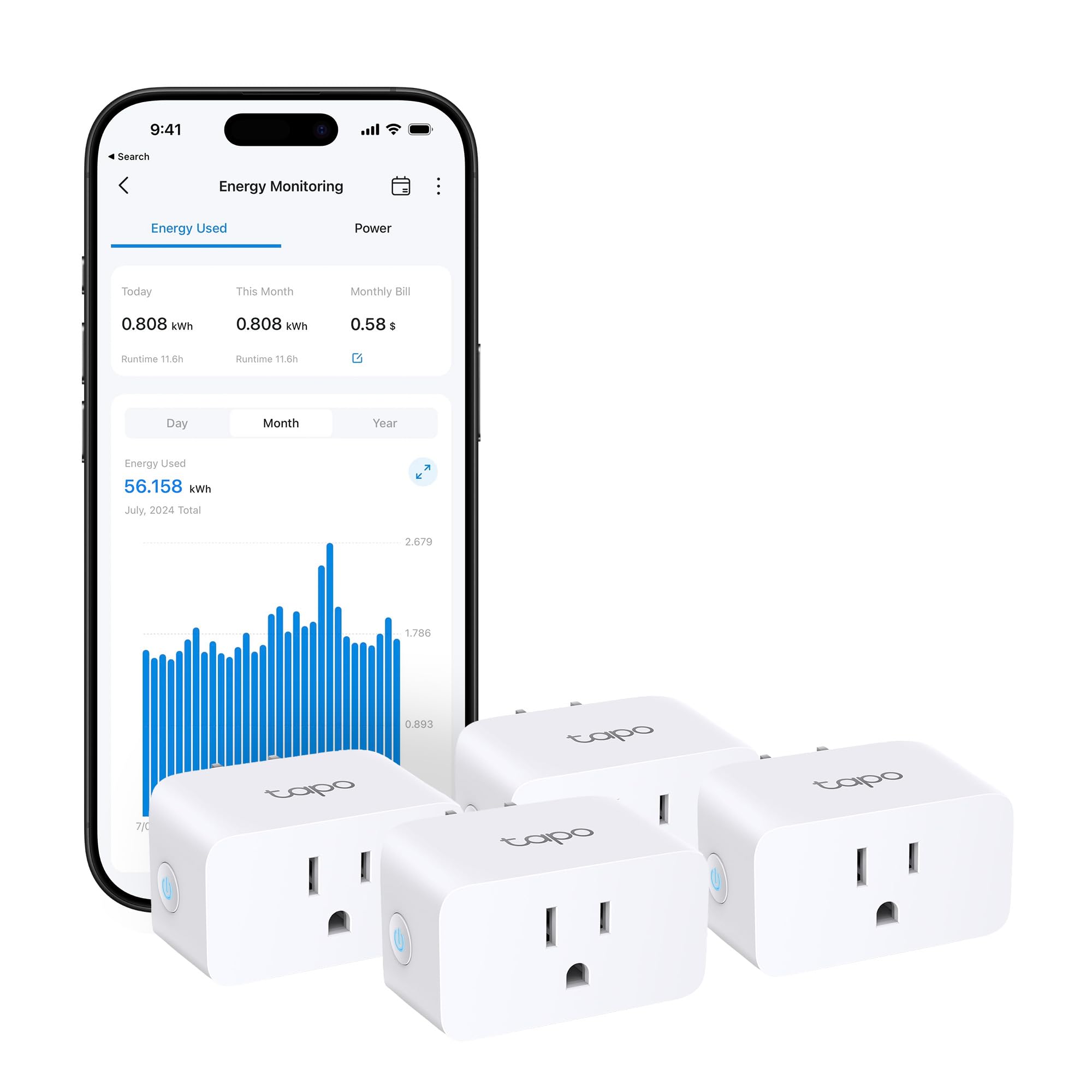
The plug that tells you, in numbers, exactly where your electricity bill is leaking.
Tapo’s P110M is the only pick here that turns energy monitoring into a full accounting tool. It logs in-depth statistics on what a device draws, models what that costs to run, and can integrate with billing systems for single and periodic readings. You can schedule high-consumption appliances to run during off-peak rates, which is the sort of thing that turns a plug into a budgeting line item. It is also Matter certified, so it lives comfortably with Google Home, Alexa, Apple HomeKit, and Samsung SmartThings — the broadest cross-platform list in this article. 15A, Wi-Fi and Matter on board, four to a box.
At 1.5 x 1.5 x 2.6 inches it’s a slim body, so it won’t fight the second outlet. There’s also overcharge prevention — set a threshold and a duration, and the plug cuts power when a device exceeds them. Smart, for anything that charges overnight and could be left too long.
The trade-off: this is the highest-priced pick in this lineup, and its 4.0+ star standing across 700+ buyers reflects that owners like the data enough to pay for it. If you only want a lamp to obey your voice, the Kasa set does that for much less. But if the goal is understanding what your appliances actually cost, this is the one plug that answers the question with real numbers instead of a guess.
The monitoring is the product: in-depth stats, cost estimates, and threshold-based overcharge cutoffs — unique at this level of the lineup.
The honest cost: the highest-priced four-pack here, and it expects you to actually use the data to justify it.
Best for: anyone who wants each appliance’s power draw quantified and scheduled around off-peak rates.
Weigh it against: the budget plugs above if you only need voice on/off and no numbers.
Know the Specs
What the 15A / 1800W Rating Means
The amp rating is how much electrical current a plug is built to carry, and 15A is the standard wall circuit size in a lot of homes. Paired with a 1800W ceiling, that’s enough for lamps, fans, humidifiers, coffee makers, and string lights. It is a limit, not an invitation — a plug that’s genuinely overloaded can’t be trusted. Check the wattage printed on any appliance you plan to run continuously and stay comfortably under the plug’s rating.
2.4GHz vs 5GHz Wi-Fi
Your router likely broadcasts two networks: 2.4GHz, which travels further through walls and is slower, and 5GHz, which is faster but shorter-reaching. Most smart plugs — including the Kasa, HBN, Lepro, and GHome picks here — only connect to 2.4GHz. That’s usually fine, but many routers combine both bands under one name, which confuses the plug during setup. The EIGHTREE dual-band plug and the Matter picks sidestep this by supporting both or pairing over Bluetooth instead of Wi-Fi alone.
Matter in Plain Terms
Matter is a shared standard that lets devices from different brands talk to one smart-home platform. In the real world it means a plug you buy today can be moved to Apple Home tomorrow without buying new hardware. The Cync and Tapo picks carry it; the Kasa and HBN sets do not. If you’re sticking with Google Home forever, Matter is a nice-to-have. If your household spans platforms — or might later — it’s a real safety net.
What Energy Monitoring Actually Gives You
A plug with energy monitoring reads how much power passes through it and reports it back in the app. That lets you see what a space heater, a gaming PC, or overnight charging actually costs. It can also drive automations — like cutting power once a device hits a set threshold or a set duration. That’s the Tapo P110M’s specialty, and it’s why it sits at the top of the price range. For a simple lamp, you don’t need it.
Common Questions
Do all smart plugs work with Google Home?
Why won’t my smart plug connect to a 5GHz Wi-Fi network?
Can I plug a space heater or air conditioner into a smart plug?
Is a Matter-certified smart plug better than a Wi-Fi-only one?
Does the smart plug need a hub?
Will a compact smart plug block the second outlet?
Can a smart plug report my energy usage in the Google Home app?
What happens to my schedules if the power goes out?
Do I need to connect the plug to its own app before Google Home?
Can family members control the same smart plug?
The Bottom Line
For most people the right pick in this lineup is the Kasa HS103P3 three-pack. It answers to Google Assistant, runs schedules without complaint, and carries a 15A rating that handles everything from a bedside lamp to a holiday-light string — the crowd favorite of the group with a strong rating across a very large owner base.
If your router only speaks 5GHz, switch your attention to the EIGHTREE 5GHz two-pack — that dual-band support removes the single biggest Google Home setup headache, and the energy monitoring that comes with it is a bonus. For a household that runs a lamp, a fan, and a charger off one plate, the GHome dual smart plug gives you two independent sockets in a single body, which is the space-saving play nothing else here matches. And if you want to know what your appliances actually cost to run, the Tapo P110M is the only pick that answers the question in numbers.
How we choose
We do not accept paid placement. Every pick is matched to a real buyer and a real use-case; we do not hands-on test units.
Sources
Specifications: manufacturer listings and product documentation. Review insights: verified customer reviews, as of November 2026. Pricing: not shown on this page (it changes often); check the current price via the retailer link.
As an Amazon Associate, Tactical Gear Guy earns from qualifying purchases. This does not affect which products we feature.