Specs are compiled from manufacturer listings and verified buyer reviews and can change over time — please confirm the key details on the product page before buying.
You want to turn a pull-chain ceiling fan into something your phone can run. That is the whole job. The catch is that most smart switches are built for light bulbs, not for the electric motor inside a fan, so buying the wrong one leads to buzzing, dead fans, or a switch that only handles the light. This guide sorts the fan-rated switches from the light-only ones and tells you which wiring setup each one needs before you buy.
This guide is built by comparing the manufacturers’ published specifications and the patterns across verified customer reviews, so you get each pick’s real strengths and trade-offs instead of marketing spin.
You will see which switches handle a fan motor, which ones dim the light separately, and which ones need a neutral wire or a hub. By the end you will know exactly which one fits your wall box: smart switch for ceiling fan.
Top Picks


How To Choose The Best Smart Switch for Ceiling Fan
The first thing that matters is whether the switch is rated to carry a fan motor at all. Some smart switches are built for lights only and will buzz, overheat, or drop the fan when the motor kicks on. Look for a fan current rating in amps (the amount of electrical current the switch is built to handle) written right in the specs.
Check your fan’s remote before you buy
If your fan already has a built-in remote control, a Bluetooth or Wi-Fi receiver, or a DC motor (a direct-current motor, common in very efficient fans), a wall switch usually will not control it. Several picks here state this plainly in their own specs, so match the switch to a plain AC pull-chain fan for the cleanest result.
Neutral wire, single pole, 2.4 GHz
A neutral wire (usually the white wire in the switch box) is required by nearly every fan-rated smart switch on this list to keep its radio powered when the fan is off. Most of these switches are single-pole and use a 2.4 GHz Wi-Fi band, not the 5 GHz band most routers also broadcast.
Side-by-Side Comparison
| Model | Best For | Fan Current | Fan Speeds | Hub | Amazon |
|---|---|---|---|---|---|
| Lutron Caseta Claro★ Best Overall | Whole-home polish | 3 A fan | — | Required | Amazon |
| MOES WiFi Smart Ceiling Fan LightBest Value | Budget entry | 1.5 A (fan) | 3-gear | None | Amazon |
| meross Smart Ceiling Fan Control | HomeKit homes | 1.5 A | 3 or 4 | None | Amazon |
| Amazon Basics Smart Fan Control | Alexa-only homes | 1.5 A | 4-speed | None | Amazon |
| Kasa Smart KS240 | Fan and dimmer combo | 2.5 A | 4 | None | Amazon |
| Leviton Decora D24SF | Retrofit, no light kit | 2 A | 4-speed | None | Amazon |
| TREATLIFE 2Pack | Two fans at once | 1.5 A | 4 | None | Amazon |
Detailed Reviews
1. Lutron Caseta Claro Smart Switch & Wallplate
Our pick — 4.5+★ from 300+ verified ratings; the strongest balance of quality and price.
The switch you can put on any wall in the house and never have to explain to a guest.
What wins people over is the dual rating: 3 A for a fan motor (the amps the switch can carry) alongside 5 A for lights. That headroom is why a Caseta is a safe pick to leave on a porch or garage circuit — the same switch covers the light and the fan pull, so you are not juggling two boxes. It connects to Alexa, Apple Home, Google Assistant, Ring, and Sonos, which is the widest device list in this lineup.
It is a smart-home ecosystem piece, not a standalone switch. You need the Lutron Smart Hub (L-BDG2-WH), sold separately, for the app, the voice control, and the schedules. The included Claro wallplate is the part most people remark on — the traditional, screwless look matches existing switches, and design is one thing that comes up with barely a complaint against it.
Here is the honest catch: value for money is the one place this switch takes real heat, and it is fair. You are paying for the “low-maintenance” reliability buyers report across seasons. It is also a 3-way-capable switch only if you add a Pico remote and wall bracket, both sold separately. If your house is already Lutron, this is the natural fit; if it is not, you are buying into a hub.
What owners keep coming back to
- Fan-rated at 3 A, light-rated at 5 A — handles a pull-chain fan and light in one box
- Works with Alexa, Apple Home, Google Assistant, Ring, and Sonos
- Reliability across seasons is the most-praised trait by a wide margin
- Screwless wallplate and familiar Claro look fit any wall
What to weigh before ordering
- Lutron Smart Hub (L-BDG2-WH) required and sold separately
- 3-way remote needs a Pico remote and wall bracket, also sold separately
- Cost is the loudest grumble on the review pages
Made for: anyone who wants a switch the whole household can use without a manual, especially where a fan and porch light share a box.
Think twice if: you are not willing to add the Lutron hub — without it the app, schedules, and voice control are dark.
2. MOES WiFi Smart Ceiling Fan Light Wall Switch
The cheapest ticket into fan-from-your-phone control, and the one that asks the most of you.
This is the entry-level route: no hub, straight into Alexa and Google Home, and it controls the fan and the light separately so you can leave the bulb off while the fan runs. The fan load cap is 1.5 A, which it lists as a separate figure from the 10 A circuit rating — that fan ceiling is the number that matters, because it sets how big a fan it will carry. It also counts down from 1 min to 60 mins in the Smart Life app, which is handy when you fall asleep with the fan going.
The panel is 2.8 by 4.6 inches and only fits a 1-gang box (a single-switch wall plate), so a two- or three-gang plate will not take it. It also states up front that it will not work with exhaust-type fans or fans that have a canopy module. Get the fan speed levels wrong and you will know it — speed accuracy is the one topic owners turn negative on. The motor hum has been a real complaint on older versions, and the current one claims to have quieted it.
Here is where it earns its value label but also its caution: functionality is the single most-discussed topic on this listing, and it splits down the middle. Roughly half the owners mention it works great, while the other half hit dead ends — a wiring-diagram that does not help, an app connection that will not stick, or voice commands that miss the light. If you are comfortable troubleshooting and your fan is a plain AC pull-chain model, this is the least expensive way in. If you want it to simply work the first night, pay for a better-reviewed name.
Why the low price is real: it needs a neutral wire, a 2.4 GHz network, and a 1-gang box, and it caps the fan at 1.5 A — the savings are in the compromises, not in a hidden fee.
Worth a shot if: you have a single-gang box, a plain pull-chain fan, and the patience to work through a setup snag.
Look elsewhere if: your fan has a remote receiver or canopy module, or you have a 2/3/4-gang plate this panel will not match.
3. meross Smart Ceiling Fan Control and Dimmer Light Switch

One switch, one wall plate, fan on the left and a smooth dimmer on the right.
The reason this sits near the top is the combination: a fan control and a dimmer in a single unit, with the light dimming from 1% to 100% and the fan swinging between three and four speeds depending on how you set it. Fan power tops out at 120W, and light power at 300W INC or 150W LED or 150W CFL — generous enough for a normal light kit. It handles Apple HomeKit, Alexa, Google Home, and SmartThings, so it does not lock you to one voice assistant.
Compare that to the MOES pick above: the MOES switch carries 1.5 A of fan load to the meross’s 1.5 A, but the meross adds a real light dimmer on top, which the MOES does not. On the wiring side, the meross needs a plain AC fan with two separate load wires and no built-in remote, Bluetooth/Wi-Fi module, or DC motor. It will not reverse the fan for up and down draft, either — you still pull the chain for that.
The manual buttons are the one place this switch gets dinged: app control and Alexa are smooth, but a light touch on the physical rocker can feel less obvious than a plain switch. Overall this is the pick that gives you dimming and fan speed without buying two devices, which is exactly what most people are after.
The arguments for this one
- Fan and light dimmer in one switch — 1% to 100% dimming, three or four fan speeds
- Apple HomeKit, Alexa, Google Home, and SmartThings support
- Preset routines keep running if your internet drops
- Backlight can be turned off for a dark bedroom
- Rated 120W fan, 150W LED — plenty for a standard fan light kit
Where the friction shows
- Manual button operation is not as intuitive as an app or voice command
- Will not reverse the fan — you still use the pull chain for draft direction
- Not for fans with built-in remote, Bluetooth/Wi-Fi, or DC motors
Best fit: the HomeKit or Alexa household that wants dimming and fan speed on one plate without adding a hub.
Reconsider if: your ceiling fan has a remote receiver or DC motor — this switch explicitly will not control those.
4. Amazon Basics Smart Ceiling Fan Control Switch

The simplest possible upgrade for a household that already runs on Alexa.
Four speed settings with an LED light for each, single-pole, 2.4 GHz Wi-Fi, and it works in the Alexa app with no hub and no third-party app. No hub and no third-party app means install it, add it in the Alexa app, done. It carries a 1.5 A fan rating to match most pull-chain fans, and it measures 2.93 by 4.67 by 1.77 inches for a wall-mount fit in a standard box.
Functionality is this switch’s strongest suit: it turns on, changes speed, and does what the button says. Installation is the second-strongest point — the manual walks you through the neutral wire and mounting without drama. If you own an Echo and a plain fan, this is the shortest path between the two.
The trade-off is the Alexa-only lock. There is no Google, no Apple Home, no SmartThings — if you later switch voice assistants, this switch comes with you only as far as Alexa goes. A few buyers also find the medium speed slower than they expected and the low setting reluctant to spin the blades on a high-friction pull chain. Those are fits to your fan’s motor, not a broken switch, but they are worth knowing going in.
Straight read: a smart fan switch stripped to the essentials — four speeds, Alexa voice, one app. Nothing wasted, nothing extra.
Reach for this if: every device in your home lives in the Alexa app and you want a fan switch to match.
Look elsewhere if: you need Google Home, Apple Home, or a dimmer on the same plate.
5. Kasa Smart Ceiling Fan Control & Dimmer Switch, KS240

Four fan speeds, real dimming, and the app walks you through the wiring yourself.
Kasa’s pitch is that the wiring is not the scary part. The app gives you step-by-step install guidance — no need to decode master versus auxiliary switch setups — and you are up in one session. It carries a 2.5 A fan rating, higher than most of this list, and it does four fan speeds plus light dimming on a single wall plate. Standard wall-plate size, so it drops into most boxes. Alexa, Google Assistant, and Apple HomeKit are all supported, and it now runs in the Tapo app as well.
Schedules and timers let you come home to a lit, moving room, and dimming gets you from a bright dinner to a dim movie without touching the pull chain. Reliability is the most-praised trait in reviews, with most buyers reporting flawless operation. Compatibility with Alexa, Google Home, and Home Assistant is the second-biggest topic and it comes back positive. Value gets a clean nod too: people describe it as a lot of switch for what it costs.
The subtle catch is the physical buttons. App control and voice are quick, but the wall rocker can be slow to register a press, so you may find yourself tapping a second time. It is a small thing next to the feature set, and it is the one reason to pause before committing if you use the wall button more than your phone.
What makes it tick
- Four fan speeds plus light dimming in one single-pole unit
- 2.5 A fan rating — comfortable ceiling for most pull-chain fans
- Works with Amazon Alexa, Apple HomeKit, and Google Assistant
- App-guided install simplifies the neutral wire wiring
- Also runs in the Tapo app with one-tap integration
The other side of the plate
- Physical button response is slower than the app or voice
- Needs a neutral wire, a 2.4 GHz network, and a single-pole setup
Your match if: you want dimming and fan speed on one plate and have a mix of Alexa, Google, or HomeKit around the house.
Pass if: you need a 3-way switch or use the physical rocker as your primary control.
6. Leviton Decora Smart Fan Speed Controller, D24SF-1RW
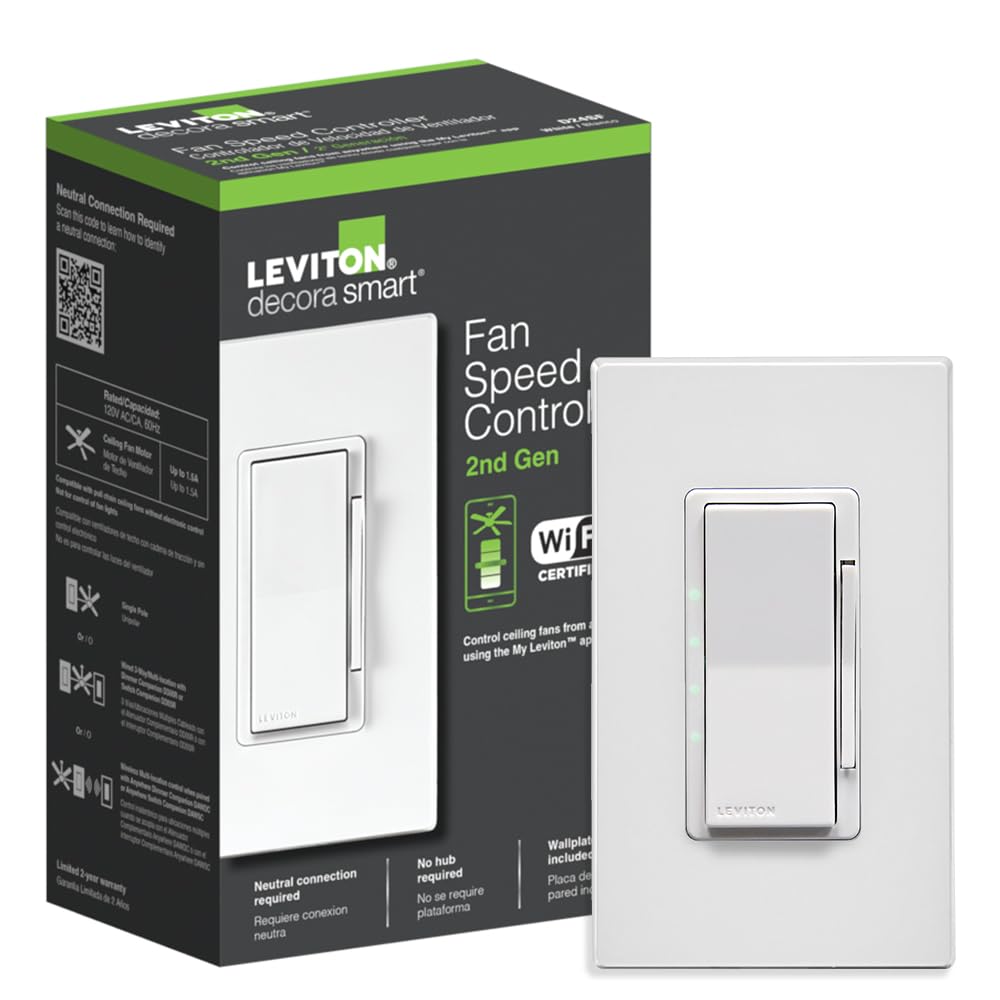
Built to run the fan and only the fan — leave your light switch where it is.
This is a fan speed controller, not a combo. It replaces an on/off fan switch and adds quiet four-speed control — low, medium, high, max — with LEDs that light to show the current speed. It works with Alexa, Google Assistant, Apple Home/Siri, SmartThings, and Sonos, and it needs no hub. It is rated to 2 A of fan load and works with pull-chain ceiling fans without electronic controls; it is not for exhaust-type fans, lighting loads, or combined fan light kits.
The setup is the strongest part. It drops in where your old switch was, uses a slim body, and comes with a screwless wallplate, so you do not need a separate plate order. It works in a single-pole setup and also supports 3-way or multi-way control via Leviton companion devices. Color can be changed with a DDKIT to black, grey, light almond, ivory, or brown if your walls are not white.
The honest note: reliability and quality control are the two topics that pull both directions on this one, and some units arrive with flawed electronics or no instructions in the box at all. A good unit — and most buyers get one — is a clean, quiet four-speed fan controller with voice and app control. It is the right pick only if your fan has its own light switch already, because this one does not do lights.
The split: install and integration are praised without reservation, while electronics reliability draws mixed reports. Inspect the unit at unboxing and test every speed before you button the wall back up.
Built for: a homeowner who has a plain pull-chain fan and a separate light switch, and wants four speeds without changing the light control.
Skip if: your fan and light share a plate, or you want a light dimmer in the same device.
7. TREATLIFE Smart Ceiling Fan Control 2Pack

Two switches, two fans, one box — the smartest way to cover a whole upstairs.
Four fan speeds at 1.5 A max per switch, Alexa and Google Assistant voice control, and no hub. The kit ships with two smart fan controls, two 2-gang wallplates, screws, and screw nuts — enough to do a bedroom and a living room in one order. There is also a Bluetooth setup step to get each unit onto your network, and it uses only 2.4 GHz Wi-Fi, not the 5 GHz band. It is single-pole only, and it will not work with fans that have built-in remotes, Bluetooth/Wi-Fi receivers, DC motors, exhaust fans, or bulbs.
The voice angle is genuinely useful if you have kids or a full pair of hands: “Alexa, set the fan to 4” and it moves. You can kill the LED indicator in the app for a dark bedroom, and the countdown timers handle the “did I leave the fan on” moment on your way home. Quality and installation are the two things buyers like most about it, and both come with a screwdriver and a few minutes.
Now the part to size: reliability is the topic that pulls both ways here, with some units running smoothly and others giving out well inside a year. Alexa connectivity is likewise a mixed bag, working fine for most and refusing to pair for some. With a two-pack, test the first switch thoroughly before installing the second, so any dud surfaces while you still have your receipt and the original box.
Why the set makes sense: you get two fan-rated switches and two wallplates in one order, with Bluetooth-assisted setup, for a house that needs both bedrooms covered.
Pick this if: you have two or more plain AC pull-chain fans and want them on the same app without buying a hub.
Move on if: you need a light dimmer in the switch, a 3-way, or a fan with a remote receiver.
Know the Specs
Fan current rating (amps)
Every fan-rated switch lists an amps number for the fan load — 1.5 A, 2 A, 2.5 A, or 3 A on this list. That number is the ceiling on how much motor current the switch will carry, and it is the first spec to match to your fan. A switch under-rated for your motor can buzz, shut off under load, or fail early. Match it to the fan, not the light.
Neutral wire
A neutral wire is the white wire in the switch box that lets the smart radio stay powered when the fan and light are off. Most fan-rated smart switches on this list require it, and a few also need 2.4 GHz Wi-Fi rather than 5 GHz. If your box has no neutral, none of these are a drop-in swap.
Fan speed levels
Most of these offer four speeds, a few offer three, and one lets you pick. Speed accuracy varies by fan motor, so the “medium slower than expected” note is a motor fit, not a defect. Four speeds means finer control over how much air you get on a muggy night.
Canopy module and remote fans
A canopy module is the receiver tucked into the fan’s ceiling housing that some fans use for a handheld remote. Switches on this list generally cannot control those fans — you would need to bypass or remove the module, or pick a switch built for that fan. Check the fan’s manual first.
Common Questions
Will a smart switch work with my ceiling fan if it has a remote control?
Do I need a neutral wire for a smart ceiling fan switch?
Can one smart switch control the fan and the light separately?
Will these switches dim my LED bulbs?
What is the difference between a fan switch and a regular smart light switch?
Can I put a smart fan switch in a 3-way circuit?
Does my smart fan switch need a hub?
Will these switches control fan direction for summer and winter?
What fan size does a 1.5 A switch handle?
The Bottom Line
For most homes, the winner is the Lutron Caseta Claro because it carries a 3 A fan rating, a 5 A light rating, and the widest device compatibility — it works with Alexa, Apple Home, Google Assistant, Ring, and Sonos, and it is built to stay on your wall for years. If you want a dimmer and fan speed on one plate with no hub, the meross Smart Ceiling Fan Control is the straightforward answer. And if you are covering two bedrooms on a single order, the TREATLIFE 2Pack gives you two fan-rated switches with wallplates in one box. Check for your neutral wire and your fan’s remote receiver before you click buy — those two facts decide everything.
How we choose
We do not accept paid placement. Every pick is matched to a real buyer and a real use-case; we do not hands-on test units.
Sources
Specifications: manufacturer listings and product documentation. Review insights: verified customer reviews, as of November 2026. Pricing: not shown on this page (it changes often); check the current price via the retailer link.
As an Amazon Associate, Tactical Gear Guy earns from qualifying purchases. This does not affect which products we feature.