Specs are compiled from manufacturer listings and verified buyer reviews and can change over time — please confirm the key details on the product page before buying.
You shot the photos, the card is full, and now you need them on your iPhone before the day runs out. A Lightning to SD card reader turns that into a plug-in-and-import job measured in seconds. The wrong one leaves your iPhone refusing to mount the card at all. This guide ranks seven Lightning readers, lists the card formats each slot actually accepts, and names the one that fits your camera bag.
This guide is built by comparing the manufacturers’ published specifications and the patterns across verified customer reviews, so you get each pick’s real strengths and trade-offs instead of marketing spin.
Most buyers pay for a reader with only an SD slot and then find their old Memory Sticks and XD cards still unreadable. Going through this selection of the best lightning to sd card reader options shows you which ones cover old Memory Sticks and XD cards too.
Top Picks
How To Choose The Best Lightning to SD Card Reader
Start with the plug. If your iPhone or iPad still has the older Lightning port, you need a reader that physically includes a Lightning connector. A USB-C-only reader will not mount on that device at all. Several picks here carry both connectors, usually with a small detachable adapter, so the same reader works across an older phone and a newer one.
Match the slots to the cards you actually own
A reader with only an SD slot covers your camera card and nothing else. If you also shoot Micro SD for a drone or dash cam, look for a dual SD and TF slot — TF is simply another name for Micro SD. And if a drawer full of old Sony Memory Sticks or XD-Picture cards is holding your family photos, you need one of the multi-format readers that lists MS and XD among its slots.
Speed matters once the card is full
Transfer speed is quoted in megabits per second, often shortened to Mbps. A reader rated at 480Mbps moves a photo batch noticeably faster than one rated at 25Mbps. For a handful of JPEGs the difference is a few seconds. For a full card of RAW files and video clips, it is the difference between a coffee break and a quick job.
Decide if you want a cable or a stub
Readers come in two shapes. A stub design plugs straight into the phone and keeps the pocket footprint tiny. A short pigtail cable keeps the reader out of the way of your phone case and lets you set the card down while it copies. Pick the stub for pocket carry and the pigtail if you shoot with a case on the phone.
Side-by-Side Comparison
| Model | Best For | Connectors | Card Slots | Transfer Rate | Amazon |
|---|---|---|---|---|---|
| SZHAIYIJIN Memory Card Reader★ Best Overall | Everyday camera-to-phone imports | Lightning + USB-C (detachable adapter) | SD + Micro SD, plus USB-A port | 25 Mbps | Amazon |
| Aplimln 5-in-1 Memory Card ReaderMost Versatile | Charging and copying at once | Lightning + USB-C + USB-A | 5 slots (dual USB 3.0, SD, TF, 60W PD) | 5 Gbps | Amazon |
| Bawanfa Plus Memory Stick Pro Duo Adapter | Old Sony and XD cards | Lightning + USB-C | 4 slots (MS, XD, SD, Micro SD) | 480 Mbps | Amazon |
| Diliichar i-Phone SD Card Reader | Travel and on-location shoots | Lightning + USB-C + USB-A | 3 slots (SD, TF, XD) | 480 Mbps | Amazon |
| Ardaddyn USB C Lightning SD Card Reader | Reading two cards at once | Lightning + USB-C 3.0 | 2 slots (SD + Micro SD) | 480 Mbps on Lightning, 5 Gbps on USB-C | Amazon |
| Bawanfa Plus XD Card Reader | XD and Fujifilm card rescue | Lightning + USB-C + USB-A | 3 slots (SD, TF, XD) | 480 Mbps | Amazon |
| MTAKYA 5-in-3 Memory Stick Pro Duo Adapter | Multi-format studio workflow | Lightning + USB-C + USB-A (15cm cable) | SD, TF, CF, MS, XD | 5 Gbps | Amazon |
Detailed Reviews
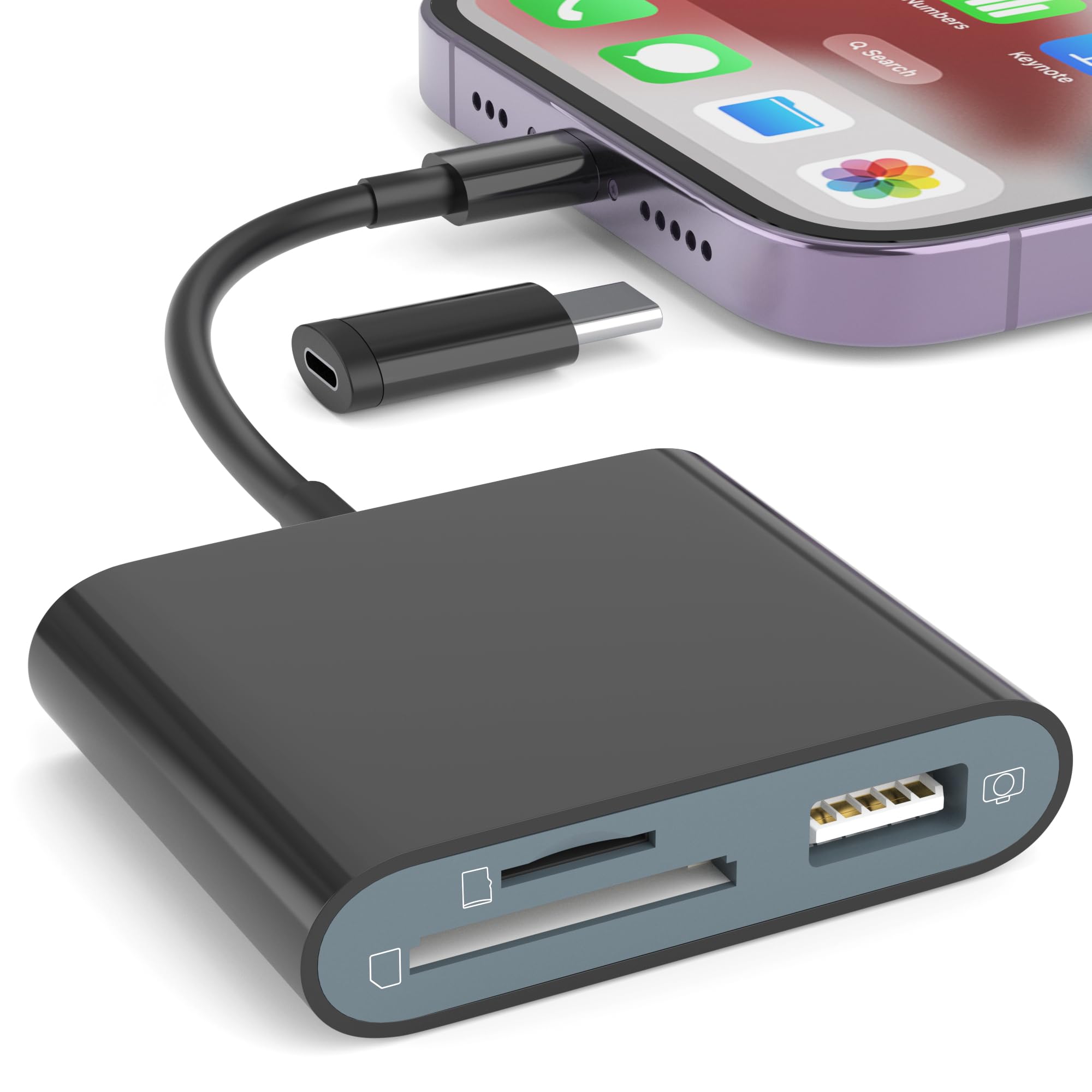
1. SD Card Reader USB-C to Lightning SZHAIYIJIN
Our pick — 4.0+★ from 14,500+ verified ratings; the strongest balance of quality and price.
The reader that treats an old iPhone and a brand-new iPad as the same device.
Its appeal is plain reliability: no app, no driver, no setup screen. Put the card in, plug in, open Photos, tap Import, and the shots land on your phone. There is no app to download and no driver to chase, which is exactly what you want when you are standing in a car park with a full card. It reads both SD and Micro SD cards, so one reader covers a DSLR and a phone-mounted card tray alike.
One reader covers both old and new Apple gear, so you don’t buy twice. A USB-C plug (the oval connector on newer phones and laptops) handles modern devices like an iPhone 16, an iPad Pro, a Mac or an Android phone. Clip on the bundled USB-C to Lightning adapter (the older Apple connector) and the same reader mounts on older Apple gear. There is also a female USB-A port (the classic rectangular USB slot) on board, which takes a flash drive, a card reader or even a USB headphone. That port’s peripherals are capped at 500 mA of current (a low power limit), so a printer or hard drive is out of scope. Two-way transfer means files move from card to iPhone, or back the other way.
Now the honest catch, and it is the one to weigh. At 25Mbps the copy speed is the slowest on this list, so a card crammed with RAW files and video will take its time. Compatibility is the other thing to check before you buy — a slice of buyers found their particular iPhone or iPad did not recognise the reader, so test the import within the return window. A unit that mounts correctly is the most flexible small reader here, thanks to the detachable Lightning adapter and the USB-A port.
Where it earns its place
- Dual Lightning and USB-C connectors mean one reader covers older and newer Apple gear.
- Reads SD and Micro SD cards with no app and no driver needed.
- Female USB-A port adds flash drives and other accessories to the mix.
- Two-way transfer lets you pull photos off the card or push files back onto it.
What to weigh first
- 25Mbps is the slowest transfer rate here — fine for JPEGs, slower for a full RAW card.
- Not every device recognised it in a handful of reports, so confirm the import works early.
- Peripherals on the USB-A port are capped at 500 mA, which rules out hard drives and printers.
Reach for this if: you want one small reader that hops between an older iPhone and a USB-C iPad or laptop without extra cables.
Look elsewhere if: you routinely dump big RAW or video cards and want the faster transfer rates listed below.
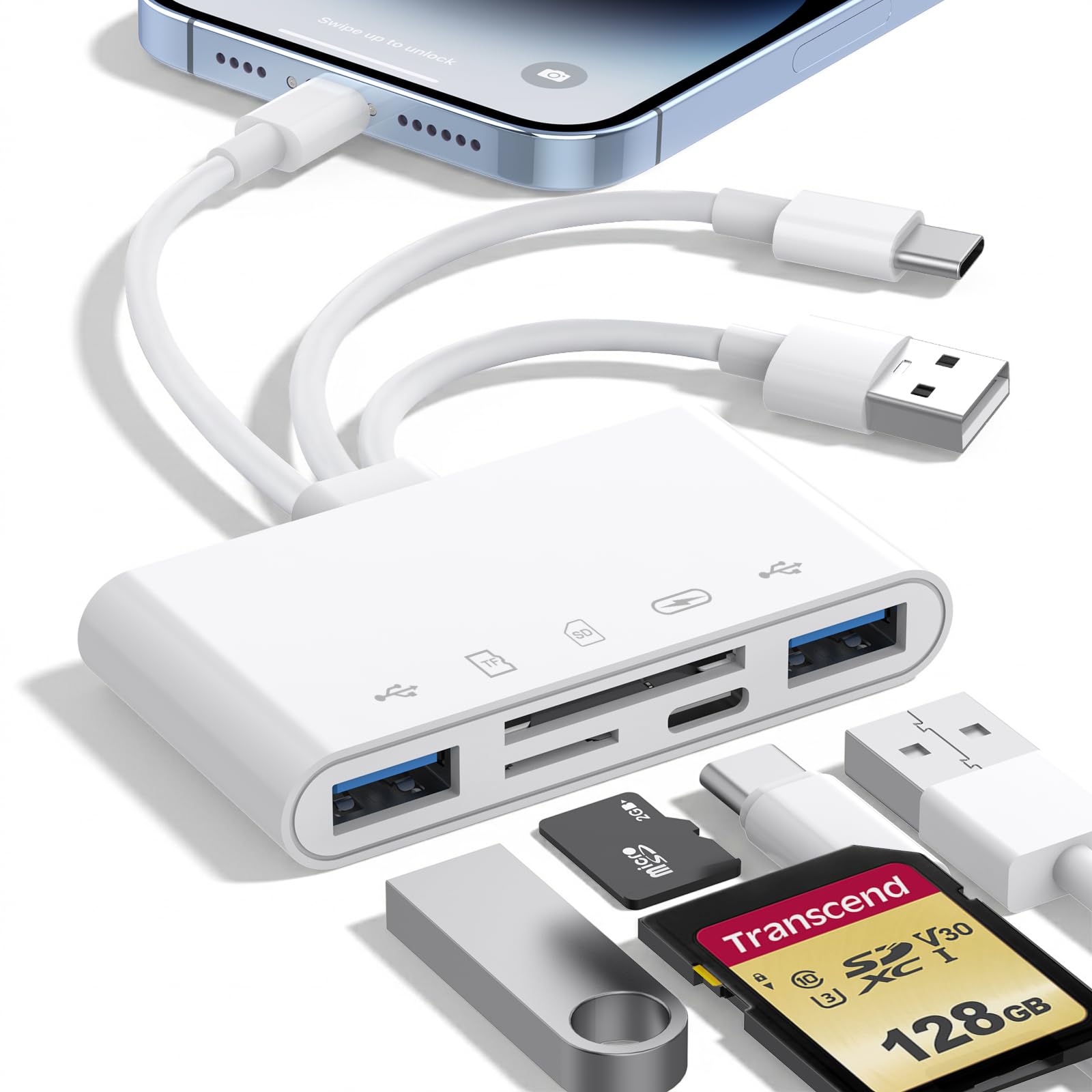
2. 5-in-1 Memory Card Reader Aplimln
Five slots on one stub, so your tablet keeps charging while the drone footage copies.
Most card readers make you choose: charge the phone, or read the card. This one does both at once. A 60W PD port — PD is Power Delivery, a fast-charging standard — feeds the device while the SD and TF slots work, and the reader handles cards up to 2TB. The 5 Gbps transfer rate is a big step up from the 480Mbps readers further down this list, which matters when you are pulling 4K clips off a card. One limit worth knowing: the SD and Micro SD slots cannot be read at the same time.
The USB-C port here does more than charge. It also moves data and passes audio, so you can plug in USB-C earphones while the tablet tops up. Two USB 3.0 ports sit alongside, which lets you run a mouse and keyboard together or copy from a flash drive and an external SSD in the same session. The compatibility record is the strongest single point — it is the most-praised aspect of this reader, and the five-star feedback is built on how broadly it connects across iOS, Android and Windows.
Set your expectations on the setup side. A mouse needs AssistiveTouch switched on before it responds, and other USB accessories need OTG mode enabled first. That is a two-tap job, not a project, but it is the kind of thing that stalls a first-timer who expects pure plug-and-play. The reported compatibility is overwhelmingly positive, with a small minority running into device-specific issues.
The efficiency angle: dual USB 3.0 ports plus a 60W PD port turns a card reader into a small desktop dock for a tablet — charge, copy and run a keyboard in one go.
The catch: the SD and Micro SD slots cannot be read simultaneously, and USB accessories need OTG mode switched on first.
Built for: tablet owners who want to charge, transfer and connect accessories through a single port.
Not for: anyone who wants to copy from an SD and a Micro SD card in the same pass — that is not how this one works.
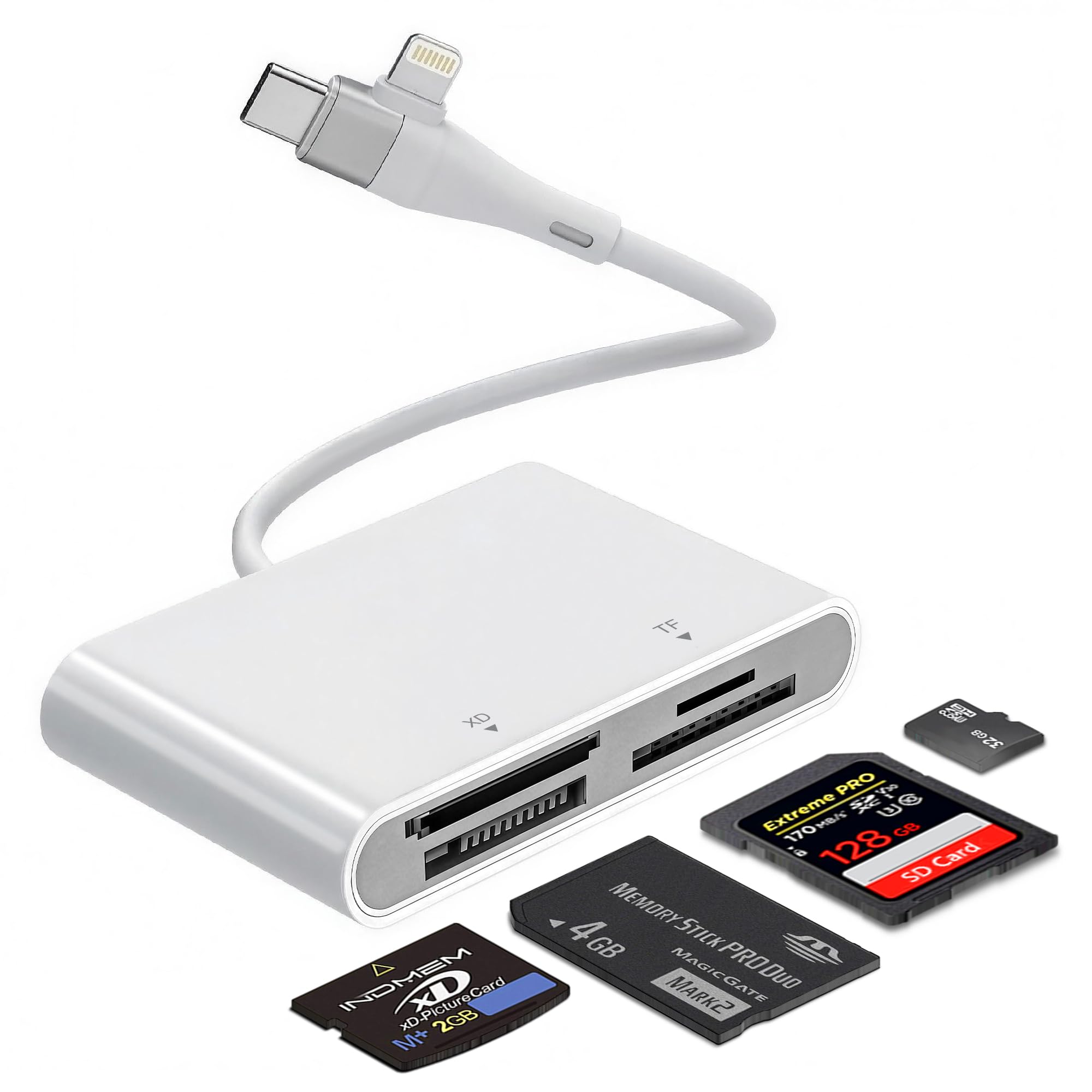
3. Memory Stick Pro Duo Adapter Bawanfa Plus
The four-slot reader that pulls photos off a Sony Cybershot and a PSP save file alike.
If a drawer of old memory cards has been unusable for years, this is the pick. It takes Memory Stick Pro Duo, XD-Picture, SD and Micro SD cards in one body, so a vintage Sony camera and a modern drone card both find a home. The transfer rate runs at 480Mbps, which is the fast tier for these readers and beats the 25Mbps SZHAIYIJIN by a wide margin. Lightning and USB-C connectors sit on the device itself, so you are not hunting for adapters to move files between an iPhone, an iPad, a MacBook, an Android phone and a PC.
The format list is what carries this reader. SD, SDHC and SDXC are covered, Micro SD too, and the Memory Stick and XD slots handle the legacy cards most readers ignore. It ships with a 2-year manufacturer warranty, which is longer than most in this lineup offer. Setup is driver-free on Mac, Windows, iOS and Android.
There is one Android quirk to know before you plug in. Some Android phones throw a format-mismatch prompt on first connection, and the fix is to back up the card and format it to FAT32 on a computer or phone. Once that is done the reader works normally and you will not repeat the step. That is a one-time inconvenience, not a recurring problem, but a first-timer on Android should plan for it.
The legacy rescue: four card formats including Memory Stick Pro Duo and XD-Picture turn a drawer of old cards back into readable storage.
The Android note: some phones need the card formatted to FAT32 on first use before the reader behaves.
Pick it for: old Sony Memory Sticks, XD-Picture cards and modern SD cards in a single reader with a 2-year warranty.
Skip the hassle if: you are on Android and do not want to format the card to FAT32 before first use.
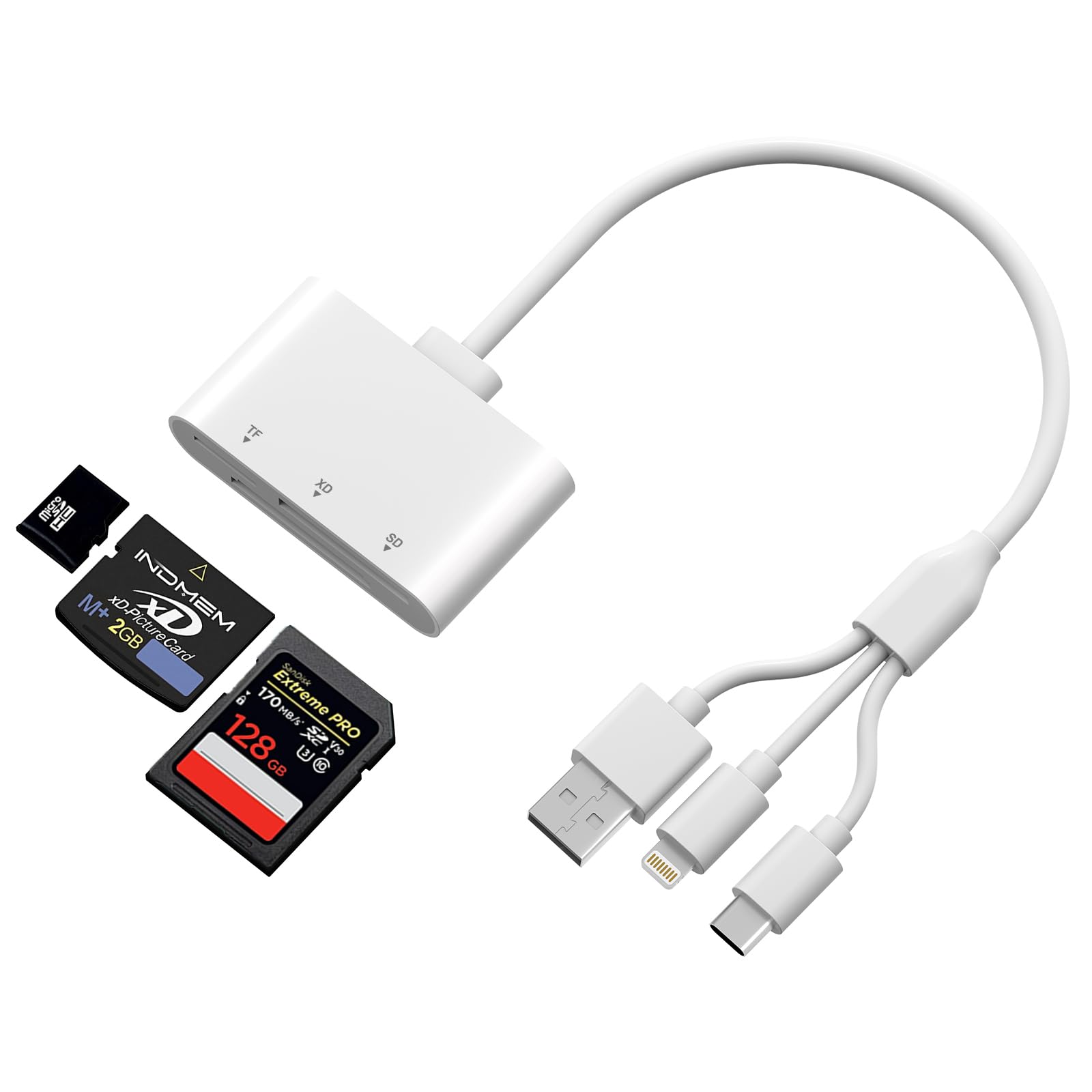
4. i-Phone SD Card Reader Diliichar
A cabled reader that sits behind the phone instead of blocking the port beside it.
The wired build is the detail that matters here. A built-in USB cord means the reader hangs away from the phone rather than jutting out of it, so a case and a crowded port area are not in the way. It carries Lightning, USB-C and USB-A interfaces in one body, which covers iPhone 5 through the iPhone 16 range, iPads, MacBooks, laptops and Android phones. Three slots take SD, Micro SD and XD cards, and the transfer rate runs at 480Mbps so high-definition movie files move in seconds rather than minutes.
Setup is a straight plug-and-play job. No app to install — insert the card, connect the device, and wait around five seconds for it to mount. The slot set covers SD, SDHC, SDXC, Micro SD and XD, so both a modern camera card and an older XD-Picture card are handled by the same reader.
The XD slot is what separates this one from the SD-only picks in this list, and the triple-interface design means you are not juggling adapters on a trip. The one thing to keep in mind is that a wired reader is a small item to pack and keep track of. It is slim enough to drop into a pocket or camera bag, but it is not built into your phone, so it is one more thing to remember at the hotel.
Why travel shooters like it
- Built-in cable keeps the reader clear of a phone case and other ports.
- Lightning, USB-C and USB-A connectors cover almost any device you carry.
- Reads SD, Micro SD and XD cards, including older XD-Picture cards.
- 480Mbps transfer moves high-definition movie files in seconds.
Things to know
- A separate reader is one more small item to pack and keep track of.
- You rely on the cable; a stub design would be smaller in a pocket.
Best fit: travellers and field shooters who want an SD, Micro SD and XD reader that will not fight a phone case.
Think twice if: you want the smallest possible pocket footprint — a stub reader is tighter.
5. USB C Lightning SD Card Reader Ardaddyn

Two slots, both live at once, so you stop pulling one card to insert another.
Reading two cards in the same pass is the whole point of this reader. An SD slot and a Micro SD slot sit side by side, and you can move files between them or between the cards and your device without swapping anything out. Capacity runs up to 2TB, which takes the largest modern cards without complaint. The connector set covers both Lightning and USB-C 3.0, so older iPhones and newer USB-C devices are both on the table.
Speed depends on which plug you use. On Lightning, transfers run at 480Mbps. On the USB-C 3.0 interface, that climbs to 5Gbps. That split is worth knowing: a modern USB-C tablet or laptop gets the faster lane, while an older Lightning phone works at the standard rate. Either way it is a step up from the slowest readers here.
One format note for Android owners: the card must be in FAT32 format for the reader to work on an OTG Android phone. That is a formatting step, not a hardware fault. On iOS and Windows the reader simply plugs in and works, with no driver to install.
The dual-slot advantage: both an SD and a Micro SD card can be live at once, so a card swap is no longer part of the workflow.
The format caveat: Android users need the card in FAT32 format before the reader will mount it.
Choose this: if your workflow involves copying between an SD and a Micro SD card without pulling either one out.
Pass if: you mostly read XD or Memory Stick cards — this reader does not cover those formats.
6. XD Card Reader Bawanfa Plus

Three card formats, three connectors, built for Fujifilm XD cards and modern SD alike.
XD-Picture cards are the reason this reader exists. It takes SD, Micro SD and XD in dedicated slots, and it carries Lightning, USB-C and USB-A connectors on the body. That means a Fujifilm camera’s XD card and a modern drone’s Micro SD both import onto an iPhone without an adapter hunt. Transfer runs at 480Mbps, with two-way movement so files go from card to phone or back again. Cards up to 2TB are supported, and the reader handles JPEG, RAW, H.264 and MPEG-4 files.
The format support has one limit: the reader takes exFAT but is incompatible with NTFS. If your card is formatted for a Windows-centric workflow, convert it before you rely on this reader. Quality is what buyers tend to praise most — the build feels solid and the slots engage cleanly.
Read the compatibility notes carefully before you commit. Most buyers see it work across both laptops and iPhones, but a smaller group found it would not talk to their computer at all. There is also a recurring data-loss report worth taking seriously: a few owners say photos disappeared after a transfer. Treat any single anecdote as a caution, not a certainty, but back up your card before the first import if the shots matter.
What it does well: an XD slot plus SD and Micro SD slots in one body, with Lightning, USB-C and USB-A connectors for a device-agnostic workflow.
The one real concern: a handful of data-loss reports sit alongside the positive feedback, so keep a backup of any card you care about.
Made for: Fujifilm XD shooters who also want modern SD and Micro SD covered in one reader.
Look elsewhere if: you need a reader with a spotless data-safety record — back up first either way.
7. 5-in-3 SD/TF/CF/MS/XD Memory Stick Pro Duo Adapter (MTAKYA)
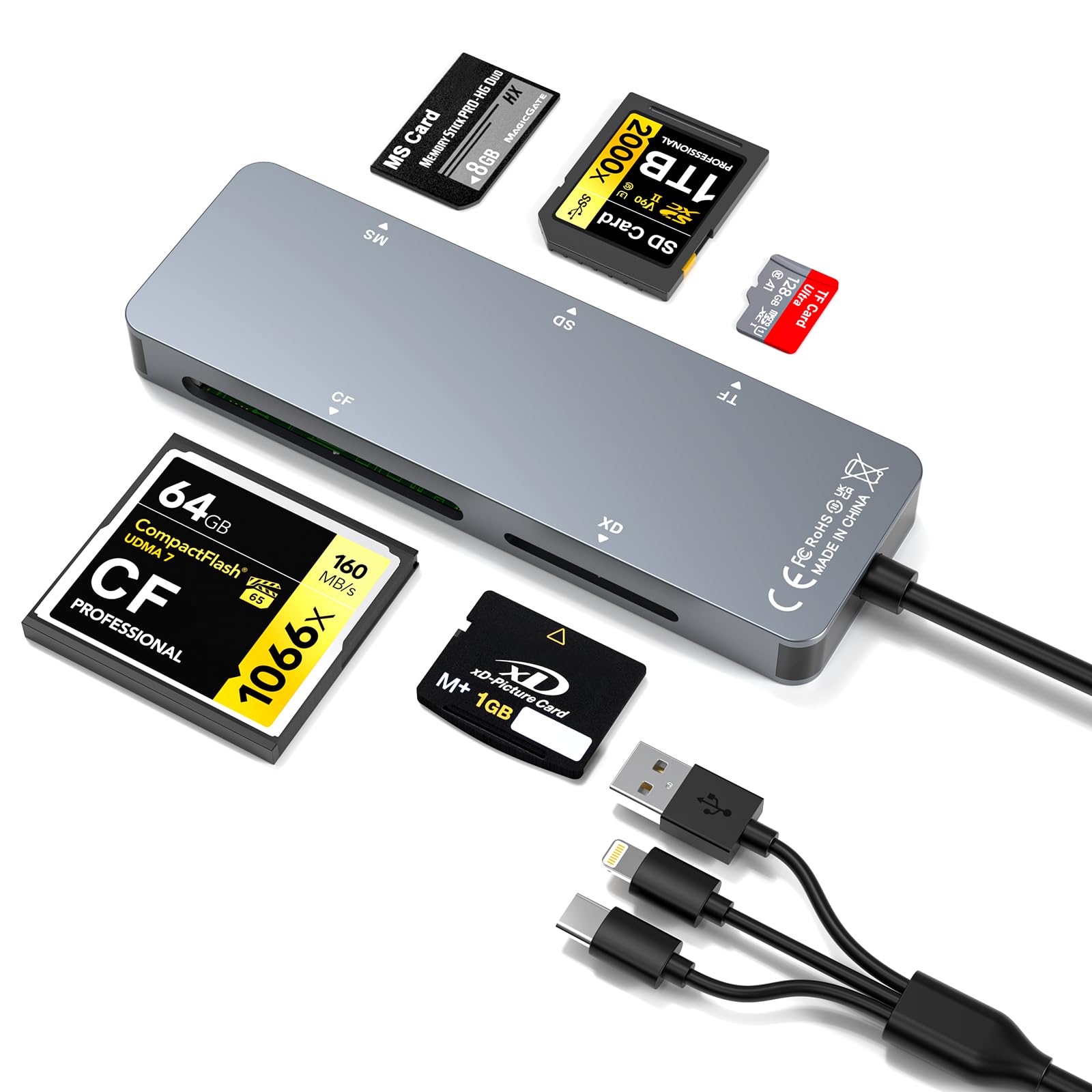
An aluminum body with a slot for nearly every card a photographer still owns.
Five card formats sit in one aluminum shell here: SD, TF, CF, MS and XD. That covers SDXC, SDHC, Micro SD, CompactFlash, Memory Stick Pro Duo and XD-Picture cards, so a GoPro, a Sony Cybershot and a CompactFlash body all find a slot. The 15cm cable carries Lightning, USB-C and USB-A connectors, which keeps the reader clear of adjacent ports and lets you position it while a card copies. Transfer speed runs up to 5Gbps, the fastest tier in this group.
The aluminum housing is the build detail worth naming. It dissipates heat and resists oxidation, which is the kind of thing that matters when a reader lives in a camera bag. The 5Gbps rate and the broad format list make this the most capable reader here on paper. Cards up to 2TB are supported, and each slot has its own LED indicator that stays lit when connected and flashes during a transfer.
The one limit to plan around: only one card can be accessed at a time, even though the reader has five slots. That is a trade for stable transfers, but it means a multi-card workflow takes a little longer than the marketing language might suggest. The aluminum shell and 5Gbps transfer rate are what the higher price buys you here.
The build case: an aluminum housing that dissipates heat and resists oxidation, with a 15cm cable that keeps ports clear and a 5Gbps transfer rate.
The single-card limit: five slots but only one card readable at a time, so a multi-card session runs in sequence.
For the working shooter: a photographer or drone pilot who needs CF, MS and XD in one aluminum reader and wants the fastest transfer tier here.
Look elsewhere if: you need to read two cards in the same pass — the dual-slot Ardaddyn is built for that.
Know the Specs
Connectors: Lightning, USB-C and USB-A
A Lightning connector is the older Apple plug found on iPhones up to the 14 series and on many iPads. USB-C is the newer oval plug on the iPhone 15 and 16, recent iPads, MacBooks and most Android phones. USB-A is the rectangular port on older laptops and desktop PCs. A reader that carries all three — often with a detachable adapter — covers any device you own today or might own next year. Check that the reader you pick actually lists a Lightning connector if your phone uses that plug.
Transfer Rate in Mbps and Gbps
Mbps stands for megabits per second, and Gbps for gigabits per second. A reader rated at 480Mbps moves data faster than one rated at 25Mbps. The 5Gbps readers here are the fastest tier, though the actual speed you see also depends on the card and the device. For a few JPEGs the difference is modest. For a card full of RAW files or a long video clip, the faster reader saves a noticeable wait.
Card Formats: SD, Micro SD, XD and Memory Stick
SD is the full-size card in most cameras, and Micro SD — also called TF — is the small card in phones, drones and dash cams. XD-Picture is an older Olympus and Fujifilm format, and Memory Stick Pro Duo is an older Sony format. Most readers handle SD and Micro SD. Only the multi-format picks here add XD and Memory Stick slots, so check the slot list if you have legacy cards to rescue.
Plug and Play and Two-Way Transfer
Plug and play means the reader works without an app or a driver. On an iPhone you open the Photos app and tap Import; on a Mac or PC the card shows up as a drive. Two-way transfer means files can move from card to device or back again, which is useful for backing up a phone onto a card as well as the other direction.
Common Questions
Will a Lightning SD card reader work with my iPhone 16?
Can I read an XD-Picture card on a Lightning reader?
What is the difference between SD and Micro SD on these readers?
Do I need an app to import photos from a card to my iPhone?
Why does my Android phone ask me to format the card?
What is the fastest transfer rate on this list?
Can a Lightning card reader move files both ways?
Will my iPhone hold a Memory Stick Pro Duo card directly?
Should I worry about data loss with these readers?
The Bottom Line
The SZHAIYIJIN reader takes the top spot because one small body covers an older Lightning iPhone and a newer USB-C device, with an extra USB-A port for a flash drive. If you want to charge and transfer at the same time, the Aplimln 5-in-1 is the pick — its 60W PD port and dual USB 3.0 ports make it a small tablet dock. And for a drawer full of old Sony Memory Sticks and XD cards, the Bawanfa Plus 4-in-1 brings those photos back without a cabinet of adapters.
How we choose
We do not accept paid placement. Every pick is matched to a real buyer and a real use-case; we do not hands-on test units.
Sources
Specifications: manufacturer listings and product documentation. Review insights: verified customer reviews, as of November 2026. Pricing: not shown on this page (it changes often); check the current price via the retailer link.
As an Amazon Associate, Tactical Gear Guy earns from qualifying purchases. This does not affect which products we feature.