Specs are compiled from manufacturer listings and verified buyer reviews and can change over time — please confirm the key details on the product page before buying.
The PS5 Slim runs hot and runs loud, and most people buy the wrong add-on first. The accessory that actually earns its spot is the one that keeps your console cool and keeps your controllers charged without becoming a second job. This guide sorts the lot by what each one actually solves: airflow, charging, storage, or looks. If you have a PS5 Slim and your only complaint is that it sounds like a hairdryer mid-game, the cooling-fan picks further down are where your money belongs. If your controllers keep dying on the couch, look at the stands with a charging dock instead.
This guide is built by comparing the manufacturers’ published specifications and the patterns across verified customer reviews, so you get each pick’s real strengths and trade-offs instead of marketing spin.
The good news: the best PS5 Slim accessories are cheap, bolt-on, and reversible, so you can fix one annoyance at a time. There is one hard rule to remember before you shop — a lot of accessories are still cut for the PS5 Slim’s disc edition only, or for the older/larger 2020 console. The picks below are all built for the Slim. Use this list as your shortlist when you shop for PS5 Slim Accessories that fit the first time.
Top Picks
How To Choose The Best PS5 Slim Accessories
Most PS5 Slim accessory letdowns trace back to two mistakes: the part was built for the wrong console, or it was bought to fix the wrong problem. Nail those two and everything else is just looks.
Fit first — “Slim” is not the same as “PS5”
Many listings sell one shell that claims to cover the PS5, the PS5 Pro, and the PS5 Slim. Some genuinely do. Others are moulded for the 2020 console and only “work” on a Slim because the clamps happen to pinch. Before anything else, read the compatibility sentence and look for the words “Slim Digital” or “Slim Digital & Discs” spelled out. A panel made for a disc edition will not sit flush on a digital edition, and vice versa.
Cooling: look at where the air goes, not just how many fans
Three small fans rated at a high RPM can move less useful air than three bigger blades on the same shroud. What matters day to day is that the intake sits where the console’s own vents are. A fan that clips onto the top pulls heat out of the case cavity; a fan that blows into a closed panel does very little. Auto temperature control is a genuine convenience — the fan cuts in and out on its own — but it is not a guarantee that your particular console runs cooler.
Charging: count the controllers you actually own
A dock that holds two DualSense pads is the right call for couch multiplayer. If you own a DualSense Edge, check the wording separately, because not every twin dock lists Edge support and the Edge’s contacts sit slightly differently. Charging time is quoted per dock, and most of these list a multi-hour full charge, so a fast top-up between matches is the realistic expectation rather than a full refill in minutes.
Stands and mounts: decide where the console lives
A horizontal stand lifts the console’s flat face off the shelf and adds stability, which is what you want if a pet or a toddler shares the room. A vertical tower stand bundles charging and cooling into one footprint but eats desk space. A wall mount clears the surface entirely and hides the console behind the TV, though it needs drilling into the wall.
Side-by-Side Comparison
| Model | Best For | Type | Fan / Cooling Detail | Extras | Amazon |
|---|---|---|---|---|---|
| Deegotech Travel Bag★ Best Overall | Carrying the console to a friend’s place | Carry bag | — | Fits a 15.6-inch laptop too | Amazon |
| JUSPRO Cooling FanBudget Cooler | Cheapest way to add airflow | Clip-on cooler | 3 fans, 5000 rpm, 28.8 dB | Auto-on above 102℉ | Amazon |
| JDGPOKOO RGB CoolerBest Lighting | RGB lighting on a budget | Clip-on cooler | 3 fans, 3 speeds, auto mode | 5 light modes, 3.0 USB passthrough | Amazon |
| Tokluck Cooling Station | One tower for cooling plus charging | Vertical tower | 3-level auto fan speed | Twin controller dock, 3 USB ports | Amazon |
| Mcbazel Face Plates | Re-colouring the console | Shell panels | Vented cutouts | Slim Digital Edition only | Amazon |
| Kammkonb Cooling Stand | Desk-side charging and disc storage | Vertical stand | Turbo fan, 3 speeds | Dual dock, 3 USB hubs, 13-disc slot | Amazon |
| AodoT Wall Mount | Floating the console behind the TV | Wall bracket | 2 silent fans, 3 speeds | Twin controller charging, 2 USB hubs | Amazon |
| FASTSNAIL Horizontal Stand | Laying the Slim flat plus extra ports | Horizontal stand | Separate 3-speed LED fan | 5 USB ports total | Amazon |
| NexiGo Horizontal Stand | Quiet, tidy horizontal setup | Horizontal stand | Temp-control fan, off below 35°C | Screw-in dock for DualSense and Edge | Amazon |
Detailed Reviews
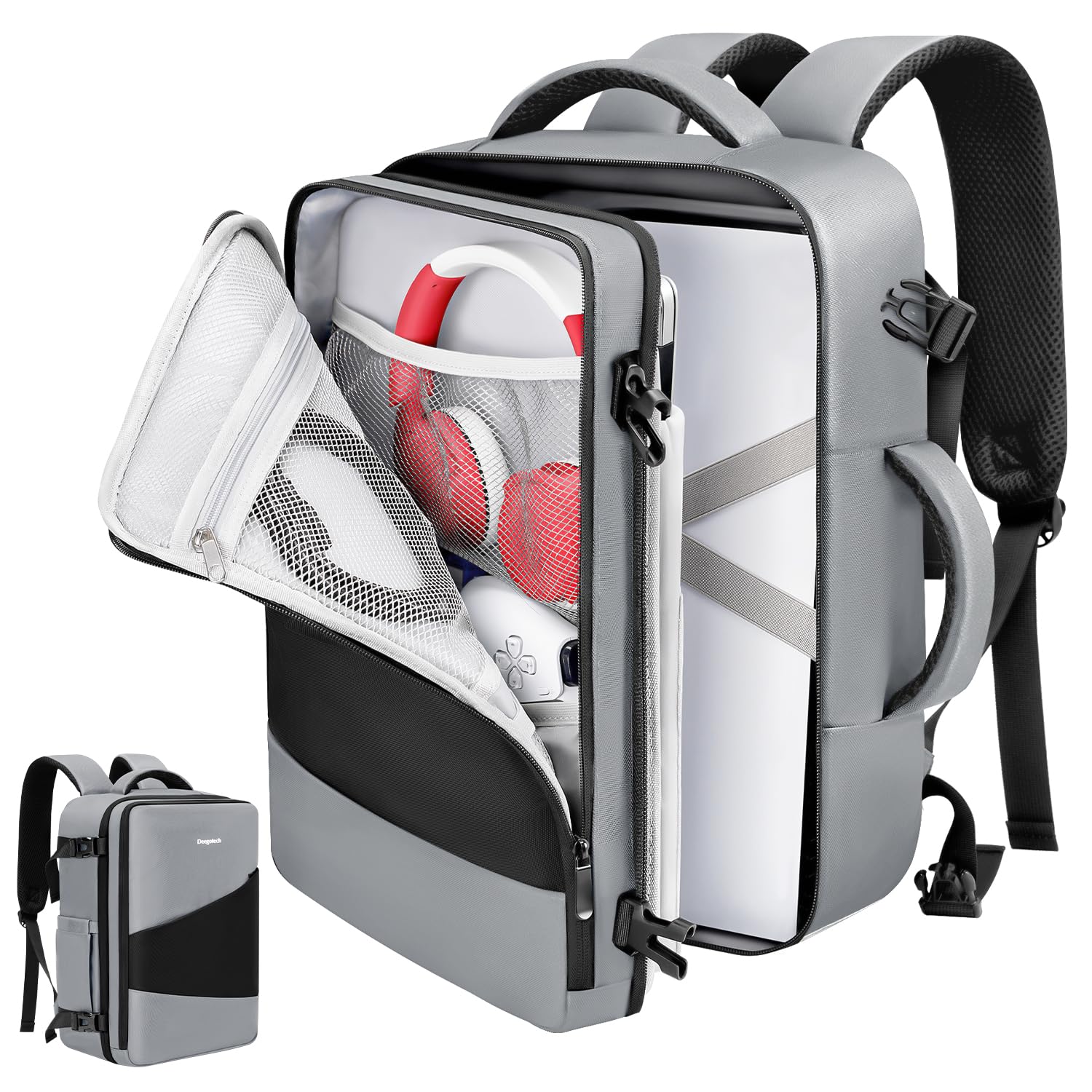
1. Deegotech Case Compatible with PS5
Our pick — 4.5+★ from 350+ verified ratings; the strongest balance of quality and price.
A padded carry bag with a buckled console compartment, front slots for two controllers and a headset, and room for a 15.6-inch laptop.
This is the one to buy if your Slim travels at all — and it is the crowd favourite of the nine, holding 4.5+ stars across 300+ ratings. The pitch is simple: one bag carries the console, pads, cables, discs, and a laptop. The interior is measured to take a laptop up to 15.6 inches, so a gaming session at a mate’s place does not mean leaving the work machine at home.
The pockets are what sell it. A front panel has four slots sized for two controllers and a headset, two mesh pockets take the loose stuff, and a small zipped pouch on the face gathers keys or chargers so nothing rattles around. Inside, the console sits in thickly padded compartments behind a secure buckle, which is the part that matters — a Slim bouncing around in an unpadded tote is how scratched panels happen.
Protection is claimed as shock resistance and water resistance, and the outer is medium-weight polyester with a brushed lining, so it handles rain on a walk to the car fine. A padded, adjustable shoulder strap and soft handle cover the carry side. The catch is honest: this is a bag, not an upgrade to the console. It does nothing for heat or cable clutter, so if you never move the console, buy a stand instead and skip this entirely.
What sells this bag
- Purpose-built console compartment with padding and a buckle strap
- Front slots hold two controllers plus a headset in one layer
- Doubles as a laptop bag up to 15.6 inches
- Shoulder strap and handle make it a one-trip carry
Where it stops short
- Adds nothing for cooling or charging — it is storage only
- Overall bulk grows fast once a console and laptop share it
The one to grab if: the Slim leaves the house — this is a console-sized bag that keeps pads and discs together.
Leave it on the shelf if: the console is a fixed piece of furniture; you would be paying for straps you never use.
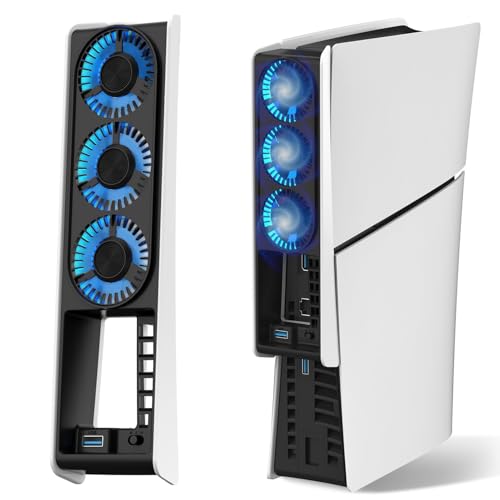
2. JUSPRO Cooling Fan for PS5 Slim
A clip-on shroud with three 5000 rpm fans that auto-start above 102℉ and pass one USB port back to you.
If your only complaint is that the Slim’s vents breathe hot air onto your hand, start here. The JUSPRO clips onto the top of the console with a slide-in hook and a USB plug, and from then on three fans do the extraction. The headline number is the 5000 rpm maximum rotational speed, which is the fan blades’ spin rate — fast enough to pull warm air out of the case cavity in a hurry. Amazon lists the noise at 28.8 dB, a whisper-level figure on paper.
The smart bit is the automatic sensor. Set the button to auto and the fan wakes up once the console climbs past 102℉, then shuts off again once it drops below that line. That means no fan noise during a menu screen and no forgotten switch left running. Two manual speeds sit alongside it, so you can pick a speed to match how hard a game is pushing the console. An extended USB port on the unit replaces the port it occupies, so you do not lose a socket.
Two things to keep in mind. First, it is explicitly not for the original 2020 PS5 or the PS5 Pro — Slim only, so check the badge on your console. Second, the noise and durability talk on this one is split; some find it near-inaudible, others find it noticeable at speed, and a handful have had a bearing go quiet on them. Neither is a reason to avoid it, just a reason to buy it expecting a small accessory, not a silent one.
Why it earns a slot: automatic temperature trigger, 5000 rpm of airflow, 28.8 dB claimed, and a passthrough USB port. That is a lot of engineering for a clip-on.
The honest catch: this is a Slim-only part. If your console is a 2020 model or a Pro, it will not seat correctly.
Go for it if: you want an airflow fix with zero setup thought — clip it, plug it, forget it.
Walk past if: your console is not a Slim, or you need the fan to also charge a controller.
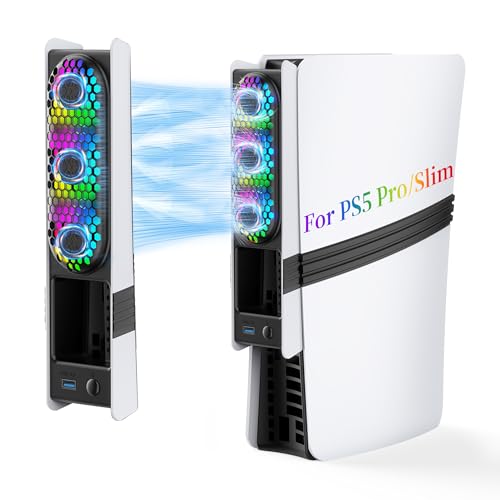
3. JDGPOKOO RGB PS5 Slim/Pro Cooling Fan
A clip-on cooler with a five-mode RGB strip and three fan speeds, both of which it remembers across restarts.
Most coolers are invisible. This one runs a five-mode colour strip along its edge and remembers your last setting, so the console comes back up in the same colour and the same fan speed you left it on. If you have built a desk setup around the console, that memory function is the reason to pick this over the plain JUSPRO above. The strip is set by a single button press, and the whole thing is moulded in ABS plastic at a slim 10.6-inch length.
Cooling is done with three fans running bigger blades, which the maker says pushes hot air out of the console more efficiently. Three manual speed gears sit alongside an automatic mode. In auto, the fan switches on once the console hits 40°C and shuts off again when it falls to 35°C — a two-second button press flips between modes. It draws 5 volts from the console’s own USB port, so there is no extra power brick on the floor.
The extra 3.0 USB port is the quiet win. The fan takes a console port to power itself, but it hands one back, and that port can charge a controller, a phone, or a headset, or take a USB stick. Two caveats: it does not fit the 2020 PS5, and there is not much owner feedback available yet, so you are buying on the spec sheet more than on a proven track record. The hardware is straightforward enough that the risk is low.
Built for: the desk-setup owner who wants the console to glow while it cools.
Skip if: you own the 2020 PS5 — the maker states this shroud does not fit it.
4. Tokluck PS5/Slim/Pro Cooling Station
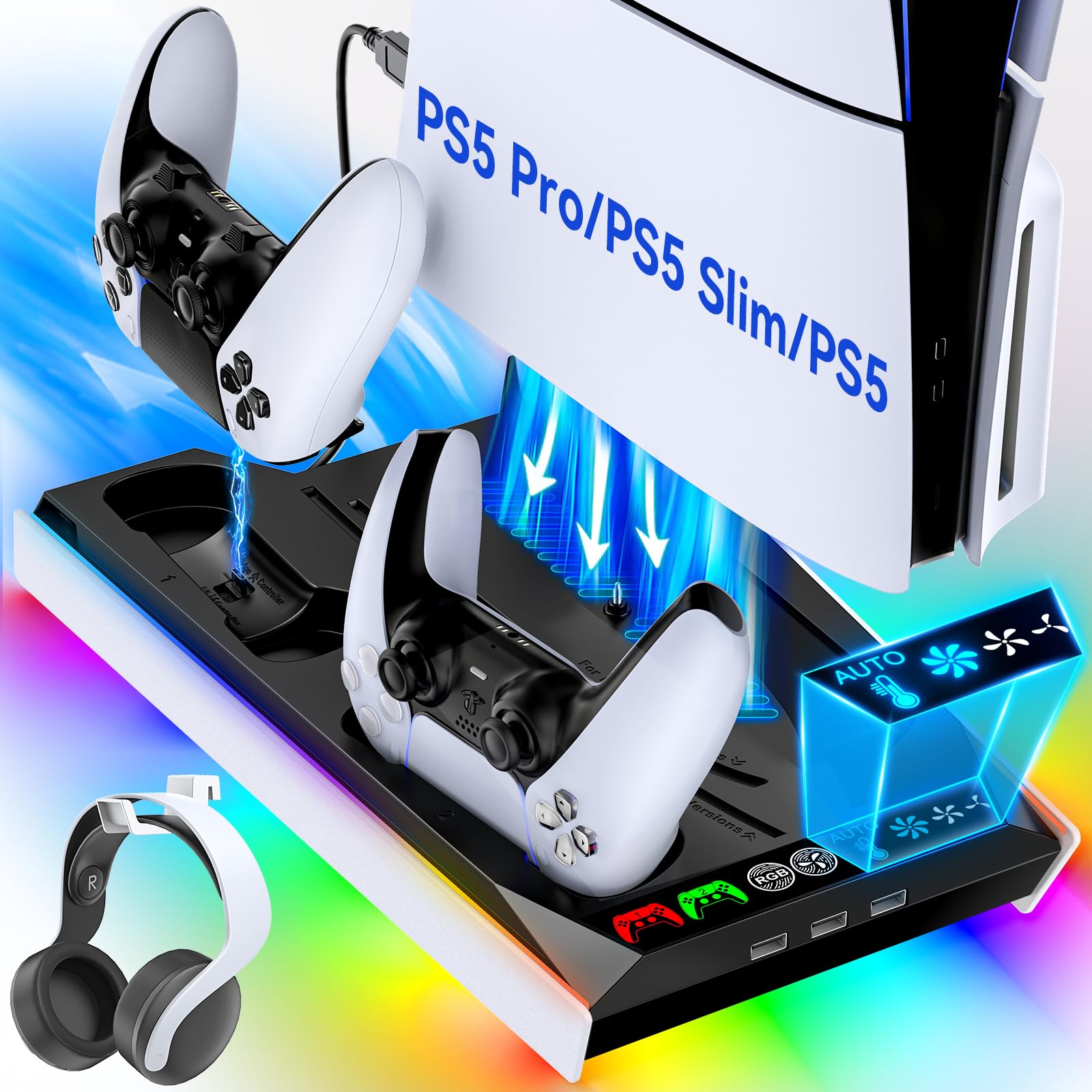
A vertical tower with a three-band auto fan, a slide-adjustable dock for standard or Edge pads, and nine RGB effects.
Buy this if you want to fix cooling and charging in a single purchase. The tower holds the console upright behind a metal-or-plastic shell, and its built-in temperature probe sets the fan speed for you across three bands: high-speed above 98.6℉, medium between 95 and 98.6℉, and low below 95℉. A manual mode hands you five settings — high, medium, low, auto, and off — and the fan remembers whichever one you used when the power comes back on.
The charging side is the differentiator. A movable USB port slides up or down to meet either a standard DualSense or a DualSense Edge, which is the detail most twin docks miss. Each pad takes 2.5 hours to a full charge, and the LED on the base flips from red while charging to green on standby. Nine RGB effects sit under the same switch, and the lighting remembers its last mode too. Three USB ports wait on the side for a headset, a phone, or anything else.
The thing to size up honestly is the cooling. Owner experience is genuinely split here — some report a cooler console, others still see heat, and the charging dock has its share of dead-port reports. It is also the heaviest piece of kit on the list at 0.83 kg, so plan where it lives permanently. Treat it as a well-featured dock that also moves air, rather than a guaranteed cure for a hot console.
The strong points
- Slide-adjustable port fits both standard and Edge controllers
- Auto mode with three temperature bands plus five manual settings
- Nine lighting effects with memory on restart
- Three extra USB ports for headset, phone, or stick
Know before you buy
- Cooling results vary between units and setups
- Charging ports have a real failure rate to watch for
Pick this for: a single tower that handles a standard pad and an Edge without a second dock.
Consider another route if: cooling is your only goal — a dedicated clip-on does that job with less desk real estate.
5. Mcbazel Face Plates for PS5 Slim Digital Edition
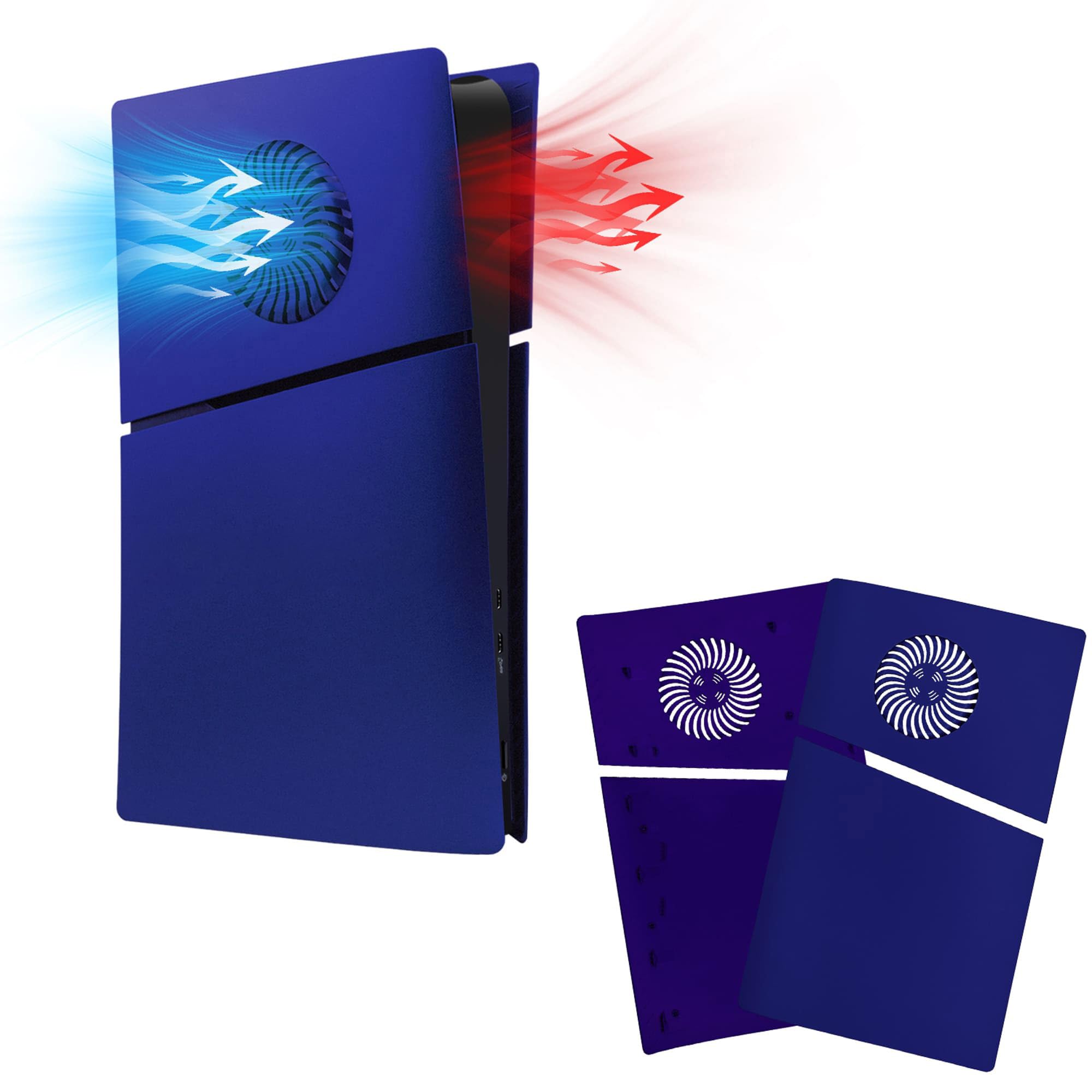
Snap-on matte ABS panels with 1:1 port cutouts and vented slots, cut for the Slim Digital Edition only.
This is a looks-first buy, so start with the fit warning: it is cut for the PS5 Slim Digital Edition only. Not the Slim disc edition, not the 2020 model. If that is your console, the swap is a slide-off, snap-on job with no tools involved, and the cutouts are done 1:1 so every port, button, and cable pass-through lines up without taking the panels back off.
The material is heavy-duty ABS — a hard, moulded plastic — finished with a matte oil-spray coat that keeps fingerprints from showing and wipes down clean. Blue is the colour shown here, and it is a proper change of wardrobe for a console sitting in a living room. The panels also add a layer of shock-absorbing protection alongside claimed water and dust defence, so a spill or a dust build-up on a gaming-room shelf stops at the shell.
There is a small cooling angle too. The panels carry strategic vent cutouts that let air circulate more freely, which helps the console shed heat rather than trapping it behind solid plastic. Not a fan replacement, but on a form that already runs warm it is a sensible touch. What you cannot expect is a miracle for the price: it is a shell, and heavy hands during the swap can crack the tabs.
The case for it: snap-on in minutes, a matte finish that resists fingerprints, and vented cutouts that keep airflow where it should be.
Fit warning: Slim Digital Edition only — disc owners should not order this.
Suits: Slim Digital owners who want a colour change without touching a screwdriver.
Not for: disc-edition or 2020-console owners, where the panels will not seat flush.
6. Kammkonb PS5/Slim/Pro Cooling Station

A vertical stand with two controller docks, a headset hook, three front USB ports, and a 13-disc storage spine.
If your gaming area has turned into a pile of cases and cables, this is the pick that reorganises it. The stand carries two controller docks, a media remote slot, a headset holder, three USB ports on the front, and a storage spine that takes 13 game discs in one place. It works with the PS5 Pro, the Slim, and the 2020 standard, in both disc and digital builds — but you must remove the panel adapter first if you are using a Slim.
Cooling comes from a turbo fan that pulls heat out of the bottom of the console, with high, mid, and low speeds selectable on the unit. Charging is quoted at three hours to fill two pads at once, powered by the console or a 5V/3A adapter. LED indicators on the base show both things at a glance: red for charging, green for full or standby. A smart protective chip shuts off overcharge, overheat, overcurrent, overvoltage, and short-circuit risk, which is what lets you leave pads docked overnight without worry.
The honest note is the cooling and value picture — this one divides opinion. Some find it keeps the console cool and consider it worth the money, others still see heat even on the highest setting. A safety screw locks the console to the stand, so it stays balanced. It is not for the DualSense Edge, though; the docks are cut for standard pads.
Reach for this if: you want a tidy, all-in-one base and own standard DualSense controllers.
Look elsewhere if: you own an Edge pad, or you need proven cooling rather than a tidier desk.
7. AodoT PS5/Slim/Pro Wall Mount
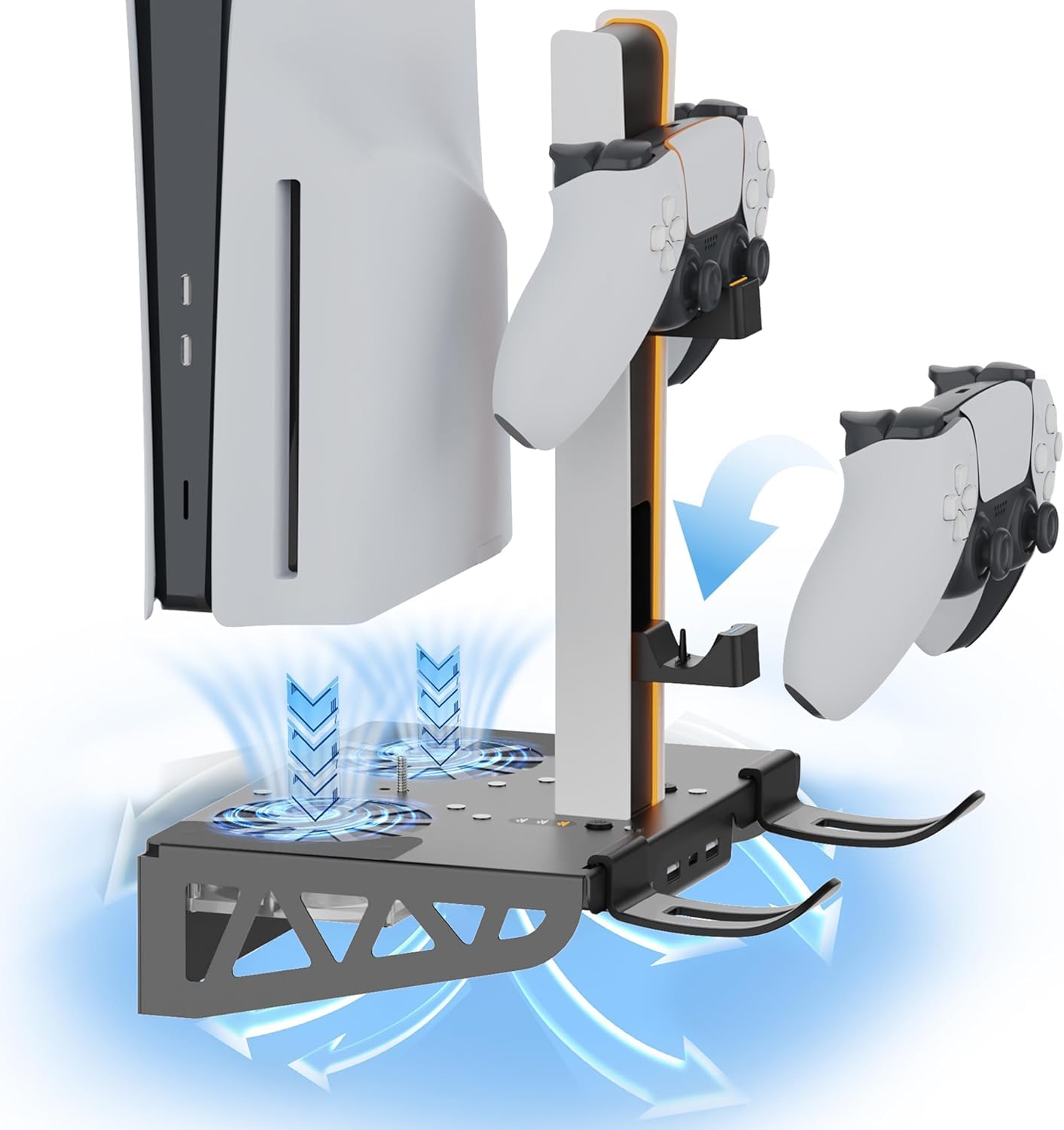
A drilled steel bracket that holds the console behind the TV, with two silent fans, a dual dock, and two USB 2.0 hubs.
This is the pick for a room where floor and shelf space are already spoken for. A steel bracket bolts to the wall and holds the console behind the TV, and the whole thing ships with one wall mount, one charging column, three screw assemblies, a rubber cap screw, and two headset hooks. It fits the PS5, the PS5 Slim in both disc and digital, and the PS5 Pro — one of the widest fit ranges here.
Cooling is handled by two silent fans with three speed levels and a light indicator, tuned to move air up and away from the console. Charging covers two controllers in under three hours, with LED feedback that runs orange while filling and blue when done. Two USB 2.0 hubs on the bracket handle charging and data transfer for a headset, a stick, or anything else you want within reach. A pair of headset hangers also gives PSVR a home.
The thing to plan for is the install. This is a drilling job — there is no stick-on option, so it is not a rental-friendly piece of kit. Once it is up, the mounting feels steady, but the stability talk on this one is not universal, and a few find it less solid than they would like. If you are confident with a drill and want the console invisible, it is the most space-efficient answer on the list.
Why it wins the space fight
- Fits PS5, PS5 Slim, and PS5 Pro in one bracket
- Two silent fans with three speed levels
- Dual controller charge in under three hours
- Two USB 2.0 hubs and two headset hangers included
Where it asks for work
- Needs drilling — no adhesive option at all
- Not everyone finds the mounting rigid once loaded
Made for: a wall-mounted setup where the console should be heard and not seen.
Think twice if: you cannot put holes in the wall or want a portable solution.
8. FASTSNAIL Horizontal Stand & Cooling Fan for PS5 Pro/Slim
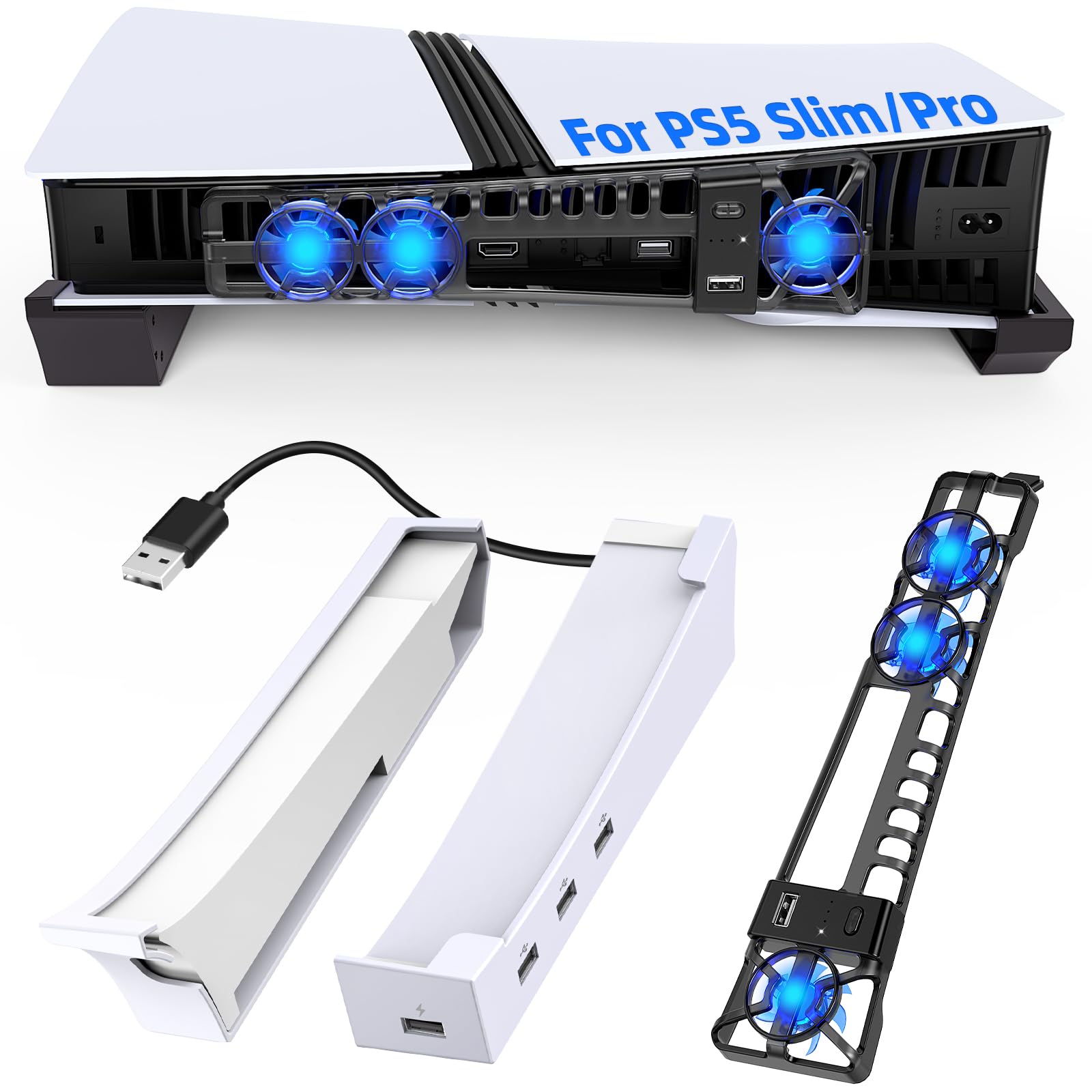
A horizontal ABS cradle with four USB ports, plus a separate three-speed clip-on fan with a fifth port and speed memory.
A crowded entertainment unit has a familiar problem: the Slim stands upright, wobbles when the dog runs past, and hides its ports behind a stack of boxes. The FASTSNAIL stops the wobble by laying the console flat on an ABS cradle (a hard plastic stand). It also beats every other pick here on ports. The stand adds four USB ports — one fast-charging USB 3.0 and three USB 2.0 (older, slower USB) — plus a fifth USB 2.0 on the fan itself. That means a pad, a keyboard, and a headset can all stay plugged in at once.
The fan is deliberately separate. It clips to the console’s vents and can be used horizontally or vertically depending on how you have the console set up. Three speeds are selectable by short-pressing the button, and a memory function brings the fan back to your last speed automatically when the console starts, so you do not have to switch it on each session. A blue LED runs while it is working, and the bottom pads keep the whole cradle from sliding.
Cooling gets a genuine boost here because the horizontal stand reduces the contact area between console and desktop, letting more air move underneath. That is a real advantage over a flat, solid base. The noise question is the one to set expectations on — some find this one of the quietest fans around, others find it loud at full tilt. At full speed you will hear it; at low speed you likely will not.
The case for it: five extra USB ports and a cradle that lifts the console clear of the shelf — a useful pairing that most stands skip.
The trade-off: noise is a matter of taste here. Buy it for the ports and the stable horizontal lay, not for silent operation.
Right for: a horizontal setup with more accessories than ports, where the console needs to stop wobbling.
Less right for: a silent-room setup — the fan is audible at its top speed.
9. NexiGo Slim Horizontal Stand for PS5 with Charging Station

A low, wide cradle that lifts the console an inch and only wakes the fans when it must.
For a living room where the console sits flat and you want it to stay flat, this is the tidiest option. The horizontal base raises the Slim an extra inch off the surface, which opens up room for air to move under the chassis and makes the whole thing more stable in a house with kids. Rubberised pads on the bottom stop it creeping across a shelf — and the review pages point to that as one of the things people value most.
The charging dock is the clever part. It screws straight into the mounting hole on the bottom of the console, so it stays put and saves space. It refills two pads — DualSense or DualSense Edge — in three hours, drawing power from the console itself. LED battery lights on the dock show how full each pad is, and you can switch them off or recolour the fan’s LEDs to taste. It fits both Slim editions, disc and digital.
Cooling runs through an optional fan attachment with a temperature-control mode. In that mode, the fan speed changes with the console’s heat, cutting off below 35°C and kicking in above 36°C, so it stays dormant on idle and quiet in light use rather than running non-stop.
Fits best: a horizontal console with DualSense or Edge pads that need a secure, no-drill dock.
Consider the other stands: if value is your top priority over finish and quiet fans.
Know the Specs
RPM and dB — what fan numbers actually tell you
RPM (revolutions per minute) is how fast the fan blades spin. A high figure like 5000 rpm means more air pushed per minute — useful, but not the whole story, because blade size and shroud shape decide whether that air actually leaves the console. dB (decibels) is the noise level on paper: 28.8 dB is roughly a quiet room’s background hush. Treat these as guide numbers, not guarantees. A fan can be rated fast and quiet and still be louder in your room if it sits close to a shelf that echoes.
Auto temperature control vs manual speed gears
Manual gears are a switch you press — high, medium, low, off. Auto mode uses a small temperature probe inside the accessory. You will see it as a tripwire (on above 102℉ or 40°C, off below 35°C), or as a banded system (high-speed above 98.6℉, medium between 95 and 98.6℉, low below 95℉). Auto mode saves power and keeps the fans quiet when the console idles, and it means you never forget to switch a fan on. Most of these units remember their last setting across restarts, so you set it once.
Common Questions
Will this accessory fit my PS5 Slim, or is it made for the older console?
Do cooling fans actually stop the PS5 Slim from overheating?
Can I charge a DualSense Edge controller on these docks?
How long does it take to fully charge a PS5 controller on these stands?
Do the extra USB ports replace the ones I lose on the console?
Is a wall mount safe for a PS5 Slim, or should it stay on a shelf?
Will the vented faceplates make a real difference to console heat?
What should I check before buying a stand for a Slim with a disc drive?
Will these fans add noise to my setup, and how noticeable is it?
Can the travel bag be used as a normal backpack or laptop bag?
The Bottom Line
For most setups, the ps5 slim accessories pick that makes the most sense is the Deegotech Travel Bag. It carries the console, pads, and discs in one trip, holds the top score on the list at 4.5+ stars, and doubles as a laptop bag for the price of a cheap accessory. If heat is the real problem, the JUSPRO fan handles it for a small outlay, with an automatic 102℉ tripwire (it kicks in at that temperature). For a horizontal, quiet, dual-dock setup, the NexiGo stand is the tidiest answer. One nudge: if you own an Edge controller, buy the Tokluck or NexiGo — the other docks are cut for standard pads only.
How we choose
We do not accept paid placement. Every pick is matched to a real buyer and a real use-case; we do not hands-on test units.
Sources
Specifications: manufacturer listings and product documentation. Review insights: verified customer reviews, as of November 2026. Pricing: not shown on this page (it changes often); check the current price via the retailer link.
As an Amazon Associate, Tactical Gear Guy earns from qualifying purchases. This does not affect which products we feature.