Specs are compiled from manufacturer listings and verified buyer reviews and can change over time — please confirm the key details on the product page before buying.
If you have ever unplugged a laptop to move rooms and then spent ten minutes reconnecting monitors, a USB-C universal docking station is the fix. One cable goes into your laptop and everything else — screens, keyboard, mouse, wired internet, charger — stays plugged into the dock. A quick note before we start: this list uses flexible, human-like matching for universal cross-brand compatibility, meaning not every pick is the exact model you typed into the search bar. The nearest same-type dock with the same job serves you just as well, and every pick here is a real, verified docking station that works across brands rather than being locked to one laptop maker.
This guide is built by comparing the manufacturers’ published specifications and the patterns across verified customer reviews, so you get each pick’s real strengths and trade-offs instead of marketing spin.
Some docks need a small driver download before your second and third screens wake up, and that is the one setup step worth knowing before you commit. This breakdown of the usb-c universal docking station covers ports, display limits, and charge wattage.
Top Picks


How To Choose The Best USB-C Universal Docking Station
Start with your laptop’s USB-C port, not the dock’s brochure. A “full-featured” USB-C port carries video, data, and power over one connector; a plain charging-only USB-C port carries none of the video. If your laptop only supports one external screen natively — most MacBooks do — you need a dock with DisplayLink inside. That is a small software layer that squeezes extra screens out of one cable, and it is the single biggest fork in the road here.
Count your screens first, then count the ports
A dock’s headline number is usually its port count, but the number that changes your workday is how many monitors it can light up. TobenONE’s 18-port unit drives three or four displays; Lenovo’s travel dock drives two. Match the display limit to your desk, then check that the leftover ports cover your keyboard, mouse, external drive, and card reader. A dock that hits your screen target but runs out of USB-A ports forces a second adapter into the chain.
Check the charge wattage against your laptop
A dock’s power adapter feeds two things at once: your laptop and the dock itself. A 150W supply with 100W out to the laptop keeps a busy workstation topped up even while running three displays; a 100W supply with 85W out is fine for a lighter ultrabook. Thin-and-light laptops usually sip well under 100W, while a workstation-class machine may want its own charger for heavy loads. Match the wattage to your machine and you avoid the slow-drain annoyance.
Know what DisplayLink asks of you
DisplayLink docks want a small driver installed before your extra screens appear. On macOS you also grant Screen Recording permission so the dock can push those displays — the driver does not record your screen. Budget five minutes for that one-time setup, and avoid these docks if your office IT locks down software installs, because you will need admin rights.
Side-by-Side Comparison
| Model | Best For | Ports | Laptop Charge | Max Displays | Amazon |
|---|---|---|---|---|---|
| TobenONE DisplayLink 120W Dock★ Best Overall | Three- and four-screen desks | 18 | 100W | 4 (Windows) / 3 (macOS) | Amazon |
| Lenovo USB-C Dual Display Travel DockCompact Pick | Road and hybrid setups | 7 | 65W (100W with 135W adapter) | 2 | Amazon |
| Baseus Spacemate 11-in-1Best Design | Stand-up desk space savers | 11 | 85W | 3 (Windows) | Amazon |
| TobenONE 16-in-1 150W Dock | High-speed network work | 16 | 100W | 3 (Windows) / 1 (macOS) | Amazon |
| Dell Pro Laptop Dock WD25 | Mixed PC and Linux fleets | 10 | 100W | 4 | Amazon |
| Dell Universal Dock UD22 | Shared hoteling desks | 10 | 96W | Dual monitor | Amazon |
| Plugable UD-6950PDH | Two 4K screens on a Mac | 14 | 100W | 2 | Amazon |
| Anker Prime 14-in-1 | Charging a whole desk of gear | 14 | 100W | 2 | Amazon |
| Plugable 12-in-1 UD-6950PDZ | Three-screen Mac workstations | 12 | 100W | 3 | Amazon |
Detailed Reviews
1. TobenONE DisplayLink Docking Station
Our pick — 4.5+★ from 950+ verified ratings; the strongest balance of quality and price.
Eighteen ports and four screens from one cable — the busiest desk here, and the one buyers trust most.
Most docks ask you to pick between screens and ports. This one hands you both: 18 ports total, three HDMI and three DisplayPort outputs, and a Windows laptop can push four separate monitors off a single USB-C cable. The four displays need your laptop’s USB-C port to carry video; macOS caps out at three. If your day involves a trading dashboard, a coding window, and a chat client all at once, this dock is built for exactly that.
The 120W power adapter feeds your laptop at up to 100W (96W certified) while the dock runs its displays, so you can leave your laptop’s own charger in the drawer. Compared with the Baseus Spacemate above, its brick is 120W to that dock’s 100W, and it passes 100W to the laptop where Baseus sends 85W. A front USB-C port adds 18W to a phone. Data moves at 10Gbps across four USB 3.1 and two Type-C ports, which is quick enough to shift a video file before your coffee cools.
Reliability is what owners talk about most, and it is why this dock holds 4.5+ stars across 900+ ratings. The honest catch: a 120W supply and a four-screen skill set put it in a higher value tier, so it suits people who genuinely use three or four monitors. It also wants a stable power connection and will not play Netflix, because the screen-recording permission DisplayLink needs blocks paid streaming playback. Fine at a trading desk, a surprise on movie night.
triple monitor output
- 18 ports cover three or four displays, peripherals, and wired internet without a second adapter.
- 120W adapter delivers up to 100W to the laptop, so the stock charger stays home.
- 10Gbps USB-C and USB-A lanes keep external drives moving fast.
- DisplayLink lets Macs that normally allow one external screen run three.
120W power draw
- Needs the DisplayLink driver installed, plus Screen Recording permission on macOS.
- Paid streaming services like Netflix will not play through it.
- Higher value tier than a two-screen travel dock — worth it only if you use the screens.
three screens: your desk genuinely runs three or four monitors and you want one cable to feed all of them plus your peripherals.
power hogs: you only ever light up two screens — a smaller travel dock does that job for less.
2. Lenovo USB-C Dual Display Travel Dock
A 4.8-ounce puck that fits a jacket pocket and still drives two 4K screens.
Here is the travel-dock math that matters: 4.8 ounces and a 0.79-inch-tall body. It slips into the same sleeve as your laptop without a bulge, and the integrated cable means nothing gets left at the hotel desk. Seven ports cover two 4K displays through one DP 1.4 and one HDMI 2.0, plus 10Gbps USB-A and USB-C, wired Ethernet, and an always-on USB port that keeps a phone topped up even when the laptop is disconnected.
Compact size is the part people like best, and 66% post-consumer recycled content in the chassis makes it the greener pick in this lineup. The base bundle ships with a 100W USB-C charger that passes 65W to your laptop; step up to the optional 135W adapter and you get 100W. That 65W ceiling is the real differentiator against the TobenONE above — enough for an ultrabook, thin for a workstation.
The catch is that reliability and port compatibility are genuinely mixed topics in the feedback, and power delivery draws more criticism than praise. Some units have stopped working after a couple of months, and a few buyers found the charging slower than expected. Most owners are running happily, but if your workflow hinges on a single dock every day, plan for the possibility that you are one of the unlucky few — that is the trade for a dock this small.
seven compact ports: 7 ports, two 4K displays, and a body you can forget about is the right answer for hybrid work and hot-desking.
dual display only: 65W laptop delivery will not feed a hungry workstation, and the reliability record is uneven enough that a desk-bound buyer should look at the 150W TobenONE instead.
travel light: you commute between office, home, and client sites and want two external monitors at every stop.
need more ports: your laptop needs more than 65W of charge or you want a fixed desk dock that never moves.
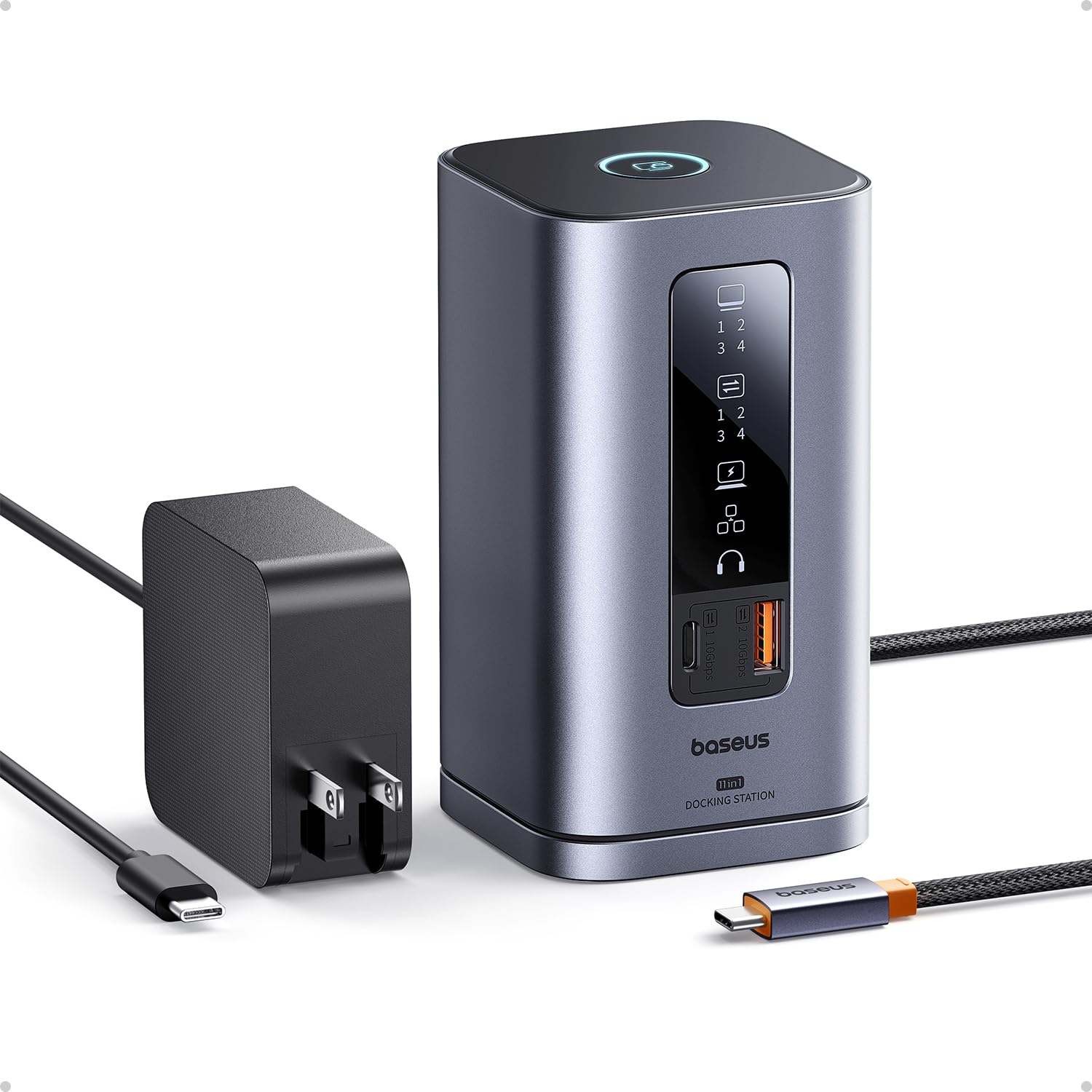
3. Baseus Spacemate 11-in-1 Docking Station
The dock that stands up and shows you which port is live — aluminum, vertical, and built to reclaim desk space.
Baseus took a different physical approach: an upright aluminum body on a magnetic base, 6.61 inches long and 9.53 inches tall, so it occupies a narrow footprint you would otherwise spend on a coffee coaster. An 80cm cable gives you reach to tuck it behind a monitor. Compare that to the TobenONE 16-in-1, which sits in a much tighter 3.54-inch cube: one saves desk, the other saves shelf.
Eleven ports handle two HDMI and two DisplayPort outputs, one USB-C and two USB-A at 10Gbps, an extra USB-A 2.0, 100W USB-C PD input, Gigabit Ethernet, and a 3.5mm audio jack. Windows machines extend up to three 4K monitors. The built-in LED screen lights up to show which port is connected, and a screen-lock button blanks the display output with one touch when someone walks up to your desk.
What wins people over is the plug-in-and-work simplicity, with the LED confirming the link. The honest friction is compatibility: it works beautifully with the laptops it matches and can be finicky with the ones it does not. The 100W adapter passes 85W to your laptop, which is a little shy of the 100W the two TobenONE docks deliver, and macOS buyers should note the three-display claim is a Windows feature. Forbes, ZDNet, and Tom’s Guide have all covered it, and it was a finalist in the Innovation Awards by Future.
all-in-one desk: your desk is small, cables annoy you, and you want a dock that looks deliberate.
tight spaces: your laptop is not on Baseus’s compatibility list, or you need the full 100W charge.
4. TobenONE 16-in-1 Laptop Docking Station
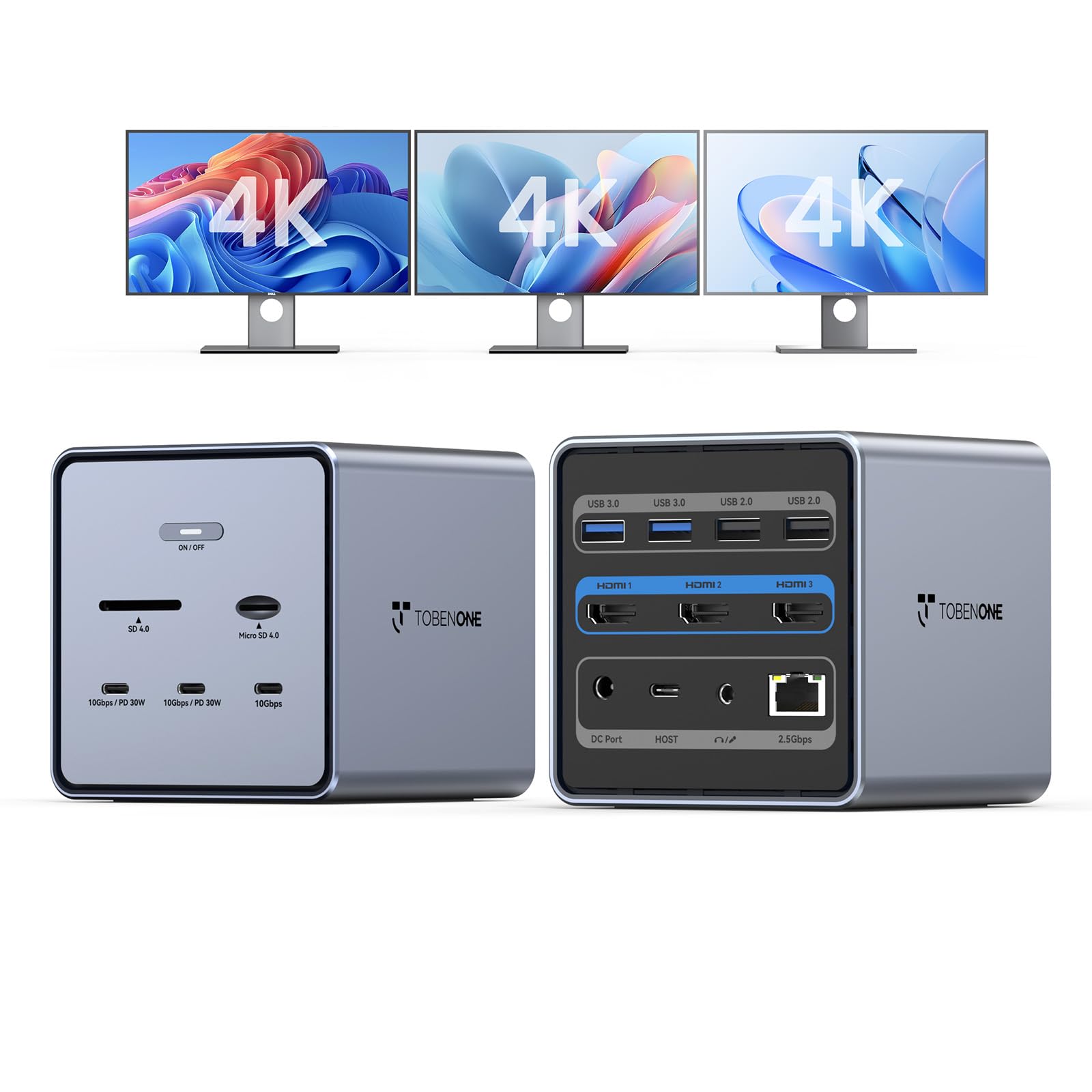
A 150W brick and 2.5Gbps Ethernet — the number that matters when files move across a network all day.
If your bottleneck is the wire between your laptop and a server, this is the dock to read first. The 2.5Gbps Ethernet port runs at 2.5 times the throughput of standard Gigabit, which video editors and engineers shuttling 4K or 8K files will feel in real minutes. That is the biggest single difference from the 120W TobenONE at the top of this list, which sticks with Gigabit.
The 150W power supply is the largest in this lineup — 30W more headroom than the 120W TobenONE and an even bigger jump past the Baseus 100W — and it delivers a stable 100W charge to your laptop while three displays and multiple high-draw devices run. Two front USB-C ports put out 30W each solo, or 15W each when both are in use, enough for a phone or tablet. The port roster runs deep: three HDMI, three USB-C at 10Gbps, two USB 3.0, two USB 2.0, an SD and microSD 4.0 card reader at 312MB/s, and 3.5mm audio. Windows buyers get three 4K@60Hz screens, and a single monitor can hit 2K@144Hz with a DP 1.4 and DSC source. MacBooks extend just one monitor.
Functionality dominates the feedback, and most of it is positive. Build quality and the compact 381.6-gram shell come in for steady praise too. What tempers the picture is a running thread of units failing during normal use or arriving defective. That is a real risk on a dock this capable, so weigh the feature depth against the possibility of a dud — the warranty conversation matters here.
sixteen ports triple 4K: 2.5Gbps wired networking plus 150W of supply makes this the pick for anyone whose bottleneck is the wire or the charge, not the port count.
bandwidth juggling: failures are a recurring note, and the MacBook one-display limit will frustrate anyone expecting three Apple screens.
many peripherals: Windows power users running three 4K monitors over a fast wired network with heavy peripherals attached.
simple setups: MacBook owners who need three external displays, since this one mirrors or extends just one.
5. Dell Pro Laptop Docking Station WD25
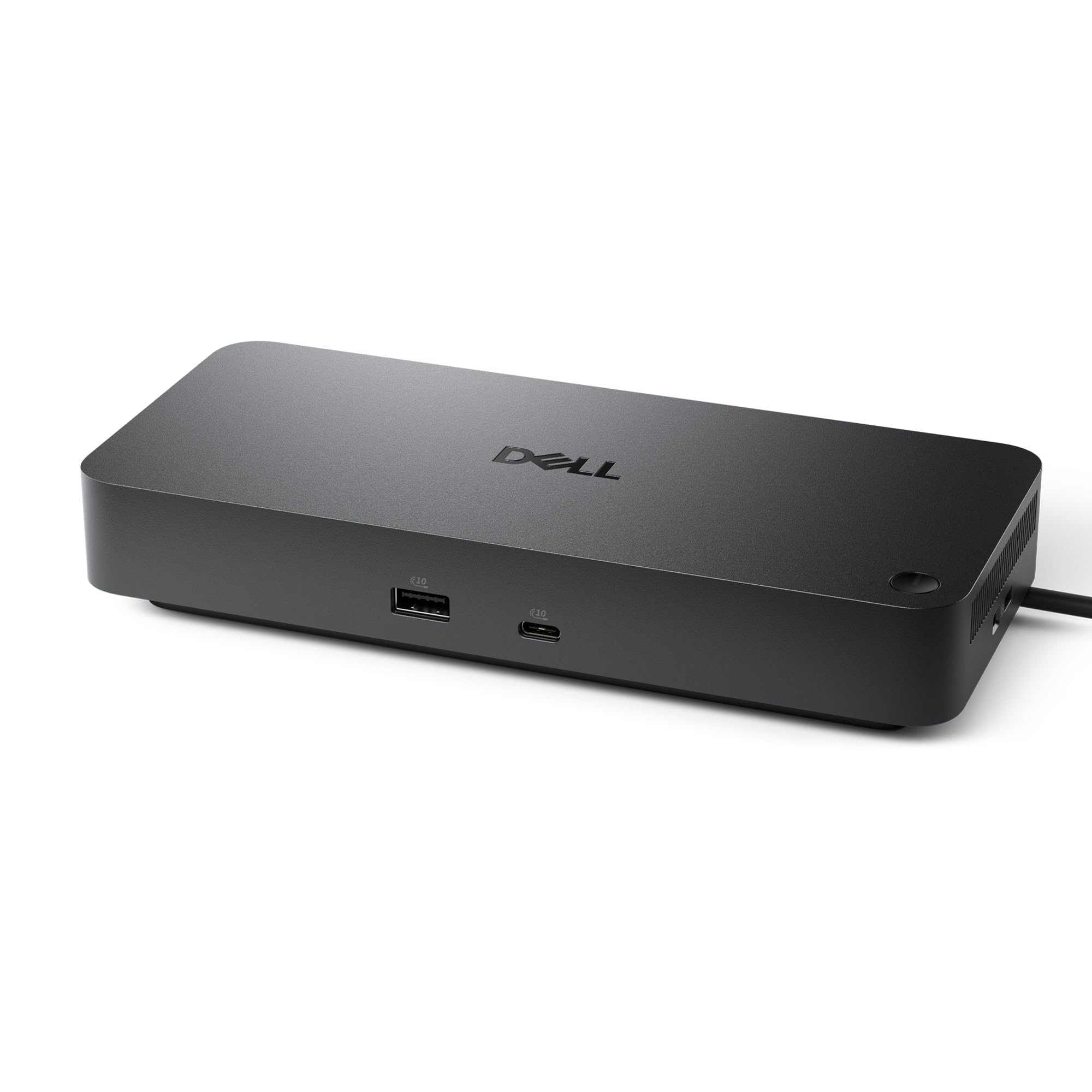
Dell built this one for IT departments: rear-routed cable, fleet management, and up to four screens.
The WD25’s headline is native support for up to four high-res displays, but its real edge is manageability. Dell calls it part of the world’s most manageable commercial docking family, with fleet tools that let IT update and provision dozens of docks at once. That is the feature you notice when you are the person supporting 40 desks, not when you are plugging in one laptop. Ten ports include DisplayPort, HDMI, Ethernet, USB-A, and USB-C, with 100W of power delivery to both Dell AI PCs and non-Dell machines.
Two practical details stand out for anyone arranging a desk. The USB-C cable is ambidextrous, so it routes left or right depending on where your laptop sits, and the connector is reinforced for the wear of daily plugging. It also leans sustainable: 65% post-consumer recycled materials in the build and 100% recycled or renewable packaging. Compared with the 7-port Lenovo above, you get three more ports and a full 100W to the laptop instead of 65W, for a bigger footprint on the desk.
Functionality and compatibility are the themes that carry this dock in feedback, and both land positive. Linux users in particular find it a smoother ride than most, and the port line-up earns its share of praise. The trade to hold in mind is durability — a handful of units have stopped working within the first six months, so buy from Dell or a seller you can go back to. The 100W ceiling is also a consideration if your laptop demands its own high-wattage brick for peak bursts.
dell laptops: a mixed Windows, Ubuntu, and ChromeOS fleet where one dock model has to work across all of them and IT wants to manage it.
mixed brands: the price places it in the higher value tier, so single users may find a two-screen dock enough.
6. Dell Universal Dock UD22

A shared-desk dock that works the moment you plug in, even before the driver is installed.
Designed for hoteling, the UD22 brings DisplayLink layout provisioning, so when you plug a new laptop into a shared desk, the preconfigured monitor arrangement loads without anyone clicking through settings. The cleverer trick: it also supports DP Alt mode, which means the dock can drive your screens instantly even if the DisplayLink driver has not been installed on that laptop yet. If your office swaps laptops between people all day, that zero-friction start is the value you are paying for.
Ten ports, a 130W power adapter, and 96W power delivery to the laptop. A 14.7-ounce body keeps it planted on a shared desk where it will be plugged and unplugged repeatedly.
Where it is loved is setup — plugging in and getting to work is the top positive theme, and compatibility across MacBooks and government Dell laptops gets a mention too. The honest caveat is divided: the reliability record has both fans and frustrated owners, with some reporting a dead HDMI port or a unit that quit inside six months. Power output is equally split, and some laptops simply do not charge through it. Test the charge handshake on your own machine before you commit to a fleet.
130W universal charging
- DP Alt mode means it can drive screens before DisplayLink is installed.
- Preconfigured layouts suit shared and rotating desk schedules.
- Cross-brand compatibility across Mac and PC hardware.
dock firmware quirks
- 96W charge may not satisfy every laptop.
- Reliability is uneven, with some units failing inside months.
- Only one HDMI and ten ports — not a three-screen workstation.
power-hungry laptops: hot-desking offices and shared workspaces where laptops change hands every few hours.
budget buyers: you need three or four displays or want the maximum charge wattage on a single laptop.
7. Plugable USB C Docking Station

Two 4K 60Hz screens on an M-series Mac that officially allows only one.
Apple silicon MacBooks support one external display natively, which leaves a lot of people stuck. This dock routes around that limit with DisplayLink, adding two 4K 60Hz monitors via HDMI and DisplayPort — even on M1 through M5 Macs and Neo models. Macworld named it the Best DisplayLink Dock for MacBook, which is the whole pitch for a MacBook Air or Pro owner who wants two real screens. Fourteen ports and 100W charging round out the package.
The 100W charge runs your MacBook while both screens stay lit, and the front USB-C and USB ports can feed extra devices. Aluminum housing with a space-gray finish keeps it in family with Apple hardware. The footprint — 9.4 inches long by 3.1 wide — is the widest of the Mac-friendly picks, so clear a strip of desk. Front card readers for SD and microSD, a 3.5mm headset jack, and Ethernet cover laptops that dropped those ports years ago.
Reliability carries this dock in feedback, and dual-monitor support is the feature buyers praise most. The honest limit is performance: some DisplayLink setups feel noticeably slower under load, and charging comes with its own mixed experiences. HDCP is not supported either, so copyrighted video playback on the external screens is off the table. Install the DisplayLink driver on macOS, Windows, or ChromeOS before you expect both screens to wake up.
mac users: Apple silicon users who need two real 4K 60Hz displays from one cable and want 100W charging at the same time.
windows only: slow-feeling performance under heavy DisplayLink load and no HDCP support for copyrighted playback.
8. Anker Prime Docking Station

A docking station that moonlights as your desk’s biggest charger — 160W across four devices.
Anker leads with the charge number, and it is the largest here: 160W of total output, split across three USB-C ports at 100W maximum each and one USB-A at 12W, enough to run a laptop, phone, tablet, and headphones off one dock. It is the only pick in this lineup designed from the charging side first. Compared with the 150W TobenONE 16-in-1, Anker sends 10W more off the brick and spreads it across up to four devices instead of two phone ports.
The 14 ports handle dual 4K displays through two HDMI outputs. One catch to plan for: the resolution depends on your laptop’s DP version — 2K@60Hz on a DP 1.4 laptop, 1080p@60Hz on a DP 1.2 machine, and a 5120×1440 ultrawide is not supported. Windows laptops get proper dual screens; macOS mirrors both external monitors to the same image, and Linux is not supported at all. Data flows at 10Gbps across the USB ports, and the 14-port count lands between the 11-port Baseus and the 18-port TobenONE at the top.
Power delivery is the part that wins people over — one stream-setup owner-style report has the dock running an entire rig, and full-speed charging lands as a highlight. What tempers the picture is reliability and connectivity, both of which split between flawless and dead-on-arrival. MacBook users in particular hit compatibility snags with external monitors. The included 3.3-foot USB-C cable at 100W and 10Gbps means you do not need to buy one, and support answers within 24 working hours.
fourteen ports charging: 160W across four ports is the widest power spread here, perfect for a phone, tablet, and laptop that all want feeding.
single 4K limit: macOS mirrors both screens and Linux is out, so Windows buyers get the most out of the dual HDMI.
anker ecosystem: an all-in-one desk power hub where one dock charges everything and runs two HDMI screens.
triple monitors: you run macOS with two distinct monitors, need Linux support, or own an ultrawide 5120×1440 panel.
9. Plugable 12-in-1 USB C Triple Monitor Docking Station

Three 4K 60Hz displays on any Mac, plus six USB ports and a lifetime support line.
This is the enterprise answer to Apple’s one-screen limit: three HDMI and three DisplayPort outputs connect virtually any monitor, and you can drive up to three 4K 60Hz displays on a Mac that officially supports only one. Three times the inputs of the dual-screen Plugable above, and the widest display capacity of any Mac-friendly pick here. Six USB 3.0 ports, Ethernet, and 3.5mm TRRS audio handle everything a workstation throws at it.
The 100W charge runs MacBooks, Dell XPS, Lenovo ThinkPad, HP EliteBook, and Surface laptops without their chargers. It is NDAA Section 889 compliant, meaning it is cleared for government and enterprise procurement, and it carries a 2-year defect warranty with lifetime support from Plugable’s North American team. A 2.4-pound body is the heaviest here, so it belongs on a desk, not in a bag. Fifteen minutes of DisplayLink driver setup on macOS gets the extra screens live.
Build quality earns the top marks in feedback, and triple-display capacity is the headline feature buyers mention. The honest catch: functionality is genuinely split. Some setups run perfectly on Windows, while others report only two of three monitors waking up or the dock dying inside a few months. Display compatibility and durability both land on the negative side of the ledger, so keep that support line close and test the three-screen setup in your first week.
three displays: you want three screens on a Mac and a dock that comes with enterprise-grade support and warranty coverage.
plug and play: you want plug-and-play simplicity — this one needs the driver installed and a careful setup window.
Know the Specs
Port Count
A port count is a promise of how much stays plugged in. Every port on a universal dock shares one USB-C cable back to the laptop, so the tally you read is the total of video, data, charging, and networking connections you can park on the dock instead of the laptop. More ports means fewer adapters on your desk, but the count matters less than the mix — a dock with plenty of USB-A beats one with only USB-C if your peripherals use older plugs. TobenONE’s 18-port and 16-port docks run the deepest; Lenovo’s 7-port travel dock is the leanest.
Charge Wattage
Two numbers sit behind every dock’s charge claim, and they are different. The adapter wattage is the total the brick supplies; the delivery wattage is what actually reaches your laptop after the dock takes its share. A 150W adapter might send 100W to the laptop; a 100W adapter might send 85W. Always compare the laptop-side number against your laptop’s own charger, not the brick. If the dock delivers less than your laptop’s stock charger, you will see slower charging while running heavy work — a real consideration for workstation-class machines that hang around 100W-plus.
DisplayLink
DisplayLink is the software plus chip combination that lets one USB-C cable push more displays than the laptop officially allows. It requires a driver, and on macOS a Screen Recording permission grant so the dock can build the extra screen images. Docks that rely on DisplayLink can light up three or four screens on a Mac that natively allows one, but they cost five minutes of setup and depend on admin rights. Docks that also support DP Alt mode can drive screens before the driver is installed — a lifesaver on shared desks.
Ethernet Speed
The wired network port is the one spec that quietly affects your day. A Gigabit port is standard on most docks here; TobenONE’s 16-in-1 upgrades to 2.5Gbps, which runs at 2.5 times the throughput of Gigabit and matters if you push large video, design, or engineering files across a network. Casual web browsing and email will not notice the difference; a video editor moving 8K footage to a server will feel it in every export.
Common Questions
Will a universal USB-C dock work with my MacBook that only supports one external screen?
Do I need to install a driver before my extra monitors will work?
What is the difference between the 120W and 150W TobenONE docks?
Can I charge a phone or tablet from the dock while it runs my laptop?
Will the dock charge my laptop as fast as its own charger?
Why does one of my screens stay blank even after setup?
Does a universal dock matter if I only use Windows laptops?
Can I use a universal dock with a shared or hoteling desk?
Is a faster Ethernet port on a dock actually useful?
Will my MacBook get three separate screens or three copies of one?
The Bottom Line
For most desks, the usb-c universal docking station to grab is the TobenONE DisplayLink 120W Dock, because 18 ports, four-screen Windows support, and 100W laptop charging cover the widest range of real work — and it is the crowd favorite at 4.5+ stars across 900+ ratings. If a fast wired network drives your day, the TobenONE 16-in-1 150W Dock trades a couple of ports for a 2.5Gbps Ethernet port and the biggest power supply here. And if you are packing a bag for hotel rooms and client sites, the Lenovo USB-C Dual Display Travel Dock asks only 4.8 ounces for two 4K screens.
How we choose
We do not accept paid placement. Every pick is matched to a real buyer and a real use-case; we do not hands-on test units.
Sources
Specifications: manufacturer listings and product documentation. Review insights: verified customer reviews, as of November 2026. Pricing: not shown on this page (it changes often); check the current price via the retailer link.
As an Amazon Associate, Tactical Gear Guy earns from qualifying purchases. This does not affect which products we feature.