Specs are compiled from manufacturer listings and verified buyer reviews and can change over time — please confirm the key details on the product page before buying.
If you are buying a PoE switch with 2.5G, the short answer is this: match the power budget to your devices first, count your ports second, and only then worry about management features. A switch that feeds your access points at the right speed but runs out of watts halfway down the port list will frustrate you every single day. One honest note before we start — this shortlist uses flexible, human-like matching for the “2.5G plus Power over Ethernet” requirement, so not every pick is the exact port count or wattage you typed into the search bar. Where a pick differs in port count or wattage, we call it out in the review.
This guide is built by comparing the manufacturers’ published specifications and the patterns across verified customer reviews, so you get each pick’s real strengths and trade-offs instead of marketing spin.
Some of these boxes are plug-and-play bricks you never think about again, and a few are managed units that let you split traffic into separate lanes. Below is a plain-English walkthrough of nine 2.5G PoE switches so you can pick the right one without decoding a datasheet — each pick below is judged on its PoE budget, port count and uplinks.
Top Picks


How To Choose The Best PoE Switch with 2.5G
Most buyers get burned by the same thing: they count ports and ignore the power budget. A 2.5G PoE switch is really two products fused together — a fast data hub and a power supply that pushes electricity down the same cable. Undersize the budget and cameras drop offline one by one as you add devices.
Start with the PoE budget, not the port count
The PoE budget is the total wattage the switch can hand out across all its powered ports at once. Each powered device draws a slice of that pool, so a switch with a small budget fills up long before every port is used. Look at the devices you plan to power and confirm the switch’s total budget covers them together, not just one at a time.
Check what 2.5G actually feeds
A 2.5G port moves data at 2.5 gigabits per second, which is the useful upgrade when your internet plan or your local network already outruns plain gigabit. Wi-Fi 6 access points, newer NAS boxes and multi-gig routers are the devices that can actually use that headroom. An ordinary printer or VoIP phone will happily run at gigabit on the same port because these switches auto-negotiate the speed.
Decide if you need managed control
Unmanaged switches are plug-and-play: you connect cables and they work. Managed switches add a web or command-line interface where you can set up VLANs (separate virtual networks that keep, say, camera traffic apart from your office computers), QoS priority and link aggregation. If you will never open a settings page, unmanaged saves you money. If you run separate camera and computer networks, management earns its keep.
Think about noise, heat and where it lives
A fanless metal case runs silent, which matters if the switch sits in a living room, office or bedroom. Some higher-power units use cooling fans and can be audible in a quiet space. Also check the mounting: desktop, wall and rack options change how easily the box fits your cabinet or equipment closet.
Side-by-Side Comparison
| Model | Best For | 2.5G PoE Ports | PoE Budget | Uplinks | Amazon |
|---|---|---|---|---|---|
| Ubiquiti Flex 2.5G PoE (USW-Flex-2.5G-8-PoE)★ Best Overall | Flexible PoE++ deployment | 8 | 196W with AC adapter | 10G RJ45/SFP+ combo | Amazon |
| MokerLink 8 Port 2.5G PoE (10G SFP)Best Value | Budget plug-and-play | 8 | 120W | 1x 10G SFP | Amazon |
| YuanLey 10 Port 2.5G PoE UnmanagedSolid All-Rounder | Small-network value | 8 | 120W | 2x 10G SFP | Amazon |
| TP-Link TL-SG105PP-M2 | Compact PoE++ desk switch | 4 | 123W | — | Amazon |
| NICGIGA 18 Port 2.5G PoE Switch | High port count | 16 | 250W | 2x 10G SFP+ | Amazon |
| Omada 8-Port 2.5G PoE (SG2210XMP-M2) | Managed 8-port reliability | 8 | 160W | 2x 10G SFP+ | Amazon |
| MokerLink 8 Port 2.5G PoE Managed | L3 managed on a budget | 8 | 120W | 2x 10G Ethernet + 4x 10G SFP+ | Amazon |
| Omada 16-Port 2.5G PoE (SG3218XP-M2) | Large mixed-device networks | 16 | 240W | 2x 10G SFP+ | Amazon |
| Ubiquiti USW-Pro-Max-16-PoE | UniFi ecosystem builds | 4 (PoE++) + 12 GbE PoE+ | 180W | 2x 10G SFP+ | Amazon |
Detailed Reviews
1. Ubiquiti Networks Flex 2.5G PoE (USW-Flex-2.5G-8-PoE)
Our pick — 4.5+★ from 150+ verified ratings; the strongest balance of quality and price.
The switch that can be powered by the very cable it feeds others through
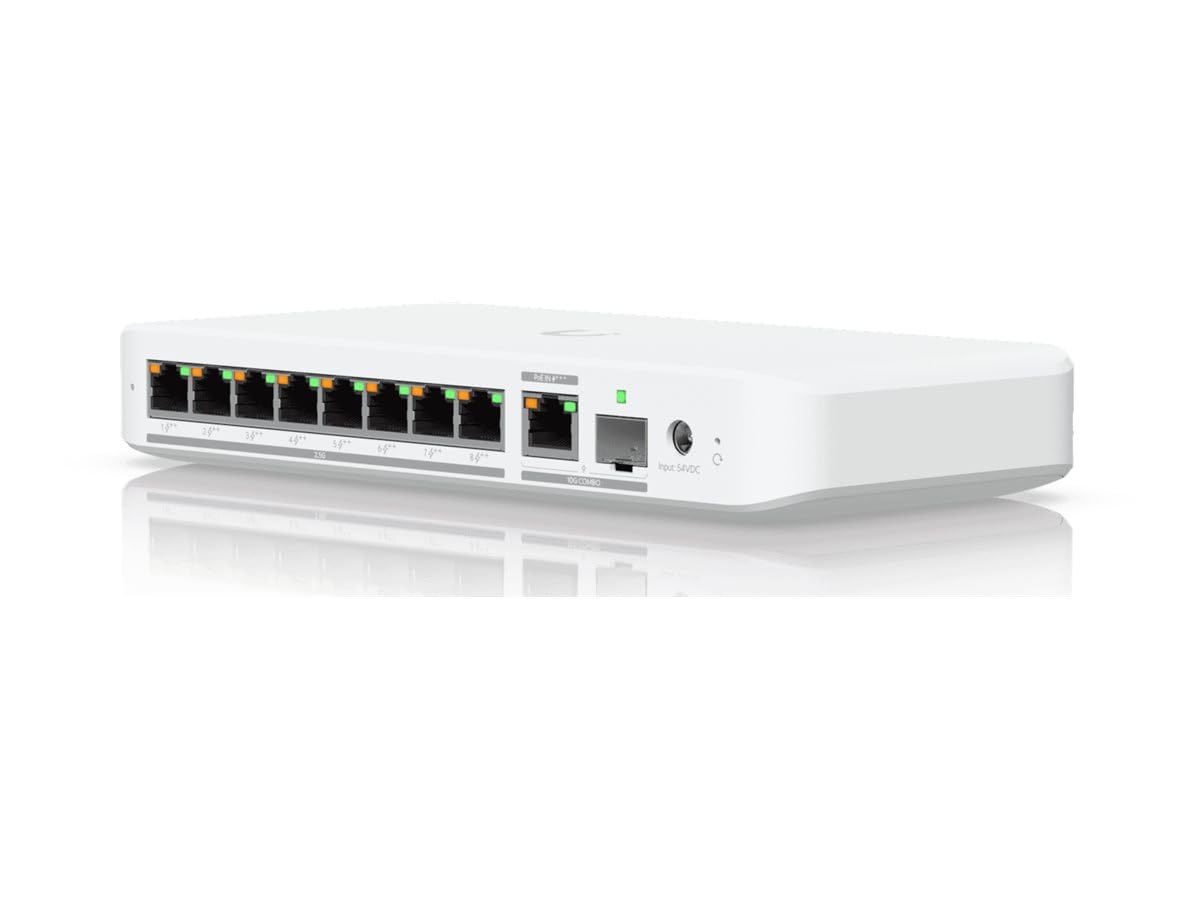
Here is the trick that makes this the best overall pick: the Flex 2.5G can take its own power in through one 10 GbE PoE+++ input port (a port that carries both data and electricity), or it can run off an AC adapter. That single combo input port doubles as an SFP+ slot, so you get a 10-gigabit uplink without giving up a data port. Run it on the adapter and you have 196W of PoE availability across eight 2.5 GbE PoE++ output ports — enough to hand power to access points and cameras at the same time. Skip the adapter, feed it through PoE+++, and that figure drops to 76W. Feed it through PoE++, and you are down to 46W. Feed it through PoE+, just 16W.
The reason owners keep coming back is the build. This is a metal-bodied unit about the size of a paperback at 1.3 pounds, and the hardware quality is the trait that stands out most across its reviews — it feels like equipment, not a plastic toy. Following close behind is how reliably it does its job. PoE delivery stays stable and powers access points without fuss, and VLAN management inside the UniFi ecosystem is straightforward if you already run UniFi gear. For surveillance and Wi-Fi traffic, that uptime is the whole point. Compare it to the higher-wattage TP-Link TL-SG105PP-M2 and you can see the design split clearly: that TP-Link supplies 123W of maximum power while this Ubiquiti sits at 17 watts natively — the Flex makes its real power only once you feed it correctly.
The catch you should know before buying: there is no power supply in the box by default on some configurations, so you either bring a PoE injector, an external adapter, or a PoE+++ source port. Price this out before you commit, because the adapter path is what gets you the full 196W. If you are already inside UniFi, this is the natural center of your rack. If you have never touched UniFi and just want a dumb fast switch, this is more control than you need — the MokerLink plug-and-play options below get you running faster. The Pro-Max-16 goes further on port count and Ubiquiti’s Etherlighting, but it costs considerably more; the Flex is the smarter entry into that ecosystem.
The arguments for putting it at the top
- Eight 2.5 GbE PoE++ output ports, each able to carry power and data down one cable
- 10 GbE RJ45/SFP+ combo input handles both your uplink and your power feed
- 196W PoE availability with the optional AC adapter, so a full load of access points stays powered
- Solid metal build that holds up in a rack or on a shelf at 1.3 pounds
- UniFi VLAN management is simple if you already run the ecosystem
Where it asks you to plan ahead
- Native maximum power is 17 watts — the big PoE numbers only arrive with the right power input
- No bundled power supply on every configuration, so budget for an injector or adapter
- UniFi management assumes you have a controller device already running
Best fit: UniFi homes and small installs that want 2.5G speed plus flexible PoE++ power from a single compact box.
Think twice if: you want to plug in a power cord and be done — this one rewards a little planning around its power source.
2. MokerLink 8 Port 2.5 Gigabit PoE Switch with 10G SFP
Eight fast ports, one 10-gig uplink, and none of the setup homework
Eight 2.5-gigabit Ethernet ports, one 10G SFP slot, and 120W of built-in power make this the switch most home and small-office buyers should start with. The 120W budget divides across the ports, with each one able to deliver up to 30W — enough for a PoE camera or wireless access point on a normal run. The 10G SFP port accepts a 1G or 2.5G module (the module itself is not included) and gives you a fast backbone link to your router or another switch. Just note the PoE standard: it supports 802.3af/at, not passive 24V, so check your devices before assuming they will power up.
What buyers notice first is that it simply works the moment you plug it in. The plug-and-play design, auto-negotiation and auto MDI/MDIX mean there is nothing to configure — connect the cables and the devices come alive. The metal case is fanless, so it runs silent and quiet enough for an office shelf, and the built-in supply saves you a separate power brick. Quality is the trait that stands out most here, followed by value for money. Owners are powering Reolink PoE cameras and Zigbee controllers off it, and setups have been running for a year or longer without drama. One 2.5G port plus PoE is a lot of capability for an entry-level price.
The honest trade-off is the smaller power pool and the lack of management. At 120W total, this is not the switch you pick to feed a dozen high-power devices — you will run the budget dry before the port list is full. Reliability also draws a mixed read, so treat it as a workhorse for normal loads rather than a mission-critical core. If you never plan to touch VLANs, the managed premium buys you nothing here. For silent, no-configuration 2.5G expansion, this is the value play.
The value read: You get 8 x 2.5G ports, a 10G SFP uplink and 120W of PoE for an entry-level outlay — the plug-and-play path for adding multi-gig PoE without a learning curve.
What to watch: That 120W ceiling fills quickly with cameras and access points, and there is no web interface for VLANs or traffic separation.
Reach for this if: you want silent, unmanaged 2.5G PoE that works the first time you connect it.
Look elsewhere if: your device count is climbing toward the full port list and you need bigger power headroom.
3. YuanLey 10 Port 2.5G PoE Switch Unmanaged
A fanless metal box that quietly holds a whole home network together
The number to start with is 60 gigabits per second of switching capacity, which is the internal plumbing that lets every port talk at full speed at once. That is the same figure the Ubiquiti Flex 2.5G carries, so you are not paying for a slower backbone to get the lower price here. Eight 2.5G PoE ports plus two 10G SFP slots give you fast data and fast uplinks in one unit, and the whole thing is a fanless metal case with 6KV lightning protection (a surge guard for the cable runs) and a wide -10 to 50°C operating range. It pulls double duty on the desk or mounted in a rack.
The thing that wins people over is reliability — it is what shows up most in owner feedback, and for good reason given how much of a home network depends on this box staying up. Quality follows close behind. It powers UniFi access points and security cameras without coaxing, and one reviewer’s camera sits on a long 100-foot cable run and still behaves fine. But the defining convenience is the one-key VLAN toggle: with a single switch flip you isolate the RJ45 ports from each other, which keeps camera traffic off your computer network and cuts down on unnecessary traffic.
The mix that shows up honestly: power supply feedback splits between people who find the supply compact and those who dislike its size. Most telling, though, is that a small group reports frequent disconnects when chained switch-to-switch — so keep this one as a single hub rather than daisy-chaining it. For the price, the combination of 60Gbps capacity, 120W of PoE, two 10G SFP slots and one-key VLAN is genuinely capable, which is why it holds up as a solid all-rounder.
Reasons this one earns its place
- 60Gbps switching capacity lets the whole port array run at full speed
- One-key VLAN isolates ports for cleaner traffic without a setup menu
- Fanless metal case with 6KV lightning protection for stable, quiet running
- Two 10G SFP slots plus rack or desktop mounting
- 120W PoE budget with up to 30W per port
Where it asks for restraint
- A small set of buyers report frequent disconnects when linking switches together
- Power supply size feedback is split between compact and cumbersome
- Unmanaged, so VLAN is a single toggle rather than real per-port control
Who it suits: the home or small office that wants 2.5G speed, silent operation and a little traffic separation without a management console.
Where to look next: if you plan to chain several switches into one big fabric, a managed unit below gives you steadier control.
4. TP-Link TL-SG105PP-M2, 5 Port 2.5 Gigabit PoE Switch

Five fast ports, four high-power outputs, and a body you can hide almost anywhere
For a desk-side switch, the shape matters. This one measures 4.1 by 1.1 by 6.3 inches and weighs 1.2 pounds, so it drops onto a shelf or hides behind a monitor without becoming furniture. Five 2.5-gigabit ports deliver up to 25 Gbps of switching capacity for a small cluster, and four of those ports are PoE++ (802.3bt/at/af) able to push up to 60W per port. The total budget is 123W, so a couple of high-draw devices plus a camera still fit. This is the counterpart to the Ubiquiti Flex: TP-Link puts more power behind each port from the start, while the Ubiquiti open up more only once you feed it correctly.
Two touches earn their keep. PoE Auto Recovery is the feature that matters most for an unattended camera or access point: if a powered device drops off, a recovery button on the switch lets it detect and reboot the device automatically, no manual reset needed. And it is fanless, so there is no whirring while it sits near your work area. IEEE 802.3X flow control keeps data moving reliably. Plug-and-play with no software means it is running within minutes of unboxing.
The honest limit is port count. Four PoE ports and one uplink is small — fine for a single camera and an access point, tight if your network is growing. And 123W total across four devices means high-draw gear eats the budget quickly. If you need more ports or a bigger pool, the NICGIGA and Omada units below carry more. If you need a quiet little 2.5G powered switch tucked out of sight, this fits the job.
The compact case for it: Five 2.5G ports and four PoE++ outputs in a 1.2-pound metal body, with up to 60W available on a single port — a lot of power in a small footprint.
The catch: Only four powered ports and a 123W pool, so it is a starter switch rather than a long-term hub.
The right owner: a desk or small rack setup needing one or two high-power 2.5G devices powered silently.
The wrong owner: anyone wiring more than a handful of cameras or access points who needs room to grow.
5. NICGIGA 18 Port 2.5G PoE Switch (16x 2.5G PoE + 2x 10G SFP+)

Sixteen powered 2.5G ports and 250W of budget — the box for a full camera wall
When your port needs outgrow a starter switch, this is the jump: sixteen 2.5G PoE ports plus two 10G SFP+ uplinks, backed by a 250W PoE budget. Each port can deliver up to 30W under 802.3af/at, so you can feed a whole set of PoE cameras, access points and VoIP phones in one place. Compared to the MokerLink 8-Port with 10G SFP above, the NICGIGA carries 250W of PoE budget versus that switch’s 120W — more than double the power pool for a much larger device count. The two 10G SFP+ uplinks can reach a Wi-Fi 6 router or NVR at higher rates than the powered ports themselves.
The physical build is meant for a closet or rack: a metal case with 6KV lightning protection, fanless silence, double-sided cooling vents and a -10 to 50°C range. It is also built to auto-detect devices — power detection recognizes what is plugged in and still gives a data link to non-PoE gear, so you are not forced to segregate powered and unpowered devices. One important compatibility note: it only supports 44-57V PoE devices, so check anything unusual before you plug it in.
The trade-off to know is scale. This is a serious amount of PoE in an unmanaged package — no web interface for VLANs, so your traffic isolation has to come from elsewhere. It also asks for a proper 250W supply draw and a spot with airflow. But for covering a large home or small office full of PoE devices at 2.5G speeds, the port and power counts are hard to argue with, and NICGIGA backs it with a one-year warranty and lifetime technical support.
Why the big installs pick it
- Sixteen 2.5G PoE ports plus two 10G SFP+ uplinks in one chassis
- 250W total PoE power for a large device count
- Auto power detection still links non-PoE devices
- Fanless metal design with 6KV lightning protection
- One-year warranty and lifetime technical support
The limits worth knowing
- Unmanaged — no per-port VLAN control for isolating traffic
- Only supports 44-57V PoE devices
- Large power draw means a proper circuit and airflow matter
Built for: the install with a dozen-plus 2.5G PoE devices that needs the port count and budget to match.
Skip if: you need managed VLAN control or are only powering a couple of devices.
6. Omada 8-Port 2.5G PoE Switch, 160W (SG2210XMP-M2)

Eight managed ports with cloud control for the network you actually want to tune
What sets this apart from the unmanaged crowd is control. Eight 2.5G ports, each 802.3at/af-compliant, feed up to 30W of PoE output per port from a 160W total budget. Two 10G SFP+ slots give you fast uplinks to a router or another switch, and 40Gbps of switching capacity moves the traffic between them. The real differentiator is Omada: you manage the switch from the web or the Omada app, either as a standalone device or as part of a centralized Omada SDN network — the same command center as your other Omada gear.
Reliability is the trait that brings people back, with functionality close behind. Owners run these for months without issues, and one buyer swapped from a lower-priced brand and found it fixed the problems they had been fighting. The 160W budget is enough for a full set of 2.5G access points and cameras, and the 2.5G ports keep pace with a fast Wi-Fi 6 deployment. TP-Link also throws in a five-year manufacturer warranty, which matters for something you hang in a closet and forget.
The honest gripe is heat. Several owners note the case runs warm, and the physical design leaves less room for passive cooling than you might want — so give it airflow. It is also larger than a desktop switch at 8.9 by 8.9 by 3.5 inches, so plan its home before it arrives. If managed control and a trusted name are what you are after, this delivers. If you never plan to open an app to configure anything, the cheaper unmanaged options below do the same data job for less.
Why it earns the managed spot: Eight 2.5G PoE ports, two 10G SFP+ uplinks and app-based Omada management, all backed by a five-year warranty.
Where it runs warm: Owners flag the case temperature — give it breathing room and it behaves.
Pick this when: you want 2.5G PoE managed centrally through the Omada app without buying into a bigger chassis.
Pass if: you need raw port count or a completely set-and-forget box with no app involved.
7. MokerLink 8 Port 2.5G PoE Managed Switch (L3, 10G Uplinks)
Layer 3 routing, six 10G uplinks, and a command line for people who want to dig in
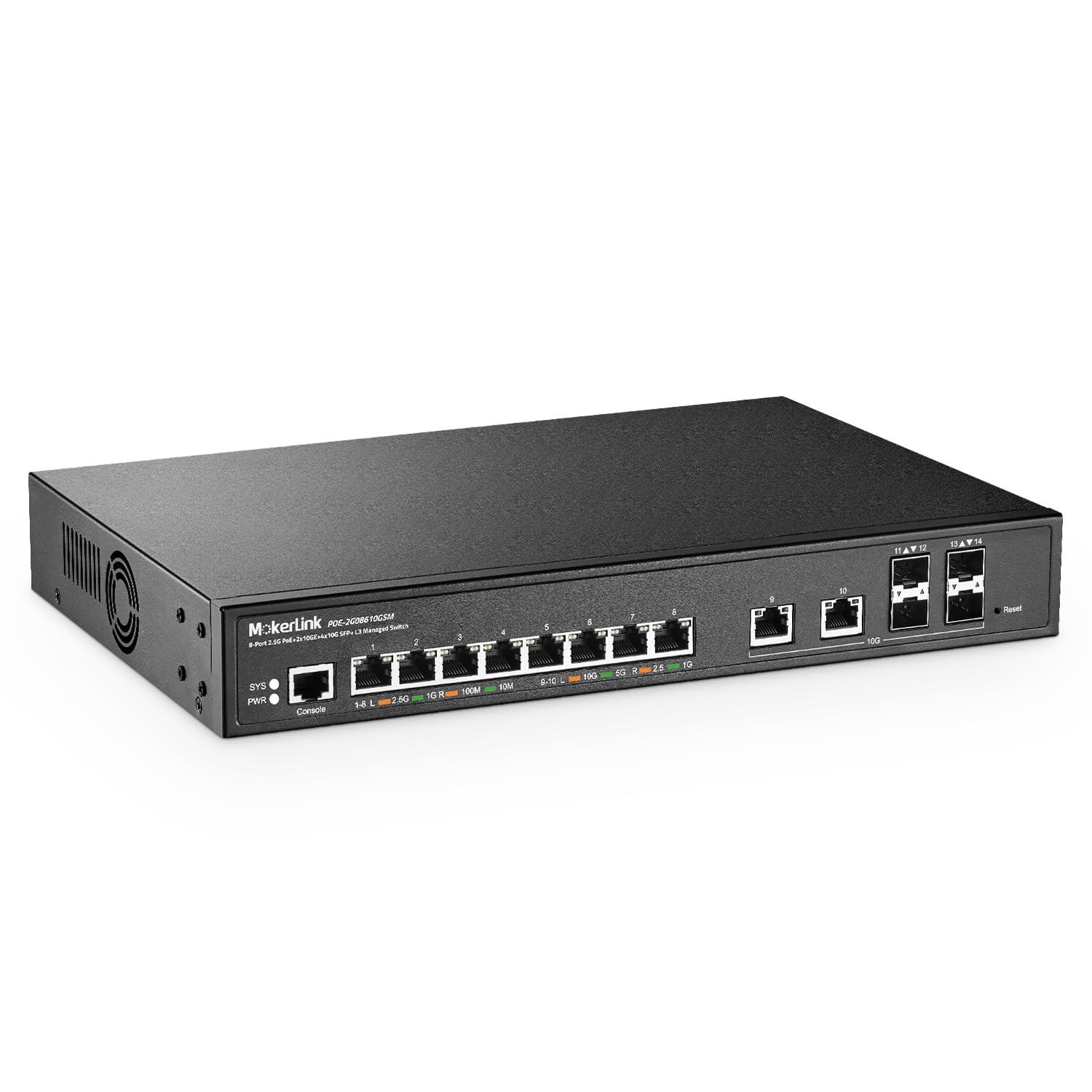
This is the switch for someone who reads a config menu without flinching. Eight 2.5G PoE ports sit alongside two 10G Ethernet uplinks and four 10G SFP+ slots — six 10-gigabit paths in total, backward compatible down to 100M and 2.5G. The 120W built-in supply feeds up to 30W per port on 802.3af/at. Then there is the management: Layer 3 routing (IPv4/IPv6 management, routes, ARP), Layer 2 features like VLAN, ACL, QoS, jumbo frame and DHCP, plus security controls such as 802.1X authentication, DHCP Snooping and port security. You get the full toolbox here, web and CLI included.
What buyers love most is sheer functionality — the range of things it can do is what stands out, with value for money close behind. It handles real work: it drives five PTZ Hikvision smart-tracking cameras, powers a Cisco desk phone, and gives an internal 2.5GbE network with PoE for access points. Setup gets credit for being quicker than expected, and the metal case supports VLANs in a way that lets it replace an older managed switch. For the management depth, the value is the honest headline.
Two things temper the picture. Port availability draws a mixed response from people wanting more lanes, and reliability shows up mixed — one owner reports a managed unit dying after roughly three months of use. That is a rare outcome, not the norm, but worth weighing against a mission-critical role. There is also an industrial fan for heat dissipation, so it is not silent like the fanless boxes above. For an enthusiast or small IT setup that wants L3 routing at 2.5G without the enterprise price, this is a lot of switch for the money.
The case for the L3 build
- Layer 3 routing plus full Layer 2 VLAN, ACL and QoS control
- Six 10G uplink paths — two 10G Ethernet plus four 10G SFP+
- 120W PoE with up to 30W per port
- Web and CLI management with strong security features
What to weigh
- Reliability reads mixed, with one report of a managed unit failing after about three months
- An industrial fan means it is not silent like the fanless models
- Some owners want more ports than eight PoE lanes provide
For the tinkerer: a home-lab or small-business network that wants L3 routing and serious VLAN/security control at 2.5G.
Not for the minimalist: if silence and set-and-forget simplicity matter more than configuration depth, look to the fanless picks.
8. Omada 16-Port 2.5G PoE Switch, 240W (SG3218XP-M2)
The managed backbone that feeds PoE++ devices and keeps a big network in order
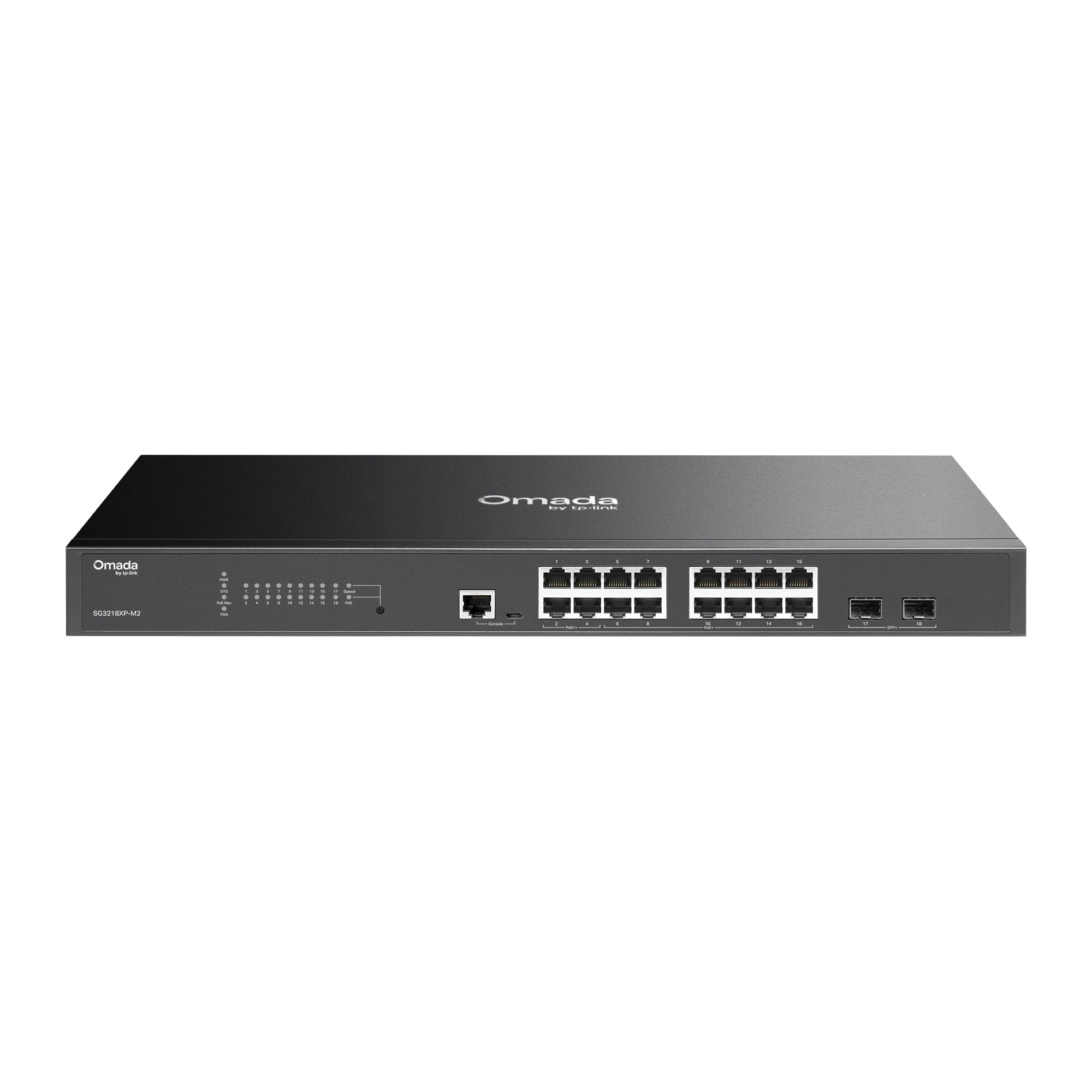
This is the switch you reach for when a network has real demands. Sixteen 2.5G PoE ports split into four PoE++ ports that push up to 90W each and twelve PoE+ ports at up to 30W each, all drawn from a 240W total budget. Two 10G SFP+ slots handle the uplinks, 30Gbps of switching capacity moves the traffic, and it runs standalone or through the Omada cloud and app. Layer features include VLAN, ACL, QoS, IGMP Snooping, OAM and DDM, plus ERPS for fast ring recovery and Static Routing to keep internal traffic local.
Where it shows off is raw performance under load — one setup runs two 10Gbps links, two 2.5Gbps links and three 1Gbps links across four VLANs and around fifty “devices” at once, which tells you this box has room to spare. The PoE++ ports make it a good home for modern high-draw gear that needs more than standard PoE+ delivers. Compared to the Omada 8-Port above, this gives you sixteen 2.5G ports and a 240W budget versus eight and 160W — the meaningful step up when your network outgrows a small managed switch.
The known downside is noise. In its stock configuration the fans run loud, and some owners compare it to a server room; a few swap them for quieter units, and one notes that doing so likely voids the warranty on a switch this costly. Give it a closet or rack away from living space. An occasional unit has also quit forwarding traffic early on, so a reliable return window is worth having. When you need this much 2.5G PoE++ capacity with management, there is not much else that does it in one box.
What makes it a backbone: Four 2.5G PoE++ ports at up to 90W each, twelve 2.5G PoE+ ports, two 10G SFP+ slots and a 240W budget — serious capacity with full management.
The price of that power: Stock fans are loud enough to demand a separate room, and the smaller share of reliability feedback means a good return window is smart.
Where it belongs: a large home or office running many 2.5G PoE and PoE++ devices that needs managed control in one chassis.
Where it does not: a living-room or bedroom install, where the fan noise will be a problem.
9. Ubiquiti USW-Pro-Max-16-PoE (180W)

Sixteen ports, silent cooling, and the best-reviewed build in the lineup
Ubiquiti’s Pro-Max-16 is the quietest way to power a full UniFi network. It packs sixteen ports — four 2.5G PoE++ ports and twelve gigabit PoE+ ports — plus two 10G SFP+ slots, drawing from a 180W PoE budget. It is a Layer 3 switch, and the standout party piece is Etherlighting: the ports glow to show port location, speed/link status and native VLAN or network, so you can read the whole switch at a glance in a dark rack. It mounts on a desktop, wall or in a rack, and the cooling is fanless, so it runs silent.
The build is the star here — the hardware quality is what wins people over most, with functionality close behind. It folds straight into an existing UniFi network with no fuss, sets up easily and delivers strong throughput. For someone already invested in UniFi access points and cameras, adding this is the natural next step. Compared to the Flex 2.5G at the top of the list, this one trades port flexibility for sheer port count and that glowing front panel — the Flex keeps its 8 x 2.5G PoE++ outputs while this spreads 16 ports across four fast and twelve gigabit lanes.
The honest note is the prerequisite: you need a device running the UniFi network software to manage it, so it is not a standalone switch. Its power draw is rated up to 210 watts and it weighs 4.6 pounds, so give it a real home rather than a cramped shelf. And the main practical gripe buyers raise is its footprint — it is bigger than people expect. If you live in UniFi, this is the polished centerpiece. If you are brand-agnostic and just want fast PoE, the managed Omada units above ask less of you.
What makes it the polished pick
- Etherlighting ports show location, speed and VLAN at a glance
- 16 ports with four 2.5G PoE++ and twelve gigabit PoE+
- Fanless, silent cooling
- 180W PoE budget and two 10G SFP+ uplinks
- Drops into an existing UniFi network with little setup
What to plan around
- Requires a UniFi controller to manage it — not standalone
- Its footprint is larger than many buyers expect
- Rated up to 210W power draw, so give it a proper spot
The ideal home: a UniFi network that wants silent 2.5G PoE++ power, plenty of ports and the visual Etherlighting readout.
The mismatch: a standalone setup with no UniFi controller in place — this switch expects one.
Know the Specs
PoE budget (in watts)
The PoE budget is the total power a switch can hand out across all its powered ports at once, and it is the number that quietly decides whether your devices stay on. Each camera or access point takes a slice of that pool. A switch with a small budget fills up before every port is used, while a larger budget keeps everything fed. Match the total to the combined draw of your devices, not just the biggest one.
2.5G port speed
A 2.5G port moves data at 2.5 gigabits per second, the step up when your internet plan, NAS or Wi-Fi 6 access points already outrun plain gigabit. These switches auto-negotiate, so older gigabit devices still run fine on the same port. Most people reach for 2.5G because their wireless or storage devices can actually use the extra headroom — if all your gear is gigabit, the speed matters less than the power budget.
SFP and SFP+ uplinks
SFP and SFP+ are slots for pluggable modules that carry your uplink to a router or another switch over a fast connection, with SFP+ handling higher rates. Think of them as a dedicated fast lane for backbone traffic, separate from your powered ports. Many of these switches leave the module from the start, so plan to buy the one that matches your distance and speed.
Managed versus unmanaged
Unmanaged switches are plug-and-play: connect cables and they run. Managed switches add a web or command-line interface for VLANs (separate virtual networks that keep traffic apart), QoS priority and link aggregation. Choose managed when you run multiple networks or need camera traffic apart from your computers. Choose unmanaged when you want fast ports and simple setup with no settings to learn.
Common Questions
Will a 2.5G PoE switch work with my older gigabit cameras and access points?
How much PoE budget do I need for security cameras?
What is the difference between PoE, PoE+ and PoE++?
Do I need a managed PoE switch or is unmanaged enough?
Why is my 2.5G switch running warm and is that a problem?
Will a 2.5G switch speed up my internet if my plan is below 2.5G?
Do I need to buy SFP modules separately?
Can I power a Ubiquiti switch from another PoE source instead of an outlet?
Is a fanless PoE switch better for a quiet room?
What does the 6KV lightning protection on these switches actually guard against?
The Bottom Line
If you want the safest bet, the Ubiquiti Flex 2.5G PoE is the one to start with — eight 2.5G PoE++ ports, a 10G combo uplink and a metal build that the crowd clearly trusts. It asks you to plan its power source, but the flexibility pays off. For the most power at the lowest complexity, the NICGIGA 18 Port gives you sixteen 2.5G PoE ports and a 250W budget in a fanless box. And if you already run UniFi gear and want a silent, managed centerpiece with Etherlighting, the Ubiquiti USW-Pro-Max-16-PoE is the polished way to finish the job — the best-rated build on this list and the natural home for a full UniFi network.
How we choose
We do not accept paid placement. Every pick is matched to a real buyer and a real use-case; we do not hands-on test units.
Sources
Specifications: manufacturer listings and product documentation. Review insights: verified customer reviews, as of November 2026. Pricing: not shown on this page (it changes often); check the current price via the retailer link.
As an Amazon Associate, Tactical Gear Guy earns from qualifying purchases. This does not affect which products we feature.